Search the Community
Showing results for tags 'fuel'.
Found 19 results
-

Version 4.0.0
9 downloads
FuelMonitor is a lightweight and fully customizable Rust plugin that displays a clean, modern fuel bar while driving fuel-powered vehicles. The plugin features a real-time updating UI with a low fuel warning system, including popup notifications and sound alerts when fuel is running low, plus a clear OUT OF FUEL indication when empty. FuelMonitor includes an in-game Admin Settings UI, allowing server owners to: Preview changes live before applying them Adjust Global Max Fuel Reposition the UI using Move Mode Reposition the popup Warning notifications Move Mode Customize all UI colors All changes are applied safely using an Apply / Cancel workflow and affect all players server-wide.| Commands : /fui FuelMonitor works automatically in the background, is performance-friendly, and requires no player commands. Need Support?$5.99 -
Version 0.1.5
449 downloads
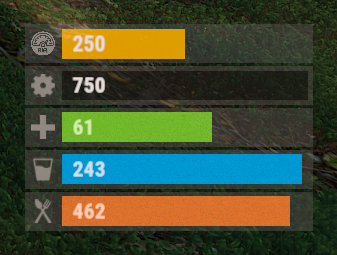
The plugin displays the vehicle's fuel level in the status bar. Depends on AdvancedStatus plugin. The ability to display the vehicle's fuel level(gauge) in the status bar; The ability to notify when a low fuel level is reached; The ability to set a color for each percentage of fuel; The ability to specify mount poses for display; The ability to automatically generate language files for different languages(filled in English); The ability to specify the order of the bar; The ability to change the height of the bar; The ability to customize the color and transparency of the background; The ability to set a material for the background; The ability to switch between CuiRawImageComponent and CuiImageComponent for the image; The ability to get images from the local folder (*SERVER*\oxide\data\AdvancedStatus\Images); The ability to set own image and customize the color and transparency of the image; The ability to set sprite instead of the image; The ability to customize the color, size, font and outline of the text. { "Is it worth enabling GameTips for messages?": true, "Is it worth using Notify plugins for messages instead of the vanilla UI?": false, "Specify the regular message type for notify": 0, "Specify the warning message type for notify": 1, "List of language keys for creating language files": [ "en" ], "Fuel stack size for fraction calculation. A value of 0 uses the actual stack size": 500, "Fuel indicator refresh interval in seconds": 5.0, "Notifications - The percentage(0.0 to 1.0) of fuel at which notifications will occur. A value of 0 disables this": 0.2, "Notifications - The effect that will be triggered upon a warning. Choose the effect carefully! An empty string disables the effect call": "assets/prefabs/locks/keypad/effects/lock.code.denied.prefab", "Status. Bar - Height": 26, "Status. Bar - Order": 1, "Status. Background - Color(Hex or RGBA)": "#FFFFFF", "Status. Background - Transparency": 0.15, "Status. Background - Material(empty to disable)": "", "Status. Image - Url": "https://i.ibb.co/4ZhnTpBv/Fuel-Status-Fuel.png", "Status. Image - Local(Leave empty to use Image_Url)": "FuelStatus_Fuel", "Status. Image - Sprite(Leave empty to use Image_Local or Image_Url)": "", "Status. Image - Is raw image": false, "Status. Image - Color(Hex or RGBA)": "#E2DBD6", "Status. Image - Transparency": 0.55, "Status. Image Outline - Is it worth enabling an outline for the image?": false, "Status. Image Outline - Color(Hex or RGBA)": "0.1 0.3 0.8 0.9", "Status. Image Outline - Transparency": 1.0, "Status. Image Outline - Distance": "0.75 0.75", "Status. Text - Size": 15, "Status. Text - Color(Hex or RGBA)": "#E2DBD6", "Status. Text - Font(https://umod.org/guides/rust/basic-concepts-of-gui#fonts)": "RobotoCondensed-Bold.ttf", "Status. Text - Offset Horizontal": 7, "Status. Text Outline - Is it worth enabling an outline for the text?": false, "Status. Text Outline - Color(Hex or RGBA)": "#000000", "Status. Text Outline - Transparency": 1.0, "Status. Text Outline - Distance": "0.75 0.75", "Status. Progress - Transparency": 0.8, "Status. Progress - OffsetMin": "25 2.5", "Status. Progress - OffsetMax": "-3.5 -3.5", "Status. Progress - Zero Text Size": 12, "Status. Progress - Zero Text Color(Hex or RGBA)": "#F70000", "List of mount poses for displaying fuel status": [ "Driving", "HandMotorBoat", "StandDrive", "SitMinicopter_Pilot", "Sit_Workcart", "Sit_Crane", "Driving_Snowmobile", "Sit_Locomotive", "Sit_DPV", "Sit_BatteringRam" ], "List of Gauge Indicators": [ { "MinRange": 0.0, "MaxRange": 0.2, "Color(Hex or RGBA)": "#F70000" }, { "MinRange": 0.2, "MaxRange": 0.6, "Color(Hex or RGBA)": "#F7BB00" }, { "MinRange": 0.6, "MaxRange": 1.0, "Color(Hex or RGBA)": "#B1C06E" } ], "Version": { "Major": 0, "Minor": 1, "Patch": 5 } } The values of MaxRange and MinRange set the range of values over which the color applies. The values for MaxRange and MinRange must be between 0.0 and 1.0 (inclusive), where 0.0 equals 0%, and 1.0 equals 100%. The value of MaxRange must be equal to the value of MinRange of the previous. EN: { "MsgFuelLow": "Warning: Fuel level is low!", "BarProgressZero": "Out of fuel, refill required!" } RU: { "MsgFuelLow": "Внимание: уровень топлива низкий!", "BarProgressZero": "Нет топлива!" } Available mount poses(PlayerModel.MountPoses): public enum MountPoses { Chair = 0, Driving = 1, Horseback = 2, HeliUnarmed = 3, HeliArmed = 4, HandMotorBoat = 5, MotorBoatPassenger = 6, SitGeneric = 7, SitRaft = 8, StandDrive = 9, SitShootingGeneric = 10, SitMinicopter_Pilot = 11, SitMinicopter_Passenger = 12, ArcadeLeft = 13, ArcadeRight = 14, SitSummer_Ring = 15, SitSummer_BoogieBoard = 16, SitCarPassenger = 17, SitSummer_Chair = 18, SitRaft_NoPaddle = 19, Sit_SecretLab = 20, Sit_Workcart = 21, Sit_Cardgame = 22, Sit_Crane = 23, Sit_Snowmobile_Shooting = 24, Sit_RetroSnowmobile_Shooting = 25, Driving_Snowmobile = 26, ZiplineHold = 27, Sit_Locomotive = 28, Sit_Throne = 29, Parachute = 30, Sit_DPV = 31, Standing_Ballista = 32, Sit_BatteringRam = 33, Standing = 128 }$3.99 -
Version 1.6.5
600 downloads
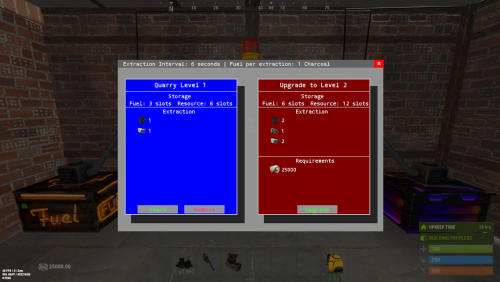
Quarries have evolved into personal computers that can be placed within player bases, providing full customization. Everything, from fuel types to unlimited upgrades, is configurable, including upgrade requirements, mined items, and fuel. Seamlessly integrating with the industrial system. FEATURES Intuitive UI: Simulates old DOS programs for easy use Full Customization: Item output, fuel, and upgrade requirements can be adjusted Unlimited Upgrades: Use items, Economics, and ServerRewards for upgrades Base Placement: Quarry Computers can be placed inside bases Industrial Automation-Ready: With permissions for seamless integration Screen Activation: Easily see if the computer is on, with percentage displays Multi-Language Support: Fully translatable Player Permissions: Control how many quarries a player can own and upgrade Persistent Data: Upgrades and item levels are saved across restarts VIDEO SHOWCASE Here’s how to add the recycler to your shop: Use the Command: gq %steamID% PERMISSIONS "quarrycomputer.give" Grants the player the ability to use the customizable command (/gq <User>) to give themselves or other players a Quarry Computer. "quarrycomputer.industrialinput" AND "quarrycomputer.industrialoutput" Allows players to connect industrial storage adaptors to their quarries, enabling automated resource handling. "quarrycomputer.vip" Provides players with additional benefits or features, such as having a higher limit on the number of quarries they can deploy. "quarrycomputer.norequirements" Allows players to upgrade their quarries without needing to meet the usual item or resource requirements. "quarrycomputer.admin" Provides administrative control over players' quarries, such as the ability to manage or interact with any quarry regardless of ownership. CONFIGURATION You can have as many upgrade levels as you want. Use Economics and ServerRewards on the item shortnames to use currency. Any in-game item can be used. Requirements can utilize Economics and ServerRewards based on the item shortname. Item shortnames are validated when the plugin loads, with a warning issued if they need to be fixed.$14.99 -

Version 1.2.6
64 downloads
Tired of the roadside gas stations being nothing more than decorative monuments? ZGasStationPlus breathes new life into these locations, turning them into fully functional, automated service points for all players. This plugin adds a dynamic open/closed schedule, automatic vehicle repair, and free refueling, all complemented by immersive visual cues. It's a lightweight, "set it and forget it" addition that enhances the player experience and adds real utility to a classic Rust monument, now with a convenient admin command for easy management. - Automated Vehicle Services: When a gas station is open, it will automatically service any vehicles parked within its designated area. - Free Refueling: Automatically adds Low Grade Fuel to vehicles up to a configurable maximum amount. - Free Repairs: Automatically repairs damaged vehicle modules, getting your players back on the road faster. Dynamic Operating Hours: Configure the exact in-game hour the gas stations open and how many hours they remain operational. Services are only active during opening hours, encouraging players to plan their pit stops. Immersive Visual Enhancements: Custom Neon Signs: The plugin spawns fully customizable neon signs on each gas station. The text and color automatically change to reflect the "OPEN" or "CLOSED" status. Functional Lighting: Industrial lights are also spawned, which automatically turn on when the station opens and switch off when it closes, providing a clear visual indicator from a distance. Admin Convenience Command: Includes the /zgas chat command for easy administration. Admins with the ZGasStationPlus.Admin permission can use this command to instantly teleport to a random gas station, making it simple to check on them or verify settings. Highly Configurable: Easily adjust fuel amounts, repair rates, service radius, and operating hours directly from the configuration file. Customize the text and color for the "OPEN" and "CLOSED" neon signs to match your server's theme. Seamless Integration: The plugin automatically detects all gas station monuments on your map upon server start. All spawned entities (lights, signs) are protected from player damage, ensuring they remain functional without admin intervention. Config: { "CheckIntervalInSeconds": 5.0, "FuelAmountPerInterval": 10, "MaxFuelAmount": 500, "RepairAmountPerInterval": 20.0, "OpeningHour": 6.0, "OpenDurationHours": 12.0, "VehicleCheckRadius": 10.0, "Enable car lift?": true, "Enable Vending machines?": true, "Enable Extra barrels? (0 = disable)": 20, "Enable HeliCrate?": true, "Enable BradleyCrate?": true, "NeonSettings": { "Enabled": true, "TextSize": 14, "Open": { "Text": "OPEN\nFree FUEL", "Color (Hex)": "#66ff66" }, "Closed": { "Text": "CLOSED", "Color (Hex)": "#ff6666" } } } Permission: ZGasStationPlus.Admin Chat command: /zgas Update: 1.1.0 - added autospawn Loots - added Car lift (works in opening time) - added VendingMachines all configurable I guarantee the functionality of the plugin as described. However, I cannot take responsibility for conflicts or issues arising from incompatibility with third-party plugins or themes. Please take this into account before purchasing. I will list all known compatibility details in the product description.$14.00 -

Version 1.2.7
1,393 downloads
SUPPORTS EVERY VEHICLE IN THE GAME! A simple plugin that brings in new types of fuel. Depending on the fuel type helis fly faster or slower. Out of the box this plugin adds 2 new fuel types to the game: Medium Grade Fuel and High Quality Fuel. For each fuel type you can configure a speed multilplier. For example High Quality Fuel makes helis go 3x as fast by default. Furthermore you can configure the fuel consumption per minute for each fuel type. Supported vehicles: Minicopter, Scrap Heli, Attack Heli Rowboat, RHIB Modular Car Small & Large Submarine Horse Bike, Motorbike Snowmobile Diver Propulsion Vehicle Configuration: Item name: The name of the ingame item; set it to null to use the default item name. Fuel skin id: the skin id of the fuel item. Note that each skin id has to be unique and can not be used for multiple fuel types Speed multiplier: the speed multiplier for the heli, 1 = default speed. It is not recommended to set this higher than 4. Fuel consumption per minute: fuel consumption per minute, set to -1 to use the default fuel consumption. Loot Table integration: This plugin supports the custom item api of Loot Table and Stack Size GUI, so you can easily add your custom fuel items to the loot table. When both plugins are installed on the server, the fuel items you configured will show up in the custom items tab of Loottable (right image): Admin commands: fuel list - View fuel types and their id fuel <id> <amount> - Give yourself x amount of fuel with the given id fuel <id> <amount> <player name or id> - Give the specified player x amount of fuel with the given id These commands are intended for admin use only and require the permission helispeed.admin Default configuration: { "Fuel Configuration": [ { "Item name": null, "Fuel skin id": 0, "Minicopter speed multiplier": 0.8, "Minicopter fuel consumption per minute (-1 for default)": -1.0, "Scap heli speed multiplier": 0.8, "Scap heli consumption per minute (-1 for default)": -1.0, "Row boat speed multiplier": 0.8, "Row boat fuel consumption per minute (-1 for default)": -1.0, "RHIB speed multiplier": 0.8, "RHIB fuel consumption per minute (-1 for default)": -1.0, "Modular car speed multiplier": 0.8, "Tugboat speed multiplier": 0.8, "Tugboat fuel consumption per minute (-1 for default)": -1.0, "Attack helicopter speed multiplier": 0.8, "Attack helicopter fuel consumption per minute (-1 for default)": -1.0 }, { "Item name": "Medium Grade Fuel", "Fuel skin id": 2501207890, "Minicopter speed multiplier": 1.5, "Minicopter fuel consumption per minute (-1 for default)": -1.0, "Scap heli speed multiplier": 1.5, "Scap heli consumption per minute (-1 for default)": -1.0, "Row boat speed multiplier": 1.5, "Row boat fuel consumption per minute (-1 for default)": -1.0, "RHIB speed multiplier": 1.5, "RHIB fuel consumption per minute (-1 for default)": -1.0, "Modular car speed multiplier": 1.5, "Tugboat speed multiplier": 1.5, "Tugboat fuel consumption per minute (-1 for default)": -1.0, "Attack helicopter speed multiplier": 1.5, "Attack helicopter fuel consumption per minute (-1 for default)": -1.0 }, { "Item name": "High Quality Fuel", "Fuel skin id": 2664651800, "Minicopter speed multiplier": 3.0, "Minicopter fuel consumption per minute (-1 for default)": -1.0, "Scap heli speed multiplier": 3.0, "Scap heli consumption per minute (-1 for default)": -1.0, "Row boat speed multiplier": 3.0, "Row boat fuel consumption per minute (-1 for default)": -1.0, "RHIB speed multiplier": 3.0, "RHIB fuel consumption per minute (-1 for default)": -1.0, "Modular car speed multiplier": 3.0, "Tugboat speed multiplier": 3.0, "Tugboat fuel consumption per minute (-1 for default)": -1.0, "Attack helicopter speed multiplier": 3.0, "Attack helicopter fuel consumption per minute (-1 for default)": -1.0 } ] }$18.00 -
.thumb.jpg.d8e944e2301f72a3096709b116c0a245.jpg)
Version 1.0.0
134 downloads
Small monument that converts fuel into electrical energy for your players with 3 possible electrical levels and admins can noclip behind the wall to change the electrical levels set for there players. ------------ French ------------ Petits monuments qui converti le fuel en énergie électrique pour vos joueurs 3 niveaux électriques possibles vous avez là possibilité de changer le niveau électrique. Extension required - Oxide.Ext.RustEdit ( https://github.com/k1lly0u/Oxide.Ext.RustEdit )Free -
Version 1.1.0
61 downloads
In short, this plugin turns low grade, crude oil and diesel into a liquid, which forces players to use jugs, bota bags and bottles to interact with fuel. Based on this, we can introduce new features such as fuel splashing, refining crude oil in regular purifiers or building autonomous refining factories using powered water purifiers and pumps! Also players can get their fuel from Oxum's Gas Station. 1. Introducing Liquid Fuel This plugin introduces 3 new liquids: Low Grade, Crude Oil and Diesel. 1 ml of the liquid represents 1 respecting "vanilla" item. Vanilla fuel is completely replaced by its liquid form. All items, vehicles, weapons and deployables now use liquid fuel. Players need to use liquid containers in order to get and store fuel. 2. Getting fuel There are several ways players can get fuel From Oxum's Gas Station Gas pumps now contain a bit of low grade inside them. Players can come to gas station and loot them. You can modify behaviour of this in the configuration file. From Red Oil Barrels Just like the regular old red barrels, players can get fuel from them, but they need to have free liquid containers inside their inventory. But players should be careful, because this plugin introduces gas explosions. From Pump Jacks. Since pump jacks now only farm crude oil, this plugin adds an option to increase crude oil production rates, see [3. Looting] Aditional Crude Oil in pumpjack configuration option. All drop rates are configurable. 2.1 Commands There are several chat and console commands so players, admins and other plugins could give liquid fuel. Chat commands: /buylowgrade /buycrudeoil /buydiesel these chat commands require liquidfuel.buyfuel permission liquidfuel.freefuel permission gives fuel for free Admin console commands: givefuel <1 - LGF , 2 - Crude Oil l, 3 - Diesel > <amount> <player name> 3. Refining Crude Oil This plugin completely rethinks the way players refine their crude oil. Old oil refineries become non-existent the second you load the plugin, which makes players use purifiers. Players are able to refine the fuel at their base almost immediately after starting out. They use regular water purifiers, that run on campfires, these purifier are slower and refine at a slower pace. Mid-game way to get fuel is to place a powered water purifier. By default, it refines faster and more efficiently, producing more low grade. Also, all purifiers have a input/output slots for connecting them to barrels or other purifiers. This allows players to build complicated autonomous fuel refining factories, which I find very interesting. Remember, speed and refining rates are configurable, so you can balance it the way you see it! 4. Fuel Splashing Now players can splash and then ignite fuel anywhere and in any pattern they wish. This allows players to raid bases, use it in PvP, create interesting trap contraptions and much more! 5. XM42 Flamethrower It was removed from the plugin, since it was added in vanilla Rust. 6. Explosions Red fuel barrels now explode when they are ignited or shot. Players should carefully farm oil barrels using tools, because one shot can initiate a chain reaction of explosions of other neighbouring oil barrels and can easily kill them. Also, fuel wagons now have a chance of exploding when hit with something flammable. You can change the projectiles and the explosion chance in the configuration file. 7. Crafting Crafting with liquid fuel is quite easy - to craft low grade you just need to have a liquid container in your inventory to store the crafted fuel inside, to craft something with low grade, you need to have a liquid container with enough fuel inside it. 7.2 Crafting with mixing table mixing low grade is done as before, by placing cloth and fat, players can get fuel, it's just in liquid form mixing recipes that require low grade are done by placing a liquid container in place of low grade. 8. Localization Built-in localization: English Russian But you can always add your own or change existing ones by modifying files in /oxide/lang/{your_language}/LiquidFuel.json 9. Configuration LiquidFuel's configuration is quite easy to understand and work with. Here is the example of the configuration file. It is located in /oxide/config/LiquidFuel.json { "[1. Prices] Low Grade Fuel Amount": 300, "[1. Prices] Low Grade Fuel Price (set value to 0 to make it free, use ServerRewards or Economics as a shortname to use RP points or Economics balance respectively)\"": { "ShortName": "scrap", "Amount": 50, "SkinID": 0 }, "[1. Prices] Crude Oil Amount": 150, "[1. Prices] Crude Oil Price (set value to 0 to make it free, use ServerRewards or Economics as a shortname to use RP points or Economics balance respectively)\"": { "ShortName": "scrap", "Amount": 75, "SkinID": 0 }, "[1. Prices] Diesel Amount": 10, "[1. Prices] Diesel Price (set value to 0 to make it free, use ServerRewards or Economics as a shortname to use RP points or Economics balance respectively)\"": { "ShortName": "scrap", "Amount": 100, "SkinID": 0 }, "[2. Entity Fuel Tanks] Max interaction distance (m)": 4.0, "[2. Entity Fuel Tanks] Fuel tank stack limits": { "fuel_storage_scrapheli": 1000, "fuel_storage_attackheli": 1000, "fuel_storage": 500, "fuelstorage": 20, "engine": 20, "crudeoutput": 5000, "crate_fuel": 100, "modular_car_fuel_storage": 250, "snowmobilefuelstorage": 250, "submarinefuelstorage": 250, "tugboat fuel_storage": 250, "workcart_fuel_storage": 250, "locomotive_fuel_storage": 250, "wagon_storage_fuel": 2500, "coaling_tower_fuel_storage.entity": 5000, "flameturret.deployed": 250, "tunalight.deployed": 250, "lantern.deployed": 250, "carvable.pumpkin": 100, "jackolantern.happy": 100, "jackolantern.angry": 100, "chineselantern.deployed": 250, "skylantern.deployed": 250, "skylantern.skylantern.red": 250, "skylantern.skylantern.green": 250, "skylantern.skylantern.orange": 250, "skylantern.skylantern.purple": 250, "fogmachine": 500, "snowmachine": 500 }, "[3. Looting] Minumum of Low Grade Fuel in red barrel": 5, "[3. Looting] Maximum of Low Grade Fuel in red barrel": 9, "[3. Looting] Minumum of Crude Oil in red barrel": 15, "[3. Looting] Maximum of Crude Oil in red barrel": 19, "[3. Looting] Minumum of Diesel per diesel barrel": 1, "[3. Looting] Maximum of Diesel per diesel barrel": 1, "[3. Looting] Aditional Crude Oil in pumpjack": 3, "[3.1. Looting Oxum's Gas Station] Enable gas pumps in Oxum's Gas Station (true/false)": true, "[3.1. Looting Oxum's Gas Station] Max interaction distance": 2.0, "[3.1. Looting Oxum's Gas Station] Raycasting interval (higher number results in better performance, but slower UI)": 0.2, "[3.1. Looting Oxum's Gas Station] Minimum gas refill time (minutes)": 2.0, "[3.1. Looting Oxum's Gas Station] Maximum gas refill time (minutes)": 5.0, "[3.1. Looting Oxum's Gas Station] Minimum Low Grade Fuel": 15, "[3.1. Looting Oxum's Gas Station] Maximum Low Grade Fuel": 40, "[4. Refineries] Regular purifier purification ratio (per 1 crude oil)": 1, "[4. Refineries] Powered purifier purification ratio (per 1 crude oil)": 3, "[4. Refineries] Regular purifier purification speed (per minute)": 24, "[4. Refineries] Powered purifier purification speed (per minute)": 60, "[5. Fuel splashing] Enable fuel splashing (true/false)": true, "[5. Fuel splashing] Minimum burn time (seconds)": 20.0, "[5. Fuel splashing] Maximum burn time (seconds)": 25.0, "[5. Fuel splashing] Fire damage radius (m)": 0.2, "[5. Fuel splashing] Fire damage (per second)": 5.0, "[5. Fuel splashing] Delay between igniting next fuel path node (seconds)": 0.1, "[5. Fuel splashing] Fuel spent per second of splashing": 15, "[5. Fuel splashing] Fuel path decay time (seconds)": 180.0, "[6. XM42 Flamethrower] Price": { "ShortName": "scrap", "Amount": 500, "SkinID": 0 }, "[6. XM42 Flamethrower] Item Name": "XM42 Flamethrower", "[6. XM42 Flamethrower] Fuel capacity": 150, "[6. XM42 Flamethrower] Damage per second": 90, "[7. Explosions] Fuel wagon explosion chance": 0.2, "[7. Explosions] Projectiles that initiate fuel wagon explosion": [ "riflebullet_fire", "pistolbullet_fire", "riflebullet_explosive" ], "[7. Explosions] Red barrel explosion damage": 60, "[8. Misc] Fuel poisoning amount": 15.0 } 10. API This plugin exposes the following API methods: // Type: 1 - LGF; 2 - Crude Oil; 3 - Diesel Item CreateFuel(int type, int amount) -> Returns the stack of the requested fuel 11. Notes Because this plugin quite drastically changes Rust world and items, it is not recommended to install/uninstall this plugin mid-wipe. Even though it preserves its state after reloads, it's not recommended to unload the plugin for long periods of time. 12. Credits Thanks to @Nikita and @kyrich for helping me with testing and video production.$18.99 -
-min.thumb.png.dd9e716dad866fa3156b606ea988bfab.png)
Version 1.0.1
106 downloads
Subsation with a one fuse simple puzzle. Less then 15m diameter. 100 prefabs. To open the door just do : Fuse box -> Timer -> Button (see video below) Features : May be used near spawn locations, starting biomes etc. Players can climb on the electric pole (to scout environment or quit the monument). Can be linked to electric poles and ziplines. Prevent players from jumping into the monument from a horse. Installation and contact : Inside the ZIP. Loot Info : Outside : 1 blue barrel 1 food crate 1 destroyable roadsign Inside : 1 blue barrel 1 food crate 1 normal crate 1 fuel crate 1 yellow box crate E&O excluded, the video is a representation of the prefab when first released and can be updated, improved and changed. EnjoyFree- 1 comment
-
- 4
-

-

-
- #substation
- #prefab
- (and 11 more)
-
Version 0.3.3
327 downloads
Manage vehicles' fuel consumption, amount of fuel they spawn with and lock their fuel containers. The default config includes a list of every vehicle that currently exists in Rust with its default fuel consumption values. Engine components will not wear out if "LockContainer" is set to true for EngineModules. Configuration { "Vehicles": { "attackhelicopter.entity": { "StartingFuel": 0, "LockFuelContainer": false, "FuelPerSecond": 0.5, "IdleFuelPerSecond": null, "MaxFuelPerSecond": null }, "minicopter.entity": { "StartingFuel": 0, "LockFuelContainer": false, "FuelPerSecond": 0.5, "IdleFuelPerSecond": null, "MaxFuelPerSecond": null }, "scraptransporthelicopter": { "StartingFuel": 0, "LockFuelContainer": false, "FuelPerSecond": 0.5, "IdleFuelPerSecond": null, "MaxFuelPerSecond": null }, "rowboat": { "StartingFuel": 0, "LockFuelContainer": false, "FuelPerSecond": 0.1, "IdleFuelPerSecond": null, "MaxFuelPerSecond": null }, "rhib": { "StartingFuel": 0, "LockFuelContainer": false, "FuelPerSecond": 0.25, "IdleFuelPerSecond": null, "MaxFuelPerSecond": null }, "submarinesolo.entity": { "StartingFuel": 0, "LockFuelContainer": false, "FuelPerSecond": null, "IdleFuelPerSecond": 0.025, "MaxFuelPerSecond": 0.13 }, "submarineduo.entity": { "StartingFuel": 0, "LockFuelContainer": false, "FuelPerSecond": null, "IdleFuelPerSecond": 0.03, "MaxFuelPerSecond": 0.15 }, "hotairballoon": { "StartingFuel": 0, "LockFuelContainer": false, "FuelPerSecond": 0.2, "IdleFuelPerSecond": null, "MaxFuelPerSecond": null }, "snowmobile": { "StartingFuel": 0, "LockFuelContainer": false, "FuelPerSecond": null, "IdleFuelPerSecond": 0.03, "MaxFuelPerSecond": 0.15 }, "tomahasnowmobile": { "StartingFuel": 0, "LockFuelContainer": false, "FuelPerSecond": null, "IdleFuelPerSecond": 0.03, "MaxFuelPerSecond": 0.15 }, "4module_car_spawned.entity": { "StartingFuel": 0, "LockFuelContainer": false, "FuelPerSecond": null, "IdleFuelPerSecond": null, "MaxFuelPerSecond": null }, "3module_car_spawned.entity": { "StartingFuel": 0, "LockFuelContainer": false, "FuelPerSecond": null, "IdleFuelPerSecond": null, "MaxFuelPerSecond": null }, "2module_car_spawned.entity": { "StartingFuel": 0, "LockFuelContainer": false, "FuelPerSecond": null, "IdleFuelPerSecond": null, "MaxFuelPerSecond": null }, "motorbike": { "StartingFuel": 0, "LockFuelContainer": false, "FuelPerSecond": null, "IdleFuelPerSecond": 0.03, "MaxFuelPerSecond": 0.125 }, "motorbike_sidecar": { "StartingFuel": 0, "LockFuelContainer": false, "FuelPerSecond": null, "IdleFuelPerSecond": 0.03, "MaxFuelPerSecond": 0.125 }, "magnetcrane.entity": { "StartingFuel": 0, "LockFuelContainer": false, "FuelPerSecond": null, "IdleFuelPerSecond": 0.06668, "MaxFuelPerSecond": 0.3334 }, "workcart.entity": { "StartingFuel": 0, "LockFuelContainer": false, "FuelPerSecond": null, "IdleFuelPerSecond": 0.025, "MaxFuelPerSecond": 0.075 }, "workcart_aboveground.entity": { "StartingFuel": 0, "LockFuelContainer": false, "FuelPerSecond": null, "IdleFuelPerSecond": 0.025, "MaxFuelPerSecond": 0.075 }, "workcart_aboveground2.entity": { "StartingFuel": 0, "LockFuelContainer": false, "FuelPerSecond": null, "IdleFuelPerSecond": 0.025, "MaxFuelPerSecond": 0.075 }, "locomotive.entity": { "StartingFuel": 0, "LockFuelContainer": false, "FuelPerSecond": null, "IdleFuelPerSecond": 0.035, "MaxFuelPerSecond": 0.1 } }, "ModularCarsSpawnFullHealth": false, "EngineModules": { "1module_cockpit_with_engine": { "PartsTier": 0, "LockContainer": false, "IdleFuelPerSecond": 0.025, "MaxFuelPerSecond": 0.08 }, "1module_engine": { "PartsTier": 0, "LockContainer": false, "IdleFuelPerSecond": 0.04, "MaxFuelPerSecond": 0.11 } } }$6.00 -
Version 1.0.3
41 downloads
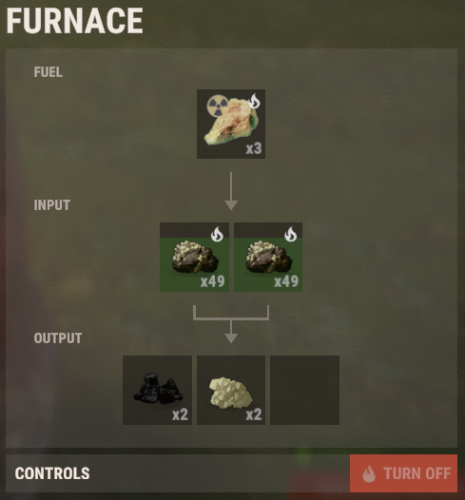
This plugin adds a new fuel for furnaces, it allows the furnace to work longer, but it is radioactive and it will be dangerous to transfer it. My other plugins ☢ Does not work with: Simple Splitter; New fuel can be extracted from certain containers, a list of which is specified in the configuration. You can turn it off, you can also turn off fuel recycling. While you have this fuel in your inventory, your radiation meter increases. There is also a FuelAmountMultiple parameter that is responsible for the duration of 1 piece of fuel. Calculation formula, 1 point = ~2.2 seconds: Time in seconds = FuelAmountMultiple * 2.2 / 60 (by default it is set ~7m 20s); Console commands: give.nuclear.fuel PLAYER (example: give.nuclear.fuel DAez); Configuration: "Fuel": { "Name": "Nuclear fuel", "SkinID": 3047814399, "FuelAmountMultiple": 200.0, "CanLootSpawn": true, "LootSpawnChance": 10.0, "WhichContainers": [ "oil_barrel", "loot_barrel_1", "loot_barrel_2", "crate_normal_2" ], "CanRecycle": true, "PossibleItemsAfterRecycler": [ { "ShortName": "sulfur", "Name": "default", "SkinID": 0, "MinAmount": 100, "MaxAmount": 300 }, { "ShortName": "charcoal", "Name": "default", "SkinID": 0, "MinAmount": 100, "MaxAmount": 1000 } ], "IncreaseRadiation": 2, "RadiationDelay": 3 }$6.00 -

Version 1.0.0
4 downloads
Who say that rust vehicles can go only on fuel ? With this plugin you are able to give your vehicles Resla(Tesla)/Electric Engine ! Your vehicles can go fully on electric mode ,without needing lowgrade! INFO : With this plugin your vehicles can go normaly on electric and on fuel ... So if you run out of el power you can still drive normaly with low grade . If you have both on your vehicle , it will use first lowgrade then el power . You dont need to have low grade in vehicle to drive if you have el power !! HINTS : This plugin supports all vehicles . Very simple plugin , just mount vehicle on driver seat and your vehicle will get electric engine . As soon you turn on your engine , electric power will be drained as you drive. When vehicle is in TC range it will recharge , as soon vehicle leave TC range it will stop charging.. Vehicle need to be turned off to start recharging ! If you dont have any el power or lowgrade ,vehicle will be turned off . Very wide config will allow you to manage lot of stuff. What vehicles can have electric engine . Charge amount , drain amount , max capacity per vehicle all can be adjusted in config.. You can enable installing battery on vehicle (you can change positions) ,its just visualy . Battery will be placed as soon player mounts driver seat . There are effect/sounds in config , effect for low el power , for max charged power , for charging . All effects can be enabled/disabled and changed ! If you have effects ,you will be able to see some sparks when vehicle is recharging , you will get sounds when its done , or when you are on low el power ! PERMS : reslavehicles.use - with this perm you will be able to add electric engine to vehicle reslavehicles.hudedit - with this perm you will be able to use command for moving ICON COMMAND : /elicon - opens editor for moving ICON ICON : There is HUD where you can see how much el power you have on vehicle.. (can be disabled in config) Icon is only visable when you are driver of vehicle . You can change in game position of icon where ever you like. (if you have perm) LANG FILE INCLUDED ! Best way to explain possibilities is true config : CONFIG : "Show Charge Capacity on mounted": true, ///// show message with capacity when you mount vehicle "Show Charge Capacity on dismounted": false, ///// show message with capacity when you dismount vehicle "Show Charge Refil Notify Always": false, ///// show message with refil capacity for your vehicles , where ever you are "Show Charge Refil Notify only when Mounted": true, ///// show message with refil capacity for your vehicles , only when you are driver "Notify each Refil Amount": 100.0, ///// if you have Always or Mounted true , each this amount you will get message "Warning Low Electric": 100.0, ///// when will send message for low el power , and sound if enabled "Enable Low Electric Warning Sound": true, ///// will you enable sound for low el power "Low Electric Warning Sound (effect prefab)": "assets/prefabs/locks/keypad/effects/lock.code.denied.prefab", ///// sound for low el power "Enable Fully Charged Sound": true, ///// will you enable sound for fully charged el power "Fully Charged Sound (effect prefab)": "assets/prefabs/locks/keypad/effects/lock.code.updated.prefab", ///// what sound for fully charged el power "Show Charge Effect (on battery)": true, ///// if enabled you will see on batery sparks (if you enabled battery) "Show Charge Effect when no battery": false, ///// if enabled you will see on vehicle sparks "Charging Effect (effect prefab)": "assets/prefabs/locks/keypad/effects/lock.code.shock.prefab", ///// sparks effect "Show HUD Icon": true, ///// show HUD with el power capacity "HUD Icon Default X": 606.0, ///// HUD postion (can be changed with command) "HUD Icon Default Y": 84.0, ///// HUD postion (can be changed with command) "Electric Vehicle List": [ { "Enable this Vehicle": true, ///// YOU CAN ADD WHAT EVER VEHICLE TO CONFIG , if true then this vehicle can run on el power ! "Vehicle Prefab Path": "assets/content/vehicles/minicopter/minicopter.entity.prefab", ///// What vehicle ? "Vehicle Display Name": "Miny", ///// Name what will be showed in chat "Start Electric Capacity": 0.0, ///// Start capacity , when player mounts for first time vehicle "Maximum Electric Capacity": 500.0, ///// Max Capacity of el power "Electric Charging per sec": 1.0, ///// How much power vehicle will get each sec when its in TC range "Electric Drain per sec": 2.0, ///// How much power vehicle will drain each sec when driving "Place Battery": true, ///// Do you wanna add batter to vehicle "Battery Positions": [ { "X": 0.0, "Y": 0.75, "Z": -0.4, ///// Position of battery ,can be changed "Rotation X": -5.0, "Rotation Y": 180.0, "Rotation Z": 0.0 } ] },$11.99 -
Version 2.0.0
64 downloads
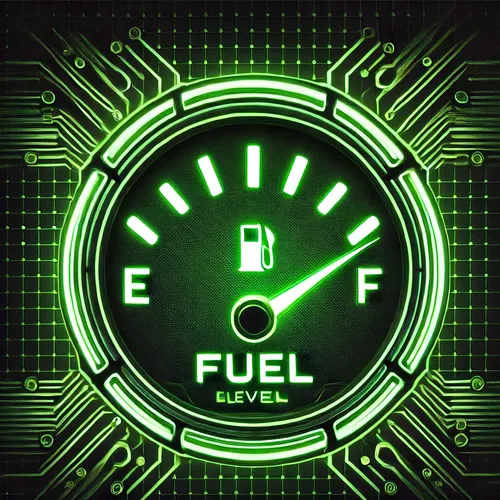
Description: The Fuel Display plugin provides a visual representation of the fuel level in vehicles within Rust. The plugin displays a dynamic bar that indicates the current fuel level and the vehicle's maximum capacity. Administrators can adjust the position and size of the display, and these changes are applied globally for all players. Features: Fuel Display: Shows the current fuel level as a bar. The display is dynamically updated while the vehicle is in use. User-Friendly GUI: A visible frame and customizable display with a bar that graphically represents the fuel level.$4.99 -
Version 1.0.0
445 downloads
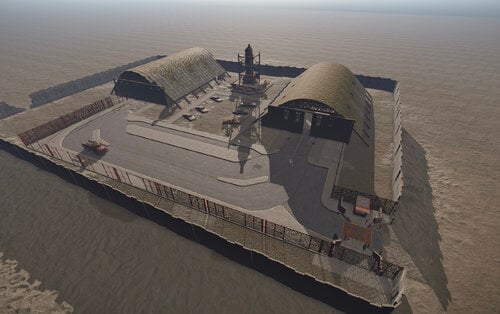
Smoke's Custom Fuel Depot Blue Card Area Blue Card Spawn 7 Scientists 11 Low Grade Barrels 8 Diesel Barrels 1 Elite Crate 12 Basic Crates Please do let me know if anything is broken and I will fix ASAP This will be free for now. Please leave feedback on how you like it. Smoke's Fuel Depot No S,B,T.prefab.zip Smoke's Fuel Depot Refined.prefab.zipFree -

Version 1.0.8
1,111 downloads
Nice and Simple.. Clears the fuel tank on Minicopter and Scrap Transport Heli and AttackHelicopter spawns at the Bandit Camp and replaces it with the amount set in the config. No need to change your stack size to counteract the new air wolf fuel give away. Load this, set the amount and be happy Configuration { "Amount of fuel to spawn with PlayerHelicopters": 100, "Amount of fuel to spawn with Scrap Helicopters": 100, "Amount of fuel to spawn with Attack Helicopters": 100 } No Perms No Commands Just Load, Set, Reload! If you have any questions or problems, join my discord https://discord.gg/D2zTWCEnrNFree- 7 comments
- 3 reviews
-
- 1
-
-
- #rust
- #helicopter
- (and 8 more)
-
Version 0.1.2
754 downloads
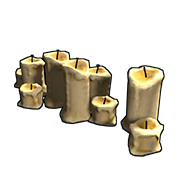
Code Pulled from Lights on to make Large and Small Candles last a very long time and light when placed. For people that just want candles support and not the full blown lights on experience, as requested by an operator.Free- 2 comments
-
- 2
-
-
-
- #rust
- #mechanics
- (and 4 more)
-
Version 1.0.2
23 downloads
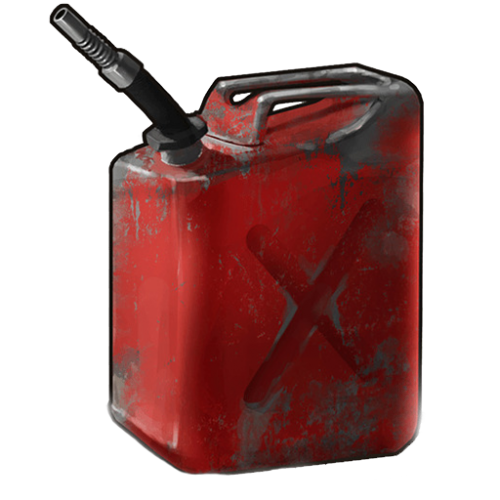
The plugin changes the mechanics of fuel use in cars. Now, before putting fuel in the gas tank, the player needs to find a canister and use it to fill the fuel. The player can find the canister in any box. From features: The player will not be able to pick up / put fuel in the tank. If a player drinks gasoline , they will be poisoned. It is possible to "suck" the gasoline from the tank, for this you need a hose. Flexible configuration of fuel purchase, you can use both the item and the balance of the economy. Later you will see a video, to fill up the car you need to press the RECHARGE key. To drain the gas you need to click the right mouse button$15.00 -
.thumb.png.3622d2d6111ec021ac1142bba30ee352.png)
Version 1.0.0
16 downloads
This monument contains pictures frames that can be filled with the desired content with the help of the plugin that you can find here for free : uMod - Sign Artist by Whispers88 and a car workshop and fuel pumps and a confectionery store. Prefabs count : 6228 Fell free to contact me on discord :Turcu' #6178 for any problem or question$6.00-
- 2
-
-
-
- #gas station
- #gas
- (and 1 more)
-
Version 1.0
3 downloads
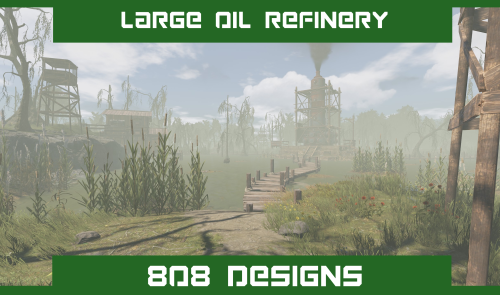
This is my Large Oil Refinery Monument. Taken over by the Bandits, It's a fast way to process fuel.. if you can hold the territory long enough! Prefab Count: 268 The Large Oil Refinery contains the following: 12x Oil Refinery Inputs 1x Oil Pump Bandit stash of fuel NPC/Bot vendor area (Plugin needed) Prefab Modifiers Height Splat Topology Note! You will need the latest versions of Oxide and Oxide.Ext.RustEdit.dll to use these on a map/server.$7.50 -
Version 1.0.0
25 downloads
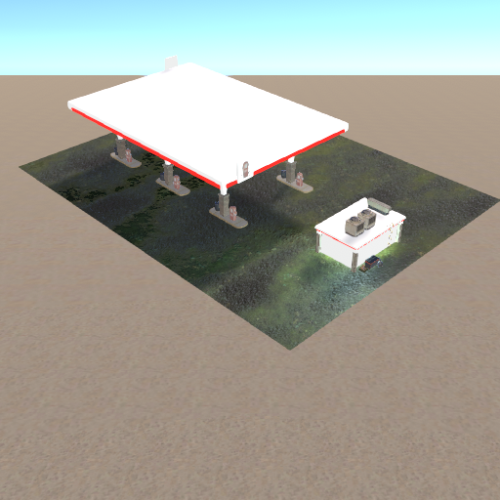
Very simple and detailed gas station, has fully finished interior and includes 6 gas pumps with a parking lot. 351 Prefabs Standalone Prefab (No terrain, splat or topology)$2.99