Search the Community
Showing results for tags 'group'.
Found 18 results
-

Version 1.0.5
118 downloads
About Battle Pass Reborn A modern battle pass system for Rust that adds progression, missions, and rewards to your server. Players complete a wide variety of tasks — from PvP and farming to building and crafting — and earn experience (XP) to unlock unique rewards at each level. The plugin is fully customizable and integrates seamlessly with your server’s economy and other popular plugins. The plugin also supports a Premium Battle Pass, giving players access to exclusive rewards and accelerated progression. This not only increases player engagement but can also generate additional revenue for server owners through premium access sales. Key Features Fully customizable progression system — levels, XP, and rewards for completing missions. Configurable mission types — PvP, events, farming, crafting, and many other activities. Premium Battle Pass — exclusive rewards and faster progression for premium users. Flexible integration — works with server economy and other popular plugins. Increased player engagement — encourages activity and retention between wipes. Modern and polished UI/UX — intuitive interface for viewing levels, missions, and rewards. Commands /bp — opens the Battle Pass interface for the player (can be changed in the plugin config). /giveexp {steamid} {quantity} - adds the specified amount of XP to a player. /removeexp {steamid} {quantity} - removes the specified amount of XP from a player. /resetprogressall - resets the progress of all players on the server. /resetprogress {steamid} - resets the progress of a specific player. Mission Types Missions are loaded from a preset file (e.g., DefaultMissions.json) and can be customized with event types, conditions (e.g., item shortnames), target counts, and difficulties. XP rewards scale by difficulty (configurable: Easy=10, Medium=25, Hard=50). extract: Gather/extract a resource (e.g., wood, stone). craft: Craft specific items. pickup: Pick up items (e.g., from ground or collectibles). loot: Loot a container (e.g., crates, barrels). kill: Kill entities (players, animals, scientists, helicopters, bradleys). build: Build structures. quest: Complete quests (from other plugins). growup: Grow and harvest plants. upgrade: Upgrade building blocks (e.g., wood to stone). fishcatch: Catch fish. heal: Use healing items (e.g., syringes). mlrsrocketfire: Fire MLRS rockets. itemuse: Use/consume items (e.g., food, medical). cardswipe: Swipe keycards. purchasing: Purchase items from NPCs/vending machines. hit_area (Head, Chest, Stomach, Arm, Hand, Leg, Foot): Hit specific body parts on players. kill_with_weapon: Kill using a specific weapon. recycling: Recycle items. gambling: Win in gambling (e.g., slots, wheels, cards; tracks deposits, wins, profits). enter_zone: Enter specific zones (via ZoneManager or similar). events: The plugin awards progress/XP in supported events. In mission presets you can specify conditions like "RaidableBase_Easy", "SpaceEvent", "ArmoredTrainEvent" etc. Event Points Integration Supported events: Air Event Arctic Base Event Armored Train Event Boss Monster Caravan Event Convoy Event Dungeon Event Ferry Terminal Event (FerryEvent) Flying Cargo Event Gas Station Event GunGame Event Harbor Event Junkyard Event Paintball Event Plant Event (PowerPlantEvent) Raidable Bases Event (with difficulty modes: Easy, Medium, Hard, Expert, Nightmare) Satellite Dish Event (SatDishEvent) Shipwreck Event Space Event Sputnik Event Supermarket Event (MarketEvent) Survival Arena Event Triangulation Event Tugboat Pirates Event (Tugboat) Water Event Abandoned Base Event Airfield Event Reward Types Item Commands Configuration Main settings — BattlePassReborn.json Mission settings — DefaultMissions.json Level and reward settings — LevelsList.json UI Settings — UI.json$30.00- 8 comments
- 3 reviews
-
- 3
-

-
- #battlepass
- #battle pass
- (and 27 more)
-
Version 1.0.4
1 download
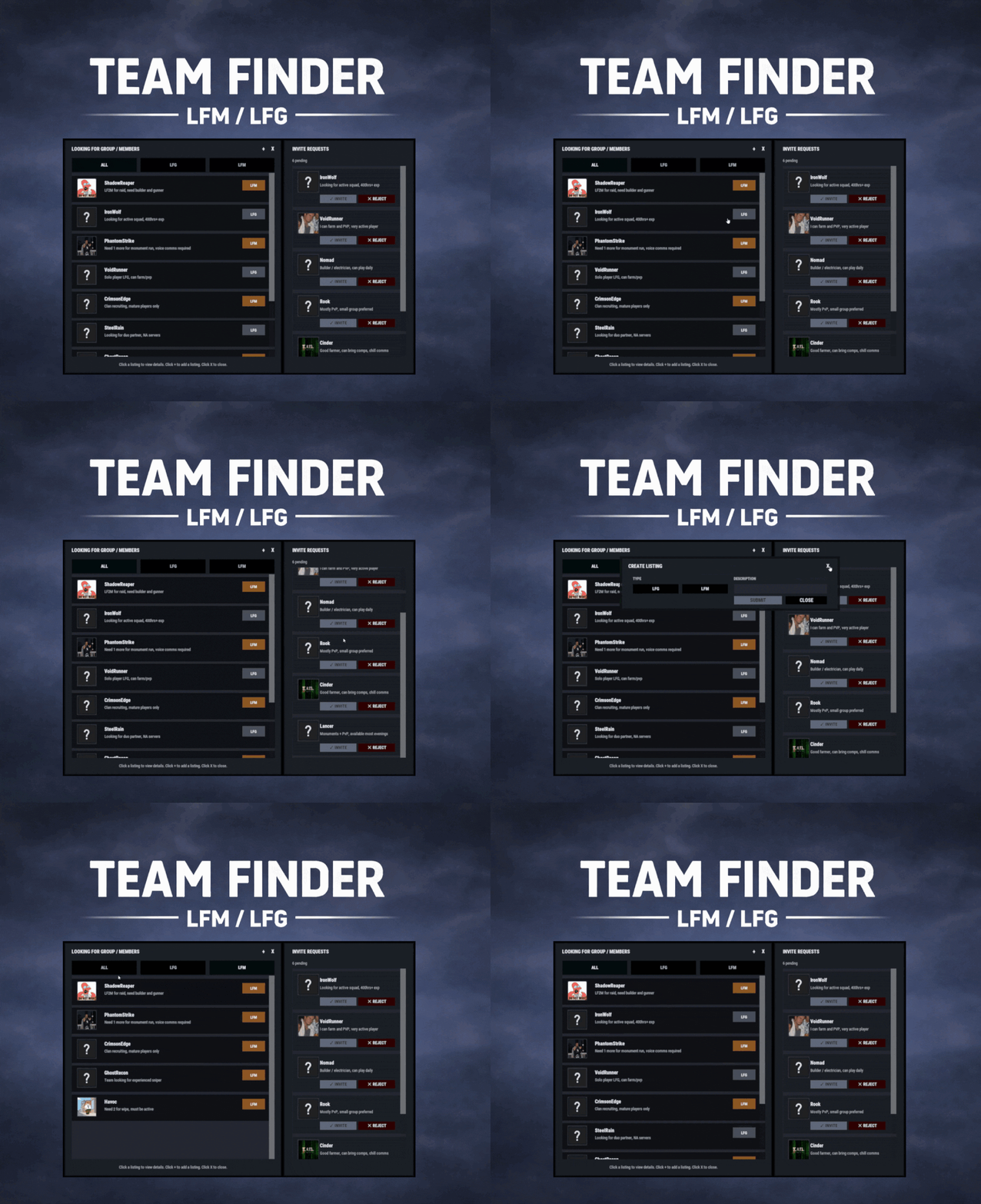
TeamFinder adds a clean, in-game Looking For Group / Looking For Members system to your Rust server. Players can post LFG listings when they’re solo, and team leaders can post LFM listings to recruit. Everything runs through an intuitive UI: browse listings, open player request details, invite, request to join, and manage incoming requests, all without needing repetitive lfg chat spam. Key Features LFG + LFM Listings LFG (Looking for Group): solo players post a listing with a description. These listings are public and team leaders can easily invite players. LFM (Looking for Members): team leaders post a listing tied to their current team. Solo players can submit an invite request along with a short description. Simple UI Workflow Full UI with a main listings panel + side panel for invite request management. Filters: All / LFG / LFM Click a listing to view: Player name + avatar Listing type tag (LFG/LFM) Full description Invite & Request System LFG listings: team leaders can directly send a team invite. LFM listings: solo players can request an invite to join that team. Optional request note (short message) included with join requests. Built-In Safety Rules / Cleanups Players can’t request invites if they’re already in a team. Players can’t be invited/request if they already have a pending Rust team invite. If a player joins a team, their other pending join requests are cleaned up automatically Invalid LFM listings (disbanded teams) are auto-removed when detected. When team leader changes, the listing ownership is moved to new leader. Reminders & Notifications Audible invites reminders for: Players with pending team invites Leaders with pending join requests Configurable reminder interval. Chat message when a LFG/LFM request is posted. Editable UI customize colors for: panels frames row borders buttons tags (LFG/LFM) input fields scrollbar elements and more via the config Localization All UI content neatly arranged in the lang file, allowing for easy translation. ________________________________________________________________ Permissions teamfinder.admin - Required to run clear commands and remove other player's listings. Chat Commands /lfg - Opens the Party Finder. This command can be changed, and multiple commands added within the config file. /lfg.clear - Admin command to clear ALL LFG listings /lfm.clear - Admin command to clear ALL LFMlistings ________________________________________________________________ Default config is created and should meet the needs of most servers.$14.99 -
Version 0.1.3
294 downloads
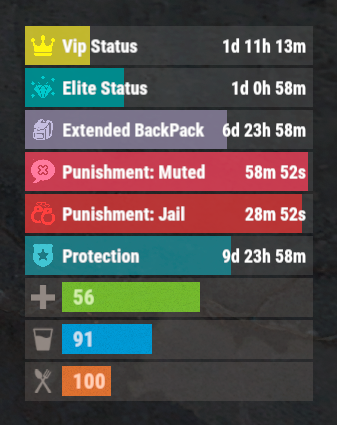
The plugin that displays temporary permissions and groups in the status bar. Depends on AdvancedStatus plugin. The ability to display temporary and permanent permissions; The ability to display temporary and permanent groups; The ability to display temporary and permanent permissions from groups; The ability to automatically generate language files for different languages(filled in English); The ability to customize the bar for each permission and group; The ability to choose between bar types(TimeCounter and TimeProgressCounter); The ability to specify the order of the bar; The ability to change the height of the bar; The abillity to customize the color and transparency of the background; The ability to set a material for the background; The ability to switch between CuiRawImageComponent and CuiImageComponent for the image; The ability to get images from the local folder(*SERVER*\oxide\data\AdvancedStatus\Images); The abillity to set own image and customize the color and transparency of the image; The abillity to set sprite instead of the image; The ability to customize the color, size, font and outline of the text. { "Chat command": "pstatus", "Is it worth enabling GameTips for messages?": true, "Is it worth clearing saved settings for permissions and groups upon detecting a wipe?": false, "Is it worth copying local images for new permissions or groups? Note: If set to true, it may create a lot of unnecessary images": false, "Is it worth displaying the status bar only when players are in the safe zone or have building privilege?": false, "List of language keys for creating language files": [ "en" ], "Default display mode for new permissions. 0 - disabled, 1 - show only temporary, 2 - show all": 1, "Default display mode for new groups. 0 - disabled, 1 - show only temporary, 2 - show all": 1, "Type of status bar for permissions. Note: You can only choose between TimeProgressCounter and TimeCounter": "TimeProgressCounter", "Type of status bar for groups. Note: You can only choose between TimeProgressCounter and TimeCounter": "TimeProgressCounter", "Default status bar settings for new permissions and groups": { "BarType - You can choose only between TimeProgressCounter and TimeCounter": "TimeProgressCounter", "Order": 20, "Height": 26, "Main_Color(Hex or RGBA)": "#FFFFFF", "Main_Transparency": 0.15, "Main_Material": "", "Image_Url": "https://i.imgur.com/BtK7YHa.png", "Image_Local(Leave empty to use Image_Url)": "PermissionsStatus_Default", "Image_Sprite(Leave empty to use Image_Local or Image_Url)": "", "Image_IsRawImage": false, "Image_Color(Hex or RGBA)": "#FFF53D", "Image_Transparency": 1.0, "Is it worth enabling an outline for the image?": false, "Image_Outline_Color(Hex or RGBA)": "0.1 0.3 0.8 0.9", "Image_Outline_Transparency": 1.0, "Image_Outline_Distance": "0.75 0.75", "Text_Size": 12, "Text_Color(Hex or RGBA)": "1 1 1 1", "Text_Font(https://umod.org/guides/rust/basic-concepts-of-gui#fonts)": "RobotoCondensed-Bold.ttf", "Text_Offset_Horizontal": 0, "Is it worth enabling an outline for the text?": false, "Text_Outline_Color(Hex or RGBA)": "#000000", "Text_Outline_Transparency": 1.0, "Text_Outline_Distance": "0.75 0.75", "SubText_Size": 12, "SubText_Color(Hex or RGBA)": "1 1 1 1", "SubText_Font": "RobotoCondensed-Bold.ttf", "Is it worth enabling an outline for the sub text?": false, "SubText_Outline_Color(Hex or RGBA)": "0.5 0.6 0.7 0.5", "SubText_Outline_Transparency": 1.0, "SubText_Outline_Distance": "0.75 0.75", "Progress_Reverse": true, "Progress_Color(Hex or RGBA)": "#FFD700", "Progress_Transparency": 0.7, "Progress_OffsetMin": "0 0", "Progress_OffsetMax": "0 0" }, "Wipe ID": "88c8bc1efdde4be39f8806c954123e36", "Version": { "Major": 0, "Minor": 1, "Patch": 3 } } EN: { "CmdFailed": "The entered command is incorrect! Try '/{0} display'", "CmdDisplayEnabled": "Displaying the bar is enabled!", "CmdDisplayDisabled": "Displaying the bar is disabled!", "BarUntilWipe": "Until wipe", "BarPermanent": "Permanent" } RU: { "CmdFailed": "Введена не верная команда! Попробуйте '/{0} display'", "CmdDisplayEnabled": "Отображение бара включено!", "CmdDisplayDisabled": "Отображение бара выключено!", "BarUntilWipe": "До вайпа", "BarPermanent": "Постоянный" } The language file is generated during the plugin initialization process. Additionally, when creating a new permission or group, a key for it will be automatically added. Note: You can also specify in the configuration file the generation of language files for other languages besides en and ru.$9.99 -

Version 0.1.8
92 downloads
GUI and sound announcements for online teammates. Announcements about teammates who have connected, disconnected, been wounded or killed while sleeping. Additionally, announcements from the team leader, in Team chat channel using "!" as a first char. { "Chat command": "teama", "Is it worth enabling GameTips for messages?": true, "Is it worth enabling leader's group announcements?": true, "Is it worth enabling sound announcements?": true, "Radius within which a wounded ally notification is received": 100.0, "Radius within which a sound effect is triggered when an ally is wounded": 50.0, "Sound effect triggered when an ally is wounded": "assets/bundled/prefabs/fx/player/beartrap_scream.prefab", "Notification settings for each type": [ { "Notification type. Do not touch this parameter": "Connected", "Language_Key": "MsgPlayerConnected", "Duration": 6.0, "Main_Color": "#4F6133", "Main_Transparency": 0.8, "Main_Material": "", "Image_URL": "https://i.imgur.com/5Q9rxNO.png", "Image_Sprite": "", "Image_IsRawImage": false, "Image_Color": "#8CBA42", "Image_Transparency": 1.0, "Text_Size": 16, "Text_Color": "#8CBA42", "Text_Font": "RobotoCondensed-Bold.ttf", "Sound_Effect": "assets/prefabs/npc/scientist/sound/chatter.prefab" }, { "Notification type. Do not touch this parameter": "Disconnected", "Language_Key": "MsgPlayerDisconnected", "Duration": 6.0, "Main_Color": "#BF3B26", "Main_Transparency": 0.8, "Main_Material": "", "Image_URL": "https://i.imgur.com/5Q9rxNO.png", "Image_Sprite": "", "Image_IsRawImage": false, "Image_Color": "#FFD173", "Image_Transparency": 1.0, "Text_Size": 16, "Text_Color": "#FFD173", "Text_Font": "RobotoCondensed-Bold.ttf", "Sound_Effect": "assets/prefabs/npc/scientist/sound/death.prefab" }, { "Notification type. Do not touch this parameter": "LeaderAnnounce", "Language_Key": "", "Duration": 6.0, "Main_Color": "#216699", "Main_Transparency": 0.8, "Main_Material": "", "Image_URL": "https://i.imgur.com/RSaRsp0.png", "Image_Sprite": "", "Image_IsRawImage": false, "Image_Color": "#82C7F5", "Image_Transparency": 1.0, "Text_Size": 16, "Text_Color": "#82C7F5", "Text_Font": "RobotoCondensed-Bold.ttf", "Sound_Effect": "assets/prefabs/npc/scientist/sound/aggro.prefab" }, { "Notification type. Do not touch this parameter": "WoundedDistance", "Language_Key": "MsgPlayerWoundedDistance", "Duration": 6.0, "Main_Color": "#FFC21A", "Main_Transparency": 0.8, "Main_Material": "", "Image_URL": "https://i.imgur.com/jMAs33v.png", "Image_Sprite": "", "Image_IsRawImage": false, "Image_Color": "#FFF54C", "Image_Transparency": 1.0, "Text_Size": 16, "Text_Color": "#FFF54C", "Text_Font": "RobotoCondensed-Bold.ttf", "Sound_Effect": "assets/prefabs/npc/scientist/sound/takecover.prefab" }, { "Notification type. Do not touch this parameter": "WoundedGrid", "Language_Key": "MsgPlayerWoundedGrid", "Duration": 6.0, "Main_Color": "#FFC21A", "Main_Transparency": 0.8, "Main_Material": "", "Image_URL": "https://i.imgur.com/jMAs33v.png", "Image_Sprite": "", "Image_IsRawImage": false, "Image_Color": "#FFF54C", "Image_Transparency": 1.0, "Text_Size": 16, "Text_Color": "#FFF54C", "Text_Font": "RobotoCondensed-Bold.ttf", "Sound_Effect": "assets/prefabs/npc/scientist/sound/takecover.prefab" }, { "Notification type. Do not touch this parameter": "DeadWhileSleeping", "Language_Key": "MsgPlayerDeadWhileSleeping", "Duration": 6.0, "Main_Color": "#FFC21A", "Main_Transparency": 0.8, "Main_Material": "", "Image_URL": "https://i.imgur.com/gwk73Tk.png", "Image_Sprite": "", "Image_IsRawImage": false, "Image_Color": "#FFF54C", "Image_Transparency": 1.0, "Text_Size": 16, "Text_Color": "#FFF54C", "Text_Font": "RobotoCondensed-Bold.ttf", "Sound_Effect": "assets/prefabs/npc/scientist/sound/responddeath.prefab" }, { "Notification type. Do not touch this parameter": "Banned", "Language_Key": "MsgPlayerBanned", "Duration": 6.0, "Main_Color": "#BF3B26", "Main_Transparency": 0.8, "Main_Material": "", "Image_URL": "https://i.imgur.com/8WsmOMo.png", "Image_Sprite": "", "Image_IsRawImage": false, "Image_Color": "#FFD173", "Image_Transparency": 1.0, "Text_Size": 16, "Text_Color": "#FFD173", "Text_Font": "RobotoCondensed-Bold.ttf", "Sound_Effect": "assets/prefabs/missions/effects/mission_failed.prefab" } ], "Version": { "Major": 0, "Minor": 1, "Patch": 8 } } EN: { "MsgPlayerConnected": "Your teammate {0} has been connected!", "MsgPlayerDisconnected": "Your teammate {0} has been disconnected!", "MsgPlayerWoundedDistance": "Your teammate {0} was wounded by {1}!\nHe is {2} meters away from you.", "MsgPlayerWoundedGrid": "Your teammate {0} was wounded by {1} at {2}!", "MsgPlayerDeadWhileSleeping": "Your teammate {0} was killed by {1} while he was sleeping at {2}!", "MsgPlayerBanned": "Your teammate {0} has been banned!\nReason: {1}.", "MsgEmptyTeam": "There is only you in your team!", "MsgNotLeader": "Only the team leader can send announcements!", "MsgOfflineMates": "All your teammates are offline!", "MsgEnableSound": "Sound notifications are enabled!", "MsgDisableSound": "Sound notifications are disabled!", "MsgEnableConnected": "Team mates connection notifications are enabled!", "MsgDisableConnected": "Team mates connection notifications are disabled!", "MsgEnableDisconnected": "Team mates disconnection notifications are enabled!", "MsgDisableDisconnected": "Team mates disconnection notifications are disabled!", "MsgEnableWounded": "Team mates wounded notifications are enabled!", "MsgDisableWounded": "Team mates wounded notifications are disabled!", "MsgEnableDeath": "Team mates sleeping kill notifications are enabled!", "MsgDisableDeath": "Team mates sleeping kill notifications are disabled!", "MsgEnableAll": "All team mates notifications are enabled!", "MsgDisableAll": "All team mates notifications are disabled!", "MsgKillerUnknown": "Unknown", "bear": "Bear", "polarbear": "PolarBear", "wolf": "Wolf", "stag": "Stag", "boar": "Boar", "chicken": "Chicken", "horse": "Horse", "simpleshark": "Shark", "patrolhelicopter": "Patrol Heli", "bradleyapc": "Bradley APC", "scientistnpc_arena": "Scientist", "scientistnpc_cargo": "Cargo Scientist", "scientistnpc_cargo_turret_any": "Cargo Scientist", "scientistnpc_cargo_turret_lr300": "Cargo Scientist", "scientistnpc_ch47_gunner": "Chinook Scientist", "scientistnpc_excavator": "Excavator Scientist", "scientistnpc_full_any": "Scientist", "scientistnpc_full_lr300": "Scientist", "scientistnpc_full_mp5": "Scientist", "scientistnpc_full_pistol": "Scientist", "scientistnpc_full_shotgun": "Scientist", "scientistnpc_heavy": "Heavy Scientist", "scientistnpc_junkpile_pistol": "Road Scientist", "scientistnpc_oilrig": "Oilrig Scientist", "scientistnpc_patrol": "Patrol Scientist", "scientistnpc_peacekeeper": "Peacekeeper Scientist", "scientistnpc_roam": "Roam Scientist", "scientistnpc_roam_nvg_variant": "Roam NVG Scientist", "scientistnpc_roamtethered": "Roam Scientist" } RU: { "MsgPlayerConnected": "Ваш союзник {0} подключился!", "MsgPlayerDisconnected": "Ваш союзник {0} отключился!", "MsgPlayerWoundedDistance": "Вашего союзника {0} серьёзно ранил {1}!\nОн в {2} метрах от вас.", "MsgPlayerWoundedGrid": "Вашего союзника {0} серьёзно ранил {1} в {2}!", "MsgPlayerDeadWhileSleeping": "Вашего союзника {0} убил {1}, пока тот спал в {2}!", "MsgPlayerBanned": "Ваш союзник {0} был заблокирован!\nПричина: {1}.", "MsgEmptyTeam": "У тебя нет союзников!", "MsgNotLeader": "Только лидер группы может отправлять объявления!", "MsgOfflineMates": "Все ваши союзники не в сети!", "MsgEnableSound": "Звуковые уведомления включены!", "MsgDisableSound": "Звуковые уведомления выключены!", "MsgEnableConnected": "Оповещение о подключении союзников включено!", "MsgDisableConnected": "Оповещение о подключении союзников выключено!", "MsgEnableDisconnected": "Оповещение об отключении союзников включено!", "MsgDisableDisconnected": "Оповещение об отключении союзников выключено!", "MsgEnableWounded": "Оповещение о ранении союзников включено!", "MsgDisableWounded": "Оповещение о ранении союзников выключено!", "MsgEnableDeath": "Оповещение о смерти во сне союзников включено!", "MsgDisableDeath": "Оповещение о смерти во сне союзников выключено!", "MsgEnableAll": "Все оповещения о состоянии союзников включены!", "MsgDisableAll": "Все оповещения о состоянии союзников выключены!", "MsgKillerUnknown": "Неизвестный", "bear": "Медведь", "polarbear": "Полярный медведь", "wolf": "Волк", "stag": "Олень", "boar": "Кабан", "chicken": "Курица", "horse": "Лошадь", "simpleshark": "Акула", "patrolhelicopter": "Патрульный вертолет", "bradleyapc": "Танк", "scientistnpc_arena": "Ученый", "scientistnpc_cargo": "Защитник карго", "scientistnpc_cargo_turret_any": "Защитник карго", "scientistnpc_cargo_turret_lr300": "Защитник карго", "scientistnpc_ch47_gunner": "Защитник чинука", "scientistnpc_excavator": "Защитник экскаватора", "scientistnpc_full_any": "Ученый", "scientistnpc_full_lr300": "Ученый", "scientistnpc_full_mp5": "Ученый", "scientistnpc_full_pistol": "Ученый", "scientistnpc_full_shotgun": "Ученый", "scientistnpc_heavy": "Heavy Scientist", "scientistnpc_junkpile_pistol": "Road Scientist", "scientistnpc_oilrig": "Oilrig Scientist", "scientistnpc_patrol": "Patrol Scientist", "scientistnpc_peacekeeper": "Peacekeeper Scientist", "scientistnpc_roam": "Roam Scientist", "scientistnpc_roam_nvg_variant": "Roam NVG Scientist", "scientistnpc_roamtethered": "Roam Scientist" } con - Personal enabling/disabling connected announcement; dis - Personal enabling/disabling disconnected announcement; wound - Personal enabling/disabling wounded announcement; death - Personal enabling/disabling sleeper's death announcement; sound - Personal enabling/disabling sound effects; all - Personal enabling all announcements; clear - Personal disabling all announcements(except leader and ban announces). Example: /teama con$3.99 -

Version 1.0.3
121 downloads
Temp grants users VIP either randomly or by being one of the first X amount of people to join after wipe. A great incentive to get players to join right on wipe and a great way to reward players for joining and playing! FEATURES - Grant vip to random players on join based on a % chance - Grant vip to the first X amount of players to join after wipe - Options to remove the ranks on next wipe - Options to remove the ranks on a time basis - ETC* CONFIG { "VIP options on new wipe": { "Grant VIP on wipe to the first X amount of joiners (0 = disabled)": 10.0, "Oxide group to grant": "vip", "Remove rank after X minutes (0 = disabled)": 120.0, "Remove rank on new wipe": true, "Count as a free VIP rank if the user already has that VIP rank": false }, "Random VIP granter options": { "Random % chance of user getting a VIP rank on join (0 = disabled)": 5.0, "Oxide group to grant": "vip", "Max Random VIP's given per wipe (0 = inf)": 10.0, "Remove rank after X minutes (0 = disabled)": 120.0, "Remove rank on new wipe": true, "Allow user to randomly get VIP more than once a wipe": false } } Need support or want updates about what is coming to the plugin? Join the support discord here https://discord.gg/RVePam7pd7$4.99 -
Version 1.0.2
9 downloads
xPermissionManager A modern, intuitive, and powerful permission management tool for Rust servers. xPermissionManager provides a complete visual interface for managing user and group permissions directly ingame. No more console commands, guesswork, or digging through permission lists. Everything is organized, accessible, and easy to control through an straight forward UI. Whether you're adjusting a single permission, overseeing full group structures, or assigning temporary access, xPermissionManager gives server owners a fast and efficient possibility to do so. Plugin Preview (Video) Full Permission Control Grant or revoke any permission from groups or individual players. Timed Permission System Assign temporary permissions that automatically expire (e.g., 30m, 1h, 1d, 1w, custom durations). Timed Group Memberships Add players to groups for a limited time - Perfect for kits, VIP, special events or whatever. Comprehensive UI A clean and intuitive interface for browsing permissions, switching groups, managing users, and applying timed access. User & Group Browsing View all available groups, check individual player permissions, and toggle them instantly. Clear Feedback Every change is acknowledged with clear messages to help admins avoid mistakes. Permission xpermissionmanager.use // Allows a player to open and use the xPermissionManager UI Chat Commands /xpm /xpmuser <name or steamID> /xpmtimed /xpmgroups /xpm [Opens the Permission Manager UI] PERMISSION OR ADMIN REQUIRED /xpmuser <name or steamID> [Opens the UI for managing a specific player’s permissions/groups] PERMISSION OR ADMIN REQUIRED /xpmtimed [Shows all active timed permissions for a player. Includes remaining duration and whether they came from a group] /xpmgroups [Shows all active timed group memberships for a player] Console Commands </> API$11.99-
- 1
-

-
- #permission
- #manager
- (and 20 more)
-

Version 1.1.5
695 downloads
Team Tracker is your is the best admin tool for monitoring player associations and enforce team size rules. Whether you need to ban an entire team or track players abusing the system, Team Tracker has you covered. It offers live logging, team queries, and auto-banning—all in one customizable and performant package. Dynamic identification of player teams Live discord logging Query a player team at any time Automatic custom ban system Battlemetrics integration High Performance clearplayerdata - deletes a players team data/history teamcheck - Sends a discord embed with a report of group data, warnings and current team players to discord. Note: All chat commands are universal meaning they can be used via the console, rcon(for import commands) and can be customized via the configuration. teamtracker.whitelist - Whitelists a player from being included in any team alerts (Admins and Developers are automatically whitelisted) teamtracker.admin - allows the use of the checkteam and whitelist commands Proximity - configurable distance between players Sleeping bag placement - bags given or placed within building Codelock authorization - authorized players on a codelock Turret authorization - authorized players on a turret Toolcupboard authorization - authorized players on a toolcupboard Healing - healing and reviving of other players Vehicle mounting - mounting of the same vehicle at the same time Team-members - history of team members PVP - players breaking team limits when pvping/roaming Raiding - players raiding together Looting - looting other players together Alerts: All alert types can be customized via the plugin config. Options include: Enable - this toggles any usage of the alert type to enable or disable the alert type Log to discord - Enables discord logs Warn Players - Sends an ingame warning to a player up to 30 seconds after the offense Weighting - configures how important the alert type is. This contributes to the ban by association score value. Warnings: Warnings are logged as a type of violation. This provides discord logs and the optional in game warning display to the violator. Display Warnings to Players - option to disable in game warnings Length of time to display warning - optional length of time to display warnings Warning Text - customizable warning text Bans: Team-Tracker allows for customizable automatic bans of players, who go over the group limits. Enable Bans - allows toggeling of the ban system Ban text - text to display as the reason for a player ban Log Bans to Discord - optionally log bans to discord. Logging Only Mode: Set Enable Bans & Log Bans to Discord to true and set Local Bans and Battlemetrics Bans to False Enable Ban by Max Association - enables banning a player or a team by summing all association values to create a total weighting. Example: if the team limit is 5 players and the Max Association Weighting is 10, if a player has more than 5 players with an association weighting of more than 10 this will apply a ban. Max Association Weighting - set the max association weighting per player in a group Ban Duration - length of time to ban for Ban Team - ban all team members of a banned player Ban Associations - bans all players over Max Association Weighting in relation to a banned player Local Bans - apply bans locally An API token for your battlemetrics org is required to use the battlemetrics ban features. A token can be acquired by visiting: https://www.battlemetrics.com/developers Server ID - set the BM server ID Go to https://www.battlemetrics.com/rcon, click into the select server. Check the address bar in your browser, the address will be ending with the Server Id, for example: https://www.battlemetrics.com/rcon/servers/123456 means 123456 is the Server Id. Org ID - set an organisation ID Go to https://www.battlemetrics.com/rcon/orgs, click into the org. Check the address bar in your browser, the address will be ending with the Organization Id, for example: https://www.battlemetrics.com/rcon/orgs/edit/123456 means 123456 is the Organization Id. BanList ID - adds a ban to a specific ban list Go to https://www.battlemetrics.com/rcon/ban-lists, click "View Bans". Check the address bar in your browser, the address will be ending with the Banlist Id, for example: https://www.battlemetrics.com/rcon/bans/?filter[banList]=abcdef-123456-example-banlist-example91011 means abcdef-123456-example-banlist-example91011 is the Banlist Id. Org Wide Ban - true if the ban should be applied to all servers in your organization Auto Add - true if the ban should automatically ban new identifiers after kicking a matching player. Native Enabled - true if native bans should be issued for this ban$24.99- 16 comments
- 5 reviews
-
- 4
-
-

-
- #teamalerts
- #team
- (and 28 more)
-

Version 1.1.1
24 downloads
Advanced Timed Permission Management System for Groups Timed Group Permissions allows you to assign permissions to any group for a limited amount of time! You can easily give, revoke, or extend timed permissions — all fully controlled by simple commands. Discord Integration - You can log all permission grants, revokes, and extensions directly to a Discord channel. - Simply add your Discord webhook URL to the config file, then run the command: - oxide.reload TimedGroupPermissions That’s it! Your actions will now be logged automatically to Discord. Data Storage To check which groups currently have timed permissions assigned, open the file: data/TimedGroupPermissions.json Commands Section Chat & Console Commands: 1. givegroupperm <group> <permission> <time> → Give a timed permission to a group. 2. extendgrouptimeperm <group> <permission> <time> → Extend the duration of an existing timed permission. 3. revokegroupperm <group> <permission> → Revoke a permission from a group. 4. viewgroupperm <group> → View all active timed permissions for that group. Example output: [Timed Group Permissions] Permissions for group 'admin': - kits.donadiscord (Expires in 23 hour(s) 59 minute(s) 39 second(s)) Examples givegroupperm admin minicopter.infinitefuel 10d → Gives the group “admin” the permission “minicopter.infinitefuel” for 10 days. extendgrouptimeperm admin minicopter.infinitefuel 10d → Extends the permission “minicopter.infinitefuel” for the group “admin” by an additional 10 days. revokegroupperm admin minicopter.infinitefuel → Removes the permission “minicopter.infinitefuel” from the group “admin”. ------------------------------------------------------------ Default Configuration { "Send messages to Discord Webhook? (Requires DiscordAPI plugin)": true, "Discord Webhook URL": "https://discord.com/api/webhooks/..." } Summary: Timed Group Permissions is the perfect solution for managing temporary permissions on your server. Reward VIP groups, event teams, or temporary staff roles — all with automatic expiration and Discord logging.$10.00 -
Version 1.0.2
32 downloads
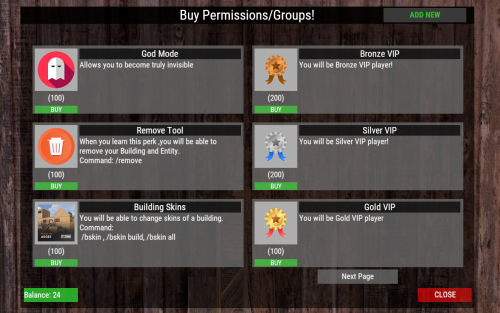
This plugin allows players to buy permissions and groups true UI. Very simple to use , all can be done true UI ... No need to hard placing perms ,groups in config . All modification work can be done true UI : Adding or removing perms/groups . Customize the permissions/groups . Changeable Perm/Group Title , ImageUrl, Description, What Perm/Group they will get , Cost . Flexible Economy : Item-Based Economy: Use in-game items as the currency for purchases. Plugin-Based Economy: Economics, ServerRewards, and CustomCurrency. Commands : Chat Command : /buyperms - Opens UI (Changeable chat command in config). Console Command : open_perms_ui - opens UI. Console Command : remove_perm <player_id or all> <permission or group_ or title> - remove from player or from all players that specific perm/group/title. Console Command : wipe_perms <player_id> or <all> - with this console command you wipe for that player , or for all players buyed perms/groups. Perms : "permbuy.buy" : required to open UI. "permbuy.admin" : required to be able to add/remove ,modify perms/groups true UI . "permbuy.bypasscost" : required for not taking any cost when you buying . Lang File Supported - you can change all texts there ! Data file - you can see there who buyed what ! Example Config : "Open UI Command": "buyperms", "UI Title Text": "Buy Permissions/Groups!", "Show Purchased Permissions in UI": true, "Cost Configuration": { "Economy Type [Item, Plugin]": "Item", "Plugin Cost Type [CustomCurrency, Economics, ServerRewards]": "CustomCurrency", "Item Shortname (if using Item-based)": "scrap", "Item Skin ID (if using Item-based)": 0, "Item Display Name (if using Item-based)": "" }, "Available Perms/Groups": [ { "Perm/Group Title": "God Mode", "Image URL": "https://www.dropbox.com/scl/fi/18yy55g7bfcz8tj4yhnkr/5e2c4da074770.png?rlkey=24zmukgzu3rll382s6wpkbd65&st=e1bi9i7k&dl=1", "Description": "Allows you to become truly invisible", "What Perm/Group": "vanish.allow", "Cost Amount": 100 }, { "Perm/Group Title": "Bronze VIP", "Image URL": "https://www.dropbox.com/scl/fi/ir8e03hvw0wtv59ofbey1/bronze-badge.png?rlkey=9gq4axhg5swt92dgqar6jk97e&st=8rz8iqh9&dl=1", "Description": "You will be Bronze VIP player!", "What Perm/Group": "group_VIP", "Cost Amount": 200 },$10.00 -

Version 1.8.32
543 downloads
IQPermissions is your server's temporary privilege controller with the ability to transfer your data from TimedPermissions, Grant or TimePrivilage! Why IQPermissions? : - Multilingual permissions and groups (configurable in the configuration) - Familiar commands, see the section "Commands" - Logging system, logs will display all the actions of the plugin and its interactions with your players - Support for logging in Discord (discord will receive notifications about the receipt and expiration of player privileges) - It is possible to use MySQL in addition to the standard data file - The ability to synchronize player privileges between your servers using MySQL (privileges and their duration will remain with the player, even if he moves to your other server) - The ability to use a "whitelist" for permissions and groups available for synchronization between servers - Safety! If the server crashes or the plugin is unloaded, it automatically clears the player's privileges before the plugin is loaded later (optional in the configuration) - Encouraging newcomers. You will be able to give groups or permissions to newcomers at any time! - Player notifications (3 types) : - 1: Receiving a privilege, the player will receive a pop-up notification that he has received a privilege - 2 : Expiration reminder, the player will receive a pop-up notification that his privilege is about to end (configurable in the configuration) - 3 : Privilege expiration, the player will receive a pop-up notification that his privilege has expired - Full customization of the UI plugin - Setting up notifications, you can specify a list of permissions and groups the plugin will remind the player about the expiration date - IQChat support UI-Alert (3 type) - Example : Discord Log - Example : CONFIGURATION - https://pastebin.com/BCV2kK4H Q: How can I transfer data from my plugin Time d Permissions/Grant/TimePrivilage? A: It's very simple, download Impermissions, configure the configuration to suit your needs and start syncing with one of the commands (you must have your data file downloaded from one of the specified plugins) Q: How to install images? A: Navigate to the folder /data/IQSystem/IQPermissions/ and move the Images folder from the archive there, then reload the plugin. Commands for transferring data from other plugins : TimedPermissions - migration.timedpermissions Grant - migration.grant TimePrivilage - migration.timeprivilage *For more commands, see the "Commands" section Commands : Commands for transferring data from other plugins: TimedPermissions - migration.timedpermissions Grant - migration.grant TimePrivilage - migration.timeprivilage Custom commands : /pinfo - displaying information about privileges to the player Issuance of temporary permissions : grantperm Steam64ID Permission Time(1d/1m/1s) - grant the player a temporary permission grant.permission Steam64ID Permission Time(1d/1m/1s) - alternative command Withdrawal of temporary permissions : revokeperm Steam64ID Permission - completely take away the temporary permission of the player revoke.permission Steam64ID Permission - alternative command revokeperm Steam64ID Permission Time(1d/1m/1s) - reduce the duration of the player's permissions revoke.permission Steam64ID Permission Time(1d/1m/1s) - alternative command Issuing temporary groups : addgroup Steam64ID Group Time(1d/1m/1s) - give the player a temporary group grant.group Steam64ID Group Time(1d/1m/1s) - alternative command Removing temporary groups : revokegroup Steam64ID Group - completely take away the temporary group from the player revoke.group Steam64ID Group - alternative command revokegroup Steam64ID Group Time(1d/1m/1s) - reduce the duration of the player's group revoke.group Steam64ID Group Time(1d/1m/1s) - alternative command Informative commands : perm.users Permission - withdraw all players who have the specified permission group.users Group - output all players who have the specified group user.perms Steam64ID - displays all active player permissions user.groups Steam64ID - displays all active player groups API : Dictionary<String, DateTime> GetPermissions(UInt64 userID) - returns a list of the player's permissions and the time of their validity Dictionary<String, DateTime> GetGroups(UInt64 userID) - returns a list of the player's groups and the time of their action void SetPermission(UInt64 userID, String Permission, DateTime DataExpired) - granting temporary permissions to the player void SetPermission(UInt64 userID, String Permission, String DataExpired) - alternative API (DataExpired in 1d/1m/1s format) void SetGroup(UInt64 userID, String Group, DateTime DataExpired) - issuing a temporary group to a player void SetGroup(UInt64 userID, String Group, String DataExpired) - alternative API (DataExpired in 1d/1m/1s format) void RevokePermission(UInt64 userID, String Permission, DateTime DataExpired = default(DateTime)) - removing player permissions (if DataExpired = default(DateTime) - completely removes the permission from the player, if a period is specified, then it will cut the validity period to this period) void RevokePermission(UInt64 userID, String Permission, String DataExpired = null) - alternative API (DataExpired format 1d/1m/1s) (if DataExpired = null - completely remove the permissions from the player, if a deadline is specified, then the validity period will be scraped until this deadline) void RevokeGroup(UInt64 userID, String Group, DateTime DataExpired = default(DateTime))- removing player group (if DataExpired = default(DateTime) - completely remove the group from the player, if a deadline is specified, then the validity period will be scraped until this deadline) void RevokeGroup(UInt64 userID, String Group, String DataExpired = null) - alternative API (DataExpired format 1d/1m/1s) (если DataExpired = null - completely remove the group from the player, if a deadline is specified, then the validity period will be scraped until this deadline)$12.99- 44 comments
-
- 1
-
-
- #timedpermissions
- #grant
- (and 8 more)
-

Version 1.0.0
3 downloads
The Prodigy logo is a prefabricated carefully created and faithful to the original logo of the legendary band The Prodigy. If you are a fan of this musical group, now you can decorate your server with the mythical ant, symbol of The Prodigy. Show the players of your server which is the true legendary music of all time with this logo.$6.94-
- 2
-
-
-
- #the prodigy
- #prodigy
- (and 20 more)
-

Version 1.0.1
36 downloads
A simple and user-friendly plugin designed to reward players for joining your Steam group! Why use this plugin? We've been using the free plugin on Umod for quite some time, which still works fine, but we've encountered repeated issues with users joining the group and then leaving, as there was no automatic removal function, causing players to retain their rewards. That's why we've developed our own version with enhanced features and we'd like to share it with you. What makes this plugin special? • User-friendly configuration file • Support for one group and one permission assignment, activatable and deactivatable in the configuration • Automatic checking upon joining and leaving the server, activatable and deactivatable in the configuration • Chat notifications, activatable and deactivatable in the configuration • Customizable notifications and Chat-Prefix • Chat command and console command only for administrators • support for Carbon and Oxide Where can I find the Steam group profile URL? • The profile URL isn't your Steam group's URL, but rather a tag for the URL. • You can find this under "Edit Group Profile" -> "Profile URL" (see image). • Then, add this tag under "SteamGroupPROFILURL." Does it support multiple permissions? • No, although technically feasible, I've decided to only support one permission. • If you wish to assign multiple permissions, I recommend assigning them directly to the group and granting all permissions to the group. What commands are available? • Checks the specified Steam group and adds or removes the permission or group accordingly. | Chat-Command • /checksteam - Chat command • checksteam - Console command What's enabled by default in the configuration? • NotifyGroupPlayers: Notifies the user when they're assigned to or removed from the group. • EnableAddGroup: Assigns the user to the specified group. • EnablePlayerDisconnectedCheck: The plugin checks each time a player leaves the server to see if they're in the Steam group. SteamGroupCheck Configuration true = active | false = disabled { "SteamGroupPROFILURL": "YoursteamGroupPROFILURL", "GroupName": "yourgroup", "AutoCreateGroup": false, "NotifyGroupPlayers": true, "NotifyPermPlayers": false, "EnableAddGroup": true, "EnableAddPerm": false, "EnablePlayerDisconnectedCheck": true, "EnablePlayerConnectedCheck": false, "EnableConsoleNotifications": false, "ChatPrefix": "<size=12><color=#AE3624>YOURSERVERNAME</color> <size=16>|</size> <color=#738D45>[SteamGroupCheck]</color>\n", "PermName": "yourpermission" } What do the individual configuration settings mean? • AutoCreateGroup: If this setting is set to "true," the group specified by you as "PlayerAddGroupName" will be automatically created. By default, this is disabled. • ChatPrefix: Sets the chat prefix displayed before each message. • EnableAddGroup: Enables or disables the function to add groups. • EnableAddPerm: Enables or disables the function to add permissions. • EnableConsoleNotifications: Enables or disables the function for console notifications. • EnablePlayerConnectedCheck: Enables or disables the check when a player joins the server. • EnablePlayerDisconnectedCheck: Enables or disables the check when a player leaves the server. • NotifyGroupPlayers: Enables or disables the notification for the player when they are assigned to or removed from the group. • NotifyPermPlayers: Enables or disables the notification for the player when permissions are assigned to or removed from them. • PlayerAddGroupName: Here, the name of the group to be assigned to the player is specified, e.g., "steam." • PlayerAddPermissions: Here, the permissions to be assigned to the player are specified, e.g., "banksystem.use." • SteamGroupPROFILURL: Here, the profile URL is entered, as explained above, the most important setting in the entire configuration. SteamGroupCheck Lang English { "GroupAdded": "Thank you for joining the Steam group! As a token of appreciation, you will receive the group <color=#738D45>{0}</color>!", "GroupRemoved": "Unfortunately, you have left the Steam group! Therefore, the permission <color=#738D45>{0}</color> has been revoked from you!", "PermissionRemoved": "Unfortunately, you have left the Steam group! Therefore, the permission <color=#738D45>{0}</color> has been revoked from you!", "PermissionGranted": "Thank you for joining the Steam group! As a token of appreciation, you will receive the permission <color=#738D45>{0}</color> from us!", "NoPermission": "You don't have permission to use this command; you need to be an administrator on the server!", "PlayerCheckExecuted": "The Steam group has been checked, and all joined players have been credited with the reward!" } Deutsch { "GroupAdded": "Danke, dass du der Steam-Gruppe beigetreten bist! Als Dankeschön erhältst Du von uns die Gruppe <color=#738D45>{0}</color>! ", "GroupRemoved": "Leider hast du die Steam-Gruppe verlassen! Daher wurde dir die Gruppe <color=#738D45>{0}</color> wieder entzogen!", "PermissionRemoved": "Leider hast du die Steam-Gruppe verlassen! Daher wurde dir die Permission <color=#738D45>{0}</color> wieder entzogen!", "PermissionGranted": "Danke, dass du der Steam-Gruppe beigetreten bist! Als Dankeschön erhältst Du von uns die Permission <color=#738D45>{0}</color>! ", "NoPermission": "Du hast keine Berechtigung, diesen Befehl zu verwenden; du musst ein Administrator auf dem Server sein!", "PlayerCheckExecuted": "Die Steam-Gruppe wurde überprüft und allen beigetretenen Spielern wurde die Belohnung gutgeschrieben!" } Certainly, you are free to adjust the notification settings according to your preferences. Furthermore, you are not obliged to use {0} if you don't wish to! If you have any questions or encounter any issues, please don't hesitate to contact me!$3.99 -

Version 1.0.0
15 downloads
Now you will have a Rust style space for your clan, group or game team. The community is a circular space with several construction zones for your base or house. Surrounded by a large wall which offers a defense for your team. The community offers a decorative space for your Rust server, junkyard style.$12.90-
- 1
-
-
- #thecommunity
- #community
- (and 59 more)
-

Version 1.0.0
8 downloads
Fear of the deep sea? Now you can overcome it with this wonderful window to the ocean. Stand out on your server with Underwater Train Station, an underwater train station with access to the subway tunnel. - Contains: NPCS, Loot, Puzzles and a nice decoration. - Tip: You can remove the train tracks and put your own custom ones (Existing tracks can serve as a guide, or if you prefer you can keep them as they are fully functional).$12.90-
- 1
-
-
- #underwatertrainstation
- #trainstation
- (and 39 more)
-
Version 1.1.1
28 downloads
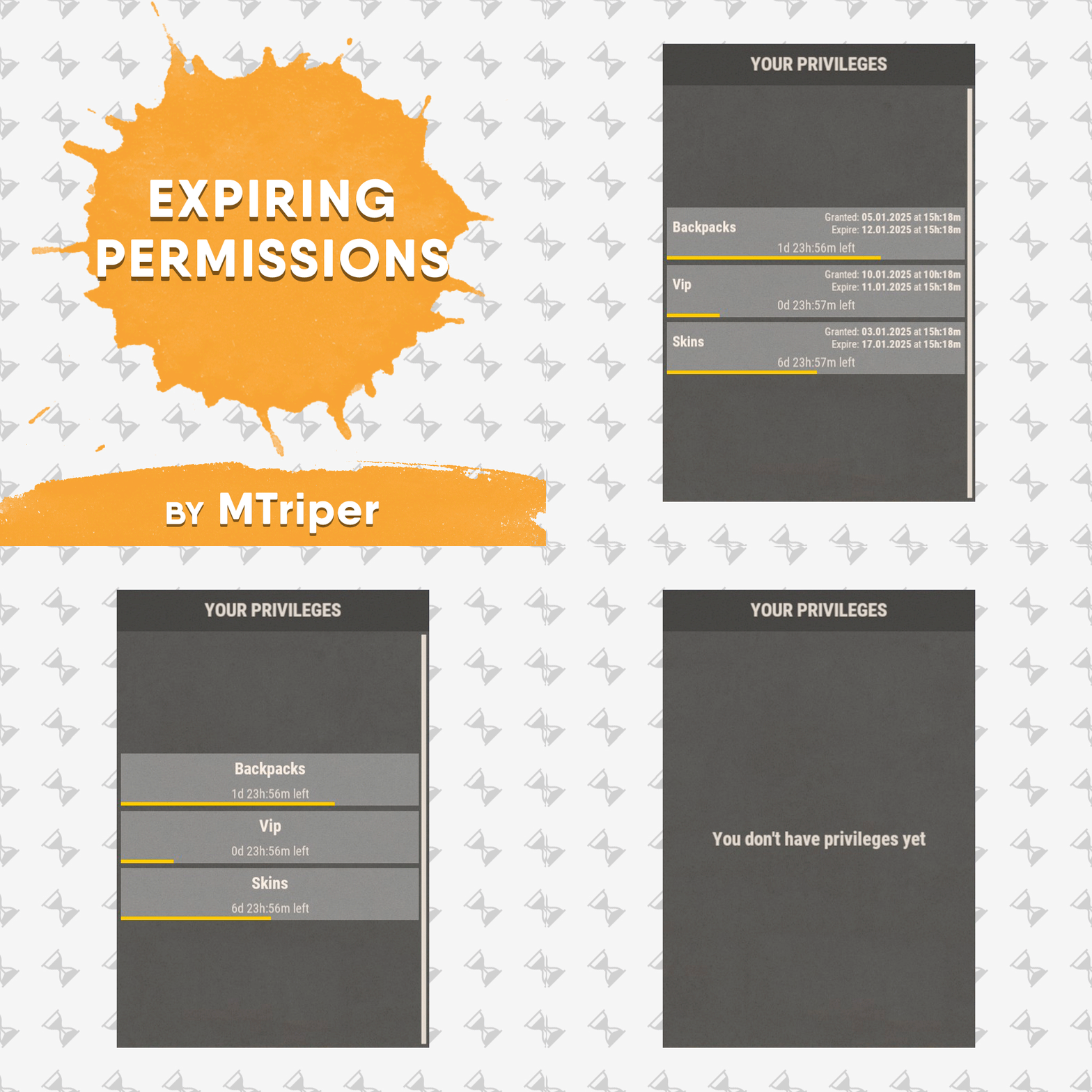
This is a simple, lightweight and easy to use plugin that allows you to grant permissions and groups for a specific amount of time. It also supports the creation of permission packs, which makes it easy to grant a large number of permissions at a time. Features Granting privileges until the end of the current wipe. Information panel with current user privileges. Customize notification in all popular notification plugins. Full-featured API for plugin developers (ability to create your own interface or integrate display of privileges into your game menu plugin). Ability to create privilege packs. Supported plugins: Notify, GUIAnnouncements - these plugins are used to display notifications. Permissions expiringpermissions.admin - to use commands to grant and revoke privileges. expiringpermissions.gui - to show a panel with the player's current privileges. Commands Commands can be entered from wherever you want: via chat, game console (F1) or server console. eperms (configurable) – shows a panel with the current privileges of the current player. setpack steamid/nickname packname time – to temporarily grant a pack of privileges to a player. revokepack steamid/nickname packname – forcibly revoke a pack of privileges from a player. grantperm steamid/nickname permission time title – temporarily grant a player a permission. revokeperm steamid/nickname permission – forcibly revoke a player's permission. addgroup steamid/nickname group time title – temporarily add a player to the group. removegroup steamid/nickname group – forcibly remove a player from a group. Description of command arguments: steamid/nickname - steamid or nickname of your choice. permission/group - plugin permission/oxide group. packname - package name from the Package name field in the config. time - duration of privileges, in the format 7d10h20m (e.g. 14d, 1d5h, 10m and etc.). You can also use the word "wipe" here. In this case the privilege will be valid until the end of the current wipe. title (optional) - name that will be displayed in the panel and indicated in messages to the player. If it is not specified, the plugin will write *title not specified*. General settings Check interval [sec] – interval for checking expiring player privileges. Show the start and end date of the permission in the panel (depends on the time on the physical server)? – in addition to the privilege name (if specified), the panel will display the privilege activation date and expiration date. Keep in mind that the plugin works with the time of the server machine (physical server). If the time and date are not configured there, they will be displayed incorrectly in the plugin. Type of notifications when permission are granted (none, title - only with name, all) none – the player will not be notified when a privilege is granted to him. title – the player will be notified about those privileges that have the name specified. all – the player will be notified when all privileges have been granted. If the privilege does not have a name set, *title not specified* will be displayed. Type of notifications when permission expire (none, title - only with name, all) – similar to the setting above, only when the privilege is revoked/expired. Show a notification if the permission is manually revoked? – show a notification to the player when an administrator manually removes a privilege. Notification settings Notification type (Chat, GameTips, Notify, GUIAnnouncements) – if this section is enabled, you must specify the type/plugin to notify the player of different warnings. Chat – notification to regular chat. GameTips – notification in the in-game Rust tooltips (blue or red at the bottom of the screen). Notify – notification in the Notify plugin by Mevent. GUIAnnouncements – notification in the GUIAnnouncements plugin by JoeSheep. Just below that are the customization fields for the specific type of notification. Setting permission packages To display privileges correctly in the panel, you can create packs. They allow you to collect several privileges or groups together. In this way you reduce the number of commands and assign a name to this pack, which will be displayed in the panel and when the player is notified. This is actually very convenient and saves problems and confusion. Display name – package name, it is displayed in the panel and in notifications. Package name – package short name, it is used when using commands. Permissions – list of permissions that will be included in the package. Groups – list of groups that will be included in the package. Then you just use the setpack command where you specify the name of the pack. Then everything in the pack (permissions and groups) will be given to the player. Plugin Api object ExpPermCanSetPackage(BasePlayer target, TimeSpan timeSpan, string packageName) { return null; } // before the pack is issued void ExpPermOnPackageSet(BasePlayer target, TimeSpan timeSpan, string packageName) // after issuing the pack object ExpPermCanRevokePackage(BasePlayer target, string packageName) { return null; } // before the pack is revoked void ExpPermOnPackageRevoked(BasePlayer target, string packageName) // after the pack is revoked object ExpPermCanGrantPermission(BasePlayer target, string permission, TimeSpan timeSpan, string title) { return null; } // before the permission is granted void ExpPermOnPermissionGranted(BasePlayer target, string permission, TimeSpan timeSpan, string title) // after the permission is granted object ExpPermCanRevokePermission(BasePlayer target, string permission) { return null; } // before the permission is revoked void ExpPermOnPermissionRevoked(BasePlayer target, string permission) // after the permission is revoked object ExpPermCanAddToGroup(BasePlayer target, string group, TimeSpan timeSpan, string title) { return null; } // before adding a player to the group void ExpPermOnAddedToGroup(BasePlayer target, string permission, TimeSpan timeSpan, string title) // after adding a player to the group object ExpPermCanRemoveFromGroup(BasePlayer target, string group) { return null; } // before a player is removed from the group void ExpPermOnRemovedFromGroup(BasePlayer target, string group) // after a player is removed from the group void ExpPermOnPackageExpired(string userId, string title, string packName) // when the privilege pack expired void ExpPermOnPermissionExpired(string userId, string title, string permName) // when the permission expired void ExpPermonGroupExpired(string userId, string title, string groupName) // when the group expired // *use the title to display the name of the privileges in your plugin // If timespan = TimeSpan.MaxValue then this privilege is valid until the end of the current wipe ExpiringPermissions.Call<bool>("HasActivePermissions", string userID); ExpiringPermissions.Call<bool>("TryGetPlayerData", out List<Dictionary<string, object>> packages, out List<Dictionary<string, object>> permissions, out List<Dictionary<string, object>> groups); /* packages/permissions/groups Dictionary contains: ["value"] = string ["title"] = string ["startDate"] = DateTime ["expireDate"] = DateTime If expireDate = DateTime.MaxValue then this privilege is valid until the end of the current wipe */ Plugin Config Example of plugin configuration in English: Example of plugin configuration in Russian. If you need Russian config, open it (ExpiringPermissions.cs) before loading the plugin, and at the top set the variable "isRus = true". Then save and upload this file to your server.$5.00 -

Version 1.0.0
3 downloads
Steam Group Whitelist – Your Exclusive Access Pass! Want a server where only the crème de la crème of your Steam group can play? With the Steam Group Whitelist, we separate the wheat from the chaff! This plugin ensures that only members of your Steam group can access your Rust server. No group membership? Then it’s "Sorry, no entry!” Players are filtered the moment they join – only those who belong get in. What else can the plugin do? • Direkt Join Check: No group membership? No access! The server is immediately off-limits to non-members. • Easy Setup: Install it once, configure it, and let it run! No hassle, just exclusive access for your group. • SteamID Whitelisting via Chat & Console Commands • Bypass Permission for VIPs and Supporters: • Customizable Messages: • Console & Chat Notifications: Easily toggle notifications on or off! Where can I find the Steam group profile URL? • The profile URL isn't your Steam group's URL, but rather a tag for the URL. • You can find this under "Edit Group Profile" -> "Profile URL" (see image). • Then, add this tag under "SteamGroupPROFILURL." What permissions are available? • There is the steamgroupwhitelist.bypass permission. Players with this permission can join the server even if they are not members of the designated Steam group. Important: The player must have been online at least once, or belong to a user group with this permission, for the bypass function to be effective. Assigning Permissions to Players & Groups • Oxide: oxide.grant user SteamID steamgroupwhitelist.bypass oxide.grant group groupname steamgroupwhitelist.bypass • Carbon: c.grant user SteamID steamgroupwhitelist.bypass c.grant group groupname steamgroupwhitelist.bypass What commands are available? • Checks the specified Steam group and adds or removes the permission or group accordingly. | Chat-Command • asw steamid = Adds a player to the SteamID Whitelist • ras steamid = Removes a player from the SteamID Whitelist • checkwhitelist = Manually verifies the player list and kicks anyone who lacks the necessary permissions or group membership. /asw 76561198116400000 = chat asw 76561198116400000 = console /ras 76561198116400000 = chat ras 76561198116400000 = console /checkwhitelist = chat checkwhitelist = console What's enabled by default in the configuration? • EnableChatNotifications • EnableSteamIDWhitelist SteamGroupWhitelist Configuration • true = active | false = disabled { "SteamGroupPROFILURL": "YourSteamGroupProfileURL", "EnableConsoleNotifications": false, "EnableChatNotifications": true, "EnableSteamIDWhitelist": true, "SteamIDWhitelist": [], "ChatPrefix": "<size=12><color=#AE3624>YOURSERVERNAME</color> <size=16>|</size> <color=#738D45>[SteamGroupWhitelist]</color>\n" } What do the individual configuration settings mean? • ChatPrefix: Sets the chat prefix displayed before each message. • EnableConsoleNotifications: Enables or disables the function for console notifications. • EnableChatNotifications: Enables or disables the function for Chat notifications. • SteamGroupPROFILURL: Here, the profile URL is entered, as explained above, the most important setting in the entire configuration. • EnableSteamIDWhitelist: Enables or disables the SteamIDWhitelist function • SteamIDWhitelist: Here, you can enter the SteamIDs of the players who should be excluded from verification and always have access to the server. SteamGroupWhitelist FAQ • If the Steam website is unreachable, the plugin will function like a standard whitelist: • Anyone who is not on the whitelist or does not have permission will be denied access. SteamGroupWhitelist Lang • Certainly, you are free to adjust the notification settings according to your preferences. Furthermore, you are not obliged to use {0} if you don't wish to! • English { "NotInGroup": "You are not a member of the required Steam group!", "NoPermission": "You do not have permission to use this command; you must be an administrator on the server!", "PlayerAddedToWhitelist": "Steam ID <color=#AE3624>{0}</color> has been added to the whitelist.", "PlayerRemovedFromWhitelist": "Steam ID <color=#AE3624>{0}</color> has been removed from the whitelist.", "PlayerAlreadyWhitelisted": "Steam ID <color=#AE3624>{0}</color> is already on the whitelist.", "PlayerNotWhitelisted": "Steam ID <color=#AE3624>{0}</color> is not on the whitelist.", "CheckStarted": "Player verification has started.", "UsageAddToWhitelist": "Usage: /asw <steamid>", "UsageRemoveFromWhitelist": "Usage: /rsw <steamid>" } • deutsch { "NotInGroup": "Du bist kein Mitglied der erforderlichen Steam-Gruppe!", "NoPermission": "Du hast keine Berechtigung, diesen Befehl zu verwenden; du musst ein Administrator auf dem Server sein!", "PlayerAddedToWhitelist": "Steam ID <color=#AE3624>{0}</color> wurde zur Whitelist hinzugefügt.", "PlayerRemovedFromWhitelist": "Steam ID <color=#AE3624>{0}</color> wurde von der Whitelist entfernt.", "PlayerAlreadyWhitelisted": "Steam ID <color=#AE3624>{0}</color> ist bereits auf der Whitelist.", "PlayerNotWhitelisted": "Steam ID <color=#AE3624>{0}</color> ist nicht auf der Whitelist.", "CheckStarted": "Überprüfung der Spieler wurde gestartet.", "UsageAddToWhitelist": "Benutze: /asw <steamid>", "UsageRemoveFromWhitelist": "Benutze: /rsw <steamid>" }$3.99 -

Version 1.4.1
37 downloads
Intelligent Group Assignment Automatically group players based on their inventory Define custom groups with precise item requirements Reward players for their in-game achievements instantly! Blazing Fast Performance Optimized multi-threaded checking Minimal server impact Intelligent caching technology Totally Customizable Check for specific items Set quantity thresholds Create unlimited group definitions Works with any item in Rust! Smart Features Real-time group updates Configurable check intervals Detailed debug logging Lightweight and efficient Examples: Give "Starter" group to players with a rock Promote to "Veteran" with 30+ kills "Teleport" a player to loot room if they find an egg Create endless possibilities! You can even destroy the item after a specified amount of time Perfect for: Group-specific UIs RPG-style servers Community progression systems Skill-based ranking Encouraging player engagement Teleportation Systems Grab Item Possession Auto-Roles NOW and transform your Rust server! { "Groups": [ { "GroupId": "Headphones", "ItemChecks": [ { "ItemId": 1675639563, "CheckQuantity": false, "RequiredAmount": 1, "RequiredCategory": null, "DestroyItems": false, "DestroyItemsDelay": 300.0, "CheckSkin": true, "SkinId": 3408362327 } ] }, { "GroupId": "advanced_user", "ItemChecks": [ { "ItemId": -699558439, "CheckQuantity": true, "RequiredAmount": 30, "RequiredCategory": null, "DestroyItems": false, "DestroyItemsDelay": 300.0, "CheckSkin": false, "SkinId": 0 } ] } ], "CheckIntervalSeconds": 10.0, "DebugMode": false, "MaxUpdatesPerTick": 10, "MinUpdateInterval": 1.0, "PlayersPerBatch": 10, "CacheSize": 1000 }$5.99 -

Version 1.0.0
6 downloads
NamePermissions automates group management based on player username. Players who include a specific phrase in their name when joining are automatically added to a set Oxide group. If they rejoin without the phrase, the plugin automatically removes them from the group. A debug feature is included to log group assignments and any issues. Example Configuration: Join My Discord Plugins By Duff https://discord.gg/2KBPH7hXb7$1.99