Search the Community
Showing results for tags 'hammer'.
Found 6 results
-

Version 1.0.5
35 downloads
Built from the ground up with pure performance as a drop in replacement for umods bgrade. Players can Auto Build with there Specified Grade when using the building planner or simply tap with the hammer! Features: BGrade supports using both the Planner & Hammer. Native Game Popups to indicate missing resources. Supports Rust Backpacks. Works well with 3rd party plugins, like remover tools, etc Chat & Console Commands: /bg /bgrade Grades 0 - 4 ( Wood > Stone > Metal > Armored ) Configuration { "Enable On Active Item Changed Notification": false, "Console & Chat Commands": [ "bg", "bgrade" ], "Sound Effects: Set Empty string to disable": { "Ok": "assets/prefabs/misc/halloween/lootbag/effects/gold_open.prefab", "Ko": "assets/prefabs/weapons/toolgun/effects/repairerror.prefab" } } Included Languages: English > French > German > Simplified Chinese > Russian //Default English { "ToggledGrade": "Toggled Grade to {0}.", "NoAccess": "You do not have permission to use {0} level of BGrade.", "Off": "Toggled BGrade Off.", "GradePerm": "You do not have permission for grade: {0}", "NoEscape": "NoEscape Blocked: BGrade Disabled.", "Notify": "BGrade is available using {0}" }$14.99- 1 review
-
- 2
-

-
- #bgrade
- #building grades
- (and 7 more)
-
Version 1.1.0
36 downloads
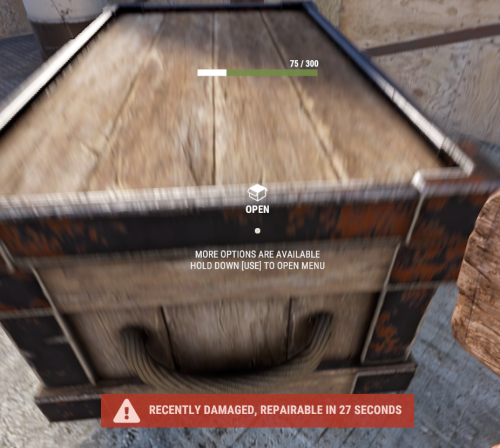
With just one tap, you can fully repair your base blocks and base items—no more having to tap repeatedly! Includes permission support and is optimized for top performance, with rotation & demolition support! Features * One Tap Repairs - Supports Base Blocks & Base Items & Vehicles, etc * Rotation - Re-Enables Base Blocks for easy native rotation again! * Demolition - Re-Enables Base Blocks for easy native demolition again! Permissions betterhammer.use ( required to do full 1 tap hit repairs with hammer & to use any features/functions )$4.99 -

Version 1.0.1
2 downloads
xInFlightHeliRepair xInFlightHeliRepair is a Rust plugin that allows players to repair an attack helicopter while mounted or in the air as a passenger, using a hammer and consuming a configurable resource (e.g., metal fragments). It includes plenty of customization options. This overrides the new behavior introduced in the “Pivot or Die” update that prevents players from repairing the attack helicopter while in flight. Features In-Flight Helicopter Repair Players/Passengers can repair an attackhelicopter by hitting it with a hammer while in flight. Resource-Based Repair Each repair “hit”: Costs a configurable item (Default: 30 metal fragments). Restores a configurable amount of health (Default: 50 HP). Automatically removes the required items from player inventory. Recent Damage Cooldown If the helicopter was recently damaged by explosive sources, repair is blocked for a set duration (Default cooldown: 10 seconds) Message informs the player how long they must wait. Player Feedback Configurable message system: Supports UI toast notifications or chat messages. Visual Repair Effect Plays a configurable FX prefab on successful repair (Default metal upgrade effect). Permission xinflighthelirepair.use Config { "RequirePermission": false, "Permission": "xinflighthelirepair.use", "EnableRecentlyExplosiveDamageRepairCooldown": true, "RecentlyExplosiveDamageRepairCooldown": 10.0, "ItemUsedForRepair": "metal.fragments", "ItemCostPerRepair": 30, "HealPerHit": 50.0, "PlayEffectOnRepair": true, "Effect": "assets/bundled/prefabs/fx/build/promote_metal.prefab", "MessagesType": "ui", // Use 'ui' for toast notifications and anything else (e.g., 'chat') for chat messages "ShowMessages": true, "NotReadyMessage": "<color=#ff5555>Heli was damaged recently. Wait {0} seconds before repairing.</color>", "FullyRepairedMessage": "<color=#ffcc00>This helicopter is already fully repaired.</color>", "NotEnoughMetalMessage": "<color=#ff5555>You need {0} {2} to repair ({1} available).</color>", "RepairedMessage": "<color=#55ff55>Repaired heli by {0} HP for {1} {2}.</color>" }$8.99 -

Version 1.1.0
148 downloads
Upgrades and removals with hammer, building plan and Garry’s mod tool gun Chat commands /remove - turn on/off the remove mode /up - enable/switch/off mode upgrade Console commands remove.use - turn on/off the remove mode upgrade.use - enable/switch/off mode upgrade Permissions removeupgradev2.use - access to console and chat command [upgrade] removeupgradev2.refund - returns items (box, furnance, chair, etc) [remove] removeupgradev2.remove - access to console and chat command [remove] removeupgradev2.up - access to console and chat command [upgrade] removeupgradev2.vip - returns the resources spent on the construction [remove] In the future, a feature will be added to improve the entire building through the cupboard Config$14.99 -
Version 1.1.0
23 downloads
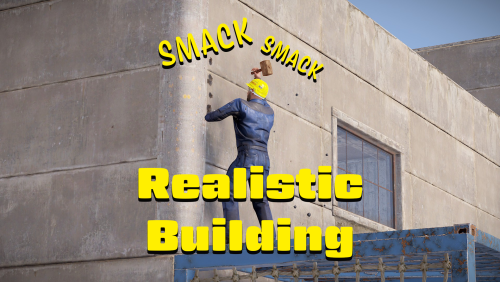
ABOUT One thing I was never too big fan of in Rust was the imbalance of harvesting and crafting taking time, but building being instant - you can build a villa faster than you finish that assault rifle. Yet all other survival games require much more effort to build, well worry no more. The Realistic Building plugin can bring you back the satisfaction of smacking your building with a hammer to build it. WHAT DOES IT DO? Newly built thatch block will have its health set to 1 by default or to your configured value. After upgrading it it will keep its last health, so if you repair it to 10 and upgrade it to stone, the upgraded stone block will have 10 health after upgrade. This means every block you build you will also need to hit it with your hammer until the health is filled up. You can also set deployables to work with this plugin. NOTE Please note that having to repair the blocks on top of deploying will double the building cost. Cost can be adjusted with server convar 'decay.upgrade_wood_cost_multiplier' variable. It is also recommended to set server convar 'decay.upkeep_heal_scale 0' to avoid deployed blocks healing themselves. When adding deployables please make sure to use the deployed short name not item short name that is in your inventory. PERMISSIONS 'realisticbuilding.use' - players with the permission will be subject to the effects of this plugin. 'realisticbuilding.bypass' - players with the permission who are in same category as use will be exempt from the effects of this plugin. CONFIGURATION FILE { "EnableDeployables": true, "HealthBuilding": 1, "HealthDeployables": 1, "Deployables": [ "wall.external.high.wood", "gates.external.high.wood", "wall.external.high.stone", "gates.external.high.stone", "wall.external.high.legacy", "gates.external.high.legacy", "wall.external.high.adobe", "gates.external.high.adobe", "wall.external.high.ice", "icewall", "graveyardfence", "furnace.large", "refinery_small_deployed", "water_catcher_large", "electric.windmill.small", "legacy.shelter.wood.deployed", "abovegroundpool.deployed" ] }$5.99-
- 1
-

-
- #realistic
- #realism
- (and 8 more)
-

Version 1.0.0
223 downloads
Plugin Information: Hit a player with your Salvaged Hammer to instantly ban them! (Permission Required) Bans a player when struck with a Salvaged Hammer. Broadcasts Ban Message to the entire server. Prints Error Message in Console when Target is Unbannable. Permissions: BanHammer.on - Grants the ability to use the Ban Hammer. Configuration: There is currently no Config Files for this plugin. If you have any issues or suggestions- Reach out to me on Discord (Waylvin) or through Codefling!Free