
Search the Community
Showing results for tags 'invisible'.
Found 2 results
-
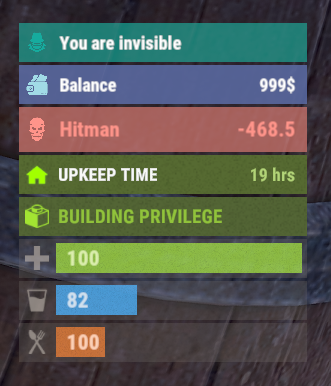
Version 0.1.8
387 downloads
The plugin displays an invisibility indication in the status bar. Depends on AdvancedStatus plugin. The ability to set a sound effect for disappearance and appearance; The ability to automatically generate language files for different languages(filled in English); The ability to individually toggle the display of status bars; The ability to specify the order of the bar; The ability to change the height of the bar; The abillity to customize the color and transparency of the background; The ability to set a material for the background; The ability to switch between CuiRawImageComponent and CuiImageComponent for the image; The ability to get images from the local folder(*SERVER*\oxide\data\AdvancedStatus\Images); The abillity to set own image and customize the color and transparency of the image; The abillity to set sprite instead of the image; The ability to customize the color, size, font and outline of the text. { "Sound effect played upon disappearance, leave empty to disable": "assets/prefabs/npc/patrol helicopter/effects/rocket_fire.prefab", "Sound effect played upon appearance, leave empty to disable": "assets/prefabs/npc/patrol helicopter/effects/rocket_fire.prefab", "List of language keys for creating language files": [ "en" ], "The height of the bar": 26, "The display order of the bar": 10, "The background color of the bar(HEX or RGBA)": "#15AC9D", "The background transparency of the bar": 0.7, "The background material of the bar, leave empty to disable": "", "The URL of the bar image": "https://i.ibb.co/LzdbT8wT/Vanish-Status-Default.png", "The local image of the bar, leave empty to use URL": "VanishStatus_Default", "The sprite image of the bar, leave empty to use local or URL": "", "Is it worth using a raw image for the bar?": false, "The color of the bar image(HEX or RGBA)": "#15AC9D", "The transparency of the bar image": 1.0, "The outline color of the bar image(HEX or RGBA)": "0.1 0.3 0.8 0.9", "The outline transparency of the bar image": 1.0, "The outline distance of the bar image, leave empty to disable. Example '0.75 0.75'": "", "The size of the bar text": 12, "The color of the bar text(HEX or RGBA)": "#FFFFFF", "The transparency of the bar text": 1.0, "The font of the bar text(https://umod.org/guides/rust/basic-concepts-of-gui#fonts)": "RobotoCondensed-Bold.ttf", "The horizontal offset of the bar text": 0, "The outline color of the bar text(HEX or RGBA)": "#000000", "The outline transparency of the bar text": 1.0, "The outline distance of the bar text, leave empty to disable": "", "The size of the bar subtext": 12, "The color of the bar subtext(HEX or RGBA)": "#FFFFFF", "The transparency of the bar subtext": 1.0, "The font of the bar subtext": "RobotoCondensed-Bold.ttf", "The outline color of the bar subtext(HEX or RGBA)": "0.5 0.6 0.7 0.5", "The outline transparency of the bar subtext": 1.0, "The outline distance of the bar subtext, leave empty to disable": "", "Version": { "Major": 0, "Minor": 1, "Patch": 8 } } EN: { "BarVanish": "You are invisible" } RU: { "BarVanish": "Вы невидимы" }$3.99 -
Hello, I've been trying to load a custom map onto my server for a few days, which works great in itself. My problem now is that when I place wooden doors (i only tryed the wooden door) or invisible chairs, they don't load on the server. I asked around a bit and was told that it could be due to Oxide.Ext.RustEdit. But I have already seen that it is already pre-installed on the server. I've also replaced it, but somehow it doesn't help either. The map I use already had some chairs on it, but when I move them, they don't load anymore. Or if I copy them they won't load either. I also have the suspicion that all the usable objects that I place do not work. What am I doing wrong and what can it be?


