Search the Community
Showing results for tags 'itemid'.
Found 2 results
-
Version 1.0.4
34 downloads
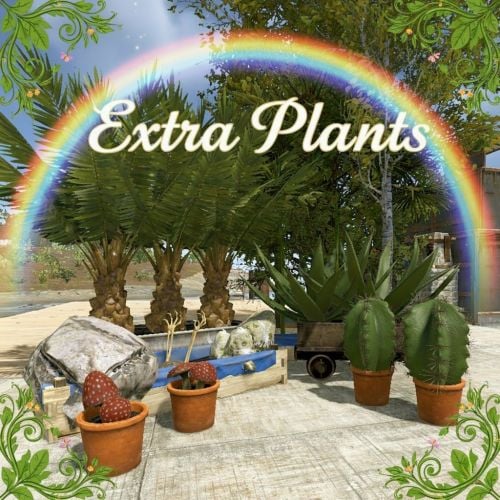
ExtraPlants Expand your farming with 10+ unique cultivatable plants! ExtraPlants introduces a brand-new farming system that goes beyond vanilla crops. Grow mushrooms, harvest resources from grubs, cultivate fruit trees. By default, all custom items are based on apples. We recommend that you set them to items that can be used with Cooking plugins, etc. This plugin has a trial version. If you are considering purchasing it, please download it here. FEATURES 10 Unique Plant Types • Mushroom - Grows naturally in planters with water and optional fertilizer • Sulfur Grub - Harvestable grub that yields sulfur ore — explodes when attacked ! You need to raise the larvae without being detected by enemies. • Metal Grub - Harvestable grub that yields metal ore • Zombie Soul - Mysterious Soul that yields bones • Aloe - Produces Aloe Vera • Cactus - Low water requirement, yields cactus flesh • Sugarcane - Produces sugar cane • Wood Tree - Grow your own wood supply • Fruits Tree - 15 fruit varieties: Apple, Orange, Strawberry, Cherry, Grape, Lemon, Peach, Pear, and more. • Tropical Fruits Tree - 11 exotic fruits: Mango, Pineapple, Banana, Dragon Fruit, Papaya, and more. • Nuts Tree - 10 nut varieties: Almond, Walnut, Coconut, Pistachio, Cashew, and more. By default, all custom items are based on apples. We recommend that you set them to items that can be used with Cooking plugins, etc. Custom Seeds System • Seeds use the fertilizer item with custom skins • Place seeds in any planter box to start growing • Each plant type has unique growth requirements Fully Configurable Every plant type can be customized: • Growth time intervals • Growth success chance • Water requirements • Drop items and quantities • Custom item names and skins • Death/consume probability for grubs COMMANDS PERMISSIONS extraplants.mushroom.nogrow - Prevents mushroom growth in player's planters Chat Commands (Admin Only) /seed Obtain 100 seeds of each type. Console Commands giveseed <steamID> <skinID> <amount> - Give special seeds to a player. Entering only "giveseed" will show the names of all plants. Aloe Sapling 3601726840 Cactus Sapling 3601727134 Tropical Fruits Tree Sapling 3601727963 Fruits Tree Sapling 3601727819 Wood Sapling 3601729292 Sulfur Grub 3601729483 Metal Grub 3601729552 Zombie Soul 3601727291 Sugarcane Sapling 3601727002 Nuts Tree Sapling 3601727388 Give Seed Example: giveseed 76561198000000000 3601726840 10 (Give 10 Aloe Sapling to 76561198012345678) Configuration Options For All Plants: • Growth Time (seconds) - Time between growth checks • Growth Chance (0.0-1.0) - Probability of successful growth • Water Required - Minimum water level needed • Seed Skin ID - Custom skin ID for the seed item For Harvestable Plants: • Max Drop Types Per Harvest - Number of different items dropped • Drop Items - List of items with amounts and drop chances For Grubs: • Probability Of Death (0.0-1.0) - Chance the plant dies after harvest HOW IT WORKS 1. Obtain Seeds - Admins give seeds using the giveseed command 2. Plant Seeds - Place seed (fertilizer with custom skin) in any planter 3. Water Plants - Ensure adequate water level for growth 4. Wait for Growth - Plants grow based on configured intervals 5. Harvest - grown plants to collect resources Special Mechanics • Sulfur Grub - Explodes when attacked Explosion Conditions The player attacks the sulfurous body with an axe or gun. The planter box containing the sulfurous is destroyed by the player or NPC, or is destroyed by weathering. (Pickup collection does not cause an explosion.) • Trees - Support multiple fruit types per harvest • Mushrooms - Can optionally require fertilizer for growth (config) FAQ Q: How do players obtain seeds? A: Seeds can only be given by server admins using the console command: giveseed <steamID> <skinID> <amount> You can integrate this with your server's shop plugin or reward system. Q: Do plants survive server restarts? A: Yes! All plant data is automatically saved and restored when the server restarts. The plugin uses persistent data files to track all planted seeds and their growth states. Q: Can I customize the drop items and amounts? A: Absolutely. Every plant type has fully configurable drop settings in the config file. You can change item types, quantities, drop chances, custom names, and skin IDs. Q: What happens if I attack the Sulfur Grub? A: The Sulfur Grub will explode, dealing 500 damage within a 12-meter radius. This is intentional — harvest it normally by interacting with it instead of attacking. Q: Why aren't my plants growing? A: Check the following: • Ensure the planter has enough water (each plant type has different requirements) • Verify the growth chance in config is set properly (0.0-1.0) • Check if the player has the "extraplants.mushroom.nogrow" permission (for mushrooms) • Wait for the configured growth interval to pass Q: Can I add my own custom plants? A: The current version supports 10 pre-configured plant types. Each plant type's drops, growth times, and requirements are fully customizable through the config file. Q: Do the fruit trees drop all fruits at once? A: No. The "Max Drop Types Per Harvest" setting controls how many different fruit types drop each harvest. For example, if set to 3, players will receive 3 random fruit types from the configured list. Q: What's the difference between Grubs and other plants? A: Grubs (Sulfur Grub, Metal Grub, Zombie Soul) have a "Probability Of Death" setting. After each growth cycle, there's a chance the grub will die and need to be replanted. Regular plants like trees continue producing indefinitely. Q: Which planters are supported? A: All vanilla planter types are supported: • Large Planter Box • Small Planter Box • Bathtub Planter • Minecart Planter • Railroad Planter • Triangle Planter • Single Plant Pot Q: Can players craft the seeds? A: No, seeds cannot be crafted by default. They must be distributed by admins. This gives you full control over your server's economy and progression. Q: Are the custom skins included? A: Yes, all skin IDs are pre-configured and included. The skins are applied automatically when seeds and harvested items are created. Q: Can I change the seed item from fertilizer to something else? A: The current version uses fertilizer items with custom skins as seeds. Changing the base item would require code modification. Q: How do I give seeds to offline players? A: The giveseed command works with sleeping players too. As long as the player has logged in at least once, you can give them seeds using their Steam ID. Q: What happens if a player's inventory is full when receiving seeds? A: The seeds will be dropped on the ground near the player's position. Contact VOID / NINJA WORKS X : @QB_WHITE MADE IN JAPAN$20.00- 9 comments
- 1 review
-
- 4
-

-
- #rust
- #facepunch
- (and 12 more)
-

Version 1.0.0
221 downloads
A small yet plugin that swiftly provides information about the item you're holding in your hand. #Features Once you have an item in your hand and want to get information about it, execute the command /iteminfo. The relevant information will then be displayed in the chat. ItemName ItemShortName ItemSkinId ItemID #Permission iteminfo.use - Grants the user permission to use the /iteminfo command. #Command /iteminfo - This command allows you to display information about the item. You need to execute the command while holding the item in your hand. #Localization The plugin currently supports English and German. English { "NoPermission": "You do not have permission to use this command!", "NoItemEquipped": "You have not equipped any item.", "PluginPrefix": "<size=16><color=#AE3624>ITEM</color> <color=#738D45>INFO</color></size>" } Deutsch { "NoPermission": "Du hast keine Berechtigung, diesen Befehl zu verwenden!", "NoItemEquipped": "Du hast kein Item ausgerüstet!", "PluginPrefix": "<size=16><color=#AE3624>ITEM</color> <color=#738D45>INFO</color></size>" } Ps: If you find the plugin useful, I would appreciate a thumbs up, as I'm fond of likes!Free