Search the Community
Showing results for tags 'launcher'.
Found 4 results
-
Version 1.0.6
53 downloads
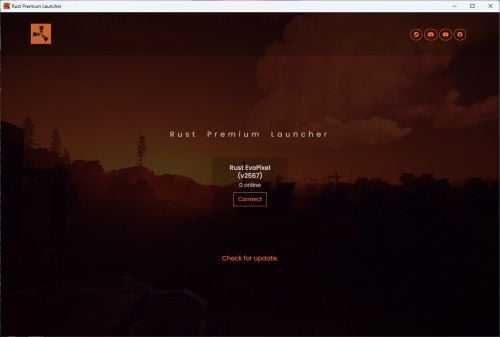
Rust Premium Launcher is a fully cross-platform customizable game launcher designed specifically for Rust. It allows you to fully personalize it with ease by editing a simple configuration file. Key features include: 1. Customization: Change the color scheme, name, logo, and background image effortlessly to suit your preferences or branding needs. 2. Multiple Server Support: Add multiple Rust servers on the launcher. 3. Cross-Platform Compatibility: The launcher can be compiled and used on Windows, Ubuntu/Linux, and MacOS, ensuring broad accessibility. 4. Discord Presence: Integrated Discord Rich Presence keeps your friends updated on your activity. 5. Auto-Updater: Stay up to date effortlessly with an automatic update system built into the launcher. Rust Premium Launcher is the ultimate tool for enhancing your Rust gaming experience, combining functionality with a sleek and personal touch. How to compile the sourcecode: 1. Install NodeJS 20+ 2. Copy all content from config.js.example located in app folder to a new file named config.js in app folder 3. Open the configuration file (config.js) from app folder and edit all fields 4. Execute command npm install in launcher directory 5. Execute command npm run dist or npm run dist:windows or npm run dist:mac or npm run dist:linux or npm run dist:ubuntu in launcher directory 6. The launcher is now compiled in dist folder Warning: 1. This launcher is made with NodeJS and Electron, so you need to install NodeJS to be able to compile the sourcecode. 2. If you want to add many servers just copy the current array from serversList, add comma and paste the copied array. 3. If you want to update the launcher from an older version to a newer one, you must delete the old launcher sourcecodes, minus the file config.js, then copy the new launcher files. 4. If you are not familiar with NodeJS, read the NodeJS documentation. You will need to install the NodeJS modules with the npm install command in order to run npm run dist. 5. If you want to compile the sourcecode for different platforms, such as Windows, Ubuntu/Linux or macOS, the sourcecode will need to be compiled on the respective operating system. For example, for Windows you will need to compile the sourcecode on Windows. 6. If you want to use the auto updater, make sure you have copied all the files from the dist folder to the website set in config on variable autoUpdaterDownloadURL, except the folders with the unpacked launcher. 7. If you want the number of online players and the server version to be updated in the launcher, make sure you put the API Key in the config from rust-servers.net. 8. If you want to modify the launcher installer icon, simply replace the icons from build folder, then recompile the sourcecode. 9. You need at least NodeJS 20 to be able to compile the sourcecode. Configuration: module.exports = { name: 'Rust Premium Launcher', // The name of launcher color: 'orange', // The color of launcher. Select from: orange, red, blue, green, yellow, purple, pink header: '', // The header image of launcher. You have to upload the image in the uploads folder, then pass the name of the image here. If it is blank, the displayed image will be the default favicon: 'favicon.ico', // The favicon of launcher. You have to upload the image in the uploads folder, then pass the name of the image here logo: 'logo.png', // The logo of launcher. You have to upload the image in the uploads folder, then pass the name of the image here discordClientId: '', // Client ID from https://discord.com/developers discordSlogan: 'Best Rust Launcher!', // The Discord slogan of launcher discordLauncherImage: 'launcher-logo', // The Discord image name of launcher defaultServerName: 'Nothing', // The default name of server defaultServerImage: 'default-logo', // The default Discord image name of server launcherURL: 'https://rustpremiumlauncher.com', // The link of launcher autoUpdaterDownloadURL: 'https://rustpremiumlauncher.com/download', // The link of auto updater download location linkSteam: 'https://steamcommunity.com/id/dfxphoenix', // The link of Steam group linkDiscord: 'https://discord.dfxphoenix.xyz', // The link of Discord server linkYoutube: 'https://youtube.com/dFxPhoeniX', // The link of Youtube channel linkFacebook: 'https://facebook.com/dFxPhoeniX', // The link of Facebook page linkInstagram: 'https://instagram.com/waltercurelea', // The link of Instagram account linkX: 'https://x.com/waltercurelea', // The link of X account linkTiktok: 'https://tiktok.com/@waltercurelea', // The link of TikTok account autoUpdater: true, // Enable/Disable the auto updater discordPresence: true, // Enable/Disable the Discord presence socialIcons: true, // Enable/Disable the social icons // Enable/Disable socials socialSteam: true, socialDiscord: true, socialYoutube: true, socialFacebook: true, socialInstagram: false, socialX: false, socialTiktok: false, serversList: { RustServer: { ServerName: 'Rust Server', // The name of server ServerIP: 'connect.rustserver.com:28017', // The IP of server discordServerImage: 'server-logo', // The Discord image name of server rustserversKey: '' // API Key from https://rust-servers.net } } }; Launcher demo: https://rustpremiumwebsite.dfxphoenix.xyz/launcher$2.99 -
Version 2.0.1
383 downloads
Adds a new rocket launcher that shoots sharks instead of rockets. I don't even know why but I need one. Launcher and ammo can be setup in config to spawn in world . so no need for loot tables. Permission SharkLauncher.spawn - required to spawn launcher with chat command Chat Command /sl Console Comands givelauncher <playername/ID> -gives the shark launcher giveammo <playername/ID> <amount> - gives shark ammo to player CONFIG { "1. Launcher does Damage [when false damage only 5]": true, "2.FireRateCooldown in Sec's": 5, "3. Shark Launch velocity [default = 20]": 20, "4. Weapon SkinID": 1964228252, "5. Ammo SkinID": 3419432559, "Enable Item world spawns?": true, "Drop Settings": [ { "Object Short prefab name": "crate_elite", "Minimum Weapon item to drop": 1, "Maximum Weapon item to drop": 1, "Minimum Ammo item to drop": 1, "Maximum Ammo item to drop": 3, "Item Drop Chance": 10.0 }, { "Object Short prefab name": "codelockedhackablecrate", "Minimum Weapon item to drop": 1, "Maximum Weapon item to drop": 1, "Minimum Ammo item to drop": 1, "Maximum Ammo item to drop": 3, "Item Drop Chance": 10.0 }, { "Object Short prefab name": "crate_ammunition", "Minimum Weapon item to drop": 1, "Maximum Weapon item to drop": 1, "Minimum Ammo item to drop": 1, "Maximum Ammo item to drop": 3, "Item Drop Chance": 20.0 } ] } ...and soon this no point becomes your point Does kill players . even if you have TruePVE$6.00 -
Version 1.1.0
49 downloads
Introduction SeekerOnSteroids is a strong, powerful missile plugin. The features are as follows: It allows you to change/add custom targets to the Homing Missile Launcher, providing you with the ability to add more targets, making the launcher more flexible. Players can purchase a missile attack, for example, 1000 scrap and 4 homing missiles, to eliminate a player. This feature is balanced to prevent it from being overpowered. It includes several commands/operations to use the homing missiles. Command overview: /gseek => Spawns 4 missiles on each corner of the map and targets the specified player. /seek => Spawns a specified number of missiles to attack the player. /cseek => Spawns a specified number of missiles above a player (missile cloud). After a while, they descend and target the specified player. /godstrike => Every time you fire a shot, a strong, fast homing missile targets the object wherever you are currently looking. Permissions: seekeronsteroids.admin => Master permission. Don't give this normal players. seekeronsteroids.gridseek => This is for the grid seek attack (payed attack) Configuration: { "PluginPicture": 76561198838421574, "PluginChatPrefix": "<color=#191A28>[</color><color=#CC3B28>SeekerOnSteroids</color><color=#191A28>]</color> ", "CustomSeekerTargets": [ { "PrefabName": "assets/rust.ai/agents/wolf/wolf.prefab", "Enabled": true, "Strength of missles (LOW, MEDIUM, HIGH, HIGHEST)": "LOW" } ], "Missle behavior of grid-seek command": { "Amount of scrap a player needs to start the attack.": 1000, "SeekerMissleConfiguration": { "Min amount of time until missle explods": 100.0, "Max amount of time until missle explods": 100.0, "ExplosionRadiusMultiplier": 1.0, "DamageScaleMultiplier": 1.0, "Handling-smoothness of the missle": 6.0, "Strength of missles (LOW, MEDIUM, HIGH, HIGHEST)": "LOW", "MissleSpeedMultiplier": 1.2 } }, "Missle behavior of godstrike command": { "Missle offset (spawn distance between player and missles)": { "x": 0.0, "y": 10.0, "z": 0.0 }, "SeekerMissleConfiguration": { "Min amount of time until missle explods": 10.0, "Max amount of time until missle explods": 10.0, "ExplosionRadiusMultiplier": 10.0, "DamageScaleMultiplier": 10.0, "Handling-smoothness of the missle": 4.0, "Strength of missles (LOW, MEDIUM, HIGH, HIGHEST)": "LOW", "MissleSpeedMultiplier": 3.0 } }, "Missle behavior of cloud-seek command": { "Time until missles attack in milliseconds": 10000.0, "Missle offset (spawn distance between player and missles)": { "x": 0.0, "y": 100.0, "z": 0.0 }, "SeekerMissleConfiguration": { "Min amount of time until missle explods": 100.0, "Max amount of time until missle explods": 100.0, "ExplosionRadiusMultiplier": 1.0, "DamageScaleMultiplier": 1.0, "Handling-smoothness of the missle": 6.0, "Strength of missles (LOW, MEDIUM, HIGH, HIGHEST)": "LOW", "MissleSpeedMultiplier": 1.0 } }, "Missle behavior of seek command": { "Min amount of time until missle explods": 100.0, "Max amount of time until missle explods": 100.0, "ExplosionRadiusMultiplier": 1.0, "DamageScaleMultiplier": 1.0, "Handling-smoothness of the missle": 4.0, "Strength of missles (LOW, MEDIUM, HIGH, HIGHEST)": "LOW", "MissleSpeedMultiplier": 1.0 } }$4.99 -
Version 1.0.3
52 downloads
Cluster rockets - this plugin allows you to give unique cluster rockets to players. After rocket explosion it will create configured number of 40mm explosive grenades around it. WARNING! Plugin will work correctly only with rockets loaded into rocket launcher. Sam missiles or any other interaction with external plugins won't work. Plugin config variables { "SkinId": 3241394422, "AmmoShortName": "ammo.rocket.basic", "DisplayName": "Cluster Rocket", "GrenadesToDrop": 12, "Rocket explosion time after launch seconds Minimal": 5, "Rocket explosion time after launch seconds Maximum": 10 } Commands: clusterrockets.give <name or steamID> <amount> - give rockets to player How it works? Contacts: Need help or custom plugin for your server? Contact me using Discord: metangerine ----------------------------------------------------------------------$9.99