Search the Community
Showing results for tags 'magic'.
Found 21 results
-
Version 1.0.10
524 downloads
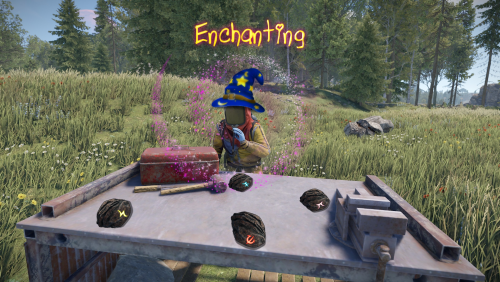
Enchanting adds the ability for different types of weapons to be enchanted with over 29 specialized, unique abilities from freezing your target in place, to increasing the speed of your horse. Each enchantment is configurable and can be added to any weapon type, or even multiple times under the same weapon type with different durations/effect modifiers. Enchanting an item requires a cost of runes, which are found from different sources. See the "Runes" section below for more information on how players obtain runes. The plugin comes with a number of pre-made enchanted weapons, but you can add, remove or edit your own via the config file, allowing you to tailor this plugin for your on worlds. Runes are required to enchant a weapon. The enchantment costs can be seen under each weapon, and must be in the players inventory when they attempt to enchant their weapon. Runes drop from multiple sources, but each rune type has a uniquely flavoured drop source by default: Ice Runes: Obtained while mining, woodcutting or picking floora (hemp, mushrooms, pumpkins etc) in the acrtic biome. Life Runes: Obtained from collecting floora in any biome. Death Runes: Obtained while harvesting the flesh of NPCs and animals. Fire Runes: Obtained while mining, woodcutting or picking floora in the arid biome (desert). Dark Runes: Obtained while mining, woodcutting or picking plants during the night (after 6pm, before 6am). Light Runes: Obtained while mining, woodcutting or picking plants during the day (between 6am and 6pm). Water Runes: Obtained while gutting fish or harvesting flesh from sharks. Runes can be adjusted, renamed and changed in the config file, and additional rune types can also be added, all of which can be assigned to any of the 15 drop sources. There are 29 enchantments available as of version 1.0.0. These enchantements can be placed onto most held items, and can be activated as long as the player is not on cooldown. The cooldown works as a global cooldown, meaning that if a player uses any enchantment, they cannot use another enchantment until their cooldown finishes. Each weapon can have a unique cooldown period, allowing for more powerful enchantments to cause a longer cooldown, while having a shorter cooldown for less powerful ones. To enchant an item, simply place it into a repairbench, which will trigger the "Enchanting" button to appear. Clicking this button will display all available enchantments for that particular item. Click the desired enchantment, click enchant and you are done! All abilities require activation by pressing MOUSE3 (default) while the weapoin is active. Stowing or swapping the weapon so something else cancels the ability. Command: inspect Action: Shows the enchantment info for the active weapon. Permission: none Command: giverunes Parameters: <Optional: quantity> Action: Gives the user x amount of each rune. Permission: enchanting.admin Command: giverandomweapon Action: Gives the user a random enchanted weapon. Permission: enchanting.admin Command (CONSOLE): generaterandomweapon Parameters: <target name/ID> Action: Gives the user a random enchanted weapon. Permission: enchanting.admin enchanting.admin - required for admin commands. enchanting.free - enchanting requires no runes. enchanting.create - required to see the enchanting menu appear in the repairbench menu. enchanting.nocooldown - no cooldown is applicable after activating an ability. [1] Freeze: Freezes the target in place when hit for x seconds. [2] Slow: Prevents the target from running when hit for x seconds. [3] Inferno: Sets the target on fire when hit for x seconds. [4] Bleeding: Applies x bleeding stacks when hit for the duration. [5] Radiation: Applies x radiation stacks when hit for the duration. [6] Poison: Poisons the target, dealing x damage every y seconds for z cycles. They also vomit. [7] Indestructable: Prevents condition loss on the weapon for the duration. [8] Lifesteal: Returns x% of the damage dealt to a target, back to the attacker. [9] PVPDamage: Increases the damage versus players by x% for the duration. [10] PVEDamage: Increases the damage versus animals and scientists by x% for the duration. [11] Blind: Blinds the player for x seconds when hit. [12] Splinter: Damages all players within x meters of the target for y% of the damage dealt to the target. [13] Explosive: Spawns and detinates an explosive at the landing point of a projectile weapon for the duration. [14] Healing: Prevents the damage that would be done to the target by the attacker, instead healing them for x% of the damage that would have been done. [15] Sleep: Forces the target into the sleep state for x seconds when hit. [16] Fumble: The target's active item is moved into their inventory when hit. It is dropped to the ground instead of there is no room in the inventory. [17] Curse: When the target is hit, their screen quickly flashes purple and black and they take 0.6 damage every 0.2 seconds for the duration. [18] GatherYield: Gather yield is increased by x% for the duration when using this enchanted tool to harvest. [19] AnimalSpawn: Spawns an animal at the hit market (default wolf) for the duration. [20] ReduceDamage: While active, this ability will reduce incoming damage by x% for the duration. [21] HealSelf: Instantly heals the player for x health. [22] HealOthers: Instantly heals other players for x health that are within y meters. [23] BradleyCloak: Makes the player invisible to bradley tank for the duration. [24] FeatherFall: Prevents fall damage while active. [25] RadiationResist: Removes all radiation stacks once per second for the duration. [26] Spectre: Makes the player invisible to turrets and base defences for the duration. [27] HorseCrop: Increases the horses stats by x for the duration. Will affect any horse that the player climbs onto while active. Horses the player dismounts from will no longer be affected. [28] ScientistCloak: Makes the player invisible to scientists for the duration. [29] ElementalDamageResist: Makes the player immune to fire and cold damage for the duration. [30] DamageIncrease: Increases the damage of the weapon to everything by x% for the duration. void GenerateRandomWeapon(BasePlayer player) //gives the player a random weapon.$25.00- 41 comments
- 4 reviews
-
- 4
-

-

-
- #enchanting
- #epic
- (and 4 more)
-
Version 1.3.2
111 downloads
Plugin add artifacts with passive and active abilities PROMO FEATURES 50+ passive and active abilities (will added more) Groups and Permissons for artifacts Easy to create and edit admin menu Fully customizable screen button Translate to EN, RU, DE, FR lang Rust inventory for artifacts with fine look UI Drop artifacts on death Dynamic slots amount with perms Prohibition on the use of identical artifacts Prohibition of using artifacts with the same abilities Auto wipe players on WIPE Full customization for all kinds of abilities Artifacts have durability and can be broken Cooldown for active abilities Maximum stats for active and passive abilities Broadcasting for active and passive abilities Custom tags for lang Beautiful visual effects Patch default stack size with Harmony Artifacts Synthesis - Synthesis table, when you can combine artifacts (free addon) Meteor Event - Artifacts drop from sky (free addon) Gather Event - Artifacts drop from special ores, that spawn throughout entire map (free addon) ️ Informational and updates videos About plugins V1 Release 25 passives and 5 active abilities V1.1 Balls Update v1.2 11 new passives abilities Plugin Structure ├── Info.txt - Commands and permissions │ ├── lang/ │ ├── en - English │ ├── ru - Russian │ ├── de - German │ └── fr - French │ ├── plugins/ │ ├── Artifacts.cs - Main plugin │ ├── ArtifactsSynthesis.cs - Synthesis table │ ├── ArtifactsMeteorEvent.cs - Meteor event │ └── ArtifactsGatherEvent.cs - Gather event │ └── data/Artifacts/ ├── Artifacts/ - Artifacts configurations ├── Players/ - Player data storage └── Prefabs/ - Custom plugin prefabs PASSIVE ABILITIES "Miner" - Increases ore gathering efficiency Start amount + ability % (ex. 1k resources, 12% value = 1120 resources) "Woodcutter" - Boosts wood amount collected Start amount + ability % (ex. 1k resources, 12% value = 1120 resources) "Picker" - Increases all resources collected from the ground Start amount + ability % (ex. 1k resources, 12% value = 1120 resources) "Butcher" - Improves harvesting from animals Start amount + ability % (ex. 1k resources, 12% value = 1120 resources) "Angler" - Increases fish catch quantity Successful = value % (ex. 1.0 = 100%, 0.2 = 20%, 0.01 = 1%) Start amount X from config (ex. 2 start 2 from config = 4 finish ) "Scavenger" - Finds more scrap in loot containers Successful = value % (ex. 1.0 = 100%, 0.2 = 20%, 0.01 = 1%) Start amount X from config (ex. 2 start 2 from config = 4 finish ) "Farmer" - Improves crop yield Start amount + ability % (ex. 1k resources, 12% value = 1120 resources) "HeatBane" - Reduces damage from high temperatures 1.0f - ability % (ex. 10 damage, 30% value = 7 damage) "FrostBane" - Reduces damage from freezing conditions 1.0f - ability % (ex. 10 damage, 30% value = 7 damage) "RadBane" - Decreases radiation damage 1.0f - ability % (ex. 10 damage, 30% value = 7 damage) "Fatstack" - Increases calories and hydration when eating Start amount + ability % (ex. 10 c+h, 12% value = 11 c+h) "BleedResistance" - Reduces bleeding damage 1.0f - ability % (ex. 10 damage, 30% value = 7 damage) "BeastResistant" - Decreases damage taken from animals 1.0f - ability % (ex. 10 damage, 30% value = 7 damage) "BeastSlayer" - Increases damage dealt to animals 1.0f + ability % (ex. 10 damage, 30% value = 13 damage) "ScientistResistant" - Reduces damage from scientists 1.0f - ability % (ex. 10 damage, 30% value = 7 damage) "ScientistSlayer" - Boosts damage against scientists 1.0f + ability % (ex. 10 damage, 30% value = 13 damage) "BradleySlayer" - Increases damage dealt to Bradley 1.0f + ability % (ex. 10 damage, 30% value = 13 damage) "BradleyResistant" - Reduces damage from Bradley 1.0f - ability % (ex. 10 damage, 30% value = 7 damage) "HeliSlayer" - Increases damage dealt to helicopter 1.0f + ability % (ex. 10 damage, 30% value = 13 damage) "HeliResistant" - Reduces damage from helicopter 1.0f - ability % (ex. 10 damage, 30% value = 7 damage) "LuckyShot" - Chance for critical hit damage Successful = value % (ex. 1.0 = 100%, 0.2 = 20%, 0.01 = 1%) Damage X from config (ex. 20 damage 2.0 from config = 40 damage) "Feather" - Reduces damage from falling Start amount - ability % (ex. 10 damage, 30% value = 7 damage) "Vampire" - Gains health when dealing damage Damage ability % (ex. 20 damage 20% value = 20.0 0.2 = 4 heal) [Types] Scientist, Animal, Heli, Bradley "Medic" - Increases healing amount from medic tool (work with instant heal only) Start amount + (Start amount ability %) (ex. 10 heal, 50% value = 10 + (10 0.5) = 15 heal) "LuckyMiner" - Chance to get loot when finish mining ore Successful = value % (ex. 1.0 = 100%, 0.2 = 20%, 0.01 = 1%) Spawn random prefab from config on Ore position "Smelter" - Processes ore during mining Successful = value % (ex. 1.0 = 100%, 0.2 = 20%, 0.01 = 1%) "CoalMiner" - Сonverts wood into coal during mining Successful = value % (ex. 1.0 = 100%, 0.2 = 20%, 0.01 = 1%) "Gunsmith" - Chance to return bullet when firing Successful = value % (ex. 1.0 = 100%, 0.2 = 20%, 0.01 = 1%) "Archer" - Chance to return arrow when shooting Successful = value % (ex. 1.0 = 100%, 0.2 = 20%, 0.01 = 1%) "Researcher" - Chance to return scrap when researching Successful = value % (ex. 1.0 = 100%, 0.2 = 20%, 0.01 = 1%) "Builder" - Chance to return resources when upgrading structure Successful = value % (ex. 1.0 = 100%, 0.2 = 20%, 0.01 = 1%) "Chef" - Cooking meat while butchering animals Successful = value % (ex. 1.0 = 100%, 0.2 = 20%, 0.01 = 1%) "GoldenHands" - Items take longer to break Return to item % from loose condition (ex. loose 2.0, value 50% = return 1.0 ) "SuperMiner" - Faster ore extraction Gather speed = start speed + value % * 2 (ex. 1.5(start) * 200% * 2 = 5.5(speed)) "SuperWoodcutter" - Faster tree cutting Gather speed = start speed + value % * 2 (ex. 1.5(start) * 200% * 2 = 5.5(speed)) "FireResistance" - Increased fire resistance 1.0f - ability % (ex. 10 damage, 30% value = 7 damage) "ExplosiveResistance" - Increased explosion protection 1.0f - ability % (ex. 10 damage, 30% value = 7 damage) "SiegeMan" - Increases the damage to buildings from explosives 1.0f + ability % (ex. 10 damage, 30% value = 13 damage) "LuckyRaider" - The chance of a double explosion Successful = value % (ex. 1.0 = 100%, 0.2 = 20%, 0.01 = 1%) "ExperienceRaider" - Increases the chance of detonation for satchels and beancans Successful = value % (ex. 1.0 = 100%, 0.2 = 20%, 0.01 = 1%) ACTIVE ABILITIES "Collector" - Searching loot around you Work with radius around player "Pathfinder" - Searching animals around you Work with radius around player "Geologist" - Searching ores around you Work with radius around player "Ranger" - Searching scientists around you Work with radius around player "Raider" - Searching traps around you Work with radius around player "Flora" - Everything starts to grow around you Work with radius around player "Fire Ball" - Launches a fireball in front of you Damage depends on the value of the artifact Radius is taken from the config "Ore Ball" - Gather ores around you Work with radius around player "Tree Ball" - Gather tree around you Work with radius around player "Loot Ball" - Loot containers around you Work with radius around player "Killer Ball" - Launches a killerball to your target, when you attack The damage depends on the value of the artifact PERMISSIONS ABILITIES You can add permissions to artifact Permissions will be added when player move artifact to special container and remove when artifact will be removed from container Recommendations Use only unique perm for artifact Not use on different artifacts one perm Not use perm that use other plugin If you remove artifact with perm, then remove this perm GROUPS ABILITIES You can add groups to artifact Groups will be added when player move artifact to special container and remove where artifact will be removed from container Recommendations Use only unique perm for artifact Not use on different artifacts one group Not use group that use other plugin If you remove artifact with group, then remove this group If you need use one perm on different artifact, then create different groups and grant them with that perm PLUGIN COMMANDS Admin: artifact.admin - show admin menu (need be admin) artifact.give "skinId" "Player Name\SteamId" - give artifact to player (console or perm : artifacts.give) table.give "Player Name\SteamId" - give synthesis table to player (console or perm: artifactssynthesis.give) /agather.spawn "Optional: Ore Presset Name" - spawn custom ore front of you (need be admin) (if presset empty, spawn first from config) /ameteor.spawn "Optional: Artifact id" - spawn meteor on your position (need be admin) Player: artifact.use "config ability name" - try use active ability artifact.broadcast - on/off broadcast of ability's message and effect artifact.open - open main artifact menu PLUGIN PERMISSIONS artifacts.give - grant to use command artifact.give artifactssynthesis.give - grant to use command table.give artifacts.slots.default, artifacts.slots.vip, artifacts.slots.premium - set amount of slots for artifacts (may change in config) THREE FREE ADD-ONS Synthesis table - сombine artifacts to create stronger ones Gather event - сustom ores appear all over the map, mine them so that you can get an artifact at the end Meteor event - artifacts fall from the sky to the island as meteorite TEST SERVER Join our test server to view and experience all our unique features yourself! Copy the IP Address below to start playing! connect 194.147.90.147:28015 API JObject GetArtifact(ulong skinId) Get artifact info by skinId ["name"] string ["skinId"] ulong ["onlyOne"] bool ["condition"] float ["passives"] Dictionary<string, float> ["actives"] Dictionary<string, float> ["groups"] List<string> ["permissions"] List<string> Item CreateArtifact(ulong skinId) Create artifact by skinId Item GiveArtifact(BasePlayer player, ulong skinId) Create artifact by skinId and give to player Item GiveArtifact(ItemContainer container, ulong skinId) Create artifact by skinId and move to container BaseEntity DropArtifact(ulong skinId, Vector3 position) Create artifact by skinId and drop on position float GetPlayerAbilityValue(ulong userId, string ability) Return player ability value (not count max stat) bool IsItemArtifact(Item item) Return true if item is artifact, else false CONFIGS Main Synthesis table Gather event Meteor event$40.00 -
Version 1.0.1
11 downloads
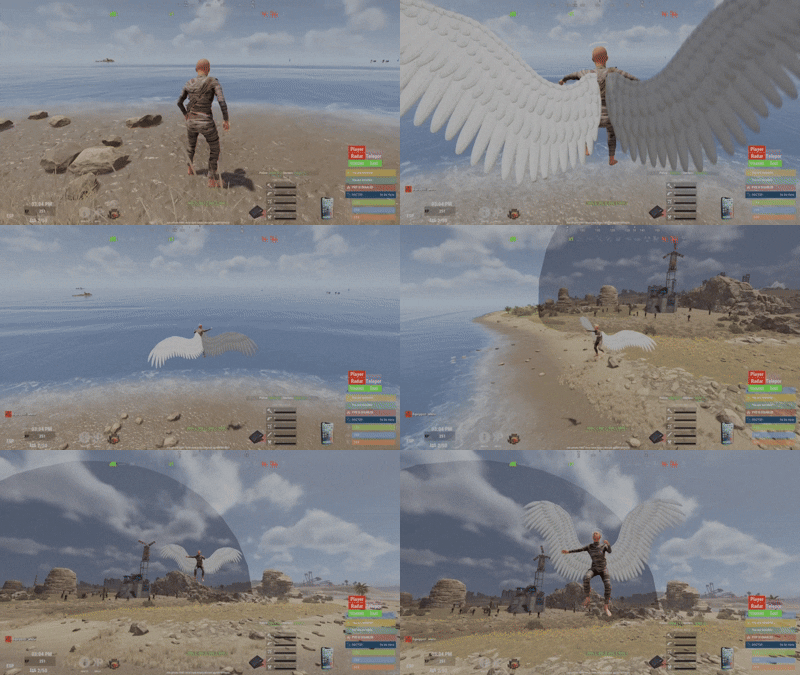
Say goodbye to the boring /noclip command. Wings NoClip reimagines the classic noclip experience into something visual, immersive, and fun, built specifically for server admins. Put on your wings, lift off, and touch the clouds. This is noclip —> evolved. Features Automatic NoClip Activation Equipping wings automatically enables noclip Removing wings automatically disables noclip No extra commands, no confusion Smooth flapping animations with optional sound effects Designed to feel powerful, not clunky 🪽 Available Wings (More Coming Soon) Currently included wings (sourced from the free Workshop): White Wings Black Wings Fairy Wings This is only the beginning Many more exclusive, custom-made wings will be added in future updates . How It Works Make sure you are NOT already in noclip Equip wings → noclip activates automatically Remove wings → noclip disables automatically To avoid conflicts, do not toggle if you are already noclipping. Keybind Support (Recommended) You can bind wing activation to a key for instant use: bind F4 chat.say "/wings white" Press F4 to toggle your wings on/off. Forget /noclip — fly instead. Permissions wings.use — Allows admins to use wings Commands /wings — Open the wings GUI Direct equip (no GUI): /wings white /wings black /wings fairy Configuration (Performance Tuned) Adjust these values based on your server’s CPU & FPS "FlapTickSeconds": 0.0007, // Tick rate for wing flapping (lower = smoother, more CPU usage) "FlapSpeed": 200, // Flapping speed (balance with tick rate for smooth visuals) "EnableFlapping": true, // Enable or disable wing flapping "EnableFlapSound": true, // Enable or disable flap sound "FlapSoundInterval": 1.0 // Number of flap sounds per second while flying.$15.00 -
Version V1.1
36 downloads
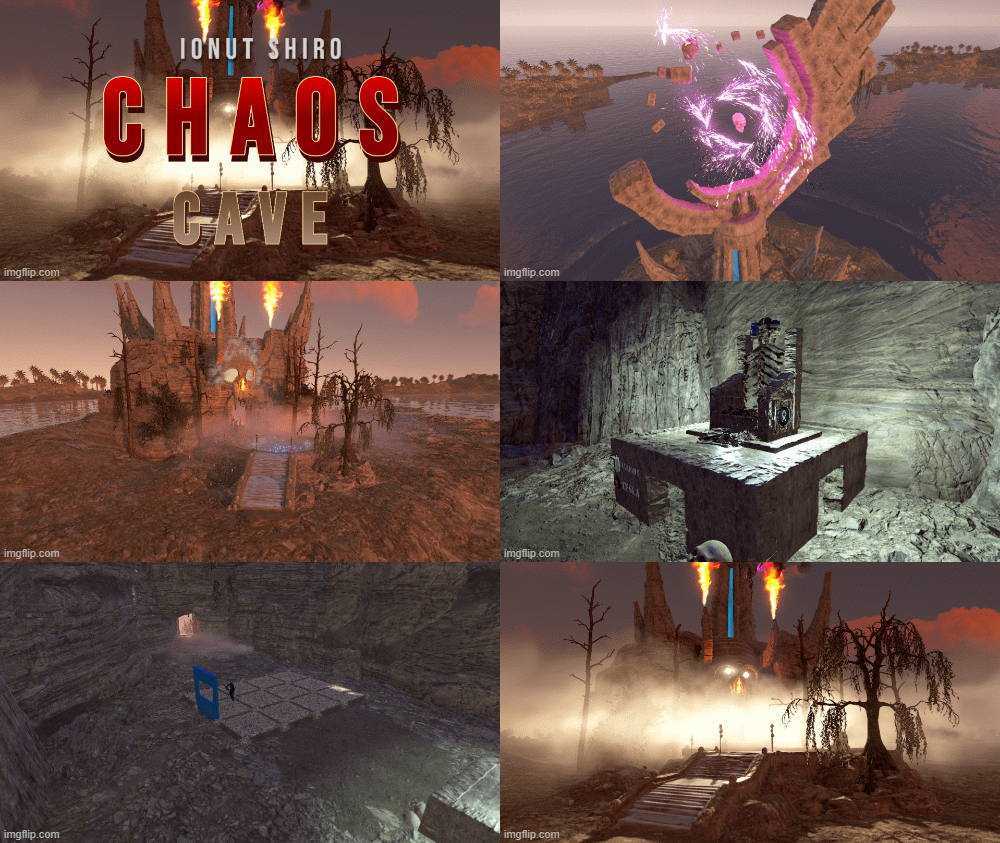
This cave is designed to build a base inside it Prefab is now much neater Prefab is easier to install on the map and it takes up less space. Increased the number of prefabs to 2771$7.00 -
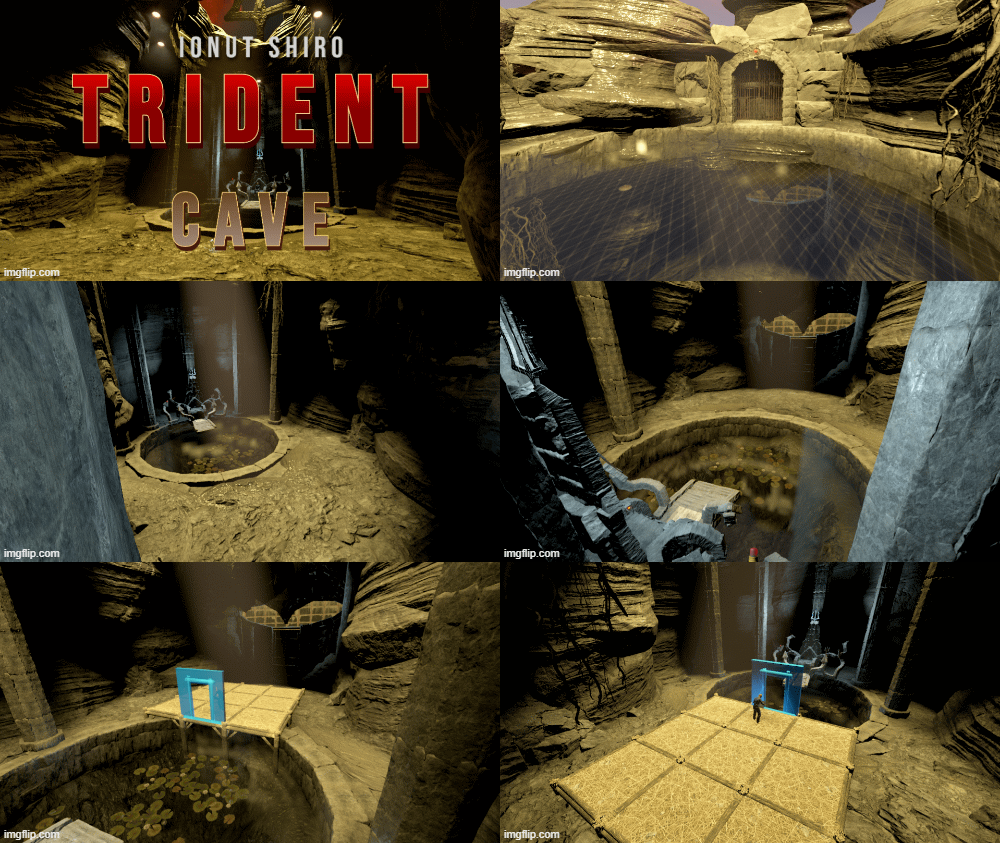
Version V1.1
45 downloads
An ancient monument once abandoned by the old Atlantean civilization. In this cave, now an ancient temple, there is a throne in the form of a kraken, with which you can control the cave. The glowing trident that is above the kraken's head is fraught with a lot of energy and you can use it. With the help of the throne, you can turn on and off the lights above, below, and open the gates that are in the Atlantean helmet. You can get into the cave in 2 ways, through the gate (provided that your teammate opened it for you). And the second way is through the top. If there is 1 person at the top, then the gate at the top will open automatically, if two, then the siren at the top will light up, if 3, then the siren on the kraken throne will light up, if 4 or more, then the Tesla coil will work on the upper gate and will work until there are less than 4 people at the top(the more people, the stronger the energy discharge). In this cave you can safely live under water and on land Total objects 2166$7.00-
- 7
-
-
-
- #underwater
- #trident
- (and 13 more)
-
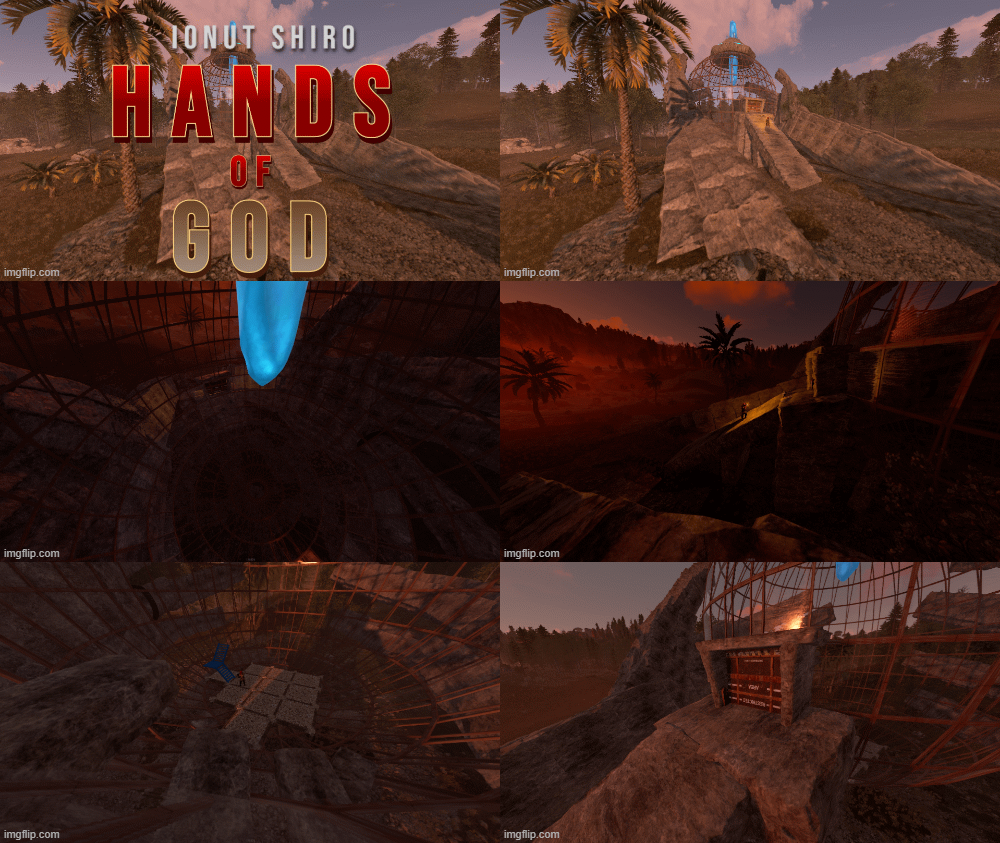
Version V1.1
20 downloads
This monument is needed for the players to build a house in it. The hands do not pass through the glass. The monument can be built up as you like, there are no places with blocking for construction! Trees, stones, fabric, berries and a little decor will spawn around the monument. You can get into the monument using a kinetic door, you can exit it using the button associated with this door The monument is easy to install, all the tools for this have been added. Objects 3424$3.50-
- 5
-
-
-
- #hand
- #electrical
- (and 10 more)
-

Version 1.2.60
37 downloads
Invisibility Cloak is a RUST plugin that provides time-limited, physical invisibility cloaks with multiple levels, skins and configurable restrictions. This plugin provides physical, worn Invisibility Cloaks (IC's) to players for them to be able to use in order to return to their dropped kits, or to enter some of the more challenging POI's without being detected by turrets or NPC's. It's highly configurable and designed for server operators who wish to provide unique items for their players through vending machines, /kits or other plugins / NPC vendors. Originally designed to provide to players who lost their kits or equipment in some of the more challenging or custom POI areas a way to retrieve their lost gear without needing an admin or other players to assist, the Invisibility Cloaks have found a niche on modded servers looking to provide players with additional capabilities. IC's do not provide unlimited invisibility! The design incorporates limited battery life (depending on cloak level) and due to the sensitive electronics used to create the invisibility field, shooting weapons or throwing explosives will cause the cloak to malfunction and de-cloak the player. (All these settings are configurable.) Works with: Item Perks plugin - Item Perks and Invisibility Cloaks now work together. (As of version 1.0.48) Raidable Bases plugin - can be configured to shut down when entering or staying within the Raidable Base bubble or protection zone. ItemOwnership - plugin designed to prevent specially crafted items from being passed on from high level players to lower level (funelling.) ImageLibrary - InvisibilityCloak's distinctive icon can be cached locally (saves on network traffic.) Numerous chat commands for both players and game admins. Summary of Features: * Comes pre-configured with 6 levels of Invisibility Cloaks: Beggar Cloak Peasant Cloak Apprentice Cloak Bard Cloak Thief Cloak Cutthroat Cloak Ability for admins to reset, change parameters, extend, and remove cloaks while in game chat or on the console. In addition to the cloak icon appearing, players given the invisibilitycloak.seebattery permission will see the remaining battery percent charge displayed. Each cloak is completely configurable, from the name of the cloak to the skin, available seconds of invisibility (before recharging) and more.$24.00- 13 comments
- 1 review
-
- 1
-
-
- #invisibility
- #vanish
- (and 5 more)
-

Version 1.2.4
73 downloads
The plugin adds magic items to the server that can be customized and new ones can be created. About The plugin has its own inventory which is opened by the command /mi or by the open button. Each magic item can be customized and an unlimited number can be created. Properties Fast extraction of ore and trees Increase the percentage of resource gather Increased damage to players Protection against damage from players Protection from heat and cold Protection against bleeding Radiation during damage Reduction of breakage of items as a percentage Adding a group Adding a permission For the last 2 properties, add those groups/permissions that are unique, since after removing the item, they are removed from the player, even if they were previously given by another plugin Settings Unlimited item creation Loss of magic items after death Number of slots by permissions Full customization of the magic item Commands /mi - open magic items inventory /givemi "Name or steamID" "MagicItem Name" /givemiid "Name or steamID" "MagicItem skinID" (only with permission magicitems.give) givemiid "givemiid|givemiid" "givemiid" (for server console) Permissions "Number of slots for items by permission": { "magicitems.default": 1, "magicitems.vip": 2, "magicitems.premium": 3 } "Permission to take a magic item with command" : { "magicitems.give" } Video Config { "Drops no more than 1 item at a time": true, "Do magic items drop after death": true, "Main item for magic items (shortname)": "glue", "All Lootboxes from which magic items can drop (to add to the magic item settings, make sure this Lootbox is here!)": [ "crate_normal", "crate_normal_2", "crate_tools", "bradley_crate", "crate_basic", "crate_elite", "crate_mine", "supply_drop", "codelockedhackablecrate", "heli_crate" ], "Number of slots for items by permission": { }, "Magic items settings": [ { "MagicItem name": "Loot artifact", "MagicItem skinID (all items should be different!)": 2358748270, "Link to picture": "https://i.imgur.com/66vrZFB.png", "Indicate from which lootboxes and the chance of drop (from 1 to 100) (if not needed, leave blank)": {}, "Indicate from which ores when mining and the chance of falling out (from 1 to 100) (if not needed, leave blank)": { "sulfure-ore": 65, "stone-ore": 5, "metal-ore": 5 }, "By what percentage does the item increase the extraction of resources": 50, "By what percentage does the item increase damage to enemies": 0, "What percentage of the item protects against damage": 0, "Does the item protect from heat and cold": false, "Does the item prevent bleeding": false, "Fast extraction of resources": true, "Radiation for each hit on the player": 0, "What permissions MagicItem add": { "signartist.url": "Drawing on tablets" }, "What groups MagicItem add": { "Miner": "Grants the Hunter group" }, "What percentage does the MagicItem reduce the breakage of items": 0 }, { "MagicItem name": "Power sword", "MagicItem skinID (all items should be different!)": 2360703637, "Link to picture": "https://i.imgur.com/978jemJ.png", "Indicate from which lootboxes and the chance of drop (from 1 to 100) (if not needed, leave blank)": { "crate_elite": 15 }, "Indicate from which ores when mining and the chance of falling out (from 1 to 100) (if not needed, leave blank)": {}, "By what percentage does the item increase the extraction of resources": 0, "By what percentage does the item increase damage to enemies": 10, "What percentage of the item protects against damage": 0, "Does the item protect from heat and cold": false, "Does the item prevent bleeding": false, "Fast extraction of resources": false, "Radiation for each hit on the player": 3, "What permissions MagicItem add": {}, "What groups MagicItem add": {}, "What percentage does the MagicItem reduce the breakage of items": 50 }, { "MagicItem name": "Mantle", "MagicItem skinID (all items should be different!)": 2361459327, "Link to picture": "https://i.imgur.com/oI21TIn.png", "Indicate from which lootboxes and the chance of drop (from 1 to 100) (if not needed, leave blank)": { "crate_elite": 15 }, "Indicate from which ores when mining and the chance of falling out (from 1 to 100) (if not needed, leave blank)": {}, "By what percentage does the item increase the extraction of resources": 0, "By what percentage does the item increase damage to enemies": 0, "What percentage of the item protects against damage": 10, "Does the item protect from heat and cold": true, "Does the item prevent bleeding": false, "Fast extraction of resources": false, "Radiation for each hit on the player": 0, "What permissions MagicItem add": {}, "What groups MagicItem add": {}, "What percentage does the MagicItem reduce the breakage of items": 0 }, { "MagicItem name": "Blood bottle", "MagicItem skinID (all items should be different!)": 2361427324, "Link to picture": "https://i.imgur.com/XEqkn5L.png", "Indicate from which lootboxes and the chance of drop (from 1 to 100) (if not needed, leave blank)": { "crate_elite": 25 }, "Indicate from which ores when mining and the chance of falling out (from 1 to 100) (if not needed, leave blank)": {}, "By what percentage does the item increase the extraction of resources": 0, "By what percentage does the item increase damage to enemies": 0, "What percentage of the item protects against damage": 0, "Does the item protect from heat and cold": false, "Does the item prevent bleeding": true, "Fast extraction of resources": false, "Radiation for each hit on the player": 0, "What permissions MagicItem add": {}, "What groups MagicItem add": {}, "What percentage does the MagicItem reduce the breakage of items": 0 } ], "Notification and interface settings": { "Whether to display a message in the chat that a magic item fell from a resource in the chat": true, "Is the open button active": true, "Link to the picture for the open button": "https://i.imgur.com/1nfaYn6.png", "Open button: Amin": "0.648125 0.02500001", "Open button: Amax": "0.6960313 0.1041667" }, "Config version": { "Major": 1, "Minor": 2, "Patch": 3 } }$12.00 -

Version V1.2
17 downloads
Its just a bunch of Hocus Pocus! Entity count on this prefab is 897 Comes with lots of loot inside and outside as well as NPC's inside. ,the door to enter is a red keycard door. This will make an awesome Halloween Prefab!$3.99 -
Version 1.0.1
52 downloads
3x config and data file for the MagicLoot plugin. Includes a bug-fixed version of the MagicLoot plugin. Removed all Junk from barrels and creates. Made so everything is 3x Get the plugin here https://umod.org/plugins/magic-loot Discord: If you find any bugs, need assistance, or have suggestions related to the plugin, you can reach out on Discord. Discord pisagor0104 https://discord.gg/JnQftZeSXD$9.99 -
.thumb.jpg.bb36de058b2d713fc6f0239e2f121ac3.jpg)
Version 3.0.0
17 downloads
Backstory This island is part of an ancient civilization, apparently people who lived before the appearance of COBALT built an arena there and used magic. We can see that the arena has not been completed and only we can decide what to do with it next. After finding this mysterious island, the mechanisms turned out to be working, all the doors open. People lived in it and built small houses and a port, over time people mysteriously disappeared and something dark and powerful blows from the island Important When installing a map, focus on the glaciers near the wooden house with traps. About the island A little about the electrics of the island When approaching the skull, bonfires light up The doors in the skull open from the inside with a button and from the outside with the help of wheels(each door separately) The world is full of beautiful places, and the world is full of beautiful places, and the world is full of beautiful places. The most important thing in life is to be happy. The most important thing is to be able to communicate with the world. The world is full of beautiful places, and the most beautiful places in the world are the ones that are full of beautiful places. The world is full of people, and the world is full of people. The world is full of beautiful places and people. The RustEdit extension -> https://www.rustedit.io/threads/rustedit-oxide-umod-extension.695/ The RustEdit extension is available for download, and you can download it from the official website.$10.00 -
Version 1.0.0
107 downloads
This is an extension of the Magic Panel plugin that shows an icon for the Helipad Event plugin. The icon's color and position can be set individually in the configuration file. Please note: The Magic Heli Event Panel only works in conjunction with the "MagicPanel" and "LaunchSiteHelipadEvent" plugins. Make sure you have installed these plugins before using the Event Panel. The plugin also automatically checks if any of the required plugins are missing. If this is the case, the "LaunchSiteHelipadEvent" plugin will be automatically unloaded. #Configuration The settings and options can be configured in the MagicLaunchSiteHelipadEventPanel file under the config directory. The use of an editor and validator is recommended to avoid formatting issues and syntax errors. { "Active Color": "#00FF00FF", "Inactive Color": "#FFFFFF1A", "Panel Settings": { "Dock": "center", "Width": 0.02, "Order": 1, "BackgroundColor": "#FFF2DF08" }, "Panel Layout": { "Image": { "Url": "https://www.dropbox.com/scl/fi/3rjja8h81fp51o87okz31/helipadicon.png?rlkey=yr768krapvk9wx5867ogt56oe&dl=1", "Enabled": true, "Color": "#FFFFFFFF", "Order": 0, "Width": 1.0, "Padding": { "Left": 0.1, "Right": 0.1, "Top": 0.05, "Bottom": 0.05 } } } } #Credits Thanks to MJSU for the Magic Panel plugin. We reworked one of the plugin extensions so that MagicPanel now also supports the Helipad Event plugin. #Trailer If you're not satisfied with the icon, take a look here – you might find something more suitable.Free -
Version 1.0.0
120 downloads
This is an extension of the Magic Panel plugin that shows an icon for the Caravan Event plugin. The icon's color and position can be set individually in the configuration file. Please note: The MagicFerryTerminalEventPanel only works in conjunction with the "MagicPanel" and "Caravan Event" plugins. Make sure you have installed these plugins before using the Event Panel. The plugin also automatically checks if any of the required plugins are missing. If this is the case, the "Caravan" plugin will be automatically unloaded. #Configuration The settings and options can be configured in the MagicCaravanEventPanel file under the config directory. The use of an editor and validator is recommended to avoid formatting issues and syntax errors. { "Active Color": "#00FF00FF", "Inactive Color": "#FFFFFF1A", "Panel Settings": { "Dock": "center", "Width": 0.02, "Order": 1, "BackgroundColor": "#FFF2DF08" }, "Panel Layout": { "Image": { "Url": "https://www.dropbox.com/scl/fi/y56ohwzs3uzr1gc3bz6ie/MagicCaravanEventPanel_icon.png?rlkey=w2hsf96c9euzg6eewmdzgcxrd&dl=1", "Enabled": true, "Color": "#FFFFFFFF", "Order": 0, "Width": 1.0, "Padding": { "Left": 0.1, "Right": 0.1, "Top": 0.05, "Bottom": 0.05 } } } } #Credits Thanks to MJSU for the Magic Panel plugin. We reworked one of the plugin extensions so that MagicPanel now also supports the Caravan Event plugin. #Caravan Event Trailer If you're not satisfied with the icon, take a look here – you might find something more suitable.Free -
Version 1.0.0
105 downloads
This is an extension of the Magic Panel plugin that shows an icon for the Ferry Terminal Event plugin. The icon's color and position can be set individually in the configuration file. Please note: The MagicFerryTerminalEventPanel only works in conjunction with the "MagicPanel" and "Ferry Terminal Event" plugins. Make sure you have installed these plugins before using the Event Panel. The plugin also automatically checks if any of the required plugins are missing. If this is the case, the "Ferry Terminal Event" plugin will be automatically unloaded. #Configuration The settings and options can be configured in the MagicFerryTerminalEventPanel file under the config directory. The use of an editor and validator is recommended to avoid formatting issues and syntax errors. { "Active Color": "#00FF00FF", "Inactive Color": "#FFFFFF1A", "Panel Settings": { "Dock": "center", "Width": 0.02, "Order": 1, "BackgroundColor": "#FFF2DF08" }, "Panel Layout": { "Image": { "Url": "https://www.dropbox.com/scl/fi/m5revdcp6j6e1qpra6b8e/MagicFerryTerminalEventPanel_icon.png?rlkey=g0w6wbqqbfvixce3kbz1tdfim&dl=1", "Enabled": true, "Color": "#FFFFFFFF", "Order": 0, "Width": 1.0, "Padding": { "Left": 0.1, "Right": 0.1, "Top": 0.05, "Bottom": 0.05 } } } } #Credits Thanks to MJSU for the Magic Panel plugin. We reworked one of the plugin extensions so that MagicPanel now also supports the Ferry Terminal Event plugin. #Ferry Terminal Event Trailer If you're not satisfied with the icon, take a look here – you might find something more suitable.Free -
Version 1.0.0
93 downloads
This is an extension of the Magic Panel plugin that shows an icon for the Flying Cargo Ship Event plugin. The icon's color and position can be set individually in the configuration file. Please note: The MagicFlyingCargoShipEventPanel only works in conjunction with the "MagicPanel" and "Flying Cargo Ship Event" plugins. Make sure you have installed these plugins before using the Event Panel. The plugin also automatically checks if any of the required plugins are missing. If this is the case, the "Flying Cargo Ship Event" plugin will be automatically unloaded. #Configuration The settings and options can be configured in the MagicFlyingCargoShipEventPanel file under the config directory. The use of an editor and validator is recommended to avoid formatting issues and syntax errors. { "Active Color": "#00FF00FF", "Inactive Color": "#FFFFFF1A", "Panel Settings": { "Dock": "center", "Width": 0.02, "Order": 1, "BackgroundColor": "#FFF2DF08" }, "Panel Layout": { "Image": { "Url": "https://www.dropbox.com/scl/fi/xlowal6iqvc9hl5831xco/MagicFlyingCargoShipEventPanel_Icon.png?rlkey=jc90tpxj29gdqvpg8or0s3wlb&dl=1", "Enabled": true, "Color": "#FFFFFFFF", "Order": 0, "Width": 1.0, "Padding": { "Left": 0.1, "Right": 0.1, "Top": 0.05, "Bottom": 0.05 } } } } #Credits Thanks to MJSU for the Magic Panel plugin. We reworked one of the plugin extensions so that MagicPanel now also supports the Flying Cargo Ship Event plugin. Buy Flying Cargo Ship Event by The_Kiiiing If you're not satisfied with the icon, take a look here – you might find something more suitable.Free -
Version 1.0.0
96 downloads
This is an extension of the Magic Panel plugin that shows an icon for the Radtown Event plugin. The icon's color and position can be set individually in the configuration file. Please note: The Magic Radtown Event Panel only works in conjunction with the "MagicPanel" and "RadtownEvent" plugins. Make sure you have installed these plugins before using the Event Panel. The plugin also automatically checks if any of the required plugins are missing. If this is the case, the "Radtown Event" plugin will be automatically unloaded. #Configuration The settings and options can be configured in the MagicRadtownEventPanel file under the config directory. The use of an editor and validator is recommended to avoid formatting issues and syntax errors. { "Active Color": "#00FF00FF", "Inactive Color": "#FFFFFF1A", "Panel Settings": { "Dock": "center", "Width": 0.02, "Order": 1, "BackgroundColor": "#FFF2DF08" }, "Panel Layout": { "Image": { "Url": "https://www.dropbox.com/scl/fi/va9fzk613ftwo6su1mfm4/RadtownEventMagicPanelIcon.png?rlkey=279j6cwx3v2lopirhgwfu55qq&dl=1", "Enabled": true, "Color": "#FFFFFFFF", "Order": 0, "Width": 1.0, "Padding": { "Left": 0.1, "Right": 0.1, "Top": 0.05, "Bottom": 0.05 } } } } #Credits Thanks to MJSU for the Magic Panel plugin. We reworked one of the plugin extensions so that MagicPanel now also supports the Radtown Event plugin. Strahlung Icons erstellt von keueo - Flaticon Buy Radtown Event by The_Kiiiing If you're not satisfied with the icon, take a look here – you might find something more suitable.Free -
Version 1.0.2
794 downloads
The "Magic sputnik Event Panel" plugin is an extension for the Magic Panel plugins on Umod. Once the Sputnik Event is activated, the color of the icon changes, and both the color and position of the icon can be individually customized in a configuration file. Please note: The Magic Convoy Event Panel only works in conjunction with the "MagicPanel" and "Sputnik" plugins. Make sure you have installed these plugins before using the Event Panel. The plugin also automatically checks if any of the required plugins are missing. If this is the case, the "MagicSputnikEventPanel" plugin will be automatically unloaded. #Configuration The settings and options can be configured in the MagicSputnikPanel file under the config directory. The use of an editor and validator is recommended to avoid formatting issues and syntax errors. { "Active Color": "#00FF00FF", "Inactive Color": "#FFFFFF1A", "Panel Settings": { "Dock": "center", "Width": 0.02, "Order": 1, "BackgroundColor": "#FFF2DF08" }, "Panel Layout": { "Image": { "Url": "https://www.dropbox.com/s/ngfz6l2362mjd4n/sputnikevent.png?dl=1", "Enabled": true, "Color": "#66666666", "Order": 0, "Width": 1.0, "Padding": { "Left": 0.1, "Right": 0.1, "Top": 0.05, "Bottom": 0.05 } } } } #Credits Thanks to MJSU for the Magic Panel plugin. We reworked one of the plugin extensions so that MagicPanel now also supports the Sputnik plugin. #Sputnik TrailerFree -
Version 1.0.1
360 downloads
This is an extension of the Magic Panel plugin that shows an icon for the Space Event plugin. The icon's color and position can be set individually in the configuration file. Please note: The Magic Space Event Panel only works in conjunction with the "MagicPanel" and "Space" plugins. Make sure you have installed these plugins before using the Event Panel. The plugin also automatically checks if any of the required plugins are missing. If this is the case, the "MagicSpaceEventPanel" plugin will be automatically unloaded. #Configuration The settings and options can be configured in the MagicSpaceEventPanel file under the config directory. "oxide\config\MagicPanel\MagicSpaceEventPanel.json" The use of an editor and validator is recommended to avoid formatting issues and syntax errors. { "Active Color": "#00FF00FF", "Inactive Color": "#FFFFFF1A", "Panel Settings": { "Dock": "center", "Width": 0.02, "Order": 1, "BackgroundColor": "#FFF2DF08" }, "Panel Layout": { "Image": { "Url": "https://www.dropbox.com/s/lxqtkye142as9tj/spaceevent.png?dl=1", "Enabled": true, "Color": "#FFFFFFFF", "Order": 0, "Width": 1.0, "Padding": { "Left": 0.1, "Right": 0.1, "Top": 0.05, "Bottom": 0.05 } } } } #Credits Thanks to MJSU for the Magic Panel plugin. We reworked one of the plugin extensions so that MagicPanel now also supports the Space Event plugin by Adem #Space Event TrailerFree -
Version 1.0.2
291 downloads
This is an extension of the Magic Panel plugin that shows an icon for the Junkyard Event plugin. The icon's color and position can be set individually in the configuration file. Please note: The Magic Junkyard Event Panel only works in conjunction with the "MagicPanel" and "JunkyardEvent" plugins. Make sure you have installed these plugins before using the Event Panel. The plugin also automatically checks if any of the required plugins are missing. If this is the case, the "MagicJunkyardEventPanel" plugin will be automatically unloaded. #Configuration The settings and options can be configured in the MagicJunkyardEventPanel file under the config directory. The use of an editor and validator is recommended to avoid formatting issues and syntax errors. { "Active Color": "#00FF00FF", "Inactive Color": "#FFFFFF1A", "Panel Settings": { "Dock": "center", "Width": 0.02, "Order": 1, "BackgroundColor": "#FFF2DF08" }, "Panel Layout": { "Image": { "Url": "https://www.dropbox.com/s/5zk8doomin2ntgu/JunkYard.png?dl=1", "Enabled": true, "Color": "#FFFFFFFF", "Order": 0, "Width": 1.0, "Padding": { "Left": 0.1, "Right": 0.1, "Top": 0.05, "Bottom": 0.05 } } } } #Credits Thanks to MJSU for the Magic Panel plugin. We reworked one of the plugin extensions so that MagicPanel now also supports the JunkyardEvent plugin. #JunkyardEvent TrailerFree -

Version 2.0.2
4 downloads
The players have a chance of finding the magic ore when mining nodes. After the player has found the ore, he carries it to the recycler where a coin can be dropped within a certain chance. This magic coin can be exchanged for a Server Reward balance, or Economy points. There are restrictions on withdrawal per day. Logging during output. Exchange Command /coin If you are not satisfied with the icons, you can contact me on discord. I will replace these icons with yours for free! CASHR#6906 I am waiting for your ideas to improve the plugin! My Discord: CASHR#6906 Join the Mad Mappers Discord here! Check out more of my work here!$10.00 -
Version 1.0.2
12 downloads
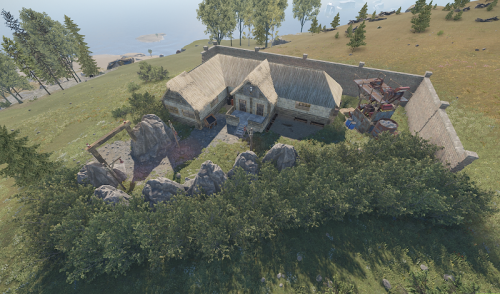
This monument is based on the fairytale "Snowwhite and the seven dwarfs". The asset is tested on a productive RP server and works fine so far. On the outside of the house you can find a mining quarry and a "Red Card Puzzle". The house contains some loot outside escorted by 2 heavies: 1x Crate Mine 1x Crate Tools 1x Crate Medical 1x Create Basic And some loot inside escorted by 5 heavies: 1x Crate Normal (Military) 1x Crate Elite 1x Create Basic 1x Crate Fuel 1x Hackable Crate$4.99-
- 2
-
-
- #fairytale
- #dwarf
- (and 4 more)