Search the Community
Showing results for tags 'mill'.
Found 3 results
-
Version 1.0.1
111 downloads
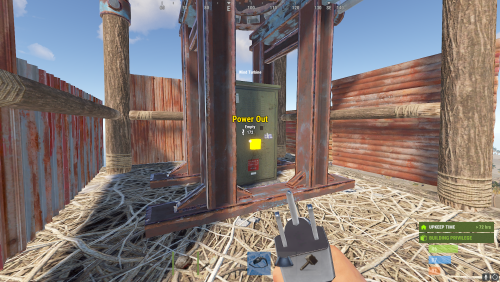
Allows adjusting of Wind Mills Globally & with different permissions based settings you can create as many different permission levels as you wish! Max height Needed for Max output is floor 18 Note Default is 100 Configuration { "Sets Global Wind Mills": { "Sets the Max Generation OutPut for Wind Mills (Default is 100)": 150, "Overrides target speed (Default is 0)": 0.0, "Reset all Wind Mills on unload (recommended true if uninstalling)": false }, "Enables use of permissions based setting": true, "Player Permissions": { "windmillmodifier.vip": { "Sets the Max Generation OutPut for Wind Mills (Default is 100)": 250, "Overrides target speed (Default is 0)": 0.0 }, "windmillmodifier.vip2": { "Sets the Max Generation OutPut for Wind Mills (Default is 100)": 300, "Overrides target speed (Default is 0)": 0.0 } } }$4.99- 2 comments
- 1 review
-
- 1
-

-
- #windmill
- #windturbine
- (and 10 more)
-
.thumb.gif.760cfd9a912fa7ae008aa90f2285db4c.gif)
Version 2.0.0
21 downloads
Introducing the Medieval Grain Mill – a highly detailed RPG-style building featuring a water mill wheel and a wheat garden, all crafted with meticulous attention to detail. This immersive structure seamlessly fits into a variety of medieval-themed settings on your server. Loot is included by default, but you can easily adjust it to suit your needs. Designed for effortless placement along any default Rust river, it blends naturally into the landscape. Quick Start Watch Install Video Here Extract the zip file into your RustEdit install folder. Click on Prefabs at the top & open up your Prefab List. Under the Custom category, you will now find RobJs Premium Prefabs. Double-click on the prefab file, which will spawn it into the map for you. Drag it to the general area you want to place it near a river Apply the Splat Mask first and align and move house to line up Apply Height Mask, Topology Mask Done Contact And Help If you need to contact me discord is best: RobJ2210#2553 For help/support my discord group is best: Join RustMaps By RobJ Discord$10.99 -
Version 1.0.0
2 downloads
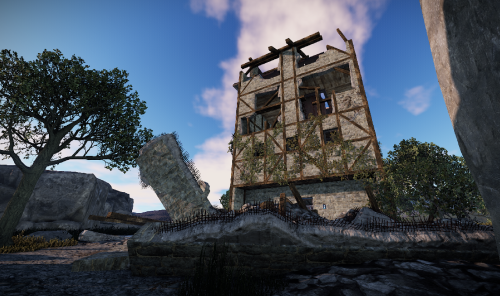
A broken mill that was probably destroyed at some point. Caution high radioactivity! A blue key door leads inside where many good loot chests are waiting. A zipline brings the visitor back safely to the ground. Prefabs: 482 Please note: Download the prefab files and place them in RustEdit/CustomPrefabs directory of RustEdit. The prefabs can be accessed in the custom section of prefab browser. To use sinlge letters, the prefab has to be broken by selecting it (once placed) and using the "break prefab" function. Questions and suggestions: If you have any problems you can contact me via Katalaner - Discord: https://discord.gg/e2vrPszZFX Katalaner Webseite: http://katalaner.de Youtube: https://www.youtube.com/channel/UC_5P_wAFKl5bdndkDEQDK4g$9.96

.thumb.gif.b68fcc45abe70ab7d7235dffc8a0c770.gif)