Search the Community
Showing results for tags 'moderation'.
Found 18 results
-

Version 1.0.3
20 downloads
AdminWarn is intended for situations where players clearly exceed server rules or must be explicitly warned. It is not a lightweight or easily dismissible notification. The purpose is not to preserve gameplay flow, but to deliver a clear and serious warning. Warnings are delivered instantly and ignore conditions such as safe zones or PvP status. Stop guessing whether your warning messages in chat were actually noticed. Tired of sending important warnings as an admin via RCON or global chat and never being sure who actually read them? AdminWarn is built to give admins certainty. AdminWarn is designed for manual warning delivery. This is not an automated warning system. Every warning is intentionally sent by an admin using commands. At the same time, AdminWarn handles warnings smartly and automatically in the background. Warnings sent to offline players are stored and shown automatically when the player next joins, even days later. For individual online players, warnings remain stored until acknowledged, then are automatically cleared. All data is wipe-aware and cleaned up automatically on server wipes. Instead of relying on admin-sent chat warnings that can get lost, ignored, or missed while players are AFK, AdminWarn delivers a mandatory, player-specific GUI warning directly on the player’s screen. Each warning includes a configurable sound effect, using only built-in, local in-game sounds. No external or custom audio files are used. This is not an auto chat message. It is a visual warning that requires player acknowledgment. Even if the player closes the game without confirming it, the warning will reappear on the next login until acknowledged. No hard movement lock is applied. Warnings can be sent via RCON, server console, or in-game admin console (F1). In-game commands /warn and /warnall are used to manually send warnings. /warn can target individual players whether they are online or offline, while /warnall applies only to online players. Discord webhook logs clearly confirm when warnings are acknowledged. Global warnings apply only to online players and do not generate Discord logs, preventing spam and rate-limit issues. How It Works? 1) Admin sends warning (chat/RCON) → Message is delivered via GUI with sound 2) Player must acknowledge → Cannot play until clicking button (No movement lock, only a visual GUI barrier) 3) Offline player support → Warnings sent to offline players are saved and displayed via GUI when they join 4) Data management → Auto-clears on wipe Key Features - GUI warning that requires player confirmation - Works online/offline - Warnings save for offline players - Global warnings - Warn all online players at once - Discord logging - Track acknowledged warnings - Wipe detection - Auto-clear data on server wipe - Professional interface - Clean GUI with sound effects - UTC-based date display - All timestamps are shown in UTC (Coordinated Universal Time) Performance AdminWarn is built with an optimized and efficient code structure, making its presence virtually unnoticeable on the server. It runs smoothly during long uptimes and maintains stable hook memory and performance values under normal server conditions. Wipe Behavior - Restarts: Data preserved (approved warnings are auto-deleted for data optimization) - Server wipe: All warning data automatically cleared - No manual cleanup needed (Most of the time, it is not necessary) Commands ➤ Admin Chat Commands: /warn <player>|<steam64ID> <message> /warnall <message> ➤ Console/RCON Commands: warn <player>|<steam64ID> <message> warnall <message> Note: Player names are not unique and may include different alphabets or special characters. To avoid ambiguity, using Steam64ID is strongly recommended when sending warnings. Permissions Oxide/Carbon oxide.grant group admin adminwarn.admin c.grant group admin adminwarn.admin Discord Webhook Logging When enabled, sends acknowledgement logs to Discord: Player name Warning message Read status (online/after reconnect) Timestamp Does NOT log warning sending (only acknowledgements) Does NOT log global warning acknowledgements (due to DC rate limits) Configuration { "Clear data on wipe": true, "Discord Log Enabled": false, "Discord Webhook URL": "", "Show Date in GUI": true, "Warning sound": "assets/prefabs/building/wall.frame.shopfront/effects/metal_transaction_complete.prefab" } Lang/en { "NoPermission": "You don't have permission to use this command.", "WarnUsage": "Usage: /warn <player name or steamid> <message>", "PlayerNotFound": "Player not found. Use SteamID for offline players.", "DuplicateWarning": "Duplicate warning prevented for player {0}", "WarningSent": "Warning sent to {0}: {1}", "WarningSaved": "Warning saved for offline player {0}.", "WarnAllUsage": "Usage: /warnall <message>", "WarnAllSent": "Global warning sent to {0} online players: {1}", "ConsoleWarnUsage": "Usage: warn <player name or steamid> <message>", "ConsoleWarnAllUsage": "Usage: warnall <message>", "AcknowledgeThanks": "Thank you for acknowledging the warning.", "GuiTitle": "SERVER WARNING", "GuiButtonText": "✔ I ACKNOWLEDGE", "GuiDatePrefix": "Date", "GuiWarningFormat": "Hello {0}, you have received a warning." }$18.99- 3 comments
-
- 1
-

-
- #admin
- #admin tools
- (and 42 more)
-

Version 1.0.4
128 downloads
Watchlist is a lightweight but powerful tool that alerts admins when specific players connect to the server. Whether you're online or offline, you'll get real-time in-game notifications and Discord alerts with fully configurable message templates and role pings. The built-in UI makes managing the watchlist easy, with support for sorting, filtering, teleporting, and note-taking. Players can be added or removed manually or straight from RustAdmin with custom commands. Very useful tool to keep you and your staff one step ahead. Configuration { "Discord Webhook URL": "https://discord.com/api/webhooks/your/webhook/url", (Your Webhook URL) "Ping Role": false, (Whether to ping a role when player comes online on discord, e.g: @Admin) "Role ID": 0, (Discord Roll Id to ping) "Purge Watchlist on Wipe": false, (whether to purge on wipe) "Purge Players List on Wipe": true, (performance, every player is stored in a file, it is recommended to clear this on wipe) "Enable UI": true, (plugin can be run entirely without UI if desired) "UI Color Scheme (Options: dark, light, rust)": "dark", ( UI styles ) "Custom Colors": { (customise the UI for your server) "PrimaryBackground": "0 0 0 0.95", "SecondaryBackground": "0.15 0.15 0.15 1", "HeaderBackground": "0.1 0.1 0.1 1", "ButtonPrimary": "0.2 0.7 0.2 0.9", "ButtonSecondary": "0.3 0.3 0.3 1", "ButtonDanger": "0.7 0.2 0.2 0.9", "TextPrimary": "1 1 1 1", "TextSecondary": "0.7 0.7 0.7 1", "OnlineIndicator": "0.2 0.8 0.2 1", "OfflineIndicator": "0.8 0.2 0.2 1", "RowEven": "0.12 0.12 0.12 0.95", "RowOdd": "0.15 0.15 0.15 0.95", "ActiveItem": "0.4 0.4 0.4 1", "AlertBackground": "0.8 0.2 0.2 0.95", "AlertText": "1 1 1 1" }, "UI Scale": 1.0, (scales the UI as desired) "Main UI Position": { "AnchorMin": "0.2 0.1", "AnchorMax": "0.8 0.9" }, "Font Size": { "Title": 20, "Header": 14, "Normal": 12, "Small": 10 }, "UI Animation": true, (enables ui animations) "Enable Sound Alert": true, (plays sound when watchlist player comes online) "Alert Sound": "assets/bundled/prefabs/fx/notice/item.select.fx.prefab", (choose which sound you want from rust prefab sounds) "Alert Duration (seconds)": 10.0, ( hlow long the alert is displayed in-game when a player comes online - only admins see this) "Show Visual Alert": true, (enable / disable the in-game alert) "Send Discord Add/Remove Notifications": true ( enable discord logging of adding/removing watchlist players) "Max Cached Players": 3000, (Performance, set this lower to reduce the memory used by the plugin this populates the player list with the last x number of players to join your server, ordered by latest) "Alert Cooldown Seconds": 120, (Prevents alert spam when players reconnect) "Startup Alert Grace Seconds": 60, (waits before firing watchlist alerts after server starts) "Auto Expire Days (0 = disabled)": 0, (auto expire watchlist players after number of days) "Send Prune Discord Notifications": true, (sent prune notification to discord) "Prune Report Max Per Embed": 10, (max players in prune message, prevents breaching discord embed count) "Prune Report Include Notes": false, "Enable Diagnostics": false (enable this for plugin performance stats and diagnostic information) } COMMANDS Chat: /watchlist Opens the Watchlist UI (requires permission) /wl <steamid> "<note>" Adds a player to the watchlist with a note (requires watchlist.admin permission) /wlr <steamid> Removes a player from the watchlist (requires watchlist.admin permission) /wlist Lists all watched players in chat (requires watchlist.admin permission) Console: watchlist.add <steamid> "<note>" Adds a player to the watchlist Example: watchlist.add 76561198000000000 "Suspected Cheater" watchlist.remove <steamid> Removes a player from the watchlist watchlist.list Lists all watched players in the server console wl <steamid> "<note>" Adds a player to the watchlist with a note (can be used via rcon) wlr <steamid> Removes a player from the watchlist (can be used via rcon) wlist Lists all watched players in the server console (can be used via rcon) purgewl Clears the entire watchlist (requires watchlist.admin permission) PERMISSIONS watchlist.admin Full access to all commands and features watchlistui.toggle Allows UI toggle via `/watchlist` command RUSTADMIN INTEGRATION You can integrate Watchlist directly with **RustAdmin** to add or remove players with a single click. Add to Watchlist Command to Execute: wl ${playerSteamid} "From RustAdmin" Tick "Show Command Output in a Dialog" (optional) Remove from Watchlist Command to Execute: wlr ${playerSteamid} Tick "Show Command Output in a Dialog" (optional)$4.99 -

Version 2.5.8-beta4
304 downloads
SmartWarnings simplifies and streamlines your server moderation by providing means to consistently Warn your players for misconduct. Gone are the times when you leave manual notes at sleeping players, for this plugin creates a smooth but intimidating pop-up window displaying clearly to the player what they've done wrong and how to learn from it. From version v2.5.0 you can now extend highly customizable actions to trigger based on your custom warnings. The imagination is the limit! Rule enforcement has never been easier before. Features Easily dispatch warnings to players and clans with a simple chat command /warn cookiemonster "leave the jar alone you bastard" Booom done! /warn clan "C00KiEZ" "no cookiemonsters allowed in the jar!!" Maybe their collective brain power is needed to understand! Announces Warnings in public Global Chat (Enabled by default, can be toggled in config) Give your Players a sense of transparent justice by displaying the dispatched warning to everyone in public. This is beneficial as players will learn what not to do from other's mistakes! Offline Players can receive warnings, no problem! Displays a pop-up window with the warning IMMEDIATELY if they are online, or as soon as the player wakes up from sleep upon connecting. Create custom presets for common violations. Presets can be made for example to reflect the server rules, it can be configured so that your admins can type /warn joe rule1 and it will spell out the entire rule 1 in the warning. Presets can have an Expiration date which will remove the warning, allowing non-repeating offenders to be cleared if they're well behaving in the long term. Presets can have a Warning Point weight which will give them different severity that can influence when to trigger an Automatic Ban (if enabled). Automatically Ban players with X amount of Warnings or Warning Points (Disabled by default, can be toggled in config) With this feature Enabled a player will be Automatically Banned when reaching the configured Warning amount or Warning Points. For example, configure 3 warnings to be max and enable auto ban will ban a player when the third warning has been dispatched. Supports Temporary Autobans (Disabled by default, can be toggled in config) If you're the kind of type that believes in second chances, when configured it bans the player lets them know when they're welcome back! Optional feature: Clear the player's warning when autobanned (True by default), This can conveniently be set to False if you want the player to be instantly auto banned next time a warning is dispatched. Extensive Logging both File based and Discord! Every move is logged in the oxide/logs/SmartWarnings folder so that you can have full traceability. Optional feature: Configure Discord Webhook links to log Warnings and/or Autobans to Discord. Persist Warnings across wipes, when you don't want to be forgiving! Set "Clear all warnings on wipe" to false and warnings will not be cleared when a new wipe is detected. NOTE: This requires that you exclude/do not remove the oxide/data/SmartWarnings_Playerdata.json file, if you're using tools to auto wipe and it gets deleted, so will the warnings. Customizable Branding Set your Server Name and custom Warning Pop-up Icon to make this plugin match your server's style! (NEW in v2.5.0) Transparency of the pop-up window can now be customized in the config! (NEW in v2.5.0) VANILLA SAFE mode: Warning display in Chat instead of GUI pop-up Warnings will be dispatched through chat and freeze the player until they acknowledge the warning. No use of GUI allows it to be vanilla safe! Acknowledge notification is fully customizable! (NEW in v2.5.0) AUTOMOD: Fully customizable command actions on X warning points Define any custom command to be executed at X warning point. This allows you to integrate with any other plugin for example mute, jails or whatever really. For example: set to mute on 2 warning points, kick on 4 warning points, teleport to jail on 6 warning points. NOTE: AutoMod actions are triggered incrementally by total warning points added to the player. This means if you configure Mute on 1 point and Kick on 3 points and give the player a warning worth 4 points, the player will be both kicked and muted. AutoMod feature can conveniently be configured together with AutoBan feature, but keep in mind to set the point/warning thresholds to line up properly. I.e. automod actions should not be on higher point level than autoban, because then player will be banned already before any actions are executed. (NEW in v2.5.5) Battlemetrics Bans & Warnings integration AutoBans will sync with Battlemetrics, duration, reason and note will be added to give context to what banned the player. Warnings will add note to the player in Battlemetrics, so you can easily track their warning history even through the BM console! Warnings will add a flag to the player in Battlemetrics, so you can easily differentiate players in the list who have warnings and not through the BM console! Click here for guide how to set up Battlemetrics integration. (NEW in v2.5.8) MySQL Database Support (allows Multi Server Warning Sync) You can now configure the plugin to use a MySQL Database as its data source. This will allow Warnings to be synced across multiple Rust servers if they are configured towards the same MySQL database. Planned future features Your ideas & feedback? Commands /warn <player name or id> "reason OR preset" Dispatches a warning with a custom reason or preset Requires permission: smartwarnings.admin /warn info <player name or id, leave blank to see yourself> Shows the amount of warnings, warning points and the individual warning details in chat. Requires permission: smartwarnings.admin to see other players. Default permission can only see their own warnings. /warn clear <player name or id> <id or ALL> Clear a specific warning ID by specifying the warning number, or specify ALL to clear all player warnings. (NEW in v2.5.0) Requires elevated permission: smartwarnings.admin.canclear /warn clan <clan tag> "reason OR preset" Dispatches a warning with a custom reason or preset to an entire clan (Requires Clans plugin) Requires permission: smartwarnings.admin /warn unfreezeall Unfreezes all players who are currently frozen due to not acknowledging any warnings, really only needs to be used in any emergency scenario where the player would not be unfrozen normally (Please report these scenarios, this command is purely proactive and will be removed when its not needed anymore) Requires permission: smartwarnings.admin Configuration { "Warning Presets": { "spam": { "Reason": " §1 - Spamming", "Points": 1, "ExpirationDays": 3.0 }, "toxic": { "Reason": " §2 - Toxic behaviour", "Points": 2, "ExpirationDays": 7.0 }, "sign": { "Reason": " §3 - Inappropriate signage", "Points": 2, "ExpirationDays": 7.0 }, "grief": { "Reason": " §4 - Griefing", "Points": 4, "ExpirationDays": 7.0 }, "group": { "Reason": " §5 - Group Limit violation", "Points": 5, "ExpirationDays": 7.0 } }, "System Settings": { "Max Warnings": 5, "Default Warning Expiration time (Days)": 7, "Announce Warnings in Global Chat": true, "Show players who issued the warning": true, "Server Name": "MyRustServer", "Clear all Warnings on Server Wipe": true, "Use MySQL database": false, "Warning Popup - GUI Enable - Set to false to use only chat (SAFE FOR VANILLA SERVER)": false, "Warning Popup - GUI Icon": "https://i.imgur.com/oImKq4X.png", "Warning Popup - GUI Opacity": 0.85, "Optional: Send anonymous analytics data about plugin usage": true, "Config Version": { "Major": 2, "Minor": 5, "Patch": 8 } }, "MySQL Database Settings": { "MySQL Host": "", "Port": 3306, "Database": "", "Username": "", "Password": "" }, "Battlemetrics Settings": { "API Token": "", "Organization ID": "", "Server ID": "", "Banlist ID": "" }, "Autoban Settings": { "How many points until automatic ban (Set 0 for Disable)": 0, "How many warnings until automatic ban (Set 0 for Disable, Recommended: Same as Max Warnings)": 0, "How long to ban in minutes (Set 0 for Permanent)": 2880, "Clear the players Warnings on AutoBan (Default: True)": true }, "Discord Settings": { "Webhook URL - Post Warnings to Discord (Leave blank to Disable)": "", "Webhook URL - Post Autobans to Discord (Leave blank to Disable)": "" }, "AutoMod Settings": { "Mute on 2 warning points": { "PointTrigger": 2, "ExecuteCommand": "mute {0} {1}", "ClearPointsOnTrigger": false }, "Kick on 4 warning points": { "PointTrigger": 4, "ExecuteCommand": "kick {0} {1}", "ClearPointsOnTrigger": true } } } Language Configuration The plugin allows a comprehensive customization of all text output for your needs. Edit the oxide/lang/en/SmartWarnings.json { "NO_PERM": "You don't have permission to use this command.", "NO_MATCH": "Could not find a match for player name or steamid", "GUI_BUTTON_ACKNOWLEDGE_WARNING": "I ACKNOWLEDGE THIS WARNING AND WILL FOLLOW THE RULES", "GUI_HEADER": "You have received a warning", "GUI_ISSUEDBY": "<color=#FFFFFF>Warning issued by {0} at {1}</color>", "GUI_ISSUEDAT": "<color=#FFFFFF>Warning issued at {0}</color>", "GUI_WARNING_TEXT": "<color=#cc0000>Repeated violations may lead to temporary or permanent banishment from this server.</color>\n\n<color=#d9d9d9>You should review the server rules immediately by typing /info in chat and clicking on the RULES tab.\nTo remove this pop-up, acknowledge this warning by clicking the button below.\nIf you feel this was an incorrect warning please reach out to our Staff via Discord.</color>", "CHAT_ACKNOWLEDGE_TEXT": "<color=#00FF00><size=12>Warning Acknowledged: You're now unfrozen and free to go.\n</size></color><size=9>Please review the server rules by typing /info in chat to avoid getting warned in the future.</color>\n\nIf you feel this was an incorrect warning please reach out to our Staff via Discord.</size>", "ANNOUNCE_WARNING_TEXT": "<color=#DC143C>{0} has been warned!\nFurther violations will lead to disciplinary action.</color>\n<color=#A9A9A9>Reason: {1}", "ANNOUNCE_WARNING_ISSUEDBY": "\n\n<size=10>Warning Issued by: {0}</size></color>", "REASON": "REASON", "AUTOBAN_PERMANENT_MESSAGE": "AutoBanned: You were permanently banned due to reaching max warnings.", "AUTOBAN_TEMPORARY_MESSAGE": "AutoBanned: You are banned until {0} due to reaching max warnings." } For example to change is the detailed warning text: You can edit the GUI_WARNING_TEXT row in the language file. Dependencies & Integrations Requires: DiscordMessages for Discord webhook functionality. Integrates with EnhancedBanSystem, autoban feature will detect if the plugin is installed and issue a ban with it, if not it will use the native Rust ban functionality. OPTIONAL: Plugin Usage Analytics The plugin optionally sends analytics about your server (Oxide version, Plugin version, Plugin configuration, Server Name, OwnerID and ModeratorID) to gauge usage of the plugin and to improve support. You can toggle this feature in the configuration.$16.99 -

Version 2.0.1
119 downloads
AdminEssentials is a powerful and easy-to-use toolkit for Rust server administrators. It provides a comprehensive suite of moderation, management, and utility commands to help you run your server smoothly. Features Teleportation tools: Teleport to players or coordinates, teleport back to previous locations, and teleport to placed map markers. Player moderation: Kick players, ban players (with timed durations and reasons), and unban players via simple commands. Player management: Heal players to full health, kill players instantly, and toggle special modes like God mode and Creative mode for yourself or others. Inventory and items: Give items to players, clear a player’s inventory, repair items, and view any player’s inventory contents in real time. Item Trash Can: Includes a personal Trash Can UI for safely destroying items. Server controls: Change the server time, set a personal “admin time”, instantly clear all weather effects, and reload server plugins in-game. Communication: Send private messages to players and reply quickly to the last message. Display a list of all online players and get detailed information on any player with a WhoIs lookup command. Automated messages: Optionally broadcast welcome messages to joining players and goodbye messages on disconnect. Configure periodic auto-messages that broadcast to the server at set intervals. Logging and customization: All admin actions can be logged to the server console/RCON and/or to a Discord webhook (configurable per command). Customize the chat prefix and icon for AdminEssentials messages to suit your server’s style. Commands (Use these commands in chat with the "/" prefix. All commands require the user to have the appropriate permission as listed in the Permissions section.) Teleportation Commands /goto – Teleport yourself to a player or to specific coordinates. (You can also teleport one player to another by specifying two player names.) /tpm – Toggle “teleport to marker” mode. When enabled, placing a map marker will instantly teleport you to that location. Use /tpm again to disable this mode. /back – Teleport back to your last saved location. Typically this returns you to where you teleported from (or your death location, if applicable). /spectate – Spectate the target player. Puts you into spectate mode attached to that player. Use the command again (or the on-screen UI button) to exit spectating and return to your original position. Moderation Commands /kick [reason] – Kick a player from the server. You may provide an optional reason which will be shown to the player. /ban [duration] [reason] – Ban a player. Optionally specify a duration (e.g. “30m”, “2h”, “7d”) and/or a reason. If no duration is given, a default (1 day) ban is applied. /unban – Unban a player. You can use either the player’s name or Steam ID. Player Management Commands /heal [player] – Fully heal yourself (no name) or the specified player (if a name is given). Restores health and vital stats to maximum. /kill [player] – Instantly kill yourself or the specified player. /god [player] – Toggle god mode (invincibility) on yourself or on another player. A player in god mode will not take damage or die until god mode is toggled off. /creative [player] – Toggle Rust’s creative mode on yourself or on another player. Creative mode allows building and crafting without restrictions. /creativeall – Toggle creative mode for all players on the server at once. Inventory Commands /give [amount] [skinId] [name] – Give an item to a player. You must specify the target player and item short name (or Item ID). You can optionally specify an amount (default 1), a skin ID, and a custom item name. /clear [player] – Clear your own inventory (no name given) or another player’s inventory (if a player name is provided). This completely empties the inventory of the target. /repair [player] – Repair the currently held item to full condition. If a player name is given, repair that player’s held item instead. /repairall [player] – Repair all items in your inventory. If a player name is given, repair all items in that player’s inventory instead. /viewinv – View the specified player’s inventory. This opens the target player’s inventory containers (main, belt, wear) for you, allowing you to see and/or move items. /trash – Open your personal trash can UI. This provides a special container (default 18 slots) where you can place items to destroy. Closing the trash UI with items inside will delete those items (after you confirm via the Delete button). Server Management Commands /time <0-24> – Change the server time to the specified hour (0–24). For example, “/time 12” sets in-game time to noon. /admintime [0-24] – Set your personal time of day. This overrides the server time for you only (useful for admins who want daylight while it’s night on the server). Specify an hour (0–24) to lock your time, or use no argument to reset back to normal server time. If you run it with no number or with -1 it will disable admintime. /clearweather – Instantly clear all weather effects on the server. This will stop rain, fog, and thunderstorms, returning to clear weather. /reload [plugin] – Reload an Oxide/Umod plugin. By default (no name given), this will reload the AdminEssentials plugin itself. You can specify another plugin name to reload that plugin instead. Communication Commands /pm <player> <message> – Send a private message to a player. The target player will receive your message privately. /r <message> – Reply to the last private message you received. This sends a PM back to whoever last messaged you (equivalent to a “reply” function). Information Commands /whois [player] – Display detailed information about a player. With no name, it will show your own info. The info can include the player’s name, Steam ID, position coordinates, connection status, health and vitals, and flags (admin, godmode, etc.). (The amount of detail shown depends on your permissions; see Permissions.) /players – Show a list of all online players on the server. By default this will list the player names (and possibly IDs) in chat. Utility Commands /essentials – Display the AdminEssentials help list. This command prints a list of all available AdminEssentials commands (the same commands listed above) with brief descriptions, to your chat. Only users with permission can use this. Permissions (Each permission can be granted to server staff or groups to allow use of the corresponding commands. All permission strings begin with adminessentials. as shown.) adminessentials.goto – Required to use the /goto command. adminessentials.back – Required to use the /back command. adminessentials.tpm – Required to use the /tpm teleport-to-marker command. adminessentials.spectate – Required to use /spectate. adminessentials.kick – Required for the /kick command. adminessentials.ban – Required for the /ban command. adminessentials.unban – Required for the /unban command. adminessentials.heal – Allows use of /heal. adminessentials.kill – Allows use of /kill. adminessentials.god – Allows use of /god mode toggle. adminessentials.creative – Allows use of /creative mode toggle. adminessentials.creativeall – Allows use of /creativeall (creative mode for all players). adminessentials.give – Required for /give item command. adminessentials.clear – Required for /clear inventory command. adminessentials.repair – Required for /repair command (repair held item). adminessentials.repairall – Required for /repairall command (repair all items). adminessentials.viewinv – Required for /viewinv (view player inventory). adminessentials.trash – Required for /trash (open personal trash can). adminessentials.time – Allows use of /time to set server time. adminessentials.admintime – Allows use of /admintime for personal time setting. adminessentials.clearweather – Allows use of /clearweather. adminessentials.reload – Allows use of /reload command to reload plugins. adminessentials.pm – Required for /pm and /r (private messaging commands). WhoIs Information Permissions: (The /whois command output is divided into sections; each section requires a specific permission. Granting all will show full info.) adminessentials.whois.info – Allows the /whois command to show basic info: player name, Steam ID, and position. adminessentials.whois.status – Allows /whois to show connection status (online/offline), life status (alive or dead), sleeping or wounded state. adminessentials.whois.stats – Allows /whois to show the player’s stats: health, calories, hydration, temperature, radiation, bleeding, wetness. adminessentials.whois.flags – Allows /whois to show player flags: whether the player is admin, in creative mode, developer mode, flying, or in god mode. adminessentials.players – Required for the /players list command. adminessentials.help – Required for the /essentials help command (to view the in-game command list).$19.99- 15 comments
- 1 review
-
- 2
-

-

-
- #admin
- #essentials
- (and 17 more)
-

Version 1.3.0
1,281 downloads
Introducing ToxVoice: A Powerful Tool for Gameserver Moderation ToxVoice is a voice-to-text transcription service designed to help game-server owners and administrators effectively moderate and maintain a healthy community. With ToxVoice, you can easily monitor player communication and automate actions to ensure a safe and enjoyable environment for all players. Key Features • Accurate voice-to-text transcription • Customizable filters to detect and flag inappropriate content • Triggers to automatically execute moderation actions on gameservers • Standalone API for transcribing audio files to text The plugin has a free trial that includes 10 free credits (2 hours of transcription) for you to use and test out. Just load it up and it will work. Cost after the free trial is €0.05/hour of voice processed. Discord: https://discord.gg/qxeQQpTWMa Register: https://toxvoice.comFree- 7 comments
- 4 reviews
-
- 8
-
-
-
- #voice
- #moderation
- (and 3 more)
-
Version 2.0.3
524 downloads
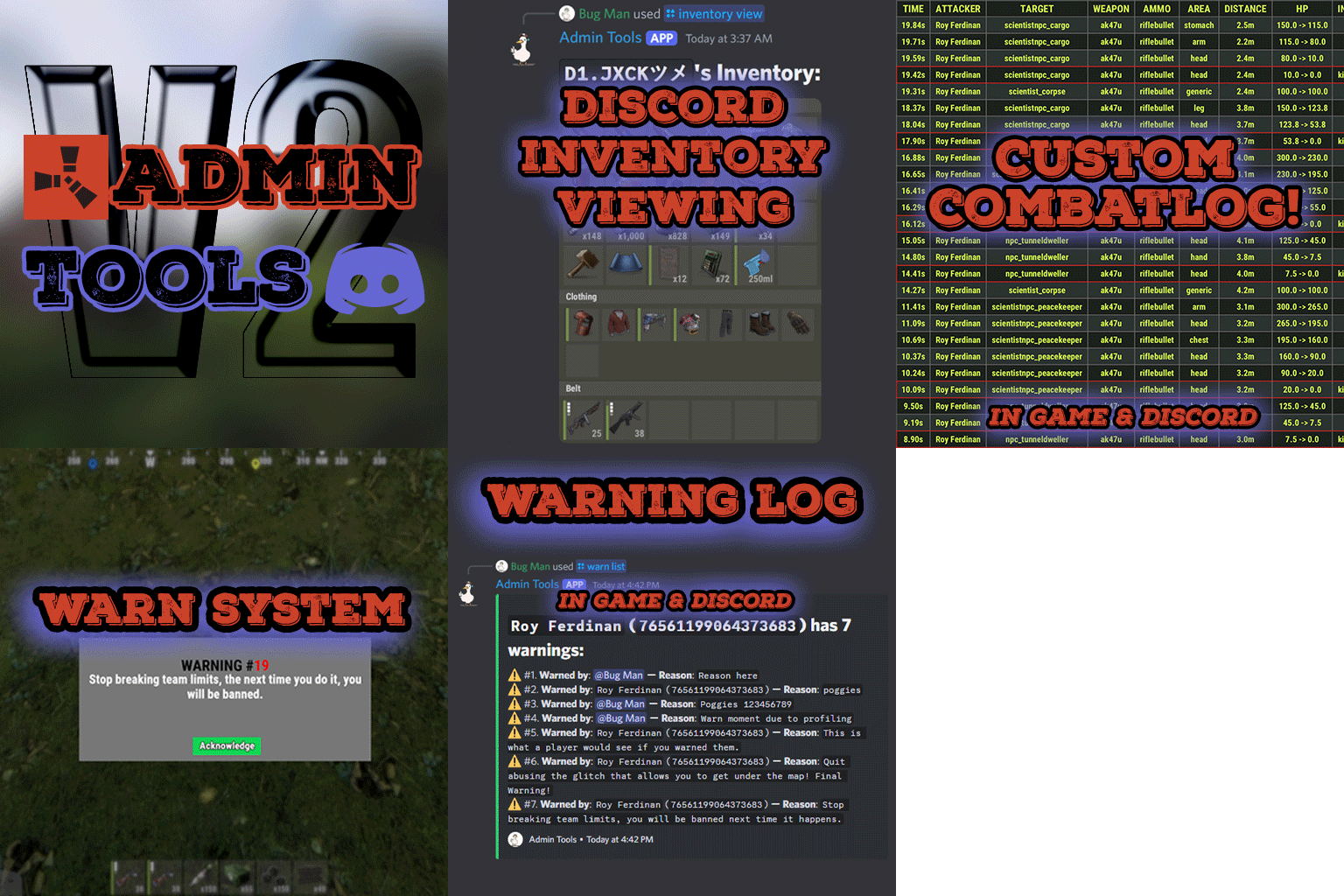
Admin Tools is an all-in-one plugin designed to make your job as a server owner/admin easier. This plugin has a wide range of features and commands that allow you to control your server easily, both in-game and via Discord. It also adds custom quality of life features exclusive to this plugin! ★ Inventory Viewing System - View an NPC or player's inventory in Discord and in-game ★ Multi-Server Support - Allows you to manage multiple Rust servers from a single bot ★ Custom Combatlog System - View a player's combatlog in Discord and in-game ★ Backpack Viewing System - View a player's backpack (uMod plugin) in Discord ★ Custom ID System - Get the ID of players on your server quick and easy, copy directly from chat ★ Warn System - Inform players of their wrongdoings and keep track of them (Warn Visuals: UI, Chat, Chat + Toast/Gametip) ★ Watchlist System - Lets you put suspicious players on a list for you to monitor, logs in-game and to discord ★ Server Command System - Reload/load/unload plugins and other console commands in Discord and in-game ★ F7 Report Logging System - Log F7 reports to discord with their combat log attached (if enabled) ★ and more! (Rest of features below) Please note, the Permissions UI Shown on screen towards the start of this video is FROM CARBON, NOT THE PLUGIN Please note, the Permissions UI Shown on screen towards the start of this video is FROM CARBON, NOT THE PLUGIN (Changed/Exclusive): * Timestamps for video in video's description - Make sure to up video quality if watching from this site. * Timestamps for video in video's description - Make sure to up video quality if watching from this site. ★ Permission System - Grant/revoke permissions to groups and players from Discord and in-game ★ Minecraft Creative System - While enabled, hold middle click to get the item you're looking at ★ Rename System - Rename the players who think they are funny (toggle in config) ★ Tempban System - Tempban players with no database required ★ Unique ID System - Find players even when they have the same or similar names -- Thanks to nivex ★ Kill, Wound, Revive & Respawn System - Kill, wound (down), revive and respawn players from Discord and in-game ★ Team Viewing System - View a player's team members from Discord and in-game Q: Does this plugin have a GUI or do its commands use GUI? A: No. The only UI in-game for this plugin is the warning screens. Please do not purchase this plugin thinking it has GUI for its commands, they are ALL commands entered into chat, Discord, or RCON. There are however, 'modals' for Discord, but nothing GUI based for within the game other than the warning screens displayed when '/warn'ing a user (which can be configured by the user). Q: How do I set up the bot? A: Set Up Instructions - If you miss any permissions, can always add them to the Admin Tools role in discord after you invite the bot. Q: Does this plugin link players to Rust? A: No. You can use the free plugin DiscordCore by MJSU if you would like to link your players. Q: Does this plugin log kills/PMs/F1 Spawn/chat? A: No. Admin Tools only logs the following if enabled: F7 Reports, Bans, commands from this plugin, and players who are watchlisted. You can always view a player's combatlog from discord though. You can use the free logging plugins DiscordLogger by MONoH or DiscordChat by MJSU depending on your goal. However, personally, I recommend against using logging functionality that would be occurring very frequently due to Discord's rate limiting. Though, DIscordLogger is made in a way that combines messages if possible to prevent limiting. Q: Can this log to multiple Discord servers? A: YES. All you need to put for logging to multiple servers is the channel ID you want to log to in the list of channel IDs in the config. Q: Does this plugin ONLY work with Discord Extension 3.0.0+? A: YES. You need to download the 3.0.0+ version from GitHub, it is linked at the top (and right here) as a required dependency. Any version prior to 3.0.0 will not work with this plugin, but any version 3.0.0 and later will. Q: Will this work on a shared hosting server? A: Yes, BUT you will not be able to take advantage of the threading done within the plugin. It should still work fine, but when you're on a shared host, you may only have access to a single core/thread (not positive on which) and as a result the threading I am doing in the plugin will just be ran on the main thread. As a result some of the discord functionality (ie: image generation) may affect the server as its now running on the main thread (what the server uses to run the game on) instead of a separate thread which would normally not affect the server. The image generation stuff (backpack and inventory) is normally pretty quick depending on number of items and pictures being used/sent, and can be between 100-250ms to generate on my server, however that was while no players were on. Q: How do I fix this error Response Code: Forbidden Discord Error Code: 50001 Discord Error: Missing Access ? A: All you need to fix this issue is MFA/2FA on the account used to create the bot. This issue is caused by Discord requiring your account to have either MFA or 2FA due to the bot being in a Community Discord server. After you add 2FA/MFA this error will go away. Q: Renaming isn't working, how do I fix this? A: The issue is likely that you don't have it enabled in the config, make sure to enable it in the config, its above the warning options and the discord API options. Q: My commands aren't appearing, how do I fix this? A: You can do the following in an attempt to try and force the bot to update its commands: Discord > Server Settings > Integrations > Admin Tools Bot > Toggle one of the checkboxes it shows in either Roles & Members or Channels > Save > Undo toggle > Save again. Q: Does this work with Rustcord? A: Yes, however you need this version here by MJSU as it has been updated to work with DiscordExtension 3.0.0+ versions. Q: How do I set up Multi-Server Support? A: Do as follows: Enable the bool (true/false) config option for multi-server system. Fill and keep the list of servers order the same if possible between configs (not required, but recommended). Use the /server command in discord to swap to the server you want to start listening to/sending commands to. On first use of command, it will error in all but one server console (tries to reply to a message more than once), that is expected and doesn't do that after that first command. It is used to set it up. If you want the activity information to change when swapping servers, make sure to enable that functionality in the config. Special thanks to Nivex for both creating and allowing me to use the method used to generate unique IDs for players. For support, please make a support ticket or join the Cobalt Studios Discord.$29.99 -
Version 1.0.1
6 downloads
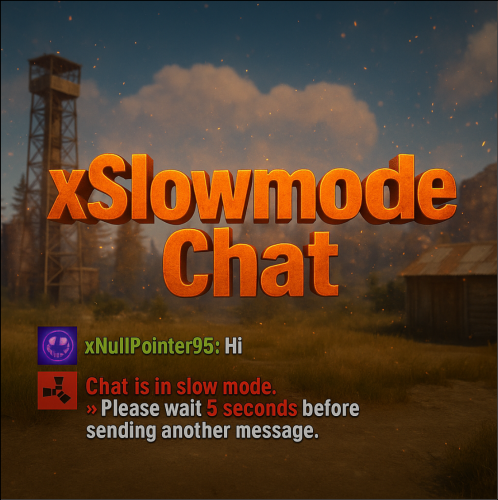
xSlowmodeChat xSlowmodeChat is a configurable chat-rate-limiting plugin for Rust servers. It allows server owners to control how frequently players can send messages, helping reduce spam, toxicity, and chat Flooding. Doesn't affect chat commands, only chat messages. Fully Configurable Slowmode Set custom cooldown between messages for normal- and vip players. Optional cumulative penalties for repeated spamming attempts. Adjustable penalty length for both, normal and VIP players. VIP Support Grant VIP players a separate cooldown & penalty system. VIP permission (xslowmodechat.vip). Lower intervals or completely remove slowmode for VIPs. Admin & Exclusion Options Easily toggle slowmode bypass for admins. Exclude specific SteamIDs from slowmode entirely. Informative Feedback Show a customizable slowmode warning message in chat. Optional on-screen UI timer showing remaining cooldown Console Commands xslowmode.enable - Enable slowmode xslowmode.disable - Disable slowmode xslowmode.setinterval <seconds> - Set default player cooldown xslowmode.setvipinterval <seconds> - Set VIP cooldown xslowmode.reloadconfig - Reload config from file Permission xslowmodechat.vip - Grants players the VIP slowmode settings. Config { "Enabled": true, "DisabledForAdmins": false, "ShowMessage": true, "MessageText": "<color=#e63939>Chat is in slow mode.\n»</color> Please wait <color=#e63939>{time} seconds</color> before sending another message.", "ShowSlowdownUi": true, "CumulativePenalty": true, "ChatMessageCooldown": 5.0, "CooldownPenalty": 5.0, "VipPermission": "xslowmodechat.vip", "VipChatMessageCooldown": 2.0, "VipCooldownPenalty": 2.0, "ExcludedSteamIds": [] }$8.99 -

Version 1.0.0
132 downloads
THIS TOOL REQUIRES A BATTLEMETRICS RCON SUBSCRIPTION Overview The BattleMetrics Moderation Bot is designed to allow trial staff to submit mutes, kicks, bans, and lift bans without requiring full access to BattleMetrics or other moderation tools. How It Works: - Trial staff submit moderation actions through Discord forms. - Actions remain pending for approval until reviewed by verified staff. - Verified staff can accept, deny, or create a discussion thread for further review. - The bot integrates exclusively with BattleMetrics and requires a BattleMetrics RCON Subscription to function. Additional Features: - All bot actions are logged in a dedicated Logs folder for full transparency and record-keeping. - Uses BattleMetrics API to ensure secure and efficient moderation. If you need assistance, contact bxcas on Discord. --- Configuration Settings for BattleMetrics Moderation Bot This section explains each configuration setting in the config.json file, what it does, and where to find the necessary values. --- Discord Configuration The discord section contains the bot's authentication details, server settings, and channels for admin messages. "discord": { "clientId": "BOT CLIENT ID", "token": "BOT TOKEN", "guildId": "DISCORD SERVER ID", "channels": { "message": "ADMINS CHANNEL ID", "request": "TRIAL CHANNEL REQUEST ID" }, "roles": { "trialStaff": ["TRIAL STAFF ROLE ID 1", "TRIAL STAFF ROLE ID 2"], "seniorStaff": ["SENIOR STAFF ROLE ID 1", "SENIOR STAFF ROLE ID 2"] } } Where to Find These Values? --- BattleMetrics Configuration (battlemetrics) This section contains settings related to BattleMetrics, which is used for managing bans and tracking players. "battlemetrics": { "organizationId": "BATTLEMETRICS ORGANIZATION ID", "banListId": "BATTLEMETRICS BAN LIST ID", "apiToken": "BATTLEMETRICS API TOKEN" } Where to Find These Values? Server Configuration (servers) This section defines the Rust servers managed by the bot. "servers": [ { "name": "SERVER NAME", "id": "SERVER ID" } ] Where to Find These Values? --- Example Full Configuration { "discord": { "clientId": "123456789012345678", "token": "YOUR_DISCORD_BOT_TOKEN", "guildId": "987654321098765432", "channels": { "message": "123456789012345678", "request": "876543210987654321" }, "roles": { "trialStaff": ["123456789012345678", "234567890123456789"], "seniorStaff": ["345678901234567890", "456789012345678901"] } }, "battlemetrics": { "organizationId": "112233", "banListId": "445566", "apiToken": "your_battlemetrics_api_token" }, "servers": [ { "name": "Main Rust Server", "id": "999999" }, { "name": "Test Server", "id": "888888" } ] } --- Installation Guide - BattleMetrics Moderation Bot Requirements To run the bot, you need a machine with: - A server or hosting environment (e.g., a VPS, dedicated machine, or a Pterodactyl Egg). - Node.js installed (recommended: latest LTS version => 22). --- Installation Steps Ensure Node.js is installed on your machine. Place the bot files in your preferred directory. Open a terminal or command prompt in the bot’s directory. Run the following command to install dependencies: npm install Start the bot by running: node . The bot will now run without any issues. --- Logs A Logs folder will be created automatically. All bot activity and errors will be logged inside this folder. Support If you need assistance, contact `bxcas` on Discord.$9.99 -

Version 1.0.2
7 downloads
Introducing Rust Discord ChatMod, a simple rust chat logging bot. It will connect to your server through RCON, and log the message types you specify. (Global, Team, Clans /c chat, Clans /a chat, Cards (blackjack/slot chat)), and allow you to mute or unmute players you specify Developed and tested with NodeJS 22 LTS. Tested and fully compatible with Rust vanilla chat, and BetterChat. Tested while connected simultaneously to 10 different Rust servers NODEJS 22 OR HIGHER IS REQUIRED FOR USE MAKE SURE TO INSTALL THE NODE REQUIREMENTS! (This can be done by running the command `npm install` from the installation directory. If you are using a Pterodactyl egg or some other hosted service, the requirements are usually installed automatically on boot Key Features: Multi-Server RCON Integration – Connect to multiple Rust servers simultaneously. Offload web requests from plugins like BetterChat, ensuring your server stays performant while your Discord stays in sync. Customizable Chat Relay – Stream global, team, clan, ally, and cards (blackjack/slots) messages directly to the Discord channels of your choice. Configure per server settings, so each Rust server has its own dedicated chat feed. Discord-Based Moderation – Mute or unmute players directly from Discord. Every action is timestamped and logged, providing a reliable record of all moderation activity for easy reference. Role-Restricted Commands – Control who can moderate your servers chat with role-locked commands. Grant chat moderation powers to staff, even if they aren’t ingame. Default Config { "discord": { "guildId": "YOUR_DISCORD_GUILD_ID", "applicationId": "YOUR_DISCORD_BOT_APPLICATION_ID", "botToken": "YOUR_DISCORD_BOT_TOKEN", "roleIDs": [ "1342385755934167051", "DISCORD_ROLE_2", "DISCORD_ROLE_3" ] }, "servers": [ { "serverName": "UNIQUE_SERVER_NAME", "rconIP": "RCON_IP_OR_DOMAIN", "rconPort": "RCON_PORT", "rconPassword": "RCON_PORT", "globalChannelID": "CHANNEL_ID_TO_LOG_GLOBAL", "teamChannelID": "CHANNEL_ID_TO_LOG_TEAM_OR_CLAN", "cardChannelID": "CHANNEL_ID_TO_LOG_CARDS_CHAT", "clansChannelID": "CHANNEL_ID_TO_LOG_CLANS_CHAT_COMMAND", "allianceChannelID": "CHANNEL_ID_TO_LOG_ALLIES_CHAT_COMMAND", "prependServerName": true, "showChannelTag": true, "showPlayerTags": true, "logTeamChat": true, "logGlobalChat": true, "logCardChat": true, "logClansChat": true, "logAllyChat": true }, { "serverName": "UNIQUE_SERVER_NAME_2", "rconIP": "RCON_IP_OR_DOMAIN", "rconPort": "RCON_PORT", "rconPassword": "RCON_PORT", "globalChannelID": "CHANNEL_ID_TO_LOG_GLOBAL", "teamChannelID": "CHANNEL_ID_TO_LOG_TEAM_OR_CLAN", "cardChannelID": "CHANNEL_ID_TO_LOG_CARDS_CHAT", "clansChannelID": "CHANNEL_ID_TO_LOG_CLANS_CHAT_COMMAND", "allianceChannelID": "CHANNEL_ID_TO_LOG_ALLIES_CHAT_COMMAND", "prependServerName": true, "showChannelTag": true, "showPlayerTags": true, "logTeamChat": true, "logGlobalChat": true, "logCardChat": true, "logClansChat": true, "logAllyChat": true } ] }$15.00 -

Version 1.1.1
17 downloads
A player voting system for temporary chat mutes. Supports both default chat and BetterChat, with persistent mute storage and Discord webhook integration. It will mute players from chat and voice channels. Permissions votemute.startvote - Allows initiating vote mutes votemute.vote - Allows participating in votes votemute.unmute - Allows manual unmuting (admin) Configuration { "Required percentage (0-100)": 60.0, // Percentage of yes votes needed "Vote duration (seconds)": 120, // How long voting period lasts "Cooldown between votes (minutes)": 10, // Time between vote initiations "Mute duration (minutes)": 60, // How long mutes last "Discord Webhook URL": "", // Optional Discord logging "Log to console": false, // Enable console logging "Minimum players required for voting": 4, // Server population requirement "Allow voting to mute self": false, // Self-mute prevention "Allow voting to mute admins": false, // Admin mute prevention "Reminder interval (seconds)": 30 // Interval of vote reminder message "Count only voters (if false, non-voters count as No)": true } Commands /votemute playername/steamid - Start vote to mute /yes - Vote in favor /no - Vote against /unmute playername/steamid - Admin unmute command Notes Mute data persists through server restarts via data file Integrates with BetterChat if present Supports team chat muting Automatic mute expiration system Vote session management with concurrent vote prevention Discord webhook sends detailed embeds with vote results Supports localization through language files Thread-safe mute operations Handles player disconnections during votes$4.99 -

Version 1.0.8
355 downloads
Temporarily or permanently restrict players to sending one message per configured interval. Permissions slowmodechat.exclude - Excludes granted players/groups from slowmode Console Commands slowmode enable - Enable slowmode slowmode disable - Disable slowmode slowmode interval <seconds> - Adjust the interval between messages slowmode reload - Load new config values without reloading the entire plugin Configuration Enabled - Enables slowmode Rcon_Only - Forces console commands to be ran via rcon Permission_Enabled - Enables slowmodechat.exclude permission Interval - Adjust the interval between messages Icon by @SawyerWDFree -

Version 1.0.0
5 downloads
BetterSecurity - Rust Server Moderation Plugin BetterSecurity is a powerful and easy-to-use Rust server plugin designed to enhance your server’s moderation capabilities. It provides a comprehensive system for temporary and permanent bans, warnings, kicks, and unbanning players, all with seamless Discord webhook integration for real-time notifications. Key Features: Temporary & Permanent Bans: Ban players either permanently or for a custom duration using intuitive commands. Warnings: Issue warnings to players with reasons, helping to maintain order without immediate bans. Kick Command: Kick disruptive players with a clear reason visible to them and the server. Unban Commands: Easily unban players by name or SteamID. Discord Integration: Automatic rich embed notifications to your configured Discord webhook for bans, warnings, kicks, unbans, and expired bans. Configurable: Set your Discord webhook URL in the config file to receive instant updates. Automatic Ban Expiry: Temporary bans automatically expire, and unban notifications are sent to Discord. Detailed Notifications: In-game messages and Discord embeds include player names, Steam IDs (with clickable Steam profile links), reasons, and durations. Robust and Reliable: Saves ban data persistently, checks for expired bans every 30 seconds. Commands: /warn (player) (reason) — Warn a player. /tempban (player) (duration) (reason) — Temporarily ban a player (e.g., 1d, 2h, 30m). /permban (player) (reason) — Permanently ban a player. /banid (steamid) (duration) (reason) — Ban by Steam ID. /kick (player) (reason) — Kick a player from the server. /unban (player) — Unban a player by name. /unbanid (steamid) — Unban a player by Steam ID. Config: Why Choose BetterSecurity? This plugin gives server admins full control over player behavior with a user-friendly command set and seamless integration with Discord, making moderation transparent and efficient. It ensures your Rust server stays clean and enjoyable for everyone.$6.00 -
Version 1.0.0
242 downloads
This file is very simple and compact. All it is meant to do is to block things that you do not want to be sent in your Discord. It's pre-built to not allow the new Discord bold text to be sent by non authorized users. However, you can keep those settings, or add more words or special things for it to block. FEATURES - Deletes unwanted messages / special formatting from your discord - Has a whitelist so selected roles are allowed to send blacklisted things - Checks edited messages to make sure people are not trying to bypass the filter - All deleted messages can be logged if you choose SIMPLE INSTALL The file includes a setup guide within it, everything is quite simple and won't take much time to get up and running. Need support or want updates about what is coming to the bot? Join the support discord here https://discord.gg/RVePam7pd7Free -
Version 1.1.0
1,109 downloads
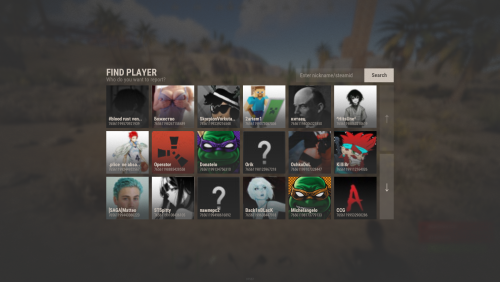
Report System - is a simple plugin from RustApp.io that allows you to get reports on players in Discord, using a nicely designed interface or F7. Need Help? Any issues feel free to contact us here: t.me/rustapp_help Configuration: { "[UI] Chat commands": [ "report" ], "[UI] Report reasons": [ "Cheat", "Abusive", "Spam" ], "[UI] Cooldown between reports (seconds)": 300, "[UI] Auto-parse reports from F7 (ingame reports)": true, "[Discord] Webhook to send reports": "https://discord.com/api/webhooks/...", "[Discord-Translations] Nickname field": "Nickname", "[Discord-Translations] Reason field": "Reason", "[Discord-Translations] Comment field": "Comment", "[Discord-Translations] Report sent text": "Report sent" } Default Language: { "Header.Find": "FIND PLAYER", "Header.SubDefault": "Who do you want to report?", "Header.SubFindResults": "Here are players, which we found", "Header.SubFindEmpty": "No players was found", "Header.Search": "Search", "Header.Search.Placeholder": "Enter nickname/steamid", "Subject.Head": "Select the reason for the report", "Subject.SubHead": "For player %PLAYER%", "Cooldown": "Wait %TIME% sec.", "Sent": "Report succesful sent" }Free -
.thumb.png.2ad6049375cfe639e3a15390264be866.png)
Version 1.0.0
46 downloads
FireworksLogger Log designs players create with fireworks in-game. Features Save firework designs as a .png image associated with the user's steam ID and timestamped. Image directory: `{Oxide Data Directory}/FireworksLogger` File name format: `{Player Name}_{Steam ID}_{Timestamp}_FireworksDesign.png` No configuration requiredFree -
.thumb.jpg.ec72ae354c55231b02db1827fe8a2521.jpg)
Version 1.1.1
17 downloads
A powerful and configurable voting system that allows players to democratically ban disruptive players from your Rust server. Features Democratic Banning System: Players can initiate votes to ban other players Configurable Parameters: Customize voting duration, required percentage, and cooldown periods Temporary or Permanent Bans: Set ban durations or make them permanent Discord Integration: Automatic notifications for ban votes and results Localization Support: Easily translate messages to any language Anti-Abuse Measures: Cooldown between votes Minimum player requirement Optional admin protection Self-vote prevention Commands /voteban playername/steamid - Start a vote to ban a player /y - Vote yes on the current ban vote /n - Vote no on the current ban vote Permissions voteban.start - Allows starting ban votes voteban.vote - Allows participating in ban votes Configuration { "Required percentage (0-100)": 90.0, "Vote duration (seconds)": 120, "Cooldown between votes (minutes)": 10, "Ban duration (minutes, 0 for permanent)": 60, "Discord Webhook URL": "", "Log to console": false, "Minimum players required for voting": 9, "Allow voting to ban self": false, "Allow voting to ban admins": false, "Reminder interval (seconds)": 30 "Count only voters (if false, non-voters count as No)": true } Messages All messages are customizable and support color formatting: Vote initiation notifications Vote success/failure messages Error messages and warnings Permission denied notifications Instructions for voting Installation Place the plugin in your server's oxide/plugins folder Configure the settings to match your server's needs Set up permissions for your players (Optional) Configure Discord webhook for notifications Notes The plugin automatically manages temporary bans Integrates with Discord for ban notifications (if webhook URL is provided) Saves ban data between server restarts$4.99 -
Version 1.1.1
207 downloads
Auto Sign Moderation is an AI based moderation plugin to automatically handle moderation of all signs and images in rust. Automatically hide, remove and log signs on your server Free Moderation mode - Basic AI moderation completely free Advance Moderation mode - Custom AI instructions to moderate content Discord logging of moderated signs Batch mode - Send images in batches for better performance and less cost Auto Sign Moderation has an optional loading image for when an image is pending approval and a Discord logging mode, where moderated content is logged to discord. autosignmoderation.whitelist - bypass sign checks There are two main moderation modes. The first is the moderation API, which is a free API endpoint of Open AI. This model has limited options for what it can moderate generally speaking it works best for sexual and violent type content. The Advance Moderation API uses the gpt-4o-mini model. This is a paid model, where each request will cost the end user. This plugin has been designed in a way to reduce costs of using the paid model, dependant on image size the cost per image is close to $0.15 per 100 images checked (more about this in the FAQ). { "Image Size 25 - 100%": 50.0, "Image Quality 25 - 100%": 75.0, "Sign Update Cooldown (seconds)": 5.0, "Player Moderated Cooldown (seconds)": 300.0, "Hide signs while being checked": true, "Use Temp Loading Image": false, "Temp Loading Image URL:": "https://i.postimg.cc/4NNrqT2x/pngegg-2.png", "Logging Mode Only": false, "Send Player Chat Warnings": false, "Batch Mode - Disables hiding of signs": { "Check images in batches (Advance Mode Only)": true, "Batch Image Check Rate (Minutes)": 15.0, "Minimum images to batch check": 3.0, "Max checks to bypass minimum images 0 = no bypass": 4.0 }, "Discord Settings": { "Log to Discord": false, "Log moderated Images to Discord (WARNING THIS MAY SEND NSFW CONTENT TO YOUR DISCORD)": false, "Discord Webhook": "https://support.discord.com/hc/en-us/articles/228383668-Intro-to-Webhooks", "Discord Username": "Sign Moderator", "Server Name": "", "Avatar URL": "https://i.ibb.co/sQ10728/Loading-Pls-Wait2.png" }, "Moderation API (Free) - Limited Options": { "Enable": true, "Open AI Token": "https://openai.com/index/openai-api/", "Cooldown between API Checks (seconds)": 1.0, "Block images of harassment": true, "Block images of harassment/threatening": true, "Block images of sexual": true, "Block images of hate": true, "Block images of hate/threatening": true, "Block images of illicit": true, "Block images of illicit/violent": true, "Block images of self-harm/intent": true, "Block images of self-harm/instructions": true, "Block images of self-harm": true, "Block images of sexual/minors": true, "Block images of violence": true, "Block images of violence/graphic": true }, "Advance Moderation API (Paid)": { "Enable GPT Model (WARNING THIS IS PAID PLEASE READ DOCS)": false, "Open AI Token": "https://openai.com/index/openai-api/", "Cooldown between API Checks (seconds)": 1.0, "Model (Don't change this if you dont know what it is)": "gpt-4o-mini", "Content to moderate": "Pornography, Hate Speech, Child Exploitation, Racist images signs text or symbols, Words like nigger, symbols which resemble swastikas" } } FAQ: Whats the difference between the paid model vs the free one? The paid model allows for complete customization of content to be moderated and it has text recognition. Meaning it is extreamly useful for symbols and hate text. What are the settings to make checks cheapest? Batch mode, will send multiple images within the same batch. This effectively reduces the default cost by about half once you send images in batches of 3 or more. Reducing the image size and resolution also assists in reducing the cost. Be mindful that if your quality reduction setting is too high the AI model may struggle moderating fine detailed content. Keeping your content to moderate prompt simple and straight forward is important as well. If the query becomes extreamly long or complex it may cost more. How do I set up an OpenAPI Token? First sign up to OpenAPI if you dont have an account: https://platform.openai.com/signup Set up an organisation this can be called anything https://platform.openai.com/settings/organization/general Create a project https://platform.openai.com/settings/organization/projects Create an API key in your organisation under the just created project https://platform.openai.com/api-keys If you wish to use the paid model there are two more steps Set your usage limits for your organisation start with a low amount for testing such as $10 https://platform.openai.com/settings/organization/limits Add credit to your account https://platform.openai.com/settings/organization/billing/overview. Its best to just add a small amount of credit such as $10 and then top up later. Where do i monitior API usuage? You can monitor usage here: https://platform.openai.com/settings/organization/usageFree- 7 comments
- 1 review
-
- 6
-
-
-
- #auto sign moderation
- #autosignmoderation
- (and 21 more)
-

Version 1.1.1
292 downloads
SmartWarnings Lite simplifies and streamlines your server moderation by providing means to consistently Warn your players for misconduct. Gone are the times when you leave manual notes at sleeping players, for this plugin creates a smooth but intimidating chat warning displaying clearly to the player what they've done wrong and how to learn from it. Rule enforcement has never been easier before. If you enjoy the Free lite version of the plugin, please consider supporting the developer by upgrading to the Full version. In return you get many more useful features & fast developer support, it's a win-win. Link here: https://codefling.com/plugins/smart-warnings Commands /warn (player name or id) "reason" Dispatches a warning with a custom reason or presetRequires permission: smartwarnings.admin /warn info (player name or id, leave blank to see your own) Shows the amount of warnings, warning points and the individual warning details in chat.Requires permission: smartwarnings.admin to see other players. Default permission can only see their own warnings. /warn clear (player name or id) (id or ALL) Clear a specific warning ID by specifying the warning number, or specify ALL to clear all player warnings. Requires elevated permission: smartwarnings.admin.canclear Below command is only supported in the full version /warn clan (clan tag) "reason" Dispatches a warning with a custom reason or preset to an entire clan (Requires Clans plugin)Requires permission: smartwarnings.admin Configuration { "System Settings": { "Max Warnings": 5, "Default Warning Expiration time (Days)": 7, "Announce Warnings in Global Chat": true, "Show players who issued the warning": true, "Server Name": "MyRustServer", "Clear all Warnings on Server Wipe": true }, ////////////////////////////////////////////////////////////////////////////////////////////////////////////////////////////////////////// ///// Below configuration is only supported in the full version @ https://codefling.com/plugins/smart-warnings ////////////////////////////////////////////////////////////////////////////////////////////////////////////////////////////////////////// "Warning Presets": { "spam": { "Reason": " §1 - Spamming", "Points": 1, "ExpirationDays": 3.0 }, "toxic": { "Reason": " §2 - Toxic behaviour", "Points": 2, "ExpirationDays": 7.0 } }, "Autoban Settings": { "How many points until automatic ban (Set 0 for Disable)": 0, "How many warnings until automatic ban (Set 0 for Disable, Recommended: Same as Max Warnings)": 0, "How long to ban in minutes (Set 0 for Permanent)": 2880, "Clear the players Warnings on AutoBan (Default: True)": true }, "Discord Settings": { "Webhook URL - Post Warnings to Discord (Leave blank to Disable)": "", "Webhook URL - Post Autobans to Discord (Leave blank to Disable)": "" }, "AutoMod Settings": { "Mute on 2 warning points": { "PointTrigger": 2, "ExecuteCommand": "mute {0} {1}", "ClearPointsOnTrigger": false }, "Kick on 4 warning points": { "PointTrigger": 4, "ExecuteCommand": "kick {0} {1}", "ClearPointsOnTrigger": true } } } SmartWarnings Full vs Lite Below are the additional features provided by the full version of the plugin. Warn entire clans using /warn clan No need to dispatch a warning to every individual player if the whole clan has been misbehaving. The full version integrates with Clans. Create custom presets for common violations Presets can be made for example to reflect the server rules, it can be configured so that your admins can type /warn joe rule1 and it will spell out the entire rule 1 in the warning. Presets can have an Expiration date which will remove the warning, allowing non-repeating offenders to be cleared if they're well behaving in the long term. Presets can have a Warning Point weight which will give them different severity that can influence when to trigger an Automatic Ban (if enabled). Automatically Ban players with X amount of Warnings or Warning Points With this feature Enabled a player will be Automatically Banned when reaching the configured Warning amount or Warning Points. For example, configure 3 warnings to be max and enable auto ban will ban a player when the third warning has been dispatched. Supports Temporary Autobans If you're the kind of type that believes in second chances, when configured it bans the player lets them know when they're welcome back! Optional feature: Clear the player's warning when autobanned (True by default), This can conveniently be set to False if you want the player to be instantly auto banned next time a warning is dispatched. Extensive Logging both File based and Discord Configure Discord Webhook links to log Warnings and/or Autobans to Discord. Customizable Branding GUI-popup warning with Server Logo branding AUTOMOD: Fully customizable command actions on X warning points Define any custom command to be executed at X warning point. This allows you to integrate with any other plugin for example mute, jails or whatever really. For example: set to mute on 2 warning points, kick on 4 warning points, teleport to jail on 6 warning points.Free