
Search the Community
Showing results for tags 'perm'.
Found 5 results
-

Version 0.1.7
1,048 downloads
Useful plugin for managing temporary permissions, temporary groups and temporary permissions for groups. This is done through chat commands, built-in Oxide commands, and API methods. Note: The dates is in UTC format. The ability to grant players temporary permissions by specifying either the number of seconds, an exact expiration date or until the wipe occurs; The ability to add players to temporary groups by specifying either the number of seconds, an exact expiration date or until the wipe occurs; The ability to grant groups temporary permissions by specifying either the number of seconds, an exact expiration date or until the wipe occurs; The ability to revoke temporary permissions from players and groups prematurely; The ability to remove players from groups prematurely; The ability to perform all the above actions using existing and familiar console commands(e.g., o.grant), simply by adding the number of seconds, the expiration date or the word "wipe" at the end; The ability to perform all the above actions using a chat command (by default /tperm); The ability to perform all the above actions using API methods; The ability to remove all temporary permissions and groups upon wipe detection. temporarypermissions.admin - Grants access to the admin command(by default /tperm). { "Chat command": "myperm", "Chat admin command": "tperm", "Is it worth enabling GameTips for messages?": true, "Is it worth saving logs to a file?": true, "Is it worth using console logging?": true, "List of language keys for creating language files": [ "en" ], "Interval in seconds for expiration check": 1.0, "Interval in seconds for checking the presence of temporary permissions and temporary groups. A value of 0 disables the check": 600.0, "Is it worth restoring removed temporary permissions and temporary groups if the timer hasn't expired? There are cases where removal cannot be tracked in the usual way": true, "Is it worth revoking temporary permissions and temporary groups when unloading the plugin, without removing them from the data file?": true, "Is it worth revoking temporary permissions and temporary groups that haven't expired yet upon detecting a wipe?": false, "Custom wipe date(detected only during initialization). Only required if you're experiencing issues with the Wipe ID. Leave empty to use the Wipe ID. Example: 2025-06-25 13:00": "", "Wipe ID": null, "Version": { "Major": 0, "Minor": 1, "Patch": 7 } } EN: { "CmdAdmin": "Available admin commands:\n\n<color=#D1CBCB>/tperm</color> <color=#D1AB9A>grant user *nameOrId* realpve.vip wipe</color> - Grants or extends the specified permission for the specified player until the end of the current wipe\n<color=#D1CBCB>/tperm</color> <color=#D1AB9A>grant user *nameOrId* realpve.vip *intValue* *boolValue*(optional)</color> - Grants or extends the specified permission for the specified player for the given number of seconds\n<color=#D1CBCB>/tperm</color> <color=#D1AB9A>grant user *nameOrId* realpve.vip *expirationDate* *assignmentDate*(optional)</color> - Grants or extends the specified permission for the specified player until the given date\n<color=#D1CBCB>/tperm</color> <color=#D1AB9A>grant group *groupName* realpve.vip wipe</color> - Grants or extends the specified permission for the specified group until the end of the current wipe\n<color=#D1CBCB>/tperm</color> <color=#D1AB9A>grant group *groupName* realpve.vip *intValue* *boolValue*(optional)</color> - Grants or extends the specified permission for the specified group for the given number of seconds\n<color=#D1CBCB>/tperm</color> <color=#D1AB9A>grant group *groupName* realpve.vip *expirationDate* *assignmentDate*(optional)</color> - Grants or extends the specified permission for the specified group until the given date\n<color=#D1CBCB>/tperm</color> <color=#D1AB9A>revoke user *nameOrId* realpve.vip</color> - Revokes the specified permission from the specified player\n<color=#D1CBCB>/tperm</color> <color=#D1AB9A>revoke group *groupName* realpve.vip</color> - Revokes the specified permission from the specified group\n<color=#D1CBCB>/tperm</color> <color=#D1AB9A>add *nameOrId* *groupName* wipe</color> - Adds or extends the specified player's membership in the specified group until the end of the current wipe\n<color=#D1CBCB>/tperm</color> <color=#D1AB9A>add *nameOrId* *groupName* *intValue* *boolValue*(optional)</color> - Adds or extends the specified player's membership in the specified group for the given number of seconds\n<color=#D1CBCB>/tperm</color> <color=#D1AB9A>add *nameOrId* *groupName* *expirationDate* *assignmentDate*(optional)</color> - Adds or extends the specified player's membership in the specified group until the given date\n<color=#D1CBCB>/tperm</color> <color=#D1AB9A>remove *nameOrId* *groupName*</color> - Removes the specified player from the specified group\n<color=#D1CBCB>/tperm</color> <color=#D1AB9A>wipe *wipeDate*</color> - Set a custom wipe date. Used in case of issues with the Wipe ID. Format: yyyy-MM-dd HH:mm\n<color=#D1CBCB>/tperm</color> <color=#D1AB9A>wipe reset</color> - Reset the custom wipe date\n\n<color=#D1CBCB>Optional values:</color>\n*boolValue* - If false(default) and an existing permission or group membership has not expired, the specified time will be added to the existing time. Otherwise, including when true, the specified time will be counted from the current time\n*assignmentDate* - If the assignment date is not specified and there is no existing permission or group membership, the assignment date will be set to the current time. If the assignment date is specified, it will be applied regardless of existing permissions or group memberships\n\n--------------------------------------------------", "CmdPermissionNotFound": "Permission '{0}' not found!", "CmdPlayerNotFound": "Player '{0}' not found! You must provide the player's name or ID.", "CmdMultiplePlayers": "Multiple players found for '{0}': {1}", "CmdGroupNotFound": "Group '{0}' not found!", "CmdGrantWrongFormat": "Incorrect command format! Example: /tperm grant user/group *nameOrId* realpve.vip *secondsOrDateTime*", "CmdRevokeWrongFormat": "Incorrect command format! Example: /tperm revoke user/group *nameOrId* realpve.vip", "CmdUserGroupWrongFormat": "Incorrect command format! Example: /tperm group add/remove *nameOrId* *groupName*", "CmdUserGranted": "Permission '{0}' granted to player '{1}'.", "CmdGroupGranted": "Permission '{0}' granted to group '{1}'.", "CmdUserGroupAdded": "Player '{0}' has been added to group '{1}'.", "CmdUserRevoked": "Permission '{0}' has been revoked for player '{1}'.", "CmdGroupRevoked": "Permission '{0}' has been revoked for group '{1}'.", "CmdUserGroupRemoved": "Player '{0}' has been removed from group '{1}'.", "CmdWipeNew": "New wipe date successfully set to '{0}'. The wipe will take effect only after the plugin is loaded following this date.", "CmdWipeReset": "The custom wipe date has been reset. The wipe is now determined by the Wipe ID.", "CmdWipeFailed": "The specified date '{0}' has an invalid format(yyyy-MM-dd HH:mm) or has already passed. Example: '{1}'.", "CmdCheckNoActive": "You have no active temporary permissions or temporary groups!", "CmdCheckTargetNoActive": "Player '{0}' has no active temporary permissions or temporary groups!", "CmdCheckPermissions": "<color=#D1AB9A>You have {0} temporary permissions(time in UTC):</color>\n{1}", "CmdCheckGroups": "<color=#D1AB9A>You have {0} temporary groups(time in UTC):</color>\n{1}", "CmdCheckTargetPermissions": "<color=#D1AB9A>Player '{2}' has {0} temporary permissions(time in UTC):</color>\n{1}", "CmdCheckTargetGroups": "<color=#D1AB9A>Player '{2}' has {0} temporary groups(time in UTC):</color>\n{1}", "CmdCheckFormatPermissions": "'{0}' - {1}({2})", "CmdCheckFormatGroups": "'{0}' - {1}({2})", "CmdUntilWipe": "Until Wipe" } RU: { "CmdAdmin": "Доступные админ команды:\n\n<color=#D1CBCB>/tperm</color> <color=#D1AB9A>grant user *имяИлиАйди* realpve.vip wipe</color> - Выдать или продлить указанный пермишен указанному игроку до конца текущего вайпа\n<color=#D1CBCB>/tperm</color> <color=#D1AB9A>grant user *имяИлиАйди* realpve.vip *числовоеЗначение* *булевоеЗначение*(опционально)</color> - Выдать или продлить указанный пермишен указанному игроку на указанное количество секунд\n<color=#D1CBCB>/tperm</color> <color=#D1AB9A>grant user *имяИлиАйди* realpve.vip *датаИстечения* *датаНазначения*(опционально)</color> - Выдать или продлить указанный пермишен указанному игроку до указанной даты\n<color=#D1CBCB>/tperm</color> <color=#D1AB9A>grant group *имяГруппы* realpve.vip wipe</color> - Выдать или продлить указанный пермишен указанной группе до конца текущего вайпа\n<color=#D1CBCB>/tperm</color> <color=#D1AB9A>grant group *имяГруппы* realpve.vip *числовоеЗначение* *булевоеЗначение*(опционально)</color> - Выдать или продлить указанный пермишен указанной группе на указанное количество секунд\n<color=#D1CBCB>/tperm</color> <color=#D1AB9A>grant group *имяГруппы* realpve.vip *датаИстечения* *датаНазначения*(опционально)</color> - Выдать или продлить указанный пермишен указанной группе до указанной даты\n<color=#D1CBCB>/tperm</color> <color=#D1AB9A>revoke user *имяИлиАйди* realpve.vip</color> - Снять указанный пермишен у указанного игрока\n<color=#D1CBCB>/tperm</color> <color=#D1AB9A>revoke group *имяГруппы* realpve.vip</color> - Снять указанный пермишен у указанной группы\n<color=#D1CBCB>/tperm</color> <color=#D1AB9A>add *имяИлиАйди* *имяГруппы* wipe</color> - Добавить или продлить пребывание в указанной группе указанному игроку до конца текущего вайпа\n<color=#D1CBCB>/tperm</color> <color=#D1AB9A>add *имяИлиАйди* *имяГруппы* *числовоеЗначение* *булевоеЗначение*(опционально)</color> - Добавить или продлить пребывание в указанной группе указанному игроку на указанное количество секунд\n<color=#D1CBCB>/tperm</color> <color=#D1AB9A>add *имяИлиАйди* *имяГруппы* *датаИстечения* *датаНазначения*(опционально)</color> - Добавить или продлить пребывание в указанной группе указанному игроку до указанной даты\n<color=#D1CBCB>/tperm</color> <color=#D1AB9A>remove *имяИлиАйди* *имяГруппы*</color> - Отменить пребывание в указанной группе указанному игроку\n<color=#D1CBCB>/tperm</color> <color=#D1AB9A>wipe *датаВайпа*</color> - Установка кастомной даты вайпа. Используется при проблемах с Wipe ID. Формат: yyyy-MM-dd HH:mm\n<color=#D1CBCB>/tperm</color> <color=#D1AB9A>wipe reset</color> - Сброс кастомной даты вайпа\n\n<color=#D1CBCB>Опциональные значения:</color>\n*булевоеЗначение* - Если false(по умолчанию) и существующий пермишен или группа не истекли, указанное время будет добавлено к существующему времени. В противном случае, в т.ч. при true, указанное время будет отсчитываться от текущего времени\n*датаНазначения* - Если дата назначения не указана и нет существующего пермишена или группы, дата назначения будет равна текущей. Если дата назначения указана, то вне зависимости от существования пермишенов или групп, присвоится указанная дата\n\n--------------------------------------------------", "CmdPermissionNotFound": "Пермишен '{0}' не найден!", "CmdPlayerNotFound": "Игрок '{0}' не найден! Вы должны указать имя или ID игрока.", "CmdMultiplePlayers": "По значению '{0}' найдено несколько игроков: {1}", "CmdGroupNotFound": "Группа '{0}' не найдена!", "CmdGrantWrongFormat": "Не верный формат команды! Пример: /tperm grant user/group *имяИлиАйди* realpve.vip *секундыИлиДата*", "CmdRevokeWrongFormat": "Не верный формат команды! Пример: /tperm revoke user/group *имяИлиАйди* realpve.vip", "CmdUserGroupWrongFormat": "Не верный формат команды! Пример: /tperm group add/remove *имяИлиАйди* *имяГруппы*", "CmdUserGranted": "Пермишен '{0}' выдан игроку '{1}'.", "CmdGroupGranted": "Пермишен '{0}' выдан группе '{1}'.", "CmdUserGroupAdded": "Игрок '{0}' был добавлен в группу '{1}'.", "CmdUserRevoked": "Пермишен '{0}' был удален для игрока '{1}'.", "CmdGroupRevoked": "Пермишен '{0}' был удален для группы '{1}'.", "CmdUserGroupRemoved": "Игрок '{0}' был удален из группы '{1}'.", "CmdWipeNew": "Новая дата вайпа успешно установлена на '{0}'. Вайп вступит в силу только при загрузке плагина после этой даты.", "CmdWipeReset": "Кастомная дата вайпа была сброшена. Вайп снова определяется по Wipe ID.", "CmdWipeFailed": "Указанная дата '{0}' имеет неверный формат(yyyy-MM-dd HH:mm) или уже прошла. Пример: '{1}'.", "CmdCheckFormatGroups": "'{0}' - {1}({2})", "CmdCheckNoActive": "У вас нет активных временных пермишенов или временных групп!", "CmdCheckTargetNoActive": "У игрока '{0}' нет активных временных пермишенов или временных групп!", "CmdCheckPermissions": "<color=#D1AB9A>У вас есть {0} временных пермишенов(время по UTC):</color>\n{1}", "CmdCheckGroups": "<color=#D1AB9A>У вас есть {0} временных групп(время по UTC):</color>\n{1}", "CmdCheckTargetPermissions": "<color=#D1AB9A>У игрока '{2}' есть {0} временных пермишенов(время по UTC):</color>\n{1}", "CmdCheckTargetGroups": "<color=#D1AB9A>У игрока '{2}' есть {0} временных групп(время по UTC):</color>\n{1}", "CmdCheckFormatPermissions": "'{0}' - {1}({2})", "CmdUntilWipe": "До вайпа" } /myperm - Displays a list of all your temporary permissions and temporary groups; /myperm *NameOrId* - Displays a list of all temporary permissions and temporary groups of the specified player. Permission "temporarypermissions.admin" required. Admin commands(/tperm). Permission "temporarypermissions.admin" required: grant - Grants a temporary permission to a player or group. user *NameOrId* realpve.vip wipe - Grants a temporary permission to a player until the next wipe by specifying the player's name or Id, the permission name and the word "wipe"; *NameOrId* realpve.vip 3600 true/false - Grants a temporary permission to a player by specifying the player's name or Id, the permission name, the number of seconds and true/false(optional). If false(default) and an existing permission has not expired, the specified time will be added to the existing time. Otherwise, including when true, the specified time will be counted from the current time; *NameOrId* realpve.vip "2024-08-19 17:57" "2024-08-19 16:57" - Grants a temporary permission to a player by specifying the player's name or Id, the permission name, the expiration date and the assigned date(optional). If the assignment date is not specified and there is no existing permission, the assignment date will be set to the current time. If the assignment date is specified, it will be applied regardless of existing permissions. group *GroupName* realpve.vip wipe - Grants a temporary permission to a group until the next wipe by specifying the group's name, the permission name and the word "wipe"; *GroupName* realpve.vip 3600 true/false - Grants a temporary permission to a group by specifying the group's name, the permission name, the number of seconds, and true/false(optional). If false(default) and an existing group membership has not expired, the specified time will be added to the existing time. Otherwise, including when true, the specified time will be counted from the current time; *GroupName* realpve.vip "2024-08-19 17:57" "2024-08-19 16:57" - Grants a temporary permission to a group by specifying the group's name, the permission name, the expiration date and the assigned date(optional). If the assignment date is not specified and there is no existing group membership, the assignment date will be set to the current time. If the assignment date is specified, it will be applied regardless of existing group memberships. revoke - Revokes a temporary permission from a player or group. user *NameOrId* realpve.vip - Revokes a temporary permission from a player by specifying the player's name or Id and the permission name; group *GroupName* realpve.vip - Revokes a temporary permission from a group by specifying the group's name and the permission name. add - Temporary addition of a player to a group. *NameOrId* *GroupName* wipe - Temporary addition of a player to a group until the next wipe by specifying the player's name or Id, the group name and the word "wipe"; *NameOrId* *GroupName* 3600 true/false - Temporary addition of a player to a group by specifying the player's name or Id, the group name, the number of seconds, and true/false(optional). If true, the specified seconds will count from the current moment, otherwise(default), they will be added to the existing time; *NameOrId* *GroupName* "2024-08-19 17:57" "2024-08-19 16:57" - Temporary addition of a player to a group by specifying the player's name or Id, the group name, the expiration date and the assigned date(optional). If not specified, the assigned date will default to the current date, otherwise, it will be set to the provided date. remove *NameOrId* *GroupName* - Removal of a player from a temporary group by specifying the player's name or Id and the group name. wipe - Setting a custom wipe date. Used if you're experiencing issues with using the Wipe ID. *wipeDate* - Set a custom wipe date(yyyy-MM-dd HH:mm). Used in case of issues with the Wipe ID; reset - Reset the custom wipe date. Example: /tperm grant user iiiaka realpve.vip wipe /tperm grant user iiiaka realpve.vip 3600 true /tperm grant user iiiaka realpve.vip "2024-08-19 17:57" "2024-08-19 16:57" /tperm wipe "2025-06-25 13:00" Note: To access the commands, the player must be an admin(console or owner) or have the temporarypermissions.admin permission. P.S. Templates for the commands above can also be used with existing console commands. For example: o.grant user iiiaka realpve.vip 3600 true All developer documentation can be found in the Docs section.Free -
Version 0.1.3
294 downloads
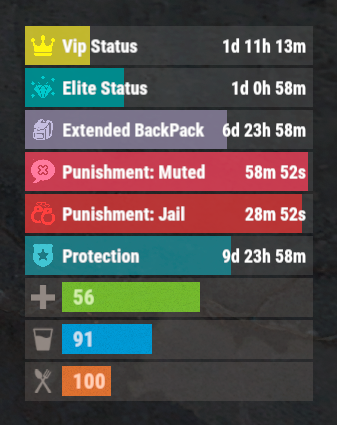
The plugin that displays temporary permissions and groups in the status bar. Depends on AdvancedStatus plugin. The ability to display temporary and permanent permissions; The ability to display temporary and permanent groups; The ability to display temporary and permanent permissions from groups; The ability to automatically generate language files for different languages(filled in English); The ability to customize the bar for each permission and group; The ability to choose between bar types(TimeCounter and TimeProgressCounter); The ability to specify the order of the bar; The ability to change the height of the bar; The abillity to customize the color and transparency of the background; The ability to set a material for the background; The ability to switch between CuiRawImageComponent and CuiImageComponent for the image; The ability to get images from the local folder(*SERVER*\oxide\data\AdvancedStatus\Images); The abillity to set own image and customize the color and transparency of the image; The abillity to set sprite instead of the image; The ability to customize the color, size, font and outline of the text. { "Chat command": "pstatus", "Is it worth enabling GameTips for messages?": true, "Is it worth clearing saved settings for permissions and groups upon detecting a wipe?": false, "Is it worth copying local images for new permissions or groups? Note: If set to true, it may create a lot of unnecessary images": false, "Is it worth displaying the status bar only when players are in the safe zone or have building privilege?": false, "List of language keys for creating language files": [ "en" ], "Default display mode for new permissions. 0 - disabled, 1 - show only temporary, 2 - show all": 1, "Default display mode for new groups. 0 - disabled, 1 - show only temporary, 2 - show all": 1, "Type of status bar for permissions. Note: You can only choose between TimeProgressCounter and TimeCounter": "TimeProgressCounter", "Type of status bar for groups. Note: You can only choose between TimeProgressCounter and TimeCounter": "TimeProgressCounter", "Default status bar settings for new permissions and groups": { "BarType - You can choose only between TimeProgressCounter and TimeCounter": "TimeProgressCounter", "Order": 20, "Height": 26, "Main_Color(Hex or RGBA)": "#FFFFFF", "Main_Transparency": 0.15, "Main_Material": "", "Image_Url": "https://i.imgur.com/BtK7YHa.png", "Image_Local(Leave empty to use Image_Url)": "PermissionsStatus_Default", "Image_Sprite(Leave empty to use Image_Local or Image_Url)": "", "Image_IsRawImage": false, "Image_Color(Hex or RGBA)": "#FFF53D", "Image_Transparency": 1.0, "Is it worth enabling an outline for the image?": false, "Image_Outline_Color(Hex or RGBA)": "0.1 0.3 0.8 0.9", "Image_Outline_Transparency": 1.0, "Image_Outline_Distance": "0.75 0.75", "Text_Size": 12, "Text_Color(Hex or RGBA)": "1 1 1 1", "Text_Font(https://umod.org/guides/rust/basic-concepts-of-gui#fonts)": "RobotoCondensed-Bold.ttf", "Text_Offset_Horizontal": 0, "Is it worth enabling an outline for the text?": false, "Text_Outline_Color(Hex or RGBA)": "#000000", "Text_Outline_Transparency": 1.0, "Text_Outline_Distance": "0.75 0.75", "SubText_Size": 12, "SubText_Color(Hex or RGBA)": "1 1 1 1", "SubText_Font": "RobotoCondensed-Bold.ttf", "Is it worth enabling an outline for the sub text?": false, "SubText_Outline_Color(Hex or RGBA)": "0.5 0.6 0.7 0.5", "SubText_Outline_Transparency": 1.0, "SubText_Outline_Distance": "0.75 0.75", "Progress_Reverse": true, "Progress_Color(Hex or RGBA)": "#FFD700", "Progress_Transparency": 0.7, "Progress_OffsetMin": "0 0", "Progress_OffsetMax": "0 0" }, "Wipe ID": "88c8bc1efdde4be39f8806c954123e36", "Version": { "Major": 0, "Minor": 1, "Patch": 3 } } EN: { "CmdFailed": "The entered command is incorrect! Try '/{0} display'", "CmdDisplayEnabled": "Displaying the bar is enabled!", "CmdDisplayDisabled": "Displaying the bar is disabled!", "BarUntilWipe": "Until wipe", "BarPermanent": "Permanent" } RU: { "CmdFailed": "Введена не верная команда! Попробуйте '/{0} display'", "CmdDisplayEnabled": "Отображение бара включено!", "CmdDisplayDisabled": "Отображение бара выключено!", "BarUntilWipe": "До вайпа", "BarPermanent": "Постоянный" } The language file is generated during the plugin initialization process. Additionally, when creating a new permission or group, a key for it will be automatically added. Note: You can also specify in the configuration file the generation of language files for other languages besides en and ru.$9.99 -

Version 2.2.0
391 downloads
VIP Status is a powerful plugin that shows custom status messages for VIP players (3 different groups) on your Rust server. With the user-friendly configuration options, you can customise the colours, icons and text of the VIP status message of all 3 VIP groups to suit your individual needs. Plus, the plugin comes with a fully customizable language file, so you can translate the status message and other plugin texts into your preferred language. But that's not all: VIP Status is designed to be stable and reliable. Unlike other plugins that use countdown timers to display the remaining time of a VIP status, VIP Status simply shows the expiration date and checks it against the player's permissions file at fixed intervals. This approach ensures that the plugin operates smoothly without causing any lags or performance issues. Many other plugins that constantly perform countdown calculations can be processor-intensive and lead to performance drops. That's why we opt for static end times, eliminating the need for resource-heavy calculations every minute. If you want to enhance the VIP experience on your Rust server and offer your players a premium status that stands out, VIP Status is the plugin for you. Try it out today and see how it can elevate your server to the next level! Please note that VIP Status requires the Free TimedPermissions plugin to function, as it relies on TimedPermissions to set and track the VIP expiration time. If a player is a member of the VIP group but not listed in the TimedPermission file, the VIP status is now displayed without an expiry date. vip groups now possible for a maximum of 3 groups with different settings (pictures, colour etc.) as well as long file for all 3 groups Toggle the visibility of your VIP status. Added new configuration option to display a custom status when the player does not belong to any group, as an example: no vip Commands: /vip - List of Commands /vt - Toggle the visibility of your VIP status. /vi - Shows how long you have left on your VIP status Config: { "VIPGroups": [ { "Color": "0.66 0.66 0.66 0.8", "IconColor": "1.5 0.8 0.0 0.9", "ImageUrl": "https://i.ibb.co/hmC7s0y/vip1.png", "SubTextColor": "1 1 1 0.7", "TextColor": "1.5 0.8 0.0 0.8", "VipStatusId": "vip1" ///name of the vip group 1 }, { "Color": "0.30 0.66 0.66 0.8", "IconColor": "1.5 0.8 0.0 0.9", "ImageUrl": "https://i.ibb.co/yN18d6h/vip2.png", "SubTextColor": "1 1 1 0.7", "TextColor": "1.5 0.8 0.0 0.8", "VipStatusId": "vip2" ///name of the vip group 2 }, { "Color": "1.0 0.0 0.0 0.4", "IconColor": "1.5 0.0 0.0 0.9", "ImageUrl": "https://i.ibb.co/py0GJpj/vip3.png", "SubTextColor": "1 1 1 0.7", "TextColor": "1.5 0.8 0.0 0.8", "VipStatusId": "vip3" ///name of the vip group 3 } ], "ShowCustomStatusWhenNoGroup": false, ///set true to display a custom status when the player does not belong to any group. "NoGroupConfig": { "Color": "1.0 0.0 0.0 0.4", "TextColor": "1.5 0.8 0.0 0.8", "SubTextColor": "1 1 1 0.7", "IconColor": "1.5 0.8 0.0 0.8", "ImageUrl": "https://i.ibb.co/hmC7s0y/vip1.png" } } Lang: { "VIPStatusText_group1": "GROUP1", ///visible name of the vip group 1 "UntilText_group1": "until {0}", ///subtext for Group 1 with expire time "NoExpireText_group1": "Unlimited", ///subtext for Group 1 without an expiry date. "VIPStatusText_group2": "GROUP2", ///visible name of the vip group 2 "UntilText_group2": "until {0}", ///subtext for Group 2 with expire time "NoExpireText_group2": "Unlimited",///subtext for Group 2 without an expiry date. "VIPStatusText_group3": "GROUP3", ///visible name of the vip group 3 "UntilText_group3": "until {0}",///subtext for Group 3 with expire time "NoExpireText_group3": "Unlimited", ///subtext for Group 3 without an expiry date. "VIPStatusOn": "VIP status display turned on.", "VIPStatusOff": "VIP status display turned off.", "VIPStatusExpiration": "{0} expires on: {1}", "VIPStatusUnlimited": "{0} has unlimited VIP status.", "MessageCommandsListTitle": "List of Commands:", "MessageCommandVT": "/vt - Toggle the visibility of your VIP status.", "MessageCommandVIPInfo": "/vi - Shows how long you have left on your VIP status.", "NoGroupStatus": "No VIPs" /// text for the custom status when the player does not belong to any group. }$19.99 -

Version 1.0.2
9 downloads
xPermissionManager A modern, intuitive, and powerful permission management tool for Rust servers. xPermissionManager provides a complete visual interface for managing user and group permissions directly ingame. No more console commands, guesswork, or digging through permission lists. Everything is organized, accessible, and easy to control through an straight forward UI. Whether you're adjusting a single permission, overseeing full group structures, or assigning temporary access, xPermissionManager gives server owners a fast and efficient possibility to do so. Plugin Preview (Video) Full Permission Control Grant or revoke any permission from groups or individual players. Timed Permission System Assign temporary permissions that automatically expire (e.g., 30m, 1h, 1d, 1w, custom durations). Timed Group Memberships Add players to groups for a limited time - Perfect for kits, VIP, special events or whatever. Comprehensive UI A clean and intuitive interface for browsing permissions, switching groups, managing users, and applying timed access. User & Group Browsing View all available groups, check individual player permissions, and toggle them instantly. Clear Feedback Every change is acknowledged with clear messages to help admins avoid mistakes. Permission xpermissionmanager.use // Allows a player to open and use the xPermissionManager UI Chat Commands /xpm /xpmuser <name or steamID> /xpmtimed /xpmgroups /xpm [Opens the Permission Manager UI] PERMISSION OR ADMIN REQUIRED /xpmuser <name or steamID> [Opens the UI for managing a specific player’s permissions/groups] PERMISSION OR ADMIN REQUIRED /xpmtimed [Shows all active timed permissions for a player. Includes remaining duration and whether they came from a group] /xpmgroups [Shows all active timed group memberships for a player] Console Commands </> API$11.99-
- 1
-

-
- #permission
- #manager
- (and 20 more)
-
Version 1.4.9
723 downloads
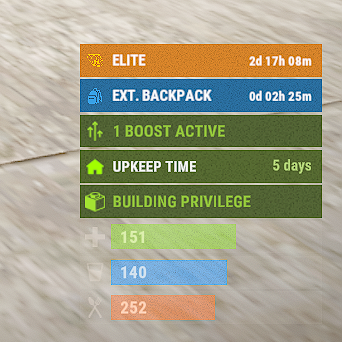
The plugin allows you to display time to expiration for permissions or groups. Features: Detailed and elegant display of your permissions and groups. Detailed customization of everything Ability to customize text for different languages to reach players from different countries. Ability to enable status display only in the authorized area of the cabinet Ability for a player to disable status display Optimized (static) status mode available Automatically generate language files for all languages, you just need to write your text. Permissions: permissionstatus.hide - this permission is used for status switching by the player. IMPORTANT: If you give this to any group, the statuses will not work. Chat Commands: ps.toggle - status display switch for a player Default Config { "ExampleGroupOrPerm": { "true - Group | false - Permission": true, "Display Mode (0 - Time, 1 - Static)": 0, "[Time display mode] Update Interval (in seconds)": 60.0, "Only show in authorized cupboard area": false, "Icon Url": "default", "Time Format": "d\\d\\ hh\\h\\ mm\\m", "Background Color": "0.16 0.44 0.63 0.85", "Icon Color": "0.22 0.63 0.90 0.9", "Title Color": "1 1 1 1", "Text Color": "1 1 1 1" } } Default Lang: { "HideMessage": "You have hidden the statuses of timed permissions.", "ShowMessage": "You have enabled the display of timed permissions statuses.", "ExampleGroupOrPerm": "ExampleGroupOrPerm" } Example Config: { "Elite": { "true - Group | false - Permission": true, "Display Mode (0 - Time, 1 - Static)": 0, "Only show in authorized cupboard area": false, "Icon Url": "default", "Time Format": "d\\d\\ hh\\h\\ mm\\m", "Color": "0.85 0.52 0.17 1", "Icon Color": "1 0.8 0 1", "Text Color": "1 1 1 1", "Subtext Color": "1 1 1 1" }, "backpackpro.size42": { "true - Group | false - Permission": false, "Display Mode (0 - Time, 1 - Static)": 0, "Only show in authorized cupboard area": false, "Icon Url": "https://static.thenounproject.com/png/74337-200.png", "Time Format": "d\\d\\ hh\\h\\ mm\\m", "Color": "0.16 0.44 0.63 1", "Icon Color": "0.22 0.63 0.90 1", "Text Color": "1 1 1 1", "Subtext Color": "1 1 1 1" } } Example Lang: { "Elite": "Elite", "backpackpro.size42": "Ext. backpack" }$15.00- 46 comments
- 3 reviews
-
- 4
-

-
- #timedpermissions
- #statusbar
- (and 7 more)




.thumb.png.ccf8a947948c9eb1445ad21a7931247b.png)
