Search the Community
Showing results for tags 'planter'.
Found 5 results
-

Version 1.3.0
190 downloads
FarmPro turns regular planter boxes into a fully automated, wireless farming system. No pipes, no cables—just place a FarmPro barrel anywhere, and nearby planters will instantly link over the air. It takes care of everything for you: planting, watering, cloning, fertilizing, harvesting, and even generating special items. All of this happens virtually, with no visible devices or messy connections. Whether you're growing hemp, berries, potatoes, or something more exotic, FarmPro makes your farm faster, cleaner, and way more fun to manage. What You Can Do with FarmPro Plant and harvest automatically – Seeds and clones are planted into empty sockets, and ripe crops are harvested or cloned depending on your settings. Go 100% wireless – No industrial piping or power required. Planters connect wirelessly within a radius that you define. Choose between clone or harvest mode – Each planter can be switched between cloning or harvesting, and you'll see visual feedback when it's changed. Use simulated farming hardware – Sprinklers, heaters, and lights work virtually—no deployables. Craft special items – Combine specific fertilizers with plants and gene patterns to generate rare, customized items with unique names and effects. Access an in-game shop – Use a clean UI to buy FarmPro gear, fertilizers, and consumables. You can even sell items back for scrap or RP. Add NPC vendors – Spawn a FarmPro seller at the Outpost or anywhere you want, with a visible map marker and fully configurable stock. Special Items with Real Buffs Grow plants using the right fertilizer and genes to generate rare items like: Ore Booster – Boosts mining yield and radiation resistance Beer of Strength – Gives cooling and comfort Recovery Balm – Increases max health and speeds up healing Energy Bloom – Makes you run and ride faster Recycler Fuel – Increases scrap yield and vision in darkness Each item is visually distinct and applies real, timed modifiers when used. Player Groups and Permissions You can set up multiple player tiers with different farming powers. For example: Control how many planters a player can use Adjust the wireless detection radius Set cloning and harvesting multipliers per crop Choose whether new planters start with full water Enable or disable access to the in-game shop You might have a "Default" group, and then extra perks for VIP1, VIP2, VIP3, VIP4, and Admins—each with more benefits. Useful Chat Commands /farmpro.give – Gives yourself a FarmPro box (permission: farmpro.give) /farmpro.menu – Opens the shop menu (only if allowed by your tier) /farmpro.spawnnpc – Spawns a vendor NPC where you're standing /farmpro.removenpc – Removes the nearest FarmPro NPC /farmpro.planters – Shows how many planters are currently on the server (admin only) /farmgive <identifier> <amount> <playerName|playerId> Parameters: <identifier>: The unique identifier for the custom item to be given. <amount>: The number of items to give. If the value is invalid or less than 1, it defaults to 1. <playerName|playerId>: The target player's display name or Steam64 ID. Shop and Economy Integration FarmPro supports Scrap, Economics, and ServerRewards. All prices, items, and categories are fully configurable. Here’s the default FarmPro item setup: "Item Short Prefab Name": "box.wooden.large", "Item SkinID": 3529006189 You can also add your own items and fertilizers to the shop. Plugin Compatibility FarmPro works great alongside: Ganja – Integrates with cannabis-related plants and items SkillTree – Grants XP and activates buffs on harvest Economics, ServerRewards – All fully supported Why Server Owners Love It No visible wiring or clutter Custom farming economy that players can grow into Clean, mobile-friendly UI Flexible configuration and permissions Powerful admin controls Fully monetizable with VIP perks and special items Start farming smarter today. No wires, no mess—just FarmPro. Configuration File$20.00- 50 comments
-
- 1
-

-
- #farm
- #automatic
- (and 6 more)
-
Version 1.0.4
161 downloads
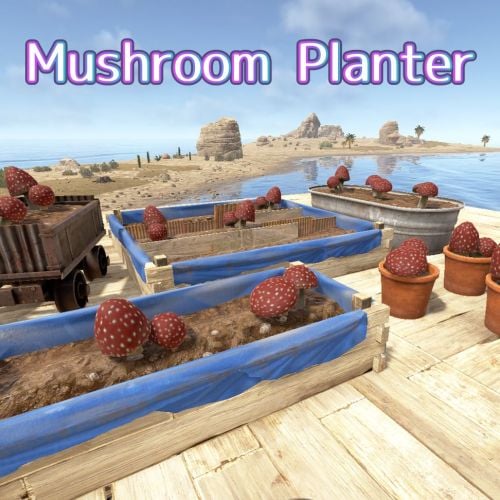
Mushroom Planter MushroomPlanter is a Rust plugin that automatically spawns mushroom clusters in the empty spaces of planter boxes. With just water, your planters will naturally transform into mushroom farms. Product version This plugin is available for purchase as a retail version. This plugin allows you to grow 10 more types of plants. The Mushroom Planter can only grow mushrooms. Features Automatic Mushroom Generation Mushrooms automatically grow in empty planter spaces Compatible with all planter types: large planters, small planters, bathtub planters, minecart planters, and more Works with single plant pots and triangle planters too Water Management System Mushrooms require water to grow Consumes a configured amount of water when spawning No mushrooms will spawn if water is insufficient Randomization Growth chance is configurable (default 80%) Randomly selects from 2 types of mushroom clusters Placed with random rotations Persistence Mushroom positions are saved across server restarts Mushroom positions cleaned up when planters are destroyed How to Use Basic Usage Install the plugin on your server Place planter boxes Supply water to the planters Plant some crops, leaving empty spaces Mushrooms will automatically grow over time Player Consideration Mushrooms won't spawn when players are standing on planters Won't spawn under sleeping players either Harvesting Mushrooms Spawned mushrooms can be harvested just like natural mushroom clusters. Configuration Customize the following settings in the config file MushroomPlanter.json { "MushroomGrowthChance": 0.8, "MushroomGrowthInterval": 1800.0, "MushroomWaterRequired": 100.0, "MinimumWaterForGrowth": 0.0, "RequireFertilizer": false } - MushroomGrowthChance: Probability of mushroom spawning (0.0-1.0, default 0.8 = 80%) - MushroomGrowthInterval: Check interval in seconds (default 1800 = 30 minutes) - MushroomWaterRequired: Amount of water required per mushroom (default 100) - MinimumWaterForGrowth: Minimum water level needed for growth (default 0 , Normally, there is no need to change this.) - RequireFertilizer: Set whether to use fertilizer for mushroom growth Permission mushroomplanter.nogrow - prevents players with this permission from growing mushrooms in their planters. Server Console Command mushroom.clear - Clears all mushroom data and removes currently spawned mushrooms. You can set whether mushrooms require fertilizer to grow. Troubleshooting Q: Mushrooms aren't spawning Check if the planter has enough water Verify there are empty spaces available Wait for the configured growth interval (default 30 minutes) Q: Mushrooms disappeared after server restart Wait approximately 5 seconds for the plugin to fully load Mushrooms should automatically restore Contact VOID / NINJA WORKS X : @QB_WHITE MADE IN JAPANFree -

Version 1.0.4
34 downloads
ExtraPlants Expand your farming with 10+ unique cultivatable plants! ExtraPlants introduces a brand-new farming system that goes beyond vanilla crops. Grow mushrooms, harvest resources from grubs, cultivate fruit trees. By default, all custom items are based on apples. We recommend that you set them to items that can be used with Cooking plugins, etc. This plugin has a trial version. If you are considering purchasing it, please download it here. FEATURES 10 Unique Plant Types • Mushroom - Grows naturally in planters with water and optional fertilizer • Sulfur Grub - Harvestable grub that yields sulfur ore — explodes when attacked ! You need to raise the larvae without being detected by enemies. • Metal Grub - Harvestable grub that yields metal ore • Zombie Soul - Mysterious Soul that yields bones • Aloe - Produces Aloe Vera • Cactus - Low water requirement, yields cactus flesh • Sugarcane - Produces sugar cane • Wood Tree - Grow your own wood supply • Fruits Tree - 15 fruit varieties: Apple, Orange, Strawberry, Cherry, Grape, Lemon, Peach, Pear, and more. • Tropical Fruits Tree - 11 exotic fruits: Mango, Pineapple, Banana, Dragon Fruit, Papaya, and more. • Nuts Tree - 10 nut varieties: Almond, Walnut, Coconut, Pistachio, Cashew, and more. By default, all custom items are based on apples. We recommend that you set them to items that can be used with Cooking plugins, etc. Custom Seeds System • Seeds use the fertilizer item with custom skins • Place seeds in any planter box to start growing • Each plant type has unique growth requirements Fully Configurable Every plant type can be customized: • Growth time intervals • Growth success chance • Water requirements • Drop items and quantities • Custom item names and skins • Death/consume probability for grubs COMMANDS PERMISSIONS extraplants.mushroom.nogrow - Prevents mushroom growth in player's planters Chat Commands (Admin Only) /seed Obtain 100 seeds of each type. Console Commands giveseed <steamID> <skinID> <amount> - Give special seeds to a player. Entering only "giveseed" will show the names of all plants. Aloe Sapling 3601726840 Cactus Sapling 3601727134 Tropical Fruits Tree Sapling 3601727963 Fruits Tree Sapling 3601727819 Wood Sapling 3601729292 Sulfur Grub 3601729483 Metal Grub 3601729552 Zombie Soul 3601727291 Sugarcane Sapling 3601727002 Nuts Tree Sapling 3601727388 Give Seed Example: giveseed 76561198000000000 3601726840 10 (Give 10 Aloe Sapling to 76561198012345678) Configuration Options For All Plants: • Growth Time (seconds) - Time between growth checks • Growth Chance (0.0-1.0) - Probability of successful growth • Water Required - Minimum water level needed • Seed Skin ID - Custom skin ID for the seed item For Harvestable Plants: • Max Drop Types Per Harvest - Number of different items dropped • Drop Items - List of items with amounts and drop chances For Grubs: • Probability Of Death (0.0-1.0) - Chance the plant dies after harvest HOW IT WORKS 1. Obtain Seeds - Admins give seeds using the giveseed command 2. Plant Seeds - Place seed (fertilizer with custom skin) in any planter 3. Water Plants - Ensure adequate water level for growth 4. Wait for Growth - Plants grow based on configured intervals 5. Harvest - grown plants to collect resources Special Mechanics • Sulfur Grub - Explodes when attacked Explosion Conditions The player attacks the sulfurous body with an axe or gun. The planter box containing the sulfurous is destroyed by the player or NPC, or is destroyed by weathering. (Pickup collection does not cause an explosion.) • Trees - Support multiple fruit types per harvest • Mushrooms - Can optionally require fertilizer for growth (config) FAQ Q: How do players obtain seeds? A: Seeds can only be given by server admins using the console command: giveseed <steamID> <skinID> <amount> You can integrate this with your server's shop plugin or reward system. Q: Do plants survive server restarts? A: Yes! All plant data is automatically saved and restored when the server restarts. The plugin uses persistent data files to track all planted seeds and their growth states. Q: Can I customize the drop items and amounts? A: Absolutely. Every plant type has fully configurable drop settings in the config file. You can change item types, quantities, drop chances, custom names, and skin IDs. Q: What happens if I attack the Sulfur Grub? A: The Sulfur Grub will explode, dealing 500 damage within a 12-meter radius. This is intentional — harvest it normally by interacting with it instead of attacking. Q: Why aren't my plants growing? A: Check the following: • Ensure the planter has enough water (each plant type has different requirements) • Verify the growth chance in config is set properly (0.0-1.0) • Check if the player has the "extraplants.mushroom.nogrow" permission (for mushrooms) • Wait for the configured growth interval to pass Q: Can I add my own custom plants? A: The current version supports 10 pre-configured plant types. Each plant type's drops, growth times, and requirements are fully customizable through the config file. Q: Do the fruit trees drop all fruits at once? A: No. The "Max Drop Types Per Harvest" setting controls how many different fruit types drop each harvest. For example, if set to 3, players will receive 3 random fruit types from the configured list. Q: What's the difference between Grubs and other plants? A: Grubs (Sulfur Grub, Metal Grub, Zombie Soul) have a "Probability Of Death" setting. After each growth cycle, there's a chance the grub will die and need to be replanted. Regular plants like trees continue producing indefinitely. Q: Which planters are supported? A: All vanilla planter types are supported: • Large Planter Box • Small Planter Box • Bathtub Planter • Minecart Planter • Railroad Planter • Triangle Planter • Single Plant Pot Q: Can players craft the seeds? A: No, seeds cannot be crafted by default. They must be distributed by admins. This gives you full control over your server's economy and progression. Q: Are the custom skins included? A: Yes, all skin IDs are pre-configured and included. The skins are applied automatically when seeds and harvested items are created. Q: Can I change the seed item from fertilizer to something else? A: The current version uses fertilizer items with custom skins as seeds. Changing the base item would require code modification. Q: How do I give seeds to offline players? A: The giveseed command works with sleeping players too. As long as the player has logged in at least once, you can give them seeds using their Steam ID. Q: What happens if a player's inventory is full when receiving seeds? A: The seeds will be dropped on the ground near the player's position. Contact VOID / NINJA WORKS X : @QB_WHITE MADE IN JAPAN$20.00- 9 comments
- 1 review
-
- 4
-
-
- #rust
- #facepunch
- (and 12 more)
-
Version 1.0.8
565 downloads
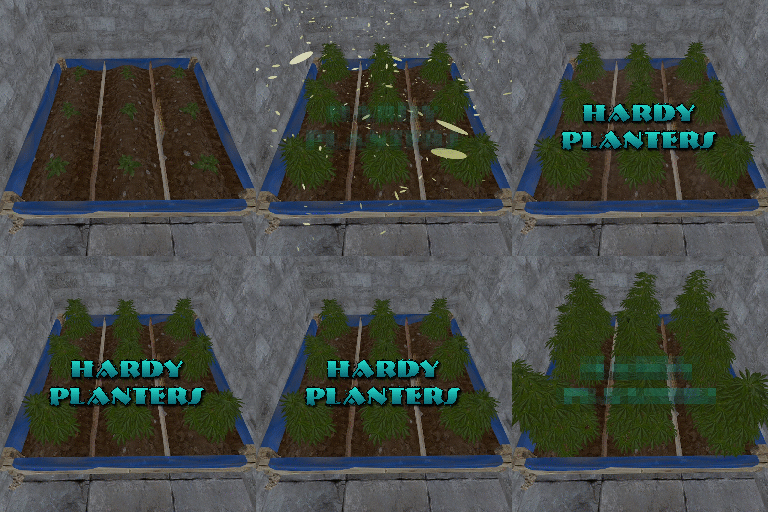
Hardy Planters creates customizable planter boxes that do not require water, sunlight, fertilizer or temperature to grow. The plugin allows server owners to create their own profiles for planter boxes, allowing for the modification of overall quality and growth gene multiplier, directly affecting how quickly all plants will grow. This allows for some unnaturally fast plant growth, if set above the default value. The plugin works by preventing the default logic on the planter boxes, and instead adds it's own behavior to control it. It is compatible with servers that adjust the "planttick" and "planttickscale" convars as well. The following video show cases and explains how the plugin's functionality. Command (chat): giveplanters Parameters: Nil Description: Gives the user one of each planterbox from the config Command (console): givehardyplanter Parameters: <target player ID or name> <profile skin ID or display name> Description: Gives the target player a planterbox that matches the specified profile. Useful in shops etc. hardyplanters.admin - Required to use the commands. hardyplanters.use - Required to find the planter boxes in loot containers. hardyplanters.drop - Required to find planterboxes while looting.$9.99 -
Version 1.0.1
12 downloads
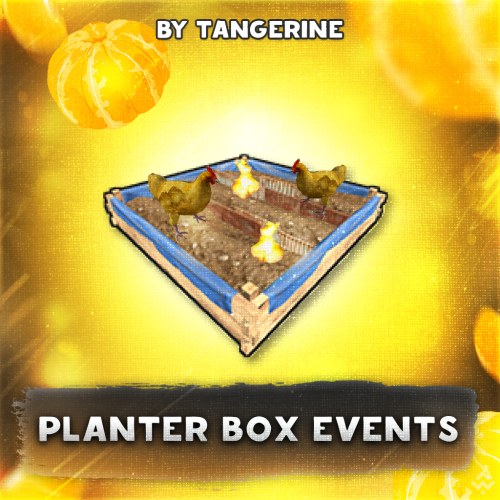
Planter Box Events - this plugin will add unique farming events to your server. Players will need to keep an eye on their farms so that it doesn't go up in flames or the seedlings aren't destroyed by chickens. If you have idea about other events that could be implemented, let me know in DMs or discussion section. Configuration { "Chicken event properties": { "Damage per second": 1.5, "Chance to start event (range: 0 - 1, -1 to off event)": 0.1 }, "Fire event properties": { "Damage per second": 2.5, "Chance to start event (range: 0 - 1, -1 to off event)": 0.1 }, "Time interval in seconds between each attempt to initialize events": 60.0 } Permissions planterboxevents.use - events will be applied to the owners of planter boxes with this permission. How it works? Contacts Need help or custom plugin for your server? Contact me using Discord: metangerine ----------------------------------------------------------------------$15.00