Search the Community
Showing results for tags 'prefix'.
Found 3 results
-

Version 1.0.0
1 download
EssentialsX — the lightweight “essentials” your Rust server actually needs Give your players the quality‑of‑life features they expect — without bloat. EssentialsX bundles the most-used commands into one clean, configurable plugin, Teleportation done right: TPA + Homes with warmup, cooldowns, movement/damage cancel, hostile checks. Kits system: permissions, cooldowns, inventory-space protection, and an admin command to create kits straight from your inventory. Modern chat experience: configurable chat format with {GROUP}/{NICK}/{MESSAGE}, Minecraft-style & colors, permission-based group tags. AutoMessages: scheduled server announcements with & colors. Wipe timer that fits your schedule: weekly / biweekly / monthly wipe schedules. Admin tools: broadcast announcements and inventory view (/invsee) with view-only mode by default. Full control: every module can be toggled via Features (enable/disable) and hidden automatically. Multi-language: all messages live in config and can be edited per language. Main Features - TPA teleport requests with timeout, warmup, cooldown, and cancel on movement/damage - Homes with limits, warmup, cooldown, and cancel on movement/damage - Kits with per-kit permissions and cooldowns - Admin kit creation that reads the creator’s inventory and saves it into config - Private messages (/msg) and quick reply (/r) - /pop online counter - /wipe countdown based on a configurable schedule (weekly/biweekly/monthly) - Admin broadcast messages - Inventory view (invsee) for admins - Chat formatting with {GROUP}/{NICK}/{MESSAGE} and Minecraft-style color codes (&0..&f, &r) - Multi-language messages (EN/RU/PL/ES/DE) via config - AutoMessages (periodic server messages) via config MORE FEATURES COMMING SOON! Installation 1) Copy the file `EssentialsX.cs` into your server’s plugins folder: oxide/plugins/EssentialsX.cs 2) Reload or restart the server: oxide.reload EssentialsX 3) Edit the generated config file: oxide/config/EssentialsX.json COLOR CODES: &0 black &1 dark blue &2 dark green &3 dark aqua &4 dark red &5 dark purple &6 gold &7 gray &8 dark gray &9 blue &a green &b aqua &c red &d light purple &e yellow &f white CONFIG Default "Chat": { "Format": "[{GROUP}] <{NICK}> {MESSAGE}", "UseMinecraftColors": true, "AllowPlayerMessageColors": true, "PermissionPrefixes": [ { "Permission": "essentialsx.prefix.admin", "Prefix": "<color=#FF5555>ADMIN</color>", "Priority": 100 }, { "Permission": "essentialsx.prefix.vip", "Prefix": "<color=#FFAA00>VIP</color>", "Priority": 10 } ] }, Modern example: "Chat": { "Format": "{GROUP} &7{NICK} &b» &7{MESSAGE}", "UseMinecraftColors": true, "AllowPlayerMessageColors": true, "PermissionPrefixes": [ { "Permission": "essentialsx.prefix.admin", "Prefix": "<color=#FF5555>[ADMIN]</color>", "Priority": 100 }, { "Permission": "essentialsx.prefix.vip", "Prefix": "<color=#FFAA00>[VIP]</color>", "Priority": 10 } ] }, Example of language coloring: default "Help.Header": "EssentialsX commands (page {0}/{1}):", Custom "Help.Header": "&eEssentialsX commands (&fpage {0}&c/&f{1}&e):", Languages (Server-wide) - Set the server language in config: Language: "en" | "ru" | "pl" | "es" | "de" - All plugin messages will use the selected language. Player Commands TPA - /tpa <name> Sends a teleport request to another online player. - /tpaccept Accepts the pending request (teleports the requester to you). - /tpdeny Denies the pending request. Notes (TPA) - Requests expire after a configurable timeout. - Teleport uses warmup time (countdown). - Teleport can be cancelled if the teleporting player moves too far. - Teleport can be cancelled if the teleporting player takes damage/hostile. - Cooldowns are saved and survive restarts. Homes - /sethome <name> Saves your current position as a home. - /home <name> Teleports you to the selected home. - /removehome <name> Removes an existing home. - /homes Lists your homes. Notes (Homes) - Home limit can be configured and can also be increased by permission. - Teleport uses warmup time (countdown). - Teleport can be cancelled on movement/damage. Kits - /kits Shows kits you can use (based on permissions). - /kit <name> Redeems a kit. Notes (Kits) - Each kit can have: - Items (with amount, skin, condition, attachments/contents where supported) - Per-kit permission - Cooldown - Kit cooldowns are saved and survive restarts. Messaging - /msg <name> <message> Sends a private message to another online player. - /r <message> Replies to the last player you messaged (or who messaged you). Info Commands - /pop Shows online player count. - /wipe Shows time remaining until next wipe (from config). - /help [page] Shows available player commands (paged). - /help admin [page] Shows available admin commands (paged). Admin Commands Broadcast - /broadcast <text> Sends a server-wide announcement with a configurable prefix. Permission: essentialsx.admin.broadcast Invsee - /invsee <name> Opens the target player’s inventory for viewing (view-only by default). Permission: essentialsx.admin.invsee Create Kit (from inventory) - /createkit <name> <cooldownSeconds> Reads your current inventory (main/belt/wear) and creates/overwrites a kit in config. A permission is automatically created for the kit using the configured prefix. Permission: essentialsx.admin.createkit Permissions Summary - essentialsx.admin.broadcast - essentialsx.admin.invsee - essentialsx.admin.createkit - essentialsx.chat.colors - essentialsx.prefix.admin - essentialsx.prefix.vip Config Overview (Important Keys) Language - Language: "en" (default) Supported: en / ru / pl / es / de Translations / Messages - UseMinecraftColorsInMessages If true, translation strings can use Minecraft color codes (&0..&9, &a..&f, &r). Use && for a literal &. - Messages All translation strings are stored in config. Wipe - Wipe.Mode: "weekly" | "biweekly" | "monthly" - Wipe.TimeZoneOffsetMinutes: 0 - Wipe.Weekly.DayOfWeek: "Thursday" - Wipe.Weekly.Hour: 16 - Wipe.Weekly.Minute: 0 - Wipe.BiWeekly.AnchorUtc: "2026-01-01T14:00:00Z" (used when Mode = biweekly) - Wipe.Monthly.Day: 1 - Wipe.Monthly.Hour: 20 - Wipe.Monthly.Minute: 0 Chat Prefix - Chat.Format Supports Minecraft-style color codes (&0..&9, &a..&f, &r) and placeholders: {GROUP}, {NICK}, {MESSAGE} - Chat.UseMinecraftColors If true, color codes in Chat.Format are converted to Rust <color=#...> tags. - Chat.AllowPlayerMessageColors If true, players with permission essentialsx.chat.colors can color their own message by typing & codes (e.g. "&2Hejka"). - Chat.PermissionPrefixes List of permission-based group tags (used for {GROUP}) with priority. Features (enable/disable) - Features (enable/disable) Toggle each module on/off. Disabled features do not work and are hidden from /help. Teleport (TPA) - Teleport.RequestTimeoutSeconds - Teleport.WarmupSeconds - Teleport.CooldownSeconds - Teleport.BlockIfHostile - Teleport.CancelOnDamage - Teleport.CancelOnMoveDistance - Teleport.SleepBeforeTeleportSeconds - Teleport.SleepAfterTeleportSeconds Home - Home.WarmupSeconds - Home.CooldownSeconds - Home.BlockIfHostile - Home.CancelOnDamage - Home.CancelOnMoveDistance - Home.SleepBeforeTeleportSeconds - Home.SleepAfterTeleportSeconds - Home.DefaultLimit - Home.LimitsByPermission Kits - Kits.PermissionPrefix (default: "essentialsx.kit.") - Kits.KitDefinitions Messaging - Messaging.SentPrefix - Messaging.ReceivedPrefix Broadcast AutoMessages - Features (enable/disable).AutoMessages - AutoMessages.IntervalSeconds - AutoMessages.Random - AutoMessages.MinOnline - AutoMessages.UseMinecraftColors - AutoMessages.Messages - Broadcast.Prefix Invsee - Invsee.TimeoutSeconds - Invsee.AllowModify$2.49 -

Version 1.0.2
402 downloads
This plugin will allow you to hide/show your prefix in global chat. This plugin only works with BetterChat and will not work without it. Configuration { "Prefix": "<color=#42f566>Prefix Visibility:</color>", "Commands": [ "tag", "prefix", "toggleprefix", "toggletag", "hideprefix", "hidetag" ], "Permission Required": false, "Permission": "prefixvisibility.use", "Remove Only Listed": true, "Remove Titles": [ "[Owner]", "[Moderator]", "[Administrator]" ] } Prefix - This will be the prefix for the messages provided in chat Commands - This is an array off commands that can be used to toggle your prefix visibility Permission Required - Determines if a permission is required to use the commands/plugin Permission - The command used to provide access (if you require it) Remove Only Listed - Removes only the provided titles (WARNING: This can and will break things like Name Color, Clans, etc. if you have this disabled) Remove Titles - This is the list of tags that will be removed (Including brackets if you use them)Free- 5 comments
-
- 1
-

-
- #chat prefix
- #prefix
- (and 2 more)
-
Version 1.3.0
19 downloads
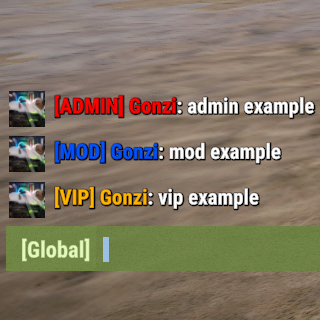
This is the Paid PLUS Version of the Chat Prefix plugin on uMod. What the uMod Version does NOT have: FakeNames (fake name, fake avatar, fake Prefix) More Updates - new functions of the unpaid version 7 days bevore the uMod release Planned: Multiple Prefixes instead of only one Permissions chatprefixplus.< config.Permission > - assigns the prefix as entered in the config. chatprefixplus.fakeName - needed for the /fakeName command Features of PLUS Version unlimited (colored) prefixes configurable in the config file Possibility to set prefixes per language (en, de, etc.) Possibility to use Groupnames instead of permissions. Fakenames (Name, Prefix, Avatar) Config file In the config file you have tree sample entrys, you can add more prefixes in the config file. If you enter "yourPermission" in the "Permission" field your permission will be `chatprefixplus.yourPermission`.$7.99
.thumb.png.9d49d03b0e808268ad5fdc77d655118d.png)