Search the Community
Showing results for tags 'range'.
Found 5 results
-
Version 1.0.8
65 downloads
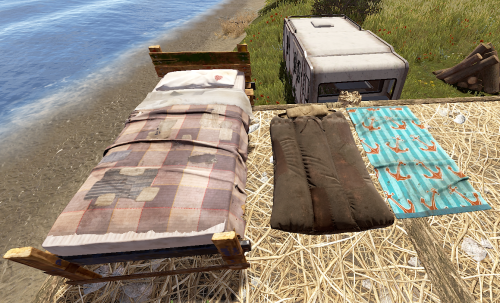
Allows complete individual settings of Beds, Towels, Bags & Campers using Permissions or Global setters with radius, limits Unlock Time, Respawn Cooldown! Improves server/client performance by auto-managing players bag limits & radius! You can assign a bed to a friend on your friends list in game & when they join it will give them the invite to join your team to get the bed/bag/towel/etc! Notes: Better Vanish ( the paid version ) has known bugs with chat commands not working while in vanish. To resolve the problem leave vanish mode. Permissions You can add or remove as many permissions as you'd like in the config! Player Chat Commands /bag <Shows just the limits & how many of what you have placed.> /bag bags | towels | beds | campers <Selects & shows how many of the specific bag you have placed down.> /bag towels clear | rename | limits /bag towels clear <Clears all of the selected bag type from the player that ran the command> /bag towels rename dingus <Renames all of the selected bag type to the new name> Configuration { "Toggle Offline Team Invite System through bag gifting. Default: Off": false, "# of players that can place a spawn point in a zone radius": 16, "Player Respawn Zone Radius Check": 35, "Sets Global Defaults": { "True Only Owner can set name | False Allows team members": false, "Sets Total Max Limit within a radius": 12, "Sets Limit radius": 35, "Sleeping Bags": { "DefaultTextName": "Unnamed Bag", "SecondsBetweenReuses": 300.0, "UnlockTime": 30.0 }, "Towel Bags": { "DefaultTextName": "Unnamed Towel", "SecondsBetweenReuses": 300.0, "UnlockTime": 30.0 }, "Beds": { "DefaultTextName": "Bed", "SecondsBetweenReuses": 120.0, "UnlockTime": 30.0 }, "Camper Bags": { "DefaultTextName": "Unnamed Camper Seat", "SecondsBetweenReuses": 120.0, "UnlockTime": 30.0 } }, "Player Permissions": { "vip1": { "True Only Owner can set name | False Allows team members": false, "Sets Total Max Limit within a radius": 12, "Sets Limit radius": 35, "Sleeping Bags": { "DefaultTextName": "Unnamed Bag", "SecondsBetweenReuses": 150.0, "UnlockTime": 20.0 }, "Towel Bags": { "DefaultTextName": "Unnamed Towel", "SecondsBetweenReuses": 150.0, "UnlockTime": 20.0 }, "Beds": { "DefaultTextName": "Bed", "SecondsBetweenReuses": 60.0, "UnlockTime": 20.0 }, "Camper Bags": { "DefaultTextName": "Unnamed Camper Seat", "SecondsBetweenReuses": 150.0, "UnlockTime": 20.0 } }, "vip2": { "True Only Owner can set name | False Allows team members": false, "Sets Total Max Limit within a radius": 12, "Sets Limit radius": 35, "Sleeping Bags": { "DefaultTextName": "Unnamed Bag", "SecondsBetweenReuses": 75.0, "UnlockTime": 15.0 }, "Towel Bags": { "DefaultTextName": "Unnamed Towel", "SecondsBetweenReuses": 75.0, "UnlockTime": 15.0 }, "Beds": { "DefaultTextName": "Bed", "SecondsBetweenReuses": 30.0, "UnlockTime": 15.0 }, "Camper Bags": { "DefaultTextName": "Unnamed Camper Seat", "SecondsBetweenReuses": 75.0, "UnlockTime": 15.0 } } } }$9.99 -

Version 1.0.0
31 downloads
TreasureEvent.cs Description : - This plugin offers a complete treasure hunt event system for your Rust server, with real-time distance tracking and customizable loot rewards. Settings : - HUD colors - Event duration (in F1 commands) - Server message (true/false) - Items (customize everything you want in the treasure, even the skins of the items) Server message = true (you need the ServerMessage.cs plugin, https://codefling.com/plugins/server-message) Server message = false (these messages will appear in the global chat, replacing the UI) F1 Commands : - t.start <x> <z> <time> (the treasure appear in a specific location) Permissions : - ownerid <steamID/user> WuyZar's Discord : https://discord.gg/NVwRcQwGwh Game interface :$3.50 -
Version 1.0.1
24 downloads
xAutoTurret360 xAutoTurret360 removes the default firing-arc limitations on auto turrets in Rust - Allowing them to instantly track and engage targets in a full 360° radius. This upgrade makes turret behavior more aggressive and responsive, ideal for heavy-defense bases, PvP arenas, PvE full-base protection or any custom game mode requiring all-round turret coverage. Performance optimized! The patch is executed only once when plugin is loaded/reloaded. Features 360° Targeting Turrets can engage targets from any direction. (360°) Console Command xautoturret360.toggle // Toggles the 360° functionality on or off. Config { "Enabled": true }$4.99 -
Version 1.03
9 downloads
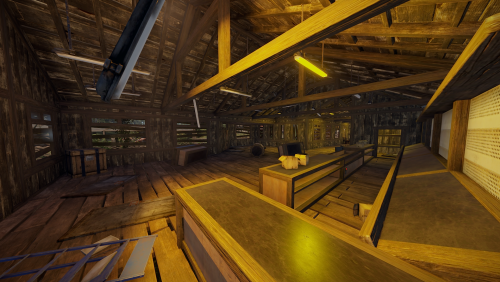
A shooting range with working scoreboards and two loot rooms, one is accessed via a fuse and panic button and the other accessed by a fuse + shooting every target in a single game on range 3. Also includes plugin to change skins on targets, change damage to knockdown and change the reset time. Prefab count – Version 1 : 3993 Prefab count – Version 2 : 3365 Details – Version 1 Range 3 mini game, shoot all 20 targets in one game to open the loot room Has io on all three ranges with scoreboards and timed games. Visitors center has a gun shop with loot panic room Details – Version 2 Less prefabs and no io to increase server performance Abandoned trashed visitors center$9.99 -
Version 2.2.0
81 downloads
FEATURES Turret Fury is a configurable plugin that allows total customization of Auto Turrets, Flame Turrets, Landmines, SAM Sites, Shotgun Traps & Tesla Coils through allowing configuration of; • Damage • Range • Accuracy • Bullet Speed • Trigger Duration • Arc • Explosion Radius • Scan/Sensing Radius • Amount of Pellets (Shotgun Traps) & More!* *See the config below for full list of configurables INSTALL To install, simply copy & paste the plugin (TurretFury.cs) as-is into your server plugins folder: ..\oxide\plugins\ CONFIG To configure; 1. Ensure you have loaded the plugin successfully in your server (this will automatically create a respective config file) 2. Open the plugin config file (TurretFury.json) in your config folder: ..\oxide\config\ 3. Adjust to the desired values 4. Save the config file & reload the plugin ("oxide.reload TurretFury”) (config preview below) { "Auto Turret": { "Enabled": true, "Infinite Ammo": false, "Health (Default 1000)": 1000.0, "Range (Default 30)": 30.0, "Bullet Speed (Default 200)": 200.0, "Aim Cone (Default 4)": 4.0, "Damage Scale (Default 1.0)": 1.0, "Ignored Shortnames": [ "sentry.scientist.static", "sentry.bandit.static" ] }, "Flame Turret": { "Enabled": true, "Fuel Per Sec (Default 0.5)": 0.5, "Health (Default 300)": 300.0, "Range (Default 4)": 4.0, "Arc (Default 45)": 45.0, "Trigger Duration (Default 4)": 4.0, "Damage Scale (Default 1.0)": 1.0, "Ignored Shortnames": [] }, "Landmine": { "Enabled": true, "Health (Default 100)": 100.0, "Min Explosion Radius (Default 2)": 2.0, "Max Explosion Radius (Default 3)": 3.0, "Damage Scale (Default 1.0)": 1.0, "Ignored Shortnames": [] }, "SAM Site": { "Enabled": true, "Requires Power": true, "Health (Default 1000)": 1000.0, "Damage Scale (Default 1.0)": 1.0, "Missile Scan Radius (Default 225)": 225.0, "Vehicle Scan Radius (Default 150)": 150.0, "Ignored Shortnames": [] }, "Shotgun Trap": { "Enabled": true, "Infinite Ammo": false, "Health (Default 300)": 300.0, "Sensor Radius (Default 1.25)": 1.25, "Aim Cone (Default 40)": 40.0, "Pellets (Default 20)": 20.0, "Damage Scale (Default 1.0)": 1.0, "Ignored Shortnames": [] }, "Tesla Coil": { "Enabled": true, "Requires Power": true, "Health (Default 250)": 250.0, "Range (Default 3)": 3.0, "Max Damage Output (Default 35)": 35.0, "Max Discharge Self Damage Seconds (Default 120)": 120.0, "Damage Scale (Default 1.0)": 1.0, "Ignored Shortnames": [] } } PERMISSIONS turretfury.use -- Required for TurretFury configuration to apply to player’s auto turrets FAQ Q: Does the Turret Fury plugin work with any Turret weapon? A: Yes, this plugin works with all Turret deployable weapons, from the revolver to the AK and everything in between. Q: How do I know what range to configure? A: This is completely up to you. A typical range configuration that our community of server admins have been using is 70.0, with some PVE servers increasing to around 100.0 Q: Will increasing Turret range and damage affect the static turrets at monuments? A: By default, this plugin does not affect/apply to any monument turrets (Bandit Camp / Compound / Fishing Village) to avoid nuisance deaths. Note the "Ignore Turret Shortnames" section of the config file addresses this. It is strongly recommended not to adjust this. Q: Does/can the plugin use permissions? A: Yes, we have implemented a number of additional features on the back of community feedback, one of these is a basic permissions system wherein users require the below permission in order to have their autoturrets use TurretFury's configuration; turretfury.use For more information, see https://umod.org/documentation/plugins/permissions/ or (https://codefling.com/plugins/permissions-manager/) Q: Will there be more features added in future? A: Yes, we have more functional improvements and additions coming soon, as well as a roadmap of ideas for future updates. If you have ideas or anything you would like to see included: please share them in the Discussion tab - they will be considered and, with enough upvotes, added to the dev roadmap. Happy turreting, and stay frosty. Discord: Dooogs#2145$19.95