Search the Community
Showing results for tags 'repair'.
Found 15 results
-

Version 1.2.0
243 downloads
What is it? Revolutionize your crafting experience with the Smart Workbench! Say goodbye to the repetitive clicking and hello to convenience and efficiency. This enhancement takes ordinary workbenches to the next level by simplifying research and repairs. Let your players focus on the fun, not the clicking; make their adventures smoother, faster and more enjoyable. Usage * Research all remaining blueprints with just one click - no more tedious individual unlocks! * Seamlessly access a Virtual Repair Bench or Research Table directly from the workbench. It's the ultimate quality-of-life improvement for any Rust server. Command /sw -- Opens UI menu (if player has workbench level 1+) Permissions smartworkbench.use -- Gives user permission to see and use the Smart Workbench Features Virtual Repair Bench Virtual Research Table Research All button Supported plugins: Server Rewards Economics (UI before Rust update) (UI after Rust update) Configuration { "Research All currency": "scrap", "Rate (Based on scrap)": 1.0, "Type of money (1 = default currency, 2 = Server Reward points, 3 = Economics cash)": 1, "Notify player when their item gets dropped from Smart repair/research table": true } Localization { "SWResearch": "RESEARCH ALL\n{0}\n{1}", "NoResources": "Not enough resources", "Success": "Successfully learned BPs from WB lvl {0}", "AlreadyKnow": "You already know everything from this workbench", "SRPoints": "Points", "Economics": "Cash", "SWResearchTable": "RESEARCH TABLE", "SWRepairTable": "REPAIR TABLE", "SWRange": "You must be close to a Workbench!", "SWT1": "Tier 1", "SWT2": "Tier 2", "SWT3": "Tier 3", "SWLvl": "Workbench level is not high enough!", "NotifyDrop": "Item/s have been dropped on the ground." }$10.00- 28 comments
- 2 reviews
-
- 3
-

-

-
- #smart
- #workbench
- (and 8 more)
-

Version 1.2.8
2,609 downloads
An event for the Arctic Research Base monument with a plot to rescue both a scientist and a pilot that have been captured by the security group who has been ordered to capture and deal with the attempted sabotage on the Arctic Base Description Welcome to a frosty new adventure in the more recently added Arctic Research Base to so many of our islands! This monument will now have an event with a storyline requiring you and your friends to rescue the Pilot, and the Scientist from their captivity by the Arctic Base security service. You don't want to know what will happen to these two if you don't save them! Our new event begins with a notification (if enabled by default) for players to know that a sabotage is about to take place on the island. There is a plot to come collect biological samples from the burned corpse of one of the recently discovered NPCs, class: Sledge. The players will soon find out that the sabotage has failed and that two of our team have been taken captive by the Artic Research security team! Players will need to free them both from this no prisoners no hostages situation, and protect the scientist while he finishes his portion of the mission. Once the Scientist or Pilot are released, snowmobiles will arrive bringing NPCs, tasked simply with killing the Scientist so he will not be able to carry out his task of reverse engineering a way to continue to combat everything they throw at us! Once the Scientist has completed his task, and the Pilot has been released and has prepped the escape helicopter, their evacuation can take place. The will get into their minicopter and begin their departure. Before you leave and as thanks, the Pilot is going to open up a warehouse full of supplies for you! Once you reach this point in the event, there are several options with different amounts of loot within the stash. If you are able to protect the Scientist, and they are able to evacuate with the pilot, then we can better find things of value on comms with the team as they leave and the looting will be most efficient! Be ready, this minicopter is an actual piece of... well it's Rusty! Let the pilot have some extra time if needed to make sure it is running smoothly before they take off. Here and now the security team will send everything they have at you and your friends. Protect the group from the attacks! In the configuration for the plugin you can change timers, NPC settings and numbers, snowmobile and crate numbers, the Scientists health, and the loot tables! As always the configurations are extensive and the creativity is in your hands to customize this plugin to your liking. Can you and your friends help make sure this sabotage takes place, and these rebels make it off the island? Dependencies (optional, not required) True PVE PveMode GUI Announcements Notify Discord Messages AlphaLoot CustomLoot NTeleportation Economics Server Rewards IQEconomic Kits Chat commands (only for administrators) /abstart - start the event /abstop - end the event Console commands (RCON only) abstart - start the event abstop - end the event Plugin Config en - example of plugin configuration in English ru - example of plugin configuration in Russian Hooks void OnArcticBaseEventStart() – called when the event starts void OnArcticBaseEventEnd() – called when the event ends void OnArcticBaseEventWinner(ulong winnerId) – called at the end of the event, where the winnerId is the player who did more actions to complete the event My Discord: KpucTaJl#8923 Join the Mad Mappers Discord here! Check out more of my work here!$35.00- 36 comments
- 8 reviews
-
- 6
-
-
-
- #arctic research base
- #ch47
- (and 21 more)
-

Version 1.0.7
71 downloads
Compliment your in game economy system by allowing players to repair weapons using their currency. Economy Repair offers a solution that lets players repair their damaged weapons using in-game currency of your choice. With this plugin, your worn-out AKs, tools, and gear can be repaired through a simple new option in the repair bench, making sure you're always prepared for the next battle! Key Features: Multiple Currency Support: Use popular Rust plugins like Economics or ServerRewards to pay for repairs using your in-game currency. You can even set up custom item-based currencies for repairs! Condition Loss: Condition loss can be disabled, or the scale of it modified. VIP Discounts: Offer VIP players reduced repair costs, providing an extra incentive for premium members of your community. Customizable Repair Costs: Tailor the repair prices for different items, ensuring fair costs for everything from weapons to tools. Repair cost can be set globally, and per item. Clean UI: Enjoy a sleek almost vanilla like repair button that appears when interacting with a repair bench. Instantly know the cost to restore your item and confirm the repair with just a click. Repair Blacklist: Administrators can blacklist certain items from being repaired, maintaining control over game balance and preventing unintended item restorations. How It Works: 1. Interact with a repair bench. 2. Insert item normally into the repair bench 3. See the cost, click the repair button! Economy Repair is your perfect choice for expanding the usefulness of economy on your server. Keep your equipment in top shape without the hassle of searching through boxes to try and find the correct components. PERMISSIONS: economyrepair.use - Required to see and use the economy repair option economyrepair.VIP - Required for VIP discount feature CONFIG EXAMPLE: { "Default Max Repair Cost": 100.0, // default repair cost for all items "Reduce Durability On Repair": true, // should the item lose durability if repaired with currency? "Durability Loss Scaling Factor": 1.0, // play with this to increase/reduce how much durability is lost "Currency System (Economics, ServerRewards, Item, TCBank)": "Economics", //which currency system to use "VIP Discount Percentage": 0.0, // percentage discount for players with VIP permission "Currency Item": { // If using "Item" as currency, specify item details here "ItemID": 0, "SkinID": 0, "Display Name": "Currency" }, "Custom Repair Costs": { // customize repair cost for individual items "hatchet": 50.0, "pickaxe": 75.0 }, "Repair Blacklist": [ // list of items which cannot be repaired using currency "minigun", "fuse" ], "Blacklisted SkinIDs": [ 3380502905, 987654321 ], "Debug Messages Enabled": false } LANG EXAMPLE: { "RepairCostLabel": "Economy Repair: {0} {1}", "CurrencyLabel": "$", "RepairButtonLabel": "Repair", "NoValidItem": "No valid item to repair.", "MaxDurability": "This item is already at full durability.", "NotEnoughCurrency": "You do not have enough {0} to repair this item.", "RepairSuccess": "Item successfully repaired.", "RepairFailed": "Failed to repair the item. Please try again.", "ItemBlacklisted": "This item cannot be repaired." }$7.98 -
Version 1.1.0
36 downloads
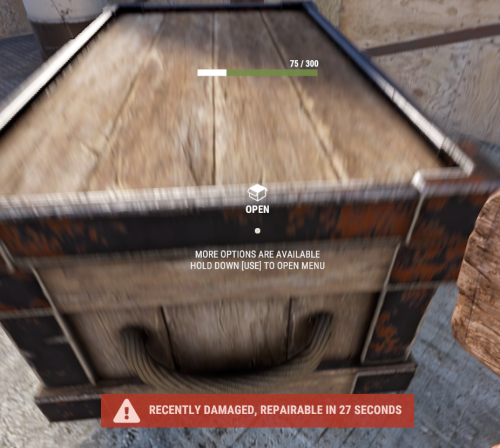
With just one tap, you can fully repair your base blocks and base items—no more having to tap repeatedly! Includes permission support and is optimized for top performance, with rotation & demolition support! Features * One Tap Repairs - Supports Base Blocks & Base Items & Vehicles, etc * Rotation - Re-Enables Base Blocks for easy native rotation again! * Demolition - Re-Enables Base Blocks for easy native demolition again! Permissions betterhammer.use ( required to do full 1 tap hit repairs with hammer & to use any features/functions )$4.99 -
Version 1.1.11
1,866 downloads
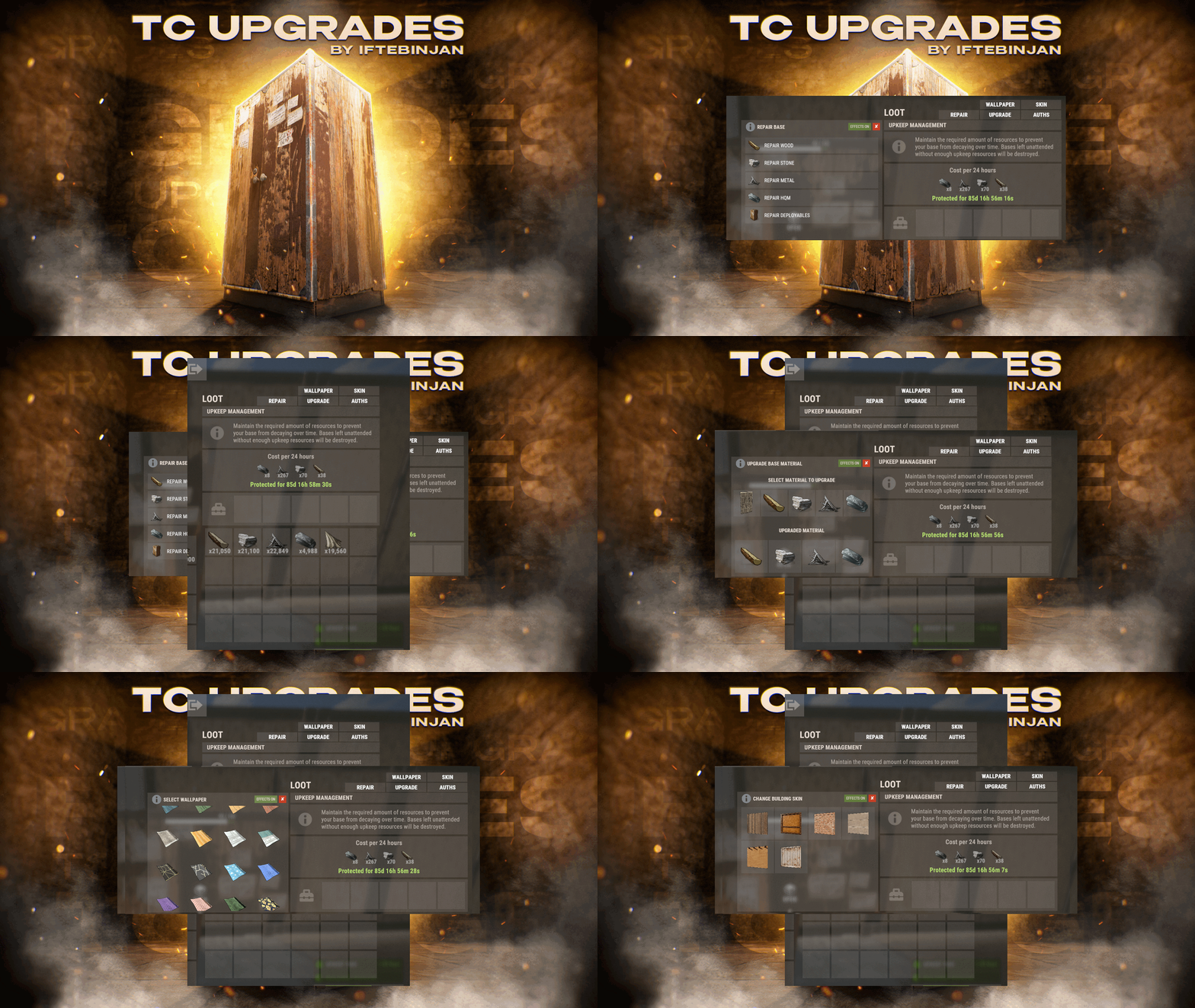
TC Upgrades provides an efficient and optimized way to enhance your base directly from the Tool Cupboard. With this plugin, you can easily change building grades, switch building skins, repair structures or deployables, and even set up wallpapers on your base, streamlining your base management process. Key Features Multi-TC Support Authorization List on Tool Cupboard Upgrade Building Grades Change Building Skins Repair Structures and Deployables Apply Wallpapers Detailed Permissions VIP Features User-Friendly UI Video Showcase Permissions TCUpgrades.admin- Shows a UI Change button when in admin mode (command: /tcuadmin) TCUpgrades.authlist - Shows Authorization list button on TC TCUpgrades.upgrade - Shows upgrade button on TC TCUpgrades.repair - Shows repair button on TC TCUpgrades.skin - Shows skin button on TC TCUpgrades.wallpaper - Shows wallpaper button on TC TCUpgrades.upgrade.nocost - Allows player to use no resources when upgrading TCUpgrades.repair.nocost - Allows player to use no resources when repairing TCUpgrades.reskin.nocost - Allows player to use no resources when reskining TCUpgrades.wallpaper.nocost - Allows player to use no resources when setting wallpaper TCUpgrades.default - Allows player to use (wood, stone, metal, hqm & deploy) TCUpgrades.wood TCUpgrades.stone TCUpgrades.metal TCUpgrades.hqm TCUpgrades.deploy Configurations Support$14.99- 68 comments
- 7 reviews
-
- 3
-
-
-
- #upgrade
- #toolcupboard
- (and 7 more)
-

Version 2.0.3
749 downloads
This plugin will add variable custom quarries and pumpjacks to your server. You can create any amount of different quarries and pumpjacks! You can get the fastest support in our Discord: Alias™ dev. Features Prefab substitution You can avoid using survey charges for installing quarries. Static quarries All 4 type of statics (pumpjack, stone, sulfur, HQM) can be configured separately. Toggle & Loot protection Each quarry have their own protection settings. There is also protection system by permissions for static quarries. Built-in remove You can configure different remove and refund settings per quarry. Repair It is very similar to the standard system with all the sounds and effects. It also supports custom items. Build limits Built in options to set limits for quarries and pumpjacks separately. Custom Items You can use any normal and/or skinned items (custom items) as fuel and/or resource production. Fuel system You can set up several different fuel types with different production settings per fuel type. Production system You can set up min/max amount of items and probability chances per item. Permissions You can set up build limits and/or gather rates by permissions and also sum all permission parameters (or not). Upgrade system You can upgrade from one quarry to another using different skin id. UI Adaptive and informative interface made in modern rust-style design so it may seem like part of the game. It will automatically change its size and screen location depending on your quarry settings. Langs You can translate any phrase in the plugin. Performance The plugin completely has its own mechanics, which ensures the best performance even compared to the standard system. This also fixes all of the default quarry bugs. Optimization You can completely disable some of the plugin's functions in the main config. Configuration Main config (oxide/config/aQuarry.json) Static quarries config (oxide/data/aQuarry/StaticQuarries/) Personal quarries config (oxide/data/aQuarry/PersonalQuarries/) Commands quarry.give «SteamID » «SkinID » => give to player the quarry with specified skin from config quarry.giveme => give all quarries from config to self Permissions: aQuarry.admin => allows to use «quarry.give » and «quarry.giveme » commands from in-game console API bool CanBuildCustomQuarry(Planner plan, BasePlayer builder, bool IsQuarryOrPumpjack) // Called right before other built-in checks. // Returning false will cancel the construction. void OnCustomQuarryBuilded(MiningQuarry quarry, BasePlayer builder, bool IsQuarryOrPumpjack) // Called right after player has built custom quarry or pumpjack.$24.00 -

Version 1.6.0
6,266 downloads
Fed up with the need to use multiple addons on my server for functions that players could execute from within the game, and considering the constant increase of new Skins for builds, I found myself dissatisfied with the limited supply of automatic upgrades on the market. For this reason, I have reworked the most used TC-related features on my server into a single plugin, which has been enriched with ideas contributed by players and other Rust administrators. All this under an attractive graphical interface, inspired by the item store of the game itself. Video Update 1.5.0 Video Update 1.4.9 Video Update 1.4.0 Old Video Features AUTOMATIC CONSTRUCTION SKINS With BetterTC your players will be able to improve their builds to any level of improvement, but they will also be able to choose their favorite Skin (if you enable it) completely free of charge or offering it to the VIPS on your server. Update system: I have added a small system that checks for new skins to automatically add them to the configuration. When you install the plugin for the first time and once you obtain permission from bettertc.admin, you must click on "Check Update" so that it performs an internal check and adds all the skins and options that exist to date. LIST OF AUTHORIZED PLAYERS It allows players or simply the rest of the Staff to easily see which players are authorized in the locker. Except for the administrators themselves, if you activate it in the config. (I don't think any player needs to know that the admin was authorized in their locker to check something) You can also allow authorizations to be deleted individually. AUTOMATIC IMPROVEMENT SYSTEM Allows your players to upgrade the grade of their bases automatically by obtaining resources directly from the TC. As long as they don't have RaidBlock (if you use NoEscape/RaidBlock plugin of course). You can configure different speed levels and costs depending on the player's permission from the plugin's own settings. That is, you can have players improve a building every 5 seconds for free and VIPs can improve every 2 or 1... Use your imagination! In addition, you can also calculate the cost of materials that will be required to carry out said improvement by clicking on the info button. A new setting has been added to disable the Container skin's multi-color option. Disabling this option, which is enabled by default, will slightly improve frame rates in builds using this skin: Fewer colors = Better performance (FPS Client). AUTOMATIC RESKIN OF EXTERNAL WALLS The plugin also includes an automatic reskin system for external walls. Previously, it was only compatible with standard stone external walls and their adobe variant. Now, it also includes the ability to switch wooden walls to Frontier and vice versa. Ice walls have also been added as a variant for stone. If you place regular stone external walls (the usual ones), you can change their appearance to adobe or ice by clicking on the corresponding wall icon. When changing the skin, the original wall's health will be preserved, so if it’s damaged, it won’t be fully restored. This prevents players from abusing the system. Important: I recommend using the system for external walls as an appearance modification system, not as an upgrade system. In other words, with the following configuration: "Only reskin on wall of the same grade": true If you disable this parameter, you will be able to change from wood to stone, or vice versa, completely free of charge. Since the wall system doesn’t have a cost mechanism for players, I recommend keeping this option enabled. AUTOMATIC REPAIR SYSTEM Allows your players to repair their bases automatically by obtaining resources directly from the TC. As long as they don't have RaidBlock (if you use NoEscape of course). Now since version 1.4.0 it will also repair damaged objects such as doors, trapdoors, windows, boxes! With configurable cooling system to prevent repair abuse during raids. ("Repair Cooldown After Recent Damage (seconds)": 30.0) AUTOMATIC CONSTRUCTION DEGRADATION It allows players to regret upgrading their huge base to metal and not being able to afford it anymore. Of course, it will charge them resources as if they improved it from 0. However, if you do not want to allow downgrade you can disable it from the config. AUTOMATIC WALLPAPER PLACEMENT Allows your players to place any available wallpaper in the game automatically based on the building type. Support for wallpapers on walls, ceilings, and floors. Wallpapers are always kept up-to-date automatically. So if FacePunch adds new wallpapers, they will be instantly added to the list. You'll also enjoy my exclusive wallpapers. Since update 1.5.0, you can also add and remove custom wallpapers with the following commands. Chat Command: Usage: /addwp <skinid> <Wall|Floor|Ceiling>, Example: /addwp 3356517390 Wall, Console Command: Usage: addwp <skinid> <Wall|Floor|Ceiling>, Example: addwp 3356517390 Wall I've added a new parameter to the config: "Wallpaper Damage": true Setting this parameter to false prevents wallpapers from being broken in melee or with ammunition. However, you can still break them with C4 or missiles. Blocking damage completely is more complex and, in my opinion, unnecessary. In addition, with BetterTC you can place wallpapers on both sides of the walls, even if they are on the outside of the building, as it includes an option in the configuration to force this placement. TC SKINS Give your players the ability to change the appearance of their TC. ALLOWS TO SAVE OLD ITEMS A new configuration option has been added to allow saving items back to the TC. "Allow items in TC inventory": { "gunpowder": false, "sulfur": false, "sulfur.ore": false, "explosives": false, "diesel_barrel": false, "cctv.camera": false, "targeting.computer": false } CONSTRUCTION EFFECTS Allows players to disable auto-build buff effects and reduces headaches.However, if you do not want to allow them to disable this, you can disable it from the config. BETTER GUI The plugin's interface has been programmed so that it maintains its size regardless of the interface scaling settings of each player. It has also been taken into account that perhaps not everyone wants to enable all options for their players. Therefore, the buttons that appear at the top of the TC have been programmed so that if a player does not have permission for a specific function, instead of leaving the space empty, the buttons adapt their position automatically. The player list GUI and construction SKINS have also been prepared with a pagination system if necessary. 95% of the images used in the plugin are loaded directly from the client side, thus optimizing the loading and rendering of the interface and reducing the use of Image Library. Carbon Image Module support. If your server is running Carbon instead of Oxide, it will now use the built-in module instead of the Image Library. Permissions bettertc.admin Exclusive for Admin. It allows you to check if there are new skins to add. You will not appear in the list of authorized players if the option in the settings is activated. bettertc.authlist Shows a button at the top of the TC to check which players are authorized. bettertc.deleteauth Allows you to individually revoke an authorized player. You can give this permission to players if you want them to be able to delete individually. bettertc.use It is the basic degree of use found in the configuration. bettertc.vip It is the level of use for advanced that is found in the configuration. Depending on how you configure it, it makes players with this permission improve/repair/change skin faster. Or it simply costs them less resources. bettertc.repair Displays a button on top of the TC to repair the build automatically. bettertc.repair.nocost No explanation needed I think. (USE WITH CAUTION) bettertc.reskin Allows players to change the skin of their build automatically. Imagine one day you upgrade your entire foundation to container and the next day you regret losing FPS and would like to leave it on normal metal. bettertc.reskin.nocost No explanation needed I think. bettertc.updefault Shows players the default upgrade options. Without SKINS. bettertc.upskin Show players upgrade options with SKINS. bettertc.upwall Allows players to change the skin of external walls. bettertc.upgrade Permission to evade blocking of all items. bettertc.upgrade.nocost No explanation needed I think. (USE WITH CAUTION) bettertc.wallpaper Allows players to place Wallpaper. bettertc.wallpaper.nocost No explanation needed I think. (USE WITH CAUTION) bettertc.wallpaper.custom Display custom wallpapers to players with this permission. bettertc.tcskinchange Allows players to change the TC skin. bettertc.tcskindeployed Allows players to place TC with Skin. Commands Chat Command: Usage: /addwp <skinid> <Wall|Floor|Ceiling>, Example: /addwp 3356517390 Wall, Console Command: Usage: addwp <skinid> <Wall|Floor|Ceiling>, Example: addwp 3356517390 Wall Configuration DEFAULT CONFIGURATION { "Check for updates when loading": true, "Bypass DLC ownership check (⚠ only allowed on creative/test servers per Facepunch rules)": false, "Use NoEscape Plugin": false, "Use RaidBlock Plugin": true, "GUI Buttons TC - Color Default": "0.3 0.40 0.3 0.60", "GUI Buttons TC - Color Active": "0.90 0.20 0.20 0.50", "GUI Buttons TC - OffsetMin": "280 621", "GUI Buttons TC - OffsetMax": "573 643", "GUI Buttons TC - AnchorMin": "0.5 0", "GUI Buttons TC - AnchorMax": "0.5 0", "Alert Gametip": true, "Alert Chat": true, "Alert Notify Plugin": false, "Notify: select what notification type to be used": { "error": 0, "info": 0 }, "Color Prefix Chat": "#f74d31", "Show Admin Auth List": false, "Show SteamID Auth List": true, "Upgrade Effect": true, "Colour Selection MultiColor Option": false, "Reskin Enable": true, "Reskin Wall Enable": true, "Only reskin on wall of the same grade": true, "Reskin Wall TC Distance (Default: 100)": 100.0, "Deployables Repair": true, "Repair Cooldown After Recent Damage (seconds)": 30.0, "Downgrade Enable": true, "Downgrade only Owner Entity Build": false, "Upgrade only Owner Entity Build": false, "Upgrade / Downgrade only Owner and Team": true, "Wallpaper Enable": true, "Wallpaper placement Cost (Cloth)": 5, "Wallpaper Damage": true, "Wallpaper both sides": true, "Force both sides including external sides": true, "Cooldown Frequency Upgrade (larger number is slower)": { "bettertc.use": 2.0, "bettertc.vip": 1.0 }, "Cooldown Frequency Reskin (larger number is slower)": { "bettertc.use": 2.0, "bettertc.vip": 1.0 }, "Cooldown Frequency Repair (larger number is slower)": { "bettertc.use": 2.0, "bettertc.vip": 1.0 }, "Cooldown Frequency Wallpaper (larger number is slower)": { "bettertc.use": 2.0, "bettertc.vip": 1.0 }, "Cost Modifier for repairs": { "bettertc.use": 1.5, "bettertc.vip": 1.0 }, "Allow Items in TC Inventory": { "gunpowder": false, "sulfur": false, "sulfur.ore": false, "explosives": false, "diesel_barrel": true, "cctv.camera": true, "targeting.computer": true }, ... ] } Bonus KNOWN ISSUES Random spawn of default (blue) wallpapers in constructions. If this happens on your server, it's likely because you have the TruePVE plugin or a similar one installed. Make sure to disable the configuration option that protects wallpaper damage in that plugin. Instead, enable wallpaper damage protection in BetterTC. While it won't prevent 100% of the damage to wallpapers, it will significantly reduce it—especially from melee weapons. For any problem, doubt, suggestion or assistance do not hesitate to contact me by Discord ninco90#6219 If you need me to configure everything from scratch, according to your tastes, for your server I can also do it for an additional fee. Although you should be able to configure everything yourself$30.00- 399 comments
- 29 reviews
-
- 14
-
-
-
- #builder
- #automation
- (and 9 more)
-
Version 1.6.1
44 downloads
Repair All allows you to easily repair all items in a container at the same time. Repair your entire storage locker, or an entire storage box full of broken shit with the click of a single button. Repair All works with any container, including your Backpacks plugin pages, or a backpack you throw on the ground. For those of you using SkillTree, it also works with the repair perks from the Build Craft Tree. Several permissions available for VIP groups including free repairs, no BPs, and full durability repairs! FEATURES Effortless Integration: Repair All works right out of the box with no extra plugins or external files needed. Seamless Compatibility: Integration with SortButton, Backpacks, and SkillTree. Smart Resource Management: Pull resources needed for repairs directly from your inventory, your backpack, or even the storage box you're repairing from! Universal Container Support: Whether it's a large wooden box, a small box, barrels, or baskets, Repair All handles them all with ease. Locker Love: Your precious locker contents? Fully repair with a single click. Roaming Goodness: Away from your base? No problem! Just drop your backpack on the ground and repair your essentials right there. Big thanks to Luffy Rust for all the help testing, and providing feedback. You guys are awesome! PERMISSIONS repairall.use Required for players to use RepairAll. repairall.use.item Allows repair of individual items. repairall.use.roam can repair outside of TC auth range. repairall.no.roam.cost no additional resource cost while outside of TC Auth range. repairall.no.add.cost Exempts player from additional resource cost. repairall.no.dura.loss Items repaired with RepairAll won't take durability loss. repairall.no.resources Allows players to make repairs without consuming resources. repairall.no.blueprints Allows repairs without having BPs. repairall.full.condition Repair items to full condition and durability. CONFIGURATION Repair Button Only If enabled, only the repair button will be shown in the UI. Default Cost % This defaults to the game's default resource cost for repairs. Additional Cost % Set the additional resource cost for repair. Additional Roaming Repair Cost %: defaults 25% Durability Loss %: Set the default loss to durability on repair. SortButton Use Permission: default: "sortbutton.use". Backpacks Use Permission: default: "backpacks.use". Backpacks Retrieve Permission: default: "backpacks.retrieve". Backpacks Gather Permission: default: "backpacks.gather". DEFAULT CONFIGURATION { "Repair Button Only": false, "Default Cost %": 20, "Additional Repair Costs %": 10, "Additional Roaming Repair Costs %": 25, "Durability Loss %": 20, "SortButton Use Permission": "sortbutton.use", "Backpacks Use Permission": "backpacks.use", "Backpacks Retrieve Permission": "backpacks.retrieve", "Backpacks Gather Permission": "backpacks.gather" }$9.00- 11 comments
- 2 reviews
-
- 1
-
-
- #inventory
- #items
- (and 2 more)
-

Version 1.0.1
2 downloads
xInFlightHeliRepair xInFlightHeliRepair is a Rust plugin that allows players to repair an attack helicopter while mounted or in the air as a passenger, using a hammer and consuming a configurable resource (e.g., metal fragments). It includes plenty of customization options. This overrides the new behavior introduced in the “Pivot or Die” update that prevents players from repairing the attack helicopter while in flight. Features In-Flight Helicopter Repair Players/Passengers can repair an attackhelicopter by hitting it with a hammer while in flight. Resource-Based Repair Each repair “hit”: Costs a configurable item (Default: 30 metal fragments). Restores a configurable amount of health (Default: 50 HP). Automatically removes the required items from player inventory. Recent Damage Cooldown If the helicopter was recently damaged by explosive sources, repair is blocked for a set duration (Default cooldown: 10 seconds) Message informs the player how long they must wait. Player Feedback Configurable message system: Supports UI toast notifications or chat messages. Visual Repair Effect Plays a configurable FX prefab on successful repair (Default metal upgrade effect). Permission xinflighthelirepair.use Config { "RequirePermission": false, "Permission": "xinflighthelirepair.use", "EnableRecentlyExplosiveDamageRepairCooldown": true, "RecentlyExplosiveDamageRepairCooldown": 10.0, "ItemUsedForRepair": "metal.fragments", "ItemCostPerRepair": 30, "HealPerHit": 50.0, "PlayEffectOnRepair": true, "Effect": "assets/bundled/prefabs/fx/build/promote_metal.prefab", "MessagesType": "ui", // Use 'ui' for toast notifications and anything else (e.g., 'chat') for chat messages "ShowMessages": true, "NotReadyMessage": "<color=#ff5555>Heli was damaged recently. Wait {0} seconds before repairing.</color>", "FullyRepairedMessage": "<color=#ffcc00>This helicopter is already fully repaired.</color>", "NotEnoughMetalMessage": "<color=#ff5555>You need {0} {2} to repair ({1} available).</color>", "RepairedMessage": "<color=#55ff55>Repaired heli by {0} HP for {1} {2}.</color>" }$8.99 -
Version 1.0.2
2,198 downloads
A simple plugin that disables max condition loss, the red bar items receive when repaired. Optional permission included to give this feature to specific users or groups instead. Important The plugin will not change existing items, so if you install the plugin while your server is running, old items will be unaffected. Rebooting your server after installation will apply the changes to existing items. Permissions fullrepair.use - Grants user the ability to fully repair items without durability penalty. (The red bar) Config UsePermission - If disabled, all players can fully repair items without durability penalty. Icon by @SawyerWDFree- 10 comments
- 1 review
-
- 6
-
-
-
- #repair
- #durability
- (and 3 more)
-
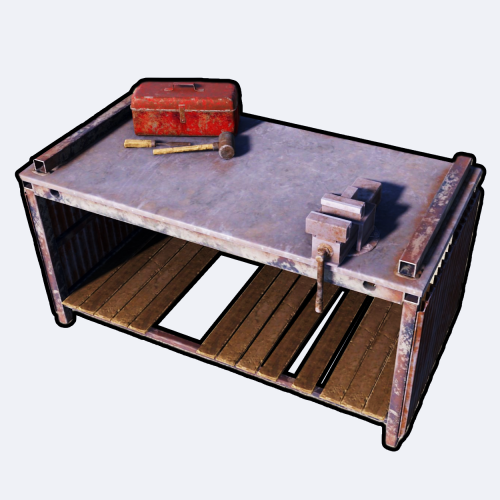
Version 1.0.6
290 downloads
Portable Repair Bench provides you and your servers' population cool-down-based Repair Benches accessible from anywhere in the world. FEATURES Use /rbench (by default, can modify in the config) to open up your private repair bench. Group-based cooldown support in the config. Friendly integration with NoEscape by Calytic with configurable rules of behavior. Chat message custom icon Steam ID. Phrase support. ROADMAP All done. If you have any suggestions, please let me know in the Discussions tab or interact with me directly on my Discord server: PERMISSIONS PortableRepairBench.use: To allow anyone to open up their repair bench. COMMANDS (CONFIGURABLE) Following commands are chat and console commands. rbench: Opens up your own personal portable repair bench. CONFIG DISCLAIMER The yellow and green buttons while using the Repair Bench in the GIF, does not come with the plugin. That's another plugin called Quick Sort by MONaH.$4.99 -
(1).thumb.gif.b7f01108ed2707569d9a6f5d8ed7e68e.gif)
Version 1.0.0
2 downloads
Auto Repair About AutoRepair is a plugin that automatically repairs items in a player's inventory when they are near a workbench. The plugin allows customization of item categories for automatic repair and the interval between notifications about insufficient resources. Key Features Customizable Item Categories Server owners can choose which item categories (weapons, clothing, tools, etc.) will be automatically repaired. Easy Configuration via JSON File Easy settings that even a person who has not long started working with plugins can understand. Workbench Levels Items in the inventory will be repaired only on those workbenches on which they are fashionable to learn or higher. logically request The plugin is configured to logically request resources when starting. Customizable Item Categories You сan choose which item categories (weapons, clothing, tools, etc.) will be automatically repaired. An example of a Config file view { "NotificationInterval": 10.0, "RepairCategories": { "weapon": true, "attire": true, "tool": true, "medical": false, "ammo": false } } NotificationInterval - Interval of messages about lack of resources when the player is near the workbench RepairCategories - Categories you want to be repaired automatically near the workbench (True - yes, False - no) You can see the above described plugin in the video Help If you have any questions or need any help, feel free to send me a private message on Discord My Discord: callofglory_anytime$5.00 -

Version 1.0.0
243 downloads
Frustrated because the minigun on your server gets destroyed after use? This plugin is perfect for your server! As you may have noticed, the minigun cannot currently be repaired or researched. That's why we've developed a plugin that automatically repairs the minigun when it has lost 99% of its durability. This way, players can use the weapon permanently without it being permanently destroyed. Required Permission: To allow players or groups to use the minigun permanently, they need the permission minigunautorepair.use. This permission prevents the minigun from breaking and disappearing forever. How to grant the permission to a user: For Carbon: c.grant user SteamID minigunautorepair.use For Oxide: o.grant user SteamID minigunautorepair.use How to grant the permission to a group: For Carbon: c.grant group groupname minigunautorepair.use For Oxide: o.grant group groupname minigunautorepair.use Of course, you can also use other plugins for permission management. We hope this plugin helps make your players happy – it worked for us! ^^ Thanks to our community for the idea!Free -
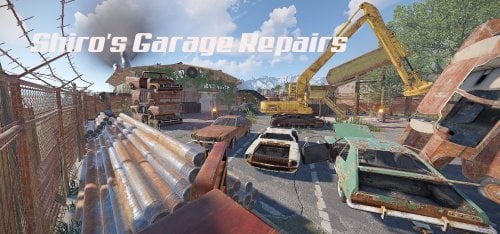
Version 1.1.0
4 downloads
A custom garage-junkyard combined with a green and red key-card puzzle. Basement holds 1 green crate + 3 Construction Crates + 1 Tool Crate and 9 oil barrels Office holds 2 elite crates and 1 hackable crate fuse for office can be found in the toilet. In the parking a Magnetic Crane can be found with a shredder and a few shreddable cars which respawn . Crane and shredder works the same way like vanilla Junkyard , pop the fuel , hop in , pickup the cars and get the loot. ~Monument comes with Alpha , Biome , Height , Splat and Topology masks. ~To use this on your map copy the files from "Custom Prefabs" folder into your "CustomPrefabs" folder in RustEdit directory and after that you can see your new prefab in the Custom Prefabs list in Rust Edit. ~Entity Count : 856$8.50 -
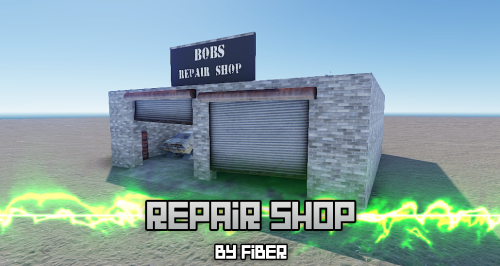
Version 1.0.0
328 downloads
Designed to add a location to roleplay at and to work on vehicles at. You can add this to your server and be sure players will get a unique roleplay experience! Have tuners on your server? This is the perfect location for them! This prefab has been designed to be placed in a city/town. This is a standalone prefab and does not include height, splat, alpha or topology of any kind. Want to have a custom map or prefab created? Any issues? Contact me on discord! Fiber#0001Free

.thumb.png.d8730004887666a2775699ef18eb252c.png)