
Search the Community
Showing results for tags 'servers controller'.
Found 1 result
-
Version 1.0.7
171 downloads
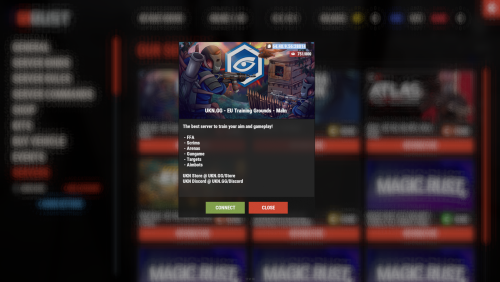
Introducing Servers, a powerful and customizable plugin that enhances your Rust server with a beautiful server browser interface! Allow your players to easily browse, view details, and connect to other servers in your network with this sleek, feature-rich plugin. Whether you're running a single server or managing a network of multiple Rust communities, Servers gives your players a seamless way to explore all your offerings. ️ Features of Servers Beautiful and intuitive server browser interface Multiple UI template options (Fullscreen, V1, V2) Support for Battlemetrics integration View server details, including player count, description, and status Customizable server banners Automatic server information updates at configurable intervals One-click connection to listed servers ServerPanel compatibility for seamless integration Available in English and Russian languages Showcase Fullscreen V1 Template V2 Template Commands /servers - Opens the server browser interface Permissions servers.use - Grants access to use the servers command and view the interface FAQ Q: How do I add a server to the list? A: Edit the Servers.json configuration file and add a new entry under "Servers settins" with the server's IP, port, optional Battlemetrics ID, and scroll height for the description. Q: Can I use Battlemetrics to show server information? A: Yes! You can provide a Battlemetrics Server ID in the configuration to display server information from Battlemetrics, especially useful if the server can't be found with just the IP and port. Q: How often does server information update? A: You can configure the update interval in the Servers.json file under "Interval updates servers info". The minimum interval is 30 seconds. Q: Does the plugin support custom server banners? A: Yes, the plugin automatically displays server banners from Battlemetrics data. You can also set a default banner to use when images can't be loaded. TEST SERVER Join our test server to experience the Servers plugin and all our other premium plugins! Copy the IP Address below to start playing! connect 194.147.90.239:28015$21.00- 2 comments
- 1 review
-
- 6
-

-

-
- #servers
- #server list
- (and 3 more)

