Search the Community
Showing results for tags 'shortname'.
Found 4 results
-

Version 0.0.1
12 downloads
APItemScan — Powerful Object Scanning Tool APItemScan is a versatile plugin for administrators and developers that instantly displays detailed technical information about any entity in Rust. Simply look at an object and use a command — the plugin will show you the prefab, shortname, skin ID, entity type, owner, and even the network ID. Permissions apitemscan.use — Allows use of the /ascan command. apitemscan.admin — Grants extended administrative privileges. Command /ascan — Scans the object you’re currently looking at. Main Features Instant object scanning — Get full data about any entity you look at. Supports all entity types — Buildings, items, deployables, decorations, and more. Chat and console output — Display results directly to the player and/or the server console. Owner information — View the Owner ID and name (if available). Network ID and position — For precise debugging and entity tracking. Customizable cooldown — Control how often the scan command can be used. Color and prefix customization — Adjust visual style to match your server theme. Permission system — Limit access between regular players and admins. Config { "General Settings": { "Enable output to player chat": true, "Enable output to server console": true, "Maximum scan distance (meters)": 5.0, "Show owner information": true, "Show Network ID": true, "Show entity type": true, "Command cooldown (seconds)": 1 }, "Output Settings": { "Header color (HEX)": "#00BFFF", "Value color (HEX)": "#7FFF00", "Plugin prefix": "[APItemScan]" } }$1.00 -

Version 1.0.0
394 downloads
- A free bridge to connect your islands and decorate your maps. - Used in Apocalypse Spain map.Free -

Version 0.0.6
281 downloads
Limits, by prefab shortname, the amount of entities that players are allowed to deploy or build. Limits building blocks and deployables. The config file contains 2 lists named limitedPrefabs and VIPlimitedPrefabs where the limits are saved. The purpose of the excludedSkinIDs list is to prevent limiting items with custom skinIDs, such as catapults, sentries, recyclers, etc. Limits can be added, removed or listed with the console command 'entitylimit', command usage examples: entitylimit add default foundation.triangle 50 - Adds the shortname 'foundation.triangle' to the 'default' list with a limit of 50. entitylimit add default chair.deployed 3 - Adds the shortname 'chair.deployed' to the 'default' list with a limit of 3. entitylimit add vip chair.deployed 30 - Adds the shortname 'chair.deployed' to the 'VIP' list with a limit of 30. entitylimit remove vip chair.deployed - Removes the shortname ´chair.deployed ´ from the 'VIP' list. entitylimit limits - Lists every limited prefab from default and VIP lists and the excluded skinIDs. entitylimit playerentities <steamID> - Lists every player's amount of entities, or optionally list only one steamID. entitylimit addskin 12345 - Adds the item skinID 12345 to the excluded skinIDs list. entitylimit removeskin 12345 - Removes the item skinID 12345 from the excluded skinIDs list. Permissions: entitylimit.bypass - Allows player to bypass any entity limits set by this plugin. entitylimit.console - Allows player to use the console command, not needed for players with ownerid. entitylimit.vip - Allows player to build and deploy using the limits from the VIP list. Notes: Setting a prefab's limit to 0 blocks its placement. If a prefab's VIP limit is accidentally set lower than its default limit, the default limit will be applied for both default and VIP players. If a prefab shortname does not exist in the default list, that prefab will not be limited for VIP players even if it exists in the VIP list.$4.00 -
Version 1.0.0
222 downloads
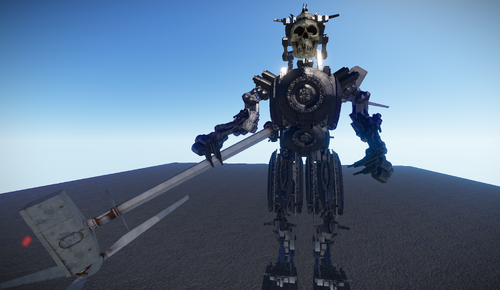
A strange robot, I don't know what it was created for... but it's free!!!Free