Search the Community
Showing results for tags 'stack size'.
Found 6 results
-
Version 2.8.31
14,941 downloads
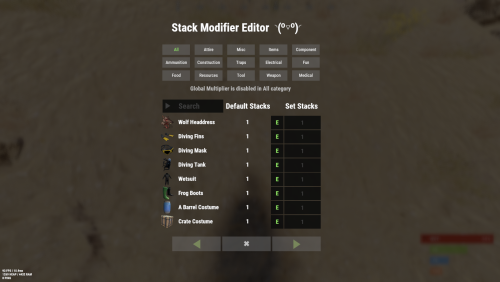
Stack Modifier is a performance-focused plugin that enhances and refines item stacking behavior in Rust. Features Includes GUI Editor - Blocks Player movements while using GUI Editor Including Keybinds! Adds NEW Stacking Support for the following. liquids ( like bota bags etc ) Stacking of Fuel Containers (hats, tools, etc.) Stacking of Guns Weapon Attachments Stacking of Skins Works with SkinBox plugins Supports stacking armor slot armors Supports Genetic Stacking Supports Food Spoil stacking Stacking of Custom Items Stacking of Custom Items with Custom Display Names Stacking of Key Cards without losing the stack when swiping Stacking Candy Cane Club without losing the stack while lick Support for modified presents for unwrapping Limits wearable clothing items to stack sizes of 1! ( on the player wear container only ) Limits weapon attachments to stack sizes of 1! ( On the weapon its self! so you can have bigger stacks! ) The largest possible value in C# is 2,147,483,647 Which means anything over this stack-size will break the plugin Patches All Industrial Conveyor stack issues! ( Yes custom items no problems! ) -- THIS IS NOW IT"S OWN PLUGIN AS AN ADDON. 4-2-2025 STACK MODIFIER INDUSTRIAL ADDON: Known Conflicts RoadBradley & HeliSignals Are doing item creations wrong and setting the item.name field as vanilla item display names thus breaking stack support. ( don't set a vanilla display name only set them if its custom names as the fix ) Conveyor Stacks Not needed & conflicts, stack-modifier already does this & has config settings for it. Davids Shop UI ( recently changed how his default data files are createdfor items ) ( you need to generate a new Items.json file and re-do custom items / pricing inside it to fix stack bugs with old data files ) Magic Coin uses some of the same hooks set up config in it correctly to not conflict Custom Skin Stack Fix not needed this handles it properly Stack Size Controller cannot have 2 of the same plugins basically Extra Loot causes a stacking bug when a reboot occurs with skinned items preventing old skinned items from stacking with new skinned items IndustrialCustomSkinsFix not needed stack-modifier has the same patch in it. IQAlcoholFarm by BadMandarin/Mercury is not supported & will cause stack bugs / problems ( could be supported with an author update, but current version is not supported ) ItemPerks by imthenewguy Causes stack bugs/problems just by having this plugin on your server due to harmony patching done inside it + repair logic is bugged. Item creation is also not handled properly resulting in duplication issues with Conveyor movements nothing can be done about that. ( plugin requires a full rewrite for proper support & repairs. ) Plugins that do not handle Item Creation Correctly: ( Which break stacks ) Custom Item Drops by Machine ( Always sets the vanilla display name when its supposed to be null for vanilla items ) XP System by fastburst ( Always sets the vanilla display name when its supposed to be null for vanilla items ) Copy Paste ( Items created by copy paste its self will not stack since item creation is not handled properly ) This list will be constantly updated as devs fix their code accordingly & new ones are discovered to be flawed. Getting Started - Click Either Link to play video Video One Video Two Permissions stackmodifier.admin - Allows players access to the UI Editor. Chat Commands /stackmodifier -- Opens Editor UI, Must enable config option "Enable UI Editor": true /stackmodifier.reset ( is also console cmd ) -- Requires stackmodifier.admin perm ( resets stack-sizes ) /resetvenders -- Requires being an admin, only resets facepunches messed-up vendors, not all /stackmodifiercolor <inputpanel|inputtext|text|transparent> <color> <alpha|ex, 0.98> Example /stackmodifiercolor inputpanel #207086 0.25 UI Editor Commands set 8 -- Inside a categories Search Bar, type set and a value and it will apply it to the whole category, reset -- Inside a categories Search Bar type reset hit the enter key or click out of the field and it resets it. multiply -- Inside a categorie use the Search Bar & type multiply and a value and it will apply it to the whole category. if you reset or set, re-click the Category Tab to refresh it before making more changes! Otherwise you will have to do your first edit twice for it to start working again UI Editor Without Images? * At the top of the config you will see the following setting set to true save and reload. "Disable Images for UI Editor": false, < Disables images and allows full use Having Problems? * Warning this plugin is not compatible with custom-skins-stacks-fix plugin since this already handles everything. * If you already have a plugin that modifies the rust stack sizes you will first need to remove that plugin. * Then you simply load Stack Modifier onto your server open the config and start editing the Modified values to your new stack-size amounts! * When you are done simply save and reload the plugin! ( oxide. reload StackModifier ) * Alternatively you can utilize the built-in UI Editor and not ever need to touch the config! * Admins - Auth level 2 will always be ignored. * This plugin is not compatible with BetterVanish, I only support Vanish from umod. How to revert to vanilla? * Run the reset command while having the stackmodifier.admin perm or Unload Stack Modifier, delete the config, and restart your server. * It will reset the config back to vanilla settings allowing you to start over. API Hooks Interface.CallHook("OnStackSizeUpdated"); //called after the plugin updates the stack sizes on server reboots & when reloading the plugin. //It's also still called right after the UI editor is closed from modifying. //Inside the oxide hook I use called OnItemAddedToContainer theirs a hook of mine, if called mine will not touch it or fix the stacks. if (Interface.CallHook("OnIgnoreStackSize", player, item) != null) return; ## Configuration { "Disable Industrial Conveyor Patch (true = disabled)": false, "Industrial Conveyor Max Stack Size Per Move Default = 60": 130, "Industrial Conveyor Move Frequency Default = 5 (Lower = faster moving)": 3, "Disable Weapon Attachment stack fix (Unsubscribes from both OnWeaponModChange & CanMoveItem)": false, "Disable Wearable Clothes fix (Unsubscribes from OnItemAddedToContainer)": false, "Disable Ammo/Fuel duplication fix (Recommended false)": false, "Disable Candy Cane Club Lick fix & unwrap fix (Unsubscribes from OnItemAction)": false, "Disable OnCardSwipe fix (Unsubscribes from OnCardSwipe)": false, "Enable VendingMachine Ammo Fix (Recommended)": true, "Enable UI Editor": true, "Disable Images / Toggles off Images for UI Editor": false, "Sets editor command": "stackmodifier", "Sets reset command for both console & chat": "stackmodifier.reset", "Sets editor color command": "stackmodifiercolor", "Sets Default Category to open": "All", "Stack Modifier UI Title": "Stack Modifier Editor ◝(⁰■¿⁰)◞", "UI - Stack Size Label": "Default Stacks", "UI - Set Stack Label": "Set Stacks", "UI - Search Bar Label": "Search", "UI - Back Button Text": "◀", "UI - Forward Button Text": "▶", "UI - Close Label": "✖", "Colors": { "InputPanel": { "Hex": "#0E0E10", "Rgb": "0.0549019607843137 0.0549019607843137 0.0627450980392157 0.98" }, "InputText": { "Hex": "#FFE24B", "Rgb": "1 0.886274509803922 0.294117647058824 0.15" }, "TextColor": { "Hex": "#FFFFFF", "Rgb": "1 1 1 1" }, "Transparency": { "Hex": "#", "Rgb": "0 0 0 0.95" } }, "Category Stack Multipliers": { "Attire": 1, "Misc": 1, "Items": 1, "Ammunition": 1, "Construction": 1, "Component": 1, "Traps": 1, "Electrical": 1, "Fun": 1, "Food": 1, "Resources": 1, "Tool": 1, "Weapon": 1, "Medical": 1 }, "Stack Categories": { "Attire": { "hat.wolf": { "DisplayName": "Wolf Headdress", "Modified": 10 }, "horse.shoes.basic": { "DisplayName": "Basic Horse Shoes", "Modified": 10 } }, "Misc": { "fogmachine": { "DisplayName": "Fogger-3000", "Modified": 10 }, "sickle": { "DisplayName": "Sickle", "Modified": 10 } }, "Items": { "kayak": { "DisplayName": "Kayak", "Modified": 10 }, "map": { "DisplayName": "Paper Map", "Modified": 10 } }, "Ammunition": { "ammo.grenadelauncher.buckshot": { "DisplayName": "40mm Shotgun Round", "Modified": 20 }, "ammo.rocket.sam": { "DisplayName": "SAM Ammo", "Modified": 10 } }, "Construction": { "door.double.hinged.metal": { "DisplayName": "Sheet Metal Double Door", "Modified": 10 }, "building.planner": { "DisplayName": "Building Plan", "Modified": 10 } }, "Component": { "bleach": { "DisplayName": "Bleach", "Modified": 2 }, "vehicle.module": { "DisplayName": "Generic vehicle module", "Modified": 10 } }, "Traps": { "trap.bear": { "DisplayName": "Snap Trap", "Modified": 30 }, "samsite": { "DisplayName": "SAM Site", "Modified": 10 } }, "Electrical": { "ceilinglight": { "DisplayName": "Ceiling Light", "Modified": 10 }, "wiretool": { "DisplayName": "Wire Tool", "Modified": 100 } }, "Fun": { "firework.boomer.blue": { "DisplayName": "Blue Boomer", "Modified": 200 }, "telephone": { "DisplayName": "Telephone", "Modified": 10 } }, "Food": { "apple": { "DisplayName": "Apple", "Modified": 100 }, "woodtea.pure": { "DisplayName": "Pure Wood Tea", "Modified": 100 } }, "Resources": { "skull.human": { "DisplayName": "Human Skull", "Modified": 10 }, "wood": { "DisplayName": "Wood", "Modified": 10 } }, "Tool": { "tool.instant_camera": { "DisplayName": "Instant Camera", "Modified": 10 }, "bucket.water": { "DisplayName": "Water Bucket", "Modified": 10 } }, "Weapon": { "gun.water": { "DisplayName": "Water Gun", "Modified": 10 }, "spear.wooden": { "DisplayName": "Wooden Spear", "Modified": 10 } }, "Medical": { "blood": { "DisplayName": "Blood", "Modified": 100 }, "bandage": { "DisplayName": "Bandage", "Modified": 30 } } } }$24.99- 195 comments
- 22 reviews
-
- 21
-

-

-

-

-
- #stacks
- #rust stacks
- (and 22 more)
-
Version 1.5.20
1,561 downloads
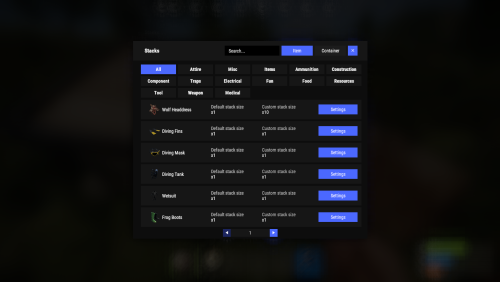
New plugin for changing item stacks and their multipliers in containers with convenient customization right in the game Commands stacks - open an UI stacks sethandstack [stack size] - set the stack size for the item in hand stacks setstack [short name] [stack size] - set the stack size for the item Permissions stacks.admin - using a plugin Config { "Commands": [ "stacks" ], "Work with Notify?": true, "Changing multiplies in containers using a hammer": false, "Default Multiplier for new containers": 1.0 } Containers Data { "assets/bundled/prefabs/static/bbq.static.prefab": { "Image": "https://i.imgur.com/L28375p.png", "Multiplier": 1.0 }, "assets/bundled/prefabs/static/hobobarrel_static.prefab": { "Image": "https://i.imgur.com/v8sDTaP.png", "Multiplier": 1.0 }, "assets/bundled/prefabs/static/recycler_static.prefab": { "Image": "https://i.imgur.com/V1smQYs.png", "Multiplier": 1.0 }, "assets/bundled/prefabs/static/repairbench_static.prefab": { "Image": "https://i.imgur.com/8qV6Z10.png", "Multiplier": 1.0 } ... Items Data [ { "ShortName": "hat.wolf", "Name": "Wolf Headdress", "Default Stack Size": 10, "Custom Stack Size": 0 }, { "ShortName": "fogmachine", "Name": "Fogger-3000", "Default Stack Size": 2, "Custom Stack Size": 0 }, { "ShortName": "strobelight", "Name": "Strobe Light", "Default Stack Size": 1, "Custom Stack Size": 0 }, { "ShortName": "kayak", "Name": "Kayak", "Default Stack Size": 1, "Custom Stack Size": 0 }, { "ShortName": "minihelicopter.repair", "Name": "MC repair", "Default Stack Size": 1, "Custom Stack Size": 0 }, { "ShortName": "scraptransportheli.repair", "Name": "ScrapTransportHeliRepair", "Default Stack Size": 1, "Custom Stack Size": 0 }, ...$19.95- 69 comments
- 11 reviews
-
- 6
-
-
-

-
- #stacks
- #chest stacks
- (and 9 more)
-
Version 1.0.1
11 downloads
Stack Size Controller – Balanced Configuration Packs Includes 4 different configs. Pick one to use, or use different configs on multiple servers. Some stack values are based on the gather rate; however, overall, resources and similar items are set higher based on player experience and community feedback. Server Compatibility - Suitable for 3x, 5x, 10x and PvE servers - If higher stack sizes are desired, the 3x preset can safely be used on 2x servers without causing major balance issues or technical problems Professionally Designed & Tested All configurations are manually created from scratch and are not auto-generated or simple default edits. Each configuration has been: - Actively tested on live servers for over 2 years - Used on long-running, active servers - Adjusted based on real player behavior and feedback - Balanced with economic flow and recycler outputs in mind The goal is to improve quality of life without breaking progression or server economy. Balanced Design Philosophy Not every item is meant to be stacked. Below are the core principles behind how these configurations are designed. Durability & Skin Safety Weapons, clothing, doors, and certain electrical items are intentionally excluded from stacking. These items rely on durability (condition) mechanics and often support skins. Stacking them may cause condition conflicts, incorrect durability behavior, skin desynchronization, and inventory-related bugs. To maintain server stability and predictable gameplay, these item types are deliberately kept unstacked. Explosives & Economy Control F1 Grenades, Smoke Grenades, and similar explosive items are intentionally excluded from stacking or only increased by reasonable amounts. This approach helps prevent gunpowder inflation, balance abuse, and uncontrolled progression. Stackable Item Categories - Resources (Some resources have been stacked above the normal limits in line with strong player demand, especially wood and stone, among others.) - Components (Excessive stacking has not been applied in order to maintain recycling balance; it has been kept at a controlled and balanced level.) - Food items - Medical items - Ammunition Easy Installation 1. Choose one of the 4 configuration presets 2. Copy StackSizeController.json into your config folder 3. Oxide.reload StackSizeController OR c.reload StackSizeController Required Plugin This configuration pack requires the Stack Size Controller plugin. You can download it for free from uMod: https://umod.org/plugins/stack-size-controller$12.99-
- 1
-
-
- #stack size controller
- #stacks
- (and 25 more)
-

Version 1.2.2
112 downloads
About plugin The plugin allows you to conveniently change the stacks of items through the use of a graphical interface Chat Commands (can be changed in config) /stacks - opens the main menu /sethandstack - change item's stack you are holding in your hands Console Commands jstacks.setstack [item shortname] [new stack] - set stack size for item. Example: jstacks.setstack ammo.rifle 256 jstacks.restore - reset all stacks to default values (be careful: there is no confirmation) Permissions jstacks.use - using the plugin Features Changing stacks for the entire category by pressing two buttons Multiple choice option for quick stack change Config { "Can admins use command": true, "Command to open the menu": "stacks", "Command to set stack size of an item in your hands": "sethandstack", "Default icons for categories (in-game only)": { "Ammunition": "assets/icons/ammunition.png", "Attire": "assets/icons/community_servers.png", "Component": "assets/icons/open.png", "Construction": "assets/icons/construction.png", "Electrical": "assets/icons/electric.png", "Food": "assets/icons/food_cooked.png", "Fun": "assets/icons/fun_alt.png", "Items": "assets/icons/extinguish.png", "Medical": "assets/icons/medical.png", "Misc": "assets/icons/menu_dots.png", "Resources": "assets/icons/community_servers.png", "Tool": "assets/icons/tools.png", "Traps": "assets/icons/traps.png", "Weapon": "assets/icons/weapon.png" } }$2.99 -

Version 2024.5.2.1658
161 downloads
SAVE 10% WHEN BUYING THE BUNDLE SAVE 10% WHEN BUYING THE BUNDLE This high performance patch will allow to set custom item stacks based on: Item name Item category Blacklist items (useful when using the categories) This is a standalone Harmony patch, Oxide installation is optional. Copy the Oxidation.StackManager.dll file into your HarmonyMods folder and restart your server. At the first server start after installing the patch a new configuration file Oxidation.StackManager.X.json will be created at the HarmonyMods folder. What is Harmony ? Harmony is a library for patching .NET code during runtime, it directly manipulates game code (CIL) without any additional abstraction layer such as Oxide. The direct patching of the game's byte code allows more performant modding as developers no longer need to rely on third party code, events or hooks to build custom functionality.$4.99- 5 comments
- 3 reviews
-
- 1
-
-
- #harmony
- #oxidation
- (and 8 more)
-
Version 2.1.1
410 downloads
Permission based full stack composting. This plugin allows full stacks to be done at 1 time inside composter. I am not sure if anyone needs this but here you go.Free