Search the Community
Showing results for tags 'stacks'.
Found 12 results
-
Version 2.8.31
14,937 downloads
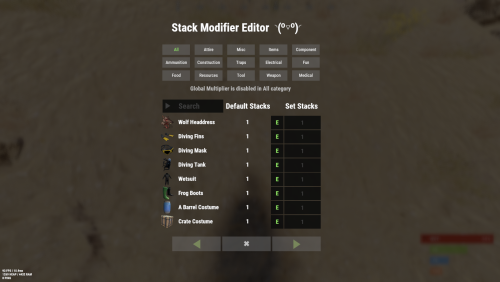
Stack Modifier is a performance-focused plugin that enhances and refines item stacking behavior in Rust. Features Includes GUI Editor - Blocks Player movements while using GUI Editor Including Keybinds! Adds NEW Stacking Support for the following. liquids ( like bota bags etc ) Stacking of Fuel Containers (hats, tools, etc.) Stacking of Guns Weapon Attachments Stacking of Skins Works with SkinBox plugins Supports stacking armor slot armors Supports Genetic Stacking Supports Food Spoil stacking Stacking of Custom Items Stacking of Custom Items with Custom Display Names Stacking of Key Cards without losing the stack when swiping Stacking Candy Cane Club without losing the stack while lick Support for modified presents for unwrapping Limits wearable clothing items to stack sizes of 1! ( on the player wear container only ) Limits weapon attachments to stack sizes of 1! ( On the weapon its self! so you can have bigger stacks! ) The largest possible value in C# is 2,147,483,647 Which means anything over this stack-size will break the plugin Patches All Industrial Conveyor stack issues! ( Yes custom items no problems! ) -- THIS IS NOW IT"S OWN PLUGIN AS AN ADDON. 4-2-2025 STACK MODIFIER INDUSTRIAL ADDON: Known Conflicts RoadBradley & HeliSignals Are doing item creations wrong and setting the item.name field as vanilla item display names thus breaking stack support. ( don't set a vanilla display name only set them if its custom names as the fix ) Conveyor Stacks Not needed & conflicts, stack-modifier already does this & has config settings for it. Davids Shop UI ( recently changed how his default data files are createdfor items ) ( you need to generate a new Items.json file and re-do custom items / pricing inside it to fix stack bugs with old data files ) Magic Coin uses some of the same hooks set up config in it correctly to not conflict Custom Skin Stack Fix not needed this handles it properly Stack Size Controller cannot have 2 of the same plugins basically Extra Loot causes a stacking bug when a reboot occurs with skinned items preventing old skinned items from stacking with new skinned items IndustrialCustomSkinsFix not needed stack-modifier has the same patch in it. IQAlcoholFarm by BadMandarin/Mercury is not supported & will cause stack bugs / problems ( could be supported with an author update, but current version is not supported ) ItemPerks by imthenewguy Causes stack bugs/problems just by having this plugin on your server due to harmony patching done inside it + repair logic is bugged. Item creation is also not handled properly resulting in duplication issues with Conveyor movements nothing can be done about that. ( plugin requires a full rewrite for proper support & repairs. ) Plugins that do not handle Item Creation Correctly: ( Which break stacks ) Custom Item Drops by Machine ( Always sets the vanilla display name when its supposed to be null for vanilla items ) XP System by fastburst ( Always sets the vanilla display name when its supposed to be null for vanilla items ) Copy Paste ( Items created by copy paste its self will not stack since item creation is not handled properly ) This list will be constantly updated as devs fix their code accordingly & new ones are discovered to be flawed. Getting Started - Click Either Link to play video Video One Video Two Permissions stackmodifier.admin - Allows players access to the UI Editor. Chat Commands /stackmodifier -- Opens Editor UI, Must enable config option "Enable UI Editor": true /stackmodifier.reset ( is also console cmd ) -- Requires stackmodifier.admin perm ( resets stack-sizes ) /resetvenders -- Requires being an admin, only resets facepunches messed-up vendors, not all /stackmodifiercolor <inputpanel|inputtext|text|transparent> <color> <alpha|ex, 0.98> Example /stackmodifiercolor inputpanel #207086 0.25 UI Editor Commands set 8 -- Inside a categories Search Bar, type set and a value and it will apply it to the whole category, reset -- Inside a categories Search Bar type reset hit the enter key or click out of the field and it resets it. multiply -- Inside a categorie use the Search Bar & type multiply and a value and it will apply it to the whole category. if you reset or set, re-click the Category Tab to refresh it before making more changes! Otherwise you will have to do your first edit twice for it to start working again UI Editor Without Images? * At the top of the config you will see the following setting set to true save and reload. "Disable Images for UI Editor": false, < Disables images and allows full use Having Problems? * Warning this plugin is not compatible with custom-skins-stacks-fix plugin since this already handles everything. * If you already have a plugin that modifies the rust stack sizes you will first need to remove that plugin. * Then you simply load Stack Modifier onto your server open the config and start editing the Modified values to your new stack-size amounts! * When you are done simply save and reload the plugin! ( oxide. reload StackModifier ) * Alternatively you can utilize the built-in UI Editor and not ever need to touch the config! * Admins - Auth level 2 will always be ignored. * This plugin is not compatible with BetterVanish, I only support Vanish from umod. How to revert to vanilla? * Run the reset command while having the stackmodifier.admin perm or Unload Stack Modifier, delete the config, and restart your server. * It will reset the config back to vanilla settings allowing you to start over. API Hooks Interface.CallHook("OnStackSizeUpdated"); //called after the plugin updates the stack sizes on server reboots & when reloading the plugin. //It's also still called right after the UI editor is closed from modifying. //Inside the oxide hook I use called OnItemAddedToContainer theirs a hook of mine, if called mine will not touch it or fix the stacks. if (Interface.CallHook("OnIgnoreStackSize", player, item) != null) return; ## Configuration { "Disable Industrial Conveyor Patch (true = disabled)": false, "Industrial Conveyor Max Stack Size Per Move Default = 60": 130, "Industrial Conveyor Move Frequency Default = 5 (Lower = faster moving)": 3, "Disable Weapon Attachment stack fix (Unsubscribes from both OnWeaponModChange & CanMoveItem)": false, "Disable Wearable Clothes fix (Unsubscribes from OnItemAddedToContainer)": false, "Disable Ammo/Fuel duplication fix (Recommended false)": false, "Disable Candy Cane Club Lick fix & unwrap fix (Unsubscribes from OnItemAction)": false, "Disable OnCardSwipe fix (Unsubscribes from OnCardSwipe)": false, "Enable VendingMachine Ammo Fix (Recommended)": true, "Enable UI Editor": true, "Disable Images / Toggles off Images for UI Editor": false, "Sets editor command": "stackmodifier", "Sets reset command for both console & chat": "stackmodifier.reset", "Sets editor color command": "stackmodifiercolor", "Sets Default Category to open": "All", "Stack Modifier UI Title": "Stack Modifier Editor ◝(⁰■¿⁰)◞", "UI - Stack Size Label": "Default Stacks", "UI - Set Stack Label": "Set Stacks", "UI - Search Bar Label": "Search", "UI - Back Button Text": "◀", "UI - Forward Button Text": "▶", "UI - Close Label": "✖", "Colors": { "InputPanel": { "Hex": "#0E0E10", "Rgb": "0.0549019607843137 0.0549019607843137 0.0627450980392157 0.98" }, "InputText": { "Hex": "#FFE24B", "Rgb": "1 0.886274509803922 0.294117647058824 0.15" }, "TextColor": { "Hex": "#FFFFFF", "Rgb": "1 1 1 1" }, "Transparency": { "Hex": "#", "Rgb": "0 0 0 0.95" } }, "Category Stack Multipliers": { "Attire": 1, "Misc": 1, "Items": 1, "Ammunition": 1, "Construction": 1, "Component": 1, "Traps": 1, "Electrical": 1, "Fun": 1, "Food": 1, "Resources": 1, "Tool": 1, "Weapon": 1, "Medical": 1 }, "Stack Categories": { "Attire": { "hat.wolf": { "DisplayName": "Wolf Headdress", "Modified": 10 }, "horse.shoes.basic": { "DisplayName": "Basic Horse Shoes", "Modified": 10 } }, "Misc": { "fogmachine": { "DisplayName": "Fogger-3000", "Modified": 10 }, "sickle": { "DisplayName": "Sickle", "Modified": 10 } }, "Items": { "kayak": { "DisplayName": "Kayak", "Modified": 10 }, "map": { "DisplayName": "Paper Map", "Modified": 10 } }, "Ammunition": { "ammo.grenadelauncher.buckshot": { "DisplayName": "40mm Shotgun Round", "Modified": 20 }, "ammo.rocket.sam": { "DisplayName": "SAM Ammo", "Modified": 10 } }, "Construction": { "door.double.hinged.metal": { "DisplayName": "Sheet Metal Double Door", "Modified": 10 }, "building.planner": { "DisplayName": "Building Plan", "Modified": 10 } }, "Component": { "bleach": { "DisplayName": "Bleach", "Modified": 2 }, "vehicle.module": { "DisplayName": "Generic vehicle module", "Modified": 10 } }, "Traps": { "trap.bear": { "DisplayName": "Snap Trap", "Modified": 30 }, "samsite": { "DisplayName": "SAM Site", "Modified": 10 } }, "Electrical": { "ceilinglight": { "DisplayName": "Ceiling Light", "Modified": 10 }, "wiretool": { "DisplayName": "Wire Tool", "Modified": 100 } }, "Fun": { "firework.boomer.blue": { "DisplayName": "Blue Boomer", "Modified": 200 }, "telephone": { "DisplayName": "Telephone", "Modified": 10 } }, "Food": { "apple": { "DisplayName": "Apple", "Modified": 100 }, "woodtea.pure": { "DisplayName": "Pure Wood Tea", "Modified": 100 } }, "Resources": { "skull.human": { "DisplayName": "Human Skull", "Modified": 10 }, "wood": { "DisplayName": "Wood", "Modified": 10 } }, "Tool": { "tool.instant_camera": { "DisplayName": "Instant Camera", "Modified": 10 }, "bucket.water": { "DisplayName": "Water Bucket", "Modified": 10 } }, "Weapon": { "gun.water": { "DisplayName": "Water Gun", "Modified": 10 }, "spear.wooden": { "DisplayName": "Wooden Spear", "Modified": 10 } }, "Medical": { "blood": { "DisplayName": "Blood", "Modified": 100 }, "bandage": { "DisplayName": "Bandage", "Modified": 30 } } } }$24.99- 195 comments
- 22 reviews
-
- 21
-

-

-

-

-
- #stacks
- #rust stacks
- (and 22 more)
-
Version 2.1.2
203 downloads
Supports: Wind Mills | Solar Panels | Fuel & Test Generators | Small-Medium-Large Batteries | Tesla Coils | Heaters Both Globally & with permission-based settings allowing you to create as many different levels as you wish! Written for the best performance possible! Defaults to first permission assigned in the config if you give out multiple. Wind Mill Note: Max height Needed for Max output is floor 18 Battery Options Explained MaxOutput: Maximum Power Out Put Efficiency: How Efficient Battery is When Charging ( this How Fast it Charges ) MaxCapacitySeconds: How Much Energy We Can Request From Power Sources For Charging is this value * our maxOutput Batteries will not show new Max Out-Puts Batteries will show New Power Usage! ( Pic is below, this is because its hardcoded on client side ) Fuel Generator Options Explained StackSize: Sets Inventory Stack Size for Fuel Inside The Fuel Generator OutputEnergy: Sets Power OutPut FuelPerSec: Sets How Much Fuel to Use Per Second Electrical Heater Options Explained GLOBAL SETTER ONLY > "Sets the Max Temperature Range for Electric Heaters Only (Default is 4.0)": 4.0, FadeDuration: Sets How Long Before Heat Dissipates ( when powered off ) HeatAmount: Sets Heat Amount ( when powered on ) Solar Panel Explained To get max Output you Need 1 floor up else it will only ever be half! + Panel must Face Direct Sun-light! Tesla Coil Options Explained A TeslaCoils Power consumption amount Is Calculated By ( MaxDamageOutput Divided / By PowerToDamageRatio ) A TeslaCoils DamageAmount is Calculated By Its (currentEnergy input * powerToDamageRatio) * dischargeTickRate A TeslaCoils SelfHarmAmount is Calculated By Its ( dischargeTickRate Divided / By maxDischargeSelfDamageSeconds * SetHealth ) SetHealth: Sets Item Condition Level MaxDamageOutput: Sets the Maximum Damage it Can OutPut Like Ever PowerForHeavyShorting: Sets Electrical Input Amount Needed for Strong-Zap Zap else = Weak-Zap Zap DischargeTickRate: Sets How Fast A TeslaCoil Discharges its Zap Zap MaxDischargeSelfDamageSeconds: Configuration { "Enables use of permission based settings": true, "Reset all modifications on unload (recommended true if uninstalling)": false, "Global Battery Small": { "MaxOutput": 9000, "Efficiency": 4.0, "MaxCapacitySeconds": 1, "Permissions": { "toptier": { "MaxOutput": 30, "Efficiency": 2.0, "MaxCapacitySeconds": 18000 }, "midtier": { "MaxOutput": 20, "Efficiency": 1.4, "MaxCapacitySeconds": 13500 }, "lowtier": { "MaxOutput": 14, "Efficiency": 1.0, "MaxCapacitySeconds": 11250 } } }, "Global Battery Medium": { "MaxOutput": 50, "Efficiency": 0.8, "MaxCapacitySeconds": 540000, "Permissions": { "toptier": { "MaxOutput": 100, "Efficiency": 2.0, "MaxCapacitySeconds": 1080000 }, "midtier": { "MaxOutput": 75, "Efficiency": 1.5, "MaxCapacitySeconds": 810000 }, "lowtier": { "MaxOutput": 60, "Efficiency": 1.0, "MaxCapacitySeconds": 675000 } } }, "Global Battery Large": { "MaxOutput": 100, "Efficiency": 0.8, "MaxCapacitySeconds": 1440000, "Permissions": { "toptier": { "MaxOutput": 200, "Efficiency": 3.0, "MaxCapacitySeconds": 2880000 }, "midtier": { "MaxOutput": 150, "Efficiency": 2.0, "MaxCapacitySeconds": 2160000 }, "lowtier": { "MaxOutput": 125, "Efficiency": 1.0, "MaxCapacitySeconds": 1800000 } } }, "Global Electric Generator": { "MaxOutputTestGen": 8, "Permissions": { "toptier": { "MaxOutputTestGen": 30 }, "midtier": { "MaxOutputTestGen": 20 }, "lowtier": { "MaxOutputTestGen": 12 } } }, "Global Fuel Generator": { "StackSize": 1000, "OutputEnergy": 35, "FuelPerSec": 1.0, "Permissions": { "toptier": { "StackSize": 2000, "OutputEnergy": 70, "FuelPerSec": 1.2 }, "midtier": { "StackSize": 1500, "OutputEnergy": 60, "FuelPerSec": 1.1 }, "lowtier": { "StackSize": 1250, "OutputEnergy": 45, "FuelPerSec": 1.0 } } }, "Global Solar Panel": { "MaxOutputSolar": 20, "Permissions": { "toptier": { "MaxOutputSolar": 30 }, "midtier": { "MaxOutputSolar": 20 }, "lowtier": { "MaxOutputSolar": 13 } } }, "Global Electric Wind Turbine": { "MaxOutput": 100, "TargetSpeed": 0.0, "Permissions": { "toptier": { "MaxOutput": 250, "TargetSpeed": 3.0 }, "midtier": { "MaxOutput": 200, "TargetSpeed": 2.0 }, "lowtier": { "MaxOutput": 140, "TargetSpeed": 1.0 } } }, "Global Electric Heater": { "FadeDuration": 1.0, "HeatAmount": 5.0, "HeaterTemperatureGrowableRange": 4.0, "Permissions": { "toptier": { "FadeDuration": 9.0, "HeatAmount": 16.0, "HeaterTemperatureGrowableRange": 14.0 }, "midtier": { "FadeDuration": 6.0, "HeatAmount": 12.0, "HeaterTemperatureGrowableRange": 10.0 }, "lowtier": { "FadeDuration": 3.0, "HeatAmount": 8.0, "HeaterTemperatureGrowableRange": 6.0 } } }, "Global Tesla Coil": { "SetHealth": 250.0, "PowerToDamageRatio": 2.0, "DischargeTickRate": 0.25, "MaxDischargeSelfDamageSeconds": 120.0, "MaxDamageOutput": 35.0, "PowerForHeavyShorting": 10, "Permissions": { "toptier": { "SetHealth": 350.0, "PowerToDamageRatio": 2.0, "DischargeTickRate": 0.25, "MaxDischargeSelfDamageSeconds": 120.0, "MaxDamageOutput": 50.0, "PowerForHeavyShorting": 10 }, "midtier": { "SetHealth": 325.0, "PowerToDamageRatio": 2.0, "DischargeTickRate": 0.25, "MaxDischargeSelfDamageSeconds": 120.0, "MaxDamageOutput": 45.0, "PowerForHeavyShorting": 10 }, "lowtier": { "SetHealth": 300.0, "PowerToDamageRatio": 2.0, "DischargeTickRate": 0.25, "MaxDischargeSelfDamageSeconds": 120.0, "MaxDamageOutput": 40.0, "PowerForHeavyShorting": 10 } } } }$19.99 -
Version 1.4.2
4,076 downloads
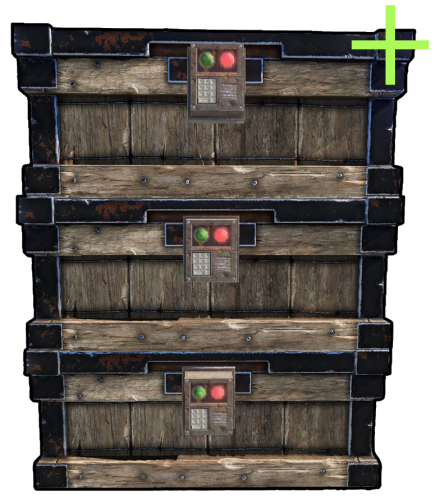
Chest Stacks is a Rust plugin that allows players to stack chests on top of each other! Configuration: { "Building privilege required": true, "Blacklisted Skins": [ 2618923347 ], "Permissions & their amount of stacked chests lmits": { "cheststacks.use": { "Chest type limits": { "SmallBox": 3, "LargeBox": 5 } }, "cheststacks.vip": { "Chest type limits": { "SmallBox": 5, "LargeBox": 10 } } } } Language: { "MaxStackAmount": "You are trying to stack more than {0} boxes!", "OnlyStackSameType": "You can only stack the same type of chests!", "CeilingBlock": "A ceiling is blocking you from stacking this chest!", "BuildingBlock": "You need to be Building Privileged in order to stack chests!" } Permissions: cheststacks.use (Always grant this permission for usage, grant additional permissions for different maximum stack amounts) In order to stack the chests you have to press RIGHT CLICK while looking at the placed chest and being near it! Supports: Small Boxes, Large Boxes$10.00- 75 comments
- 12 reviews
-
- 9
-
-
-
- #rust
- #rust plugin
- (and 9 more)
-
Version 1.5.20
1,561 downloads
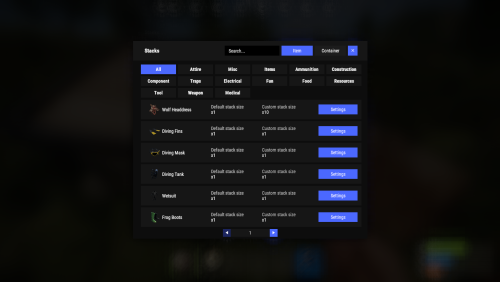
New plugin for changing item stacks and their multipliers in containers with convenient customization right in the game Commands stacks - open an UI stacks sethandstack [stack size] - set the stack size for the item in hand stacks setstack [short name] [stack size] - set the stack size for the item Permissions stacks.admin - using a plugin Config { "Commands": [ "stacks" ], "Work with Notify?": true, "Changing multiplies in containers using a hammer": false, "Default Multiplier for new containers": 1.0 } Containers Data { "assets/bundled/prefabs/static/bbq.static.prefab": { "Image": "https://i.imgur.com/L28375p.png", "Multiplier": 1.0 }, "assets/bundled/prefabs/static/hobobarrel_static.prefab": { "Image": "https://i.imgur.com/v8sDTaP.png", "Multiplier": 1.0 }, "assets/bundled/prefabs/static/recycler_static.prefab": { "Image": "https://i.imgur.com/V1smQYs.png", "Multiplier": 1.0 }, "assets/bundled/prefabs/static/repairbench_static.prefab": { "Image": "https://i.imgur.com/8qV6Z10.png", "Multiplier": 1.0 } ... Items Data [ { "ShortName": "hat.wolf", "Name": "Wolf Headdress", "Default Stack Size": 10, "Custom Stack Size": 0 }, { "ShortName": "fogmachine", "Name": "Fogger-3000", "Default Stack Size": 2, "Custom Stack Size": 0 }, { "ShortName": "strobelight", "Name": "Strobe Light", "Default Stack Size": 1, "Custom Stack Size": 0 }, { "ShortName": "kayak", "Name": "Kayak", "Default Stack Size": 1, "Custom Stack Size": 0 }, { "ShortName": "minihelicopter.repair", "Name": "MC repair", "Default Stack Size": 1, "Custom Stack Size": 0 }, { "ShortName": "scraptransportheli.repair", "Name": "ScrapTransportHeliRepair", "Default Stack Size": 1, "Custom Stack Size": 0 }, ...$19.95- 69 comments
- 11 reviews
-
- 6
-
-
-

-
- #stacks
- #chest stacks
- (and 9 more)
-
Version 1.2.3
996 downloads
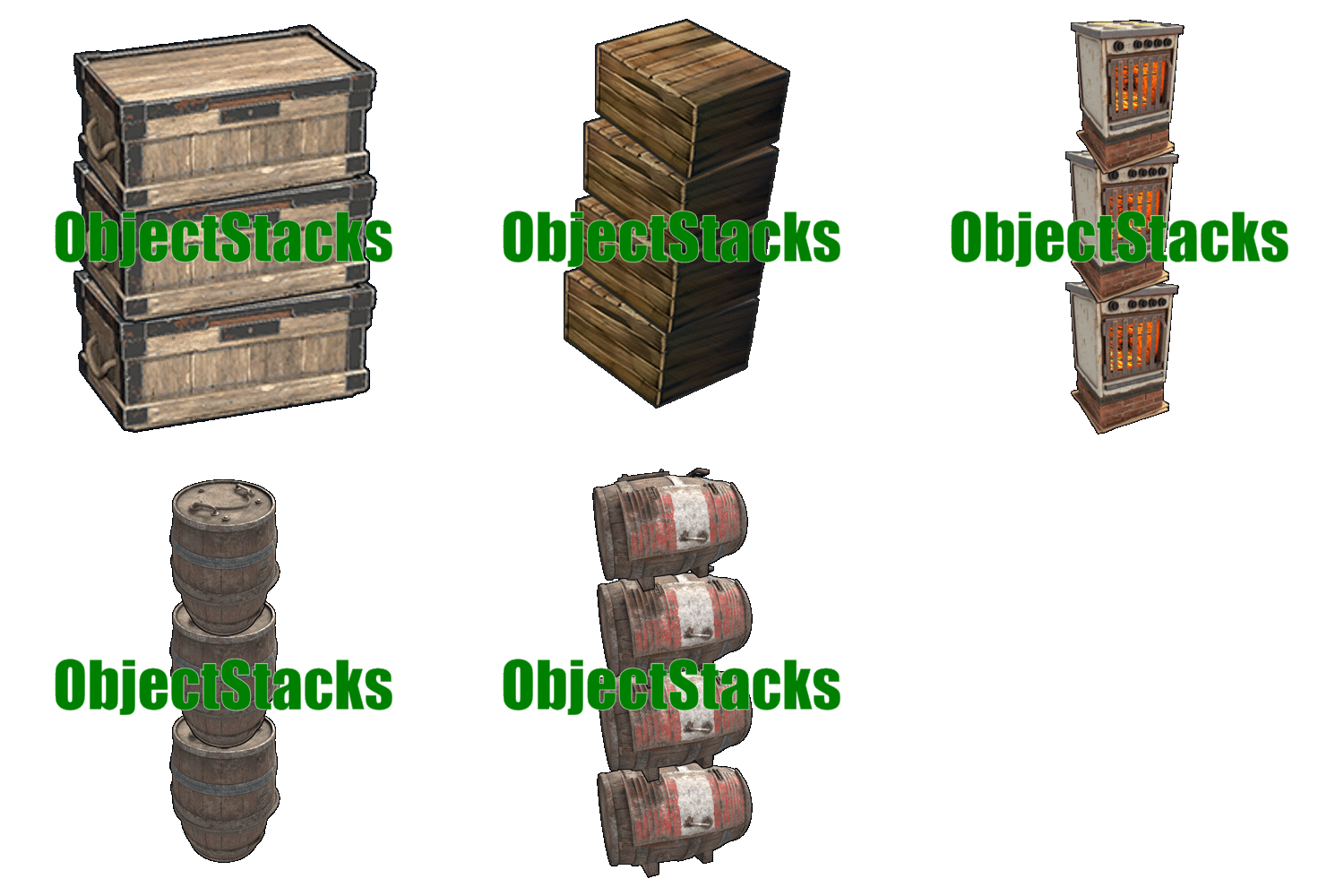
Tired of cluttered bases? ObjectStacks allows players to stack deployable objects vertically, creating organized, space-efficient storage areas and base layouts. Simply right-click while holding a deployable item to stack it on top of an existing object of the same type. Perfect for organizing furnaces, storage containers, generators, and more! Features of ObjectStacks One-Click Stacking: Right-click to stack objects - no commands needed, just intuitive gameplay Precise Vertical Spacing: Customizable Y-Offset for each object type ensures perfect alignment and prevents clipping Permission-Based Stacking Limits: Control how many objects each player group can stack (e.g., regular users: 2, VIPs: 4) Building Privilege Restriction: Optional restriction to Tool Cupboard zones to maintain game balance Smart Stability System: Automatic stability checking prevents floating structures and ensures realistic placement Skin Blacklist System: Prevent stacking of specific item skins that might cause visual or gameplay issues Tugboat Integration: Full support for stacking on tugboats with automatic parenting and stability bypass Ground Protection: Prevents stacked objects from falling when base objects are removed, maintaining structural integrity Automatic Permission Management: All permissions are automatically registered based on your configuration Comprehensive Logging: Optional logging system with multiple levels (None, File, Console, All) for debugging Wide Compatibility: Supports storage containers, electrical items, composters, and many more deployable objects Easy Configuration: Simple JSON configuration file - add new objects in minutes Usage To stack an object: Hold the deployable item you want to stack in your hands Look at an existing object of the same type (must be within 3 meters) Press right-click (secondary fire button) The item will be automatically placed on top at the correct height Cooldown: There's a 0.5 second cooldown between stacking attempts to prevent spam-clicking. Permissions Permissions follow the format: objectstacks.<shortname>.<group> Permission Format Explanation: objectstacks - Plugin prefix <shortname> - The shortname defined in the object's configuration (e.g., "box_wooden", "electric_furnace") <group> - Your custom group name (e.g., "use", "vip", "premium") Examples: objectstacks.storage_barrel_b.use - Regular users can stack up to 2 storage barrels (limit set in config) objectstacks.storage_barrel_b.vip - VIP users can stack up to 4 storage barrels objectstacks.electric_furnace.use - Regular users can stack up to 2 furnaces objectstacks.electric_furnace.vip - VIP users can stack up to 4 furnaces Important: The plugin uses the highest limit among all permissions the player has. If a player has both objectstacks.box_wooden.use (limit: 2) and objectstacks.box_wooden.vip (limit: 4), they will be able to stack up to 4 boxes. Supported Objects Storage Containers: Wooden Box (small) Large Wooden Box Storage Barrel B Storage Barrel C Coffin Storage Medieval Large Wooden Box Bamboo Barrel Wicker Barrel Abyss Barrel (Vertical and Horizontal) Electrical Items: Electric Furnace Small Generator Small Fuel Generator Rechargeable Battery (Small, Medium, Large) Other: Composter Note: You can add any deployable object to the configuration. Simply find its prefab path and configure the Y-Offset and permissions. Configuration Guide Logging Level: None - Disable all logging File - Log to files in oxide/logs (or carbon/logs) Console - Log to server console All - Log to both files and console Can stack only in Building Privileged zones?: When set to true, players can only stack objects within Tool Cupboard zones (or on tugboats). This prevents excessive stacking in public areas and maintains game balance. Set to false to allow stacking anywhere. Blacklisted Skins: Array of skin IDs that cannot be used for stacking. Add skin IDs here to prevent stacking of problematic skins. Example: [123, 1223] Permissions & their amount of stacked objects allowed: Dictionary mapping permission names to stacking limits. The limit represents the maximum number of objects that can be stacked in a single stack. Objects and offsets: Dictionary mapping object prefab paths to their configuration: YOffset - Vertical spacing between stacked objects (in meters) Shortname - Used for permission names (format: objectstacks.<shortname>.<group>) FAQ Q: How do I stack objects? A: Hold the item in your hands, look at an existing object of the same type (within 3 meters), and right-click. The item will be automatically stacked on top. Q: Why isn't stacking working for me? A: Check these requirements: The object type must be configured in the plugin You need the appropriate permission (e.g., objectstacks.box_wooden.use) You must not have exceeded your stacking limit If "Only in Building Privileged zones" is enabled, you must be in a Tool Cupboard zone The item skin must not be blacklisted There must be enough stability at the placement location You must be looking at the object (within 3 meters) The object you're looking at must be the same type as the item in your hands Q: How do I add a new object to the configuration? A: Follow these steps: Find the object's prefab path (use spawn command in F1 console or check Rust documentation) Add an entry to "Objects and offsets": "assets/prefabs/path/to/object.prefab": { "YOffset": 1.0, "Shortname for permissions (objectstacks.THISNAME.[use/vip/etc.])": "my_object" } Add permissions with limits: "objectstacks.my_object.use": 2, "objectstacks.my_object.vip": 4 Reload the plugin: o.reload ObjectStacks (Oxide) or c.reload ObjectStacks (Carbon) Q: What is Y-Offset and how do I determine the right value? A: Y-Offset is the vertical spacing between stacked objects, measured in meters. To determine the right value: Check the object's height in-game or in Unity Set Y-Offset slightly larger than the object's height to prevent clipping Common values: 0.5-0.7 for small objects, 1.0-1.5 for medium objects, 1.5-2.0 for large objects Test and adjust as needed - you can see the spacing immediately when stacking Q: How do stacking limits work? A: Limits control the maximum number of objects that can be stacked in a single stack. The plugin counts all objects of the same type in the vertical column and prevents stacking beyond the limit. The plugin uses the highest limit from all permissions the player has. Q: Can I stack objects outside Tool Cupboard zones? A: Yes, if you set "Can stack only in Building Privileged zones?": false in the config. By default, this is set to true to maintain game balance. Q: Does stacking work on tugboats? A: Yes! ObjectStacks fully supports tugboats. When stacking on a tugboat: Stability checks are bypassed Objects are automatically parented to the tugboat Building privilege restrictions don't apply Q: What happens if I remove a base object from a stack? A: The plugin includes ground protection via the OnEntityGroundMissing hook. If you remove a base object, stacked objects above will check if there's another object of the same type below them. If found within the Y-Offset range, they won't fall, preventing accidental destruction. Q: How do I find the prefab path for an object? A: Several methods: Use spawn command in F1 console - it shows prefab paths as you type Check the default config for examples of similar objects Look up Rust prefab documentation online Use server console commands that list prefabs Q: Can I prevent specific skins from being stacked? A: Yes! Add the skin ID to the "Blacklisted Skins" array in the config. For example: "Blacklisted Skins": [123, 1223, 4567] Q: What does the error message "Building blocked!" mean? A: This means "Can stack only in Building Privileged zones?" is enabled, and you're trying to stack outside a Tool Cupboard zone. Either move to a TC zone, or disable this setting in the config. Q: What does "Not enough stability to place the entity" mean? A: The plugin checks if the placement location has enough structural support. If you see this message, try stacking in a different location or ensure there's proper foundation below. Q: Where can I see an example configuration? A: The default config file generated by the plugin contains comprehensive examples of all supported objects. You can use it as a template when adding new objects.$21.95 -
Version 1.0.1
11 downloads
Stack Size Controller – Balanced Configuration Packs Includes 4 different configs. Pick one to use, or use different configs on multiple servers. Some stack values are based on the gather rate; however, overall, resources and similar items are set higher based on player experience and community feedback. Server Compatibility - Suitable for 3x, 5x, 10x and PvE servers - If higher stack sizes are desired, the 3x preset can safely be used on 2x servers without causing major balance issues or technical problems Professionally Designed & Tested All configurations are manually created from scratch and are not auto-generated or simple default edits. Each configuration has been: - Actively tested on live servers for over 2 years - Used on long-running, active servers - Adjusted based on real player behavior and feedback - Balanced with economic flow and recycler outputs in mind The goal is to improve quality of life without breaking progression or server economy. Balanced Design Philosophy Not every item is meant to be stacked. Below are the core principles behind how these configurations are designed. Durability & Skin Safety Weapons, clothing, doors, and certain electrical items are intentionally excluded from stacking. These items rely on durability (condition) mechanics and often support skins. Stacking them may cause condition conflicts, incorrect durability behavior, skin desynchronization, and inventory-related bugs. To maintain server stability and predictable gameplay, these item types are deliberately kept unstacked. Explosives & Economy Control F1 Grenades, Smoke Grenades, and similar explosive items are intentionally excluded from stacking or only increased by reasonable amounts. This approach helps prevent gunpowder inflation, balance abuse, and uncontrolled progression. Stackable Item Categories - Resources (Some resources have been stacked above the normal limits in line with strong player demand, especially wood and stone, among others.) - Components (Excessive stacking has not been applied in order to maintain recycling balance; it has been kept at a controlled and balanced level.) - Food items - Medical items - Ammunition Easy Installation 1. Choose one of the 4 configuration presets 2. Copy StackSizeController.json into your config folder 3. Oxide.reload StackSizeController OR c.reload StackSizeController Required Plugin This configuration pack requires the Stack Size Controller plugin. You can download it for free from uMod: https://umod.org/plugins/stack-size-controller$12.99-
- 1
-
-
- #stack size controller
- #stacks
- (and 25 more)
-

Version 1.1.2
528 downloads
This plugin solves the problem of items with different skins transferred by industrial pipe lines being improperly stacked together. This plugin ensures that items with different skins are kept as separate stacks during transfer to storage containers. Important note. Plugin fully depends Harmony. How it works?Free- 33 comments
- 6 reviews
-
- 4
-
-
-
- #industrial
- #rust
- (and 7 more)
-

Version 1.2.2
112 downloads
About plugin The plugin allows you to conveniently change the stacks of items through the use of a graphical interface Chat Commands (can be changed in config) /stacks - opens the main menu /sethandstack - change item's stack you are holding in your hands Console Commands jstacks.setstack [item shortname] [new stack] - set stack size for item. Example: jstacks.setstack ammo.rifle 256 jstacks.restore - reset all stacks to default values (be careful: there is no confirmation) Permissions jstacks.use - using the plugin Features Changing stacks for the entire category by pressing two buttons Multiple choice option for quick stack change Config { "Can admins use command": true, "Command to open the menu": "stacks", "Command to set stack size of an item in your hands": "sethandstack", "Default icons for categories (in-game only)": { "Ammunition": "assets/icons/ammunition.png", "Attire": "assets/icons/community_servers.png", "Component": "assets/icons/open.png", "Construction": "assets/icons/construction.png", "Electrical": "assets/icons/electric.png", "Food": "assets/icons/food_cooked.png", "Fun": "assets/icons/fun_alt.png", "Items": "assets/icons/extinguish.png", "Medical": "assets/icons/medical.png", "Misc": "assets/icons/menu_dots.png", "Resources": "assets/icons/community_servers.png", "Tool": "assets/icons/tools.png", "Traps": "assets/icons/traps.png", "Weapon": "assets/icons/weapon.png" } }$2.99 -
Version 1.0.0
1,659 downloads
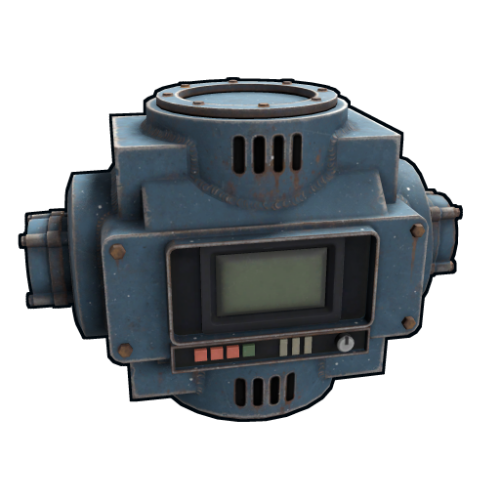
Allows changing the max stack amount that industrial conveyors can transfer at once. How it works In vanilla Rust, let's say you have a stack of 500 scrap in a box. A connected industrial conveyor will transfer out at most 60 scrap from that stack at a time. This plugin allows you to change that 60 number to whatever you want, and allows you to set different numbers for different players using permissions. This plugin is especially useful for servers that have high loot content and high stack sizes. Note: Even when using this plugin, the transfer max stack amount cannot exceed the item's max stack size. For best results, adjust max stack sizes as well. Related ConVars If you are having issues with conveyor transfer speeds, consider changing the following ConVars as well. server.conveyormovefrequency -- How often industrial conveyors attempt to move items. Setting to 0 will disable all movement. Default: 5. server.maxitemstacksmovedpertickindustrial -- How many stacks a single conveyor can move in a single tick. Default: 12. As an alternative to this plugin, you can try simply increasing the server.conveyormovefrequency ConVar, but that may affect server performance, and will not help that much for servers with very high stack sizes. Another alternative is for players to simply spread out the items in the source container, since that will utilize the conveyor feature to move multiple stacks at once (which is a ConVar-controlled number), but that is more work for players. Permissions This plugin uses the permission system. To assign a permission, use oxide.grant <user or group> <name or steam id> <permission>. To remove a permission, use oxide.revoke <user or group> <name or steam id> <permission>. By default, the plugin provides the following permissions. Each one grants the corresponding max transfer amount to all industrial conveyors deployed by the player. conveyorstacks.amount.100 conveyorstacks.amount.1000 conveyorstacks.amount.10000 conveyorstacks.amount.100000 Notes These permissions are generated automatically when the plugin loads and reads the config. You can change these values and even add more by editing the config and reloading the plugin. If a player has multiple of these permissions assigned, the highest will apply. If you grant one of these permissions, then change that number in the config, the old permission will no longer exist, so you will have to grant permission again for the new value. For a seamless installation, make your intended config edits before granting any permissions to avoid any confusion. Configuration The settings and options can be configured in the ConveyorStacks file under the config directory. The use of an editor and validator is recommended to avoid formatting issues and syntax errors. Default transfer max stack amount (Default: 60) -- Determines the max stack amount that industrial conveyors can transfer at once. Can be overriden by granting permissions. This default value of 60 matches vanilla Rust as of this writing (March 2023). Transfer max stack amounts requiring permission -- Defines additional max stack amounts that will be used to generate permissions like conveyorstacks.amount.<amount>. Developer Hooks object OnConveyorMaxStackAmountChange(IndustrialConveyor conveyor) Return false to prevent the plugin from affecting the conveyor.Free -

Version 2024.5.2.1658
161 downloads
SAVE 10% WHEN BUYING THE BUNDLE SAVE 10% WHEN BUYING THE BUNDLE This high performance patch will allow to set custom item stacks based on: Item name Item category Blacklist items (useful when using the categories) This is a standalone Harmony patch, Oxide installation is optional. Copy the Oxidation.StackManager.dll file into your HarmonyMods folder and restart your server. At the first server start after installing the patch a new configuration file Oxidation.StackManager.X.json will be created at the HarmonyMods folder. What is Harmony ? Harmony is a library for patching .NET code during runtime, it directly manipulates game code (CIL) without any additional abstraction layer such as Oxide. The direct patching of the game's byte code allows more performant modding as developers no longer need to rely on third party code, events or hooks to build custom functionality.$4.99- 5 comments
- 3 reviews
-
- 1
-
-
- #harmony
- #oxidation
- (and 8 more)
-
Version 1.0.5
245 downloads
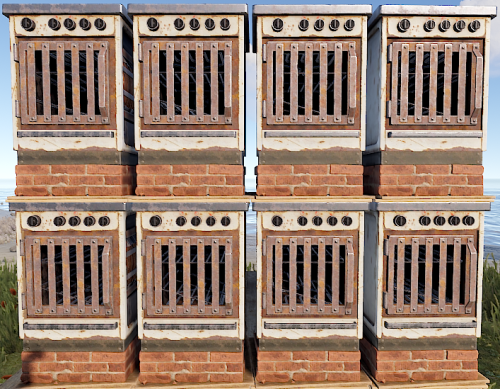
Configuration: { "Only stack furnaces in Building Privileged zones": true, "Permissions & their amount of stacked furnaces allowed": { "furnacestacks.use": 2, "furnacestacks.vip": 4 } } Language: { "MaxStackAmount": "You are trying to stack more than {0} furnaces!", "OnlyStackFurnaces": "You can only stack electric furnaces!", "CeilingBlock": "A ceiling is blocking you from stacking this furnace!", "BuildingBlock": "You need to be Building Privileged in order to stack furnaces!" } Permissions: furnacestacks.use (Always grant this permission for usage, grant additional permissions for different maximum stack amounts) In order to stack the furnaces you have to press RIGHT CLICK while looking at the placed furnace and being near it! Bugs & Questions: If you've found any bugs, have any questions/suggestions please let me know in the support section!$10.00 -
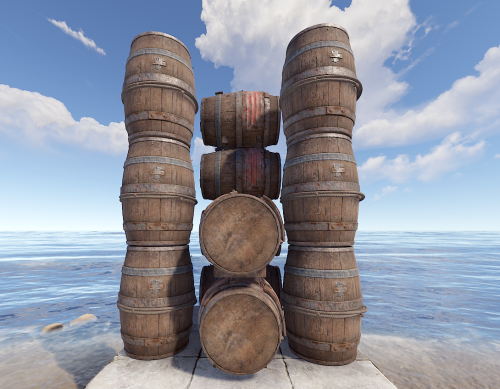
Version 1.0.4
146 downloads
Barrel Stacks is a Rust plugin that allows players to stack barrels on top of each other! Configuration: { "Only stack barrels in Building Privileged zones": true, "Blacklisted Skins": [ 2618923347 ], "Permissions & their amount of stacked barrels allowed": { "barrelstacks.use": 3, "barrelstacks.vip": 5 } } Language: { "MaxStackAmount": "You are trying to stack more than {0} barrels!", "OnlyStackSameType": "You can only stack the same type of barrels!", "CeilingBlock": "A ceiling is blocking you from stacking this barrel!", "BuildingBlock": "You need to be Building Privileged in order to stack barrels!" } Permissions: barrelstacks.use (Always grant this permission for usage, grant additional permissions for different maximum stack amounts) DO NOT USE COPY/PASTE PLUGIN TO PASTE STACKED BARRELS, IT WON'T WORK PROPERLY. In order to stack the barrels you have to press RIGHT CLICK while looking at the placed barrel and being near it!$10.00