Search the Community
Showing results for tags 'target'.
Found 3 results
-
Version 1.0.1
574 downloads
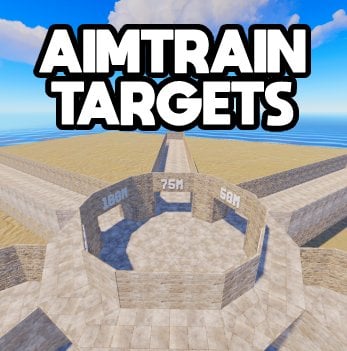
This is a prefab made for aim train servers or servers that want targets! Target In-Game Distances: 25M 50M 75M 100M 125M 150M AimTrain Targets arena with 6 distances to practise on! Constantly updated, well maintained, 24/7 Support (below) Join my support discord for any questions: LinkFree -
Version 1.0.0
10 downloads
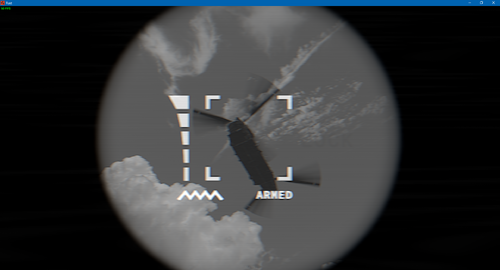
This plugin adds a flexible goal management system for the man-portable air defense system (MANPADS). With it, server administrators can easily add various objects of the BaseCombatEntity type to the list of potential targets for MANPADS missiles. A key feature is the use of the hook private object CanBeHomingTargeted(BaseCombatEntity target) through which an object can be canceled as a target or custom logic used when a player tries to aim. The plugin configuration allows you to set parameters for each prefab object. For example, for each object, you can specify a damage multiplier from a MANPADS missile hit, allowing fine-tuning of combat balance. And for patrol helicopters, you can also configure the chance of using thermal decoys. The plugin is designed for Rust servers and provides administrators with greater freedom in configuring gameplay, making it more diverse and engaging for players. Video overview of the plugin$6.00 -
Version 1.3.2
1,323 downloads
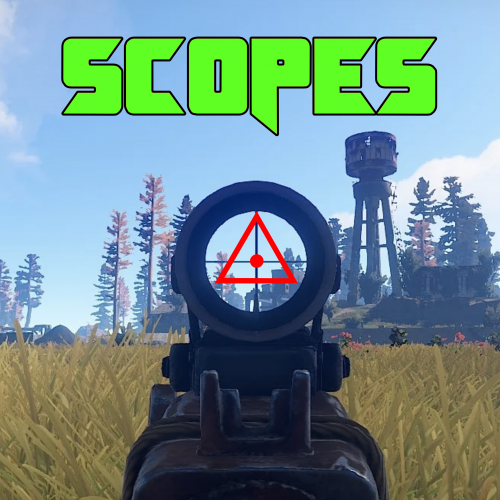
Scopes is an on screen crosshair solution for all your rusty shooting needs. Features Selection of 6 Scopes that are customisable via the config. Permissions Scopes.Toggle << Required to use Scopes. Commands /Scope << Tells players to use the following: /Scope 1 << Scope1 (Default is 「」 /Scope 2 <<Scope2 (Default is + /Scope 3 <<Scope3 (Default is ◊ /Scope 4 <<Scope4 (Default is ◬ /Scope 5 <<Scope5 (Default is ・ /Scope 6 <<Scope6 (Default is Ⓧ /NoScope <<Disables the Scope. Configuration The settings and options for this plugin can be configured in the Scopes.json file under the oxide/config directory. The use of a JSON editor or validation site such as jsonlint.com is recommended to avoid formatting issues and syntax errors. { "symbols": [ "「」", "+", "◊", "◬", "・", "Ⓧ" ], "Colour": "1 0 0 1" } SPECIAL CAUTION NEEDS TO BE TAKEN WHEN EDITING THE CONFIG. USE NOTEPAD++ OR VSC. SOME PLAIN TEXT EDITORS (Like the one built into WinSCP) CANNOT LOAD THE SYMBOLS AND REPLACES THEM WITH GARBAGE! Variables As you can see to change a symbol you just type in your favourite character Within Rusts abilities (Some symbols are not supported as they are not included in Rusts Language packs... can be a little bit trial and error) Symbol Color is in the RGBA format Examples below.. Color Examples blackSolid black. RGBA is (0 0 0 1). blueSolid blue. RGBA is (0 0 1 1). clearCompletely transparent. RGBA is (0 0 0 0). cyanCyan. RGBA is (0 1 1 1). grayGray. RGBA is (0.5 0.5 0.5 1). greenSolid green. RGBA is (0 1 0 1). greyEnglish spelling for grey. RGBA is the same (0.5 0.5 0.5 1). magentaMagenta. RGBA is (1 0 1 1). redSolid red. RGBA is (1 0 0 1). whiteSolid white. RGBA is (1 1 1 1). The Last digit dictates Alpha channel... so for an opaque appearance select a value below 1 E.g. 0.7Free