
Search the Community
Showing results for tags 'timed'.
Found 17 results
-

Version 1.1.1
316 downloads
Heavy Military Tunnel Event is a configurable plugin that allows for a new type of random event. Randomly a message will appear letting players know that a heavy unit is now guarding Military Tunnel The Military Tunnel will then be equipped with extra scientists both light and heavy, auto turrets, and Bradleys. Players must try to clear the military tunnel and find the scientist who drops the code to disable the auto turrets OR destroy all the turrets. If the code is found, it can be entered into the code lock hidden in a room to disable the turrets. Once the turrets and scientists are dealt with, players must defeat the Bradleys that guard the hackable crates. Finally, once the Bradleys are defeated, players can collect all the loot. That's if someone else doesn't get to it first! This is a great event to add to your server to give it a little more variety. It can be a fun PVP zone or a PVE event for non PVP servers. EASY OPTIONAL SETUP - NO SETUP REQUIRED You can simply drop the plugin in as-is and it will start the random event every 1 to 2 hours OR you can modify the config to your specific needs. Configuration Example - en Admin Only Commands /HmtStart /HmtStop /HmtPos Hooks void HeavyMilitaryTunnelEventStarted() void HeavyMilitaryTunnelEventStopped() Customization Spawn locations as well as the total number turrets, scientists, hackable crates, & APCbradleys can be modified. Simply go to the location in game you want to place the new item and use the command /HmtPos. It will message you the location. You can the add that location to the config in the appropriate section for want you want to modify. Reload the plugin and you're good to go! Support Create a support ticket here or message me on discord: cahnu$19.99 -
Version 0.1.24
4,516 downloads
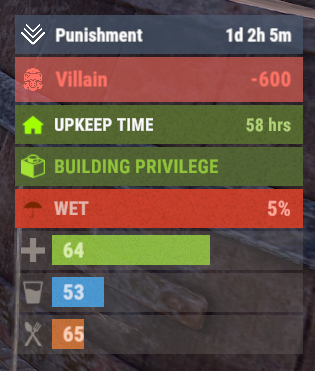
A useful API plugin that mimics in-game status bars and allows the addition of custom ones. Note: AdvancedStatus does not display any bars on its own. This is done by other plugins that work with it. An example plugin demonstrating interaction with AdvancedStatus. The ability to specify the frequency of calculating the number of bars; The ability to specify the order of the bar; The ability to change the height of the bar; The abillity to customize the color and transparency of the background; The ability to set a material for the background; The ability to switch between CuiRawImageComponent and CuiImageComponent for the image; The ability to get images from the local folder(*SERVER*\oxide\data\AdvancedStatus\Images); The abillity to set own image and customize the color and transparency of the image; The abillity to set sprite instead of the image; The ability to specify custom text; The ability to customize the color, size and font of the text; No need to pass all parameters; No need to manually delete your bar when unloading your plugin. advancedstatus.admin - Grants access to the chat command(by default /bar). { "Chat command": "bar", "Is it worth enabling console notifications for the successful loading of local images?": false, "Interval(in seconds) for counting in-game status bars": 0.5, "Interval(in seconds) for counting Building Privilege status bars. Note: Calculating Building Privilege is significantly more resource-intensive than other counts": 1.0, "Bar - Display Layer. If you have button bars, it's advisable to use Hud(https://umod.org/guides/rust/basic-concepts-of-gui#layers)": "Under", "Bar - Left to Right": true, "Bar - Offset between status bars": 2, "Bar - Default Height": 26, "Main - Default Color": "#505F75", "Main - Default Transparency": 0.7, "Main - Default Material(empty to disable)": "", "Image - Default Image": "AdvancedStatus_Default", "Image - Default Color": "#6B7E95", "Image - Default Transparency": 1.0, "Image - Outline Default Color": "#000000", "Image - Outline Default Transparency": 1.0, "Image - Outline Default Distance": "0.75 0.75", "Text - Default Size": 12, "Text - Default Color": "#FFFFFF", "Text - Default Transparency": 1.0, "Text - Default Font(https://umod.org/guides/rust/basic-concepts-of-gui#fonts)": "RobotoCondensed-Bold.ttf", "Text - Default Offset Horizontal": 0, "Text - Outline Default Color": "#000000", "Text - Outline Default Transparency": 1.0, "Text - Outline Default Distance": "0.75 0.75", "SubText - Default Size": 12, "SubText - Default Color": "#FFFFFF", "SubText - Default Transparency": 1.0, "SubText - Default Font": "RobotoCondensed-Bold.ttf", "SubText - Outline Default Color": "#000000", "SubText - Outline Default Transparency": 1.0, "SubText - Outline Default Distance": "0.75 0.75", "Progress - Default Color": "#89B840", "Progress - Default Transparency": 0.7, "Progress - Default OffsetMin": "25 2.5", "Progress - Default OffsetMax": "-3.5 -3.5", "Version": { "Major": 0, "Minor": 1, "Patch": 24 } } EN: { "MsgDays": "d", "MsgHours": "h", "MsgMinutes": "m", "MsgSeconds": "s" } RU: { "MsgDays": "д", "MsgHours": "ч", "MsgMinutes": "м", "MsgSeconds": "я" } images reload *ImageName* - Reloads the specified image from the image folder; all - Reloads all local images from the image folder. Example: /bar images reload all Note: To access the commands, the player must be an admin(console or owner) or have the advancedstatus.admin permission. OnAdvancedStatusLoaded: Called after the AdvancedStatus plugin is fully loaded and ready. OnPlayerGainedBuildingPrivilege: Called after the player enters their building privilege. OnPlayerLostBuildingPrivilege: Called after the player exits their building privilege. void OnAdvancedStatusLoaded() { Puts("The AdvancedStatus plugin is loaded and ready to go!"); } void OnPlayerGainedBuildingPrivilege(BasePlayer player) { Puts($"{player.displayName} entered the authorized building privilege zone."); } void OnPlayerLostBuildingPrivilege(BasePlayer player) { Puts($"{player.displayName} exited the authorized building privilege zone."); } [PluginReference] private Plugin AdvancedStatus; There are 15 methods: IsReady CreateBar UpdateContent DeleteBar DeleteCategory DeleteAllBars GetTotalClientBars GetTotalPlayerBars LoadImages LoadImage CopyImage DeleteImages DeleteImage BarExists InBuildingPrivilege There are 5 types of bar: Default - A simple bar that displays the provided information. Does not update the value of SubText by itself; Timed - Similar to the default bar, but it automatically disappears after the specified time in the TimeStamp parameter; TimeCounter - The SubText shows the remaining time until TimeStamp. Also automatically removed upon expiration of the TimeStamp; TimeProgress - Similar to the Timed bar, but additionally features an automatically filling progress bar; TimeProgressCounter - Similar to the TimeCounter bar, but additionally features an automatically filling progress bar. IsReady: Used to check if the AdvancedStatus plugin is loaded and ready to work. The IsReady method returns true if it is ready, or null if it is not. (bool)AdvancedStatus?.Call("IsReady");//Calling the IsReady method. If the result is not null(bool true), the plugin is ready. CreateBar: Used to create a bar or update bar values for a player. To call the CreateBar method, you need to pass 2 parameters. The first one is BasePlayer or <ulong>playerID. The second one is a dictionary with the parameters you need. In the CreateBar method, all parameters are optional, except for two: Id; Plugin. Parameters not specified when creating a new bar will use the values set in the AdvancedStatus plugin's configuration file. Parameters not specified during bar update will retain the values they had before the update. Note: The plugin does not update values automatically, you need to manually send new values. Dictionary<string, object> parameters = new Dictionary<string, object> { { "Id", "AdvancedStatusDemo_1" }, //<string>Unique identifier for the bar in your plugin. ***This is a required field. { "BarType", "Default" }, //<string>Type of the bar. There are 4 types: Default, Timed, TimeCounter and TimeProgress. { "Plugin", "AdvancedStatusDemo" }, //<string>Name of your plugin. ***This is a required field. { "Category", "Default" }, //<string>Internal plugin category of the bar. { "Order", 10 }, //<int>The position of your bar relative to others. Order is determined by increasing values(ASC). { "Height", 26 }, //<int>The height of your bar. A standard bar is 26 pixels. { "Main_Color", "#505F75" }, //<string>HTML Hex color of the bar background. { "Main_Transparency", 0.7f }, //<float>Transparency of the bar background. { "Main_Material", "assets/content/ui/uibackgroundblur.mat" }, //<string>Material of the bar background(empty to disable). { "Image", "scrap" }, //<string>Name of the image saved in the ImageLibrary or a direct link to the image if ImageLibrary is not used. { "Image_Local", "AdvancedStatusDemo_Scrap" }, //<string>The name of the image file(without its extension) located in *SERVER*\data\AdvancedStatus\Images. Leave empty to use Image. { "Image_Sprite", "" }, //<string>Sprite image of the bar. Leave empty to use Image_Local or Image. { "Is_RawImage", true }, //<bool>Which type of image will be used? True - CuiRawImageComponent. False - CuiImageComponent. { "Image_Color", "#6B7E95" }, //<string>HTML Hex color of the bar image. { "Image_Transparency", 1.0f }, //<float>Transparency of the image. { "Text", "Scrap" }, //<string>Main text. { "Text_Size", 12 }, //<int>Size of the main text. { "Text_Color", "#FFFFFF" }, //<string>HTML Hex color of the main text. { "Text_Font", "RobotoCondensed-Bold.ttf" }, //<string>Font of the main text. { "Text_Offset_Horizontal", 0 }, //<int>Horizontal offset for the main text. { "SubText", "35" }, //<string>Sub text. { "SubText_Size", 12 }, //<int>Size of the sub text. { "SubText_Color", "#FFFFFF" }, //<string>HTML Hex color of the sub text. { "SubText_Font", "RobotoCondensed-Bold.ttf" }, //<string>Font of the sub text. { "TimeStampStart", Network.TimeEx.currentTimestamp }, //<double>Responsible for specifying the start point of the time reference and 0% for TimeProgress and TimeProgressCounter bars. Used if the bar type is Timed, TimeCounter, TimeProgress or TimeProgressCounter. { "TimeStamp", Network.TimeEx.currentTimestamp + 6 }, //<double>Specifies the end time point after which the bar will be destroyed and 100% for TimeProgress and TimeProgressCounter bars. Used if the bar type is Timed, TimeCounter, TimeProgress or TimeProgressCounter. { "TimeStampDestroy", Network.TimeEx.currentTimestamp + 3 }, //<double>If TimeStampDestroy is specified and it is less than TimeStamp, the bar will be destroyed by TimeStampDestroy. Used if the bar type is Timed, TimeCounter, TimeProgress or TimeProgressCounter. { "Progress", (float)35 / 100f }, //<float>Progress. From 0.0 to 1.0. { "Progress_Reverse", false }, //<bool>Progress reverse. A value of false means that the progress will increase. Used if the bar type is TimeProgress or TimeProgressCounter. { "Progress_Color", "#89B840" }, //<string>Progress color. { "Progress_Transparency", 1f }, //<float>Progress transparency. { "Progress_OffsetMin", "25 2.5" }, //<string>Progress OffsetMin: "*left* *bottom*". { "Progress_OffsetMax", "-3.5 -3.5" }, //<string>Progress OffsetMax: "*right* *top*". { "Command", "kit" } //<string>If the field is not empty, the bar becomes clickable, and the specified command is executed upon clicking. Note: the command must be covalence. }; AdvancedStatus?.Call("CreateBar", player.userID.Get(), parameters); //Calling the CreateBar method with the passing of BasePlayer/playerID and a dictionary containing the required parameters. UpdateContent: Used to update only the content of an existing status bar. To call the UpdateContent method, you need to pass 2 parameters. The first one is BasePlayer or <ulong>playerID. The second one is a dictionary with the parameters you need. In the UpdateBar method, all parameters are optional, except for two: Id; Plugin. var parameters = new Dictionary<string, object> { { "Id", "MyID" }, //<string>Unique identifier for the bar in your plugin. ***This is a required field. { "Plugin", Name }, //<string>Name of your plugin. ***This is a required field. { "Text", "MyText" }, //<string>Main text. { "SubText", "MyText" }, //<string>Sub text. { "Progress", (float)amount / 100f }, //<float>Progress. From 0.0 to 1.0. }; AdvancedStatus?.Call("UpdateContent", player.userID.Get(), parameters); //Calling the UpdateContent method with the passing of BasePlayer/playerID and a dictionary containing the required parameters. DeleteBar: Used to remove the bar for a player. There are two methods for removing a bar by ID: with specifying a particular player; To call this method, you need to pass 3 parameters. The first one is BasePlayer or <ulong>playerID. The second one is Id of your bar and the third one is name of your plugin. without specifying a particular player (which removes it for all players) To call this method, you need to pass 2 parameters. The first one is Id of your bar and the second one is name of your plugin. AdvancedStatus?.Call("DeleteBar", player.userID.Get(), barID, Name); //Calling the DeleteBar method with the passing of BasePlayer/playerID, ID of the bar and the name of your plugin. AdvancedStatus?.Call("DeleteBar", barID, Name); //Calling the DeleteBar method with the passing of ID of the bar and the name of your plugin. If you try to delete a bar that doesn't exist, nothing bad will happen. So feel free to delete the bar without checking its existence. P.S. When unloading your plugin, there is no need to manually delete bars for players, AdvancedStatus will handle it automatically. DeleteCategory: Used to remove all bars associated with the plugin's category. To call the DeleteCategory method, you need to pass 2 parameters. The first one is category and the second one is name of your plugin. AdvancedStatus?.Call("DeleteCategory", "Default", Name);//Calling the DeleteCategory method by passing the category and name of your plugin DeleteAllBars: Used to remove all bars associated with the plugin. To call the DeleteAllBars method, you need to pass only 1 parameter. It is name of your plugin. AdvancedStatus?.Call("DeleteAllBars", Name);//Calling the DeleteAllBars method, passing the name of your plugin GetTotalClientBars: Used to get the number of client bars for the player. To call the GetTotalClientBars method, you need to pass only 1 parameter. It is BasePlayer or <ulong>playerID. (int)AdvancedStatus?.Call("GetTotalClientBars", player.userID.Get());//Calling the GetTotalClientBars method, passing the name of BasePlayer/playerID GetTotalPlayerBars: Used to get the number of active custom bars for the player. To call the GetTotalPlayerBars method, you need to pass only 1 parameter. It is BasePlayer or <ulong>playerID. (int)AdvancedStatus?.Call("GetTotalPlayerBars", player.userID.Get());//Calling the GetTotalPlayerBars method, passing the name of BasePlayer/playerID LoadImages: Used to check if the local images specified in the list are loaded. If any of the images are not loaded but their files exist in the images folder, the plugin will load them. To call the LoadImages method, you need to pass only 2 parameters. The first one is the <List<string>>list of image's name and the second one(optional) is <bool>force, which, if set to true, will force reload the image even if it already exists. AdvancedStatus?.Call("LoadImages", list, false);//Calling the LoadImages method, passing a list of image names LoadImage: Used to check if the local image is loaded. If the file is not loaded and exists in the images folder, the plugin will load it. To call the LoadImage method, you need to pass 2 parameters. The first one is the <string>image's name and the second one(optional) is <bool>force, which, if set to true, will force reload the image even if it already exists. AdvancedStatus?.Call("LoadImage", imgName, false);//Calling the LoadImage method, passing an image's name CopyImage: Used to create and load a copy of an existing image. To call the CopyImage method, you need to pass 3 parameters. The first parameter is the <string>source image's name, the second parameter is the <string>new image's name and the third one(optional) is <bool>force, which, if set to true, will force copy and reload the image even if it already exists. AdvancedStatus?.Call("CopyImage", "ZoneStatus_Default", "ZoneStatus_NewZone", false);//Calling CopyImage, passing the source image name and the new image name. DeleteImages: Used to delete a list of images and their files. To call the DeleteImages method, you need to pass 2 parameters. The first one is the <List<string>>list of image's name and the second one(optional) parameter is <bool>deleteFile, which, if set to true, will delete image's file too. AdvancedStatus?.Call("DeleteImages", list, true);//Calling DeleteImages, passing a list of image names. DeleteImage: Used for removing the image and the image file. To call the DeleteImage method, you need to pass 2 parameters. The first parameter is the <string>image's name and the second one(optional) parameter is <bool>deleteFile, which, if set to true, will delete image's file too. AdvancedStatus?.Call("DeleteImage", "ZoneStatus_NewZone", true);//Calling DeleteImage, passing the image name. BarExists: Used to check if the specified bar exists. To call the BarExists method, you need to pass 3 parameters. The first one is BasePlayer or <ulong>playerID. The second one is Id of your bar. And the third one is name of your plugin. (bool)AdvancedStatus?.Call("BarExists", player.userID.Get(), barID, Name);//Calling the BarExists method with the passing of BasePlayer/playerID, ID of the bar and name of your plugin. InBuildingPrivilege: Used to check if the player has authorized building privileges. To call the InBuildingPrivilege method, you need to pass BasePlayer or <ulong>playerID. (bool)AdvancedStatus?.Call("InBuildingPrivilege", player.userID.Get());//Checking if the player has Building Privilege.$1.99 -

Version 0.1.7
1,048 downloads
Useful plugin for managing temporary permissions, temporary groups and temporary permissions for groups. This is done through chat commands, built-in Oxide commands, and API methods. Note: The dates is in UTC format. The ability to grant players temporary permissions by specifying either the number of seconds, an exact expiration date or until the wipe occurs; The ability to add players to temporary groups by specifying either the number of seconds, an exact expiration date or until the wipe occurs; The ability to grant groups temporary permissions by specifying either the number of seconds, an exact expiration date or until the wipe occurs; The ability to revoke temporary permissions from players and groups prematurely; The ability to remove players from groups prematurely; The ability to perform all the above actions using existing and familiar console commands(e.g., o.grant), simply by adding the number of seconds, the expiration date or the word "wipe" at the end; The ability to perform all the above actions using a chat command (by default /tperm); The ability to perform all the above actions using API methods; The ability to remove all temporary permissions and groups upon wipe detection. temporarypermissions.admin - Grants access to the admin command(by default /tperm). { "Chat command": "myperm", "Chat admin command": "tperm", "Is it worth enabling GameTips for messages?": true, "Is it worth saving logs to a file?": true, "Is it worth using console logging?": true, "List of language keys for creating language files": [ "en" ], "Interval in seconds for expiration check": 1.0, "Interval in seconds for checking the presence of temporary permissions and temporary groups. A value of 0 disables the check": 600.0, "Is it worth restoring removed temporary permissions and temporary groups if the timer hasn't expired? There are cases where removal cannot be tracked in the usual way": true, "Is it worth revoking temporary permissions and temporary groups when unloading the plugin, without removing them from the data file?": true, "Is it worth revoking temporary permissions and temporary groups that haven't expired yet upon detecting a wipe?": false, "Custom wipe date(detected only during initialization). Only required if you're experiencing issues with the Wipe ID. Leave empty to use the Wipe ID. Example: 2025-06-25 13:00": "", "Wipe ID": null, "Version": { "Major": 0, "Minor": 1, "Patch": 7 } } EN: { "CmdAdmin": "Available admin commands:\n\n<color=#D1CBCB>/tperm</color> <color=#D1AB9A>grant user *nameOrId* realpve.vip wipe</color> - Grants or extends the specified permission for the specified player until the end of the current wipe\n<color=#D1CBCB>/tperm</color> <color=#D1AB9A>grant user *nameOrId* realpve.vip *intValue* *boolValue*(optional)</color> - Grants or extends the specified permission for the specified player for the given number of seconds\n<color=#D1CBCB>/tperm</color> <color=#D1AB9A>grant user *nameOrId* realpve.vip *expirationDate* *assignmentDate*(optional)</color> - Grants or extends the specified permission for the specified player until the given date\n<color=#D1CBCB>/tperm</color> <color=#D1AB9A>grant group *groupName* realpve.vip wipe</color> - Grants or extends the specified permission for the specified group until the end of the current wipe\n<color=#D1CBCB>/tperm</color> <color=#D1AB9A>grant group *groupName* realpve.vip *intValue* *boolValue*(optional)</color> - Grants or extends the specified permission for the specified group for the given number of seconds\n<color=#D1CBCB>/tperm</color> <color=#D1AB9A>grant group *groupName* realpve.vip *expirationDate* *assignmentDate*(optional)</color> - Grants or extends the specified permission for the specified group until the given date\n<color=#D1CBCB>/tperm</color> <color=#D1AB9A>revoke user *nameOrId* realpve.vip</color> - Revokes the specified permission from the specified player\n<color=#D1CBCB>/tperm</color> <color=#D1AB9A>revoke group *groupName* realpve.vip</color> - Revokes the specified permission from the specified group\n<color=#D1CBCB>/tperm</color> <color=#D1AB9A>add *nameOrId* *groupName* wipe</color> - Adds or extends the specified player's membership in the specified group until the end of the current wipe\n<color=#D1CBCB>/tperm</color> <color=#D1AB9A>add *nameOrId* *groupName* *intValue* *boolValue*(optional)</color> - Adds or extends the specified player's membership in the specified group for the given number of seconds\n<color=#D1CBCB>/tperm</color> <color=#D1AB9A>add *nameOrId* *groupName* *expirationDate* *assignmentDate*(optional)</color> - Adds or extends the specified player's membership in the specified group until the given date\n<color=#D1CBCB>/tperm</color> <color=#D1AB9A>remove *nameOrId* *groupName*</color> - Removes the specified player from the specified group\n<color=#D1CBCB>/tperm</color> <color=#D1AB9A>wipe *wipeDate*</color> - Set a custom wipe date. Used in case of issues with the Wipe ID. Format: yyyy-MM-dd HH:mm\n<color=#D1CBCB>/tperm</color> <color=#D1AB9A>wipe reset</color> - Reset the custom wipe date\n\n<color=#D1CBCB>Optional values:</color>\n*boolValue* - If false(default) and an existing permission or group membership has not expired, the specified time will be added to the existing time. Otherwise, including when true, the specified time will be counted from the current time\n*assignmentDate* - If the assignment date is not specified and there is no existing permission or group membership, the assignment date will be set to the current time. If the assignment date is specified, it will be applied regardless of existing permissions or group memberships\n\n--------------------------------------------------", "CmdPermissionNotFound": "Permission '{0}' not found!", "CmdPlayerNotFound": "Player '{0}' not found! You must provide the player's name or ID.", "CmdMultiplePlayers": "Multiple players found for '{0}': {1}", "CmdGroupNotFound": "Group '{0}' not found!", "CmdGrantWrongFormat": "Incorrect command format! Example: /tperm grant user/group *nameOrId* realpve.vip *secondsOrDateTime*", "CmdRevokeWrongFormat": "Incorrect command format! Example: /tperm revoke user/group *nameOrId* realpve.vip", "CmdUserGroupWrongFormat": "Incorrect command format! Example: /tperm group add/remove *nameOrId* *groupName*", "CmdUserGranted": "Permission '{0}' granted to player '{1}'.", "CmdGroupGranted": "Permission '{0}' granted to group '{1}'.", "CmdUserGroupAdded": "Player '{0}' has been added to group '{1}'.", "CmdUserRevoked": "Permission '{0}' has been revoked for player '{1}'.", "CmdGroupRevoked": "Permission '{0}' has been revoked for group '{1}'.", "CmdUserGroupRemoved": "Player '{0}' has been removed from group '{1}'.", "CmdWipeNew": "New wipe date successfully set to '{0}'. The wipe will take effect only after the plugin is loaded following this date.", "CmdWipeReset": "The custom wipe date has been reset. The wipe is now determined by the Wipe ID.", "CmdWipeFailed": "The specified date '{0}' has an invalid format(yyyy-MM-dd HH:mm) or has already passed. Example: '{1}'.", "CmdCheckNoActive": "You have no active temporary permissions or temporary groups!", "CmdCheckTargetNoActive": "Player '{0}' has no active temporary permissions or temporary groups!", "CmdCheckPermissions": "<color=#D1AB9A>You have {0} temporary permissions(time in UTC):</color>\n{1}", "CmdCheckGroups": "<color=#D1AB9A>You have {0} temporary groups(time in UTC):</color>\n{1}", "CmdCheckTargetPermissions": "<color=#D1AB9A>Player '{2}' has {0} temporary permissions(time in UTC):</color>\n{1}", "CmdCheckTargetGroups": "<color=#D1AB9A>Player '{2}' has {0} temporary groups(time in UTC):</color>\n{1}", "CmdCheckFormatPermissions": "'{0}' - {1}({2})", "CmdCheckFormatGroups": "'{0}' - {1}({2})", "CmdUntilWipe": "Until Wipe" } RU: { "CmdAdmin": "Доступные админ команды:\n\n<color=#D1CBCB>/tperm</color> <color=#D1AB9A>grant user *имяИлиАйди* realpve.vip wipe</color> - Выдать или продлить указанный пермишен указанному игроку до конца текущего вайпа\n<color=#D1CBCB>/tperm</color> <color=#D1AB9A>grant user *имяИлиАйди* realpve.vip *числовоеЗначение* *булевоеЗначение*(опционально)</color> - Выдать или продлить указанный пермишен указанному игроку на указанное количество секунд\n<color=#D1CBCB>/tperm</color> <color=#D1AB9A>grant user *имяИлиАйди* realpve.vip *датаИстечения* *датаНазначения*(опционально)</color> - Выдать или продлить указанный пермишен указанному игроку до указанной даты\n<color=#D1CBCB>/tperm</color> <color=#D1AB9A>grant group *имяГруппы* realpve.vip wipe</color> - Выдать или продлить указанный пермишен указанной группе до конца текущего вайпа\n<color=#D1CBCB>/tperm</color> <color=#D1AB9A>grant group *имяГруппы* realpve.vip *числовоеЗначение* *булевоеЗначение*(опционально)</color> - Выдать или продлить указанный пермишен указанной группе на указанное количество секунд\n<color=#D1CBCB>/tperm</color> <color=#D1AB9A>grant group *имяГруппы* realpve.vip *датаИстечения* *датаНазначения*(опционально)</color> - Выдать или продлить указанный пермишен указанной группе до указанной даты\n<color=#D1CBCB>/tperm</color> <color=#D1AB9A>revoke user *имяИлиАйди* realpve.vip</color> - Снять указанный пермишен у указанного игрока\n<color=#D1CBCB>/tperm</color> <color=#D1AB9A>revoke group *имяГруппы* realpve.vip</color> - Снять указанный пермишен у указанной группы\n<color=#D1CBCB>/tperm</color> <color=#D1AB9A>add *имяИлиАйди* *имяГруппы* wipe</color> - Добавить или продлить пребывание в указанной группе указанному игроку до конца текущего вайпа\n<color=#D1CBCB>/tperm</color> <color=#D1AB9A>add *имяИлиАйди* *имяГруппы* *числовоеЗначение* *булевоеЗначение*(опционально)</color> - Добавить или продлить пребывание в указанной группе указанному игроку на указанное количество секунд\n<color=#D1CBCB>/tperm</color> <color=#D1AB9A>add *имяИлиАйди* *имяГруппы* *датаИстечения* *датаНазначения*(опционально)</color> - Добавить или продлить пребывание в указанной группе указанному игроку до указанной даты\n<color=#D1CBCB>/tperm</color> <color=#D1AB9A>remove *имяИлиАйди* *имяГруппы*</color> - Отменить пребывание в указанной группе указанному игроку\n<color=#D1CBCB>/tperm</color> <color=#D1AB9A>wipe *датаВайпа*</color> - Установка кастомной даты вайпа. Используется при проблемах с Wipe ID. Формат: yyyy-MM-dd HH:mm\n<color=#D1CBCB>/tperm</color> <color=#D1AB9A>wipe reset</color> - Сброс кастомной даты вайпа\n\n<color=#D1CBCB>Опциональные значения:</color>\n*булевоеЗначение* - Если false(по умолчанию) и существующий пермишен или группа не истекли, указанное время будет добавлено к существующему времени. В противном случае, в т.ч. при true, указанное время будет отсчитываться от текущего времени\n*датаНазначения* - Если дата назначения не указана и нет существующего пермишена или группы, дата назначения будет равна текущей. Если дата назначения указана, то вне зависимости от существования пермишенов или групп, присвоится указанная дата\n\n--------------------------------------------------", "CmdPermissionNotFound": "Пермишен '{0}' не найден!", "CmdPlayerNotFound": "Игрок '{0}' не найден! Вы должны указать имя или ID игрока.", "CmdMultiplePlayers": "По значению '{0}' найдено несколько игроков: {1}", "CmdGroupNotFound": "Группа '{0}' не найдена!", "CmdGrantWrongFormat": "Не верный формат команды! Пример: /tperm grant user/group *имяИлиАйди* realpve.vip *секундыИлиДата*", "CmdRevokeWrongFormat": "Не верный формат команды! Пример: /tperm revoke user/group *имяИлиАйди* realpve.vip", "CmdUserGroupWrongFormat": "Не верный формат команды! Пример: /tperm group add/remove *имяИлиАйди* *имяГруппы*", "CmdUserGranted": "Пермишен '{0}' выдан игроку '{1}'.", "CmdGroupGranted": "Пермишен '{0}' выдан группе '{1}'.", "CmdUserGroupAdded": "Игрок '{0}' был добавлен в группу '{1}'.", "CmdUserRevoked": "Пермишен '{0}' был удален для игрока '{1}'.", "CmdGroupRevoked": "Пермишен '{0}' был удален для группы '{1}'.", "CmdUserGroupRemoved": "Игрок '{0}' был удален из группы '{1}'.", "CmdWipeNew": "Новая дата вайпа успешно установлена на '{0}'. Вайп вступит в силу только при загрузке плагина после этой даты.", "CmdWipeReset": "Кастомная дата вайпа была сброшена. Вайп снова определяется по Wipe ID.", "CmdWipeFailed": "Указанная дата '{0}' имеет неверный формат(yyyy-MM-dd HH:mm) или уже прошла. Пример: '{1}'.", "CmdCheckFormatGroups": "'{0}' - {1}({2})", "CmdCheckNoActive": "У вас нет активных временных пермишенов или временных групп!", "CmdCheckTargetNoActive": "У игрока '{0}' нет активных временных пермишенов или временных групп!", "CmdCheckPermissions": "<color=#D1AB9A>У вас есть {0} временных пермишенов(время по UTC):</color>\n{1}", "CmdCheckGroups": "<color=#D1AB9A>У вас есть {0} временных групп(время по UTC):</color>\n{1}", "CmdCheckTargetPermissions": "<color=#D1AB9A>У игрока '{2}' есть {0} временных пермишенов(время по UTC):</color>\n{1}", "CmdCheckTargetGroups": "<color=#D1AB9A>У игрока '{2}' есть {0} временных групп(время по UTC):</color>\n{1}", "CmdCheckFormatPermissions": "'{0}' - {1}({2})", "CmdUntilWipe": "До вайпа" } /myperm - Displays a list of all your temporary permissions and temporary groups; /myperm *NameOrId* - Displays a list of all temporary permissions and temporary groups of the specified player. Permission "temporarypermissions.admin" required. Admin commands(/tperm). Permission "temporarypermissions.admin" required: grant - Grants a temporary permission to a player or group. user *NameOrId* realpve.vip wipe - Grants a temporary permission to a player until the next wipe by specifying the player's name or Id, the permission name and the word "wipe"; *NameOrId* realpve.vip 3600 true/false - Grants a temporary permission to a player by specifying the player's name or Id, the permission name, the number of seconds and true/false(optional). If false(default) and an existing permission has not expired, the specified time will be added to the existing time. Otherwise, including when true, the specified time will be counted from the current time; *NameOrId* realpve.vip "2024-08-19 17:57" "2024-08-19 16:57" - Grants a temporary permission to a player by specifying the player's name or Id, the permission name, the expiration date and the assigned date(optional). If the assignment date is not specified and there is no existing permission, the assignment date will be set to the current time. If the assignment date is specified, it will be applied regardless of existing permissions. group *GroupName* realpve.vip wipe - Grants a temporary permission to a group until the next wipe by specifying the group's name, the permission name and the word "wipe"; *GroupName* realpve.vip 3600 true/false - Grants a temporary permission to a group by specifying the group's name, the permission name, the number of seconds, and true/false(optional). If false(default) and an existing group membership has not expired, the specified time will be added to the existing time. Otherwise, including when true, the specified time will be counted from the current time; *GroupName* realpve.vip "2024-08-19 17:57" "2024-08-19 16:57" - Grants a temporary permission to a group by specifying the group's name, the permission name, the expiration date and the assigned date(optional). If the assignment date is not specified and there is no existing group membership, the assignment date will be set to the current time. If the assignment date is specified, it will be applied regardless of existing group memberships. revoke - Revokes a temporary permission from a player or group. user *NameOrId* realpve.vip - Revokes a temporary permission from a player by specifying the player's name or Id and the permission name; group *GroupName* realpve.vip - Revokes a temporary permission from a group by specifying the group's name and the permission name. add - Temporary addition of a player to a group. *NameOrId* *GroupName* wipe - Temporary addition of a player to a group until the next wipe by specifying the player's name or Id, the group name and the word "wipe"; *NameOrId* *GroupName* 3600 true/false - Temporary addition of a player to a group by specifying the player's name or Id, the group name, the number of seconds, and true/false(optional). If true, the specified seconds will count from the current moment, otherwise(default), they will be added to the existing time; *NameOrId* *GroupName* "2024-08-19 17:57" "2024-08-19 16:57" - Temporary addition of a player to a group by specifying the player's name or Id, the group name, the expiration date and the assigned date(optional). If not specified, the assigned date will default to the current date, otherwise, it will be set to the provided date. remove *NameOrId* *GroupName* - Removal of a player from a temporary group by specifying the player's name or Id and the group name. wipe - Setting a custom wipe date. Used if you're experiencing issues with using the Wipe ID. *wipeDate* - Set a custom wipe date(yyyy-MM-dd HH:mm). Used in case of issues with the Wipe ID; reset - Reset the custom wipe date. Example: /tperm grant user iiiaka realpve.vip wipe /tperm grant user iiiaka realpve.vip 3600 true /tperm grant user iiiaka realpve.vip "2024-08-19 17:57" "2024-08-19 16:57" /tperm wipe "2025-06-25 13:00" Note: To access the commands, the player must be an admin(console or owner) or have the temporarypermissions.admin permission. P.S. Templates for the commands above can also be used with existing console commands. For example: o.grant user iiiaka realpve.vip 3600 true All developer documentation can be found in the Docs section.Free -
Version 0.1.3
294 downloads
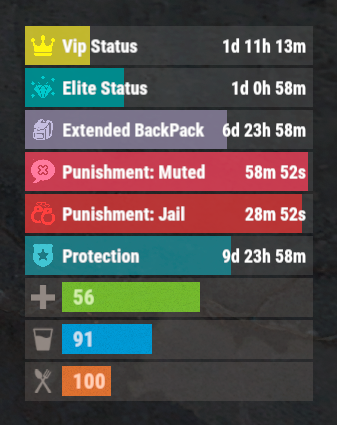
The plugin that displays temporary permissions and groups in the status bar. Depends on AdvancedStatus plugin. The ability to display temporary and permanent permissions; The ability to display temporary and permanent groups; The ability to display temporary and permanent permissions from groups; The ability to automatically generate language files for different languages(filled in English); The ability to customize the bar for each permission and group; The ability to choose between bar types(TimeCounter and TimeProgressCounter); The ability to specify the order of the bar; The ability to change the height of the bar; The abillity to customize the color and transparency of the background; The ability to set a material for the background; The ability to switch between CuiRawImageComponent and CuiImageComponent for the image; The ability to get images from the local folder(*SERVER*\oxide\data\AdvancedStatus\Images); The abillity to set own image and customize the color and transparency of the image; The abillity to set sprite instead of the image; The ability to customize the color, size, font and outline of the text. { "Chat command": "pstatus", "Is it worth enabling GameTips for messages?": true, "Is it worth clearing saved settings for permissions and groups upon detecting a wipe?": false, "Is it worth copying local images for new permissions or groups? Note: If set to true, it may create a lot of unnecessary images": false, "Is it worth displaying the status bar only when players are in the safe zone or have building privilege?": false, "List of language keys for creating language files": [ "en" ], "Default display mode for new permissions. 0 - disabled, 1 - show only temporary, 2 - show all": 1, "Default display mode for new groups. 0 - disabled, 1 - show only temporary, 2 - show all": 1, "Type of status bar for permissions. Note: You can only choose between TimeProgressCounter and TimeCounter": "TimeProgressCounter", "Type of status bar for groups. Note: You can only choose between TimeProgressCounter and TimeCounter": "TimeProgressCounter", "Default status bar settings for new permissions and groups": { "BarType - You can choose only between TimeProgressCounter and TimeCounter": "TimeProgressCounter", "Order": 20, "Height": 26, "Main_Color(Hex or RGBA)": "#FFFFFF", "Main_Transparency": 0.15, "Main_Material": "", "Image_Url": "https://i.imgur.com/BtK7YHa.png", "Image_Local(Leave empty to use Image_Url)": "PermissionsStatus_Default", "Image_Sprite(Leave empty to use Image_Local or Image_Url)": "", "Image_IsRawImage": false, "Image_Color(Hex or RGBA)": "#FFF53D", "Image_Transparency": 1.0, "Is it worth enabling an outline for the image?": false, "Image_Outline_Color(Hex or RGBA)": "0.1 0.3 0.8 0.9", "Image_Outline_Transparency": 1.0, "Image_Outline_Distance": "0.75 0.75", "Text_Size": 12, "Text_Color(Hex or RGBA)": "1 1 1 1", "Text_Font(https://umod.org/guides/rust/basic-concepts-of-gui#fonts)": "RobotoCondensed-Bold.ttf", "Text_Offset_Horizontal": 0, "Is it worth enabling an outline for the text?": false, "Text_Outline_Color(Hex or RGBA)": "#000000", "Text_Outline_Transparency": 1.0, "Text_Outline_Distance": "0.75 0.75", "SubText_Size": 12, "SubText_Color(Hex or RGBA)": "1 1 1 1", "SubText_Font": "RobotoCondensed-Bold.ttf", "Is it worth enabling an outline for the sub text?": false, "SubText_Outline_Color(Hex or RGBA)": "0.5 0.6 0.7 0.5", "SubText_Outline_Transparency": 1.0, "SubText_Outline_Distance": "0.75 0.75", "Progress_Reverse": true, "Progress_Color(Hex or RGBA)": "#FFD700", "Progress_Transparency": 0.7, "Progress_OffsetMin": "0 0", "Progress_OffsetMax": "0 0" }, "Wipe ID": "88c8bc1efdde4be39f8806c954123e36", "Version": { "Major": 0, "Minor": 1, "Patch": 3 } } EN: { "CmdFailed": "The entered command is incorrect! Try '/{0} display'", "CmdDisplayEnabled": "Displaying the bar is enabled!", "CmdDisplayDisabled": "Displaying the bar is disabled!", "BarUntilWipe": "Until wipe", "BarPermanent": "Permanent" } RU: { "CmdFailed": "Введена не верная команда! Попробуйте '/{0} display'", "CmdDisplayEnabled": "Отображение бара включено!", "CmdDisplayDisabled": "Отображение бара выключено!", "BarUntilWipe": "До вайпа", "BarPermanent": "Постоянный" } The language file is generated during the plugin initialization process. Additionally, when creating a new permission or group, a key for it will be automatically added. Note: You can also specify in the configuration file the generation of language files for other languages besides en and ru.$9.99 -
.thumb.png.6f2cc3c36f104ea6f3afb9b0e5827ff5.png)
Version 1.0.1
453 downloads
The "PlaytimeCommands" plugin for Rust allows server administrators to automate the execution of commands when players achieve specific playtime milestones. Upon initialization, it checks players' playtime at regular intervals and triggers configured commands when certain hour goals are reached. (This plugin requires PlaytimeTracker or PlayTimeRewards plugin to work.) Features Easy config, add unlimited playtime goals and their rewards Light plugin, no performance issues Saved PlayerData to ensure they don't get repeat rewards Reset PlayerData when editing config values Commands /prc reset - Reset all player data(Requires 'PlaytimeCommands.admin' permission to use this command in chat.) Console Commands prc reset - Reset all player data. Config { "Check how often it checks for playtime and execute commands?(In Seconds)": 1800, //Timer interval, set a higer value for timer check "Execute command upon playtime hour completation": { "20": [ //Playtime Minute number "oxide.usergroup add {UserID} chads", //commands - Placeholders are {UserID} & {Name} which will replace with SteamID and Player Name "chat user add {UserID} chads" //commands ], "30": [ //Playtime Minute number "sr add {Name} 1000", //commands "sr take {UserID} 100", "oxide.usergroup add {UserID} veteran" ] } }Free -

Version 2.2.0
391 downloads
VIP Status is a powerful plugin that shows custom status messages for VIP players (3 different groups) on your Rust server. With the user-friendly configuration options, you can customise the colours, icons and text of the VIP status message of all 3 VIP groups to suit your individual needs. Plus, the plugin comes with a fully customizable language file, so you can translate the status message and other plugin texts into your preferred language. But that's not all: VIP Status is designed to be stable and reliable. Unlike other plugins that use countdown timers to display the remaining time of a VIP status, VIP Status simply shows the expiration date and checks it against the player's permissions file at fixed intervals. This approach ensures that the plugin operates smoothly without causing any lags or performance issues. Many other plugins that constantly perform countdown calculations can be processor-intensive and lead to performance drops. That's why we opt for static end times, eliminating the need for resource-heavy calculations every minute. If you want to enhance the VIP experience on your Rust server and offer your players a premium status that stands out, VIP Status is the plugin for you. Try it out today and see how it can elevate your server to the next level! Please note that VIP Status requires the Free TimedPermissions plugin to function, as it relies on TimedPermissions to set and track the VIP expiration time. If a player is a member of the VIP group but not listed in the TimedPermission file, the VIP status is now displayed without an expiry date. vip groups now possible for a maximum of 3 groups with different settings (pictures, colour etc.) as well as long file for all 3 groups Toggle the visibility of your VIP status. Added new configuration option to display a custom status when the player does not belong to any group, as an example: no vip Commands: /vip - List of Commands /vt - Toggle the visibility of your VIP status. /vi - Shows how long you have left on your VIP status Config: { "VIPGroups": [ { "Color": "0.66 0.66 0.66 0.8", "IconColor": "1.5 0.8 0.0 0.9", "ImageUrl": "https://i.ibb.co/hmC7s0y/vip1.png", "SubTextColor": "1 1 1 0.7", "TextColor": "1.5 0.8 0.0 0.8", "VipStatusId": "vip1" ///name of the vip group 1 }, { "Color": "0.30 0.66 0.66 0.8", "IconColor": "1.5 0.8 0.0 0.9", "ImageUrl": "https://i.ibb.co/yN18d6h/vip2.png", "SubTextColor": "1 1 1 0.7", "TextColor": "1.5 0.8 0.0 0.8", "VipStatusId": "vip2" ///name of the vip group 2 }, { "Color": "1.0 0.0 0.0 0.4", "IconColor": "1.5 0.0 0.0 0.9", "ImageUrl": "https://i.ibb.co/py0GJpj/vip3.png", "SubTextColor": "1 1 1 0.7", "TextColor": "1.5 0.8 0.0 0.8", "VipStatusId": "vip3" ///name of the vip group 3 } ], "ShowCustomStatusWhenNoGroup": false, ///set true to display a custom status when the player does not belong to any group. "NoGroupConfig": { "Color": "1.0 0.0 0.0 0.4", "TextColor": "1.5 0.8 0.0 0.8", "SubTextColor": "1 1 1 0.7", "IconColor": "1.5 0.8 0.0 0.8", "ImageUrl": "https://i.ibb.co/hmC7s0y/vip1.png" } } Lang: { "VIPStatusText_group1": "GROUP1", ///visible name of the vip group 1 "UntilText_group1": "until {0}", ///subtext for Group 1 with expire time "NoExpireText_group1": "Unlimited", ///subtext for Group 1 without an expiry date. "VIPStatusText_group2": "GROUP2", ///visible name of the vip group 2 "UntilText_group2": "until {0}", ///subtext for Group 2 with expire time "NoExpireText_group2": "Unlimited",///subtext for Group 2 without an expiry date. "VIPStatusText_group3": "GROUP3", ///visible name of the vip group 3 "UntilText_group3": "until {0}",///subtext for Group 3 with expire time "NoExpireText_group3": "Unlimited", ///subtext for Group 3 without an expiry date. "VIPStatusOn": "VIP status display turned on.", "VIPStatusOff": "VIP status display turned off.", "VIPStatusExpiration": "{0} expires on: {1}", "VIPStatusUnlimited": "{0} has unlimited VIP status.", "MessageCommandsListTitle": "List of Commands:", "MessageCommandVT": "/vt - Toggle the visibility of your VIP status.", "MessageCommandVIPInfo": "/vi - Shows how long you have left on your VIP status.", "NoGroupStatus": "No VIPs" /// text for the custom status when the player does not belong to any group. }$19.99 -

Version 1.0.2
9 downloads
xPermissionManager A modern, intuitive, and powerful permission management tool for Rust servers. xPermissionManager provides a complete visual interface for managing user and group permissions directly ingame. No more console commands, guesswork, or digging through permission lists. Everything is organized, accessible, and easy to control through an straight forward UI. Whether you're adjusting a single permission, overseeing full group structures, or assigning temporary access, xPermissionManager gives server owners a fast and efficient possibility to do so. Plugin Preview (Video) Full Permission Control Grant or revoke any permission from groups or individual players. Timed Permission System Assign temporary permissions that automatically expire (e.g., 30m, 1h, 1d, 1w, custom durations). Timed Group Memberships Add players to groups for a limited time - Perfect for kits, VIP, special events or whatever. Comprehensive UI A clean and intuitive interface for browsing permissions, switching groups, managing users, and applying timed access. User & Group Browsing View all available groups, check individual player permissions, and toggle them instantly. Clear Feedback Every change is acknowledged with clear messages to help admins avoid mistakes. Permission xpermissionmanager.use // Allows a player to open and use the xPermissionManager UI Chat Commands /xpm /xpmuser <name or steamID> /xpmtimed /xpmgroups /xpm [Opens the Permission Manager UI] PERMISSION OR ADMIN REQUIRED /xpmuser <name or steamID> [Opens the UI for managing a specific player’s permissions/groups] PERMISSION OR ADMIN REQUIRED /xpmtimed [Shows all active timed permissions for a player. Includes remaining duration and whether they came from a group] /xpmgroups [Shows all active timed group memberships for a player] Console Commands </> API$11.99-
- 1
-

-
- #permission
- #manager
- (and 20 more)
-
Version 1.0.3
458 downloads
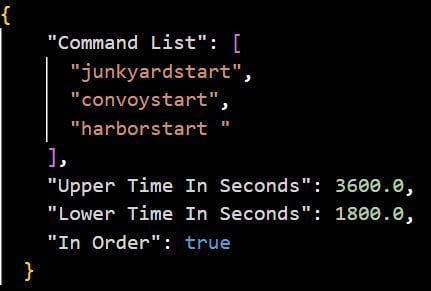
Timed Commands is an updated version of ComTimer. Features: This plugin is great for calling events and console commands - Commands run from a random time between an interval you set - Option to run commands in a random order Config: Default Configuration: { "Command List": [], "Longer Time In Seconds": 500.0, "Shorter Time In Seconds": 200.0, "In Order": true } Setting a single command: { "Command List": ["junkyardeventstart"], "Longer Time In Seconds": 500.0, "Shorter Time In Seconds": 200.0, "In Order": true } Setting more than one command: { "Command List": [ "junkyardeventstart", "callheli 1", "harborstart" ], "Longer Time In Seconds": 500.0, "Shorter Time In Seconds": 200.0, "In Order": true }Free -
Version 1.0.0
44 downloads
ServerPeriods.cs Description : - This plugin offers a complete periodic event system for your Rust server, allowing you to create structured game phases with customizable restrictions. Each period can independently control PvP, raiding, gathering, and building permissions, providing a dynamic gameplay experience. It includes a persistent, real-time user interface displaying the current period name and remaining time, with an automatic "Next Period" indicator, and the execution of custom server commands for each period. Settings : - HUD colors - Custom periods (name/perms/time/commands) F1 Commands : - p.start (to start the periods) - p.stop (to stop the periods) - p.next (to move on to the next period) - p.prev (to move on to the previous period) Permissions : - ownerid <steamID/user> WuyZar's Discord : https://discord.gg/NVwRcQwGwh Chat messages : Game interface :$6.50- 4 comments
-
- 2
-

-

-
- #event
- #tournament
- (and 17 more)
-

Version 3.0.0
162 downloads
Video : Features : - Randomized loot respawn intervals, configurable for each monument. Example: { "Monuments": { "ferry terminal": { "Allowed Groups": [ "red", "blue", "green", "crate", "barrel", "elite", "diesel", "loot_barrel" ], "Respawn Max Time": 600, "Respawn Min Time": 300 }, "fishing village": { "Allowed Groups": [ "red", "blue", "green", "crate", "barrel", "elite", "diesel", "loot_barrel" ], "Respawn Max Time": 600, "Respawn Min Time": 300 } } } - Default respawn time is set between 30-60 minutes but can be fully adjusted through the configuration. - Automatically removes monuments that no longer exist after a server wipe, keeping the configuration clean and up-to-date. Supported Crates [ Not only the containers shown below , almost every container in the game is now supported! ]: Supported Monuments : All Game Monuments Additional Settings : { "General": { "Enable When Player Dont Finish Looting Containers Will Drop Loot On Ground": true } }$19.99 -

Version 1.0.0
31 downloads
TreasureEvent.cs Description : - This plugin offers a complete treasure hunt event system for your Rust server, with real-time distance tracking and customizable loot rewards. Settings : - HUD colors - Event duration (in F1 commands) - Server message (true/false) - Items (customize everything you want in the treasure, even the skins of the items) Server message = true (you need the ServerMessage.cs plugin, https://codefling.com/plugins/server-message) Server message = false (these messages will appear in the global chat, replacing the UI) F1 Commands : - t.start <x> <z> <time> (the treasure appear in a specific location) Permissions : - ownerid <steamID/user> WuyZar's Discord : https://discord.gg/NVwRcQwGwh Game interface :$3.50 -

Version 1.0.0
178 downloads
Countdown.cs Description : - This plugin allows you to send a beautiful countdown visible to all players on your server, with the option to execute a command at the end of the countdown. Settings : - HUD colors F1 Commands : - c.start <time> <command> Example : (c.start 20 say HELLO) - c.stop Permissions : - ownerid <steamID/user> WuyZar's Discord : https://discord.gg/NVwRcQwGwh Game interface :Free -

Version 1.0.4
94 downloads
DynamicData — Configurez sans limites « Plus aucune limite de configuration. Laissez libre cours à votre imagination. » DynamicData automatise l'application de vos fichiers de données (JSON) pour Rust selon une chronologie relative à l'effacement. Ajoutez vos profils (par plugin) , spécifiez quand ils doivent s'appliquer (par exemple, 2j4h, 6h30m, 1j@redémarrage) , et le plugin cible est rechargé avec la bonne configuration, immédiatement ou au prochain redémarrage. Objectif : moins d’opérations manuelles, moins d’erreurs, une progression de réinitialisation claire et amusante pour vos joueurs. Points forts Aucune limite : planifiez autant de profils que nécessaire, pour autant de plugins que vous le souhaitez. Délai d'activation flexible : immédiat ou au prochain redémarrage (idéal pour les changements importants). Progression naturelle des réinitialisations : rendez vos serveurs lisibles et motivants, dès le premier jour. Conçu pour être compatible : fonctionne avec tous les plugins utilisant des fichiers de données. Installation et démarrage rapide Déposez DynamicData.cs dans oxide/plugins et (re)chargez-le. Préparez vos fichiers JSON pour chaque plugin. Placez-les sous oxide/data/DynamicData/<Plugin>/... avec un suffixe temporel (et @restart si souhaité). Démarrez le serveur : DynamicData applique et recharge automatiquement les plugins cibles aux moments opportuns. Comment ça marche Placez vos profils JSON ici : oxide/data/DynamicData/<Plugin>/<Subfolder>/*.json (par exemple, DynamicData/RaidableBases/Profiles/Medium_2d.json) . Les fichiers comportent un suffixe temporel (\d+[dhms] peuvent être chaînés) et éventuellement @restart. Exemples : Easy_6h.json, [email protected] . DynamicData calcule chaque échéance à partir du Jour 1 (effacement) , ajoute une marge déterministe (quelques secondes) pour lisser les pics, puis copie le JSON vers l'emplacement de données du plugin cible et recharge ce plugin. If @restart is present, the profile is marked READY and only applies at the next reboot (useful for big changes). Structure & Naming Dynamic root: oxide/data/DynamicData (real-time watch on *.json). Destination: the base name (without the time suffix) becomes the final data file for the plugin (e.g., Profiles/Medium_2d.json ⇒ oxide/data/RaidableBases/Profiles/Medium.json). Valid suffixes: concatenations of d/h/m/s (e.g., 2d4h30m, 45m, 10s). Add @restart to force application on reboot. Important — Match the Target Plugin’s Official Directory Structure DynamicData applies your files only if the tree under oxide/data/DynamicData/<Plugin>/... mirrors exactly what the target plugin expects under oxide/data/<Plugin>/.... Golden rule Everything after <Plugin>/ in DynamicData must be the exact same path as in oxide/data/<Plugin>/... (same folders, same case, same filename). Concrete Examples oxide/data/DynamicData/RaidableBases/Profiles/Easy.json <- Default config (Important to place if you want a default config loaded) oxide/data/DynamicData/RaidableBases/Profiles/Medium.json+12h <- Config loaded after 12h of wipe oxide/data/DynamicData/RaidableBases/Profiles/Hard.json+2d <- Config loaded after 2 days of wipe oxide/data/DynamicData/RaidableBases/Profiles/Expert.json+4d@restart <- Config loaded after 4 days of wipe, only after a server restart Raidable Bases Evolving Over the Wipe Days 1–2: Easy + Medium profiles, 1 event, component-heavy loot; applied immediately at opening. Days 3–5: Medium + Hard profiles, 2–3 events, T2/T3 loot; applied on next restart for a smooth transition. Day 6+: Hard + Expert profiles, 3–4 events, rich loot (rare C4/Rockets), buffed NPCs; applied immediately on the morning of Day 6. One-Click Seasonal Pack Halloween (Oct 24 → 31): “Spooky” bases, themed loot, NPC +25%; trigger with @restart on 10/24. Other Plugins (any that read data files) Kits: Starter (D1–D2), weekend farm promo (D3–D5), advanced kits (D6+). BetterNPC: Calm day / Night +HP +accuracy / end-of-wipe heavy loadouts. Loot tables: progressive T2/T3 ramp, event boosts. NTeleportation: cooldowns and costs relax as the wipe progresses. Skins/SkinBox: automatic seasonal whitelists; off-season ⇒ vanilla/server set. Permissions dynamicdata.admin — access to commands (authLevel 1+ also accepted). oxide.grant group admin dynamicdata.admin Commands (console/RCON) dyndata.list – Shows Day 1 (wipe), last application, and next due time per plugin; marks [PAUSE] if applicable. dyndata.simulate <duration|all|*> – Simulates upcoming applications up to a horizon (e.g., 1h, 30m, 2d, all). Useful to verify your plan. dyndata.rescan – Immediate rescan of the DynamicData folder, applies what’s due, reschedules the rest. dyndata.pause <Plugin> – Pauses a plugin (no applications while paused). dyndata.resume <Plugin> – Resumes a previously paused plugin. Configuration (oxide/config/DynamicData.json) Available keys (defaults shown): LogLevel: "info" — levels: quiet, info, verbose. RateLimitPerMinute: 3 — limit of applications per minute (built-in queue). JitterMinSeconds: 5, JitterMaxSeconds: 30 — deterministic jitter per plugin/file to avoid bursts. MaxDataSizeBytes: 2000000 — max JSON size (safety). DisplayTimeZone: "Europe/Paris" — timezone for logs/displays. InterpretSaveCreatedAs: "auto" — how to interpret SaveCreatedTime if it lacks a timezone (auto, display-tz, server-local, utc). WipeDetectPriority: ["signature","files","serverinfo"] — wipe detection order: signature: seed/size/level change ⇒ wipe, files: detect via .map/.sav timestamps, serverinfo: SaveCreatedTime reported by the server. FileDetectionWindowHours: 12 — analysis window for .map/.sav files. FilePreGenToleranceHours: 2 — tolerance when files are pre-generated before boot. FileClampToBoot: true — if needed, clamps Day 1 to boot time to stay consistent. WipeLogShowUtc: false — also show UTC timestamps in wipe logs. ReloadTargetPlugin: true — auto-reload target plugin after copying. QuarantineStrayDynamicFiles: true — quarantines “stray” dynamic files in oxide/data/DynamicData.__quarantine__. Conseil : utilisez dyndata.simulate 2d pour valider votre plan avant une réinitialisation réelle. FAQ Q : Cela ne fonctionne-t-il qu'avec certains plugins ? A : Non, tout plugin qui utilise des fichiers de données (JSON) . Q : Dois-je redémarrer à chaque modification ? R : Non. Choisissez « immédiat (en direct) » ou « @restart » . Le plugin cible se recharge automatiquement. Q : Que se passe-t-il si je veux revenir en arrière ? R : Conservez vos profils intermédiaires (début/milieu/fin/saisonnier) et réactivez le précédent pour revenir à l'état souhaité. Q : Impact sur les performances ? R : Les applications sont occasionnelles, les rechargements sont ciblés, la limite de débit est configurable — impact négligeable pour un serveur standard.$19.99 -

Version 1.1.1
24 downloads
Advanced Timed Permission Management System for Groups Timed Group Permissions allows you to assign permissions to any group for a limited amount of time! You can easily give, revoke, or extend timed permissions — all fully controlled by simple commands. Discord Integration - You can log all permission grants, revokes, and extensions directly to a Discord channel. - Simply add your Discord webhook URL to the config file, then run the command: - oxide.reload TimedGroupPermissions That’s it! Your actions will now be logged automatically to Discord. Data Storage To check which groups currently have timed permissions assigned, open the file: data/TimedGroupPermissions.json Commands Section Chat & Console Commands: 1. givegroupperm <group> <permission> <time> → Give a timed permission to a group. 2. extendgrouptimeperm <group> <permission> <time> → Extend the duration of an existing timed permission. 3. revokegroupperm <group> <permission> → Revoke a permission from a group. 4. viewgroupperm <group> → View all active timed permissions for that group. Example output: [Timed Group Permissions] Permissions for group 'admin': - kits.donadiscord (Expires in 23 hour(s) 59 minute(s) 39 second(s)) Examples givegroupperm admin minicopter.infinitefuel 10d → Gives the group “admin” the permission “minicopter.infinitefuel” for 10 days. extendgrouptimeperm admin minicopter.infinitefuel 10d → Extends the permission “minicopter.infinitefuel” for the group “admin” by an additional 10 days. revokegroupperm admin minicopter.infinitefuel → Removes the permission “minicopter.infinitefuel” from the group “admin”. ------------------------------------------------------------ Default Configuration { "Send messages to Discord Webhook? (Requires DiscordAPI plugin)": true, "Discord Webhook URL": "https://discord.com/api/webhooks/..." } Summary: Timed Group Permissions is the perfect solution for managing temporary permissions on your server. Reward VIP groups, event teams, or temporary staff roles — all with automatic expiration and Discord logging.$10.00 -

Version 1.0.2
39 downloads
Take your Rust server to the next level with InstancedAirdrops, the ultimate solution for fair and personalized airdrop looting! This premium plugin ensures that every player gets their own unique loot from airdrops, eliminating kill-stealing and loot disputes. Each airdrop is instanced per player, so only the intended recipient can access their rewards—no more fighting over drops! Key Features: Personalized Loot: Each player receives their own loot container from airdrops. Anti-Steal: Prevents other players from looting someone else’s drop. Admin Commands: Easily save and load plugin data with simple chat commands. Debug Logging: Optional detailed debug messages for easy troubleshooting. Configurable: Set loot window duration, plane flight time, and more. Seamless Integration: Works smoothly with existing Rust server setups. Why Choose InstancedAirdrops? Boosts player satisfaction by ensuring fair loot distribution. Reduces player conflict and improves server retention. Simple to install, configure, and manage. Upgrade your Rust server with InstancedAirdrops and give your players the fair, frustration-free airdrop experience they deserve! Example Config { "Enable Debugging Messages": false, "Loot Window (seconds)": 60.0, "Plane Timer": 20.0, "Airdrop Drag (Vanilla=3)": 0.5, "Lock to Player for called airdrops": true }$5.00-
- 1
-
-
- #instanced
- #airdrop
- (and 1 more)
-
Version 0.1.4
497 downloads
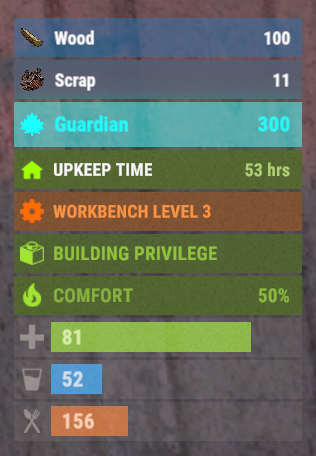
This plugin demonstrates the integration with the AdvancedStatus plugin. It displays the amount of a specific item in the player's inventory in the status bar. In this case, it's Scrap, to track a different item, replace the itemID value on line 47 with the ID of the desired item. This plugin can be downloaded by plugin developers as a reference to understanding how to work with the AdvancedStatus and by server owners to easily display desired items in the status bar.Free -
Version 1.4.9
723 downloads
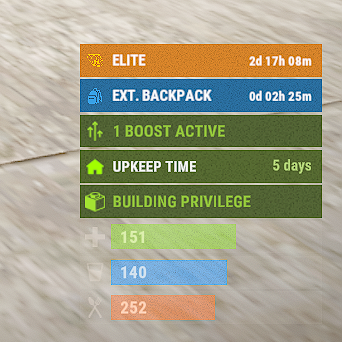
The plugin allows you to display time to expiration for permissions or groups. Features: Detailed and elegant display of your permissions and groups. Detailed customization of everything Ability to customize text for different languages to reach players from different countries. Ability to enable status display only in the authorized area of the cabinet Ability for a player to disable status display Optimized (static) status mode available Automatically generate language files for all languages, you just need to write your text. Permissions: permissionstatus.hide - this permission is used for status switching by the player. IMPORTANT: If you give this to any group, the statuses will not work. Chat Commands: ps.toggle - status display switch for a player Default Config { "ExampleGroupOrPerm": { "true - Group | false - Permission": true, "Display Mode (0 - Time, 1 - Static)": 0, "[Time display mode] Update Interval (in seconds)": 60.0, "Only show in authorized cupboard area": false, "Icon Url": "default", "Time Format": "d\\d\\ hh\\h\\ mm\\m", "Background Color": "0.16 0.44 0.63 0.85", "Icon Color": "0.22 0.63 0.90 0.9", "Title Color": "1 1 1 1", "Text Color": "1 1 1 1" } } Default Lang: { "HideMessage": "You have hidden the statuses of timed permissions.", "ShowMessage": "You have enabled the display of timed permissions statuses.", "ExampleGroupOrPerm": "ExampleGroupOrPerm" } Example Config: { "Elite": { "true - Group | false - Permission": true, "Display Mode (0 - Time, 1 - Static)": 0, "Only show in authorized cupboard area": false, "Icon Url": "default", "Time Format": "d\\d\\ hh\\h\\ mm\\m", "Color": "0.85 0.52 0.17 1", "Icon Color": "1 0.8 0 1", "Text Color": "1 1 1 1", "Subtext Color": "1 1 1 1" }, "backpackpro.size42": { "true - Group | false - Permission": false, "Display Mode (0 - Time, 1 - Static)": 0, "Only show in authorized cupboard area": false, "Icon Url": "https://static.thenounproject.com/png/74337-200.png", "Time Format": "d\\d\\ hh\\h\\ mm\\m", "Color": "0.16 0.44 0.63 1", "Icon Color": "0.22 0.63 0.90 1", "Text Color": "1 1 1 1", "Subtext Color": "1 1 1 1" } } Example Lang: { "Elite": "Elite", "backpackpro.size42": "Ext. backpack" }$15.00- 46 comments
- 3 reviews
-
- 4
-
-
- #timedpermissions
- #statusbar
- (and 7 more)











.thumb.png.ccf8a947948c9eb1445ad21a7931247b.png)
