Search the Community
Showing results for tags 'toolcupboard'.
Found 10 results
-
Version 1.0.5
3 downloads
TCLocator – Find Your Tool Cupboards (Without Cheating) - Added TC Limits - Stash location as well. Ever forget where you put your Tool Cupboard? TCLocator lets players temporarily reveal their authorized TCs on the map with a simple command — then quietly removes the markers so gameplay stays fair. Players only see their own cupboards, admins can see everything, and markers auto-despawn after a configurable time or instantly with /tc off. No permanent map clutter. Just quick, clean information when you need it. Features Players see only TCs they’re authorized on Admins can view all TCs Per-player map markers (no global spam) Markers auto-hide after X seconds (configurable) Marker labels show who placed the TC TC Limits by permission Supports shop marker or crate marker Lightweight, no data files, wipe-safe Commands /tc → Show your authorized TCs /tc all → (Admin) Show all TCs /tc.stash → Show player stash Permissions tclocator.use tclocator.admin tclocator.limit.1 tclocator.limit.2 tclocator.limit.3 tclocator.limit.4$4.99 -
Version 1.4.0
440 downloads
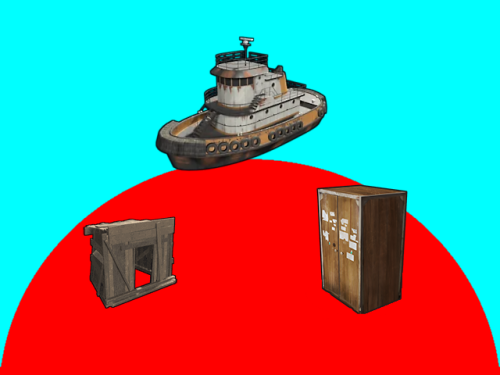
Introduction Automatically manages PVP zones for player bases, legacy shelters and tugboats. Background/Compatibility Player Base PVP Zones is meant for hybrid PVP servers that want to allow online raiding. It is meant to complement Dynamic PVP which only provides zones for monuments and events. Zone Manager is a hard requirement in order to implement moving zones for tugboats, as it doesn't officially support this feature. A PVE mod is required to make this useful. I only tested with True PVE for various reasons. Others have reported success with SimplePVE. Features Manages its own Zone Manager zones and maps them as True PVE exclusion zones (Re)creates zones on plugin load and cleans them up on unload Provides tool cupboard based zones: Configurable creation & deletion delays Automatic resizing to always encompass the base as building blocks are added/destroyed, with configurable delay Configurable minimum total base and per-building-block buffer sizes Provides legacy shelter based zones: Configurable zone size Provides tugboat based zones: Configurable zone size Zone moves with the tugboat Optional support for visible zone spheres: Configurable sphere darkness Option to globally network tugboats to prevent spheres from disappearing Optional support for language file based zone creation/deletion and entry/exit notifications Configurable PVP expiration delay on player exit from zones Optional support for toggling zones on and off via a permission-controlled command Zone Toggling Notes In order for players to toggle zones, they must have the `PlayerBasePvpZones.toggleZones` Oxide permission, or be in an Oxide group that has that permission. The `/pbpz toggle` command will attempt to toggle a zone if the player is doing one of the following: Looking at and authorized to a Tool Cupboard within interaction range Within building privilege of a Legacy Shelter Mounted to the steering wheel of a Tugboat If a zone creation/deletion timer is in effect, toggling will cancel it; otherwise, PBPZ will act as if the associated entity (TC/shelter/tugboat) just (de)spawned, applying any appropriate delays. Besides standard zone creation/deletion delays, exploitation of the toggle feature can be discouraged by configuring timed toggle lockouts that are triggered by toggling and/or by damage being done to building blocks, Tool Cupboards, Shelters, or Tugboats. Admins can bypass the standard creation/deletion delays by reloading the plugin after running the toggle command. Admins can also toggle Tool Cupboard zones for other players by temporarily authorizing on the TC, and of course anyone with permission can toggle any Tugboat zone. Admin toggling of other players' shelter zones is currently not supported (if someone really needs it, I can implement it). Permissions `PlayerBasePvpZones.toggleZones` controls whether a player/group can use the `/pbpz toggle` command Commands `/pbpz` in chat supports the following sub-commands: `/pbpz help` shows info on currently available sub-commands (if any) `/pbpz toggle` attempts to toggle a zone on or off Configuration Default configuration: { "Zone creation delay in seconds (excludes tugboat)": 60.0, "Zone creation delay notifications (owner only, excludes tugboat)": true, "Zone deletion delay in seconds": 300.0, "Zone deletion delay notifications (all players in zone)": true, "Zone creation/deletion notification prefix": "[PBPZ] ", "Zone exit PvP delay in seconds (0 for none)": 5.0, "Zone sphere darkness (0 to disable, maximum 10)": 0, "Zone entry/exit ZoneManager messages": true, "Zone TruePVE mappings ruleset name": "exclude", "Building settings": { "Building update check delay in seconds": 5.0, "Building zone overall minimum radius": 16.0, "Building zone per-block minimum radius": 16.0 }, "Shelter settings": { "Shelter zone radius": 8.0 }, "Tugboat settings": { "Tugboat force global rendering on/off when spheres enabled (null=skip)": null, "Tugboat force enable buoyancy when forcing global rendering": false, "Tugboat zone radius": 32.0 }, "Zone toggle settings": { "Zone toggle lockout seconds after damage": 60.0, "Zone toggle lockout seconds after toggle": 60.0 } } NOTE: The tugboat rendering options should be left at defaults. The options are provided for the case that you are running other plugins that force global networking/rendering for tugboats, which can cause spheres to disappear when a tugboat comes back into client render range.This plugin will automatically attempt to synchronize tugboat sphere networking with each tugboat's networking type when (re)creating the spheres. Developer API Supported API calls: bool IsUsingExcludePlayer() Returns whether True PVE 2.2.3+ ExcludePlayer() PVP delay API is being used. string OnPlayerBasePvpDelayQuery(ulong playerID) Provides the ability to query whether a player has an active PVP delay Returns the triggering zone ID if the referenced player has an active PVP delay Returns an empty string If no PVP delay is active Hooks: void OnPlayerBasePvpDelayStart(ulong playerID, string zoneID) Called when PVP exit delay is applied to a player as a result of their exiting a base zone playerID is the ID of the triggering player zoneID is the Zone Manager zone ID whose exit triggered the delay void OnPlayerBasePvpDelayStop(ulong playerID, string zoneID) Called when PVP exit delay expires from a player playerID is the ID of the triggering player zoneID is the Zone Manager zone ID whose exit triggered the delay Zone Manager / PVE Plugin Integration Direct Zone Manager API calls are used to maintain zones for all bases, and indirect True PVE API calls are used to map those zones to the configured True PVE ruleset (`exclude` by default). This will cause True PVE (or other PVE plugins that implement a compatible API) to treat them as PVP areas. Zone names are broken into categories in case you want other plugins to recognize them separately: `PlayerBasePVP:building` for building block bases `PlayerBasePVP:shelter` for legacy wood shelters `PlayerBasePVP:tugboat` for tugboats Developer note: Zone IDs are `PlayerBasePVP:` followed by a unique identifier. Credits Thanks to the following folks for making this plugin possible: bmgjet (help with / code for tugboat sphere issues) CatMeat & Arainrr (moving Zone Manager zones code examples in Dynamic PVP) Karuza (help with unique entity identifiers & tugboat sphere issues) Kulltero (help with TC/building relationship) WhiteThunder (help with tugboat sphere issues) AFKBank and Mooselips whose bases I took screenshots of on my server during testingFree -
Version 1.1.11
1,866 downloads
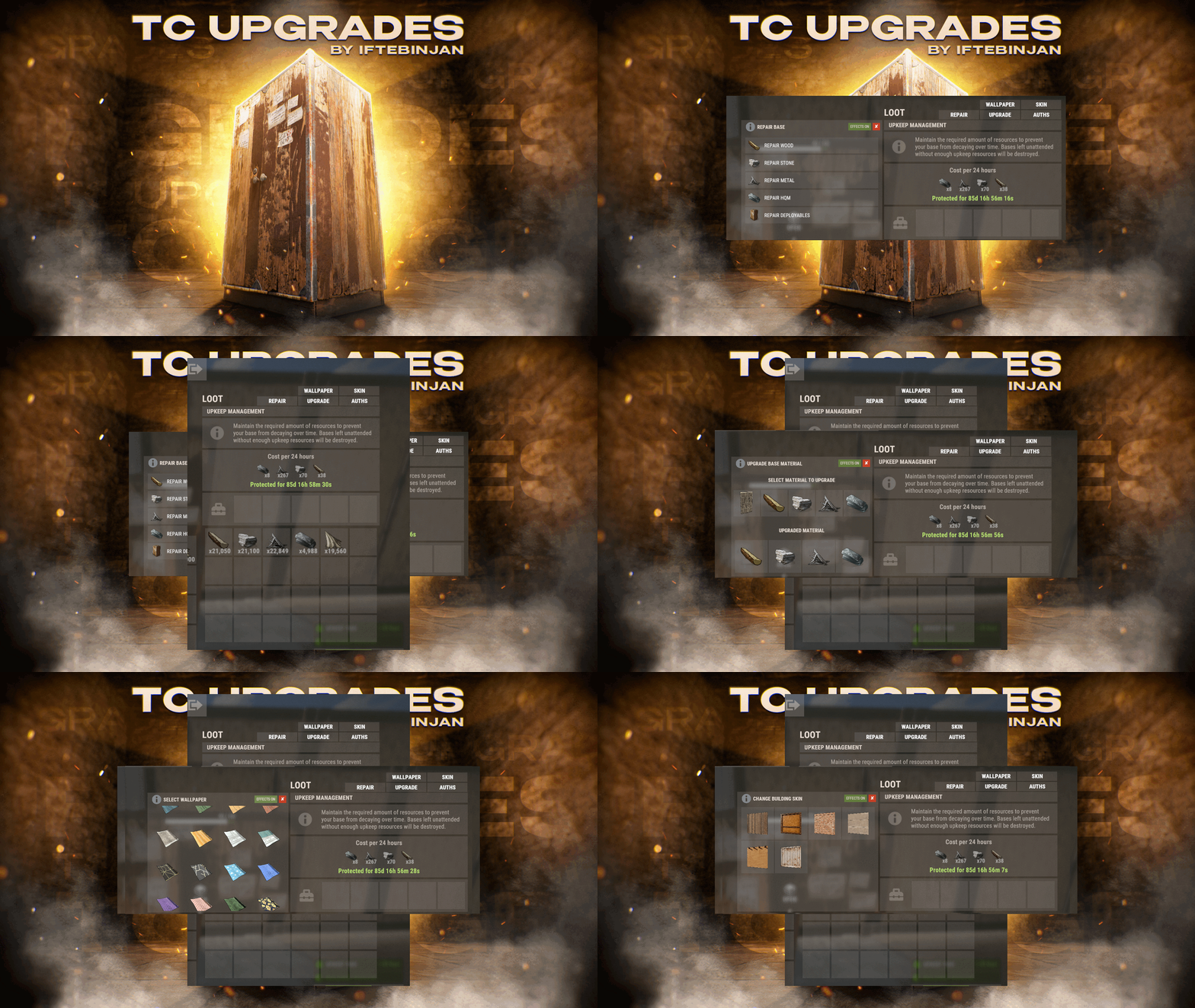
TC Upgrades provides an efficient and optimized way to enhance your base directly from the Tool Cupboard. With this plugin, you can easily change building grades, switch building skins, repair structures or deployables, and even set up wallpapers on your base, streamlining your base management process. Key Features Multi-TC Support Authorization List on Tool Cupboard Upgrade Building Grades Change Building Skins Repair Structures and Deployables Apply Wallpapers Detailed Permissions VIP Features User-Friendly UI Video Showcase Permissions TCUpgrades.admin- Shows a UI Change button when in admin mode (command: /tcuadmin) TCUpgrades.authlist - Shows Authorization list button on TC TCUpgrades.upgrade - Shows upgrade button on TC TCUpgrades.repair - Shows repair button on TC TCUpgrades.skin - Shows skin button on TC TCUpgrades.wallpaper - Shows wallpaper button on TC TCUpgrades.upgrade.nocost - Allows player to use no resources when upgrading TCUpgrades.repair.nocost - Allows player to use no resources when repairing TCUpgrades.reskin.nocost - Allows player to use no resources when reskining TCUpgrades.wallpaper.nocost - Allows player to use no resources when setting wallpaper TCUpgrades.default - Allows player to use (wood, stone, metal, hqm & deploy) TCUpgrades.wood TCUpgrades.stone TCUpgrades.metal TCUpgrades.hqm TCUpgrades.deploy Configurations Support$14.99- 68 comments
- 7 reviews
-
- 3
-

-

-
- #upgrade
- #toolcupboard
- (and 7 more)
-

Version 2.0.2
162 downloads
Overview ExtraBoxesPlus is a Rust plugin that automatically spawns additional storage options (wooden boxes) on top of tool cupboards, workbenches and more! when they are placed. It also provides configuration options to spawn a Pookie Bear on tool cupboards and manage wooden box behavior across different workbench tiers. The boxes are conveniently placed to maximize storage capacity and space efficiency. Features • Automatic wooden box spawning on workbenches, repair benches, mixing tables, research tables, cooking workbenches, and BBQs • Tool cupboard enhancement with wooden box storage • Pookie bear comfort system with permission-based radius (12m, 20m, or 35m) • Only authorized players on tool cupboards receive pookie bear comfort • Custom skin support for all spawned boxes • Boxes cannot be picked up separately (protection system) • Prevents deployable pickup when boxes contain items • Automatic pookie bear updates when permissions change • Performance optimized with batched processing Quick start Basic Setup (All Players): oxide.grant group default extraboxesplus.use.workbench oxide.grant group default extraboxesplus.use.repairbench oxide.grant group default extraboxesplus.use.mixingtable oxide.grant group default extraboxesplus.use.researchtable oxide.grant group default extraboxesplus.use.cookingworkbench oxide.grant group default extraboxesplus.use.bbq oxide.grant group default extraboxesplus.use.toolcupboard oxide.grant group default extraboxesplus.use.pookie VIP Setup: oxide.grant group vip extraboxesplus.use.all oxide.grant group vip extraboxesplus.pookie.plus VIP + Setup: oxide.grant group premium extraboxesplus.use.all oxide.grant group premium extraboxesplus.pookie.extra Permissions This plugin uses the permission system. To assign a permission, use oxide.grant <user or group> <name or steam id> <permission>. To remove a permission, use oxide.revoke <user or group> <name or steam id> <permission>. extraboxesplus.use.all -- Grants access to ALL plugin features, overrides all specific permissions. extraboxesplus.use.workbench -- Required to spawn boxes on Workbench Level 1, 2, and 3. extraboxesplus.use.repairbench -- Required to spawn boxes on Repair Bench. extraboxesplus.use.mixingtable -- Required to spawn boxes on Mixing Table. extraboxesplus.use.researchtable -- Required to spawn boxes on Research Table. extraboxesplus.use.cookingworkbench -- Required to spawn boxes on Cooking Workbench. extraboxesplus.use.bbq -- Required to spawn boxes on BBQ. extraboxesplus.use.toolcupboard -- Required to spawn boxes on Tool Cupboards. extraboxesplus.use.pookie -- Required for basic pookie bear functionality (12m comfort radius). extraboxesplus.pookie.plus -- Provides enhanced pookie bear comfort (20m radius). Requires base pookie permission. extraboxesplus.pookie.extra -- Provides maximum pookie bear comfort (35m radius). Requires base pookie permission. Note: Pookie bear permissions are hierarchical. Players need the base pookie permission for any pookie functionality. The system automatically uses the highest permission among all authorized players on a tool cupboard. Configuration ExtraBoxesPlus comes with several configuration options that allow you to tailor the plugin's behavior to your server's needs: { "ConfigVersion": "2.0.1", "PermissionMigrationVersion": "2.0.1", "PookieBearSettings": { "DefaultRadius": 12.0, "PermissionBasedRadius": { "extraboxesplus.pookie.plus": 20.0, "extraboxesplus.pookie.extra": 35.0 } }, "WorkbenchSettings": { "EnableByTier": { "Workbench Level 1": true, "Workbench Level 2": true, "Workbench Level 3": true } }, "DeployableSettings": { "EnableForDeployables": { "Repair Bench": true, "Mixing Table": true, "Research Table": true, "Cooking Workbench": true, "BBQ": true } }, "SkinSettings": { "EnableCustomSkins": true, "SkinIDs": { "Tool Cupboard": 3306209184, "Workbench Level 1": 3306209184, "Workbench Level 2": 3306209184, "Workbench Level 3": 3306209184, "Repair Bench": 3306209184, "Mixing Table": 3306209184, "Research Table": 3306209184, "Cooking Workbench": 3306209184, "BBQ": 3306209184 } } } Configuration Sections Explained: PookieBearSettings: DefaultRadius: 12.0 - Sets the base comfort radius in meters for players with basic pookie permission - This applies to players with extraboxesplus.use.pookie permission - Range: 1.0 to 50.0 meters (50m is hardcoded maximum for server stability) PermissionBasedRadius: extraboxesplus.pookie.plus: 20.0 - Comfort radius for players with enhanced pookie permission - Overrides DefaultRadius when player has this permission extraboxesplus.pookie.extra: 35.0 - Comfort radius for players with premium pookie permission - Highest tier, overrides all other radius settings - Maximum recommended for server performance WorkbenchSettings: EnableByTier: "Workbench Level 1": true - Set to false to disable boxes on Tier 1 workbenches - Useful for progression-based servers "Workbench Level 2": true - Set to false to disable boxes on Tier 2 workbenches - Independent control from other tiers "Workbench Level 3": true - Set to false to disable boxes on Tier 3 workbenches - Highest tier workbench control DeployableSettings: EnableForDeployables: "Repair Bench": true - Set to false to disable boxes on repair benches - Spawns 2 boxes when enabled "Mixing Table": true - Set to false to disable boxes on mixing tables - Spawns 2 boxes when enabled "Research Table": true - Set to false to disable boxes on research tables - Spawns 2 boxes when enabled "Cooking Workbench": true - Set to false to disable boxes on cooking workbenches - Spawns 1 box when enabled "BBQ": true - Set to false to disable boxes on BBQs - Spawns 1 box when enabled SkinSettings: EnableCustomSkins: true - Master toggle for custom skins on all spawned boxes - Set to false to use default Rust wooden box appearance - Must reload plugin after changing this setting SkinIDs: - Steam Workshop skin ID for boxes spawned on tool cupboards - Set to 0 to use default wooden box skin - Must be a valid Steam Workshop item ID Configuration Tips: - Backup your config before making changes - Use oxide.reload ExtraBoxesPlus after config changes - Test skin IDs on a development server first - Lower pookie bear radius for better server performance - Disable specific deployables if causing conflicts with other plugins Notes Legacy Permission Migration: extraboxesplus.use → Grants all individual deployable permissions: • extraboxesplus.use.workbench • extraboxesplus.use.repairbench • extraboxesplus.use.mixingtable • extraboxesplus.use.researchtable • extraboxesplus.use.cookingworkbench • extraboxesplus.use.bbq • extraboxesplus.use.toolcupboard • extraboxesplus.use.pookie Legacy Config Migration: - Your old config file will be automatically converted - All your existing settings will be preserved - Pookie bear system now requires permissions (see PERMISSIONS section) - The old "EnablePookieBearOnToolCupboard" setting is replaced by the permission system - Server console will show migration progress messages$4.99- 28 comments
- 5 reviews
-
- 5
-
-
-

-
- #toolcupboard
- #workbench
- (and 7 more)
-
Version 1.0.0
21 downloads
Allows you to restrict resource gathering in TC areas to authorized players only. Permissions tczonerestriction.use - Use the plugin. tczonerestriction.bypass - bypass the restrictions Configuration { "Block Trees Farm in Building Blocked Zone": false, "Block Ores Mining in Building Blocked Zones": false, "Block Pickup of Collectible Resources (e.g., hemp, mushrooms)": false, "Block Pickup of Dropped Items (e.g., loot, tools)": false, "Show Warning Message When Player Is Blocked": true, "Warning Message Shown When Player Is Blocked": "You must be authorized on the TC to gather resources in this area." }$6.99 -
![More information about "Container Item Block [Tool Cupboard, Small & Large Wooden Box]"](https://codefling.com/uploads/monthly_2025_05/ItemBlockTemplateNew.thumb.png.f70ebc2dec43377ada413c52dd1d2638.png)
Version 1.1.2
24 downloads
Container Item Block prevents players from storing certain items inside the Tool Cupboard, Small & Large Wooden Box. { "Tool Cupboard Settings": { "Enabled": true, "Blocked Items": [ "wood", "stones", "metal.ore", "skull.wolf", "targeting.computer", "battery.small", "fertilizer", "lowgradefuel", "researchpaper", "can.beans.empty", "diesel_barrel", "hq.metal.ore", "metal.refined", "charcoal", "bone.fragments", "can.tuna.empty", "skull.human", "metal.fragments", "gunpowder", "leather", "cloth", "scrap", "paper", "coal", "cctv.camera", "explosives", "horsedung", "sulfur", "sulfur.ore", "fat.animal" ] }, "Small Box Settings": { "Enabled": false, "Blocked Items": [ "explosives", "gunpowder" ] }, "Large Box Settings": { "Enabled": false, "Blocked Items": [ "explosives", "gunpowder" ] }, "Block Message": "You can't place {0} in this container. It will be moved back to your inventory." }$4.99- 2 comments
-
- 1
-
-
- #toolcupboard
- #rust
- (and 6 more)
-

Version 1.5.0
36 downloads
TC Stack Limiter lets you set custom stack limits for items inside the Tool Cupboard (TC). It’s a great way to control how much stuff players can store in the TC and help keep the game balanced. Can this plugin do that? Server operators can manage game balance by adjusting the number of items that can be stored in a TC. Key Future * Change the global stack size of items: by setting a global stack multiplier, you can change the stack size of a particular item. * Item Stack Limit in Tool Cabinet: Apply a specific maximum stack number to wood, stone, Metal Fragments, and HQMs set in the Cabinet Stack Override. (e.g. if wood: 1000 is set, only a maximum of 1000 pieces of wood can be stacked in the tool cabinet). * Notification: If enable notification is set to true, items that exceed the stack limit will be automatically returned to the player's inventory and the player will be notified. * Handling of items exceeding stack limit: If a player attempts to place an item in the tool cabinet that exceeds the limit, the excess will be returned to the player's inventory. If the player's inventory is full, the item will be dropped to the floor. Compatibility * StackSizeController * Loot Table & Stacksize GUI Although this plugin is compatible with StackSizeController, an error is triggered every time an item is placed into a Tool Cupboard due to an issue on StackSizeController's side. For this reason, we recommend using Loot Table & Stacksize GUI instead. Admin Commands /tcstack list - Displays the current configuration. /tcstack set <item shortname> <amount> - Sets the TC stack limit for the specified item to <amount>. /tcstack remove <item shortname> - Removes the stack limit (reverts to the normal stack size in the TC). /tcstack reload - Reloads the configuration. Config { "Cupboard Stack Overrides": { "wood": 1000, "stones": 1000, "metal.ore": 1000, "metal.fragments": 1000, "hq.metal.ore": 100, "metal.refined": 100, "lowgradefuel": 500, "crude.oil": 500 "fat.animal": 1000, "cloth": 1000, "bone.fragments": 1000, "charcoal": 1000, "horsedung": 500, "fertilizer": 1000, "scrap": 1000 }, "Enable Notifications": true, // Toggle whether players receive a message when an item exceeds the stack limit. "Priority Mode (TCFirst or InventoryFirst)": "TCFirst", // "TCFirst": Try placing excess items in other TC slots first, then. "InventoryFirst": Try returning to player's inventory first, then TC. "Enforce TC Limits": true, // Whether to actually apply stack limits in the TC. If disabled, limits are only visual. "Split Excess Stacks": true, // If enabled, automatically split items into valid stack sizes when inserting into the TC. "Override Other Plugins for TC": true // "true": Prioritize TCStackLimiter values inside the TC. "false": Use the minimum stack size between TCStackLimiter and other plugins. }$2.99 -
Version 1.3.3
52 downloads
I've disabled sales of this product here moving forward.$9.99- 13 comments
- 2 reviews
-
- 3
-
-
-
- #deployables
- #plugin
- (and 23 more)
-
Version 1.0.0
14 downloads
The Cupboard - is a powerful tool that every Rust server needs. Rust gameplay is based on the opportunity to raid and take the loot but there is a problem that raiders usually destroy the tool cupboard and take the base under their control. This affects base owners and most of them leave from the server and you lose your online. The Cupboard solves the problem It provides many combinations for server owners to keep their lovely project PVP-based (or even PVP/PVE) and prevents losing online because of "base griefing”. Example of usage (default): TC can be destroyed by authorized players anytime TC can be destroyed by not authorized players during 24 hours after placement If a raider attacks a TC it will drop 90% of loot needed for the base upkeep and all the loot not needed for the upkeep This case allows the base owner to keep his base safe after 24 hours of the TC being placed and allows anti-raiders completely destroy a small base built by raiders as a spawn point near the base they are going to raid. Default plugin setup improves the experience of players who do not want to lose their base during their gameplay on your server and keeps the opportunity for anti-raiding in a classic way (or allows players to destroy new structures around their base during next 24 hours). Time preset can be adjusted according to your wishes. The feature that allows dropping resources from the TC is very useful (even if the TC can not be destroyed). It allows your players to get the loot and reduce time left for the upkeep, and on the other hand it gives the opportunity for the base owners to have some time to fill it back with needed resources and to keep control under their base. The Cupboard provides as many combinations as possible to control damage dealt to the TC. You even can control the rules of damage dealing for authorized players. Your players can type in chat "/tc” and they will get full information about TC damage dealing rules and of course they can receive the same information while attacking the TC (or you can just remove any notifications using config). Players will also receive in chat your TC damage rules after the TC being placed. Commands /tc Configuration Config:{ "Plugin Settings": { "skipPlacementByAdmin": false, "removeNonExistentTCFromDB": true }, "Settings": { "canTakeDamageFromAuthedPlayers": true, "canTakeDamageFromAuthedPlayersAfterACertainTime": false, "canTakeDamageFromAuthedPlayersBeforeACertainTimeHasPassed": false, "amountOfMinutesForTimeModeForAuthedPlayers": 1440, "canTakeDamageFromNotAuthedPlayers": true, "canTakeDamageFromNotAuthedPlayersAfterACertainTime": false, "canTakeDamageFromNotAuthedPlayersBeforeACertainTimeHasPassed": true, "amountOfMinutesForTimeModeForNotAuthedPlayers": 1440, "dropLootOnHitByNotAuthedPlayer": true, "percentOfEachStackOfLootToKeep": 10, "dropLootNotNeededForUpkeepOnHitByNotAuthedPlayer": true, "sendNotificationsWhenDamageProhibited": true, "sendDetailedNotificationsWithTimeInfo": true, "convertMinutesToHoursForNotifications": true }, "Loot": { "StoneStackQty": 1000, "WoodStackQty": 1000, "MetalFragmentsStackQty": 1000, "HighQualityMetalStackQty": 100 } } Config explanation Plugin settings skipPlacementByAdmin - set it to "true" if you want to skip this plugin logic for a TC placed by an admin (for example if you are using CopyPaste etc.) removeNonExistentTCFromDB - if set to "true" will remove all non-existent entities(TC) in the world from the database on server/plugin load (useful after the server wipe, you do not need to clean the data file yourself) Damage control for authorized players canTakeDamageFromAuthedPlayers - if set to "true” allows damage to the TC provided by authorized players Time modes (requires dropLootOnHitByAuthedPlayer to be "true”) canTakeDamageFromAuthedPlayersAfterACertainTime - if set to "true” allows damage (made by authorized players) to the TC only after a certain time after the TC being placed. canTakeDamageFromAuthedPlayersBeforeACertainTimeHasPassed - if set to "true” allows damage (made by authorized players) during a certain time after the TC being placed (after the timer ends damage will be prohibited). * you need to choice canTakeDamageFromAuthedPlayersAfterACertainTime OR canTakeDamageFromAuthedPlayersBeforeACertainTimeHasPassed (only one presset works at a time). Or you can turn both off. amountOfMinutesForTimeModeForAuthedPlayers - controls the amount of minutes for the chosen time mode for authorized players. Damage control for not authorized players canTakeDamageFromNotAuthedPlayers - if set to "true” allows damage to the TC provided by not authorized players Time modes (requires dropLootOnHitByNotAuthedPlayer to be "true”) canTakeDamageFromNotAuthedPlayersAfterACertainTime - if set to "true” allows damage (made by not authorized players) to the TC only after a certain time after the TC being placed. canTakeDamageFromNotAuthedPlayersBeforeACertainTimeHasPassed - if set to "true” allows damage (made by not authorized players) during a certain time after the TC being placed (after the timer ends damage will be prohibited). * you need to choice canTakeDamageFromNotAuthedPlayersAfterACertainTime OR canTakeDamageFromNotAuthedPlayersBeforeACertainTimeHasPassed (only one presset works at a time). Or you can turn both off. amountOfMinutesForTimeModeForNotAuthedPlayers - controls the amount of minutes for the chosen time mode for not authorized players. Other options dropLootOnHitByNotAuthedPlayer - if set to "true” and the TC being attacked it will drop some resources. percentOfEachStackOfLootToKeep - if set to "10” the TC will drop on the ground 90% of each stack of resources needed for the base upkeep dropLootNotNeededForUpkeepOnHitByNotAuthedPlayer - if set to "true” the TC will drop on the ground 100% of each stack of resources not needed for the base upkeep. sendNotificationsWhenDamageProhibited - if set to "true” will send notifications for the TC attacker about damage prohibition. sendDetailedNotificationsWithTimeInfo - if set to "true” will send detailed notifications for the TC attacker about damage prohibition with time values convertMinutesToHoursForNotifications - if set to "true” will convert minutes to hours (for example if you have southands of minutes for your time values) and it also affects messages that players receive. sendNotificationOnTCPlacement - if set to "true” will send your TC damage rules (based on your setup) to the player in the chat after the TC being placed. Loot quantity setup Adjust these values if your server has modified values for the max stack quantity of each time of resources the TC can store. Config has values for resources needed for the base upkeep only: StoneStackQty - 1000 of Stone (default) WoodStackQty - 1000 of Wood (default) MetalFragmentsStackQty - 1000 of Metal Fragments (default) HighQualityMetalStackQty - 100 of High Quality Metal (default)$14.99 -
Hello, not having found a corresponding plugin, I ask you. Plugin name: ManagerUpKeep Description: Block the number of resources in the CT taking into account the value of decay.upkeep_period_minutes which I defined at 1440. This value will not change in the future. Stack x2 maximum with compatibility with the StackSizeController plugin Block resources that are not necessary for the upkeep (fabric, gunpowder, animal fat, leather, etc.) Example: the plugin authorizes 15k (this must include all resources, wood, stone, metal fragment, hqm). The player puts: 5k stone, 8k metal, 1k hq and 1k wood if he tries to add resources then we block and send him a message. Price: free or paids (within reason) ... I have little money ... hoping my request is clear enough ^^ Thank you !