Search the Community
Showing results for tags 'top'.
Found 12 results
-
Version 1.1.5
956 downloads
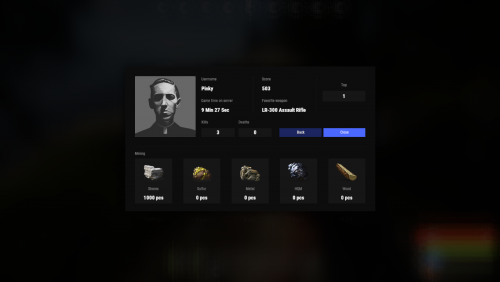
Beautiful display of player statistics and player ratings. Features: Beautiful user interface Customization (all interface you can set up in configuration) Performance Commands stats open statistics interface stats [steamId] open statistics interface leaderboard open leaderboard interface Permissions statistics.use open statistics interface statistics.hide hides player from leaderboard FAQ: Q: Where can I see an example of a config? A: Config Q: What should I do if I get the error "You do not have permission to use this command!"? A: To solve this problem, you need to grant the "statistics.use" permission to your players. For example, granting this permission to the "default" group is done with the following command: oxide.grant group default statistics.use$19.95- 53 comments
- 3 reviews
-
- 4
-

-
- #statistics
- #leaderboard
- (and 12 more)
-
Version 1.5.35
3,360 downloads
Introducing UltimateLeaderboard, the most advanced and comprehensive leaderboard system designed for Rust servers! Elevate your server competitive spirit by tracking an extensive range of player statistics—everything from kills and deaths to resources gathered, items crafted, structures built, and more. Featuring a sleek, customizable user interface and seamless integration with popular plugins, UltimateLeaderboard is the perfect addition to engage your players and showcase their achievements. Features of Ultimate Leaderboard Track a wide variety of player statistics, including kills, deaths, resources gathered, items crafted, structures built, and more. Fully customizable leaderboard—choose which stats to display and tailor it to your server unique style. Intuitive and visually appealing user interface for players to view their stats and compare rankings. Seamless integration with plugins like ServerPanel for enhanced displays, and Notify/UINotify for in-game alerts. Flexible data storage options: choose between JSON, SQLite, or MySQL to suit your server needs. Two reward systems: post-wipe awards that give actual items, kits, and money to top players when they connect, plus an optional companion plugin UltimateLeaderboardTop for real-time privilege management based on current rankings. Custom Titles system that automatically displays achievement-based chat titles for top performers (requires BetterChat plugin). Optimized for high performance, ensuring smooth operation even with large player bases and extensive data. Configurable templates. Optional real-time database updates for integrations (e.g., Discord Bot). Showcase Fullscreen Template ServerPanel V1 (V1.1) ServerPanel V2 Video Overview Commands /leaderboard or /stats - Opens the leaderboard interface for players to view stats and rankings. /leaderboard <steamid> - Opens another player's profile (requires ultimateleaderboard.profile permission). /leaderboard.hide - Allows players to hide themselves from the leaderboard (requires ultimateleaderboard.hide.self permission). leaderboard.manage hide <steamid> - Console command to hide a player from the leaderboard (server console only). leaderboard.wipe - Console command to reset all leaderboard data (server console only). leaderboard.migrate <migration_id> - Console command to perform database migrations (server console only). Available: — leaderboard.migrate 1 adds HiddenFromLeaderboard column to PlayerStats table (upgrade from v1.1.7 to v1.1.8) — leaderboard.migrate 2 migrates BodyHits data to the new format (upgrade to v1.5.10) leaderboard.find.short.prefab <search_term> - Console command to search for prefabs containing the specified search term (server console only). Useful for finding correct prefab names for configuration. leaderboard.manage - Console command to manage player statistics (server console only). Use leaderboard.manage help for detailed usage information. Permissions ultimateleaderboard.use - grants players access to leaderboard commands and interface. ultimateleaderboard.profile - allows players to view other players' profiles using the leaderboard command. ultimateleaderboard.hide.self - allows players to hide themselves from the leaderboard using the /leaderboard.hide command. Web Config Editor Easily manage your UltimateLeaderboard settings with our web-based configuration editor. This tool allows you to adjust plugin configurations through a user-friendly interface, eliminating the need to manually edit files on your server. P.S. To access the web config editor, you must be part of the "UltimateLeaderboard" group in our Discord server. Join us at https://discord.gg/mevent and request the group to get started. FAQ Q: How do I install UltimateLeaderboard? A: Download the UltimateLeaderboard.cs file, place it in your oxide/plugins directory, and restart your server or reload the plugin using the Oxide command oxide.reload UltimateLeaderboard. Q: Can I choose which statistics to track and display? A: Yes! The plugin allows you to customize tracked statistics and leaderboard displays via the configuration file. You can enable or disable specific stats like kills, resources, or events to suit your server. Q: What data storage options are available? A: UltimateLeaderboard supports JSON, SQLite, and MySQL. You can select your preferred storage method in the config file, offering flexibility for small or large servers. Q: How do I set up the awards system? A: In the configuration file, define award categories (e.g., most kills, top gatherer) and their criteria. The plugin will automatically track and assign awards to top players based on your settings. Q: Where can I configure the UI? A: UI is now template-driven. Use configurable templates stored at oxide/data/UltimateLeaderboard/Templates. Q: What happens to the data on a server wipe? A: By default, data wipes with a new save file, but you can disable this in the config (Wipe data on new save) to persist stats across wipes if desired. Q: How do I add UltimateLeaderboard to the ServerPanel menu? A: Follow these simple steps: 1. Open ServerPanel menu in-game and click "+ADD CATEGORY" button 2. Set these exact parameters: Type: Plugin Plugin Name: UltimateLeaderboard Plugin Hook: API_OpenPlugin 3. Click "SAVE" button to create the category Q: I see black images with Rust logo or get error 429 when loading images. What should I do? A: These issues occur when there are problems downloading images from the internet. The UltimateLeaderboard plugin sends images to ImageLibrary but is not responsible for the downloading process itself. Error 429 typically occurs due to rate limits imposed by image hosting services like Imgur (see HTTP 429 documentation for more details). To fix this, enable Offline Image Mode which will use local images instead: Enable the mode in config: Open "oxide/config/UltimateLeaderboard.json" (or "carbon/config/UltimateLeaderboard.json" for Carbon) Set "Enable Offline Image Mode": true Set up the images: Create folder "TheMevent" in "oxide/data" (or "carbon/data" for Carbon) Download PluginsStorage (click "CODE" → "Download ZIP") Extract the ZIP and copy all contents to the "TheMevent" folder Reload the plugin: Type o.reload UltimateLeaderboard (Oxide) or c.reload UltimateLeaderboard (Carbon) Note: If you want to add your own custom images, place them in the "TheMevent" folder and reference them with the "TheMevent/" prefix. For example: "TheMevent/Icon1.png", "TheMevent/MyCustomIcon.jpg", etc. Q: What's the difference between UltimateLeaderboard awards and UltimateLeaderboardTop? A: UltimateLeaderboardTop is a companion plugin that automatically manages player privileges based on leaderboard positions. Main Plugin Awards: Gives actual rewards (kits, money, commands) to top players after wipe - rewards are given once when player connects. UltimateLeaderboardTop: Continuously manages privileges (VIP groups, permissions) as players enter/exit top positions in real-time. To display awards in UI while using UltimateLeaderboardTop: Configure awards in UltimateLeaderboard config Configure awards in UltimateLeaderboardTop config Set "Automatically give rewards after the wipe": false Q: Can UltimateLeaderboardTop give items/kits to players? A: No, UltimateLeaderboardTop is designed only for reversible actions (permissions, groups, etc.). Since items can't be taken back from players when they leave top positions, item rewards are not supported. Use the main plugin's awards system for item rewards instead. Q: How do I configure rewards for top players? A: There are two reward systems available: UltimateLeaderboard Awards (Post-Wipe Rewards): Configure in the main plugin's config file under "Awards Settings": Set award categories (e.g., "Most Kills", "Top Gatherer") Define criteria: loot type, prefab, and minimum amount required Set rewards: commands to execute (give items, kits, money, etc.) Awards are given once when top players connect after a wipe UltimateLeaderboardTop (Real-time Privileges): Configure in UltimateLeaderboardTop.json: Set leaderboard types to monitor (kills, points, playtime, etc.) Define top positions (1st, 2nd, 3rd, etc.) Configure "Enter place commands" (given when player reaches position) Configure "Exit place commands" (executed when player loses position) Use for permissions, groups, temporary privileges Example UltimateLeaderboardTop configuration: { "Loot type": "Kill", "Prefab": "kills", "Places settings": { "1": { "Enter place commands": ["o.usergroup add %steamid% vip"], "Exit place commands": ["o.usergroup remove %steamid% vip"] } } } Q: What are Custom Titles and how do they work? A: Custom Titles automatically display achievement-based titles in chat for top players. For example, top killers get "[Killer]" title, top builders get "[Builder]" title, etc. Requires BetterChat plugin to work. Titles are updated automatically based on leaderboard positions and can be configured with priority system and limits. Q: Why don't I see my statistics updated immediately on the leaderboard? A: The leaderboard is cached and refreshes periodically (configurable interval) to minimize server load and ensure optimal performance. This means statistics may take a few minutes to appear on the leaderboard after the action is performed. The caching system helps maintain smooth server operation even with large player bases and extensive statistics tracking. Q: How can I track multiple similar items or entities with one statistic? A: You can combine multiple prefabs using the pipe symbol | in the prefab field. For example, to track all types of scientists as one "NPC Kills" statistic, use: npc_tunneldweller|npc_underwaterdweller|scientistnpc_arena|scientistnpc_bradley. This is useful for grouping similar items, resources, or entities into a single tracked category. Q: How do I find the correct prefab names for items, entities, or events? A: There are several ways to find prefab names: In-game console command: Use leaderboard.find.short.prefab <search_term> in the server console to search for prefabs containing your search term. For example: leaderboard.find.short.prefab scientist will show all prefabs containing "scientist". F1 console spawn command: In-game, open F1 console and use the spawn command to see available entity prefabs. Type spawn followed by part of the name to see matching options. Item shortnames: For items, use their shortname (e.g., "stones", "metal.ore", "wood"). You can find these by examining items in your inventory or using item-related commands. Plugin documentation: Check the "Custom Prefabs" and "Available Loot Types" sections in this plugin's description for comprehensive lists of supported prefabs and loot types. Q: How can I output the sum of all values by type of statistics (for example, all kills, all loot collected)? A: Use the prefab total_sum for the desired LootType. For example, to show the total number of all player kills, specify the LootType Kill and the prefab total_sum in the column or block settings. It works for any type: Kill, Gather, Craft, Event, and others. Q: How does the leaderboard scoring system work? A: The leaderboard uses a points-based scoring system. Points are earned from in-game actions, and each action has: Loot Type - The category of action (e.g., Kill, Gather, Construction, Craft, Event) Prefab/Short Name - The specific item or entity (e.g., "kills", "stones", "helicopter", "supply_drop") Score Value - The points awarded for this action (configured in Loot Settings) When a player performs an action: The plugin looks up the score for that action type + prefab combination Multiplies the score by the action value (usually 1 per action) Adds it to the player's total Points Example scores (from config): Player kills: +1.0 point per kill Deaths: -1.0 point per death Gathering stone: +0.1 point per stone Supply drop looted: +3.0 points Bradley crate: +5.0 points Helicopter kill: +15.0 points Bradley kill: +10.0 points How to become top player: Perform actions that have scores configured in Loot Settings Accumulate the most total Points The leaderboard ranks players by their Points value (or other tracked stats) Q: What award types are available and how do I configure them? A: UltimateLeaderboard supports 8 award types: Command - Execute console commands. Supports %steamid% placeholder. Use | to separate multiple commands. Example: "Command (%steamid%)": "inventory.giveto %steamid% rifle.ak 1|oxide.usergroup add %steamid% vip" Kit - Give kits from Kits plugin. Requires Kits plugin to be loaded. Example: "Type": "Kit", "Kit Name": "vip_starter" ServerRewards - Add reward points. Requires ServerRewards plugin. Example: "Type": "ServerRewards", "Amount": 1000 Economics - Deposit money via Economics plugin. Example: "Type": "Economics", "Amount": 5000 BankSystem - Deposit money to player's bank account. Example: "Type": "BankSystem", "Amount": 2500 GameStores - Add balance via GameStoresRUST plugin. Example: "Type": "GameStores", "Amount": 100 MoscowOVH - Add balance via RustStore plugin (Moscow OVH integration). Example: "Type": "MoscowOVH", "Amount": 50 Custom Prefabs UltimateLeaderboard supports advanced custom prefabs for granular statistics tracking and display: total_play_time - Total playtime (in seconds) current_playtime - Current session duration kdr - Kill/Death ratio points - Internal points system longest_kill_distance - Longest kill distance record total_hits - Total player hits total_resources - Total resources gathered total_items_crafted - Items crafted events_won - Event victories structures_built - Structures built upgrades_performed - Building upgrades name/nickname - Player display name formatted_total_playtime - Human-readable playtime (Xd Xh Xm) kd - K/D formatted as "Kills/Deaths" favorite_resource - Most gathered resource favorite_crafted_item - Most crafted item favorite_event - Most won event favorite_building_material - Preferred building material favorite_weapon - Most used weapon total_quests_completed - Total completed quests total_sum - Sum of all values for the selected LootType. For example, using total_sum with LootType Kill will show the total number of all kills for the player (across all kill categories). Works for any LootType: Kill, Gather, Craft, Event, etc. Available Loot Types None Construction Medical Event Available prefabs: Convoy Sputnik Caravan GasStationEvent AirEvent SatDishEvent Triangulation WaterEvent HarborEvent FerryTerminalEvent ArcticBaseEvent JunkyardEvent SupermarketEvent PowerPlantEvent ArmoredTrainEvent SurvivalArena KillBoss PaintballTeam PaintballFFA GunGame ZombieInfection TugboatPirates SpaceEvent AbandonedBase DungeonEvent FlyingCargoEvent AirfieldEvent Gather Kill Available custom prefabs: helisignals_{skin} - Tracks helicopter kills from HeliSignals (e.g., "helisignals_2920175997") bradleydrops_{skin} - Tracks bradley kills from BradleyDrops (e.g., "bradleydrops_2905355269") roadbradley_{profile} - Tracks bradley kills from RoadBradley (e.g., "roadbradley_easy") helicopter - Tracks helicopter kills Custom NPC support: horde_npc - For NPCs from ZombieHorde plugin raidbase_npc - For NPCs from Raidable Bases plugin For NPCs from NpcSpawn use NPC name as key (BossMonster, BetterNpc, NPCs from events, etc.) Other entity prefabs can be found in-game by using the "spawn" command in the F1 console Consume Raid Death Available custom prefabs: Custom NPC support: horde_npc - For NPCs from ZombieHorde plugin raidbase_npc - For NPCs from Raidable Bases plugin For NPCs from NpcSpawn use NPC name as key (BossMonster, BetterNpc, NPCs from events, etc.) Craft Crate LootItems Fishing Puzzle Available prefabs: keycard_1 keycard_2 keycard_3 Custom Upgrade ShotFired ExplosiveUsed RecycleItem BodyHits WeaponUsed RaidableBases Available prefabs: easy medium hard expert nightmare Economy Available prefabs: ShoppyStock Economics IQEconomic Quest EconomyBalance Available prefabs: Economics ServerRewards BankSystem IQEconomic Gambling Available prefabs: BlackjackDeposit BlackjackWon SlotDeposit SlotWon PockerDeposit PockerWon WheelDeposit WheelWon SkillTree Available prefabs: xp - Experience points earned level - Skill tree level reached Trivia MixingTable API for Developers UltimateLeaderboard provides a comprehensive API for developers to integrate with other plugins and extend functionality: Methods JArray API_GetUltimateLeaderboardUsers(int offset, int limit, int? columnIndex = null) - Get leaderboard users with pagination float API_GetPlayerStat(ulong playerId, string lootType, string shortname) - Get specific player statistic bool API_IsHiddenFromLeaderboard(ulong playerId) - Check if player is hidden from leaderboard void API_OnItemGather(ulong player, string shortname, int amount) - Add gather statistics for a player void API_OnEventWin(ulong userID, string eventName, int amount = 1) - Record event wins for a player Hooks void OnUltimateLeaderboardContent(BasePlayer player, string categoryType, CuiElementContainer container) - Called when displaying custom category content void OnUltimateLeaderboardCached() - Called when leaderboard data is cached and ready$45.00- 33 comments
- 15 reviews
-
- 8
-
-

-
- #ultimateleaderboard
- #leaderboard
- (and 20 more)
-
Version 0.1.9
163 downloads
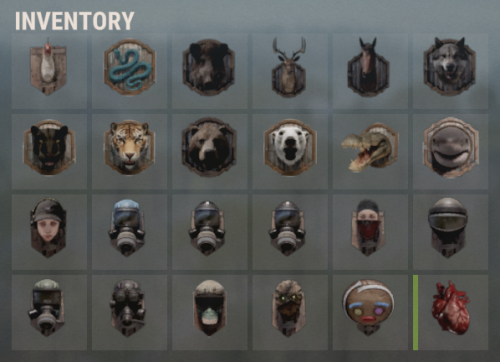
Useful multifunctional plugin related to trophy harvesting. The ability to automatically add a player's skull to their inventory without the need to harvest it; The ability to replace a player's skull upon harvesting; The ability to set the chance of harvesting a player's heart; The ability to harvest head bags without a special knife; The ability to customize head bags by type and separately for players; The ability to set icons for head bags; The ability to customize the name of head bags by type; The ability to add custom head bags for entities that don't have them by default; The ability to prevent harvesting one's own head bag if the corresponding permission is present. skulltrophy.vip - Allows players to save their clothing or copy someone else's saved clothing for display on a hunting trophy. skulltrophy.ignore - A player with this permission is protected from custom drop of skull and heart. skulltrophy.admin - Grants the same privileges as skulltrophy.vip. Additionally, it allows saving, modifying, and resetting saves for anyone, including by types. { "Chat command": "strophy", "Is it worth enabling GameTips for messages?": true, "List of language keys for creating language files": [ "en" ], "Is it worth ignoring Facepunch's rules regarding skins and DLCs?": false, "Is it worth creating a player's skull in their inventory upon suicide?": false, "Is it worth creating skulls for NPCs? 0 - disabled, 1 - enabled for all, 2 - enabled only for NPCs with a skinID from the list": 2, "List of NPC skinIDs for skull creation": [ 14922524, 8675309 ], "Is it worth allowing the Head Bag to be harvested without a special knife?": true, "Text format when harvesting the Head Bag": "<color=#FFFFFF>{0}</color>", "List of skin IDs for Head Bag icons": { "Chicken": 3075281761, "Snake": 3470214843, "Boar": 3074393967, "Stag": 3074394545, "Horse": 3074392217, "Wolf": 3074393525, "Panther": 3470215653, "Tiger": 3470216364, "Bear": 3074392575, "Polarbear": 3470216633, "Crocodile": 3470217480, "SimpleShark": 3252067977, "BasePlayer": 3074297551, "ScientistNPC": 3075282198, "UnderwaterDweller": 3075283082, "TunnelDweller": 3075283387, "BanditGuard": 3075283702, "ScientistHeavy": 3075283936, "ScientistPeacekeeper": 3075284145, "ScientistNVG": 3075284355, "ScientistOutbreak": 3470232890, "NPCShopKeeper": 3534310675, "ScarecrowNPC": 3075284618, "GingerbreadNPC": 3075284816 }, "List of displayed names by type for the Head Bag": { "Chicken": "Chicken", "Snake": "Snake", "Boar": "Boar", "Stag": "Stag", "Horse": "Horse", "Wolf": "Wolf", "Panther": "Panther", "Tiger": "Tiger", "Bear": "Bear", "Polarbear": "Polar Bear", "Crocodile": "Crocodile", "SimpleShark": "Shark", "ScientistNPC": "Scientist", "UnderwaterDweller": "Underwater Dweller", "TunnelDweller": "Tunnel Dweller", "BanditGuard": "Bandit Guard", "ScientistHeavy": "Scientist Heavy", "ScientistPeacekeeper": "Peacekeeper", "ScientistNVG": "Scientist NVG", "ScientistOutbreak": "Scientist Outbreak", "NPCShopKeeper": "Shop Keeper", "ScarecrowNPC": "Scarecrow", "GingerbreadNPC": "Gingerbread" }, "Chance of harvesting the Heart(0-100)": 50, "Shortname of the source item for the Heart": "chicken.cooked", "Skin ID of the icon for the Heart": 3075285011, "Name of the effect when eating the Heart. An empty string disables the effect": "assets/prefabs/misc/xmas/snowball/effects/strike_screenshake.prefab", "Temperature applied when eating the Heart. A negative value adds cold, a positive value adds heat": 30.0, "Text format when harvesting the Heart": "<color=#FFFFFF>{0}</color>", "Is it worth replacing the Skull(vanilla) when it's harvested?": true, "The shortname of the item that replaces the Skull when it's harvested. An empty string removes the item": "skull.trophy", "Text format when harvesting Trophies": "<color=#FFFFFF>{0}</color>", "List of random shortname Trophies upon harvesting": [ "trophy", "skull.trophy", "skull.trophy.table", "skull.trophy.jar", "skull.trophy.jar2", "huntingtrophylarge", "huntingtrophysmall", "fishtrophy" ], "Version": { "Major": 0, "Minor": 1, "Patch": 9 } } EN: { "CmdMainAdmin": "Available admin commands:\n\n<color=#D1CBCB>/strophy</color> <color=#D1AB9A>clear</color> <color=#D1CBCB>all/types/players/*nameOrId*</color>(optional) - Clear saved data for the hunting trophy\n<color=#D1CBCB>/strophy</color> <color=#D1AB9A>save</color> <color=#D1CBCB>*type*/*nameOrId*</color>(optional) - Save outfit for the hunting trophy\n<color=#D1CBCB>/strophy</color> <color=#D1AB9A>copy</color> <color=#D1CBCB>*nameOrId*</color> - Copy outfit for the hunting trophy from the specified player\n<color=#D1CBCB>/strophy</color> <color=#D1AB9A>add</color> <color=#D1CBCB>*type*</color> - Add an entity type for the hunting trophy\n<color=#D1CBCB>/strophy</color> <color=#D1AB9A>remove</color> <color=#D1CBCB>*type*</color> - Remove an entity type from the hunting trophy\n\n--------------------------------------------------", "CmdMain": "Available commands:\n\n<color=#D1CBCB>/strophy</color> <color=#D1AB9A>clear</color> - Clear saved data for the hunting trophy\n<color=#D1CBCB>/strophy</color> <color=#D1AB9A>save</color> - Save outfit for the hunting trophy\n<color=#D1CBCB>/strophy</color> <color=#D1AB9A>copy</color> <color=#D1CBCB>*nameOrId*</color> - Copy outfit for the hunting trophy from the specified player\n\n--------------------------------------------------", "CmdNotAllowed": "You do not have permissions to use this command!", "CmdPlayerNotFound": "Player '{0}' not found! You must provide the player's name or ID.", "CmdMultiplePlayers": "Multiple players found for '{0}': {1}", "CmdClearAll": "The saved clothing of all players and NPCs has been reset!", "CmdClearAllTypes": "The saved clothing by types has been reset!", "CmdClearAllPlayers": "The saved clothing of all players has been reset!", "CmdClearPlayer": "{0}'s saved clothing has been reset!", "CmdClearMyself": "Your saved clothing has been reset!", "CmdWearSavedForType": "Clothing for type '{0}' has been saved!", "CmdWearSavedFor": "Clothing for player '{0}' has been saved!", "CmdWearSaved": "Your clothing has been saved!", "CmdWearCopied": "{0}'s clothing has been successfully copied!", "CmdPlayerNoSavedWear": "The player did not save their clothing!", "CmdTypeAdded": "A new type of '{0}' has been created! It used your clothing.", "CmdTypeRemoved": "Type '{0}' has been successfully deleted!" } RU: { "CmdMainAdmin": "Доступные админ команды:\n\n<color=#D1CBCB>/strophy</color> <color=#D1AB9A>clear</color> <color=#D1CBCB>all/types/players/*имяИлиАйди*</color>(опционально) - Очистка сохранённых данных для трофейного панно\n<color=#D1CBCB>/strophy</color> <color=#D1AB9A>save</color> <color=#D1CBCB>*тип*/*имяИлиАйди*</color>(опционально) - Сохранение одежды для трофейного панно\n<color=#D1CBCB>/strophy</color> <color=#D1AB9A>copy</color> <color=#D1CBCB>*имяИлиАйди*</color> - Копирование одежды для трофейного панно с указанного игрока\n<color=#D1CBCB>/strophy</color> <color=#D1AB9A>add</color> <color=#D1CBCB>*тип*</color> - Добавить тип сущности для трофейного панно\n<color=#D1CBCB>/strophy</color> <color=#D1AB9A>remove</color> <color=#D1CBCB>*тип*</color> - Удалить тип сущности для трофейного панно\n\n--------------------------------------------------", "CmdMain": "Доступные команды:\n\n<color=#D1CBCB>/strophy</color> <color=#D1AB9A>clear</color> - Очистка сохранённых данных для трофейного панно\n<color=#D1CBCB>/strophy</color> <color=#D1AB9A>save</color> - Сохранение одежды для трофейного панно\n<color=#D1CBCB>/strophy</color> <color=#D1AB9A>copy</color> <color=#D1CBCB>*имяИлиАйди*</color> - Копирование одежды для трофейного панно с указанного игрока\n\n--------------------------------------------------", "CmdNotAllowed": "У вас недостаточно прав для использования этой команды!", "CmdPlayerNotFound": "Игрок '{0}' не найден! Вы должны указать имя или ID игрока.", "CmdMultiplePlayers": "По значению '{0}' найдено несколько игроков: {1}", "CmdClearAll": "Сохраненная одежда всех игроков и NPC была обнулена!", "CmdClearAllTypes": "Сохраненная одежда по типам была обнулена!", "CmdClearAllPlayers": "Сохраненная одежда всех игроков была обнулена!", "CmdClearPlayer": "Сохраненная одежда игрока '{0}' была обнулена!", "CmdClearMyself": "Ваша сохраненная одежда была обнулена!", "CmdWearSavedForType": "Одежда для типа '{0}' была сохранена!", "CmdWearSavedFor": "Одежда для игрока '{0}' была сохранена!", "CmdWearSaved": "Ваша одежда была сохранена!", "CmdWearCopied": "Одежда игрока '{0}' была успешно скопирована!", "CmdPlayerNoSavedWear": "Игрок не сохранял свою одежду!", "CmdTypeAdded": "Новый тип '{0}' был создан! Использовалась ваша одежда.", "CmdTypeRemoved": "Тип '{0}' был успешно удален!" } Admin commands: clear all/types/players/*nameOrId*(optional) - Clear saved data for the hunting trophy; save *type*/*nameOrId*(optional) - Save outfit for the hunting trophy; copy *nameOrId* - Copy outfit for the hunting trophy from the specified player; add *type* - Add an entity type for the hunting trophy; remove *type* - Remove an entity type from the hunting trophy. Players commands: clear - Clear saved data for the hunting trophy; save - Save outfit for the hunting trophy; copy *nameOrId* - Copy outfit for the hunting trophy from the specified player. Example: /strophy clear all /strophy copy iiiaka$4.99 -
Version 0.1.7
223 downloads
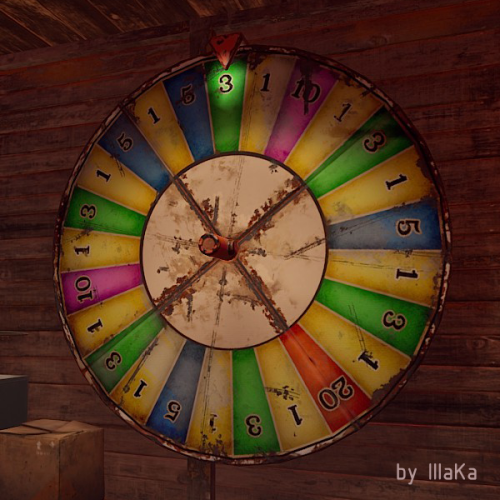
An indispensable plugin that collects Fortune Wheel statistics and provides the ability to view them through the UI. bigwheelstats.use - Provides access to use UI; bigwheelstats.admin - Provides the same permissions as bigwheelstats.use. Additionally, it provides the ability to manage big game wheels without any limitations. { "Is it worth checking for permissions before displaying the UI?": false, "Is it worth clearing statistics during a wipe?": true, "List of language keys for creating language files": [ "en" ], "Name of the prefab to play when a player becomes the best player. Leave empty to disable": "assets/prefabs/misc/xmas/advent_calendar/effects/open_advent.prefab", "Is it worth skipping the reward for the first best player?": true, "Command to execute when a player becomes the best player(0 - userID). Leave empty to disable, or null to use the default": "tperm add {0} vip 3600", "Cash reward for becoming the best player. Leave 0 to disable": 100.0, "List of items granted for becoming the best player. Leave empty to disable, or null to use the default": [ { "ShortName": "scrap", "Amount": 100, "SkinId": 0 } ], "List of permissions for top players. Each position in the list corresponds to the player's rank. Note: empty or null entries will be removed": [ [ "example.firstA", "example.firstB" ], [ "example.secondA" ], [ "example.thirdA" ] ], "List of permissions for top players for custom game wheels": [], "Big Wheel Game - Default name": "BIG WHEEL GAME", "Big Wheel Game - Name length limit(1–30)": 16, "Big Wheel Game - Cooldown time in seconds for changing the image url": 600.0, "Big Wheel Game - Default image Url": "https://i.imgur.com/MhW63JV.png", "Big Wheel Game - Allowed image Url prefix. Leave empty to allow all sites. Example: 'https://i.imgur.com/'": "", "Ui - Main Background Color": "#1A1A1A", "Ui - Main Background Transparency": 0.95, "Ui - Text Font(https://umod.org/guides/rust/basic-concepts-of-gui#fonts)": "RobotoCondensed-Bold.ttf", "Hud - Icon Url": "https://i.imgur.com/HvoFS7p.png", "Hud - Icon Color": "#808080", "Hud - Icon Transparency": 0.5, "Hud - Icon Is Raw Image": false, "Hud - Icon AnchorMin": "1 0", "Hud - Icon AnchorMax": "1 0", "Hud - Icon OffsetMin": "-250 15", "Hud - Icon OffsetMax": "-220 45", "Hit - Yellow Color": "#BFBF40", "Hit - Yellow Transparency": 0.4, "Hit - Green Color": "#408C8C", "Hit - Green Transparency": 0.4, "Hit - Blue Color": "#03598C", "Hit - Blue Transparency": 0.4, "Hit - Purple Color": "#8026CC", "Hit - Purple Transparency": 0.4, "Hit - Red Color": "#B24C59", "Hit - Red Transparency": 0.4, "Panel - Background Color": "#4C4C4C", "Panel - Background Transparency": 0.5, "Panel - OffsetMin": "-320 -255", "Panel - OffsetMax": "320 255", "Panel - Close Url": "https://i.imgur.com/O9m6yZF.png", "Panel - Close Color": "#D94026", "Panel - Close Transparency": 0.6, "Panel - Close Is Raw Image": false, "Panel - Close AnchorMin": "1 0", "Panel - Close AnchorMax": "1 0", "Panel - Close OffsetMin": "-250 15", "Panel - Close OffsetMax": "-220 45", "Menu - Buttons Color": "#808080", "Menu - Buttons Color Transparency": 0.4, "Menu - Buttons Active Color": "#3380BF", "Menu - Buttons Active Color Transparency": 0.6, "Menu - Font Size": 18, "Menu - Font Color": "#CCCCCC", "Menu - Font Color Transparency": 0.5, "Menu - Font Active Color": "#FFFFFF", "Menu - Font Active Color Transparency": 1.0, "Sub Menu - Reload Color": "#CCCCCC", "Sub Menu - Reload Color Transparency": 0.5, "Sub Menu - Settings Color": "#CCCCCC", "Sub Menu - Settings Color Transparency": 0.5, "Player Info - Online Color": "#CCFFB2", "Player Info - Online Transparency": 0.4, "Player Info - Offline Color": "#FF0000", "Player Info - Offline Transparency": 0.4, "Player Info - Font Size": 16, "Player Info - Font Color": "#FFFFFF", "Player Info Card - Background Color": "#808080", "Player Info Card - Background Transparency": 0.4, "Player Info Card - Title Font Size": 12, "Player Info Card - Title Font Color": "#808080", "Player Info Card - Value Font Size": 16, "Player Info Card - Value Font Color": "#CCCCB2", "Game Info - Color": "#808080", "Game Info - Transparency": 0.4, "Game Info - Font Size": 16, "Game Info - Font Color": "#FFFFFF", "Game Info Card - Background Color": "#808080", "Game Info Card - Background Transparency": 0.4, "Game Info Card - Title Font Size": 12, "Game Info Card - Title Font Color": "#808080", "Game Info Card - Value Font Size": 16, "Game Info Card - Value Font Color": "#CCCCB2", "Game Info Card - Percentage Font Size": 12, "Game Info Card - Percentage Font Color": "#808080", "Column Header - Color": "#4C4C4C", "Column Header - Transparency": 1.0, "Column Header - Active Color": "#595959", "Column Header - Active Transparency": 1.0, "Column Header - Font Size": 16, "Column Header - Font Color": "#CCCCB2", "Column Header - Font Active Color": "#FFFFFF", "Column Item - Font Size": 16, "Column Item - Color": "#808080", "Column Item - Transparency": 0.3, "Column Item - Even Color": "#808080", "Column Item - Even Transparency": 0.6, "Column Item - Font Color": "#CCCCB2", "Column Item - Font Active Color": "#FFFFFF", "Player HitList - Win Color": "#8CC83C", "Player HitList - Win Transparency": 0.4, "Player HitList - Lose Color": "#CD4632", "Player HitList - Lose Transparency": 0.4, "Game HitList Item - Font Size": 18, "Game HitList Item - Font Color": "#CCCCB2", "Player List - Name Font Size": 12, "Player List - ID Font Size": 10, "Player List - ID Font Color": "#808080", "Game List - Name Font Size": 12, "Game List - ID Font Size": 10, "Game List - ID Font Color": "#808080", "Settings - Background Color": "#4C4C4C", "Settings - Background Color Transparency": 0.5, "Settings - Title Color": "#4C4C4C", "Settings - Title Color Transparency": 0.7, "Settings - Input Color": "#4C4C4C", "Settings - Input Color Transparency": 0.7, "Settings - Button Color": "#4C4C4C", "Settings - Button Color Transparency": 0.7, "Settings - Text Color": "#CCCCB2", "Settings - Text Color Transparency": 1.0, "Settings - Sub Text Color": "#808080", "Settings - Sub Text Color Transparency": 1.0, "Scrolling - Width": 3.0, "Scrolling - Handle color": "#CCCCCC", "Scrolling - Handle color transparency": 0.5, "Scrolling - Pressed color": "#CCCCB2", "Scrolling - Pressed color transparency": 1.0, "Scrolling - Track color": "#000000", "Scrolling - Track color transparency": 0.0, "Footer - Color": "#4C4C4C", "Footer - Transparency": 0.4, "Footer - Font Size": 16, "Footer Buttons - Between Button Text": "...", "Footer Buttons - Color": "#808080", "Footer Buttons - Transparency": 0.4, "Footer Buttons - Active Color": "#3380BF", "Footer Buttons - Active Transparency": 0.6, "Footer Buttons - Font Color": "#CCCCB2", "Footer Buttons - Font Active Color": "#FFFFFF", "Footer Custom Button - Command. Leave empty to disable": "", "Footer Custom Button - Color": "#808080", "Footer Custom Button - Transparency": 0.4, "Footer Text - Font Size": 12, "Footer Text - Font Color": "#808080", "Wipe ID": null, "Version": { "Major": 0, "Minor": 1, "Patch": 7 } } EN: { "UiMenuPlayer": "My statistics", "UiMenuPlayerList": "Top players", "UiMenuGameList": "Game list", "UiFooterCustomButton": "My button", "UiFooterText": "Showing {0} to {1} of {2}", "UiPlayerTotalSpins": "Total spins", "UiPlayerWinSpins": "Win spins", "UiPlayerLoseSpins": "Lose spins", "UiPlayerScrapSpend": "Scrap spend", "UiPlayerScrapWin": "Scrap win", "UiPlayerScrapResult": "Scrap result", "UiPlayerScrapRecordBid": "Scrap record bid", "UiPlayerScrapLastBid": "Scrap last bid", "UiPlayerScrapLastWin": "Scrap last win", "UiPlayerHitsItem": "Item", "UiPlayerHitsHit": "Hit", "UiPlayerHitsBidAmount": "Bid amount", "UiPlayerHitsResultAmount": "Result", "UiPlayerListPlayer": "Player", "UiPlayerListTotal": "Total", "UiPlayerListLoses": "Loses", "UiPlayerListWins": "Wins", "UiPlayerListRecordBid": "Record bid", "UiPlayerListRecordWin": "Record win", "UiPlayerListResult": "Result", "UiGameBestPlayer": "Best player", "UiGameCurrentSpins": "Current session spins", "UiGameTotalSpins": "Total spins", "UiGameTotalYellow": "Yellow", "UiGameTotalGreen": "Green", "UiGameTotalBlue": "Blue", "UiGameTotalPurple": "Purple", "UiGameTotalRed": "Red", "UiGameSettingsTitle": "Big Wheel Game Management", "UiGameSettingsName": "Name:", "UiGameSettingsImage": "Image Url:", "UiGameSettingsImageCooldown": "The next opportunity to change the image will be available in {0} seconds!", "UiGameSettingsReset": "Reset statistics", "UiGameSettingsResetSpinning": "Can't reset the game wheel statistics while it is spinning!", "UiGameListBigWheelGame": "Big wheel game", "UiGameListBestWin": "Best Win", "UiGameListTotalSpins": "Total spins" } RU: { "UiMenuPlayer": "Моя статистика", "UiMenuPlayerList": "Топ игроков", "UiMenuGameList": "Список игр", "UiFooterCustomButton": "Моя кнопка", "UiFooterText": "Отображены с {0} по {1} из {2}", "UiPlayerTotalSpins": "Всего ставок", "UiPlayerWinSpins": "Выигрышные ставки", "UiPlayerLoseSpins": "Проигрышные ставки", "UiPlayerScrapSpend": "Потрачено скрапа", "UiPlayerScrapWin": "Выиграно скрапа", "UiPlayerScrapResult": "Итог скрапа", "UiPlayerScrapRecordBid": "Рекордная ставка", "UiPlayerScrapLastBid": "Последняя ставка", "UiPlayerScrapLastWin": "Последний выигрыш", "UiPlayerHitsItem": "Предмет", "UiPlayerHitsHit": "Число", "UiPlayerHitsBidAmount": "Ставка", "UiPlayerHitsResultAmount": "Итог", "UiPlayerListPlayer": "Игрок", "UiPlayerListTotal": "Всего", "UiPlayerListLoses": "Проигрышей", "UiPlayerListWins": "Выигрышей", "UiPlayerListRecordBid": "Рекордная ставка", "UiPlayerListRecordWin": "Рекордный выигрыш", "UiPlayerListResult": "Итог", "UiGameBestPlayer": "Лучший игрок", "UiGameCurrentSpins": "Вращений за сессию", "UiGameTotalSpins": "Всего вращений", "UiGameTotalYellow": "Желтый", "UiGameTotalGreen": "Зеленый", "UiGameTotalBlue": "Синий", "UiGameTotalPurple": "Фиолетовый", "UiGameTotalRed": "Красный", "UiGameSettingsTitle": "Управление игровым колесом", "UiGameSettingsName": "Имя:", "UiGameSettingsImage": "Ссылка на изображение:", "UiGameSettingsImageCooldown": "Следующая возможность изменить изображение будет доступна через {0} секунд!", "UiGameSettingsReset": "Сбросить статистику", "UiGameSettingsResetSpinning": "Нельзя сбросить статистику игрового колеса пока оно крутится!", "UiGameListBigWheelGame": "Игра", "UiGameListBestWin": "Лучший выигрыш", "UiGameListTotalSpins": "Всего вращений" }$14.99 -
Version 2.1.18
686 downloads
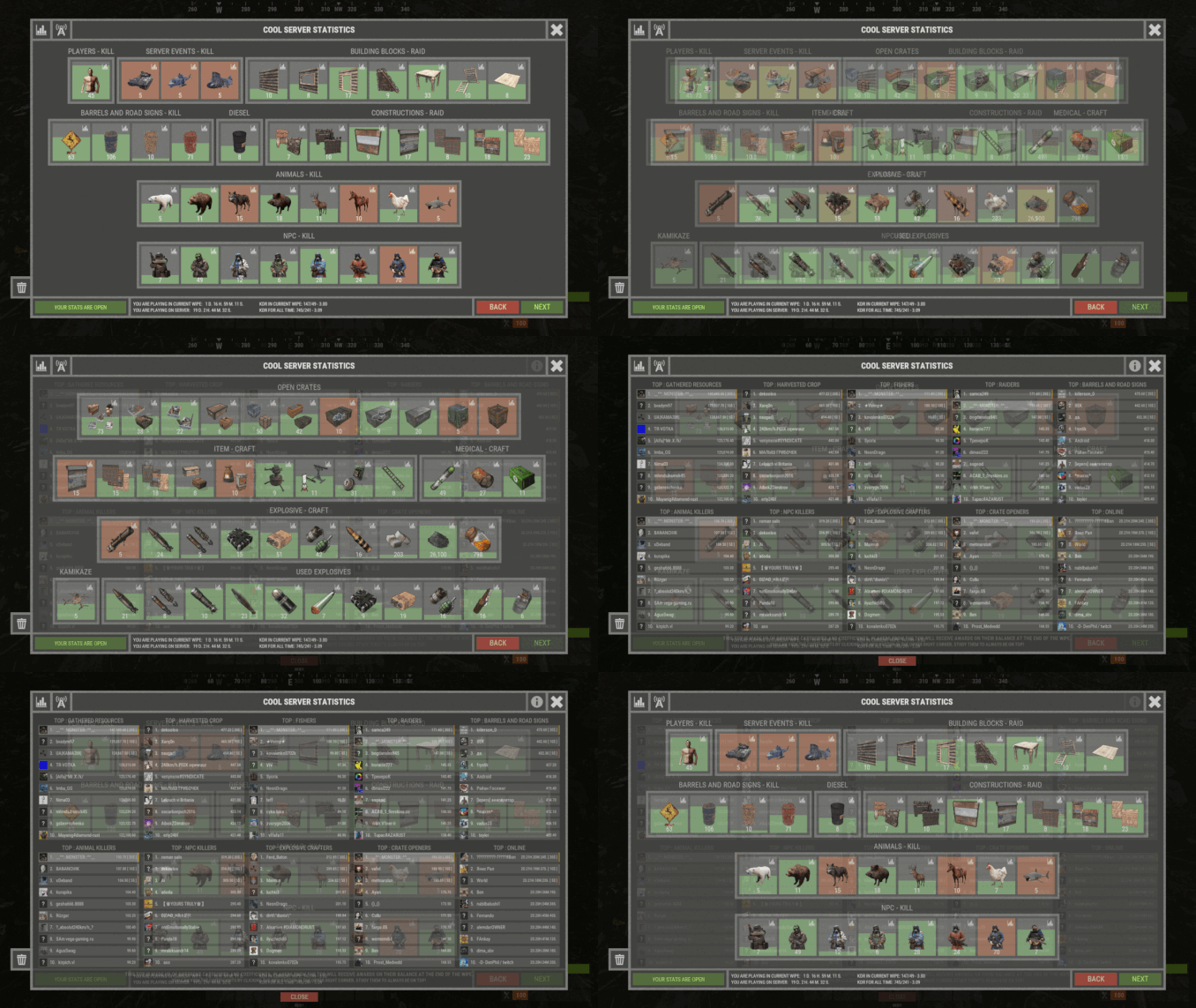
XStatistics - statistics for your server. - Optimization of the interface for different monitor resolutions. - Storing player data in - oxide/data/XDataSystem/XStatistics or MySQL or SQLite. - There is a lang ru/en/uk/es. - Sound effects when interacting with the menu. - UI settings in the configuration. - Display TOPs in game chat. - Ability to customize the privacy of the default statistics. - Ability to delete a player's stats after they have been banned. - Ability to customize grades of building blocks. [ To be recorded in statistics. ] - Ability to add a player to the blacklist. [ Player's statistics will not be displayed in the TOPs and will not be available to other players. ] - Ability to use MySQL or SQLite database. - Ability to automatically give awards and clear data after a WIPE. [ Settings in the configuration. ] [ Plugin economics or any other. Also [ RU ] GameStores. ] - A player can hide/open his statistics. [ Need permission. ] - A player can view the statistics of other players. [ Need permission. ] - A player can reset their statistics to zero. [ Need permission. ] - The player can view the entire list of players and search. [ Need permission. ] - Creating an unlimited number of categories, subcategories and pages. - Creating custom TOPs, coefficients and awards. [ Unlimited number. ] - Various admin commands to manage player statistics. - Support and compatibility with many plugins. - Server events (Bradley, Chinook, and Patrol Helicopter) count as stats for the player who did the most damage. - Checking OwnerID of Building blocks, Constructions and other entities. - Ability to create a Global TOP of your project. [ For this purpose it is enough to enter MySQL data and server name into the configuration.] [ This TOP can be disabled in the configuration and only the TOP players of the server can be used. Or you can use two TOPs at the same time! ] - Ability to use pages for categories with subcategories. - Administrator Mode. [ View hidden player stats, open player search and more ]. - Automatic deletion of statistics of players who have not logged connection the server for N days. - Ability for players to disable messages with the TOP players in chat. If your server is visited by more than 500 players, it is recommended to use SQLite or MySQL. Statistics were tested on a server with 120 online and 5000 players in the database. Excellent result on optimization. To display player avatars you need to customize the configuration of the ImageLibrary plugin! What are the statistics at this point? Global TOP data is manually deleted from the MySQL database. [ It is important that the servers are turned off so that online players data is not written to the database ]. Or after all servers are wiped, run the command - player_stats_reset globaldata null - on one of the servers. [ Also take into account the servers parameters, for a fair TOP they should be the same! ] Shortnames to customize statistics Permissions xstatistics.use - access to the statistics menu. xstatistics.top - access to the TOPs of subcategories. xstatistics.coefficients - access to view the coefficients. xstatistics.player - access to view player statistics, player list and player search. xstatistics.resetwipe - access to the ability for a player to reset his statistics - WIPE. xstatistics.resetall - access to the ability for a player to reset his statistics - ALL TIME. xstatistics.shstats - access to the ability to hide/open your statistics. [ If the permission has been revoked, the statistics privacy will automatically change to default. ] xstatistics.admin - access to admin mode. Commands /stat, /stats, /statistic, /statistics - to open the statistics menu. [ Commands can be changed in the config. ] Server console --- Admin commands. stats_ct <customTopName> - to see the top players. [ Custom TOP. ] stats_t <subcategoryName> - to see the top players. [ TOP subcategory. ] player_stats_reset statswipe <steamID> - to reset a player stats to zero - WIPE. player_stats_reset statsall <steamID> - to reset a player stats to zero - ALL TIME. player_stats_reset all <steamID> - to reset a player stats to zero - WIPE and ALL TIME. player_stats_reset global <steamID> - delete a player from the database Global TOP. [ Player must be offline! ] player_stats_reset globaldata null - Delete data from a table in a MySQL database - Global TOP. [ Use this command after all of your servers have been wiped. ] [ The command can be used on any of the Global TOP servers. ] player_actstats global true/false - change statistics privacy for all players. player_actstats <steamID> true/false - change statistics privacy for a player. stats_give_award - start giving out awards for TOPs. stats_clear_data_wipe - to clear all statistics - WIPE. [ Same as after a server wipe ] API - void API_AddSubcategoryValue(BasePlayer player, string subcategoryName, long amount) - Add a value for the subcategory. player - must be online and not equal to null. - void API_SetSubcategoryValue(BasePlayer player, string subcategoryName, long amount) - Set a value for the subcategory. player - must be online and not equal to null. - bool API_CheckForSubcategory(ulong userID, string subcategoryName) - Check if a subcategory exists. - long API_GetSubcategoryValue(ulong userID, string subcategoryName) - Get the subcategory value. Config$45.99 -
Version 1.3.900
1,677 downloads
Discord Join our community discord for fast support and future updates. We have several channels where you can get help, offer suggestions, see what's coming in future updates, and more. Our discord is the fastest way to get the help and info you need! http://discord.rustlevels.com/ Features: Tracks Animal Kills Tracks Player Kills Tracks NPC Kills Tracks Fish Caught Tracks Loot Containers Destroyed / Looted Tracks Animals Harvested Tracks Corpse Harvested Tracks Player Deaths Tracks Suicides Tracks Harvest Counts Options to Enable/Disable Tracking Option to enable/disable messages and message intervals UI for Player Stats, Global Stats, Top 10 Displays, Leaderboards WebRequests for external data storage SQL Support (2 options availble, read documentaion: https://umod.org/community/kill-records/36935-setting-up-using-sql)) Chat Commands: Player Commands: /krhelp - Shows all commands in chat /pkills - Shows your kill records UI /pkills (playername) - Shows another players kill records UI /pkillschat - Shows your kill records in chat /pkillschat (playername) - Shows another players kill records in chat /topkills - Shows top kills UI with page selection /topkillschat (entity) - Shows top kills in chat /totalkills - Shows global kill count for all entities /totalkillschat - Shows global kill count in chat for all entities /killchat true/false - turns on/off kill messages in chat /totalkills - Shows global kill count for all entities /leadkills - Shows leaderboads UI /pstats - shows your harvest records UI /pstatschat - shows your harvest records in chat /pstats (playername) - Shows another players harvest record UI /pstatschat (playername) - Shows another players harvest record in chat /topstats - shows top player harvest stats UI Admin Commands: (Requires killrecords.admin permission) /krhelpadmin - Shows all admin commands in chat /killsweb - Sends data over webrequest /krbackup - saved datafile when using SQL /krsql update - Updates your records in SQL /krsql check - Checks SQL to see if your records exist, if not will create if SQL enabled /krsql checkall - Checks SQL to see if all records exist from cache, if not will create if SQL enabled /krreset - Clears and resets all player data in Kill Records Permissions: This plugin uses the permission system. To assign a permission, use oxide.grant <user or group> <name or steam id> <permission>. To remove a permission, use oxide.revoke <user or group> <name or steam id> <permission>. killrecords.admin -- Gives permission to use all admin chat commands killrecords.killchat -- Allows player to turn on/off kill messages Configuration: { "Tracking Options": { "Trackchicken": true, "Trackboar": true, "Trackstag": true, "Trackwolf": true, "Trackbear": true, "Trackpolarbear": true, "Trackshark": true, "Trackhorse": true, "Trackfish": true, "TrackPlayer": true, "Trackscientist": true, "Trackdweller": true, "Tracklootcontainer": true, "Trackunderwaterlootcontainer": true, "Trackbradhelicrate": true, "Trackhackablecrate": true, "Trackdeaths": true, "Tracksuicides": true, "TrackAnimalHarvest": true, "TrackCorpseHarvest": true, "TrackBradley": true, "TrackHeli": true }, "Player Chat Commands": { "krhelp": "krhelp", "pkills": "pkills", "pkillschat": "pkillschat", "topkills": "topkills", "topkillschat": "topkillschat", "totalkills": "totalkills", "totalkillschat": "totalkillschat", "leadkills": "leadkills", "pstats": "pstats", "pstatschat": "pstatschat", "topstats": "topstats", "totalstats": "totalstats", "totalstatschat": "totalstatschat", "killchat": "killchat" }, "Admin Chat Commands": { "krhelpadmin": "krhelpadmin", "krweb": "krweb", "krsql": "krsql", "krbackup": "krbackup", "krreset": "krreset" }, "Harvest Options": { "treescut": true, "oremined": true, "cactuscut": false, "woodpickup": true, "orepickup": true, "berriespickup": true, "pumpkinpickup": true, "potatopickup": true, "cornpickup": true, "mushroompickup": true, "hemppickup": true, "seedpickup": true }, "Order Options": { "chickenpos": 1, "boarpos": 2, "stagpos": 3, "wolfpos": 4, "bearpos": 5, "polarbearpos": 22, "sharkpos": 6, "horsepos": 7, "fishpos": 19, "playerpos": 8, "scientistpos": 9, "dwellerpos": 10, "lootpos": 11, "unlootpos": 12, "bradhelicratepos": 13, "hackablecratepos": 14, "deathpos": 15, "suicidepos": 16, "corpsepos": 17, "pcorpsepos": 18, "bradleypos": 20, "helipos": 21 }, "Chat & UI Options": { "enableui": true, "UseImageLibrary": true, "ShowKillMessages": true, "KillMessageInterval": 1, "KillMessageLimit": 5000, "enableuinotify": true, "disablechats": true, "uinotifytype": 4 }, "Web Request": { "UseWebrequests": false, "DataURL": "URL", "SecretKey": "SecretKey" }, "SQL": { "UseSQL": false, "FileType": 0, "SQL Host": "HOST", "SQL Port": 3306, "SQL Database": "DATABASENAME", "SQL Username": "DATABASEUSERNAME", "SQL Password": "DATABASEPASSWORD" } Localization { "players": "Players: {0}", "noplayer": "Kill Records:\n No player found with: {0}", "chicken": "Chickens: {0}", "boar": "Boars: {0}", "stag": "Stags: {0}", "wolf": "Wolves: {0}", "bear": "Bears: {0}", "polarbear": "PolarBears: {0}", "simpleshark": "Sharks: {0}", "horse": "Horses: {0}", "fish": "Fish: {0}", "treecut": "Trees: {0}", "oremined": "Ore Mined: {0}", "cactuscut": "Cactus Cut: {0}", "woodpickup": "Wood Pickup: {0}", "orepickup": "Ore Pickup: {0}", "berries": "Berries: {0}", "seeds": "Seeds: {0}", "mushroom": "Mushroom: {0}", "corn": "Corn: {0}", "potato": "Potato: {0}", "pumpkin": "Pumpkin: {0}", "hemp": "Hemp: {0}", "dweller": "Dwellers: {0}", "corpse": "Animals Harvested: {0}", "pcorpse": "Bodies Harvested: {0}", "loot": "Loot Containers: {0}", "unloot": "Underwater Loot Containers: {0}", "bradheliloot": "Brad/Heli Crates: {0}", "hackloot": "Hackable Crates: {0}", "bradley": "Bradley: {0}", "heli": "Patrol Helicopter: {0}", "bradleyapc": "Bradley: {0}", "patrolhelicopter": "Patrol Helicopter: {0}", "scientists": "Scientist: {0}", "deaths": "Deaths: {0}", "suicide": "Suicides: {0}", "killchat": "Show chat kill messages {0}", "chickenui": "Chickens", "boarui": "Boars", "stagui": "Stags", "wolfui": "Wolves", "bearui": "Bears", "polarbearui": "PolarBears", "sharkui": "Sharks", "horseui": "Horses", "fishui": "Fish", "playerui": "Players", "scientistui": "Scientists", "dwellerui": "Dwellers", "deathui": "Deaths", "suicideui": "Suicides", "lootui": "Loot Containters", "wlootui": "Underwater Loots", "bradheliui": "Brad/Heli Crates", "hackableui": "Hackable Crates", "bradleyui": "Bradley", "treeui": "Trees", "oreminedui": "Ore Mined", "cactusui": "Cactus Cut", "woodui": "Wood Picked Up", "oreui": "Ore Picked Up", "mushroomui": "Mushrooms", "potatoui": "Potatos", "pumpkinui": "Pumpkins", "hempui": "Hemp", "berriesui": "Berries", "seedsui": "Seeds", "cornui": "Corn", "patrolhelicopterui": "Patrol Helicopter", "corpseui": "Animals Harvested", "pcorpseui": "Bodies Harvested", "webrequestgood": "Kill Record Data Sent to Website:", "webrequestbad": "Couldn't get an answer from Website!", "webrequestdisabled": "WebRequest Disabled - Enable in Config file", "totalkills": "Total Kills All Players", "totalstats": "Total Harvests All Players", "sqlupdate": "Your records have been manually updated in the database", "sqlcheck": "Your records have been checked and updated in database", "sqlcheckall": "All players have been checked and updated in database", "datafilebackup": "Records have been manually saved to data file", "datafilenotinuse": "DataFile not in use, config is set to SQL only", "resetkills": "All Kill Records have been reset and plugin reloaded", "KRHelp": "Kill Records by MACHIN3 \n/pkills - Open Kill Records UI \n/pkillschat - Show kill Records in chat \n/pkills (playername) - Open players Kill Records UI \n/pkillschat (playername) - Show players Kill Records in chat \n/topkills - Open top players UI \n/topkillschat (type) - Show top players list in chat \n/leadkills - Opens leaderboards UI \n/totalkills - Show global kill count for all entities \n/totalkillschat - Show global kill count in chat \n/killchat true/false - Enable/Disable Kill messages", "KRHelpadmin": "Kill Records by MACHIN3 \n/krbackup - Manually saves records to datafile \n/krweb - Manually sends records over webrequest if webrequest enabled \n/krsql update - Manually updates your records to SQL if SQL enabled \n/krsql check - Checks SQL to see if your records exist, if not will create if SQL enabled \n/krsql checkall - Checks SQL to see if all records exist, if not will create if SQL enabled \n/resetkillrecords - Clears all kill record data for all players" } API private object GetKillRecord(string playerid, string KillType) // Returns kill total int for specific kill or full kill record of player in jsonFree -
![More information about "Plugin Interface [Statistics]"](https://codefling.com/uploads/monthly_2025_07/.thumb.png.78b55c6ebd15e4e0d6e31645e2301048.png)
Version 1.0.0
1 download
Introducing our unique design for the [Statistics] plugin. A very stylish and minimalistic design. If you have any problems, do not write angry comments, write to me, and I will be happy to help you solve the problem. IMPORTANT: Please do not use the design for plugins that will be sold (public distribution). Do not resell the design or place our design on other platforms. If you want to release forks with my development, you can buy them on the rights or order a design from me for your fork. Below you will see a reminder on how to launch our design in Figma. Under the reminders, our social networks are indicated, where you can contact us. Thank you all for your attention. With love, Spacesett.$10.00 -

Version 2.3.0
143 downloads
Increase your server visibility by registering it on https://top-games.net and automatically give player a role in-game after X votes. Features - Count votes for each players - Execute a set of custom commands to reward the player after X votes - Configure as much rewards as you want with different vote caps - Send a message on Discord when a player gets his reward and/or on each vote - Display a leaderboard based on a start date - Show a custom message on player connection about votes and rewards Permissions - getleaderboard : Show leaderboard in player / server console Dependencies None Language It supports different languages, EN by default, feel free to add your own translation. Support This plugin is not changing any gameplay and won't get you blacklisted from community by Facepunch. Join my discord if you need support or have any questions => https://discord.gg/RZ8h7e2D6E$10.00- 7 comments
- 6 reviews
-
- 3
-
-
- #top-games.net
- #top-serveurs.net
- (and 6 more)
-
.thumb.jpg.764e94d8c1146c86bc166e228ab781a0.jpg)
Version 1.2.5
103 downloads
The cursed island has several custom monuments that your players will have to solve to access the loot of even a secret that will have to search at the cursed temple they will be able to discover places unique all that has several places of the map. Number of entiter: 45K ( this value is an estimate it can change following an update! ) Map size: 4056 Personalized monuments: - Abandoned town (several small houses can be visited) - A hospital ( 2 possible access floors guarded by scientisques) - Building under construction (an event is present on the crane with the plugin "" trigger the using the button in the crane) - Cobalt apartment ( 2 possible access floors guarded by scientisques + a safe box) - Ski Station (small puzzle kept by scientists) - Cable Car ( loot + zip line ) - Abandoned House 1 - Abandoned House 2 - West Station ( Train ) - Central Station (small puzzle, Train) - Convert Fuel Power ( Convert your fuel into electrical energy 3 levels posible max 750V ) - Blind + ( 2 scientisque and a green card ready from the caise and a red one that is hidden in the office trash) - Gas Power ( jigsaw puzzle: run the central to unlock the loot 30min for the rest of the jigsaw.) - OFC ( small puzzle)- Temple cursed ( Find the 4 Crane cursed to unlock the code ) - Dome Water build ( 2 underwater domes that is possible to build in and train station) - Cursed Temple ( Find the 4 Cursed Crane to unlock the code ) - Dome Water Builld ( 2 underwater dome that is posible to build from in and station for train ) - Underground mine with resource (mine resources on the wall) - Several Small Buil Monuments ( indicate on the map of an X ) - Underground cannabis planting (puzzle: Ralumer the generator in the mine to unlock the door) - Storm basin (a small sewer monument protected by scientists) Monuments of Facepunch: + Ferry Terminal + Missile silo - Launch site - Outpost - Dump - Treatment plant - Giant excavator pit - Train yard - Aerodrome - Military tunnel - Power plant - Oil rig (2) - port - Bandit camp - Sewer branch - Desert Military Base - Lighthouse - Fishing village - Ranch - The dome - Satellite antenna - Road monument - Underground tunnels - Arctic Research Base - Underwater laboratory$11.99 -
Version 2.0.2
28 downloads
ClanStats by staticDev ClanStats is GUI and text based stat tracker for clans and individual players. Depends on the Clans by k1lly0u Permissions: No permissions needed. Drag and drop to begin using. Commands: Finished: /stats : Brings up a GUI with an option to view player or clan leaderboards will also displays the current players stats and their clan stats /kdr : Player gets their clan and personal stats (text based) /top : Displays the top 3 clans and their stats (text based) /myclan : Brings up the current players clan position and kills (text based) WIP: /ckdr : Brings up the current players clan stats if they are in one (text based) /pkdr : Brings up the current players stats (text based) /helpclanstats : Brings up a list of available stats for ClanStats Dev Log: Fixed variable definition due to scope issue. Bug regarding existing Clan data has been squashed Passed all test cases! Config: A config file has not been introduced yet. License: Not for resale or redistribution after purchase under any condition! Shoutouts: UI Classes and UI development made possible by LaserHydra KDRGui source code by Ankawi - usable under the MIT license$10.00 -
Version 1.0.1
875 downloads
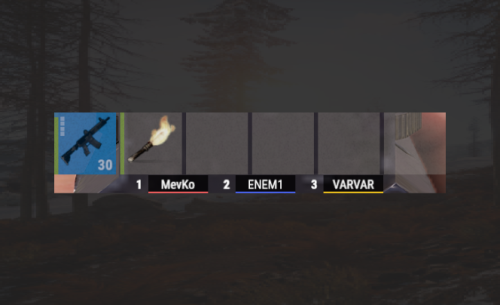
This plugin allows you to monitor real-time clan rankings in real-time! Lively battles right here and right now FAQ Q: What clan plugins does the top work with? A: Only with the Clans by Mevent plugin Config Example { "Interface Settings": { "Max clans on string": 3, "Colors": [ { "HEX": "#FF6060", "Opacity (0 - 100)": 100.0 }, { "HEX": "#4B68FF", "Opacity (0 - 100)": 100.0 }, { "HEX": "#FFD01B", "Opacity (0 - 100)": 100.0 } ], "Background Color": { "HEX": "#000000", "Opacity (0 - 100)": 80.0 }, "Bottom Indent": 0.0, "Side Indent": 0.0, "Width": 70.0, "Height": 17.5, "Margin": 15.0, "Number Text Size": 12, "Text Size": 12, "TextAlign": "MiddleCenter" } }Free -
![More information about "UmbrellaBase [HDRP]"](https://codefling.com/uploads/monthly_2022_02/20220222145924_1.thumb.jpg.c3bbce968c726bae90c4e48214f71c79.jpg)
Version 1.0.2
14 downloads
The prefab has a custom RT with its own atmosphere, immerse yourself in the new projects of COBALT KINETICS and Umbrella COMPANY. To get to the object you will have to prepare as it is under water. To enter directly inside you will need a blue and red access card, the COBALT employees conducting the experiment are armed and are on the object, after cleaning you will find a worthy reward. Total Objects 1200 Requires a Dll extension Oxide.Ext.RustEdit.dll https://www.rustedit.io/threads/rustedit-oxide-umod-extension.695/ If you install a prefab house without RustEditAPIExample, then you will not be able to use all the electric that is in this monument$3.99