Search the Community
Showing results for tags 'tp'.
Found 13 results
-
Version 0.1.2
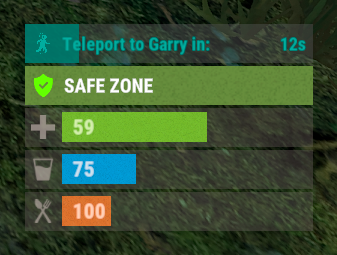
209 downloads
A useful plugin that displays the time until teleportation with the ability to automatically generate hooks. Depends on AdvancedStatus plugin. The ability to display status bars until teleportation; The ability to automatically generate code for teleport hooks; The ability to automatically generate language files for different languages(filled in English); The ability to customize the status bar for each teleport hook; The ability to choose between bar types(TimeCounter and TimeProgressCounter); The ability to specify the order of the bar; The ability to change the height of the bar; The abillity to customize the color and transparency of the background; The ability to set a material for the background; The ability to switch between CuiRawImageComponent and CuiImageComponent for the image; The ability to get images from the local folder(*SERVER*\oxide\data\AdvancedStatus\Images); The abillity to set own image and customize the color and transparency of the image; The abillity to set sprite instead of the image; The ability to customize the color, size, font and outline of the text. { "Is it worth generating teleport hooks? 0 - disabled, 1 - one-time activation, 2 - always enabled": 2, "List of language keys for creating language files": [ "en" ], "List of 'cancel' teleport commands": [ "tpc" ], "Limits the length of the displayed teleport name. A value of 0 disables the limitation": 10, "List of hooks for generation. Leave empty or null to recreate the default list": [ { "IsEnabled": true, "Hook method name": "OnTeleportAccepted", "Language key for the text": "BarTeleportToPlayer", "Specify the status bar Id used for this hook": "ToPlayer", "Is it worth sending the status bar for the target player?": true, "Language key for the text for the target player": "BarTeleportFromPlayer", "Specify the status bar Id used for the target player": "FromPlayer", "Specify all hook arguments(type and name) in order, separated by commas. Example: BasePlayer target, BasePlayer player, int countdown": "BasePlayer target, BasePlayer player, int countdown", "Indicates whether this hook represents a teleport cancelation event(e.g. OnTeleportInterrupted). Only InitiatorIndex is required": false, "Specify the index of the argument that contains the initiator": 1, "Specify the index of the argument that contains the target": 0, "Specify the argument index that contains the teleport countdown. Note: this index must not overlap with others, only int type is supported": 2 }, { "IsEnabled": true, "Hook method name": "OnHomeAccepted", "Language key for the text": "BarTeleportToHome", "Specify the status bar Id used for this hook": "Home", "Is it worth sending the status bar for the target player?": false, "Language key for the text for the target player": null, "Specify the status bar Id used for the target player": null, "Specify all hook arguments(type and name) in order, separated by commas. Example: BasePlayer target, BasePlayer player, int countdown": "BasePlayer player, string home, int countdown", "Indicates whether this hook represents a teleport cancelation event(e.g. OnTeleportInterrupted). Only InitiatorIndex is required": false, "Specify the index of the argument that contains the initiator": 0, "Specify the index of the argument that contains the target": 1, "Specify the argument index that contains the teleport countdown. Note: this index must not overlap with others, only int type is supported": 2 }, { "IsEnabled": true, "Hook method name": "OnHomeAccepted", "Language key for the text": "BarTeleportToHome", "Specify the status bar Id used for this hook": "Home", "Is it worth sending the status bar for the target player?": false, "Language key for the text for the target player": null, "Specify the status bar Id used for the target player": null, "Specify all hook arguments(type and name) in order, separated by commas. Example: BasePlayer target, BasePlayer player, int countdown": "BasePlayer player, string home, Vector3 pos, int countdown", "Indicates whether this hook represents a teleport cancelation event(e.g. OnTeleportInterrupted). Only InitiatorIndex is required": false, "Specify the index of the argument that contains the initiator": 0, "Specify the index of the argument that contains the target": 1, "Specify the argument index that contains the teleport countdown. Note: this index must not overlap with others, only int type is supported": 3 }, { "IsEnabled": true, "Hook method name": "OnTownAccepted", "Language key for the text": "BarTeleportToTown", "Specify the status bar Id used for this hook": "Town", "Is it worth sending the status bar for the target player?": false, "Language key for the text for the target player": null, "Specify the status bar Id used for the target player": null, "Specify all hook arguments(type and name) in order, separated by commas. Example: BasePlayer target, BasePlayer player, int countdown": "BasePlayer player, string name, int countdown", "Indicates whether this hook represents a teleport cancelation event(e.g. OnTeleportInterrupted). Only InitiatorIndex is required": false, "Specify the index of the argument that contains the initiator": 0, "Specify the index of the argument that contains the target": 1, "Specify the argument index that contains the teleport countdown. Note: this index must not overlap with others, only int type is supported": 2 }, { "IsEnabled": true, "Hook method name": "OnTeleportBackAccepted", "Language key for the text": "BarTeleportToBack", "Specify the status bar Id used for this hook": "Back", "Is it worth sending the status bar for the target player?": false, "Language key for the text for the target player": null, "Specify the status bar Id used for the target player": null, "Specify all hook arguments(type and name) in order, separated by commas. Example: BasePlayer target, BasePlayer player, int countdown": "BasePlayer player, Vector3 location, int countdown", "Indicates whether this hook represents a teleport cancelation event(e.g. OnTeleportInterrupted). Only InitiatorIndex is required": false, "Specify the index of the argument that contains the initiator": 0, "Specify the index of the argument that contains the target": 1, "Specify the argument index that contains the teleport countdown. Note: this index must not overlap with others, only int type is supported": 2 }, { "IsEnabled": true, "Hook method name": "OnWarpAccepted", "Language key for the text": "BarTeleportToWarp", "Specify the status bar Id used for this hook": "Warp", "Is it worth sending the status bar for the target player?": false, "Language key for the text for the target player": null, "Specify the status bar Id used for the target player": null, "Specify all hook arguments(type and name) in order, separated by commas. Example: BasePlayer target, BasePlayer player, int countdown": "BasePlayer player, Vector3 warpPosition, int countdown", "Indicates whether this hook represents a teleport cancelation event(e.g. OnTeleportInterrupted). Only InitiatorIndex is required": false, "Specify the index of the argument that contains the initiator": 0, "Specify the index of the argument that contains the target": 1, "Specify the argument index that contains the teleport countdown. Note: this index must not overlap with others, only int type is supported": 2 }, { "IsEnabled": true, "Hook method name": "OnTeleportInterrupted", "Language key for the text": "", "Specify the status bar Id used for this hook": "", "Is it worth sending the status bar for the target player?": false, "Language key for the text for the target player": null, "Specify the status bar Id used for the target player": null, "Specify all hook arguments(type and name) in order, separated by commas. Example: BasePlayer target, BasePlayer player, int countdown": "BasePlayer player", "Indicates whether this hook represents a teleport cancelation event(e.g. OnTeleportInterrupted). Only InitiatorIndex is required": true, "Specify the index of the argument that contains the initiator": 0, "Specify the index of the argument that contains the target": -1, "Specify the argument index that contains the teleport countdown. Note: this index must not overlap with others, only int type is supported": -1 } ], "List of status bar settings. The keys of these settings can be used for generated hooks. Leave empty or null to recreate the default list": { "ToPlayer": { "BarType(TimeProgressCounter or TimeCounter)": "TimeProgressCounter", "Order": 21, "Height": 26, "Main_Color(Hex or RGBA)": "#FFFFFF", "Main_Transparency": 0.15, "Main_Material(empty to disable)": "", "Image_Url": "https://i.imgur.com/NuAl6T5.png", "Image_Local(Leave empty to use Image_Url)": "TeleportStatus_Player", "Image_Sprite(Leave empty to use Image_Local or Image_Url)": "", "Image_IsRawImage": false, "Image_Color(Hex or RGBA)": "#15AC9D", "Image_Transparency": 1.0, "Is it worth enabling an outline for the image?": false, "Image_Outline_Color(Hex or RGBA)": "0.1 0.3 0.8 0.9", "Image_Outline_Transparency": 1.0, "Image_Outline_Distance": "0.75 0.75", "Text_Size": 12, "Text_Color(Hex or RGBA)": "#15AC9D", "Text_Font(https://umod.org/guides/rust/basic-concepts-of-gui#fonts)": "RobotoCondensed-Bold.ttf", "Text_Offset_Horizontal": 0, "Is it worth enabling an outline for the text?": false, "Text_Outline_Color(Hex or RGBA)": "#000000", "Text_Outline_Transparency": 1.0, "Text_Outline_Distance": "0.75 0.75", "SubText_Size": 12, "SubText_Color(Hex or RGBA)": "#15AC9D", "SubText_Font": "RobotoCondensed-Bold.ttf", "Is it worth enabling an outline for the sub text?": false, "SubText_Outline_Color(Hex or RGBA)": "0.5 0.6 0.7 0.5", "SubText_Outline_Transparency": 1.0, "SubText_Outline_Distance": "0.75 0.75", "Progress_Reverse": false, "Progress_Color(Hex or RGBA)": "#009688", "Progress_Transparency": 0.7, "Progress_OffsetMin": "0 0", "Progress_OffsetMax": "0 0" }, "FromPlayer": { "BarType(TimeProgressCounter or TimeCounter)": "TimeProgressCounter", "Order": 22, "Height": 26, "Main_Color(Hex or RGBA)": "#FFFFFF", "Main_Transparency": 0.15, "Main_Material(empty to disable)": "", "Image_Url": "https://i.imgur.com/G3TrHoc.png", "Image_Local(Leave empty to use Image_Url)": "TeleportStatus_FromPlayer", "Image_Sprite(Leave empty to use Image_Local or Image_Url)": "", "Image_IsRawImage": false, "Image_Color(Hex or RGBA)": "#E2DBD6", "Image_Transparency": 0.55, "Is it worth enabling an outline for the image?": false, "Image_Outline_Color(Hex or RGBA)": "0.1 0.3 0.8 0.9", "Image_Outline_Transparency": 1.0, "Image_Outline_Distance": "0.75 0.75", "Text_Size": 12, "Text_Color(Hex or RGBA)": "#15AC9D", "Text_Font(https://umod.org/guides/rust/basic-concepts-of-gui#fonts)": "RobotoCondensed-Bold.ttf", "Text_Offset_Horizontal": 2, "Is it worth enabling an outline for the text?": false, "Text_Outline_Color(Hex or RGBA)": "#000000", "Text_Outline_Transparency": 1.0, "Text_Outline_Distance": "0.75 0.75", "SubText_Size": 12, "SubText_Color(Hex or RGBA)": "#15AC9D", "SubText_Font": "RobotoCondensed-Bold.ttf", "Is it worth enabling an outline for the sub text?": false, "SubText_Outline_Color(Hex or RGBA)": "0.5 0.6 0.7 0.5", "SubText_Outline_Transparency": 1.0, "SubText_Outline_Distance": "0.75 0.75", "Progress_Reverse": false, "Progress_Color(Hex or RGBA)": "#009688", "Progress_Transparency": 0.7, "Progress_OffsetMin": "25 0", "Progress_OffsetMax": "0 0" }, "Home": { "BarType(TimeProgressCounter or TimeCounter)": "TimeProgressCounter", "Order": 23, "Height": 26, "Main_Color(Hex or RGBA)": "#FFFFFF", "Main_Transparency": 0.15, "Main_Material(empty to disable)": "", "Image_Url": "https://i.imgur.com/3xQmCKv.png", "Image_Local(Leave empty to use Image_Url)": "TeleportStatus_Home", "Image_Sprite(Leave empty to use Image_Local or Image_Url)": "", "Image_IsRawImage": false, "Image_Color(Hex or RGBA)": "#E2DBD6", "Image_Transparency": 0.55, "Is it worth enabling an outline for the image?": false, "Image_Outline_Color(Hex or RGBA)": "0.1 0.3 0.8 0.9", "Image_Outline_Transparency": 1.0, "Image_Outline_Distance": "0.75 0.75", "Text_Size": 12, "Text_Color(Hex or RGBA)": "#E2DBD6", "Text_Font(https://umod.org/guides/rust/basic-concepts-of-gui#fonts)": "RobotoCondensed-Bold.ttf", "Text_Offset_Horizontal": 2, "Is it worth enabling an outline for the text?": false, "Text_Outline_Color(Hex or RGBA)": "#000000", "Text_Outline_Transparency": 1.0, "Text_Outline_Distance": "0.75 0.75", "SubText_Size": 12, "SubText_Color(Hex or RGBA)": "#E2DBD6", "SubText_Font": "RobotoCondensed-Bold.ttf", "Is it worth enabling an outline for the sub text?": false, "SubText_Outline_Color(Hex or RGBA)": "0.5 0.6 0.7 0.5", "SubText_Outline_Transparency": 1.0, "SubText_Outline_Distance": "0.75 0.75", "Progress_Reverse": false, "Progress_Color(Hex or RGBA)": "#009688", "Progress_Transparency": 0.7, "Progress_OffsetMin": "25 2.5", "Progress_OffsetMax": "-3.5 -3.5" }, "Town": { "BarType(TimeProgressCounter or TimeCounter)": "TimeProgressCounter", "Order": 24, "Height": 26, "Main_Color(Hex or RGBA)": "#FFFFFF", "Main_Transparency": 0.15, "Main_Material(empty to disable)": "", "Image_Url": "https://i.imgur.com/FswyqvJ.png", "Image_Local(Leave empty to use Image_Url)": "TeleportStatus_Town", "Image_Sprite(Leave empty to use Image_Local or Image_Url)": "", "Image_IsRawImage": false, "Image_Color(Hex or RGBA)": "#E2DBD6", "Image_Transparency": 0.55, "Is it worth enabling an outline for the image?": false, "Image_Outline_Color(Hex or RGBA)": "0.1 0.3 0.8 0.9", "Image_Outline_Transparency": 1.0, "Image_Outline_Distance": "0.75 0.75", "Text_Size": 12, "Text_Color(Hex or RGBA)": "#E2DBD6", "Text_Font(https://umod.org/guides/rust/basic-concepts-of-gui#fonts)": "RobotoCondensed-Bold.ttf", "Text_Offset_Horizontal": 0, "Is it worth enabling an outline for the text?": false, "Text_Outline_Color(Hex or RGBA)": "#000000", "Text_Outline_Transparency": 1.0, "Text_Outline_Distance": "0.75 0.75", "SubText_Size": 12, "SubText_Color(Hex or RGBA)": "#E2DBD6", "SubText_Font": "RobotoCondensed-Bold.ttf", "Is it worth enabling an outline for the sub text?": false, "SubText_Outline_Color(Hex or RGBA)": "0.5 0.6 0.7 0.5", "SubText_Outline_Transparency": 1.0, "SubText_Outline_Distance": "0.75 0.75", "Progress_Reverse": false, "Progress_Color(Hex or RGBA)": "#009688", "Progress_Transparency": 0.7, "Progress_OffsetMin": "0 0", "Progress_OffsetMax": "0 0" }, "Back": { "BarType(TimeProgressCounter or TimeCounter)": "TimeProgressCounter", "Order": 25, "Height": 26, "Main_Color(Hex or RGBA)": "#FFFFFF", "Main_Transparency": 0.15, "Main_Material(empty to disable)": "", "Image_Url": "https://i.imgur.com/I9B2joa.png", "Image_Local(Leave empty to use Image_Url)": "TeleportStatus_Back", "Image_Sprite(Leave empty to use Image_Local or Image_Url)": "", "Image_IsRawImage": false, "Image_Color(Hex or RGBA)": "#E2DBD6", "Image_Transparency": 0.55, "Is it worth enabling an outline for the image?": false, "Image_Outline_Color(Hex or RGBA)": "0.1 0.3 0.8 0.9", "Image_Outline_Transparency": 1.0, "Image_Outline_Distance": "0.75 0.75", "Text_Size": 12, "Text_Color(Hex or RGBA)": "#E2DBD6", "Text_Font(https://umod.org/guides/rust/basic-concepts-of-gui#fonts)": "RobotoCondensed-Bold.ttf", "Text_Offset_Horizontal": 2, "Is it worth enabling an outline for the text?": false, "Text_Outline_Color(Hex or RGBA)": "#000000", "Text_Outline_Transparency": 1.0, "Text_Outline_Distance": "0.75 0.75", "SubText_Size": 12, "SubText_Color(Hex or RGBA)": "#E2DBD6", "SubText_Font": "RobotoCondensed-Bold.ttf", "Is it worth enabling an outline for the sub text?": false, "SubText_Outline_Color(Hex or RGBA)": "0.5 0.6 0.7 0.5", "SubText_Outline_Transparency": 1.0, "SubText_Outline_Distance": "0.75 0.75", "Progress_Reverse": false, "Progress_Color(Hex or RGBA)": "#009688", "Progress_Transparency": 0.7, "Progress_OffsetMin": "25 0", "Progress_OffsetMax": "0 0" }, "Warp": { "BarType(TimeProgressCounter or TimeCounter)": "TimeProgressCounter", "Order": 26, "Height": 26, "Main_Color(Hex or RGBA)": "#FFFFFF", "Main_Transparency": 0.15, "Main_Material(empty to disable)": "", "Image_Url": "https://i.imgur.com/sczcAdC.png", "Image_Local(Leave empty to use Image_Url)": "TeleportStatus_Warp", "Image_Sprite(Leave empty to use Image_Local or Image_Url)": "", "Image_IsRawImage": false, "Image_Color(Hex or RGBA)": "#E2DBD6", "Image_Transparency": 0.55, "Is it worth enabling an outline for the image?": false, "Image_Outline_Color(Hex or RGBA)": "0.1 0.3 0.8 0.9", "Image_Outline_Transparency": 1.0, "Image_Outline_Distance": "0.75 0.75", "Text_Size": 12, "Text_Color(Hex or RGBA)": "#E2DBD6", "Text_Font(https://umod.org/guides/rust/basic-concepts-of-gui#fonts)": "RobotoCondensed-Bold.ttf", "Text_Offset_Horizontal": 0, "Is it worth enabling an outline for the text?": false, "Text_Outline_Color(Hex or RGBA)": "#000000", "Text_Outline_Transparency": 1.0, "Text_Outline_Distance": "0.75 0.75", "SubText_Size": 12, "SubText_Color(Hex or RGBA)": "#E2DBD6", "SubText_Font": "RobotoCondensed-Bold.ttf", "Is it worth enabling an outline for the sub text?": false, "SubText_Outline_Color(Hex or RGBA)": "0.5 0.6 0.7 0.5", "SubText_Outline_Transparency": 1.0, "SubText_Outline_Distance": "0.75 0.75", "Progress_Reverse": false, "Progress_Color(Hex or RGBA)": "#009688", "Progress_Transparency": 0.7, "Progress_OffsetMin": "0 0", "Progress_OffsetMax": "0 0" } }, "Version": { "Major": 0, "Minor": 1, "Patch": 2 } } EN: { "BarTeleportToPlayer": "Teleport to {0} in:", "BarTeleportFromPlayer": "{0} will be at you in:", "BarTeleportToHome": "Teleport to {0} in:", "BarTeleportToTown": "Teleport to {0} in:", "BarTeleportToBack": "Teleport to {0} in:", "BarTeleportToWarp": "Teleport to {0} in:" } RU: { "BarTeleportToPlayer": "Телепорт к {0} через:", "BarTeleportFromPlayer": "{0} будет у вас через:", "BarTeleportToHome": "Телепорт в {0} через:", "BarTeleportToTown": "Телепорт в {0} через:", "BarTeleportToBack": "Телепорт в {0} через:", "BarTeleportToWarp": "Телепорт в {0} через:" }$3.99 -
Version 1.0.6
98 downloads
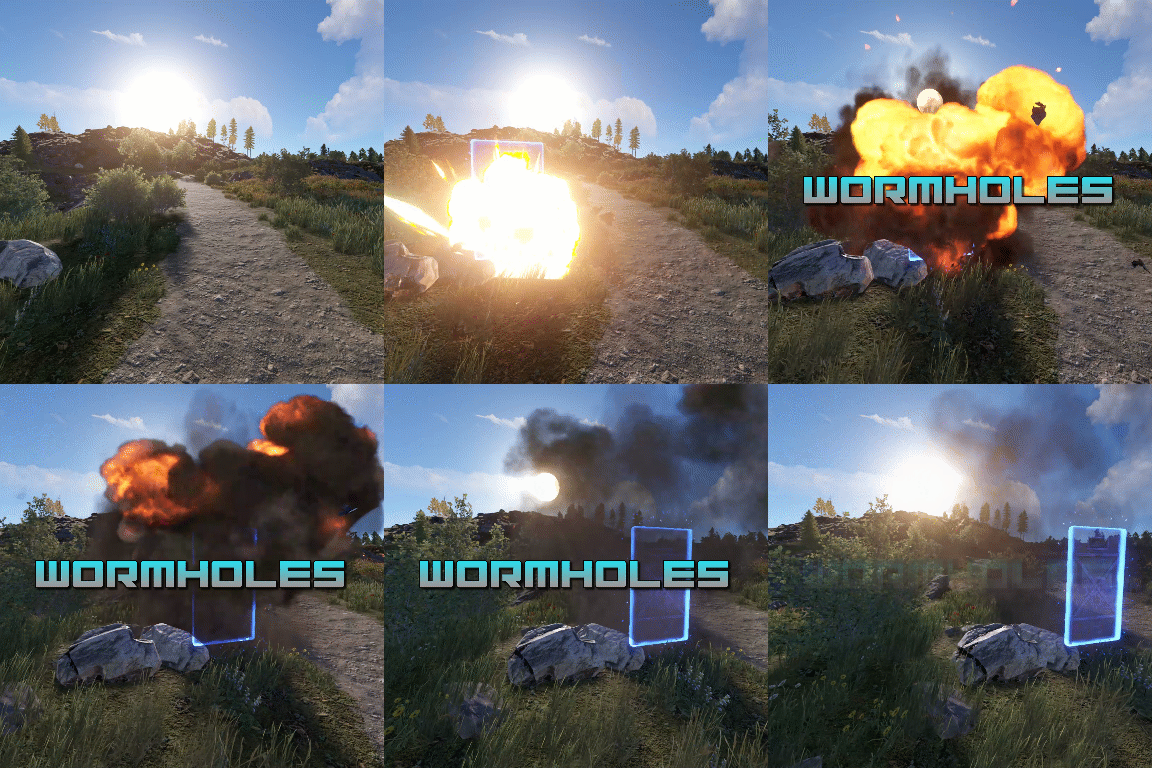
Transform your Rust map with dynamic wormholes that open up thrilling new possibilities for players! This plugin introduces randomly spawning, paired wormholes that create instant portals between two locations on the map. Admins can also create static wormhole pairs between locations. Randomized Spawns: Wormholes appear at random intervals, based on configurable timer ranges. Paired Portals: Each wormhole is linked to another, allowing seamless teleportation between the two. Customizable Settings: Time Limits: Control how long wormholes remain active. Usage Limits: Set how many times a wormhole can be used before it despawns. Condition Restrictions: Prevent players from using wormholes when they are Bleeding Starving Dehydrated Cold/Hot Wounded Irradiated Escape/Raid/Combat blocked Spice up gameplay, encourage exploration, and create chaotic or strategic opportunities for your players to interact with the world in new ways. Perfect for servers looking to add a touch of unpredictability and fun! Permission required to use the plugin: wormholes.access Admin permission: wormholes.admin Command: wormhole.spawn <grid coordinate> <grid coordinate> Type: Chat Permission: wormholes.admin Description: Forces a pair of wormholes to spawn in each grid coordinate. For example wormhole.spawn b2 c5 would spawn a wormhole in a random location in b2, with the other side of the wormhole at a random location in c5. Both coordinates need to contain valid spawn points. Command: whgrid Type: Chat Permission: wormholes.admin Description: Draws all valid spawn positions that the plugin has cached to the user. Requires level 1 auth. Command: dbwh Type: Chat Permission: wormholes.admin Description: Debugs all active wormholes on the map. Draws lines between each wormhole pair. Command: statichole.add <optional: name> Type: Chat Permission: wormholes.admin Description: Creates a wormhole at the players position with the designated name if applicable. Requires the command to be run twice at 2 different locations for the wormholes to appear.$9.99 -
Version 1.3.11
1,236 downloads
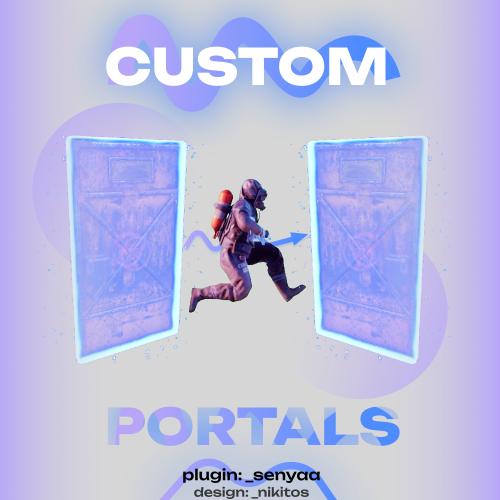
This plugin adds custom portals, which could be deployed on players' bases, vanilla and custom monuments. Custom maps To use Custom Portals on your map you need to place any prefab and create a custom prefab from it. Name it CustomPortals.<portal name> 2 portals with the same name will link. ! Make sure not to break the prefab and not to add them as part of other prefabs ! Commands Player Chat Commands /buyportal - buy portal (requires customportals.buy permission) /spawnportal - spawns portal (requires customportals.spawn permission) Admin Chat Commands All of the commands that are mentioned below require customportals.admin permission! /customportals add <portal name> - spawns portal on the monument you stand on /customportals remove - removes portal from the monument /customportals reset - removes all portals from the monument /changeportal - setup any portal Admin Console Commands giveportal <amount> <player name> - gives portal(s) to the specified player Permissions customportals.use - required to use portals customportals.admin - allows usage of /customportals and giveportal commands customportals.buy - allows players to buy portal, using /buyportal command customportals.free - allows players to get portal for free, using /buyportal command (buy permission is still required) customportals.freeuse - allows players to use the portal for free (if the use price is set) customportals.bypasslimit - allows players to place infinite amount of portals customportals.bypasslinkinglimits - allows players to link any portals customportals.spawn - alllows players to spawn portals using a command, instead of placing them manually If you are an admin, you can specify individual portal permissions. They are saved as customportals.portal.<portal permission name> Localization This plugin has built-in support for the following languages - English Russian API BasePortal SpawnPortal(Vector3 position, Quaternion rotation, string name) // spawns portal Item CreatePortalItem() // returns portal item$9.99 -
Version 1.0.21
7 downloads
MyTeleport – an advanced and modern teleportation system for players, offering flexible teleport requests, homes, warps and powerful admin controls. Functions: 1. Player & Admin Teleportation Player teleport requests and accepts Admin teleport to players, coordinates and map markers Teleport all players to a position or to a player Dynamic height detection (use y to auto-detect ground level) Fast, optimized teleport pipeline 2. Homes System Set / teleport / remove personal homes Admin management for player homes (list / remove / tp) Home set mode: command or item Min distance between homes, build-zone checks and allowed block/item lists Custom icons and colors for homes 3. Warps Create permission-based or public warps Teleport to warps and list warps Warp creation/removal with optional permission flag 4. Requests & Trust /tp <player> — send teleport request Accept / cancel / auto-retry requests Trust system for instant teleports to trusted players UI request panel (configurable) and sound notifications 5. Moderation & Restrictions Combat block with configurable triggers and duration Restrict teleports by status (hunger, bleed, rad, cold, swim, building blocked, safe zones) Monument radius and restricted monuments list Option to deny teleport if target's vehicle has no free seats 6. Status & Notifications Notification type: chat / toast / both (notify setting) Sounds for teleport, request received, request accepted Simple Status integration for active teleport UI (customizable text, colors, icon, progress) Admin Commands: /tp <player> — Teleport to a player /tp <x> <y/"y"> <z> — Teleport to specific coordinates (use "y" to automatically determine the terrain height) /tp <player> <target> — Teleport one player to another /tpm — Enable or disable teleportation to a map marker /tp.all — Teleport all players to yourself /tp.all <x> <y/"y"> <z> — Teleport all players to specified coordinates (use "y" for automatic height) /tp.all <player> — Teleport all players to a specific player /a.home <player> list — Show all home points of a player /a.home <player> teleport/tp <home.name> — Teleport to a specific home of a player /a.home <player> remove/rem <home.name> — Remove a specific home of a player /warp list — Show a list of all created warps /warp create/add <name> <permission>* — Create a warp at your current location with the given name (permission optional) /warp remove/rem <name> — Remove a specific warp Player Commands: /tp <player> — Send a teleport request to the specified player /reply — Send a teleportation request to a past player /accept — Accept a teleport request /cancel — Cancel an active teleport request /trust <player> — Add or remove a player from your trusted list (allows teleportation without confirmation) /<warp.name> — Teleport to a specified warp (if permission is granted) Permissions: myteleport.moder – access to administrative commands myteleport.tp.request – allow sending teleport requests myteleport.tp.accept – allow accepting requests myteleport.warp.tp – default permission for warp teleportation myteleport.warp.list – permission to list warps myteleport.warp.create – permission to create warps myteleport.warp.remove – permission to delete warps Configuration: API: Hooks:$24.00 -
Version 1.0.5
27 downloads
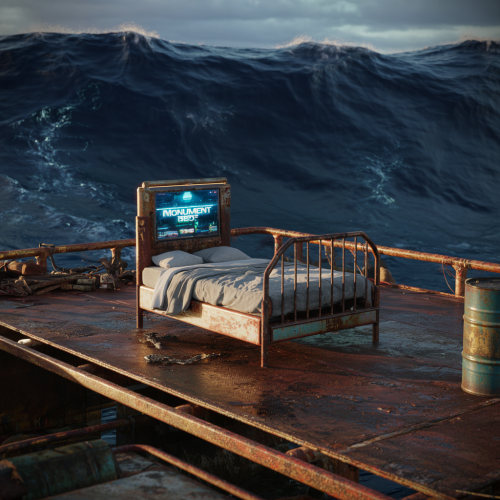
Monument Beds allows players to respawn at randomized locations around selected monuments directly from the death screen. All behavior is fully configurable, allowing server owners to enable or disable specific monuments as needed. Supported locations include Outpost, Bandit Camp, Large Oil Rig, and 42+ additional monuments. The plugin creates multiple bed spawn points within each monument’s range when it initially loads and randomly selects an exact spawn location on respawn. This provides fair, varied spawns while preventing predictable or exploitable locations. More features and functionality are planned for future updates. Note: Monument Finder is required to be installed on the server for this plugin to function correctly. List of Monuments supported: Config$9.99-
- 1
-

-
- #monument beds
- #monument bed
- (and 13 more)
-
Version 1.27.32
28 downloads
IQTeleportation - is an advanced, optimized teleportation system that provides a wide range of features to improve player comfort and convenience. Only the necessary, user-friendly features — the plugin isn’t overloaded with extras. All capabilities are designed for stability and maximum player convenience. Plugin Installation : When you download the resource, you receive an archive with plugins and data folders. Move the file from data strictly following the archive path: oxide/data/IQSystem/IQTeleportation. If any of these files don’t exist on your server, create them. Move IQTeleportation.cs from plugins strictly following the archive path: oxide/plugins. Note for users who use a “web editor” on hosting panels. Before uploading, unpack the archive locally in any convenient place, then upload the files from there. Feature List : Minimalist UI for the player : The plugin supports UI for teleport requests and for setting a home point. These are optional and configured in the config. Teleport directly into vehicles : Optional feature. Allows accepting a teleport while controlling a vehicle. The player will be teleported into a free seat; if there are no free seats, the teleport is canceled. Sound effects : Built-in sound effects for teleportation. Players can feel the timer through sound: as teleport time approaches, the sound frequency increases. This makes it clear when a teleport to a friend or home point will occur, without distracting from gameplay and keeping focus. Home points on G-Map : Optional feature. Displays the last 6 home points the player teleported to directly on the G-Map, with the ability to teleport to them via the UI. It fits the Rust and G-Map style nicely and is very convenient for players! Teleport requests via G-Map : Now you can simply right-click on a friend’s nickname (or near it) on the G-Map, and a teleport request will be sent automatically. This helps players stay focused on gameplay and simplifies team interactions. Automatic teleport between friends : The plugin supports automatically accepting teleport requests from friends. This feature can be toggled with the /atp command. Players in a team no longer need to confirm requests manually — friend teleports will happen automatically, making co-op play even more comfortable. Block teleporting from monuments : You can forbid teleporting from specific monuments. This improves gameplay and prevents using monument structures as a hideout followed by teleporting away from an opponent, creating a more balanced experience for everyone. Home point marker : After setting a home point, the player automatically gets a duplicate marker with the point’s name on their G-Map. This improves visibility, helps orientation, and simplifies coordination with home points. A temporary mark with a visual effect is also shown at the placement location. Simplified commands : The goal is to simplify usage and add convenience for players — commands weren’t overlooked: /sethome has a shorter alias /sh /removehome has a shorter alias /rh /tpr has “built-in memory,” making player interaction easier. You no longer need to specify a nickname every time you send a teleport request. The command remembers the last player you teleported to, and when you run /tpr again without a name, it will send the request to that player. This makes teleporting even faster and more convenient. See the full command list in the “Commands” section. WARP system : The plugin includes a warp system with multiple points and convenient commands. What is this system for? For example, you want players to teleport to Outpost (or any other monument) with /compound — you can do this with the system: just create the points, and the commands will be registered automatically and will persist every server wipe! Other uses? Use it however you like: for events, create a teleport point for the event, then remove the warp after it’s over. Points placed outside standard monuments will not be saved after a map change. Logging system : If you want to monitor the plugin and know about your players’ teleports to analyze activity, there’s an optional logging feature for teleport requests, accepted teleports, and home teleports. There are many simple, clear configuration options — you can preview them in the “Configuration” section. Permissions : iqteleportation.gmap — permission to use /gmap and instant admin teleports via G-Map to any point on the map iqteleportation.tp — permission to use /tp for instant teleport to a player iqteleportation.warpadmin — for using WARP features and the /warp command These permissions are intended for administrators only and do not affect player features. Do not grant them to regular players! Command List : Chat Commands : /atp – toggle automatic acceptance of teleport requests from friends /sethome Name – set a home point at your current position /sh Name – shorthand alias for /sethome /removehome Name – remove a previously set home point /rh Name – shorthand alias for /removehome /home NameHome – teleport to your home point /home NameHome FriendName – teleport to a friend’s home point /homelist – view all your home points /tpr Name – send a teleport request to a player /tpr – send a teleport request to the last player who accepted your request /tpa – accept a teleport request /tpc – cancel a teleport request Warp System : /warp list – show all available warps /warp points WarpName – show all teleport points for the specified warp /warp add WarpName – create a new warp or add an extra teleport point to that warp /warp edit WarpName PointNumber – edit a specific teleport point for the warp /warp remove WarpName – remove the warp and all its teleport points /warp remove WarpName PointNumber – remove the specified teleport point of the warp /NAMEWARP – command to teleport to a warp; created automatically based on your warp name For Administrators : /gmap – enable teleporting to any position via G-Map by right-clicking the map /tp Name – instantly teleport to a player /tp Name NameTwo – instantly teleport player “Name” to player “NameTwo” /mblock – block teleportation from the monument where the admin is currently standing /a.home points NameOrID – show all named home points of the specified player /a.home clear NameOrID – delete all home points of the specified player Console Commands : atp – toggle automatic acceptance of teleport requests from friends sethome Name – set a home point at your current position sh Name – shorthand alias for sethome removehome Name – remove a previously set home point rh Name – shorthand alias for removehome home NameHome – teleport to your home point home NameHome FriendName – teleport to a friend’s home point homelist – view all your home points tpr Name – send a teleport request to a player tpr – send a teleport request to the last player who accepted your request tpa – accept a teleport request tpc – cancel a teleport request For Administrators : gmap – enable teleporting to any position via G-Map by right-clicking the map tp Name – instantly teleport to a player tp Name NameTwo – instantly teleport player “Name” to player “NameTwo” Configuration : { "General plugin settings": { "Log player actions to file (true = yes / false = no)": false, "Use sound effects (true = yes / false = no)": true, "Use GameTip messages instead of chat (true = yes / false = no)": false, "Wake the player immediately after teleport (otherwise they remain 'sleeping') (true = yes / false = no)": false, "List of monuments where teleportation is forbidden (applies to home points / teleport-to-player / warps)": [], "IQChat settings": { "IQChat : Custom prefix in the chat": "[IQTeleportation]", "IQChat : Custom avatar in the chat (Steam64ID) (If required)": "0" }, "SimpleStatus settings": { "SimpleStatus: Enable plugin support": false, "SimpleStatus: UI settings for teleportation": { "SimpleStatus: Background panel color": "0.3 0.3 0.3 0.5", "SimpleStatus: Prefix translations [LanguageKey] = Text": { "ru": "Телепортация", "en": "Teleporation" }, "SimpleStatus: Prefix color": "0.5647059 0.5490196 0.5333334 1", "SimpleStatus: UI sprite": "assets/icons/stopwatch.png", "SimpleStatus: Sprite color": "0.5647059 0.5490196 0.5333334 1" } } }, "Teleport-to-player settings": { "Teleport request settings": { "Offer to accept teleport requests in the UI (true = yes / false = no)": true, "Teleportation mode: true — teleport the player to the position where the request was accepted; false — teleport the player to the other player regardless of where it was accepted": false, "Allow players to send teleport requests via G-Map (true = yes / false = no)": true, "Use instant teleport to a point via G-Map (true = yes / false = no) (requires admin rights or the iqteleportation.gmap permission)": true, "Disable teleportation features on the server (tpr and tpa will be unavailable) (true = yes / false = no)": false, "Forbid sending and accepting teleport requests while the player is in a vehicle (true); otherwise teleport directly into the vehicle if a seat is free (false)": true, "Block sending and accepting teleport requests in a safe zone (true = yes / false = no)": false, "Block sending and accepting teleport requests during raid block (true = yes / false = no)": true, "Block sending and accepting teleport requests while the player is in the subway (train tunnels) (true = yes / false = no)": true, "Block sending and accepting teleport requests while the player is in the Underwater Lab (true = yes / false = no)": true, "Block sending and accepting teleport requests while the player is on the Cargo Ship (true = yes / false = no)": true, "Block sending and accepting teleport requests while the player is in a hot air balloon (true = yes / false = no)": true, "Block sending and accepting teleport requests while the player is cold (freezing) (true = yes / false = no)": true, "Block sending and accepting teleport requests while the player is swimming (true = yes / false = no)": true, "Block sending and accepting teleport requests while the player is under radiation (true = yes / false = no)": true, "Block sending and accepting teleport requests while the player is bleeding (true = yes / false = no)": true, "Block sending and accepting teleport requests while the player is in another player's building privilege area (building blocked) (true = yes / false = no)": true, "Allow teleportation only to friends (true = yes / false = no)": false }, "Teleport-to-player cooldown settings": { "Default count for players without permissions": 60, "Count overrides for players with permissions [Permission] = Count": { "iqteleportation.vip": 45, "iqteleportation.premium": 35, "iqteleportation.gold": 25 } }, "Teleport-to-player countdown settings": { "Default count for players without permissions": 20, "Count overrides for players with permissions [Permission] = Count": { "iqteleportation.vip": 15, "iqteleportation.premium": 10, "iqteleportation.gold": 5 } }, "Teleport-to-player limit settings": { "Use player teleport-to-player limits (true = yes / false = no)": false, "Hours until player limits are reset": 24, "Player teleport limit settings": { "Default count for players without permissions": 15, "Count overrides for players with permissions [Permission] = Count": { "iqteleportation.vip": 20, "iqteleportation.premium": 25, "iqteleportation.gold": 30 } } } }, "Home points settings": { "Allow teleporting to a friend's home point (true = yes / false = no)": true, "Enable UI with recent home points on G-Map (true = yes / false = no)": true, "Offer setting a home point in the UI after placing a bed or sleeping bag (true = yes / false = no)": true, "Allow players to teleport to a home point via G-Map (true = yes / false = no)": false, "Block home teleports in a safe zone (true = yes / false = no)": false, "Add a visual ping effect to the home point after it’s set (true = yes / false = no)": true, "Add a marker on the player’s G-Map after setting a home (true = yes / false = no)": true, "Permissions for setting home points": { "Block setting a home point during raid block (true = yes / false = no)": true, "Allow setting home points on tugboats (true = yes / false = no)": false, "Allow setting home points only when building privilege is present (true = yes / false = no)": true, "Allow setting home points only when authorized in the building privilege area (true = yes / false = no)": true }, "Home point count settings": { "Default count for players without permissions": 2, "Count overrides for players with permissions [Permission] = Count": { "iqteleportation.vip": 3, "iqteleportation.premium": 4, "iqteleportation.gold": 5 } }, "Home teleport cooldown settings": { "Default count for players without permissions": 30, "Count overrides for players with permissions [Permission] = Count": { "iqteleportation.vip": 25, "iqteleportation.premium": 20, "iqteleportation.gold": 15 } }, "Home teleport countdown settings": { "Default count for players without permissions": 20, "Count overrides for players with permissions [Permission] = Count": { "iqteleportation.vip": 15, "iqteleportation.premium": 10, "iqteleportation.gold": 5 } }, "Home teleport limit settings": { "Use player home-teleport limits (true = yes / false = no)": false, "Hours until player limits are reset": 12, "Home teleport limit settings": { "Default count for players without permissions": 15, "Count overrides for players with permissions [Permission] = Count": { "iqteleportation.vip": 20, "iqteleportation.premium": 25, "iqteleportation.gold": 30 } } } }, "Warp system settings": { "Enable warp support (true = yes / false = no)": false, "Block teleport to a warp if the player is hostile (safe-zone aggression) (true = yes / false = no)": true, "Teleport-to-warp cooldown settings": { "Default count for players without permissions": 120, "Count overrides for players with permissions [Permission] = Count": { "iqteleportation.vip": 100, "iqteleportation.premium": 80, "iqteleportation.gold": 60 } }, "Teleport-to-warp countdown settings": { "Default count for players without permissions": 30, "Count overrides for players with permissions [Permission] = Count": { "iqteleportation.vip": 25, "iqteleportation.premium": 20, "iqteleportation.gold": 15 } }, "Permissions for teleporting to specific warps: [WarpKey] = Permission (otherwise available to everyone)": { "warpName": "iqteleportation.warpPermission" }, "Teleport-to-warp limit settings": { "Use player teleport-to-warp limits (true = yes / false = no)": false, "Hours until player limits are reset": 6, "Teleport-to-warp limit settings": { "Default count for players without permissions": 15, "Count overrides for players with permissions [Permission] = Count": { "iqteleportation.vip": 20, "iqteleportation.premium": 25, "iqteleportation.gold": 30 } } } } } For Developers : API : private void ClearHomesPlayer(UInt64 userID, String pluginName) // Clears all home points of the player. private Boolean API_HavePendingRequest(BasePlayer player) // Returns true if the player has an active (pending) teleport request. private Dictionary<String, Vector3> GetHomes(UInt64 userID) // Returns all home points of the player. Hooks : private Object CanTeleport(BasePlayer player) // Called when attempting to teleport to a player. // Return a string with the reason to cancel the teleport. private Object canTeleport(BasePlayer player) // Same as above (alternate hook name). // Return a string with the reason to cancel the teleport. private Object OnTeleportRequested(BasePlayer player, BasePlayer requester) // Called when a teleport request is sent to a player. // You can cancel by returning false (bool) or a String (your message). private Object CanTeleportHome(BasePlayer player, Vector3 positionHome) // Called when attempting to teleport home. // You can cancel by returning a String with the reason. private Object OnHomeAdd(BasePlayer player, String homeName, Vector3 positionHome) // Called when attempting to set a home point. // You can cancel by returning a String with the reason. private void OnTeleportRejected(BasePlayer player, BasePlayer requester) // Called when a teleport request to a player is canceled/rejected. private void OnTeleportAccepted(BasePlayer player, BasePlayer requester, Int32 countdown) // Called when a teleport request is accepted. private void OnPlayerTeleported(BasePlayer player, Vector3 playerPos, Vector3 teleportationPos) // Called after the player has been teleported. private void OnHomeAccepted(BasePlayer player, String homeName, Int32 countdown) // Called after the player has sent a teleport-home request. private void OnHomeAdded(BasePlayer player, Vector3 positionHome, String homeName) // Called after a home point has been set. private void OnHomeRemoved(BasePlayer player, Vector3 positionHome, String homeName) // Called after a home point has been removed. private Object CanTeleportWarp(BasePlayer player) // Called when a player tries to teleport to a warp. // Return a string to cancel; return null to ignore (allow). private Object CanTeleportHome(BasePlayer player, Vector3 positionHome) // Called when a player tries to teleport to a home point. // Return a string to cancel; return null to ignore (allow). private Object CanTeleportPlayer(BasePlayer player) // Called when a player tries to teleport to another player. // Return a string to cancel; return null to ignore (allow). private void OnPlayerTeleported(BasePlayer player, BasePlayer target) // Called when a player has teleported to another player. private void OnPlayerTeleportedWarp(BasePlayer player, Vector3 positionWarp) // Called when a player has teleported to a warp. private void OnPlayerTeleportedHome(BasePlayer player, Vector3 positionHome) // Called when a player has teleported to a home point.$26.49 -
Version 1.1.2
35 downloads
This plugin allows users with permission to throw a custom grenade, which when it explodes, teleports the player to its location. The time between throwing the grenade and teleporting to it can be configured to whatever times you like. You can have as many different grenades as you want, all with different fuse lengths if you would like. In the config file, you can control whether players can use while mounted, while building blocked and also set a maximum range (meters) which they work. It's a lot of fun, and players will find all sorts of fun ways to use them to their advantage. For example, imagine setting the fuse length (if allowed in the config) to several minutes, then dropping it on the floor of your base before going out for a roam or farm and then after fuse time expires, you instantly teleport back to the safety of your base. Or, if allowed within building blocked zones, players could use them to exploit weaknesses in other players bases, any open windows or roof access could quite literally now become a portal into their base! The possibilities are endless, only limited by your players imagination (and your configuration! :D) Teleport Grenade SkinID: 3338854123 Permissions: teleportgrenades.admin (to use give & clear cooldown commands) teleportgrenades.buy (to use /tpgbuy command) teleportgrenades.bypasscooldown teleportgrenades.use Default Commands (Prefix with / for chat command): tpgbuy <FuseLength> <Amount> (Buy a TP Grenade - requires buy perm) tpggive <PlayerName> <Amount> <FuseLength> (Give a TP Grenade - requires admin perm) tpgclearcd <Playername> (Clear cooldown for a player - requires admin perm) tpgclearcd (Clears all cooldowns - requires admin perm) tpgfuse <FuseLength> (Change the fuse length of the item you are holding) How it works: Server owners can place TP Grenades in their loot tables using the smoke grenade item (ItemID: 1263920163) and the SkinID above, then they must use a custom name. By default, the plugin issues grenades using the name "Teleport Grenade", but the way this plugin works, players can choose to buy TP Grenades with whatever fuse length they want. For example, if a player wants a 3 second fuse, they purchase using the command "tpgbuy 3". The item which appears in their inventory will be called "Teleport Grenade (3 sec)". The display name is IMPORTANT, since the plugin uses the value within the brackets to determine the fuse length. If server owners are placing these items in the loot table, they must consider this and use the same naming format, with the time within brackets exactly as above. If server owners want to issue grenades to players with a command, they can do so using the syntax "tpggive PlayerName Amount FuseLength" Players Can Set The Fuse Length of a Held Teleport Grenade item: Simply set the active item in the hot bar to the grenade you want to se, then use the SetFuse command, "tpgfuse" by default. e.g. "tpgfuse 3" sets a 3 second fuse etc. If you have any issues, please join my Discord for help: https://discord.gg/jnyg3FvDnc Help: FuseLength must be in seconds. tpgclearcd clears all players cooldowns tpgclearcd PlayerName clears cooldown for that player only Default Config: { "General Options": { "Chat Prefix": "<color=orange>[Teleport Grenades]</color>", "Use Chat Prefix": true, "Custom Chat Icon (Default = 0)": 0, "Use This Plugin to Control Stacking/Combining of TP Grenade Items": true, "Use NoEscape to Prevent TP Grenade Use": true, "Player Cooldown Time (seconds)": 600, "VIP/Custom Cooldowns (seconds)": { "teleportgrenades.example1": 480.0, "teleportgrenades.example2": 360.0, "teleportgrenades.example3": 240.0 } }, "Purchasing Options": { "Enable purchasing via chat or F1 console command": false, "Player Buy Command (Chat or F1 Console)": "tpgbuy", "Purchasing Currency (ServerRewards|Economics|Custom)": "Custom", "Currency Unit Displayed e.g: RP | $ (Not Used for Custom Currency)": "RP", "Cost Per Teleport Grenade": 500, "Custom Currency": [ { "ShortName": "scrap", "SkinID": 0, "Display Name": "Scrap" } ] }, "Grenade Options": { "Skin ID": 3338854123, "Display Name": "Teleport Grenade", "Set Fuse Command (Chat or F1 Console)": "tpgfuse", "Allow Use in Building Blocked Zone": false, "Allow Use While Mounted": false, "Dud if Thrown While Mounted or Building Blocked (false = Refunded)": false, "Maximum Fuse Length Allowed (Seconds)": 30, "Grenade Emits Repeating Beep Sound When Armed": true, "Prefab Path to Use For Beeping Sound": "assets/prefabs/locks/keypad/effects/lock.code.lock.prefab", "Delay Between Beep Sounds (Seconds)": 1.0, "Velocity Modifier For Thrown Grenade (0 = Default)": 1.0, "Maximum Range (meters) That TP Grenade Will Work (0 = Unlimited)": 0.0, "Teleport Appear Effect (Prefab Path)": "assets/prefabs/missions/portal/proceduraldungeon/effects/appear.prefab", "Teleport Disappear Effect (Prefab Path)": "assets/prefabs/missions/portal/proceduraldungeon/effects/disappear.prefab" }, "Version Number": { "Major": 1, "Minor": 1, "Patch": 1 } } API: The following hook is available to use in your plugins to check custom Smoke Grenades to avoid conflict with your plugins: object IsTpGrenade(ulong skinID) // returns true if is a TP Grenade, otherwise returns null Call it directly without referencing the plugin: if (Interface.CallHook("IsTpGrenade", skinID) != null) return true; // Is a TP Grenade Or reference my plugin and call like this: [PluginReference] Plugin TeleportGrenades; if (TeleportGrenades.CallHook("IsTpGrenade", skinID) != null) return true; // Is TP Grenade$4.99 -
Version 1.0.7
244 downloads
Grid based teleportation plugin with daily limits, cooldowns, and permissions. Also has useful admin features. Note - GridTP is accurate right to the lines in both axis. Permissions. gridtp.admin gridtp.clickmap gridtp.precisemap gridtp.tomiddle gridtp.tocorner gridtp.whereis gridtp.back gridtp.toplayer gridtp.vip (for VIP cooldowns and daily limits) With 'precise' perm, players can TP to the precise spot they clicked on the map, or the nearest safe spot. With 'middle' or 'corner' perms, players can use map right-click or chat commands to TP to a safe spot in the middle of the grid, or the top left corner of the grid. Config. Hour at which daily limits reset : 22 Log details of successful Tps : false Disable map use for regular players : true Disable map use for everybody : true Prevent TP into building-blocked : true* Prevent TP from within building-blocked : true* Prevent TP into monuments : true* Prevent TP from within monuments : true* Prevent TP from whilst swimming : true* Disable TP whilst mounted : true* Maintain admin height when TPing in noclip : true Player should be sleeping after TP : true* Custom Chat Command : "gridtp" Config also includes daily limits, (0 means disabled) and cooldown times for precise/middle/corner TPs Notes. Holders of admin permission are not subject to the options marked '*' Map right-click takes 'admins' precisely where they clicked when in noclip, and to the closest safe spot when not in noclip, regardless of other perms. Data. If logging is enabled, the data file stores steamID, username, time and TP type for each successful TP. Data file also stores a date for reference when resetting daily limits. Manual editing of the data file is never required. Chat Commands. /gridtp <letters> <numbers> - Attempt to TP to the specified grid. /gridtp back - Attempt to TP back to previous location (one use per TP) Admin or back permission required. /gridtp limits - Display your remaining daily Tps. /gridtp whereis <playername> - Displays player grid coordinates. Admin or whereis permission required. /nomap - Toggles right click map to TP. Admin perm only. /gridtp wipelogs - Wipes all data file TP logs. /gridtp toplayer <playername> - Tps close to specified player. /gridtp reveal <playername> - Publishes player grid coordinates to the server. /gridtp trackpublic <playername> - Toggles publishing player grid to the server every time it changes. /gridtp trackprivate <playername> - Toggles displaying player grid to you every time it changes.$10.00- 9 comments
- 5 reviews
-
- 3
-

-

-
- #admin tool
- #teleport
- (and 5 more)
-
Version 1.1.0
385 downloads
Administrative information about teleport How do I use it? /tp username ---- Just write the name of the player you want to go to.---- /tptomeall ---- Teleport all players to you ---- Right click on the map of the place you want to go update has been brought$25.00 -
Version 1.0.0
2 downloads
SpawnCyclesV2 is a versatile plugin for Rust server administrators that allows for the creation of PvP zones with customizable teleport options. This plugin adds functionality to set up a central spawn point or multiple spawn locations where players can teleport to engage in PvP combat. Here are the key features: Random Teleportation: Players can teleport to a random location within a specified radius of a set center point or from predefined locations. Cyclical Teleportation: Option to cycle through a list of set spawn locations, preventing camping by ensuring players appear in different spots each time. Time Restrictions: Admins can set active hours during which players can use the teleport command. Admin Controls: Commands for admins to set, add, or remove spawn points dynamically. Blacklisting: Option to blacklist players by their SteamID from using the teleport command. Setup Instructions: Plugin Installation: Download the SpawnCyclesV2.cs file. Place the file in your Rust server's oxide/plugins directory. Configuration: Upon loading the plugin, a default SpawnCyclesV2.json configuration file will be created in the oxide/config folder. Edit this file to customize settings: GoPvpCommand: Change the command players use to teleport (gopvp by default). SetPvpSpawnCommand: Admin command to set the PvP spawn centre (setpvpspawns by default). SetPvpLocationCommand: Admin command to add a specific spawn location (setpvp by default). SpawnRadius: Radius around the centre for random spawns (150 meters by default). ActiveHours: Define the hours when teleportation is allowed. BlacklistedPlayers: List SteamIDs of players forbidden from teleporting. TeleportEnabled: Toggle teleport functionality on or off. TpRandom: Set to true for random spawning, false for cycling through set locations. In-Game Configuration: Use /setpvpspawns to set the centre point for random spawns. Use /setpvp as many times as needed to add various spawn locations for non-random cycling. Usage Instructions: For Players: Type /gopvp to teleport to a PvP area. If TpRandom is true, you'll be teleported to a random spot; if false, you'll cycle through the set spawns. For Admins: /setpvpspawns - Set the center for random spawns. /setpvp - Add a new PvP spawn location. spawncyclesv2.blacklist <SteamID> - Blacklist a player from using /gopvp. spawncyclesv2.unblacklist <SteamID> - Remove a player from the blacklist. Note: Ensure your server has the Oxide mod framework installed to run this plugin. Always test changes in a non-production environment first, if possible. Reload the plugin with the command oxide.reload SpawnCyclesV2 after making changes to the config file or adding new spawn locations. This plugin offers a flexible solution for managing PvP engagements on your Rust server, enhancing the experience with strategic teleporting options. AI was used to assist in the creation of this plugin. Ai was used to generate a helpful set of instructions.$6.24 -
Version 1.1.0
13 downloads
Dynamic Warps - Teleportation Plugin for Rust | Plugin de teletransportacion para Rust ENGLISH Version: 1.0.0 Author: TSG_ERIC Description Dynamic Warps is a simple and efficient plugin for Rust servers that allows administrators with auth level 2 to manage teleportation points (warps). Players can easily access these warps, enhancing the overall server experience. Features Warp Management: Create, update, and remove teleportation points. Custom Delays: Set a waiting time before teleporting. Visual Effects: Optional animations when teleporting. Accessible Commands: Players can list and use warps effortlessly. ================================================================================ Main Commands Administrators (auth level 2): /warp create [name] → Create a warp at your current position. /warp set [name] → Update an existing warp's position. /warp remove [name] → Delete a warp. /warp time [name] [seconds] → Set a teleport delay for a warp. ================================================================================ Players: /warp list → Show the list of available warps. /[name] → Teleport to the selected warp. ================================================================================ Dynamic Warps is the perfect tool to enhance your Rust server gameplay, offering a balanced and easy-to-use teleportation system. Dynamic Warps - Plugin de Teletransporte para Rust ================================================================================================================================================================ ESPAß‘OL Versión: 1.0.0 Autor: TSG_ERIC Descripción Dynamic Warps es un plugin sencillo y eficiente para servidores de Rust que permite a los administradores con auth level 2 gestionar puntos de teletransporte (warps). Los jugadores pueden acceder fácilmente a estos warps, mejorando la experiencia del servidor. ================================================================================ Características Gestión de warps: Crea, actualiza y elimina puntos de teletransporte. Retraso personalizable: Configura un tiempo de espera antes de teletransportarse. Efectos visuales: Animaciones opcionales al teletransportarse. Comandos accesibles: Los jugadores pueden listar y usar los warps fácilmente. ================================================================================ Comandos Principales Administradores (auth level 2): /warp create [nombre] → Crea un warp en tu posición actual. /warp set [nombre] → Actualiza la posición de un warp existente. /warp remove [nombre] → Elimina un warp. /warp time [nombre] [segundos] → Configura el retraso del warp en segundos. ================================================================================ Jugadores: /warp list → Muestra la lista de warps disponibles. /[nombre] → Teletranspórtate al warp seleccionado. ================================================================================ Dynamic Warps es la herramienta perfecta para mejorar la jugabilidad de tu servidor Rust, ofreciendo un sistema de teletransporte balanceado y fácil de usar. ================================================================================ YOUTUBE VIDEO ================================================================================ EXAMPLE OF CONFIGURATION FILE | EJEMPLO DE ARCHIVO DE CONFIGURACIß"N { "WarpList": { "example": { "x": -757.5041, "y": 2.30591822, "z": -184.441864 } }, "TeleportDelays": { "example": 5.0 }, "EnableTeleportAnimation": true } ================================================================================$2.99 -

Version 0.1.0
142 downloads
What is it? A simple command to jump from one place to another. How to use it? Look at anything and type /jump and you will be teleported to the place you are looking at if the place is further than the MaxDistance in config you will be teleported (MaxDistance meters) into that direction. Permission jump.use -- Gives you ability to use the /jump command ChatCommand /jump Configuration { "Max jump distance": 300.0 }Free -

Version 1.0.0
72 downloads
RandomTeleport Rust Plugin The RandomTeleport plugin allows admins on a Rust server to teleport to a random player. It provides a simple command that can be used by admins to teleport to a random player's location. Features Teleport admins to a random player on the server. Permission system to control who can use the teleport command. Notifications displayed to the admin about the teleportation process. Installation Make sure you have the Oxide framework installed on your Rust server. If not, follow the instructions provided by Oxide to set it up. Download the RandomTeleport.cs file. Place the RandomTeleport.cs file into the server's oxide/plugins directory. Restart the Rust server or use the Oxide command to load the plugin (oxide.load RandomTeleport.cs). Usage Only admins or players with the randomteleport.use permission can use the teleport command. To teleport to a random player, use the command /tr in the game chat. After executing the command, you will be teleported to a random player's location. A notification will be displayed indicating the teleportation and the target player's name. If no players are found on the server, a notification will be displayed indicating that no players are available to teleport to. Permissions randomteleport.use - Allows players to use the teleport command. Configuration (Optional) The RandomTeleport plugin does not have any configuration options.$5.00-
- 2
-
-
- #teleport
- #teleportation
- (and 2 more)








.thumb.jpg.53c36e52e849d11c183d9961aada4799.jpg)