Search the Community
Showing results for tags 'user'.
Found 1 result
-
Version 25.6.1968
157 downloads
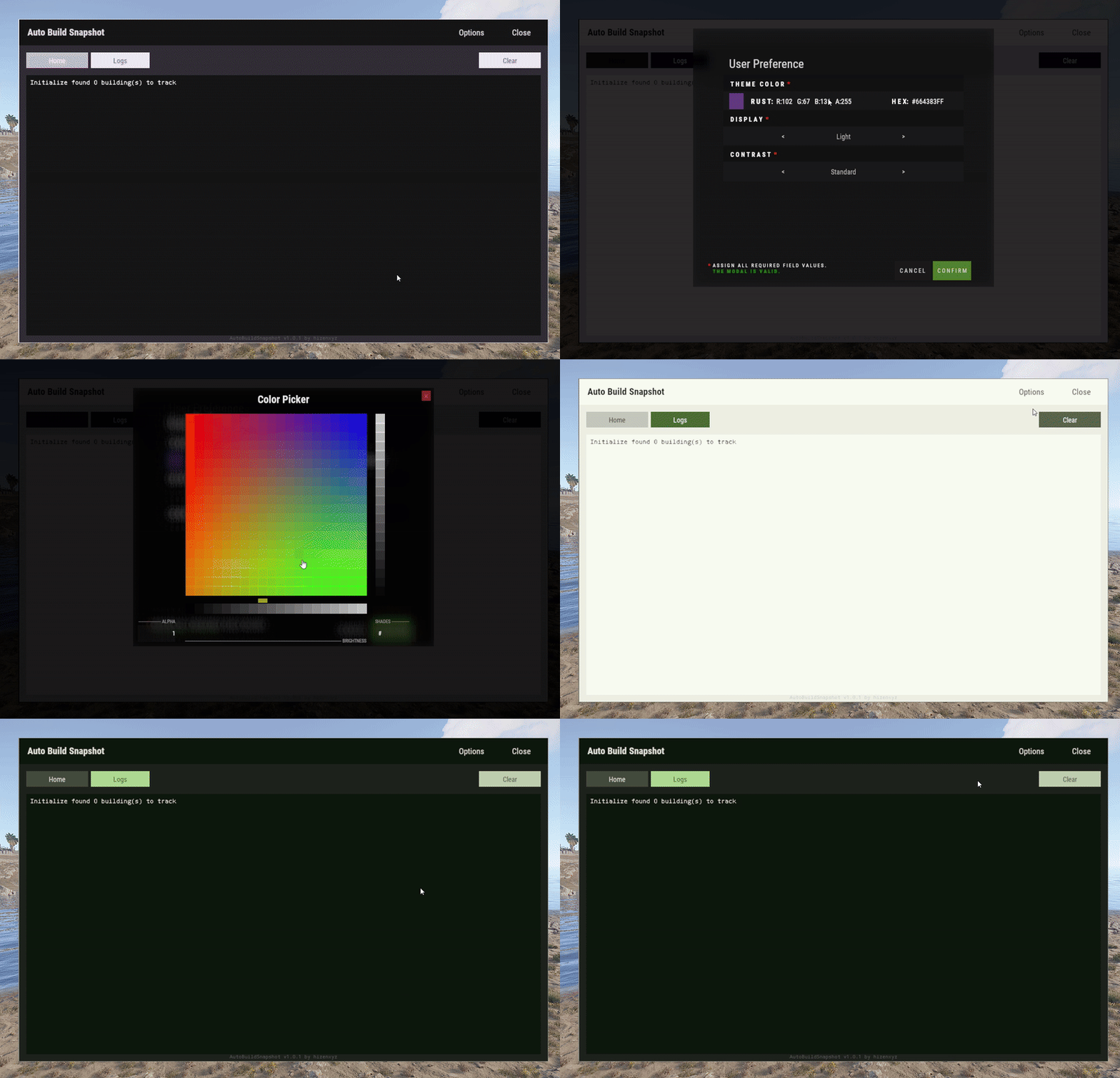
User Preference is an extension that enables plugin developers to provide a way for their users to customize their interface. Plugins can use this extension by placing a button in their application that calls the API to show the user interface options modal. Donations You won't get any extra colors, but if it makes you feel better!- Ko-fi: https://ko-fi.com/hizenxyz Note: If you want this to be optional, plugins should use the EXTENSION_USER_PREFERENCE region directive. See usage example below. Example 1 (optional dependency, recommended, using region directives): #if EXTENSION_USER_PREFERENCE using HizenLabs.Extensions.UserPreference.Data; #endif ... void Init() { #if EXTENSION_USER_PREFERENCE UserPreferenceData.SetDefaultTheme(this, MaterialTheme.CreateFromRgbHex("#FFFFFF", isDarkMode: true)); #endif } ... void ShowMenu(BasePlayer player) { #if EXTENSION_USER_PREFERENCE var userPreference = UserPreferenceData.Load(_instance, player); var theme = userPreference.Theme; string primary = theme.Primary; string onPrimary = theme.OnPrimary; var userPreferenceButton = CreateButton(cui, player, userPreference, container: headerButtons, position: new(optionsButtonX - .005f, 0, closeButtonX - .005f, 1), offset: LuiOffset.None, color: primary, textColor: primary, textKey: LangKeys.StringEmpty, commandName: nameof(CommandMenuSettings), fontSize: 14 ); #else string primary = "0.2 0.2 0.1 1"; string onPrimary = "0.9 0.9 0.9 1"; #endif // do ui stuff, using the defined color variables ... } #if EXTENSION_USER_PREFERENCE [ProtectedCommand(CommandPrefix + nameof(CommandMenuSettings))] private void CommandMenuSettings(BasePlayer player, string command, string[] args) { UserPreferenceUI.Show(this, player, onConfirm: () => UserInterface.ShowMenu(player)); } #endif For a complete example of how far you can take this, see the AutoBuildSnapshot implementation: https://github.com/HizenLabs/Plugins.Free/blob/main/src/Carbon.Plugins/Active/AutoBuildSnapshot/AutoBuildSnapshot.UserInterface.cs Example 2 (optional dependency, using PluginReference): [Info("Plugin Test", "hizenxyz", "1.0.0")] [Description("A plugin to test things.")] public class PluginTest : CarbonPlugin { [PluginReference("UserPreferencePlugin")] private CarbonPlugin userPreference; [ChatCommand("test")] private void TestCommand(BasePlayer player, string command, string[] args) { if (userPreference == null) { // Show the selection UI. userPreference.Call("Show", this, player, () => ShowConfirm(player)); } } private void ShowConfirm(BasePlayer player) { // Use the resulting values in the UI var primary = userPreference.Call<string>("GetPrimary", this, player); player.ChatMessage($"Primary: {primary}"); var secondary45Percent = userPreference.Call<string>("GetSecondary", this, player, 0.45f); player.ChatMessage($"Secondary (45% Opacity): {secondary45Percent}"); } } Example 3 (hard dependency): UserPreferenceUI.Show(this, player, onConfirm: () => Puts("Player clicked confirm!"); Example 3 continued in theme: var userPreference = UserPreferenceData.Load(this, player); var theme = userPreference.Theme; cui.v2.CreatePanel( container: parent, position: LuiPosition.MiddleCenter, offset: new(-450, -275, 450, 275), color: theme.SurfaceContainer ); cui.v2.CreateText( container: parent, position: LuiPosition.Top, offset: LuiOffset.None, color: theme.OnBackground, fontSize: 16, text: "Welcome!", alignment: TextAnchor.UpperCenter ); Themes (color palettes) are based on Material Design 3 (Material You) - https://material-foundation.github.io/material-theme-builder/ The user simply selects a color, a display mode (light/dark), and a contrast level, and a palette will be automatically generated off their selections. The available colors for use in theme are as follows: Primary Colors Primary OnPrimary PrimaryContainer OnPrimaryContainer InversePrimary Secondary Colors Secondary OnSecondary SecondaryContainer OnSecondaryContainer Tertiary Colors Tertiary OnTertiary TertiaryContainer OnTertiaryContainer Error Colors Error OnError ErrorContainer OnErrorContainer Surface & Background Surface SurfaceBright SurfaceContainerLowest SurfaceContainerLow SurfaceContainer SurfaceContainerHigh SurfaceContainerHighest SurfaceVariant OnSurface OnSurfaceVariant Background OnBackground InverseSurface InverseOnSurface Outline & Effects Outline OutlineVariant SurfaceTint Shadow Scrim Transparent (static 0 opacity black) You can either use these directly as properties of MaterialTheme, or all of these can be called from the plugin with userPref.Call<string>("Get[Option]") where [Option] is the color option above. It is recommended to use them directly and just use the #if EXTENSION_USER_PREFERENCE constant to toggle functionality.Free