Search the Community
Showing results for tags 'vote'.
Found 18 results
-

Version 1.0.0
26 downloads
What differentiates our plugins from others is the ability to create votes for customized server events in addition to our exclusive and modern design, making it stand out among other servers! A modern and elegant interface inspired by the design of the game League of Legends; Fully customizable interface; Multiple chat commands; Different permission for each sub command; Different cooldown for each event; Plugin default events; Option to enable/disable events without deleting them; Customized icon for each event; Can I assign a price to run the command? Yes, you can set the option "Cost" in the config file to use the Economics plugin and add a cost to the command. Can I give specific event permissions only to VIPs? Yes, you can create specific permission for each sub command and only give it to the users or groups you prefer! You can see the default config of the plugin above:$13.00 -

Version 2.0.2
504 downloads
NOTE: Version 2.0.0 is not backwards compatible with 1.x - please backup your config file! About Kill Heli Vote This plugin allows your players to kill all Patrol Helicopters that have spawned, by simply voting in chat! Snaplatack Note: I originally made this plugin for my servers, but haven't seen anything similar that was already published. So I figured I would release it here HunterZ Note: Version 2.x is my own rewrite of another rewrite started by Snaplatack, which adds new features and addresses some issues I encountered in my own use. Optional Dependencies Heli Signals Loot Defender Features Kill all eligible Patrol Helicopters via a vote system Kill all eligible Patrol Helicopters via an Admin command Ignore Patrol Helicopters called by Heli Signals and/or while protected by Loot Defender Ban players from voting or resetting votes Reset votes on damage to Patrol Helicopters from a non-banned player Customize commands, permissions, and messages Permissions killhelivote.use - controls whether voting command can be used by a player/group killhelivote.admin - controls whether kill command can be used by a player/group killhelivote.banned - controls whether voting command and damage reset features should be locked out for a player/group Notes: The names of these can be overridden via the config file The plugin will react to permission changes without a reload Commands /voteheli - record vote towards killing all eligible active helis /killhelis - kills all eligible helis on the map, bypassing any votes Notes: These are the default command names, which can be overridden via the config file Configuration Plugin Settings Frequency of vote announcements [in seconds] - how often voting message/toast should be shown Percentage of votes required [0 - 100] - percentage of votes by eligible voters required to kill helis Ignore helis spawned by Heli Signals - whether helis called by Heli Signals should be ignored by this plugin Ignore helis locked by Loot Defender - whether helis should be ignored by this plugin while protected by Loot Defender Reset vote when a heli takes damage - whether to reset votes when any kill-eligible heli is attacked by a player who is not banned from voting Commands & Permissions This section allows you to customize command and permission names used by the plugin. Messages Steam ID to use for the image for messages [0 = default] - set this to the SteamID of an account whose profile picture you want to use for chat messages produced by this plugin Use chat messages - whether to show a given message via in-game chat Use native toast messages - whether to show a given message via toasts (popup banners) Toast type - style of toast to use (0 => Blue Normal, 1 => Red Normal, 2 => Blue Long, 3 => Blue Short, 4 => Server Event, 5 => Error) Notes: Chat and toast messages can be enabled at the same time if desired Credits snaplatack - original author nivex - (2.x) Loot Defender coordination zeeuss - (1.x) finding objects more efficiently on reload mr01sam - (1.x) helping with some Init procedures ViolationHandler - (1.x) code cleanup and improved code efficiencyFree -

Version 1.1.8
1,060 downloads
Give your players ability to vote for their favorite map or alternatively gather feedback on various custom maps to see if players are interested before buying them. • FAQ • Can I add as many maps as I want? Yes, numbers of map you can have is unlimited, although I recommend using around 15-20. • Do map votes wipes automatically? Yes you can enable this option in config file. Every time you change map, votes will be wiped. • Is there any limit for images? No, you can use as many images as you want, but I advice you using smaller images. Avoid using images with high resolution since plugin showing them in sizes 500x300 (image gallery) and 190x190 (thumbnail). You can use online image resizers. • ImageLibrary While I listed it as optional dependency, I strongly suggest you to install this plugin. Not only it will significantly speed up image loading in game but it will also preserve image quality for users with low gfx settings. If file size is above allowed limit of ImgLibrary, you will get console error and image wont be cached into server. In this case, image will be loaded directly from url. When you load VoteMap plugin first time, ImageLibrary should start load order automatically. If not, reload ImageLibrary and then reload VoteMap again or use console command "refreshallimages" . • Discord Message Broadcast winning map before the wipe into your discord server. • Commands • Map List Example (data/votemap/maplist.json) • Vote Settings (config/VoteMap.json)$10.99 -

Version 1.4.4
1,063 downloads
Introducing Total Control – The Ultimate Rust Server Administration Tool Total Control is a powerful, full-GUI admin plugin designed to give Rust server owners and admins unprecedented control. Whether you’re running hardcore survival or a casual PvE playground, Total Control puts every system at your fingertips live, in-game. Dynamic Schedule System Plan and automate your server’s evolution with ease — no more manual toggling or config edits. The Schedule System lets you: Automate server changes over time – Adjust gather rates, stack sizes, smelting speeds, rewards, raid protection, or PvE/PvP status automatically. Create up to 6 configuration sets per feature (1 default + 5 extra) – Schedule different setups for each stage of your wipe. Scale your server naturally – Increase resource rates as wipes progress or gradually tweak settings to keep gameplay fresh. Fully integrated with the GUI – Configure all schedules directly in-game with the Total Control UI — no external files required. Run your server exactly how you want, exactly when you want — automatically. Core Server Settings Skip Night / Time Freeze – Automate day/night or let players vote, including custom voting percentages and skip limits. Day & Night Length – Configure how long the day lasts and how short nights are. Custom Vote Commands – Define your own chat commands beyond /day. PvE/PvP Modes & Raid Protection – Toggle instantly or schedule on timers, with player HUD indicators. Now includes an option to use in-game or local time. Economy & Progression StackSize Control – Set multipliers per item or entire categories. Gather Rate Control – Fine-tune every item’s resource yield. Easy Item Management – Add or remove items to the GatherRate and StackSize pages directly via chat commands using item shortnames. (Shortnames list: https://www.corrosionhour.com/rust-item-list) Smelting & Cooking – Adjust speeds, outputs, and fuel use. Rewards & Incentives Reward players for kills, gathering, mining, defeating Bradley/Patrol Heli, or emptying crates to encourage active gameplay. Choose between Economics, ServerRewards, scrap payouts or reward all three simultaneously. Configure loot-splitting for Bradley and Heli: split rewards based on damage dealt or grant the full amount to the player landing the final blow. Accessible In-Game Any admin with permission can open the Total Control UI with /tc and adjust settings live no server file access required. Whether your admins are across town or across the globe, they can fine-tune all settings directly in-game. Permissions & Commands Permission: TotalControl.OpenGui (access admin UI) Chat Commands: /tc To open TotalControl /addgather <shortname> Add item to GatherRates page. /removegather <shortname> Remove item to GatherRates page. /addstack <shortname> Add item to StackSize page. /removestack <shortname> Remove item to StackSize page. Join the Community Stay up to date, promote your server, report bugs, or get support: https://discord.gg/AkwHUs8Qma$29.99 -
Version 2.0.0
48 downloads
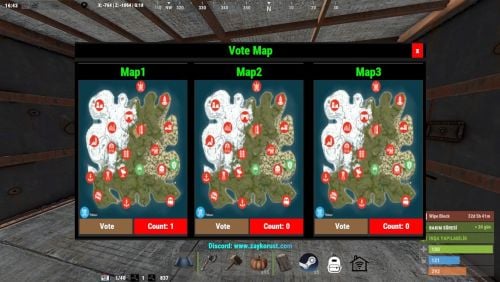
This plugin can help to player seelct new Map for next Wipe? /votemap -> open vote menu Example Config: { "Plugin Icon Id": 76561198286834661, "Gui Button Enabled": true, "ColumnCount": 3, "RowCount": 1, "Gui Maps List": { "0": { "Name": "Map1", "Url": "https://content.rustmaps.com/maps/247/ac81fbe38a2d4ca2805e8385353b83aa/thumbnail.png" }, "1": { "Name": "Map2", "Url": "https://content.rustmaps.com/maps/247/ac81fbe38a2d4ca2805e8385353b83aa/thumbnail.png" }, "2": { "Name": "Map3", "Url": "https://content.rustmaps.com/maps/247/ac81fbe38a2d4ca2805e8385353b83aa/thumbnail.png" } } } Discord: If you find any bugs, need assistance, or have suggestions related to the plugin, you can reach out on Discord. Discord pisagor0104 https://discord.gg/JnQftZeSXD$4.99 -

Version 1.0.0
14 downloads
English Description (Deutsche Beschreibung weiter unten): With the ItemPost plugin for Rust, players can claim items sent to them by administrators via the console or RCON. The ItemPost plugin is a practical solution for Rust server administrators to send items to players that they can claim later. Integration with other plugins, such as Azuriom's Vote plugin, expands the possibilities and offers server operators additional incentives for their players. How it works: The plugin allows administrators to send items to players by using the givepost command in the console or via RCON. The command syntax is: givepost <playerID> <itemName> <amount> Once an item is sent to a player, it is stored in the plugin's internal list (_claimedItems), and the affected player is notified. Players can view and claim their claimable items by using the /claim chat command. When they have successfully claimed items, they will receive a confirmation message. Every 5 minutes, the plugin automatically checks if players have items to claim and notifies them accordingly. Language file: The plugin supports multiple languages and allows customizing messages. The following messages are available in the default settings: NoItemsToClaim: "You have no items to claim." ItemsAvailable: "You have items available to claim! Type /claim to claim your items." ClaimSuccess: "Claimed all your items!" ClaimFull: "Your inventory is full." Integration with Azuriom's Vote plugin: To combine the ItemPost plugin with Azuriom's Vote plugin, administrators can use the givepost command to send rewards for voting to players. For example, when a player votes for the server, the administrator can execute a command like givepost {steam_id} stones 150 to send a reward to the player. Deutsche Beschreibung: Mit dem ItemPost-Plugin für Rust können Spieler Gegenstände beanspruchen, die ihnen von Administratoren über die Konsole oder RCON gesendet wurden. Das ItemPost-Plugin ist eine praktische Lösung für Rust-Server-Administratoren, um Gegenstände an Spieler zu senden, die sie später beanspruchen können. Die Integration in andere Plugins wie das Vote-Plugin von Azuriom erweitert die Einsatzmöglichkeiten und bietet Serverbetreibern zusätzliche Anreize für ihre Spieler. Funktionsweise: Das Plugin ermöglicht es Administratoren, Gegenstände an Spieler zu senden, indem sie den Befehl givepost in der Konsole oder über RCON verwenden. Der Befehl hat die Syntax: givepost <playerID> <itemName> <amount> Sobald ein Gegenstand an einen Spieler gesendet wird, wird er in der internen Liste des Plugins (_claimedItems) gespeichert und der betroffene Spieler wird benachrichtigt. Spieler können ihre beanspruchbaren Gegenstände einsehen und beanspruchen, indem sie den Chat-Befehl /claim verwenden. Wenn sie erfolgreich Gegenstände beansprucht haben, erhalten sie eine Bestätigungsnachricht. Alle 5 Minuten überprüft das Plugin automatisch, ob Spieler Gegenstände zum Beanspruchen haben und benachrichtigt sie entsprechend. Sprachdatei: Das Plugin unterstützt mehrere Sprachen und ermöglicht es, Nachrichten anzupassen. In der Standardeinstellung sind folgende Nachrichten verfügbar: NoItemsToClaim: "You have no items to claim." ItemsAvailable: "You have items available to claim! Type /claim to claim your items." ClaimSuccess: "Claimed all your items!" ClaimFull: "Your inventory is full." Integration mit dem Vote-Plugin von Azuriom: Um das ItemPost-Plugin mit dem Vote-Plugin von Azuriom zu kombinieren, können Administratoren den Befehl givepost verwenden, um Belohnungen für das Abstimmen an Spieler zu senden. Zum Beispiel, wenn ein Spieler für den Server abstimmt, kann der Administrator einen Befehl wie givepost {steam_id} stones 150 ausführen, um dem Spieler eine Belohnung zu senden.$10.00 -
.thumb.gif.be4d7c48ffb8b6bd133b250f73404356.gif)
Version 1.0.6
42 downloads
What is Vote System ? Vote System is a sophisticated plugin designed to track player votes in real-time on various ranking sites. It offers two main functionalities: Integration with other plugins: Vote System can be paired with other plugins to enhance its features. See the list of compatible plugins. API for Developers: With a robust API, developers can create plugins that directly interact with the voting system, allowing for advanced customization. Supported Plugins Vote System is compatible with the following plugins: CustomReward: Allows players to receive rewards through a user interface after voting. Economics: Converts votes into virtual currency for players. Documentation : More informations on documentation Supported Ranking Sites Vote System currently supports the following ranking sites: rust-servers.net top-games.net top-serveurs.net$4.99 -

Version 1.1.1
17 downloads
A player voting system for temporary chat mutes. Supports both default chat and BetterChat, with persistent mute storage and Discord webhook integration. It will mute players from chat and voice channels. Permissions votemute.startvote - Allows initiating vote mutes votemute.vote - Allows participating in votes votemute.unmute - Allows manual unmuting (admin) Configuration { "Required percentage (0-100)": 60.0, // Percentage of yes votes needed "Vote duration (seconds)": 120, // How long voting period lasts "Cooldown between votes (minutes)": 10, // Time between vote initiations "Mute duration (minutes)": 60, // How long mutes last "Discord Webhook URL": "", // Optional Discord logging "Log to console": false, // Enable console logging "Minimum players required for voting": 4, // Server population requirement "Allow voting to mute self": false, // Self-mute prevention "Allow voting to mute admins": false, // Admin mute prevention "Reminder interval (seconds)": 30 // Interval of vote reminder message "Count only voters (if false, non-voters count as No)": true } Commands /votemute playername/steamid - Start vote to mute /yes - Vote in favor /no - Vote against /unmute playername/steamid - Admin unmute command Notes Mute data persists through server restarts via data file Integrates with BetterChat if present Supports team chat muting Automatic mute expiration system Vote session management with concurrent vote prevention Discord webhook sends detailed embeds with vote results Supports localization through language files Thread-safe mute operations Handles player disconnections during votes$4.99 -

Version 1.2.4
1,331 downloads
Vote Rewards Plugin for RustServers.gg Information This plugin is created for the website rustservers.gg, which is one of the largest platform for searching Rust servers. It is intended to reward players for voting on your server. Features Random or Static rewards for voting. Simplicity, easy to configure. Multiple Chat commands, work all the same way /vote /claim etc. Will show where the player can vote and claims the reward is egible. No permissions needed, only edit the config file and you are ready to go. Lightweight, does barely use resources on your server, perfect for beginning servers on Shared Game Hosting Servers. How do i setup Vote Rewards? Go to Control Panel if you are logged in [Skip step 2 if you are loged in] If not logged in it requires you to register an account, takes 20 seconds. Check if you claimed your server [Skip to 4 if you claimed your server] if not go to Add / Claim Server and follow the instructions In the My Servers tab click on the pecil icon next to your server name In this tab you can see your server ID replace the your-server-id text with your ID Below the ID you find the API key replace the your-api-key with your own API key Reload your plugin to finish the setup For Oxide o.reload RSVote For Carbon c.load RSVote Chat Commands /vote - Check Votes/ Shows where to vote / Claims votes /claim - ^ /votes - ^ Config Example { "API Key": "your-api-key", "Server Id": "your-server-id", "Chat Commands": [ "claim", "vote", "votes" ], "Reward items": [ { "Item Shortname": "wood", "Description": null, "Item Amount Min": 1000, "Item Amount Max": 2000, "Item Skin id": 0 }, { "Item Shortname": "stones", "Description": null, "Item Amount Min": 1000, "Item Amount Max": 2000, "Item Skin id": 0 }, { "Item Shortname": "metal.refined", "Description": null, "Item Amount Min": 1000, "Item Amount Max": 2000, "Item Skin id": 0 } ], "Reward Commands Help": "use {steamid} to add user steam id\nExamples:\nsr add {steamid} 10 - to add ServerRewards points\ndeposit {steamid} 10 - to add Economics points\n", "Reward Commands": [ { "Command": "example {steamid} 1d", "Description": "example Description (will appear on Message)", "Type": "example type of Reward (Kit, Permission etc.)" }, { "Command": "example {steamid} 1d", "Description": "example Description (will appear on Message)", "Type": "example type of Reward (Kit, Permission etc.)" }, { "Command": "example {steamid} 1d", "Description": "example Description (will appear on Message)", "Type": "example type of Reward (Kit, Permission etc.)" } ] }Free -
![More information about "VoteDay [NO UPDATE]"](https://codefling.com/uploads/monthly_2024_07/obraz_2024-07-23_212800470.thumb.png.ed04c7fd2007656dfc1ee5c6d54c15e0.png)
Version 1.2.0
770 downloads
The plugin adds the ability to skip nights by voting with the /voteday command. Additionally, the command can be used by people who have permission. Every day at 19:00 in-game time the voting is turned on, if the voting is successful the time is switched to 8:00 am. Command /voteday: Starts voting for skipping the night if voting is not already in progress. Requires the "voteday.use” permission. /voteday reload: Reloads the plugin configuration. Requires "voteday.admin” permission. /voteday set timevote <seconds>: Sets the voting time in seconds and saves it to the configuration file. Requires the "voteday.admin” permission. /voteday set requiredpercentage <percentage>: Sets the required percentage of votes (ranging from 1 to 100) and writes it to the configuration file. Requires the "voteday.admin” permission. Permission voteday.use: Allows the player to participate in voting. voteday.admin: Allows the player to reload the plugin configuration and change the voting settings. Configuration file { "VoteDuration": 180.0, "RequiredPercentage": 50 } Lang { "VoteStarted": "<color=#FFFF00>Vote to skip the night has started! You have {0} seconds to vote. Type /voteday to vote. {1} votes are needed to pass.</color>", "VoteCount": "<color=#00FF00>{0} players voted yes out of {1}.</color>", "VotePassed": "<color=#00FF00>The vote passed! {0} players voted yes out of {1}. Skipping to day.</color>", "VoteFailed": "<color=#FF0000>The vote failed. {0} players voted yes out of {1}. The night will continue.</color>", "NoPermission": "<color=#FF0000>You do not have permission to use this command.</color>", "AlreadyVoting": "<color=#FF0000>A vote is already in progress.</color>", "AlreadyVoted": "<color=#FF0000>You have already voted.</color>", "ConfigReloaded": "<color=#00FF00>Configuration reloaded successfully.</color>", "InvalidCommand": "<color=#FF0000>Invalid command usage. Use /voteday set timevote <seconds> or /voteday set requiredpercentage <percentage>.</color>", "VoteDurationSet": "<color=#00FF00>Vote duration set to {0} seconds.</color>", "RequiredPercentageSet": "<color=#00FF00>Required vote percentage set to {0}%.</color>", "InvalidPercentage": "<color=#FF0000>Invalid percentage. Please enter a value between 1 and 100.</color>" }Free -

Version 1.2.3
46 downloads
IQSimpleVote - a plugin that allows you to create polls and votes for your server! Gather player opinions, conduct surveys, and learn the wishes of your players who are active on the server! Unlimited number of polls—create as many as you want on any topic—the only limit is your imagination. Plugin Installation: - Download and extract the archive to a convenient folder. - Move the images to your server's data files at the path .../data/IQSystem/IQSimpleVote/Images (If this folder does not exist, create it). - Upload the IQSimpleVote.cs plugin to the ../oxide/plugins folder. Note for users who use the "Web File Editor" on hosting services: Before transferring files, extract the archive locally to a convenient location, and then move the files from there. Permissions : iqsimplevote.admin - permission to manage polls using commands. Chat Commands: /vote - opens the voting interface /vote.start Key - starts voting from the configuration /vote.stop - ends the active voting /vote.admin Key - shows the admin UI interface for checking the voting text /vote.key - displays all available keys from the configuration Console Commands: vote - opens the voting interface vote.start Key - starts voting from the configuration vote.stop - ends the active voting vote.admin Key - shows the admin UI interface for checking the voting text vote.key - displays all available keys from the configuration Feature List: Beautiful and Intuitive Interface: No hassle for players—simply choose the answer that suits them from the available options! Check out the "Screenshots" tab for more visuals! Discord Notifications: The plugin supports notifications about the start of a poll and its results upon completion! Multilingual Support: The plugin offers full multilingual support, from language files to headers and descriptions in the configuration! Your polls are accessible to all players, regardless of their language. You can check out a sample configuration in the "Configuration" tab. Configuration : { "Chat command to open UI": "vote", "Configuration of supported plugins": { "IQChat: Chat notification settings": { "IQChat: Custom prefix in chat": "<color=#1F6BA0>[IQSimpleVote]</color>\n", "IQChat: Custom avatar in chat (if required)": "0" } }, "Discord settings": { "Webhook (Leave empty if you do not need results and notifications in Discord)": "https://discord.com/api/webhooks/1161367749281456250/kvwg6ArR-iZbQdrk-oxtKRUnC_5vYaMRMLMLmG3duWgnOFvFeEkCmjkrNBYySLDWDRob", "Configuration of Discord message formatting for vote start": { "Title": "A new vote has started!", "Description (do not delete {0})": "Join the server and vote using the command {0}", "Additional text in the footer": "Every vote counts! Join in and participate!", "Message (e.g., you can use @everyone)": "@everyone", "Message color": 7572805, "Author's name": "Voting", "Author's avatar": "https://i.postimg.cc/pX1XBcZf/vote.png", "Additional image": "https://i.postimg.cc/pX1XBcZf/vote.png" }, "Configuration of Discord message formatting for vote end": { "Title": "Voting has ended", "Description (do not delete {0})": "Voting results: \n{0}", "Additional text in the footer": "Thank you for participating", "Message (e.g., you can use @everyone)": "", "Message color": 13451563, "Author's name": "Voting", "Author's avatar": "https://i.postimg.cc/8kfSSkB6/stats.png", "Additional image": "https://i.postimg.cc/8kfSSkB6/stats.png" } }, "Interface settings": { "Text color": "0.8941177 0.854902 0.8196079 1", "Background color": "0.8941177 0.854902 0.8196079 0.3", "Color of the button for the option voted by the player": "0.7607843 0.427451 0.2 1", "Color of the buttons for options not voted by the player": "0.4509804 0.5529412 0.2705882 1" }, "List of votes [UniqueKey] - Settings": { "map": { "Title for voting in different languages [LanguageKey] = Text": { "ru": "", "en": "Voting for the card for the next wipe" }, "List of voting options (Must be at least 2)": [ { "Image for the voting option (Upload to ..data/IQSystem/IQSimpleVote/Images)": "EXAMPLE_VOTE_MAP_ICON", "Title for the option in different languages [LanguageKey] = Text": { "ru": "", "en": "Map 'Poseidon'" }, "Description for the option in different languages [LanguageKey] = Text": { "ru": "", "en": "Size: 3500\nCustom RTs: 10\nIncludes a spaceport\n\nAlmost the entire map is underwater" } }, { "Image for the voting option (Upload to ..data/IQSystem/IQSimpleVote/Images)": "EXAMPLE_VOTE_MAP_ICON", "Title for the option in different languages [LanguageKey] = Text": { "ru": "", "en": "Map 'Drought'" }, "Description for the option in different languages [LanguageKey] = Text": { "ru": "", "en": "Size: 3250\nCustom RTs: 6\nNo spaceport\n\nAlmost the entire map is made of sand" } }, { "Image for the voting option (Upload to ..data/IQSystem/IQSimpleVote/Images)": "EXAMPLE_VOTE_MAP_ICON", "Title for the option in different languages [LanguageKey] = Text": { "ru": "", "en": "Map 'Procedural'" }, "Description for the option in different languages [LanguageKey] = Text": { "ru": "", "en": "Size: 3000\nCustom RTs: 0\nRandom monuments\n\nThe map's terrain will be completely random" } } ] }, "drone": { "Title for voting in different languages [LanguageKey] = Text": { "ru": "", "en": "Voting for the installation of a new plugin" }, "List of voting options (Must be at least 2)": [ { "Image for the voting option (Upload to ..data/IQSystem/IQSimpleVote/Images)": "DRONE_YES", "Title for the option in different languages [LanguageKey] = Text": { "ru": "", "en": "Like" }, "Description for the option in different languages [LanguageKey] = Text": { "ru": "", "en": "IQDronePatrol Plugin\nDrones will patrol monuments\nAdditional loot\nMore gameplay experience" } }, { "Image for the voting option (Upload to ..data/IQSystem/IQSimpleVote/Images)": "DRONE_NO", "Title for the option in different languages [LanguageKey] = Text": { "ru": "", "en": "Dislike" }, "Description for the option in different languages [LanguageKey] = Text": { "ru": "", "en": "Think About It!\nThis is a very interesting experience.\nShare in our Discord why you’re against it." } } ] } } }$9.49 -
Version 1.0.1
39 downloads
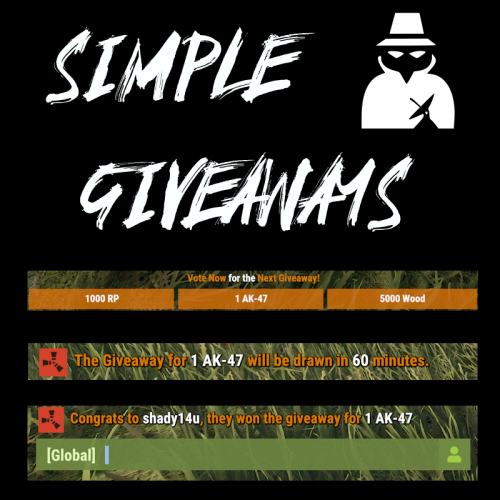
Create "Automated" Giveaways, Items based on Votes At the Set Interval, a small popup voting UI is shown to players. Based on the players online, this list is randomized, and players vote on the giveaway they want. After the end of the voting, UIs close and the item with the most votes is locked in. At the end of the giveaway, a random online user is given the prize. Awards can be any command you can run in game, (give items, give kits, Give RP, Give Economics, etc.) Permissions "simplegiveaways.use" : Ability to start or restart a giveaway. Chat Commands /giveaway.start : Stops the current giveaway and starts a new one. Config https://pastebin.com/fU2EZBtv Discord: Shady14u https://discord.gg/8mvvBrrw4Y$10.50 -
.thumb.jpg.ec72ae354c55231b02db1827fe8a2521.jpg)
Version 1.1.1
17 downloads
A powerful and configurable voting system that allows players to democratically ban disruptive players from your Rust server. Features Democratic Banning System: Players can initiate votes to ban other players Configurable Parameters: Customize voting duration, required percentage, and cooldown periods Temporary or Permanent Bans: Set ban durations or make them permanent Discord Integration: Automatic notifications for ban votes and results Localization Support: Easily translate messages to any language Anti-Abuse Measures: Cooldown between votes Minimum player requirement Optional admin protection Self-vote prevention Commands /voteban playername/steamid - Start a vote to ban a player /y - Vote yes on the current ban vote /n - Vote no on the current ban vote Permissions voteban.start - Allows starting ban votes voteban.vote - Allows participating in ban votes Configuration { "Required percentage (0-100)": 90.0, "Vote duration (seconds)": 120, "Cooldown between votes (minutes)": 10, "Ban duration (minutes, 0 for permanent)": 60, "Discord Webhook URL": "", "Log to console": false, "Minimum players required for voting": 9, "Allow voting to ban self": false, "Allow voting to ban admins": false, "Reminder interval (seconds)": 30 "Count only voters (if false, non-voters count as No)": true } Messages All messages are customizable and support color formatting: Vote initiation notifications Vote success/failure messages Error messages and warnings Permission denied notifications Instructions for voting Installation Place the plugin in your server's oxide/plugins folder Configure the settings to match your server's needs Set up permissions for your players (Optional) Configure Discord webhook for notifications Notes The plugin automatically manages temporary bans Integrates with Discord for ban notifications (if webhook URL is provided) Saves ban data between server restarts$4.99 -

Version 1.0.6
137 downloads
We are excited to present our revamped plugins for Rust. Previously bundled as VoteReward, we've now separated the functionalities into two distinct plugins: VoteSystem and CustomRewards. This division offers users enhanced flexibility and customization options. Upon purchasing our product, you will receive both plugins, along with the original VoteReward, giving you the freedom to update at your own pace. VoteReward is a plugin for Rust, specifically designed to encourage players to vote for their server on various ranking sites. By offering in-game rewards for each vote, VoteReward turns voting into an interactive and rewarding experience, reminiscent of the battle pass systems found in many games. Documentation: More informations on VoteSystem and CustomRewards Documentations Command: To access the VoteReward user interface, players need to use the command /votes Compatibility with ranking sites: VoteReward currently supports the following ranking sites: rust-servers.net top-games.net top-serveurs.net If you wish to add more ranking sites, feel free to contact us. Features: VoteReward stores players' votes and allows them to claim their rewards at their own pace, even several days after voting. The user interface is fully customizable: colors, positions, sizes, and texts can all be modified via the Configuration and Lang files. You can set the number of points awarded per vote for each ranking site. Rewards can be in-game items or commands from other plugins, offering a wide variety of rewards. Each reward can be associated with a custom image. You can set the rarity of rewards, which changes the background color of the user interface. Configuration To configure the Vote System, navigate to Oxide/Config/VoteSystem.json. Below are the fields you can adjust: Vote Servers Settings: This represents the list of ranking sites. Please refrain from altering the key names. Enabled: Set this to true if you want votes from this site to be counted. API url: Do not modify this unless the URL changes. API token: Enter your unique token, which can be obtained from the respective ranking site. Points by vote: This determines the number of points awarded per vote (acts as a multiplier). Check Interval: Specifies the number of seconds between each API check. Ensure you save any changes made to the configuration file and reload the pluging for them to take effect. Reward Configuration: Customizing rewards is made easy with the configuration file. UI Settings: Max Reward By Page: Maximum number of rewards displayed per page. Window Rect: Position and size of the window. Top Rect: Position and size of the title bar. Close Rect: Position and size of the close button. Description Rect: Position and size of the description root. Rewards Rect: Position and size of the rewards root. Line Rect: Position and size of the progress line. Reward Margin: Margin between each reward. Show Description: Option to display or hide the description. Description font size: Font size of the description. Title font size: Font size of the title. Background Url: URL of the background image for a reward. New Icon Url: URL of the icon when the reward is new. Check Icon Url: URL of the icon when a reward has been claimed. Lock Icon Url: URL of the icon when a reward is locked. Prev Icon url: URL of the previous arrow. Next Icon url: URL of the next arrow. Theme: Color palette with available colors such as Surface, SurfaceDisabled, Background, TextPrimary, TextOnSecondary, Primary, Secondary, and Danger. Rewards Settings Rarity: Reward rarity (Common, Rare, Epic, Legendary). Quantity: Displayed quantity; for an item, the player will receive this quantity. Item Name: Item to be received (optional). Server Commands: List of commands to execute when the player claims the reward. Grant Permissions: List of permissions to grant (or remove) to the player when they claim the reward. Grant Groups: List of groups to grant (or remove) to the player when they claim the reward. Need Permissions: List of permissions required to unlock the reward. Need Groups: List of groups required to unlock the reward. If you're using a command rather than an item as a reward, leave the "Item Shortname (optional)" field blank. Optimization: VoteReward has been designed to have a minimal impact on server resources. Beta Phase: VoteReward is currently in the final beta phase. Although problems are rare, we advise you to exercise caution when configuring the plugin. Support: I am available to answer any questions or address any issues you may encounter when using VoteReward. Do not hesitate to contact me. With VoteReward, stimulate your players' engagement and enrich their gaming experience! More informations on VoteSystem and CustomRewards Documentations VoteReward.json$10.99 -
Version 1.1.4
161 downloads
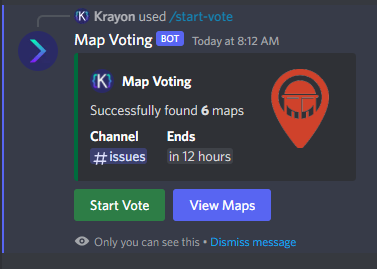
Map Voting is a Discord Bot that mainly utilizes RustMaps to get Map Information and then feeds it to the end user so they can vote on which map they would like on the server(s). Server Owners can easily setup map voting with easy to use commands. Map Voting Features - Start Map Voting Maps are added manually with either their seed/size or their Map ID (Custom Maps work!) or they can be added through a RustMaps share link. The end of a map voting session is set by the server owner on command initialization Channel of the map voting is also set during command initialization After command is used, you will be able to view the maps that have been added - Stop Map Voting Map Voting can be stopped at any time with a command - View Votes After map voting has been stopped, you will be able to view all votes until another one is started as shown in images - Presence Ability to change the bot's status, activity name and activity type with a simple command - Customization Yes and No reactions can be customized to be any Unicode emoji or any Guild emoji (bot has to be in the guild the emoji is from) You can customize the Embed Color, Author Name, Author Icon URL, Author URL Information If you have ANY questions just hop in the Discord and send me a DM. Join the Discord for Support - https://discord.gg/YbkvZWs3a4 (All suggestions are welcome for new features or changes) Setup 1 - Install Node and NPM (Node v16.17.1 & NPM v8.15.0) HIGHLY recommend installing Node v16 or else I'm pretty sure you will encounter issues 2 - Unzip Map-Voting.zip 3 - Open a terminal under the Map-Voting folder and execute the command: npm install 4 - Open config.json and fill in all the required information RustMaps API_Key (https://rustmaps.com/user/profile -> Api Key Button -> Copy) Discord BOT Token (https://discord.com/developers/applications -> Applications -> New Application -> Bot -> Create New Bot -> Reset Token) Guild ID (Enable Developer mode in Discord (https://beebom.com/how-enable-disable-developer-mode-discord/) and then right click on the Guild you will be using the bot in and click "Copy ID") 5 - Run the Bot (Recommend using PM2 for this) Configuration File { "RustMaps": { "API_Key": "" }, "Discord": { "BOT_Token": "", "Guild_ID": "", "Reactions": { "YES_Reaction": "", "NO_Reaction": "" }, "Embed": { "Color_In_HEX": "006B3C", "Author": { "Name": "Map Voting", "IconURL": "", "URL": "" } } } }$10.00 -

Version 2.3.0
143 downloads
Increase your server visibility by registering it on https://top-games.net and automatically give player a role in-game after X votes. Features - Count votes for each players - Execute a set of custom commands to reward the player after X votes - Configure as much rewards as you want with different vote caps - Send a message on Discord when a player gets his reward and/or on each vote - Display a leaderboard based on a start date - Show a custom message on player connection about votes and rewards Permissions - getleaderboard : Show leaderboard in player / server console Dependencies None Language It supports different languages, EN by default, feel free to add your own translation. Support This plugin is not changing any gameplay and won't get you blacklisted from community by Facepunch. Join my discord if you need support or have any questions => https://discord.gg/RZ8h7e2D6E$10.00- 7 comments
- 6 reviews
-
- 3
-

-
- #top-games.net
- #top-serveurs.net
- (and 6 more)
-
Version 2.10.6
557 downloads
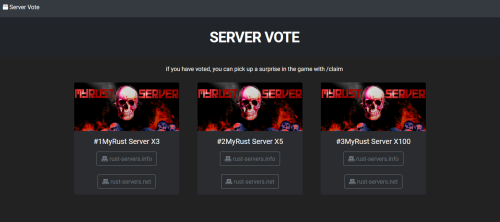
This is an Ember module for Ember websites. This is not only for Rust, anyone who has Ember script can have it. Dependencies Ember (Required) https://www.gmodstore.com/market/view/5620 How to Install? - Copy the servervote folder in root\modules - Edit the file modules\servervote\resources\views\vote.twig - After edit, clear cache for Ember and reload yousite\vote How to Update? - save your vote.twig - replace all files - copy your vote.twig file into the directory Customize - More than one Server - Header Text - Info text - Server Pictures - Server Text - Button Text HTML / TWIG Knowledge should be a bit assumed.Free -
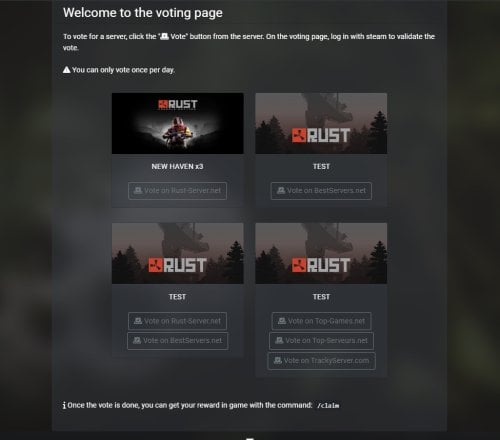
Version 1.0.1
49 downloads
This module adds a Voting page to the Ember application. You can configure up to 4 servers and have your visitors vote on 5 different voting sites: rust-servers.net bestservers.com top-games.net top-serveurs.net trackyserver.com Caution: This module doesn't use API. It can't verify the votes, it just gives you the ability to add a vote page to Ember. For checking votes you can use one of these plugins: Voter Rewards Easy Vote How to install: Copy the "ember-simple-vote-module" directory to the folder called "modules" in your Ember web directory. Settings: You can configure the module by editing the VoteController.php file in "Controllers\VoteController.php" The settings are commented, so you can't find info about each parameter. Things that you can configure: Global: 'title' => 'Vote', // Replace if you want to rename page title. This doesn't change page url or button name. Only the title in web browser. 'claimcommand' => '/claim', // Replace by your rust server claim command. Server: This is an example with the first server: // SERVER #1 'ServerName1' => 'NEW HAVEN x3', // Replace by the first server name. 'ServerBannerImg1' => 'https://i0.wp.com/www.thexboxhub.com/wp-content/uploads/2021/03/rust-console-edition-header.jpg', // Replace by your server banner url. 'EnableRustServers1' => 'ON', // Replace 'OFF' by 'ON' to enable vote button for Rust-Server.net. 'RustServersID1' => '167267', // Replace by your Rust-Server.net ID. Help -> https://prnt.sc/A1gz3i0Tdnxr 'EnableBestServers1' => 'OFF', // Replace 'OFF' by 'ON' to enable vote button for BestServers.net. 'BestServersID1' => '1922', // Replace by your BestServers.net ID. Help -> https://prnt.sc/FRtt47wLvhon 'EnableTopGames1' => 'OFF', // Replace 'OFF' by 'ON' to enable vote button for Top-Games.net . 'TopGamesID1' => 'new-haven-x3', // Replace by your Top-Games.net custom url name ex: https://top-games.net/rust/YOUR_CUSTOM_URL_NAME. Help -> https://prnt.sc/D_CkEOJ3MewW 'EnableTopServeurs1' => 'OFF', // Replace 'OFF' by 'ON' to enable vote button for Top-Serveurs.net. 'TopServeursID1' => 'fr-new-haven', // Replace by your Top-Serveurs.net custom url name ex: https://top-serveurs.net/rust/YOUR_CUSTOM_URL_NAME. Help -> https://prnt.sc/ZwlATTv2zjlE 'EnableTrackyServer1' => 'OFF', // Replace 'OFF' by 'ON' to enable vote button for TrackyServer.com. 'TrackyServerID1' => 'x3-new-haven-1971966', // Replace by your TrackyServer.com custom url name ex: https://www.trackyserver.com/fr/server/YOUR_CUSTOM_URL_NAME. Help -> https://prnt.sc/wezbi5zNnSQa Configs is the same for other server, there is just on more option to enable them: // SERVER #2 'EnableServer2' => 'ON', // Replace 'OFF' by 'ON' if you want to display a second server. If you modify any other part of the script, it is at your own risk. No support will be given to you.$4.99