Search the Community
Showing results for tags 'voting'.
Found 7 results
-

Version 1.0.0
26 downloads
What differentiates our plugins from others is the ability to create votes for customized server events in addition to our exclusive and modern design, making it stand out among other servers! A modern and elegant interface inspired by the design of the game League of Legends; Fully customizable interface; Multiple chat commands; Different permission for each sub command; Different cooldown for each event; Plugin default events; Option to enable/disable events without deleting them; Customized icon for each event; Can I assign a price to run the command? Yes, you can set the option "Cost" in the config file to use the Economics plugin and add a cost to the command. Can I give specific event permissions only to VIPs? Yes, you can create specific permission for each sub command and only give it to the users or groups you prefer! You can see the default config of the plugin above:$13.00 -
.thumb.png.dc682eadc1e5d61faf2a085e305630a9.png)
Version 3.0.4
233 downloads
EasyVoteExtended is an upgraded version of Easy Vote, the most advanced and versatile voting plugin available, designed to enhance player engagement and community interaction effortlessly. With its fully customizable system, server owners can tailor every aspect of the voting process without any coding knowledge. General Features Players receive a reward every time they vote successfully. You can edit the available rewards in the configuration file. Add custom reward based how many time player has voted. You can add many as you like custom rewards, there is no limits. Global Announcement - Alert to every player in server. Who and how many time player has voted. Discord Announcement - Alert to every player in server. Who and how many time player has voted. Wipe Rewards Add custom links in config And much more! Variables Use the below replacement variables when creating your rewards. {playername} -- player's display name {playerid} -- player's Steam ID Chat Commands /vote -- Show vote link(s) /claim -- Claim vote reward(s) /rewardlist -- Display what reward(s) can get Server Commands eve.clearvote - Clear a player vote count. eve.checkvote - Check a player vote count. eve.setvote - Set a player vote count to a specific number. eve.resetvotedata - Reset all vote data. API Hooks int getPlayerVotes(string steamID) Languages Easy Vote Extended have two languages by default (English and Romanian), but you can add more in Oxide lang folder Configuration The settings and options for this plugin can be configured in the EasyVoteExtended.json file in the config directory. The use of a JSON editor or validation site such as jsonlint.com is recommended to avoid formatting issues and syntax errors. { "Debug Settings": { "Debug Enabled?": "false", "Enable Verbose Debugging?": "false", "Set Check API Response Code (0 = Not found, 1 = Has voted and not claimed, 2 = Has voted and claimed)": "0", "Set Claim API Response Code (0 = Not found, 1 = Has voted and not claimed. The vote will now be set as claimed., 2 = Has voted and claimed": "0" }, "Plugin Settings": { "Enable logging => logs/EasyVoteExtended (true / false)": "true", "Wipe Rewards Count on Map Wipe?": "false", "Vote rewards cumulative (true / false)": "false", "Chat Prefix": "<color=#e67e22>[EasyVote]</color> " }, "Notification Settings": { "Globally announcment in chat when player voted (true / false)": "true", "Enable the 'Please Wait' message when checking voting status?": "true", "Notify player of rewards when they stop sleeping?": "false", "Notify player of rewards when they connect to the server?": "true" }, "Discord": { "Discord webhook (URL)": "https://support.discord.com/hc/en-us/articles/228383668-Intro-to-Webhooks", "DiscordMessage Enabled (true / false)": "false", "Discord Title": "A player has just voted for us!" }, "Rewards": { "@": [ "giveto {playerid} supply.signal 1" ], "first": [ "giveto {playerid} stones 10000", "sr add {playerid} 10000" ], "3": [ "addgroup {playerid} vip 7d" ], "6": [ "grantperm {playerid} plugin.test 1d" ], "10": [ "zl.lvl {playerid} * 2" ] }, "Reward Descriptions": { "@": "1 Supply Signal", "first": "10000 Stones, 10000 RP", "3": "7 days of VIP rank", "6": "1 day of plugin.test permission", "10": "2 zLevels in Every Category" }, "Server Voting IDs and Keys": { "ServerName1": { "Rust-Servers.net": "ID:KEY", "Rustservers.gg": "ID:KEY", "BestServers.com": "ID:KEY", "GamesFinder.net": "ID:KEY", "Top-Games.net": "ID:KEY", "TrackyServer.com": "ID:KEY" }, "ServerName2": { "Rust-Servers.net": "ID:KEY", "Rustservers.gg": "ID:KEY", "BestServers.com": "ID:KEY", "GamesFinder.net": "ID:KEY", "Top-Games.net": "ID:KEY", "TrackyServer.com": "ID:KEY" } }, "Server Vote Custom link": { "ServerName1": "https://vote.servername1.com" }, "Voting Sites API Information": { "Rust-Servers.net": { "API Claim Reward (GET URL)": "https://rust-servers.net/api/?action=custom&object=plugin&element=reward&key={0}&steamid={1}", "API Vote status (GET URL)": "https://rust-servers.net/api/?object=votes&element=claim&key={0}&steamid={1}", "Vote link (URL)": "https://rust-servers.net/server/{0}", "Site Uses Username Instead of Player Steam ID?": "false" }, "Rustservers.gg": { "API Claim Reward (GET URL)": "https://rustservers.gg/vote-api.php?action=claim&key={0}&server={2}&steamid={1}", "API Vote status (GET URL)": "https://rustservers.gg/vote-api.php?action=status&key={0}&server={2}&steamid={1}", "Vote link (URL)": "https://rustservers.gg/server/{0}", "Site Uses Username Instead of Player Steam ID?": "false" }, "BestServers.com": { "API Claim Reward (GET URL)": "https://bestservers.com/api/vote.php?action=claim&key={0}&steamid={1}", "API Vote status (GET URL)": "https://bestservers.com/api/vote.php?action=status&key={0}&steamid={1}", "Vote link (URL)": "https://bestservers.com/server/{0}", "Site Uses Username Instead of Player Steam ID?": "false" }, "GamesFinder.net": { "API Claim Reward (GET URL)": "https://www.gamesfinder.net/api/vote?mode=claim&key={0}&steamid={1}", "API Vote status (GET URL)": "https://www.gamesfinder.net/api/vote?key={0}&steamid={1}", "Vote link (URL)": "https://www.gamesfinder.net/server/{0}", "Site Uses Username Instead of Player Steam ID?": "false" }, "Top-Games.net": { "API Claim Reward (GET URL)": "https://api.top-games.net/v1/votes/claim-username?server_token={0}&playername={1}", "API Vote status (GET URL)": "https://api.top-games.net/v1/votes/check?server_token={0}&playername={1}", "Vote link (URL)": "https://top-games.net/rust/{0}", "Site Uses Username Instead of Player Steam ID?": "false" }, "TrackyServer.com": { "API Claim Reward (GET URL)": "https://api.trackyserver.com/vote/?action=claim&key={0}&steamid={1}", "API Vote status (GET URL)": "https://api.trackyserver.com/vote/?action=status&key={0}&steamid={1}", "Vote link (URL)": "https://trackyserver.com/server/{0}", "Site Uses Username Instead of Player Steam ID?": "false" } } }Free- 5 comments
-
- 1
-

-
- #easyvote
- #rust servers
- (and 8 more)
-

Version 1.1.1
17 downloads
A player voting system for temporary chat mutes. Supports both default chat and BetterChat, with persistent mute storage and Discord webhook integration. It will mute players from chat and voice channels. Permissions votemute.startvote - Allows initiating vote mutes votemute.vote - Allows participating in votes votemute.unmute - Allows manual unmuting (admin) Configuration { "Required percentage (0-100)": 60.0, // Percentage of yes votes needed "Vote duration (seconds)": 120, // How long voting period lasts "Cooldown between votes (minutes)": 10, // Time between vote initiations "Mute duration (minutes)": 60, // How long mutes last "Discord Webhook URL": "", // Optional Discord logging "Log to console": false, // Enable console logging "Minimum players required for voting": 4, // Server population requirement "Allow voting to mute self": false, // Self-mute prevention "Allow voting to mute admins": false, // Admin mute prevention "Reminder interval (seconds)": 30 // Interval of vote reminder message "Count only voters (if false, non-voters count as No)": true } Commands /votemute playername/steamid - Start vote to mute /yes - Vote in favor /no - Vote against /unmute playername/steamid - Admin unmute command Notes Mute data persists through server restarts via data file Integrates with BetterChat if present Supports team chat muting Automatic mute expiration system Vote session management with concurrent vote prevention Discord webhook sends detailed embeds with vote results Supports localization through language files Thread-safe mute operations Handles player disconnections during votes$4.99 -

Version 1.2.4
1,331 downloads
Vote Rewards Plugin for RustServers.gg Information This plugin is created for the website rustservers.gg, which is one of the largest platform for searching Rust servers. It is intended to reward players for voting on your server. Features Random or Static rewards for voting. Simplicity, easy to configure. Multiple Chat commands, work all the same way /vote /claim etc. Will show where the player can vote and claims the reward is egible. No permissions needed, only edit the config file and you are ready to go. Lightweight, does barely use resources on your server, perfect for beginning servers on Shared Game Hosting Servers. How do i setup Vote Rewards? Go to Control Panel if you are logged in [Skip step 2 if you are loged in] If not logged in it requires you to register an account, takes 20 seconds. Check if you claimed your server [Skip to 4 if you claimed your server] if not go to Add / Claim Server and follow the instructions In the My Servers tab click on the pecil icon next to your server name In this tab you can see your server ID replace the your-server-id text with your ID Below the ID you find the API key replace the your-api-key with your own API key Reload your plugin to finish the setup For Oxide o.reload RSVote For Carbon c.load RSVote Chat Commands /vote - Check Votes/ Shows where to vote / Claims votes /claim - ^ /votes - ^ Config Example { "API Key": "your-api-key", "Server Id": "your-server-id", "Chat Commands": [ "claim", "vote", "votes" ], "Reward items": [ { "Item Shortname": "wood", "Description": null, "Item Amount Min": 1000, "Item Amount Max": 2000, "Item Skin id": 0 }, { "Item Shortname": "stones", "Description": null, "Item Amount Min": 1000, "Item Amount Max": 2000, "Item Skin id": 0 }, { "Item Shortname": "metal.refined", "Description": null, "Item Amount Min": 1000, "Item Amount Max": 2000, "Item Skin id": 0 } ], "Reward Commands Help": "use {steamid} to add user steam id\nExamples:\nsr add {steamid} 10 - to add ServerRewards points\ndeposit {steamid} 10 - to add Economics points\n", "Reward Commands": [ { "Command": "example {steamid} 1d", "Description": "example Description (will appear on Message)", "Type": "example type of Reward (Kit, Permission etc.)" }, { "Command": "example {steamid} 1d", "Description": "example Description (will appear on Message)", "Type": "example type of Reward (Kit, Permission etc.)" }, { "Command": "example {steamid} 1d", "Description": "example Description (will appear on Message)", "Type": "example type of Reward (Kit, Permission etc.)" } ] }Free -
Version 1.1.4
161 downloads
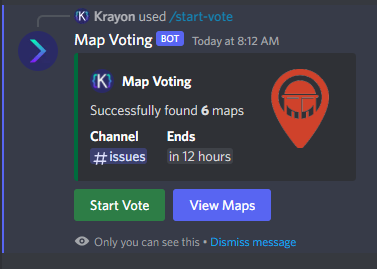
Map Voting is a Discord Bot that mainly utilizes RustMaps to get Map Information and then feeds it to the end user so they can vote on which map they would like on the server(s). Server Owners can easily setup map voting with easy to use commands. Map Voting Features - Start Map Voting Maps are added manually with either their seed/size or their Map ID (Custom Maps work!) or they can be added through a RustMaps share link. The end of a map voting session is set by the server owner on command initialization Channel of the map voting is also set during command initialization After command is used, you will be able to view the maps that have been added - Stop Map Voting Map Voting can be stopped at any time with a command - View Votes After map voting has been stopped, you will be able to view all votes until another one is started as shown in images - Presence Ability to change the bot's status, activity name and activity type with a simple command - Customization Yes and No reactions can be customized to be any Unicode emoji or any Guild emoji (bot has to be in the guild the emoji is from) You can customize the Embed Color, Author Name, Author Icon URL, Author URL Information If you have ANY questions just hop in the Discord and send me a DM. Join the Discord for Support - https://discord.gg/YbkvZWs3a4 (All suggestions are welcome for new features or changes) Setup 1 - Install Node and NPM (Node v16.17.1 & NPM v8.15.0) HIGHLY recommend installing Node v16 or else I'm pretty sure you will encounter issues 2 - Unzip Map-Voting.zip 3 - Open a terminal under the Map-Voting folder and execute the command: npm install 4 - Open config.json and fill in all the required information RustMaps API_Key (https://rustmaps.com/user/profile -> Api Key Button -> Copy) Discord BOT Token (https://discord.com/developers/applications -> Applications -> New Application -> Bot -> Create New Bot -> Reset Token) Guild ID (Enable Developer mode in Discord (https://beebom.com/how-enable-disable-developer-mode-discord/) and then right click on the Guild you will be using the bot in and click "Copy ID") 5 - Run the Bot (Recommend using PM2 for this) Configuration File { "RustMaps": { "API_Key": "" }, "Discord": { "BOT_Token": "", "Guild_ID": "", "Reactions": { "YES_Reaction": "", "NO_Reaction": "" }, "Embed": { "Color_In_HEX": "006B3C", "Author": { "Name": "Map Voting", "IconURL": "", "URL": "" } } } }$10.00 -

Version 1.0.1
22 downloads
ServerPolls+ Summary: Admins can announce server polls with any information they choose. Players can vote by clicking the buttons on the UI. This is an incredible plugin for compiling data for new additions to the server from your players. Your discord polls don't reach all of your players! That's why server polls are the most effective way to learn about what players really want! Commands: admin.feedback (message) Permissions: serverpollsplus.view & serverpollsplus.send Dependencies: ImageLibrary Core Features: 1. On screen polls 2. Voting options 3. Flawless UI design 4. Permissions 5. Discord Integration Configuration: Language Settings Confirmation Message In Chat Upon Vote Discord Channel Integration for Results$10.00 -
Version 1.0.0
848 downloads
Reward players for advertising your server! Players with a key of your choosing in their name will be given reoccurring rewards. Player names can have the key anywhere as long as it's continuous, examples: Key: RR RR-Username RR username useRRname usernameRR Offers full integration with ServerRewards and Economy plugins to allow for rewards such as shop points and money. Examples for each are included with the default config that are generated on the plugin's initial load. Examples for rust items are also included, using the short-name as the key to allow for readable configs. Short names can be found here: CorrosionHour I offer full support through comments and pm's, as well as feature requests.$2.00