Search the Community
Showing results for tags 'wipe'.
-

Version 2024.5.2.1658
305 downloads
SAVE 13% WHEN BUYING THE BUNDLE NOW SUPPORTING PROCGEN AND CUSTOM URL BASED MAPS ! This plugin will allow you to setup automatic server wipes without requiring external scripts. This plugin is very useful for any server owner but I'm positive that it will be really useful for those hosting providers running panel based game instances where you do not have full access to customize the server or the provided wipe tool is very limited. You should have a look at the suggested plugins for Oxidation's Scheduler which is a perfect fit for a fully in-game automatic wipe process. The plugin also allows you to set a list of seeds that will be used at server wipe to select the new map seed. You can define as many different wipe types as you'd like on the config file like so: This example is for a "forced" wipe. In order to execute the wipe type on the rcon console "wipe forced". "Forced": { "Restart": 120, "Message": "A server wipe is being executed, we'll be back shortly", "Game": { "Blueprints": true, "Logs": true, "Map": true, "PlayerDeaths": true, "PlayerIdentities": true, "PlayerStates": true, "PlayerTokens": true }, "Plugins": { "Convalence": true, "Data": true, "Groups": true, "Language": true, "Logs": true, "Users": true }, "Files": [ "my/custom/path/this_file_will_be_deleted.json" ], "Blacklist": [ "carbon/data/this_file_will_never_be_deleted.json" ] } This example is for a "weekly" wipe. In order to execute the wipe type on the rcon console "wipe weekly". "Weekly": { "Restart": 120, "Message": "A server wipe is being executed, we'll be back shortly", "Game": { "Blueprints": false, "Logs": true, "Map": true, "PlayerDeaths": true, "PlayerIdentities": false, "PlayerStates": true, "PlayerTokens": false }, "Plugins": { "Convalence": false, "Data": true, "Groups": false, "Language": true, "Logs": true, "Users": false }, "Files": [ "my/custom/path/this_file_will_be_deleted.json" ], "Blacklist": [ "carbon/data/this_file_will_never_be_deleted.json" ] } This is a standalone Harmony patch, Oxide installation is optional. Copy the Oxidation.Wiper.X.dll file into your HarmonyMods folder and restart your server. At the first server start after installing the patch a new configuration file Oxidation.Wiper.json will be created at the HarmonyMods folder. What is Harmony ? Harmony is a library for patching .NET code during runtime, it directly manipulates game code (CIL) without any additional abstraction layer such as Oxide. The direct patching of the game's byte code allows more performant modding as developers no longer need to rely on third party code, events or hooks to build custom functionality.$4.99 -

Version 0.1.1
27 downloads
This addon for RoamingNPCs allows you to dynamically control RNPCs spawn based on hours after wipe and current amount of players online, helping to create a balanced experience. Population Control • Setup specific bots presets as the wipe progresses — customize which RNPCs appear after 6h, 12h, 24h, and beyond. • You can make early wipes feel balanced and late wipes stay challenging with various RNPCs presets. • Integrates with your existing RoamingNPC presets. Adaptive Limits • Limit the max number of active RNPCs based on how many players are online at the moment. • Keep a balance between players and bots. • Keep the server performance smooth during peak hours. Map Markers • Optionally show live markers for all RNPCs on map. • Display RNPC's base locations on map (requires RNPCs Buildings Addon). • Customize colors, names, radius, refresh rate, and visibility duration. Requirements • RoamingNPCs Plugin Video Demo of Map Markers: Configuration: { "Available bots by wipe hours (key - hours after wipe, value - list of bot's setup names from main config)": { "6": [ "bob_resources_farmer", "john_looter" ], "12": [ "alfred_hunter", "austin_fighter" ], "24": [ "alfred_hunter", "austin_fighter", "bob_resources_farmer", "john_looter" ] }, "Limits based on amount of players online": { "Limit amount of active bots based on amount of players online?": false, "Limits (key - min amount of players, value - max amount of bots)": { "0": 5, "5": 4, "10": 3, "15": 2, "20": 1, "25": 0 } }, "Markers to show all RoamingNPCs on map": { "Enable these markers?": true, "Display name": "NPC {name}", "Refresh rate in seconds": 1.0, "Duration": 0, "Radius": 0.2, "Color 1": "#313647", "Color 2": "#435663", "Alpha": 0.75 }, "Markers to show all RoamingNPC's bases on map (RNPCs Buildings Addon)": { "Enable these markers?": false, "Display name": "Base of NPC {name}", "Refresh rate in seconds": 0.0, "Duration": 0, "Radius": 0.2, "Color 1": "#313647", "Color 2": "#435663", "Alpha": 0.75 } }$4.90 -

Version 1.4.0
9 downloads
Wipe Timer – Professional Discord Wipe Countdown System Stop manually announcing wipes. Let your Discord handle it automatically — clean, dynamic, and fully automated. Wipe Timer is a premium Rust plugin that displays a continuously updating wipe countdown inside a dedicated Discord channel using a Discord Bot. It keeps your community informed 24/7 with zero manual effort. Why This Plugin? ✔ No more manual wipe reminders ✔ Always accurate countdown ✔ Fully automated Discord updates ✔ Clean, modern embed design ✔ Admin private alert system ✔ Lightweight & optimized Designed for serious Rust server owners who want professional presentation. Core Features: Live Discord Countdown The plugin automatically updates a single Discord embed message at a configurable interval (default: every 60 seconds). No spam. No duplicate messages. Only one clean message that updates itself. Smart Dynamic Color System: The embed color automatically changes based on remaining time: Green — More than 24 hours remaining Yellow — Between 1 hour and 24 hours Red — Less than 1 hour remaining This gives your community an instant visual warning. Private Admin Alerts (DM): Admins receive a private Discord message before the wipe. Configurable alert time (default: 1 hour before wipe). Fully optional. Perfect for staff coordination. Clean & Informative Embed: The embed includes: Remaining time Exact wipe date & time Server name Server IP Server country Online player count Server news Website link Map image Thumbnail All formatted in a clean and professional layout. Fully Configurable : Everything is configurable inside config.json: • Next wipe date & time • UTC offset • Update interval • Embed colors • Server information • Images • Admin Discord IDs In-Game Commands: Set the next wipe time (server local time). /setwipe <yyyy-MM-dd HH:mm> Adjust your server UTC offset. /setutcoffset <hours> Update displayed server country. /setservercountry <name> Ideal For: Weekly wipe servers Bi-weekly wipe servers Monthly wipe servers Competitive PvP servers Large community servers Professional branded servers Performance & Stability Lightweight Optimized update logic No spam requests Only updates when needed Safe WebRequests usage Minimal data storage Built for production servers. Configuration Example: { "BotToken": "YOUR_BOT_TOKEN_HERE", "ChannelId": 0, "NextWipeLocalDateTime": "2026-02-01 18:00", "UtcOffsetHours": 3, "UpdateIntervalSeconds": 60, "ColorLongTime": 3066993, "ColorMediumTime": 16776960, "ColorShortTime": 15158332, "AdminDiscordIds": [], "AdminAlertBeforeSeconds": 3600, "EmbedSettings": { "Title": "Wipe Countdown", "Footer": { "Text": "Rust Server", "IconUrl": null } }, "ServerIP": "0.0.0.0", "ServerCountry": "Unknown", "ServerNews": "Stay tuned for upcoming events!", "ServerWebsiteUrl": "", "ThumbnailUrl": "", "MapImageUrl": "" } Need Support:$9.99 -
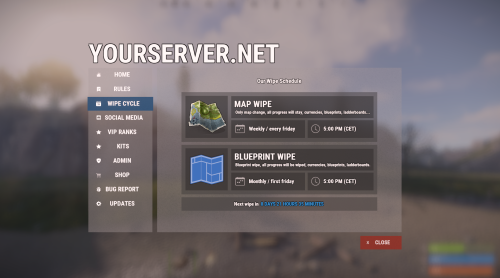
Version 1.3.23
10,661 downloads
Bundle of four addons made for Welcome Panel UI. All four addons including preset default config files as you see them on screenshots.$14.99 -

Version 1.1.4
1 download
Wipe Permission Groups Tired of manually removing permission groups and player permissions every wipe? Players keeping their earned titles, ranks, and special permissions from the previous wipe when they shouldn't? Spending the first hours of every wipe cleaning up your permission system instead of enjoying the fresh start? WipePermissionGroups is your solution. How It Works On every map wipe, the plugin detects the OnNewSave event Automatically removes all players from your configured permission groups Revokes specified user permissions (supports wildcards like kits.* to remove all kit permissions at once) Logs everything to console so you know exactly what happened Features Zero Maintenance: Set it up once, never worry about it again Wildcard Support: Bulk permission removal with patterns like kits.* Manual Commands: /wipegroups and /wipepermissions available anytime Detailed Logging: Full console output (can be disabled in config) Perfect For Servers with progression-based rank systems Event rewards that should reset Raid tier permissions Any permission that should reset with the wipe Set it once, wipe worry-free.$1.99 -
Version 2.1.8
806 downloads
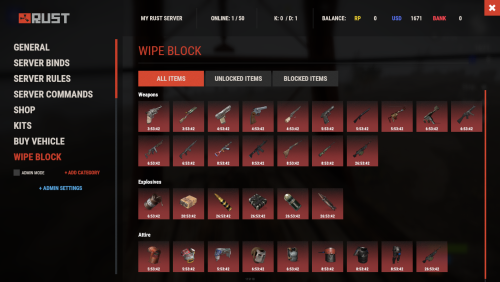
Introducing WipeBlock, the essential Rust server management plugin that allows you to control which items players can access at different stages after a server wipe! Create a balanced progression system that prevents early access to powerful weapons, explosives, and high-tier gear, ensuring a fair and enjoyable experience for all players during the critical early-game phase. ️ Features of WipeBlock Elegantly prevents access to high-tier items for configurable time periods after a server wipe Customizable categories for Weapons, Explosives, and Attire with independent timers Beautiful user interface showing players which items are currently blocked and when they will unlock Visual gradient system to indicate how much time remains until an item becomes available Seamless integration with ServerPanel for easy access Compatible with Notify plugin for player notifications when items are blocked On-screen indicator showing when blocked items are about to unlock Permission system to allow VIPs or admins to bypass item restrictions Notification system for players when items become available Handles all item interactions - equipping, moving, reloading weapons, etc. Automatic monitoring of player inventories to enforce restrictions Multiple UI templates (Fullscreen, ServerPanel V1, ServerPanel V2) Commands /block or /wipeblock - Open the WipeBlock menu to view blocked items and timers wb.indent [seconds] - Admin command to adjust the time indent from the wipe date Permissions WipeBlock.ignore - Allows players to bypass the WipeBlock restrictions WipeBlock.unlocknotify - Players with this permission receive notifications when items unlock Showcase Fullscreen Template ServerPanel V1 Template ServerPanel V2 Template On-Screen Indicator TEST SERVER Join our test server to experience WipeBlock and our other plugins in action! Copy the IP Address below to start playing! connect 194.147.90.239:28015 Developer API WipeBlock provides a developer-friendly API for integration with other plugins: bool AnyBlocked() - Checks if any items are currently blocked int SecondsFromWipe() - Returns the number of seconds since the wipe (adjusted by time indent) bool IsBlocked(ItemDefinition def) - Checks if a specific item definition is blocked bool IsBlocked(string shortName, ulong skin = 0) - Checks if an item with the specified shortname and skin is blocked int LeftTime(string shortName, ulong skin = 0) - Returns the remaining time in seconds until the specified item unlocks Hooks WipeBlock provides the following hooks that other plugins can subscribe to: void OnWipeBlockEnded() - Called when all items have been unblocked Example usage in your plugin: private void OnWipeBlockEnded() { // Execute code when all WipeBlock items are unlocked Puts("All items have been unblocked!"); // Perhaps enable your PVP plugin or other game-changing features } FAQ Q: How do I configure which items are blocked and for how long? A: In the WipeBlock.json configuration file, you can define categories (Weapons, Explosives, Attire, etc.) and set time periods in seconds for each item. For example, setting "3600" means the item will be blocked for 1 hour after wipe. Q: Can players still find these items in-game during the block period? A: Yes, players can still find or loot these items, but they cannot equip, use, or place them in their hotbar until the block period expires. The items will automatically move to their main inventory. Q: Does this plugin affect all players equally? A: By default, yes. However, you can grant the "WipeBlock.ignore" permission to specific players or groups to allow them to bypass the restrictions. Q: How will players know which items are blocked? A: Players will see notifications when they try to use blocked items. Additionally, they can use the /block command to view a complete list of blocked items and their remaining time until unlocking. Q: Can I adjust the timers during a running wipe? A: Yes, administrators can use the /wb.indent command to adjust the time indent, effectively changing when items will unlock. Q: Does WipeBlock work with modded or custom items? A: Yes, you can add any item to the configuration using its shortname and skin ID. Q: How do I add WipeBlock to the ServerPanel menu? A: Follow these simple steps: 1. Open ServerPanel menu in-game and click "+ADD CATEGORY" button 2. Set these exact parameters: Type: Plugin Plugin Name: WipeBlock Plugin Hook: API_OpenPlugin 3. Click "SAVE" button to create the category$21.95- 39 comments
-
- 4
-

-

-
- #wipeblock
- #auto wipe
- (and 7 more)
-

Version 2.0.19
731 downloads
The ultimate solution for RUST server owners. Our plugin gives you complete control over scheduling server events, allowing you to create unique schedules that automatically adapt to your needs. Features of Wipe Schedule Handy built-in editor: Manage events directly in-game through an intuitive and user-friendly interface. Customizable calendar commands: Set up custom commands, so players can easily open the calendar and view upcoming events. Multi-language support: Localize the plugin for your audience by translating all interface text into any language. Customization flexibility: Add events with individual descriptions, dates, and times — perfect for wipes, tournaments, or special server events. Easy integration: Quick and easy installation with Server Panels. Flexible week display: Choose between two calendar week formats — Monday-first (ISO standard) or Sunday-first (American style) to match your server's preferences. Recurring events: Say goodbye to the hassle of manually scheduling events every week! Create events that automatically repeat on a set schedule:| Weekly events. Repeats every X days. Monthly and annual events. Complex combinations: Combine different repeat types to build unique and fully customizable schedules. Commands /wipe: Open the calendar interface (for players) wipeschedule.time (console): Displays current plugin time with configured timezone offset. Useful for verifying timezone settings. (RCON/Server console only) Permissions wipeschedule.admin: Grants full access to create, edit, and delete scheduled events through the in-game interface. Video Overview Test Server Join our test server to experience all our unique features firsthand! Copy the IP address below to start playing! connect 194.147.90.239:28015 FAQ Q: Where can I see an example of a config? A: Config Q: How do I add WipeSchedule to the ServerPanel menu? A: Follow these simple steps: 1. Open ServerPanel menu in-game and click "+ADD CATEGORY" button 2. Set these exact parameters: Type: Plugin Plugin Name: WipeSchedule Plugin Hook: API_OpenPlugin 3. Click "SAVE" button to create the category Q: How can I hide the bottom panel with "/info" command and event color markers? A: To hide the bottom information panel, edit the UI configuration file located at oxide/data/WipeSchedule/SetupUI and set "Show panel with /info command and event color markers?": false in the Schedule section. The file name depends on your template: UIFullScreen.json for full screen mode, UIMenuV1.json for ServerPanel template V1, or UIMenuV2.json for ServerPanel template V2. Q: How do I set the calendar to start the week on Monday? A: By default, the calendar week starts on Monday (ISO standard). If you need to change it, edit the plugin configuration file and set "Start calendar week on Sunday": false to keep Monday as the first day, or set it to true to use Sunday-first format (American style).$29.95- 12 comments
- 3 reviews
-
- 8
-
-
-
- #wipe schedule
- #wipe
- (and 4 more)
-
.thumb.gif.4ed2fdcad021291913a8aed7146cf08c.gif)
Version 1.1.9
2,150 downloads
Daily Rewards is a strong tool for Rust admins who want to keep their players engaged until the end of the wipe. You can provide your gamers with distinct daily rewards for logging in with this plugin. This way, you not only liven up gameplay, but also encourage longer playtime. With Daily Rewards, don't lose the chance to draw in new players and keep returning ones! Features of Daily Rewards Beautiful and user-friendly interface Daily rewards for logging Motivating players to stay in the game longer Retention of players until the end of the wipe Compatibility with many plugins Edit rewards and config via in-game interface (no JSON editing required) By default, the plugin supports English, Russian, and Chinese languages Cooldown time before receiving an award Saving rewards in the plugin's inventory Do not receive rewards from inventory while in the build block, raid block, or combat block Commands daily – open daily rewards interface dailyrewards.wipe – wipe of player data dailyrewards.top [format: csv, empty (default)] [limit (10 is default)] – get a list of players with the day their award. dailyrewards.manage – manage daily reward settings dailyrewards.manage playtime set <steam_id> <amount> – sets the playtime for the specified player. dailyrewards.template [fullscreen/inmenu] [target_template] – sets the interface template for daily rewards. Parameters: [fullscreen/inmenu]: Type of interface template to set. Valid values: fullscreen or inmenu. [target_template]: For the inmenu template, you must specify the template number (1 or 2). Permissions dailyrewards.use – allows you to open the DailyRewards menu dailyrewards.edit - allows you to enable edit mode Video FAQ Q: Where can I see an example of a config? A: Config Q: How do I add DailyRewards to the ServerPanel menu? A: You can do this directly from the ServerPanel in-game: 1. Open the ServerPanel menu in-game. 2. If you have permission to edit, switch the panel to edit mode so you can see the blue "EDIT CATEGORY" and "EDIT PAGES" buttons. 3. Choose the category where you want DailyRewards to appear and click the "EDIT CATEGORY" button for that category. 4. While you are in this category in the ServerPanel, click the "EDIT PAGES" button to create a new page (or edit an existing one) for DailyRewards. 5. For that page, set these exact parameters: Type: Plugin Plugin Name: DailyRewards Plugin Hook: API_OpenPlugin 6. Save the changes. The DailyRewards button will now appear in the ServerPanel in the category you selected.$34.95 -

Version 1.0.0
3 downloads
NexusRestartManager is a professional Rust server lifecycle plugin that manages restarts, wipe tracking, Discord notifications, and native decay configuration COMMANDS (ADMIN): • Restart server: /nrm restart <seconds> [reason] Example: /nrm restart 300 Server update • Cancel a scheduled restart: /nrm cancel COMMANDS (PLAYERS): • View wipe info : /nrmwipe • View wipe info: /nextwipe PERMISSIONS: Admins must have: nexusrestartmanager.admin Grant using your permissions plugin (Oxide/Carbon). oxide.grant user <playername_or_steamid> nexusrestartmanager.admin carbon.grant user <playername_or_steamid> nexusrestartmanager.admin DISCORD FEATURES (AUTOMATIC): • Server Online message (status + wipe cycle) • Restart Scheduled message (countdown + reason) • Server Offline message (uptime + wipe age + wipe cycle) • No duplicate or spam messages • No fake player counts DECAY SETTINGS (CONFIG ONLY): This plugin uses Rust’s native decay system. Example: "Decay": { "Upkeep period (minutes)": 1440 } • 1440 = normal (vanilla) decay • Higher number = slower decay • Lower number = faster decay • Applies automatically on server start and wipe • No commands required IMPORTANT NOTES: • Requires Oxide/Carbon Discord extension for Discord messages • Does NOT wipe blueprints • Does NOT force wipes (tracking only) • Lightweight and production safe This plugin uses a Discord webhook to send server status messages. STEP 1: Create a Discord webhook 1. Open Discord 2. Go to your server 3. Right-click the channel you want messages in 4. Click "Edit Channel" 5. Go to "Integrations" 6. Click "Webhooks" 7. Click "New Webhook" 8. Copy the Webhook URL STEP 2: Add webhook to the plugin config 1. Start the server once with the plugin installed 2. Stop the server 3. Open this file: oxide/config/NexusRestartManager.json or use carbon config 4. Paste your webhook URL into: "Discord": { "Webhook URL": "PASTE_URL_HERE" } STEP 3: Save the file and restart the server • Do NOT reload for first setup • Restart the server fully STEP 4: Verify it works • When the server starts, Discord should show "Server Online" • Run: /nrm restart 60 Test • You should see a restart message in Discord$9.99 -

Version 1.0.0
1 download
EssentialsX — the lightweight “essentials” your Rust server actually needs Give your players the quality‑of‑life features they expect — without bloat. EssentialsX bundles the most-used commands into one clean, configurable plugin, Teleportation done right: TPA + Homes with warmup, cooldowns, movement/damage cancel, hostile checks. Kits system: permissions, cooldowns, inventory-space protection, and an admin command to create kits straight from your inventory. Modern chat experience: configurable chat format with {GROUP}/{NICK}/{MESSAGE}, Minecraft-style & colors, permission-based group tags. AutoMessages: scheduled server announcements with & colors. Wipe timer that fits your schedule: weekly / biweekly / monthly wipe schedules. Admin tools: broadcast announcements and inventory view (/invsee) with view-only mode by default. Full control: every module can be toggled via Features (enable/disable) and hidden automatically. Multi-language: all messages live in config and can be edited per language. Main Features - TPA teleport requests with timeout, warmup, cooldown, and cancel on movement/damage - Homes with limits, warmup, cooldown, and cancel on movement/damage - Kits with per-kit permissions and cooldowns - Admin kit creation that reads the creator’s inventory and saves it into config - Private messages (/msg) and quick reply (/r) - /pop online counter - /wipe countdown based on a configurable schedule (weekly/biweekly/monthly) - Admin broadcast messages - Inventory view (invsee) for admins - Chat formatting with {GROUP}/{NICK}/{MESSAGE} and Minecraft-style color codes (&0..&f, &r) - Multi-language messages (EN/RU/PL/ES/DE) via config - AutoMessages (periodic server messages) via config MORE FEATURES COMMING SOON! Installation 1) Copy the file `EssentialsX.cs` into your server’s plugins folder: oxide/plugins/EssentialsX.cs 2) Reload or restart the server: oxide.reload EssentialsX 3) Edit the generated config file: oxide/config/EssentialsX.json COLOR CODES: &0 black &1 dark blue &2 dark green &3 dark aqua &4 dark red &5 dark purple &6 gold &7 gray &8 dark gray &9 blue &a green &b aqua &c red &d light purple &e yellow &f white CONFIG Default "Chat": { "Format": "[{GROUP}] <{NICK}> {MESSAGE}", "UseMinecraftColors": true, "AllowPlayerMessageColors": true, "PermissionPrefixes": [ { "Permission": "essentialsx.prefix.admin", "Prefix": "<color=#FF5555>ADMIN</color>", "Priority": 100 }, { "Permission": "essentialsx.prefix.vip", "Prefix": "<color=#FFAA00>VIP</color>", "Priority": 10 } ] }, Modern example: "Chat": { "Format": "{GROUP} &7{NICK} &b» &7{MESSAGE}", "UseMinecraftColors": true, "AllowPlayerMessageColors": true, "PermissionPrefixes": [ { "Permission": "essentialsx.prefix.admin", "Prefix": "<color=#FF5555>[ADMIN]</color>", "Priority": 100 }, { "Permission": "essentialsx.prefix.vip", "Prefix": "<color=#FFAA00>[VIP]</color>", "Priority": 10 } ] }, Example of language coloring: default "Help.Header": "EssentialsX commands (page {0}/{1}):", Custom "Help.Header": "&eEssentialsX commands (&fpage {0}&c/&f{1}&e):", Languages (Server-wide) - Set the server language in config: Language: "en" | "ru" | "pl" | "es" | "de" - All plugin messages will use the selected language. Player Commands TPA - /tpa <name> Sends a teleport request to another online player. - /tpaccept Accepts the pending request (teleports the requester to you). - /tpdeny Denies the pending request. Notes (TPA) - Requests expire after a configurable timeout. - Teleport uses warmup time (countdown). - Teleport can be cancelled if the teleporting player moves too far. - Teleport can be cancelled if the teleporting player takes damage/hostile. - Cooldowns are saved and survive restarts. Homes - /sethome <name> Saves your current position as a home. - /home <name> Teleports you to the selected home. - /removehome <name> Removes an existing home. - /homes Lists your homes. Notes (Homes) - Home limit can be configured and can also be increased by permission. - Teleport uses warmup time (countdown). - Teleport can be cancelled on movement/damage. Kits - /kits Shows kits you can use (based on permissions). - /kit <name> Redeems a kit. Notes (Kits) - Each kit can have: - Items (with amount, skin, condition, attachments/contents where supported) - Per-kit permission - Cooldown - Kit cooldowns are saved and survive restarts. Messaging - /msg <name> <message> Sends a private message to another online player. - /r <message> Replies to the last player you messaged (or who messaged you). Info Commands - /pop Shows online player count. - /wipe Shows time remaining until next wipe (from config). - /help [page] Shows available player commands (paged). - /help admin [page] Shows available admin commands (paged). Admin Commands Broadcast - /broadcast <text> Sends a server-wide announcement with a configurable prefix. Permission: essentialsx.admin.broadcast Invsee - /invsee <name> Opens the target player’s inventory for viewing (view-only by default). Permission: essentialsx.admin.invsee Create Kit (from inventory) - /createkit <name> <cooldownSeconds> Reads your current inventory (main/belt/wear) and creates/overwrites a kit in config. A permission is automatically created for the kit using the configured prefix. Permission: essentialsx.admin.createkit Permissions Summary - essentialsx.admin.broadcast - essentialsx.admin.invsee - essentialsx.admin.createkit - essentialsx.chat.colors - essentialsx.prefix.admin - essentialsx.prefix.vip Config Overview (Important Keys) Language - Language: "en" (default) Supported: en / ru / pl / es / de Translations / Messages - UseMinecraftColorsInMessages If true, translation strings can use Minecraft color codes (&0..&9, &a..&f, &r). Use && for a literal &. - Messages All translation strings are stored in config. Wipe - Wipe.Mode: "weekly" | "biweekly" | "monthly" - Wipe.TimeZoneOffsetMinutes: 0 - Wipe.Weekly.DayOfWeek: "Thursday" - Wipe.Weekly.Hour: 16 - Wipe.Weekly.Minute: 0 - Wipe.BiWeekly.AnchorUtc: "2026-01-01T14:00:00Z" (used when Mode = biweekly) - Wipe.Monthly.Day: 1 - Wipe.Monthly.Hour: 20 - Wipe.Monthly.Minute: 0 Chat Prefix - Chat.Format Supports Minecraft-style color codes (&0..&9, &a..&f, &r) and placeholders: {GROUP}, {NICK}, {MESSAGE} - Chat.UseMinecraftColors If true, color codes in Chat.Format are converted to Rust <color=#...> tags. - Chat.AllowPlayerMessageColors If true, players with permission essentialsx.chat.colors can color their own message by typing & codes (e.g. "&2Hejka"). - Chat.PermissionPrefixes List of permission-based group tags (used for {GROUP}) with priority. Features (enable/disable) - Features (enable/disable) Toggle each module on/off. Disabled features do not work and are hidden from /help. Teleport (TPA) - Teleport.RequestTimeoutSeconds - Teleport.WarmupSeconds - Teleport.CooldownSeconds - Teleport.BlockIfHostile - Teleport.CancelOnDamage - Teleport.CancelOnMoveDistance - Teleport.SleepBeforeTeleportSeconds - Teleport.SleepAfterTeleportSeconds Home - Home.WarmupSeconds - Home.CooldownSeconds - Home.BlockIfHostile - Home.CancelOnDamage - Home.CancelOnMoveDistance - Home.SleepBeforeTeleportSeconds - Home.SleepAfterTeleportSeconds - Home.DefaultLimit - Home.LimitsByPermission Kits - Kits.PermissionPrefix (default: "essentialsx.kit.") - Kits.KitDefinitions Messaging - Messaging.SentPrefix - Messaging.ReceivedPrefix Broadcast AutoMessages - Features (enable/disable).AutoMessages - AutoMessages.IntervalSeconds - AutoMessages.Random - AutoMessages.MinOnline - AutoMessages.UseMinecraftColors - AutoMessages.Messages - Broadcast.Prefix Invsee - Invsee.TimeoutSeconds - Invsee.AllowModify$2.49 -
Version 0.1.10
970 downloads
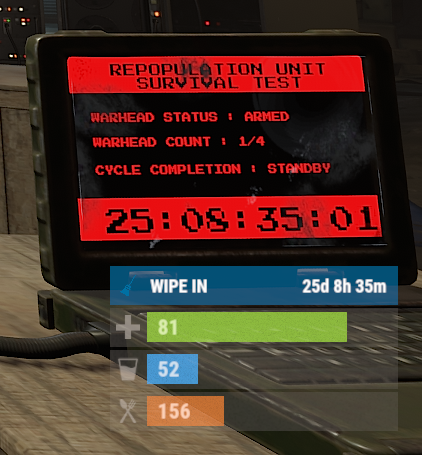
The plugin displays the time until the next wipe in the status bar. Depends on AdvancedStatus plugin. The ability to display the remaining time until the wipe: If there are N days left. Configurable in the configuration file; If player is in a safe zone or building privilege zone; The option to choose between a server wipe and a manually specified wipe; The ability to automatically generate language files for different languages(filled in English); The ability to customize the status bar for each of wipes; The ability to specify the order of the bar; The ability to change the height of the bar; The abillity to customize the color and transparency of the background; The ability to set a material for the background; The ability to switch between CuiRawImageComponent and CuiImageComponent for the image; The ability to get images from the local folder(*SERVER*\oxide\data\AdvancedStatus\Images); The abillity to set own image and customize the color and transparency of the image; The abillity to set sprite instead of the image; The ability to customize the color, size, font and outline of the text. wipestatus.admin - Provides the ability to set custom date of wipe. { "Chat command": "wipe", "Is it worth enabling GameTips for messages?": true, "List of language keys for creating language files": [ "en" ], "Is it worth displaying the wipe timer only when players in the safe zone or building privilege?": false, "The number of days before the wipe when the status bar will start to display. A value of 0 enables constant display": 0, "Bar settings key for a vanilla wipe": "_default", "Custom wipe dates list. Format: yyyy-MM-dd HH:mm. Example: 2025-12-25 13:30": {}, "List of status bar settings. Leave empty or null to recreate the default list": { "_default": { "Progress_Main_Color(Hex or RGBA)": "1 1 1 0.15", "Progress_Main_Transparency": 0.15, "BarType(TimeProgressCounter or TimeCounter)": "TimeCounter", "Order": 10, "Height": 26, "Main_Color(Hex or RGBA)": "#0370A4", "Main_Transparency": 0.7, "Main_Material(empty to disable)": "", "Image_Url": "https://i.imgur.com/FKrFYN5.png", "Image_Local(Leave empty to use Image_Url)": "WipeStatus_Default", "Image_Sprite(Leave empty to use Image_Local or Image_Url)": "", "Image_IsRawImage": false, "Image_Color(Hex or RGBA)": "#0370A4", "Image_Transparency": 1.0, "Is it worth enabling an outline for the image?": false, "Image_Outline_Color(Hex or RGBA)": "0.1 0.3 0.8 0.9", "Image_Outline_Transparency": 1.0, "Image_Outline_Distance": "0.75 0.75", "TextKey": "Bar_default", "Text_Size": 12, "Text_Color(Hex or RGBA)": "#FFFFFF", "Text_Font(https://umod.org/guides/rust/basic-concepts-of-gui#fonts)": "RobotoCondensed-Bold.ttf", "Text_Offset_Horizontal": 0, "Is it worth enabling an outline for the text?": false, "Text_Outline_Color(Hex or RGBA)": "#000000", "Text_Outline_Transparency": 1.0, "Text_Outline_Distance": "0.75 0.75", "SubText_Size": 12, "SubText_Color(Hex or RGBA)": "#FFFFFF", "SubText_Font": "RobotoCondensed-Bold.ttf", "Is it worth enabling an outline for the sub text?": false, "SubText_Outline_Color(Hex or RGBA)": "0.5 0.6 0.7 0.5", "SubText_Outline_Transparency": 1.0, "SubText_Outline_Distance": "0.75 0.75", "Progress_Reverse": false, "Progress_Color(Hex or RGBA)": "#0370A4", "Progress_Transparency": 0.7, "Progress_OffsetMin": "0 0", "Progress_OffsetMax": "0 0" } }, "Version": { "Major": 0, "Minor": 1, "Patch": 10 } } EN: { "CmdMainAdmin": "Available admin commands:\n\n<color=#D1CBCB>/wipe</color> <color=#D1AB9A>bar</color> <color=#D1CBCB>*booleanValue*(optional)</color> - Toggle the wipe bar display\n<color=#D1CBCB>/wipe</color> <color=#D1AB9A>time</color> - Current time based on server's timezone\n<color=#D1CBCB>/wipe</color> <color=#D1AB9A>add</color> <color=#D1CBCB>*wipeDate* *barId*(optional) *numericValue*(optional) *numericValue*(optional)</color> - Add a custom wipe date. Optionally, you can specify the style of the status bar, interval/spacing between wipes, and the number of intervals. Date format: yyyy-MM-dd HH:mm\n<color=#D1CBCB>/wipe</color> <color=#D1AB9A>add bar</color> <color=#D1CBCB>*wipeDate* *barID*(optional) *newBarId*(optional) *targetBarId*(optional)</color> - Add new status bar settings. Optionally, specify the ID of an existing bar to copy from\n<color=#D1CBCB>/wipe</color> <color=#D1AB9A>update</color> <color=#D1CBCB>*wipeDate* *newBarId*</color> - Update the status bar settings key for the specified custom wipe date. Use 'vanilla' instead of a wipe date to select the vanilla wipe\n<color=#D1CBCB>/wipe</color> <color=#D1AB9A>clear</color> - Clear all custom wipe dates\n\n--------------------------------------------------", "CmdMain": "Available commands:\n\n<color=#D1CBCB>/wipe</color> <color=#D1AB9A>bar</color> <color=#D1CBCB>*booleanValue*</color>(optional) - Toggle the wipe bar display\n\n--------------------------------------------------", "CmdServerTime": "Current real server time: '{0}'", "CmdNewDateAdded": "The new date '{0}' has been successfully added!", "CmdNewDateRangeAdded": "The list of dates was successfully added!", "CmdNewDateAddFailed": "Invalid format or the date is earlier than the current one. Example: '{0}'", "CmdUpdateFailed": "Failed to add/update status bar settings for '{0}'!", "CmdClearDates": "Custom dates list has been successfully cleared!", "CmdBarEnabled": "Displaying the wipe bar is enabled!", "CmdBarDisabled": "Displaying the wipe bar is disabled!", "Bar_default": "WIPE IN" } RU: { "CmdMainAdmin": "Доступные админ команды:\n\n<color=#D1CBCB>/wipe</color> <color=#D1AB9A>bar</color> <color=#D1CBCB>*булевоеЗначение*(опционально)</color> - Переключение отображения вайп бара\n<color=#D1CBCB>/wipe</color> <color=#D1AB9A>time</color> - Текущее время по часовому поясу сервера\n<color=#D1CBCB>/wipe</color> <color=#D1AB9A>add</color> <color=#D1CBCB>*датаВайпа* *айдиБара*(опционально) *числовоеЗначение*(опционально) *числовоеЗначение*(опционально)</color> - Добавление кастомной даты вайпа. Опционально можно указать стиль статус бара, интервал/отступ между вайпами и кол-во интервалов. Формат даты: yyyy-MM-dd HH:mm\n<color=#D1CBCB>/wipe</color> <color=#D1AB9A>add bar</color> <color=#D1CBCB>*айдиНовогоБара* *айдиЦелевогоБара*(опционально)</color> - Добавление новых настроек статус бара. Опционально можно указать айди исходного статус бара для копирования\n<color=#D1CBCB>/wipe</color> <color=#D1AB9A>update</color> <color=#D1CBCB>*датаВайпа* *новоеАйдиБара*</color> - Обновление ключа настроек статус бара для указанной даты вайпа. Используйте 'vanilla' вместо даты вайпа для выбора ванильного вайпа\n<color=#D1CBCB>/wipe</color> <color=#D1AB9A>clear</color> - Очистка всех кастомных дат вайпа\n\n--------------------------------------------------", "CmdMain": "Доступные команды:\n\n<color=#D1CBCB>/wipe</color> <color=#D1AB9A>bar</color> <color=#D1CBCB>*булевоеЗначение*</color>(опционально) - Переключение отображения вайп бара\n\n--------------------------------------------------", "CmdServerTime": "Текущее реальное серверное время: '{0}'", "CmdNewDateAdded": "Новая дата '{0}' успешно добавлена!", "CmdNewDateRangeAdded": "Список дат был успешно добавлен!", "CmdNewDateAddFailed": "Не верный формат или дата меньше текущей. Пример: '{0}'", "CmdUpdateFailed": "Не удалось добавить/обновить настройки статус бара для '{0}'!", "CmdClearDates": "Список дат был успешно очищен!", "CmdBarEnabled": "Отображение вайп бара включено!", "CmdBarDisabled": "Отображение вайп бара выключено!", "Bar_default": "ВАЙП ЧЕРЕЗ" } bar *booleanValue*(optional) - Toggle wipe bar visibility; time - Current time based on server's timezone. Permission "wipestatus.admin" required; add *wipeDate* *barID*(optional) *numberValue*(optional) *numberValue*(optional) - Add a custom wipe date. Optionally, you can specify the style of the status bar, interval/spacing between wipes, and the number of intervals. Date format: yyyy-MM-dd HH:mm. Permission "wipestatus.admin" required; add bar *wipeDate* *barID*(optional) *newBarId*(optional) *targetBarId*(optional) - Add new status bar settings. Optionally, specify the ID of an existing bar to copy from. Permission "wipestatus.admin" required; update *wipeDate* *newBarId* - Update the status bar settings key for the specified custom wipe date. Use 'vanilla' instead of a wipe date to select the vanilla wipe. Permission "wipestatus.admin" required; clear - Clear all custom wipe dates. Permission "wipestatus.admin" required. Example: /wipe add "2023-12-28 15:16" /wipe add bar "test" "_default" /wipe add "2024-07-16 19:00" "test" 7 20 - Starting from the date 2024-07-16 19:00, 7 days will be added 20 times, with "test" status bar style. /wipe update "vanilla" "test" /wipe update "2025-12-25 13:30" "test"$3.99 -
.thumb.gif.e73a8449ea926ee79cd72ce008633bc0.gif)
Version 3.1.1
49 downloads
A comprehensive kit management system for Rust that allows server administrators to create, manage, and distribute item kits to players with a user-friendly UI. General: Intuitive and customizable GUI for managing and distributing kits. Multi-page support for kit display. Adjustable UI colors and elements. Sound effects for actions. Permission-based access control. Compatibility with Economics and ServerRewards payment methods. Integration with NoEscape for combat/raid blocking. Automated data management for wipes. Cooldown system with visual timers and usage limits per kit. Auto-distribution of kits on spawn (AutoKits). Kit Configuration: Customizable names, display names, and colors for kits. Options for usage limits, cooldown timers, and wipe block durations. Permissions and payment method support. Command execution upon kit redemption. Priority-based AutoKit functionality. Ability to hide kits and display custom "no permission" messages. Item Management: Detailed configuration for all usable items in Rust. Support for blueprints, custom skin IDs, and drop probabilities. Adjustable item quantities and assignment across multiple inventory slots (Main, Belt, Wear). Admin Tools: In-game kit creation and editing. Copy items directly from inventory. Real-time kit previews and categorized item selectors. Advanced item editing and permission management. Commands: /kit - Opens the kit menu. kits.reset data [steamid64/all] - Resets kit data for a specific player or all players (Admin only). Permissions: kits.admin - Grants access to kit management UI. Command Variables: %playerid% - Numeric player ID. %playername% - Player's display name. %userid% - String version of the player ID. give %playerid% wood 1000 oxide.grant %userid% vip say %playername% has received a VIP kit! Config: { "General Settings": { "Default No Permission Message": "Buy this kit at @ store.codefling.com", "Commands": [ "kit", "kits", "kitmenu" ] }, "Wipe Settings": { "Auto wipe kit use data on wipe": false, "Save given kits on wipe": false }, "NoEscape Settings": { "Use NoEscape? (Raid/Combat block)": false, "Use Raid Blocked?": true, "Use Combat Blocked?": true, "Block Text Color": "0.7764706 0.5137255 0.4196078 1", "Raid Block Message": "RAIDBLOCK", "Combat Block Message": "COMBATBLOCK" }, "UI Settings": { "Image URL": "https://i.imgur.com/TwAgZ85.png", "Title Text": "Kits available", "Subtitle Text": "codefling.com", "Main Background Color": "0 0 0 0.7803922", "Main Panel Color": "0.1 0.1 0.1 0.8", "Kit Panel Color": "0.1 0.1 0.1 0.8", "Redeem Button - Enabled Color": "0.3647059 0.4470588 0.2235294 0.85", "Redeem Button - Enabled Icon Color": "0.5568627 0.7764706 0.1843137 1", "Redeem Button - Disabled Color": "0.4156863 0.1101371 0.1101371 0.9", "Redeem Button - Disabled Icon Color": "0.7764706 0.5137255 0.4196078 0.85", "Info Button Color": "0.1 0.1 0.1 0.8", "Info Button Icon Color": "0.7 0.7 0.7 1", "Close Button Color": "0.4156863 0.1101371 0.1101371 0.9", "Close Button Icon Color": "0.7764706 0.5137255 0.4196078 0.85", "Add Kit Button Color": "0.3137255 0.5843138 0.772549 0.85", "Add Kit Button Icon Color": "0.3960784 0.7137255 0.9294118 1", "Kit Price Label Background Color": "0.3647059 0.4470588 0.2235294 0.85", "Kit Price Text Color": "0.5568627 0.7764706 0.1843137 1", "Wipe Block Text Color": "0.7764706 0.5137255 0.4196078 1", "Cooldown Text Color": "1 1 1 1", "AutoKit Text Color": "0.7 0.7 0.7 1", "Navigation Button Color": "0.1 0.1 0.1 0.8", "Navigation Button Text Color": "1 1 1 1", "Page Counter Text Color": "1 1 1 1" }, "Sound Settings": { "Enable Sound Effects": true, "Kit Redeem Sound Effect": "assets/bundled/prefabs/fx/invite_notice.prefab", "Kit Delete Sound Effect": "assets/prefabs/locks/keypad/effects/lock.code.lock.prefab", "Copy Items Sound Effect": "assets/bundled/prefabs/fx/notice/item.select.fx.prefab", "Save Kit Sound Effect": "assets/prefabs/locks/keypad/effects/lock.code.unlock.prefab", "Checkbox Toggle Sound Effect": "assets/bundled/prefabs/fx/notice/item.select.fx.prefab", "Error Sound Effect": "assets/prefabs/locks/keypad/effects/lock.code.lock.prefab", "Button Click Sound Effect": "assets/bundled/prefabs/fx/notice/item.select.fx.prefab" }, "Notification Settings": { "Use Notify Plugin": true, "Also Send Chat Messages": false, "Kit Claimed Notification Type": 0, "Kit Purchased Notification Type": 0, "Kit Error Notification Type": 1, "AutoKit Received Notification Type": 0, "Admin Action Notification Type": 0, "Items Dropped Notification Type": 1, "Remaining Uses Notification Type": 2, "Balance Error Notification Type": 1, "Permission Error Notification Type": 1, "Cooldown Warning Notification Type": 1, "Wipe Block Notification Type": 1, "Combat/Raid Block Notification Type": 1 } } Lang: { "AutoKitReceived": "You received autokit: {0}", "KitNotFound": "Kit '{0}' not found.", "KitClaimed": "You have claimed the kit: {0}", "KitPurchased": "You have purchased the kit '{0}' for ${1}.", "KitSaved": "Kit '{0}' has been saved.", "KitRemoved": "Kit '{0}' has been removed.", "AutoKitNotManual": "This kit is an autokit and cannot be claimed manually.", "UsesExhausted": "You have exhausted all uses of this kit and cannot claim it again.", "WipeBlocked": "This kit is blocked by wipe. Remaining time: {0}", "OnCooldown": "You can't claim this kit yet. Remaining time: {0}", "NoBalance": "You don't have enough balance to buy this kit.", "NoPermission": "You don't have permission for this action.", "ItemsCopied": "Items copied from your inventory to the kit preview.", "ItemsDropped": "Some items have been dropped on the ground because your inventory was full.", "InvalidKitData": "Invalid kit data. Make sure you've entered a kit name.", "InvalidKitName": "Invalid kit name.", "ItemsCopiedToPreview": "Items copied to the kit preview.", "FillAllFields": "Please fill in all fields.", "InvalidAmountOrProbability": "Invalid amount or drop probability.", "KitRemovedSuccess": "Kit '{0}' has been removed.", "KitNotFoundError": "Kit '{0}' not found.", "NoILError": "The plugin does not work correctly, contact the administrator!", "RemainingUses": "You have {0} uses remaining for this kit.", "RAIDBLOCK": "You cannot redeem kits while raid blocked", "COMBATBLOCK": "You cannot redeem kits while combat blocked", "AutoKitReceivedNotify": "AutoKit '{0}' received!", "KitClaimedNotify": "Kit '{0}' claimed successfully!", "KitPurchasedNotify": "Kit '{0}' purchased for ${1}!", "ItemsDroppedNotify": "Some items dropped on ground - inventory full!", "RemainingUsesNotify": "{0} uses remaining for this kit", "NoBalanceNotify": "Insufficient balance to purchase this kit!", "CooldownNotify": "Kit on cooldown: {0} remaining", "WipeBlockNotify": "Kit wipe-blocked: {0} remaining", "CombatBlockNotify": "Cannot use kits while combat blocked!", "RaidBlockNotify": "Cannot use kits while raid blocked!", "PermissionErrorNotify": "No permission to access this kit!", "AdminKitSavedNotify": "Kit '{0}' saved successfully!", "AdminKitRemovedNotify": "Kit '{0}' removed successfully!", "AdminItemsCopiedNotify": "Items copied to kit preview!" }$12.99 -
Version 1.0.3
215 downloads
Extremely easy and dynamic Calendar system for your server! In just a few seconds you could inform players about the next few months of wipes, events, etc! FEATURES - Built in editor - Auto schedule events and wipe info - Click one button to add the next needed month - Auto generates the new month if you forget to - Page with all months listed - Schedule based on week day - Schedule based on x amount of days - Built in legend editor to alter your legends - Built in day editor if you just want to edit one day at a time - Support for Welcome Controller - Add images on specific days - Add larger images within the info of that day - Editable commands - All UI colors are easily editable - Full lang file - ETC!!**** EXTRA INFO ADMIN PERMISSION: calendarcontroller.admin Default commands: /calendar & /wipe Support? Questions? Comments? Concerns? Message me in my Discord! https://discord.gg/RVePam7pd7$19.99 -
Version 1.0.0
13 downloads
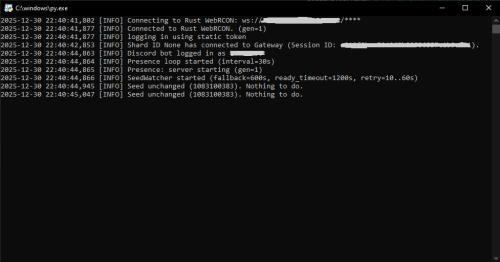
Discord Players & Wipes Alerts is a real-time monitoring bot for Rust servers written in Python that displays live player counts on Discord and automatically detects map wipes by tracking the server seed. The bot connects directly to the Rust WebRCON and keeps your Discord server continuously updated with accurate server information. When a wipe happens and the server restarts, the bot detects the new map seed and sends a notification to a designated Discord channel. All configuration is handled through a .env file, making the bot easy to customize and deploy on any server. Features: Displays the current number of players online in the Discord bot presence Automatically reconnects to WebRCON when the Rust server restarts Detects map wipes by monitoring changes in the server.seed value Sends wipe notifications to a specific Discord channel Stores the last known seed to avoid duplicate wipe alerts Handles long server startup times on large or heavily modded maps Fully configurable through environment variables How it works? The bot maintains a persistent connection to the Rust WebRCON. When the server restarts, the WebRCON connection drops and reconnects automatically. This reconnect is used as a trigger to verify whether a new map seed is active. After reconnecting, the bot waits until the Rust server is fully operational. It then runs the server.seed command and compares the result with the previously stored seed. If the seed has changed, a wipe is detected and a notification is sent to Discord. This approach guarantees reliable wipe detection even on servers that take a long time to load their maps. Required configuration The following environment variables must be set in the .env file for the bot to function correctly: DISCORD_TOKEN=The Discord bot token. This allows the bot to connect to Discord and update its presence and send messages. RUST_RCON_HOST=The IP address or hostname of the Rust server WebRCON. RUST_RCON_PORT=The WebRCON port of the Rust server. RUST_RCON_PASSWORD=The WebRCON password used to authenticate with the Rust server. SEED_CHANNEL_ID=The Discord channel ID where wipe alerts will be sent. SEED_CHANGE_MESSAGE=The message sent when a wipe is detected. You can use {old_seed} and {new_seed} as placeholders in the message. Example: SEED_CHANGE_MESSAGE=Map wipe detected. Old seed: {old_seed} -> New seed: {new_seed}Free -

Version 1.0.2
70 downloads
Global Storage Pro creates storage for your players that can be access from any global storage container. Containers will automatically spawn at safe-zone monuments, allowing players to safely store their items. The plugin will create an instance of storage for each player that loots the box, allowing for multiple players to loot the same global storage chest to manage their own instances of storage. Monument spawns: Automatically spawns containers at safe zone monuments. These can be repositioned using the gs.setpos command. Map specific spawns: Use the gs.addloc command to create a spawn point for a container that will be based on the map name. Anytime the map with a valid name is loaded, a container will spawn at the specified location. Placeholder spawns: Using RustEdit, placeholder entities can be deployed at specific locations to create automatic spawns for your custom monuments. Deployable containers: Players can be given deployable containers to setup in their bases that access the storage network. Comprehensive white/black list: Have full control over what items can be added to GlobalStoragePro containers based on skin, name, shortname and text fields. Permission based slots and deployments: You can create any number of permissions that will provide more or less storage slots, and deployments of containers. Administrative tool: Access the contents of any players global storage in-game using the gs.view command. Persistent wipe settings: Allow contents of containers to persist between wipes. Command: gs.givestorage <target> <amount> Type: Console Permission: globalstoragepro.admin (or can be run by the server with no perms) Description: Gives the target player a deployable global storage item. Command: gs.setpos Type: Chat Permission: globalstoragepro.admin Description: Sets the spawn location for the nearest monument (or monument marker for custom monuments) Command: gs.addloc Type: Chat Permission: globalstoragepro.admin Description: Adds a spawn location for a global storage chest. The name of the map is captured and put into the config along with the location for future spawns. Command: gs.openplayerinventory <userid> Type: Chat Permission: globalstoragepro.admin Description: Opens the storage container for the specified userid. Command: gs.view Type: Chat Permission: globalstoragepro.admin Description: Provides a list of all containers that have contents to the admin, who can then select one to view its contents. // Adds an item to the target players global storage container void TryAddItemToGlobalStorage(BasePlayer player, Item item, bool notify)$14.99 -
Version 1.2.3
186 downloads
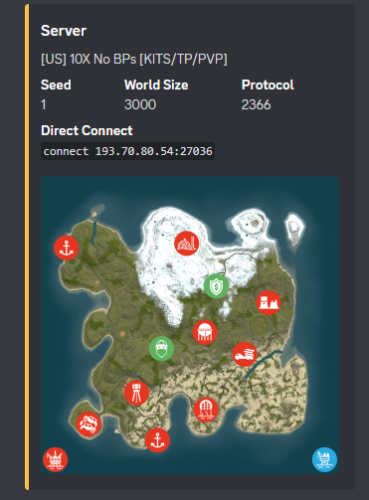
Using Discords Webhooks it sends an embed to discord notifying users of server wipes. * Different message support between FacePunch Forced wipes & Manually wiped * Includes Automation * Includes test console command * Includes Embed Setting Options * Coded for optimal performance Now requires RustMaps.com API key! Because they re-wrote the website forcing all users to sign in & make one, lol. Notes: * When you see " [Discord Wipe Embed] Waiting on rustmaps retrying in 60seconds." It means exactly what it says... * It means it's waiting on the rust-maps website to generate the Image & will re-try posting the discord embed in 60 sec. Configuration { "Sets Console Command": "sendwipe", "Disable Auto Send (Requires you to manually use console command to send embed message)": false, "ConnectionInfo": { "DiscordWebhookURL": "", "ServerName": "[US] -10X No BPs [KITS/TP/PVP]", "RustServerIp": "", "DonationURL": "", "EnableStaging": false, "EnableBarren": false, "RustMapsApiKey": "" }, "ForceWipe": { "AtEveryone": false, "AtRoleID": "", "EmbedHexColour": "#ffc348", "This will replace the Map Image if used": "", "This will generate the Map Image if enabled": false }, "Manually": { "AtEveryone": false, "AtRoleID": "", "EmbedHexColour": "#ffc348", "This will replace the Map Image if used": "", "This will generate the Map Image if enabled": false }, "Embed Fields & Descriptions": { "Map": { "Enabled": true, "Description": "", "Inline": false }, "Seed": { "Enabled": true, "Description": "", "Inline": true }, "World Size": { "Enabled": true, "Description": "", "Inline": true }, "Protocol": { "Enabled": true, "Description": "", "Inline": true }, "Direct Connect": { "Enabled": true, "Description": "", "Inline": false }, "Donation Link": { "Enabled": true, "Description": "", "Inline": false } }, "Sets Server Commands to run after wipe": [], "Do not touch.": { "WipedTime": "Thursday, 13 November 2025 17:29", "LastWipe": "Thursday, 13 November 2025 17:29" } }$9.99- 9 comments
- 1 review
-
- 1
-
-
- #khan
- #discordwipeembed
- (and 8 more)
-

Version 5.1.3
15,514 downloads
MyRustServer is a Rust Server Tool that allows you to create and manage your own Rust Server in just a few clicks. The tool brings many possibilities and options that simplify your life as a server admin. No unnecessary creation of batch files, easy installation of the server and extensions, easy updating of your plugins, wipe your server with one click and manage your players. Join the discord for better and faster support Big thanks to everyone who supports the project and helped me You can run MyRustServer on up to 4 different systems. You can create as many servers on one system as your hardware allows. It is a standalone program for Windows Only, with which you can host your own server, connecting to other server host service providers is not possible. No Support for OneDrive Drives. No Support for Cracked Servers. The dashboard shows you all relevant information about your server. Here you control your server. Auto Restart Server Auto Update Server Auto Update Oxide/Carbon Only Updates on Startup Force Restart Set Game Mode (Vanilla, Survival, Softcore, Hardcore, Weapontest and Primitive) Set CPU Affinity Set Process Priority Start/Restart Kill and Save Server With the installer you can easily install and update your server. No batch files are used. Server Install or Update Server (Master, BETA, AUX01, AUX02, AUX03) Verify Server Files Repair Server Files Install Discord Extension Install RustEdit Install Rust.UI Oxide Install Oxide (Public, Staging) Update/Uninstall Oxide Show Server in Modded/Community Permisson Manager Carbon Install Carbon (Production, Preview, Edge, Staging, AUX02, AUX03) Update/Uninstall Carbon Show Server in Modded/Community Under Settings you give your server your personal touch. Here you can set everything for your server. Server Settings Name Logo URL Web URL App Logo URL Description Tags Max Players Add Users (Admins, Mods) RCON Password Add Ports to Windows Firewall Server Port RCON Port Query Port App Port Server IP RCON IP Add Custom Maps Server Map (Procedural, Custom, Barren, Hapis Island, Craggy, Savas Island, Savas Island Island_koth) Map Size Map Seed Start Configs (convars) Backups (MRS, Oxide/Carbon, Server, Harmony) Advanced Settings Create Backup on Server Start Minimize Server Console at Startup Start Rust Server on MyRustServer Startup Disable MyRustServer Console Process Start Commands for RustDedicated.exe In Plugins you can easily manage your plugins. No annoying manual reload after editing. Plugins Reload Update View Website Enable/Disable Delete Update Check Plugins for Update (Supported sites for checking are: uMod, Codefling, Lone.Design, Chaos, RustWorkshop, Github, ModPulse, RustPlugins, ServerArmour, ImperialPlugins, MyVector, SkyPlugins, Game4Freak) Update Plguin (Only plugins from uMod can be updated directly from MyRustServer.) Editor Edit Configs/Data Auto Reload Plugin on Save Reload Search by Text Plugin Installer Install Plugins from uMod Here you can create your own schedule if I don't have time at the moment. Wipe Shedule Blueprints, Map, Backpacks, Logs, Player Deaths, Player Identities, Player Stats, Player Tokens, Custom Folder/File Custom Map New Map Seed on Wipe Custom Seed Date to Server Title Customs (Wipe Shedule) Custom Maps Custom Seed Wipe Blueprints, Map, Backpacks, Logs, Player Deaths, Player Identities, Player Stats, Player Tokens, Custom Folder/File Custom Map New Map Seed on Wipe Custom Seed See exactly who is on your server. Online Player List Offline Player List Banned Player List Give Item Open Steam profile Copy SteamID Copy Name Check IP Kick Player Ban Player Teleport to Me to Player Teleport Player to Me Set/Remove Admin/Mod White List Kick Max Allowed Bans Kick Max Allowed Ping Enable Whitelist Block Country View Server Console Send Commands/Say to your Server Add Quick Commands Connect your server to your Discord to use as remote control or status information. Start Bot on MyRustServer Startup Bot Commands: send Commands talk to Server check server status start the server stop the server restart the server kill the server version status update server update Oxide update Carbon check plugins Webhooks: Send Server Startup Send Server Online Send Server Offline Send Server Restart Send Client Update Send Server Update Send Oxide Update Send Carbon Update Send Wipe Notification Send Low FPS Warning Send Plugins Update Personalize your server messages. Send Server Messages (Restart, Updates and Wipe) Send Custom Messages Send Custom Commands Sets for each Message a Time Determine how long your server needs until it is reloaded. Server Restart Server Update Update Oxide/Carbon Server Wipe$29.99- 239 comments
- 65 reviews
-
- 44
-
-
-

-
- #rust server tool
- #rust server management
- (and 28 more)
-

Version 1.0.7
9 downloads
RustWipeInfoPlus A complete wipe tracking and server information plugin for Rust — automatically updates your hostname, map name, and Discord announcements whenever a wipe occurs. Main Features Automatic wipe detection (detects map, seed, or level changes) “Time since wipe” counter for hostname and map name Manual override system (ManualStartISO or ManualStartUnix) Custom map labels (show your own map name or brand) Discord webhook notifications with rich embeds and color Customizable embed color, title, and content (@everyone support) Message placeholders: {level}, {size}, {seed}, {iso}, {age}, {days}, {hostname}, {serverip}, {port}, Auto-update loop that keeps your info fresh in real time Works with both Carbon and uMod (Oxide) Installation Upload RustWipeInfoPlus.cs to your oxide/plugins/ folder. Reload the plugin: oxide.reload RustWipeInfoPlus Edit your generated config in oxide/config/RustWipeInfoPlus.json. Add your Discord webhook URL and optional message ID. Example Config "General": { "CustomLabel": "Isla Rustalia 3700 — testing.com", "PrependMapInfo": false, "MaxLength": 70 }, "HostnameTag": { "Enable": true, "Format": "Wiped: {0} ago", "Separator": " | ", "Position": "suffix", "BaseHostname": "testing [LATAM] PVE" }, "Webhook": { "Enable": true, "Url": "https://discord.com/api/webhooks/XXXX/XXXX", "MessageTemplate": "TESTING [PVE] Wipeo!\n\nMapa: {level} {size} (Seed {seed})\nWipe time: {iso}\nIP: {serverip}:{port}", "UseEmbed": true, "ContentTemplate": "@everyone", "EmbedTitle": "TESTING WIPEO BIENVENIDOS", "EmbedColor": 16711680, "AllowEveryone": true, "EditInsteadOfPost": true, "MessageId": "123456789012345678" } Commands | Command | Permission | Description | | ------------------------------------- | ---------------------- | ------------------------------------ | | `/mapname.info` | rustwipeinfoplus.admin | Shows current wipe info and hostname | | `/mapname.resetage` | rustwipeinfoplus.admin | Resets wipe timer to now | | `/mapname.setdate <YYYY-MM-DD HH:mm>` | rustwipeinfoplus.admin | Manually set wipe start | | `/mapname.clearmanual` | rustwipeinfoplus.admin | Clears manual override | | `/mapname.forceapply` | rustwipeinfoplus.admin | Forces reapply of mapname/hostname | | `/mapname.dstest` | rustwipeinfoplus.admin | Sends a test Discord message |$4.99 -

Version 1.0.4
94 downloads
DynamicData — Configurez sans limites « Plus aucune limite de configuration. Laissez libre cours à votre imagination. » DynamicData automatise l'application de vos fichiers de données (JSON) pour Rust selon une chronologie relative à l'effacement. Ajoutez vos profils (par plugin) , spécifiez quand ils doivent s'appliquer (par exemple, 2j4h, 6h30m, 1j@redémarrage) , et le plugin cible est rechargé avec la bonne configuration, immédiatement ou au prochain redémarrage. Objectif : moins d’opérations manuelles, moins d’erreurs, une progression de réinitialisation claire et amusante pour vos joueurs. Points forts Aucune limite : planifiez autant de profils que nécessaire, pour autant de plugins que vous le souhaitez. Délai d'activation flexible : immédiat ou au prochain redémarrage (idéal pour les changements importants). Progression naturelle des réinitialisations : rendez vos serveurs lisibles et motivants, dès le premier jour. Conçu pour être compatible : fonctionne avec tous les plugins utilisant des fichiers de données. Installation et démarrage rapide Déposez DynamicData.cs dans oxide/plugins et (re)chargez-le. Préparez vos fichiers JSON pour chaque plugin. Placez-les sous oxide/data/DynamicData/<Plugin>/... avec un suffixe temporel (et @restart si souhaité). Démarrez le serveur : DynamicData applique et recharge automatiquement les plugins cibles aux moments opportuns. Comment ça marche Placez vos profils JSON ici : oxide/data/DynamicData/<Plugin>/<Subfolder>/*.json (par exemple, DynamicData/RaidableBases/Profiles/Medium_2d.json) . Les fichiers comportent un suffixe temporel (\d+[dhms] peuvent être chaînés) et éventuellement @restart. Exemples : Easy_6h.json, [email protected] . DynamicData calcule chaque échéance à partir du Jour 1 (effacement) , ajoute une marge déterministe (quelques secondes) pour lisser les pics, puis copie le JSON vers l'emplacement de données du plugin cible et recharge ce plugin. If @restart is present, the profile is marked READY and only applies at the next reboot (useful for big changes). Structure & Naming Dynamic root: oxide/data/DynamicData (real-time watch on *.json). Destination: the base name (without the time suffix) becomes the final data file for the plugin (e.g., Profiles/Medium_2d.json ⇒ oxide/data/RaidableBases/Profiles/Medium.json). Valid suffixes: concatenations of d/h/m/s (e.g., 2d4h30m, 45m, 10s). Add @restart to force application on reboot. Important — Match the Target Plugin’s Official Directory Structure DynamicData applies your files only if the tree under oxide/data/DynamicData/<Plugin>/... mirrors exactly what the target plugin expects under oxide/data/<Plugin>/.... Golden rule Everything after <Plugin>/ in DynamicData must be the exact same path as in oxide/data/<Plugin>/... (same folders, same case, same filename). Concrete Examples oxide/data/DynamicData/RaidableBases/Profiles/Easy.json <- Default config (Important to place if you want a default config loaded) oxide/data/DynamicData/RaidableBases/Profiles/Medium.json+12h <- Config loaded after 12h of wipe oxide/data/DynamicData/RaidableBases/Profiles/Hard.json+2d <- Config loaded after 2 days of wipe oxide/data/DynamicData/RaidableBases/Profiles/Expert.json+4d@restart <- Config loaded after 4 days of wipe, only after a server restart Raidable Bases Evolving Over the Wipe Days 1–2: Easy + Medium profiles, 1 event, component-heavy loot; applied immediately at opening. Days 3–5: Medium + Hard profiles, 2–3 events, T2/T3 loot; applied on next restart for a smooth transition. Day 6+: Hard + Expert profiles, 3–4 events, rich loot (rare C4/Rockets), buffed NPCs; applied immediately on the morning of Day 6. One-Click Seasonal Pack Halloween (Oct 24 → 31): “Spooky” bases, themed loot, NPC +25%; trigger with @restart on 10/24. Other Plugins (any that read data files) Kits: Starter (D1–D2), weekend farm promo (D3–D5), advanced kits (D6+). BetterNPC: Calm day / Night +HP +accuracy / end-of-wipe heavy loadouts. Loot tables: progressive T2/T3 ramp, event boosts. NTeleportation: cooldowns and costs relax as the wipe progresses. Skins/SkinBox: automatic seasonal whitelists; off-season ⇒ vanilla/server set. Permissions dynamicdata.admin — access to commands (authLevel 1+ also accepted). oxide.grant group admin dynamicdata.admin Commands (console/RCON) dyndata.list – Shows Day 1 (wipe), last application, and next due time per plugin; marks [PAUSE] if applicable. dyndata.simulate <duration|all|*> – Simulates upcoming applications up to a horizon (e.g., 1h, 30m, 2d, all). Useful to verify your plan. dyndata.rescan – Immediate rescan of the DynamicData folder, applies what’s due, reschedules the rest. dyndata.pause <Plugin> – Pauses a plugin (no applications while paused). dyndata.resume <Plugin> – Resumes a previously paused plugin. Configuration (oxide/config/DynamicData.json) Available keys (defaults shown): LogLevel: "info" — levels: quiet, info, verbose. RateLimitPerMinute: 3 — limit of applications per minute (built-in queue). JitterMinSeconds: 5, JitterMaxSeconds: 30 — deterministic jitter per plugin/file to avoid bursts. MaxDataSizeBytes: 2000000 — max JSON size (safety). DisplayTimeZone: "Europe/Paris" — timezone for logs/displays. InterpretSaveCreatedAs: "auto" — how to interpret SaveCreatedTime if it lacks a timezone (auto, display-tz, server-local, utc). WipeDetectPriority: ["signature","files","serverinfo"] — wipe detection order: signature: seed/size/level change ⇒ wipe, files: detect via .map/.sav timestamps, serverinfo: SaveCreatedTime reported by the server. FileDetectionWindowHours: 12 — analysis window for .map/.sav files. FilePreGenToleranceHours: 2 — tolerance when files are pre-generated before boot. FileClampToBoot: true — if needed, clamps Day 1 to boot time to stay consistent. WipeLogShowUtc: false — also show UTC timestamps in wipe logs. ReloadTargetPlugin: true — auto-reload target plugin after copying. QuarantineStrayDynamicFiles: true — quarantines “stray” dynamic files in oxide/data/DynamicData.__quarantine__. Conseil : utilisez dyndata.simulate 2d pour valider votre plan avant une réinitialisation réelle. FAQ Q : Cela ne fonctionne-t-il qu'avec certains plugins ? A : Non, tout plugin qui utilise des fichiers de données (JSON) . Q : Dois-je redémarrer à chaque modification ? R : Non. Choisissez « immédiat (en direct) » ou « @restart » . Le plugin cible se recharge automatiquement. Q : Que se passe-t-il si je veux revenir en arrière ? R : Conservez vos profils intermédiaires (début/milieu/fin/saisonnier) et réactivez le précédent pour revenir à l'état souhaité. Q : Impact sur les performances ? R : Les applications sont occasionnelles, les rechargements sont ciblés, la limite de débit est configurable — impact négligeable pour un serveur standard.$19.99 -

Version 0.5.4
132 downloads
Hey! This is RustHandler, a tool for automatic Rust management (Debian-based Linux distros: Debian, Ubuntu Desktop & Server (64 bit)). No, you're not in the wrong place, this is all about hosting a RustDedicated Linux server, and managing it with a simple, pleasant Winform panel, making server management a breeze with just a few clicks. Installation : On the server side: -Put RustHandler.sh in your user's root directory (/home/YourUser/*here), where it must remain for RustHandler to function properly. -Do : chmod +x RustHandler.sh sudo ./RustHandler.sh -install And that's it! That's all there is to it! PC side : -Now run RustHandlerClient.exe on your PC, log in with your normal user (not root). -Log in > apply your settings in "Server Settings", save > Wipe > Update > Start ! THAT'S IT. -Optional: Install the Rust typography in the archive so that it's correctly interpreted in your software If you have any problem, you can contact me via Discord, I will answer you faster than on the site, search : sebl4rd With RustHandler, you can: -Wipe your server in 1 click. Before wiping, change your settings in Server Settings, then stop your server and wipe it (Full wipe or Save BP option). The Server settings panel contains a number of parameters, including : -CPU affinity -Automatic backups -Custom path selection -Network management -Startup convars -Autoupdate on startup -Choice of Oxide or Carbon compiler -Tips you have about 40 of the most useful convars. You can add/remove as many as you want. RustHandler automatically restarts your server, if for example you use the "TimedExecute.cs” plugin, if you program the command, every day at noon "restart 300”, the server will restart automatically, and if you activate the "Auto_Update” mod, it will update each time it restarts! RustHandler logs all restarts of your Rust server, whether accidental or not. If for example your server becomes unstable, and you suspect it to restart randomly, consult: /home/YourUser/RustHandler/restarter.log You will have a detailed list of reboots your machine has done. Server restart on 2022-04-07 19:59:05 Server restart on 2022-04-08 12:00:58 Server restart on 2022-04-09 12:01:25 Server restart on 2022-04-10 12:00:54 Server restart on 2022-04-11 12:01:18 Server restart on 2022-04-12 12:00:55 Also saves Rust server status backups. Plugin manager: Plugin Manager, allows you to install, update and manage your plugins very easily. Auto scraping of Umod site to keep database up to date. Detection of out-of-date plugins, links to plugins in an organized list... Etc. Rcon client : A Rcon client window, allowing you to make basic commands, and get feedback from your server. Currently pretty basic, but just a click away. You can easily check that your server has started up correctly with this. This window will be greatly improved. RustHandler also has a "protection”, which prevents launching a Rust server several times (otherwise data corruption). But it also allows you to run multiple Rust servers on your machine. If you want to run a 2nd Rust server simultaneously on your dedicated machine (or more), simply create another user, paste Rusthandler.sh at the root of this user, run RustHandler_Client.exe and log in. RustHandler automatically creates logs (raw logs) of your server, including EVERYTHING, so also the start of the server, which does not normally appear on an RCON protocol. Each time your server restarts, RustHandler creates a new log file. Linux beginners : Remember, NEVER to use root/sudo to modify server files/folders. If you modify files with root/sudo, your normal user will no longer be able to modify them! Upcoming updates: -Unfortunately, I haven't had time to translate everything yet, but it will happen very soon! (Baguette !) Added : English version since 0.0.3 -A Wipe mod (without BP)/ FullWipe : Done : in 0.0.4 version Plugin Manager : Oopsie ! A presentation in video A clicable interface throught ssh instead of word commands : Done.. Long time ago Scheduled Wipe -A command or clickable menu to easily import a backup. In case you have a corrupt save. -Your suggestions? Tell me about !$25.00 -
Version 2.4.2
352 downloads
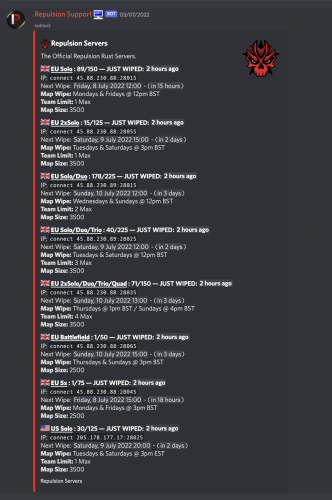
Simply the bot uses the integration of discord unix/epoch timestamps to count down your server(s) wipes in your discord automatically generating new timestamps as your server wipes, currently the bot allows monthly - (wiping at force) weekly, biweekly - (every 2 weeks) & Custom - (Multiple times a week) - as well as the full customisation of the embed in which the server info is held in (see above for example), the system is 100% automated once you create your servers/wipes. Countdown bot is coded in python utilising discord.py along with mongodb to store information Feature List : Create & Delete Wipes Fully customisable embed (Title, Description, Thumbnail, Footer, Embed Colour) Edit server information ie wipe-times or server descriptions Fully automated countdowns - autogenerates the next wipes Display server pop in the embed & last wipe Works alongside Force wipe, currently offering Monthly (force), Biweekly and Weekly wipe aswell as Custom - multiple wipes a week eg 2 Commands : (All showcased in pictures) !wipe - displays all servers and wipes to users !list - displays all embeds & serverids !create - allows you to make a new server / embed - followed by a number of questions !delete <server/embed> <id> allows you to delete servers & embeds !editeembed <id> - allows you to edit the embed id eg : thumbnail, description etc !editserver <id> - allows you to edit server information eg : wipe time, name, info Config: { "Misc":{ "Bot_Prefix":"!", "Bot_Token":"", "Server_Name":"Server Name Here", "Embed_Hex_Color":"#FFFFFF" }, "Mongo_Config":{ "MONGO_URL": "" }, "Discord_Config":{ "Guild_ID":0, "StaffRole_ID":0 } } Requirements Server with python 3.7 or above Pip packages listed - discord.py, aiohttp, motor,d nspython, python-dateutil, arrow, requests Suggested bot host 0.99$ -> https://serverstarter.host/ For any problems please msg me on discord : Skizzy#0037$21.99 -

Version 2.3.4
468 downloads
IQWipeBlock – a reliable, time-tested plugin! Many servers choose this plugin for temporary item blocking! A large number of reviews, discussions, and updates throughout the plugin's existence! I present to you the new version of the plugin! Features List: UI Interface: Scrollable UI with support for pagination – add unlimited categories and items, everything is scrollable! New notifications with animations – yes, animations in RUST! It's more than possible – try it yourself! Configuration: Simplified configuration – even a beginner admin can handle it. Everything is clear and easy to use! Item Block Notification: Simplified and familiar to players – GameTip style. This is the built-in notification from Rust. Welcome Notification: When a player joins the server, they are greeted with an animated notification informing them about the current temporary item block. Block End Notification: As soon as the item block ends, all players receive a chat message. Meanwhile, the plugin disables 90% of its functions to reduce server load, keeping only the essential ones! Permissions: iqwipeblock.ignore – ignore all item blocks$24.99- 28 comments
-
- 1
-
-
- #wipeblock
- #rust
- (and 8 more)
-
.thumb.png.0691b0d854065d98f062c9504dea6d02.png)
Version 1.1.1
169 downloads
Automated Maps - plugin that allows you fully automate map wipe replacements. Plugin will automatically detect server wipe, get next map from configured maps pool and replace it. What this plugin can do? Create voting polls in using Discord API, so players can choose next map listed in map pool. Announce next map using Discord API. Automatically detect wipe. RustMaps integration, plugin can fill map pool using RustMaps.com API, supports custom map config and other paid subscription features. What is cron expression and how do I use it? A cron expression is a string of characters used to schedule tasks to run at specific times or intervals. It is widely used in Unix-based systems for automating repetitive tasks such as backups, updates, and maintenance. Structure of a Cron Expression Allowed values Allowed special characters Comment ┌───────────── second (optional) 0-59 * , - / │ ┌───────────── minute 0-59 * , - / │ │ ┌───────────── hour 0-23 * , - / │ │ │ ┌───────────── day of month 1-31 * , - / L W ? │ │ │ │ ┌───────────── month 1-12 or JAN-DEC * , - / │ │ │ │ │ ┌───────────── day of week 0-6 or SUN-SAT * , - / # L ? Both 0 and 7 means SUN │ │ │ │ │ │ * * * * * * Special characters which are supported by plugin now * (all): Specifies that the event should happen for every time unit. For example, * in the minute field means "every minute." - (range): Specifies a range of values. For example, 10-12 in the hour field means "10th, 11th, and 12th hours." , (values): Specifies multiple values. For example, 10,12 in the hour field means "10th and 12th hours." / (increments): Specifies incremental values. For example, 5/15 in the minute field means "5, 20, 35, and 50 minutes of an hour." Examples of Cron Expressions 0 12 * * * -> At 12:00 p.m. (noon) every day: 0/15 * * * * -> Every 15 minutes every day 0/5 13,18 * * * -> Every five minutes starting at 1 p.m. and ending at 1:55 p.m., and then starting at 6 p.m. and ending at 6:55 p.m., every day 30 9 * * 1-5 -> At 9:30 a.m. every Monday to Friday 0 0 L * * -> At 00:00 AM on the last day of the month 0 0 L-1 * * -> At 00:00 AM the day before the last day of the month 0 0 3W * * -> At 00:00 AM, on the 3rd weekday of every month 0 0 LW * * -> At 00:00 AM, on the last weekday of the month 0 0 * * 2L -> At 00:00 AM on the last tuesday of the month 0 0 * * 6#3 -> At 00:00 AM on the third Saturday of the month 0 0 ? 1 MON#1 -> At 00:00 AM on the first Monday of the January Detailed definition can be found here: Cronos You can try to use this generator. If you need help with setting up your own wipe schedule don't hesitate to ask for support! You can use plugin support section or DM me in Discord: metangerine. Configuration Language { "Discord_Poll_Title": "Please, choose next wipe map: ", "Discord_Poll_Option": "MAP #{0}", "Discord_Poll_Result_Title": "Vote ended with result: ", "Discord_Poll_MostVoted": "Most voted map", "Discord_Post_Title": "Next wipe map ({0}):", "Discord_Seed": "Seed", "Discord_Size": "Size", "Discord_PreviewLink": "Preview Link", "Discord_MapLink": "[Map Link]({0})" } Commands automaps.postnext - to post map automaps.runvote - to run vote CONTACT Need help or custom plugin for your server? Contact me using Discord: metangerine ----------------------------------------------------------------------$19.99 -
.thumb.png.3bab5c828e195fc20d9791ab794a009a.png)
Version 1.1.6
283 downloads
Auto Wipe - This plugin allows to schedule regular wipes, including map, blueprint, and data resets. It offers customizable settings for wipe intervals and automated backups to prevent data loss. This plugin will simplify the maintenance process and reduce administrative workload. What this plugin can do? Create specific wipe schedules for daily, weekly and monthly basis. Wipe oxide(config/data/logs/plugins)/map files. Create backups of data/map files. Send discord wipe message using tool: https://discohook.org/ Do files replacements during wipe. (In case if you want to load new config files for new map) Set own startup ConVars such as 'server.seed', 'server.levelurl'. No additional scripts or harmony mods required, everything plugin based. How it works? When the wipe preset schedule is enabled and matched, the plugin sends a restart command. During server startup, it deletes all configured files before they are loaded by other plugins or the server itself and executes all commands from the preset. It is recommended to have software or a batch file that will automatically start the server after shutdown because the "restart" command only shuts down the server without restarting it. What is cron expression and how do I use it? A cron expression is a string of characters used to schedule tasks to run at specific times or intervals. It is widely used in Unix-based systems for automating repetitive tasks such as backups, updates, and maintenance. Structure of a Cron Expression Allowed values Allowed special characters Comment ┌───────────── second (optional) 0-59 * , - / │ ┌───────────── minute 0-59 * , - / │ │ ┌───────────── hour 0-23 * , - / │ │ │ ┌───────────── day of month 1-31 * , - / L W ? │ │ │ │ ┌───────────── month 1-12 or JAN-DEC * , - / │ │ │ │ │ ┌───────────── day of week 0-6 or SUN-SAT * , - / # L ? Both 0 and 7 means SUN │ │ │ │ │ │ * * * * * * Special characters which are supported by plugin now * (all): Specifies that the event should happen for every time unit. For example, * in the minute field means "every minute." - (range): Specifies a range of values. For example, 10-12 in the hour field means "10th, 11th, and 12th hours." , (values): Specifies multiple values. For example, 10,12 in the hour field means "10th and 12th hours." / (increments): Specifies incremental values. For example, 5/15 in the minute field means "5, 20, 35, and 50 minutes of an hour." Examples of Cron Expressions 0 12 * * * -> At 12:00 p.m. (noon) every day: 0/15 * * * * -> Every 15 minutes every day 0/5 13,18 * * * -> Every five minutes starting at 1 p.m. and ending at 1:55 p.m., and then starting at 6 p.m. and ending at 6:55 p.m., every day 30 9 * * 1-5 -> At 9:30 a.m. every Monday to Friday 0 0 L * * -> At 00:00 AM on the last day of the month 0 0 L-1 * * -> At 00:00 AM the day before the last day of the month 0 0 3W * * -> At 00:00 AM, on the 3rd weekday of every month 0 0 LW * * -> At 00:00 AM, on the last weekday of the month 0 0 * * 2L -> At 00:00 AM on the last tuesday of the month 0 0 * * 6#3 -> At 00:00 AM on the third Saturday of the month 0 0 ? 1 MON#1 -> At 00:00 AM on the first Monday of the January Detailed definition can be found here: Cronos You can try to use this generator. If you need help with setting up your own wipe schedule don't hesitate to ask for support! You can use plugin support section or DM me in Discord: metangerine. CONFIGURATION COMMANDS autowipe.run <preset name> - runs auto wipe preset CONTACTS Need help or custom plugin for your server? Contact me using Discord: metangerine ----------------------------------------------------------------------$19.99 -

Version 1.0.2
810 downloads
This is an incredibly simple, and potentially misleading with its name, plugin that will edit your hostname & description to include your wipe dates. Key Features Modifies server name & description to include the date of your wipe. Automatically insert "JUST WIPED" to the name of your server. Supports custom date format. Reverts to the original hostname & description when the plugin is unloaded Important Information This plugin will completely override your server name and description! If the plugin is not loaded then your server will default to its originally set values. If you need to change your server name or description, its recommended to change it in both the WipeSettings.json config file and the server.cfg config file, so that your server name is up to date in the event that Oxide fails to load. This plugin does not contain any configuration for scheduling your wipes. This means that in order to display an accurate wipe date, the plugin must be loaded from the start of wipe. Config { "Date Format (dd, mm)": "dd/mm", "How many days counts as 'Just Wiped'?": 2, "What text should be added if the server is 'Just Wiped'?": "JUST WIPED | ", "Hostname ({wipe} goes where you want the wipe text, {just} goes where JUST WIPED should go)": "{just}My Server | Active Admins | {wipe}", "Description ({wipe} goes where you want the wipe text, 'Just Wiped' will not be added here)": "Welcome to XXYY, join our discord: discord.gg/abcdef\nLast wipe was on {wipe}", "Hostname Update Interval (seconds)": 3600 } {wipe} - Replaced with the wipe date, per your configured Date Format. {just} - Replaced with the 'Just Wiped' text, per your configured text The hostname and description both support displaying the wipe date. Put {wipe} anywhere in your text and it'll get replaced with the current date. Update Interval Let's say your server wipes on 22/11, and you only want it to say "Just Wiped" for the first 3 days of your 7 day wipe cycle. At some point during the third day, the server will no longer count as "Just Wiped" by your own definition, and there needs to be a good way to check this. You can alter the update interval to be as long or as short as you wish. If you choose to set this to 0, the timer will never be created but the plugin will not update the hostname again until you restart the server or reload the pluginFree








.thumb.png.9d49d03b0e808268ad5fdc77d655118d.png)