
Connect with Disc Golf Players Worldwide
Overview
Circle One Disc Golf Community (CODGC) is a desktop application designed for disc golf enthusiasts seeking to expand their network and stay engaged with the global disc golf community. The software serves as a centralized hub for players to connect, share content, and participate in discussions. Its primary purpose is to bridge the gap between players, clubs, events, and content creators within the disc golf ecosystem. By integrating multiple social and organizational tools, CODGC aims to simplify how users interact with the sport’s digital landscape.
Target users include amateur and professional disc golfers, event organizers, and fans who want to remain active in the sport’s online culture. The app supports real-world use cases such as finding local players based on skill level or PDGA number, joining discussion groups, and accessing event calendars. It also enables users to follow social media content from platforms like Instagram, TikTok, YouTube, and Reddit—all curated in one location through the Drop Zone feature.
The developer, Circle One Disc Golf Community, has positioned the app as a community-first platform focused on engagement and accessibility. While no additional background on the developer is available, the app’s structure suggests a strong emphasis on user-driven interaction and content discovery. The software is designed to enhance both personal connections and professional networking within the disc golf world.
Key Features & Capabilities
- Members Directory: Search and connect with players using filters such as skill level, PDGA number, UDisc handle, and location. This feature supports targeted networking for casual play, tournament partnerships, or team formation.
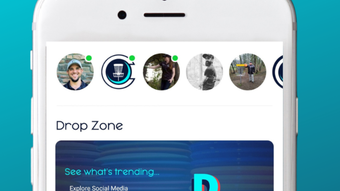
- Drop Zone: Aggregates real-time social media content from Instagram, Twitter, TikTok, YouTube, Reddit, Reumble, and podcasts. Users can follow trending discussions, watch highlights, and discover new creators without switching between platforms.
- Community Connection: Offers group forums, live messaging, and discussion boards to facilitate ongoing conversations. Ideal for event planning, strategy sharing, and community building.
- Business Profiles: Displays profiles of disc golf-related businesses, including pro shops, courses, and equipment brands. Users can explore services, read reviews, and stay informed about promotions.
- Event Calendar: Centralized access to upcoming disc golf events, tournaments, and meetups. Users can filter by date, location, or type to find relevant opportunities.
These features collectively create a dynamic environment where users can maintain visibility, foster relationships, and stay updated on the latest developments in the sport. Whether organizing a weekend round or researching new gear, CODGC streamlines the user experience by consolidating essential tools into a single desktop application.
User Interface, Workflow & Performance
The user interface of CODGC appears to be structured around intuitive navigation, with clearly labeled sections for the Members Directory, Drop Zone, Community Connection, Business Profiles, and Event Calendar. The layout likely supports tab-based or sidebar navigation, allowing users to switch between functions without confusion. Interaction design emphasizes ease of use, with consistent icons, readable fonts, and logical grouping of related features.
Workflow efficiency is enhanced by the app’s ability to centralize multiple digital activities—social media monitoring, player matching, event tracking, and messaging—into one interface. This reduces the need to manage multiple browser tabs or third-party apps, improving overall productivity for users who are deeply involved in the disc golf community.
Performance details were not specified by the developer. However, given the app’s size of 250 MB and its focus on content aggregation and user interaction, it is expected to operate smoothly on modern Windows and Mac systems. The developer did not provide additional system requirements, so resource usage such as CPU or RAM consumption remains unspecified. Stability and responsiveness are likely optimized for typical desktop usage, but exact behavior may vary depending on individual hardware and network conditions.
Compatibility & System Requirements
CODGC is available for both Windows and Mac operating systems, making it accessible to a broad user base across desktop platforms. The software version is 1.0.0, indicating a stable initial release with full feature deployment. The installation size is 250 MB, which is moderate for a desktop application with integrated media and networking capabilities.
Exact system requirements were not listed by the developer. This includes no information on minimum processor speed, RAM, or graphics capabilities. As such, users are advised to ensure their system meets general desktop software standards. Compatibility information is limited to the provided OS support, with no details on older or specialized hardware configurations.
Pros and Cons
Pros
- Centralized platform for disc golf community engagement
- Comprehensive Members Directory with advanced filtering options
- Aggregated social media content via Drop Zone
- Integrated event calendar and business profiles
- Free to download and use
Cons
- No publicly available system requirements
- Performance data not provided
- Limited compatibility details beyond OS support
- Relies on third-party platforms for content (e.g., Instagram, YouTube)
- Community features depend on user activity for full functionality
FAQ Section
Is CODGC available for both Windows and Mac?
Yes, CODGC is compatible with both Windows and Mac operating systems.
Is the software free to use?
Yes, CODGC is available at no cost. There are no subscription fees or in-app purchases required.
Can I use CODGC offline?
While the app may support limited offline functionality, full access to features such as live messaging, social media feeds, and event updates requires an active internet connection.
How often are updates released?
Updates are released periodically to improve performance, add features, and address user feedback. The latest version is 1.0.0, with future updates expected.
What type of license does CODGC use?
CODGC operates under a standard end-user license agreement. Specific details are not publicly disclosed, but the software is intended for personal and community use.
Final Thoughts + CTA
CODGC stands out as a dedicated desktop tool for disc golf enthusiasts who value community, connection, and content discovery. Its integration of a Members Directory, Drop Zone, forums, event calendar, and business profiles creates a cohesive digital ecosystem tailored to the sport’s growing online culture. While system requirements and performance metrics are not detailed, the app’s free model and broad OS support make it accessible to a wide audience.
It is particularly beneficial for players seeking to expand their network, stay updated on trends, and participate in discussions across multiple platforms. For those deeply involved in disc golf, CODGC offers a streamlined way to manage social and organizational aspects of the sport from a single desktop application.
With its community-first design and practical feature set, CODGC delivers real value to its target users. Download CODGC now.








