
Screenshots
App details
- Updated
- April 26, 2025
- Requires
- Chrome
- License
- Subscription
- Developer
- codia
- Category
- Web Apps
About Codia
Download Codia – AI‑Powered Design‑to‑Code Tool for Faster Development
Overview: Turn Designs into Production‑Ready Code in Minutes
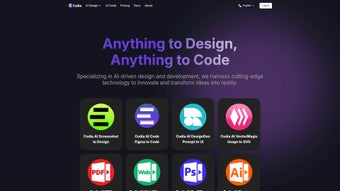
Codia is a browser‑based AI platform that bridges the traditional gap between designers and developers. By feeding the engine a Figma link, a Sketch file, a PNG mock‑up, or even a hand‑drawn sketch, the service instantly produces clean, responsive HTML, CSS, and JavaScript that adheres to modern best practices. The AI not only copies pixel data; it interprets component hierarchy, detects reusable patterns, and injects accessibility attributes, resulting in code that can be shipped without heavy refactoring. Because the entire workflow runs in a secure, encrypted container, your design assets never leave your jurisdiction, satisfying GDPR and other data‑sovereignty requirements.
The dual‑focus of Codia—“Design to Code” and “Screenshot to Figma”—makes it versatile for every stage of the product lifecycle. Teams can rapidly prototype from low‑fidelity sketches, then scale up to high‑fidelity designs and export ready‑to‑deploy components for React, Vue, or Tailwind‑based projects. The free tier offers generous limits, while paid plans unlock batch processing, higher resolution inputs, and priority support. Below is a concise feature list that captures the core capabilities.
- AI‑Driven Code Generation: Produces clean, responsive HTML, CSS, and JavaScript from design files or screenshots.
- Screenshot‑to‑Figma Converter: Recreates editable Figma layers from hand‑drawn wireframes or UI screenshots.
- Component‑Aware Output: Detects buttons, cards, modals and exports reusable snippets for React, Vue, and Tailwind.
- Privacy‑First Architecture: All processing occurs in‑browser or within encrypted containers; files are deleted after the session.
- Cross‑Platform Compatibility: Works on Chrome, Edge, Firefox, Safari across Windows, macOS, Linux, Android, and iOS.
- One‑Click Export: Download ZIP archives, push to GitHub, or use API tokens for CI/CD integration.
- Continuous AI Updates: Monthly model refreshes keep the output aligned with the latest web standards.
- Collaboration Hub: Share projects, comment in real time, and version‑control design‑to‑code sessions.
- Scalable Pricing: Free tier for freelancers; paid plans start at $19/month for enterprises.
- Extensive Documentation: Video tutorials, step‑by‑step guides, and an active community forum.
Installation & Usage – Getting Started in Seconds
Step 1: Open the Web App (No Download Required)
Navigate to codia.ai and click “Get Started.” Create a free account using an email address or single‑sign‑on provider. The onboarding wizard guides you through project creation, selection of “Design to Code” or “Screenshot to Figma,” and the initial file upload.
Step 2: Choose Your Input Format
For “Design to Code,” drag‑and‑drop a Figma link, Sketch file, or PNG/JPG image. For “Screenshot to Figma,” upload a screenshot of a UI or a photo of a hand‑drawn wireframe. Codia’s AI parses layers, typography, color palettes, and geometry before building a component tree.
Step 3: Configure Output Settings
Select the target framework (plain HTML/CSS/JS, React, Vue 3, or Tailwind) and optional post‑processing hooks. Enable accessibility checks to automatically add ARIA attributes and semantic tags.
Step 4: Generate, Review, and Refine
Click “Generate.” Within seconds, Codia presents a live preview and a code diff viewer. Minor tweaks can be made directly in the UI or by re‑running the AI with adjusted parameters.
Step 5: Export or Deploy
Export the result as a ZIP archive, push to a GitHub repository, or retrieve an API token for automated pipelines. Each export includes a README with setup instructions, dependencies, and licensing details.
Compatibility – Works Everywhere
Because Codia runs entirely in the browser, it is compatible with the latest versions of Chrome, Edge, Firefox, and Safari on Windows 10/11, macOS Monterey or later, popular Linux distributions, as well as Android 9+ and iOS 14+ mobile browsers. No native installers are required, making it ideal for distributed teams with mixed OS environments.
Pros, Cons, and Frequently Asked Questions
Pros
- Rapid conversion from design to production‑ready code, saving hours of manual work.
- High‑quality output that follows modern best practices and includes accessibility features.
- Privacy‑first processing with end‑to‑end encryption and automatic data deletion.
- Fully browser‑based, eliminating OS‑specific installations.
- Generous free tier suitable for freelancers and small teams.
- Continuous AI model updates keep the tool current with industry trends.
- Seamless integration with GitHub, GitLab, and CI/CD pipelines via API and webhooks.
- Robust documentation, video tutorials, and an active community forum.
Cons
- Highly complex animations or custom CSS may require manual post‑processing.
- Internet connection is mandatory; offline usage is not supported.
- Advanced framework options (Next.js, Svelte) are still in beta.
- Free plan limits the number of high‑resolution inputs per month.
- Design‑heavy users may need a short learning curve to master export settings.
Frequently Asked Questions
Is Codia free to use, and what does the free tier include?
Yes. The free tier provides up to 20 design‑to‑code conversions per month, access to both core services, and ZIP export. Paid plans start at $19/month for higher limits and priority support.
Can I run Codia on a mobile device?
Absolutely. Because it’s a web app, modern browsers on Android and iOS handle the full workflow, including uploads, generation, and downloads.
How does Codia protect my design files?
All data is transmitted over TLS 1.3, processed in isolated encrypted containers, and automatically deleted after the session. Codia never stores your files beyond the brief processing period.
Which frameworks can I export code to?
Codia supports plain HTML/CSS/JS, React, Vue 3, and Tailwind CSS out of the box. Beta support for Next.js, Svelte, and Angular is available for early adopters.
Can I integrate Codia with my CI/CD pipeline?
Yes. Codia provides a RESTful API and webhook system that can trigger conversions, push generated code to repositories, and fit into Jenkins, GitHub Actions, or CircleCI workflows.
Conclusion – Why You Should Download Codia Today
Speeding up the hand‑off from design to development is no longer a luxury—it’s a necessity for competitive product teams. Codia delivers a secure, AI‑driven shortcut that turns sketches, mock‑ups, and high‑fidelity designs into production‑ready code in seconds, while preserving component structure and accessibility. Its browser‑only architecture eliminates installation headaches and guarantees cross‑platform accessibility, making it a natural fit for remote, mixed‑OS teams.
Whether you are a freelancer needing a quick prototype, a startup scaling its UI pipeline, or an enterprise looking for a privacy‑first, scalable solution, Codia’s free tier lets you test the core value proposition without commitment. Paid plans unlock higher limits, advanced framework support, and priority assistance, ensuring the tool grows alongside your needs.
Ready to cut weeks of manual coding from your workflow? Download Codia now, create your first project, and watch your designs become clean, deployable code in moments.
Guides & Tutorials
How to install Codia
- Click the Download button above.
- Once redirected, accept the terms and click Install.
- Wait for the Codia download to finish on your device.
How to use Codia
This software is primarily used for its core features described above. Open the app after installation to explore its capabilities.
User Reviews
No reviews yet. Be the first to share your experience.
You may also like
more
3D AI Studio
3D AI Studio Overview 3D AI Studio is a web-based AI-powered tool developed by S...

3D textures by Polycam
Generate Realistic 3D Textures Effortlessly 3D Textures by Polycam is an innovat...

3DAiLY
Customizable 3D Modeling Tool: 3DAiLY 3DAiLY is an online platform that harnesse...

3DFY
Revolutionizing 3D Model Creation: 3DFY Review 3DFY is an AI-powered service, de...

AI Dungeon
AI Dungeon: Deep Learning Text Adventure AI Dungeon is an artificial intelligenc...

Alpha3D
A subscription-based program for Web apps, by alpha3d. Alpha3D is a subscription...
