Resource Icons


Latest Highlights
Check Out The Latest in The Qrew

1 MIN READ
Learn about the most recent updates to Quickbase, right here:
Highlights include:
Release Schedule change
Releases will now happen on Wednesday evenings R...
RobHenderson
Quickbase Staff

Quickbase Qrew! February 19th, at 11am EST, we're bringing The Qrew together with Quickbase leadership for an Ask Me Anything webinar.
What do you want to know from Quickbase leaders? What's to...
ben_simon
Community Manager
At a glance:
After February 10th, Pipelines will handle errors in loops more consistently: If a step fails during one loop iteration—even when that iteration includes an IF/ELSE ...
VentsislavTasev
Quickbase Staff
The Content Feed
Feed

Pipeline - Make a Request - Api_Doquery get results and copy in a table using JINJA
Hello, this is my first time here. I was wondering if somebody can help me with a Pipeline, Make a Request (Api_DoQuery) a. Search Records b. Make a Request (Api_DoQuery - Method: POST - Content Type: Application/JSON the output in Activity Log shows what I need (current_record_qf) content:<?xml version="1.0" ?> <qdbapi> <action>API_DoQuery</action> <errcode>0</errcode> <errtext>No error</errtext> <dbinfo> <name>Subunit Goals</name> <desc></desc> </dbinfo> <variables> </variables> <chdbids> </chdbids> <record rid="80"> <current_record_qf>184,104.0080 ; 210,384.1373 ; 227,928.3268 ; 219,168.3467 ; 219,912.3468 ; 220,584.3469 ; 221,327.3470 ; 222,047.3471 ; 222,791.3472 ; 223,511.3473 ; 224,255.3474 ; 224,999.3475 ; 225,719.3476 ; 226,463.3477 ; 227,184.3478 ; 228,360.3663</current_record_qf> <update_id>1756412052839</update_id> </record> </qdbapi> Then I have a CREATE A RECORD with the following jinja. FIELD {{b.json.qdbapi.current_record_qf}} It is creating a record on the table but it is not passing the value into the field. Am I missing something? I will appreciate any suggestion please?0likes2CommentsDeleted records and record pickers / Formula check if related record has been deleted
I have a record that appeared to be missing a related record, but wasn't showing up on a report I have for identifying records with relational issues. It turned out that there was a value in my reference field, but it was pointing to a deleted record. This was not clear at all because the record picker for the related field (I have the record in edit mode) appeared exactly as if it were null/empty. It used to be that when a reference field had a value but there was no record in the foreign table with that id QB would display a red message indicating this, but now it simply says "Search and Select" as if there were no current value there at all. The only way to tell that there was a value there previously is to start editing the field and then hit backspace; QB will then highlight the field to indicate its value has changed (see pics). So I've been tearing my hair out staring at this record because it appeared to have a null value but it wasn't working with any of my null check formulae. Is there any way to get the old behavior back for the record picker? I can make the id field itself read only (it's in an admin section of my form anyway) but I'd still like the user to know when about the deleted record when looking at the proxy field. Better yet, is there a good way to check if a related record has been deleted formulaically so I can adjust my report to include these issues?Solved0likes6CommentsJan 2026Asset Management Qrew Meetup Recap
Hi Mobile Qrew! It's been a while since I've posted in here, and wanted to share the recap to a recent Asset Management Qrew Meetup that featured a mobile component to it. Cam Urevick and Kojo Acquaah from Mondelez/Levery Digital walked the Qrew through their hybrid desktop and mobile Asset Management App built for warehouse and finance teams. A mobile-ready Quickbase app powered by QR codes + Secure Links. Kojo and Cam demo’d scanning an asset QR code to open the asset record, then using a simple “mobile action bar” to launch either an Audit form or a Service Request form. The audit flow captured condition, mileage, photos, and notes. Dashboards + reports designed for action (especially on mobile). Next, they shared the mobile dashboards with gauge reports and drilldowns for overdue audits/PMs and missing assets, plus “My Asset Tags” for printing QR labels during rollout. They also highlighted Kanban reports as a fast way to move asset statuses during team collaboration on touchscreen devices. Scalable app structure + role-based access + finance reporting. They walked through the backend tables (Locations, Asset Types, Assets, Audits, Service Requests, Service Providers, Employees) and how Locations + user groups enable cascading permissions, so users only see their site. On the desktop side, they highlighted a depreciation report to replace manual Excel and support rolling audits vs. one painful annual cycle. Qrew Tips: Mobile: Less is more! Focus on Short forms and fewer choices per page. Put Locations + user groups in place early if plan to scale across sites. Build dashboards for action: Add drilldown reports, exceptions, and a Kanban view when teams collaborate. Missed the meeting? Here’s the recording. If you’d like to connect with Cam or Kojo to discuss what they presented, feel free to reach out to me and I’ll be happy to make the introduction. FYI: A copy of this app will be available for the exchange soon. I’ll make an announcement to the Qrew when the app is officially published. Thank you and have a good afternoon!0likes0Comments
Custom GPT: Quickbase Formula Builder - Version of ChatGPT Optimized for Writing QuickBase Formulas
[Link to Quickbase Formula Builder Custom GPT] I've been using ChatGPT a lot this year, and have found it especially useful for writing simple code, typically in Python. I've attempted to use it for writing Quickbase formulas too, but it never got it quite right. A couple months ago, OpenAI released the "Custom GPT" feature for ChatGPT. This allows people to create custom chatbots designed to perform specific tasks by providing instructions and reference information. I had some free time at work, so I decided to attempt to make a Custom GPT that actually can write formulas for Quickbase. I provided some basic information on required syntax as well as a list of all of the built-functions. The result actually seems to work pretty well! I asked it to write a formula that calculates Sales Tax using a couple different rules, and this is what it wrote: var number taxRate = Case([State], "State1", 0.07, // Replace "State1", "State2", etc., with actual state names and their respective tax rates "State2", 0.08, // ... add more states and their rates here 0); // Default tax rate if state is not listed var number tax = If([Customer Type] = "General" or [Customer Type] = "Subsidized", [Subtotal] * $taxRate, 0); var number adjustedTax = If([Customer Type] = "Subsidized", $tax / Sqrt(ToNumber([Customer Tenure])), $tax); $adjustedTax; This is a work-in-progress, but I wanted to share what I made in case it is useful to anyone else. [Link to Quickbase Formula Builder Custom GPT] You do need a ChatGPT Plus subscription to use this, unfortunately. If you are already subscribed, I'd love you to give this a try and let me know how it works for you. If you aren't, keep in mind that this is a work-in-progress, so I don't recommend getting a subscription just for this tool. When writing requests, it's helpful to do the following: State the name of the field you are creating Describe in plain English what you want the calculation to do Mention the exact column names used on your table ------------------------------ Dylan Moring ------------------------------5likes7CommentsUpcoming change: More consistent loop behavior when a step fails in conditional logic
At a glance: After February 10th, Pipelines will handle errors in loops more consistently: If a step fails during one loop iteration—even when that iteration includes an IF/ELSE branch—the pipeline will skip only that iteration and continue to the next. The full pipeline will only stop if you explicitly use a STOP step. Why we’re making this change In Pipelines, errors typically stop a pipeline run. That’s a safe default: if something unexpected happens, the pipeline pauses, allowing you to review and fix the issue. Loops are the notable exception. In many real-world automations, it’s better to keep going even if one item fails—especially when processing a list of records (like invoices or purchase orders). Today, loops already behave that way: If one loop iteration fails, Pipelines usually skips that record and continues with the next one. But we found an inconsistency: If an iteration includes conditional branching (IF/ELSE) and the logic step fails along that path, the entire pipeline run stops, rather than skipping just the one problematic iteration. We’re updating Pipelines so that loop behavior is consistent, regardless of whether an iteration includes an IF/ELSE. Learn more about conditions in our help article. A quick refresher: How errors normally work in Pipelines Simple pipeline (no loop) Use case: When a new invoice is marked “Approved,” update a related project record. Example flow: Trigger: Invoice is updated (Status = Approved) Step: Find the related Project Step: Update Project “Invoiced Amount” If any step fails (for example, the Project can’t be found), the pipeline run will stop, and you’ll see the error in the activity log. Today, the HTTP channel is an exception because it provides more built-in options for handling responses and failures. We’re also planning improvements to error handling over time, so stay tuned. Loops: What happens when one record fails Loop without conditional branching (current behavior) Use case: Every night, process all “Ready to Pay” invoices. Example flow: Trigger: Scheduled (nightly) Step: Find invoices where Status = “Ready to Pay” Loop: For each invoice Update invoice status to “Submitted to Accounting” Write a note back to the invoice If there are 10 invoices and invoice #6 fails (maybe it was deleted, locked, or missing required fields): Pipelines will skip invoice #6 Continue processing invoices #7–#10 The run will not fail entirely The activity log will show which invoice failed and why This is the behavior many customers expect (and rely on) when automating batches of records. The inconsistency we’re addressing Loop with IF/ELSE branching (current behavior in some cases) Now, let’s add a very common pattern: decisions as part of each loop iteration. Use case: Nightly invoice processing with a rule: If the invoice total is over $10,000, send it for additional approval Otherwise, submit it to Accounting Example flow: Trigger: Scheduled (nightly) Step: Find invoices where Status = “Ready to Pay” Loop: For each invoice IF Total > $10,000 Create an “Approval Request” record Notify an approver (email/Slack/etc.) ELSE Update invoice status to “Submitted to Accounting” What can happen today: If the condition step fails in a single iteration (for example, invoice #6 amount is missing), the pipeline run will stop completely—even though you still have invoices #7–#10 to process. That’s inconsistent with how loops behave in other scenarios. The upcoming change With this update, the loop will behave the same way regardless of whether conditional logic is part of the iteration. If a step fails during one loop iteration: The pipeline will skip that one invoice Continue with the next invoice The activity log will still capture the failure for visibility and troubleshooting What won’t change If you want the pipeline to stop intentionally, you still can The STOP step is the right tool when you intentionally do not want the pipeline to continue (for example, when a condition indicates the run should end). This upcoming change does not remove that control. It simply ensures that unexpected failures in one loop iteration don’t take down the whole run when conditional branching is involved. What this means for you Most pipelines won’t require any changes. But the planned for February 10th change is especially relevant if you: Use loops to process batches of records (invoices, purchase orders, requests, etc.) Use IF/ELSE branching inside the loop to apply different actions per record Expect the pipeline to continue even if one of its iterations fails If you previously relied on the pipeline stopping in this scenario, consider adding a STOP step intentionally when you want that behavior.1like1CommentJan 2026 Release Enablement
Learn about the most recent updates to Quickbase, right here: Highlights include: Release Schedule change Releases will now happen on Wednesday evenings Relevant Blog Post Fastfield Intelligent Assistant Was getting in the way so it's been removed from the form builder It's still available in other parts of the Fastfield Portal Release Notes App Record Canadian HST Tax ID now available Good news for some of you, eh? Release Notes App Record Pipelines Enhacements File Transfer Handle fields have a new icon New Metadata fields for the HTTP channel's "Fetch Items" step Accounts Page has had a glow up Configuring Pipelines steps is now faster than ever Apps and Tables now appear separately Now use any unique field to lookup a record New StepNotes Icon now appears next to Steps View the Release Notes App0likes0Comments
Grid Edit - Embedded Forms
I understand that grid reports are still in beta, but I have been unable to edit records directly (inline editing) on embedded reports. I have doubled checked all the settings. I confirmed that inline editing is enabled, and I have tried this in multiple apps. Is this currently disabled?
Post Webhook External
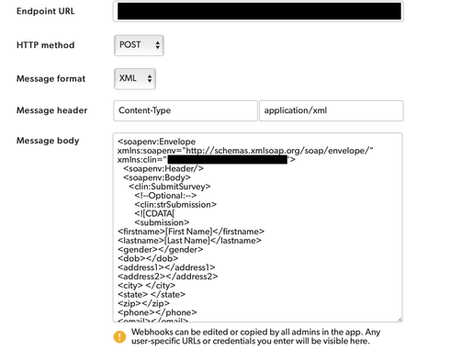
I'm trying to post a Webhook into a CTMS and it's out of scope for QuickBase to help with. The documentation doesn't provide any info on posting Webhooks externally. This is the instructions that our CTMS vendor provided: <soapenv:Envelope xmlns:soapenv="http://schemas.xmlsoap.org/soap/envelope/"; xmlns:clin="URL"><soapenv:Header/> <soapenv:Body> <clin:SubmitSurvey> <!--Optional:--> <clin:strSubmission> <![CDATA[ <submission> <firstname> </firstname> <lastname> </lastname> <gender></gender> <dob></dob> <address1></address1> <address2></address2> <city> </city> <state> </state> <zip></zip> <phone></phone> <email></email> <besttimetocall></besttimetocall> <howdidyouhearaboutus></howdidyouhearaboutus> <comments></comments> </submission> ]]> </clin:strSubmission> <clin:strSecret>PASSWORD</clin:strSecret> </clin:SubmitSurvey> </soapenv:Body> </soapenv:Envelope> The validator on our (CTMS Vendors) end does not like capitals, spaces or special characters. I plugged their info in like this and many other variations of this, but am failing: Can QuickBase send XML formatted submissions in a SOAP message externally?2likes5CommentsWeek of January 26th
Hello Qrew! Here’s what’s on the Qrew Events calendar the week of January 26 th : 📦 Tue, Jan 27 | Qrew Meetup: Asset Management | 12:00–1:00 PM EDT Cameron Urevick + Kojo Acquaah (Mondelez + Levery Digital) will demo a hybrid asset management app using a desktop app + Quickbase Mobile, plus practical takeaways you can use right away. Register: https://quickbase.zoom.us/meeting/register/x0A7dRm8SpywS754An70lA 🧭 Tue, Jan 27 | 2026 Product Roadmap Webinar | 1:00–2:00 PM EDT See what’s in the works for Quickbase + FastField in 2026 — the product team will walk through upcoming features and enhancements coming soon. Register: https://quickbase.registration.goldcast.io/webinar/3132986e-7ccd-4217-abaa-cfe393273f09 🔁 Wed, Jan 28 | Pipelines Qrew Meetup | 12:00–1:00 PM EDT Heather Delozier (GrantWorks Inc.) walks through a Pipelines workflow inside an environmental review app, including a triggered task list pipeline that auto-creates and manages follow-up work. Register: https://quickbase.zoom.us/meeting/register/eHUIGXi_RwS7PWOTuy7BMQ 🌲 Wed, Jan 28 | Portland Qrew Meetup | 3:00–4:00 PM PDT Join in person at Harder Mechanical Contractors or log in virtually to network + share what you’re working on (and yes—there will be pecans + green chilis). Reach out to Jim Harrison in the Portland Qrew Group for more details: https://community.quickbase.com/discussions/portland-orforum-board/january-28th-2026-qrew-meetup-event/920270likes0CommentsReminder: 2026 Product Roadmap Webinar
Come see what’s in the works for 2026 Quickbase, Pipelines and FastField! Join members of our product team as they share the roadmap for the latest new features and enhancements that are coming soon. Jan 27, 1:00 PM — 2:00 PM EST BONUS! One attendee from the 2026: Product Roadmap webinar will be randomly selected to receive a FREE All-Access Pass to Empower 26, May 19-20, 2026 in Houston, TX. * *All live attendees will be automatically entered to win. The winner will be chosen at random and alerted following the webinar's duration.0likes0Comments