


Download Comodo Programs Manager – uninstaller, program manager, system maintenance, Windows update manager, fix faulty install, remove drivers
Overview
Comodo Programs Manager is a system utility tool developed to assist users in maintaining optimal performance on their Windows machines. Designed as a comprehensive administrative solution, it enables users to manage installed programs, fix incomplete or corrupted installations, and efficiently handle Windows updates and drivers. The primary purpose of this application is to simplify the often complex tasks associated with system maintenance, offering a centralized interface for uninstalling unwanted software, repairing faulty installations, and managing system components. This tool is especially beneficial for users who seek greater control over their system’s software environment without relying on built-in Windows tools that may lack depth or clarity.
It serves a broad range of users, from casual computer users to IT administrators, who require a reliable method to declutter their systems and resolve installation issues. Real-world use cases include freeing up disk space by removing outdated or unused updates, troubleshooting software that fails to launch due to incomplete installation, and safely removing drivers or system components that may be causing conflicts. In the broader context of the Windows ecosystem, Comodo Programs Manager fills a niche for users who want a lightweight, dedicated tool for program and system management.
Developed by Comodo, a well-known name in cybersecurity and system integrity, the tool reflects the company’s focus on providing practical, user-centric utilities. Although the developer did not provide additional technical details about its architecture or integration with Windows APIs, the tool’s functionality suggests deep system access for managing installed components. Its release date, January 31, 2012, places it in an era when system maintenance tools were becoming more essential due to the increasing complexity of software installations and update cycles.
Key Features & Functionality
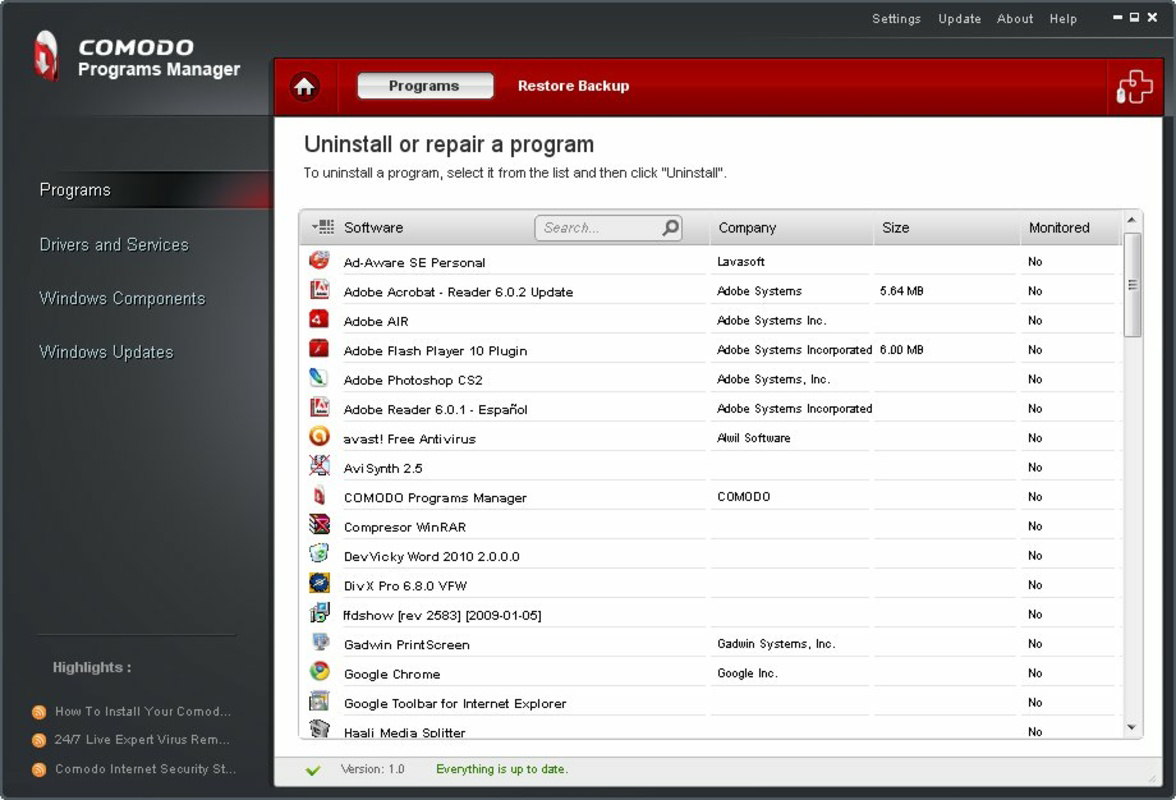
- Easy Uninstallation: Comodo Programs Manager allows users to remove applications with minimal effort. Unlike standard Windows uninstallers, this tool provides a streamlined interface that displays all installed programs with clear metadata, enabling faster identification and removal of unwanted software.
- Fix Faulty Installations: The tool includes functionality to repair programs that exhibit issues due to incomplete or corrupted installations. This feature helps restore application functionality without requiring a full reinstallation or system rollback.
- Windows Update Management: Users can view a detailed list of installed Windows updates, including update names, dates, and sizes. This enables informed decisions about which updates to remove to reclaim disk space, particularly useful on systems with limited storage.
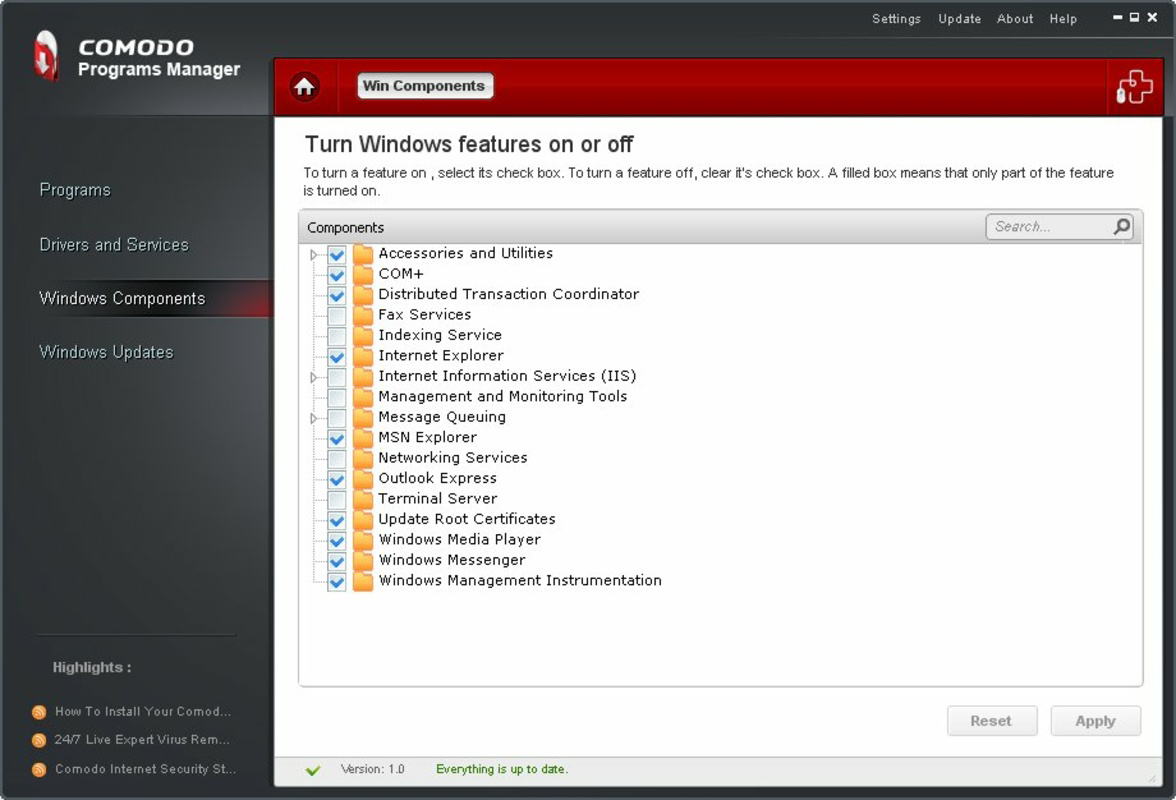
- Quick Component Removal: Beyond standard applications, the tool supports the removal of system components, drivers, and background services. This capability is valuable for advanced users who need to clean up unused or conflicting system elements.
- User-Friendly Interface: The intuitive layout ensures that users of all experience levels can navigate the tool effectively. Clear categorization and straightforward controls reduce the learning curve and minimize the risk of accidental system changes.
For example, a user struggling with a program that crashes on startup can use the “Fix Faulty Install” feature to repair the installation. Similarly, a system administrator managing multiple machines can use the update management function to identify and remove outdated or redundant updates to optimize disk usage. These real-world scenarios demonstrate the tool’s practical value in both personal and professional environments.
Interface, UX & Performance
The user interface of Comodo Programs Manager is designed with clarity and accessibility in mind. The layout presents a clean, organized view of all installed programs, updates, and system components, using consistent visual cues to differentiate between categories. Navigation is straightforward, with a sidebar or menu system that allows users to switch between functions such as uninstallation, repair, and update management.
Interaction is intuitive, with minimal clicks required to perform core actions like selecting a program for removal or viewing update details. The tool avoids clutter by focusing on essential information, reducing cognitive load and minimizing the risk of user error. Although the developer did not list formal performance metrics, the application’s lightweight size of 11.8 MB suggests it operates efficiently without consuming significant system resources.
Performance across different device categories is not explicitly detailed. However, given its age and small footprint, it is likely compatible with a wide range of Windows systems, including older hardware. Responsiveness is expected to be consistent, as the tool relies on standard Windows APIs rather than resource-intensive processes. Stability appears to be a strength, particularly in handling system-level operations without triggering crashes or system instability. Users can expect reliable operation during routine maintenance tasks.
Platform Compatibility & Technical Requirements
Comodo Programs Manager is designed for the Windows operating system. The tool is available in version 1.0.0.27, with a file size of 11.8 MB. It is offered as a free application, making it accessible to users seeking a no-cost solution for system maintenance.
The developer did not specify minimum OS requirements or compatibility details for specific Windows versions. As such, it is uncertain whether the tool supports modern Windows releases such as Windows 10 or Windows 11. However, given its release date in 2012, users should verify compatibility with their current system before installation. The absence of updated compatibility information may pose a challenge for users on newer platforms, though the tool’s lightweight nature may still allow it to function on supported systems.
Pros and Cons
Pros
- Free to download and use, making it accessible for all users.
- Lightweight design with a small file size of 11.8 MB.
- Provides detailed management of installed programs and Windows updates.
- Offers tools to repair faulty installations without system restore.
- Intuitive interface suitable for both beginners and advanced users.
Cons
- Compatibility with modern Windows versions is uncertain due to lack of updated information.
- Release date of 2012 suggests potential outdated technology and missing support for newer system features.
- Developer did not provide detailed system requirements or performance benchmarks.
- No visible update history or recent development activity.
- Limited documentation or support resources available.
FAQ
Is Comodo Programs Manager safe to use?
Yes, the tool is designed to manage system components and installed programs safely. However, users should exercise caution when removing system updates or drivers, as improper actions may affect system stability.
Can I use Comodo Programs Manager on Windows 10 or Windows 11?
Compatibility with Windows 10 and Windows 11 is not confirmed by the developer. Users are advised to test the application on their system before relying on it for critical tasks.
Does Comodo Programs Manager require admin rights?
Yes, as the tool performs system-level operations such as uninstalling programs and managing updates, it typically requires administrator privileges to function properly.
How often should I use Comodo Programs Manager?
It is recommended to use the tool periodically—such as every few months—to clean up unused programs, outdated updates, and fix installation issues that may impact system performance.
Is there a mobile version of Comodo Programs Manager?
Comodo Programs Manager is designed exclusively for Windows desktop systems. There is no mobile version available for Android or iOS devices.
Final Thoughts
Comodo Programs Manager remains a practical tool for users seeking a straightforward way to manage installed software, fix installation issues, and maintain system health. Its ability to handle program removal, repair faulty installations, and manage Windows updates provides tangible benefits for both casual users and IT professionals. While its age and lack of updated compatibility details present concerns, the tool’s lightweight design and free availability make it a viable option for older systems or users who prioritize functionality over modern features.
For those maintaining legacy Windows machines or looking for a no-cost utility to streamline system maintenance, Comodo Programs Manager offers a focused, effective solution. Its user-friendly interface and clear functionality set it apart from more complex system tools.
Download Comodo Programs Manager now


