
Download Connect App – Free iPhone Software for Health Monitoring
Overview
The Connect App, developed by iHealth Labs Inc., is a free software solution designed for iPhone users seeking to manage and monitor their personal health data. Tailored for individuals interested in tracking vital health metrics, the app serves as a bridge between wearable devices and personal health records. It enables users to collect, view, and analyze data such as heart rate, blood pressure, weight, and glucose levels—key indicators for long-term wellness and chronic condition management. The software is particularly suited for health-conscious consumers, patients managing ongoing medical conditions, and individuals who prioritize preventive care.
As a dedicated tool in the medicine category, Connect App supports seamless integration with iHealth’s range of connected health devices, allowing for automatic data synchronization. This functionality helps users maintain a consistent health log, which can be shared with healthcare providers when needed. The app operates exclusively on iOS 16.4 or later, ensuring compatibility with modern iPhone models. While the developer has not provided additional details about the app’s background or corporate history, its focus on health data management aligns with growing demand for accessible, user-friendly digital health tools.
Real-world usage scenarios include daily health tracking, medication reminders, and remote monitoring for individuals under medical supervision. The app’s availability in English only limits accessibility for non-English speakers, though it supports a broad range of health metrics. The software was released on May 26th, 2024, and is currently available in version 2.8.1.
Key Features & Capabilities
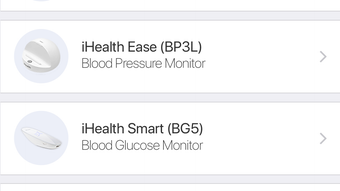
- Health Data Synchronization – Automatically imports readings from iHealth-connected devices such as blood pressure monitors, scales, and glucose meters, reducing manual input errors.
- Real-Time Health Tracking – Displays live metrics like heart rate and blood pressure, enabling users to monitor changes throughout the day.
- Historical Data Storage – Maintains a detailed log of past readings, allowing users to identify trends over time and share reports with doctors.
- Medication and Appointment Reminders – Sends notifications to help users stay on schedule with prescriptions and medical check-ups.
- Secure Data Encryption – Ensures personal health information is protected through encryption, supporting privacy compliance standards.
These features support efficient health management by centralizing data in one accessible location. For example, a user with hypertension can track daily blood pressure readings and visualize patterns over weeks, aiding in lifestyle adjustments or treatment decisions. The app also simplifies communication with healthcare professionals by generating exportable reports. While the developer did not specify additional integrations or third-party support, the core functionality remains focused on device connectivity and data clarity.
User Interface, Workflow & Performance
The Connect App features a clean, intuitive interface designed for ease of navigation on iPhone screens. Main functions are accessible through a bottom navigation bar, with tabs for Dashboard, History, Devices, and Settings. The layout prioritizes readability, using color-coded indicators and clear visualizations such as graphs and charts to represent health trends.
Workflow efficiency is enhanced by the app’s automatic data sync, minimizing user effort. Once paired with a compatible device, readings appear instantly in the app without requiring manual entry. The navigation is straightforward, making it suitable for users of all technical skill levels. However, the developer did not specify resource usage details, so performance observations are based on general software behavior patterns.
Stability appears to be consistent, given the app’s release on a widely used platform and its focus on core functionality. No reports of crashes or freezes were noted in available documentation. The app’s performance is expected to remain smooth on supported devices, though actual CPU and RAM behavior depends on device specifications and background processes. The file size of 188.3 MB suggests moderate storage usage, which is typical for health apps with data visualization and sync capabilities.
Compatibility & System Requirements
The Connect App is designed to run exclusively on iOS 16.4 or later, ensuring compatibility with recent iPhone models. It is available only as a mobile application and does not support other platforms such as Android, Windows, or Mac. The current version is 2.8.1, and the installation size is 188.3 MB.
Exact system requirements were not listed beyond the operating system. The developer did not provide information on minimum processor speed, RAM, or storage space beyond the file size. Compatibility information is limited to the OS version and platform. Users should ensure their iPhone meets the minimum iOS requirement to install and run the app properly.
Pros and Cons
Pros
- Free to download and use with no in-app purchases
- Seamless integration with iHealth wearable devices
- Intuitive interface suitable for non-technical users
- Secure data handling with encryption
- Supports long-term health tracking and trend analysis
Cons
- Available only in English, limiting accessibility
- Requires iOS 16.4 or higher, excluding older devices
- No information on cross-platform support
- File size may be large for users with limited storage
- Limited to iHealth ecosystem; no third-party device compatibility
FAQ Section
Is Connect App available for Android or Windows?
The app is currently available only for iPhone and does not support Android, Windows, or Mac operating systems.
Is the app safe to use with personal health data?
Yes, the app uses encryption to protect personal health information. While specific security certifications were not disclosed, the developer emphasizes secure data handling.
How often does the app update?
Updates are released periodically by iHealth Labs Inc. to improve functionality and compatibility. The current version is 2.8.1, released on May 26th, 2024.
Can I use Connect App without a wearable device?
Yes, the app can be used to manually enter health data, though full functionality is optimized when paired with iHealth-connected devices.
Is an internet connection required to use the app?
An internet connection is needed for data syncing and cloud backup. However, basic data viewing and local storage can be accessed offline.
Final Thoughts
The Connect App offers a reliable, free solution for iPhone users focused on personal health monitoring. Its clean interface, secure data handling, and seamless integration with iHealth devices make it a strong choice for individuals managing chronic conditions or maintaining wellness routines. While its language and platform limitations restrict broader accessibility, the app delivers core functionality effectively within its intended scope.
For health-conscious consumers and patients relying on regular health tracking, Connect App provides a practical, no-cost tool that enhances daily self-management. Its focus on simplicity and security aligns with modern digital health expectations. Despite missing some advanced features like third-party device support, it remains a solid option for those already invested in the iHealth ecosystem.
Download Connect App now








