
Download Coolors – Color Palette Generator, Web Tool, Design Utility
Overview
Coolors is a digital tool designed to assist users in generating harmonious color palettes with minimal effort. The software functions as a web and mobile application, offering a streamlined experience for creating visually balanced color combinations. It is particularly useful for designers, artists, and creative professionals who require inspiration or ready-to-use schemes for branding, web design, app interfaces, and fabric selection. The core functionality revolves around generating random, aesthetically pleasing palettes with each interaction—reminiscent of a slot machine, where each tap or click produces a new set of five hues. This dynamic approach encourages exploration and reduces decision fatigue during the early stages of a creative project.
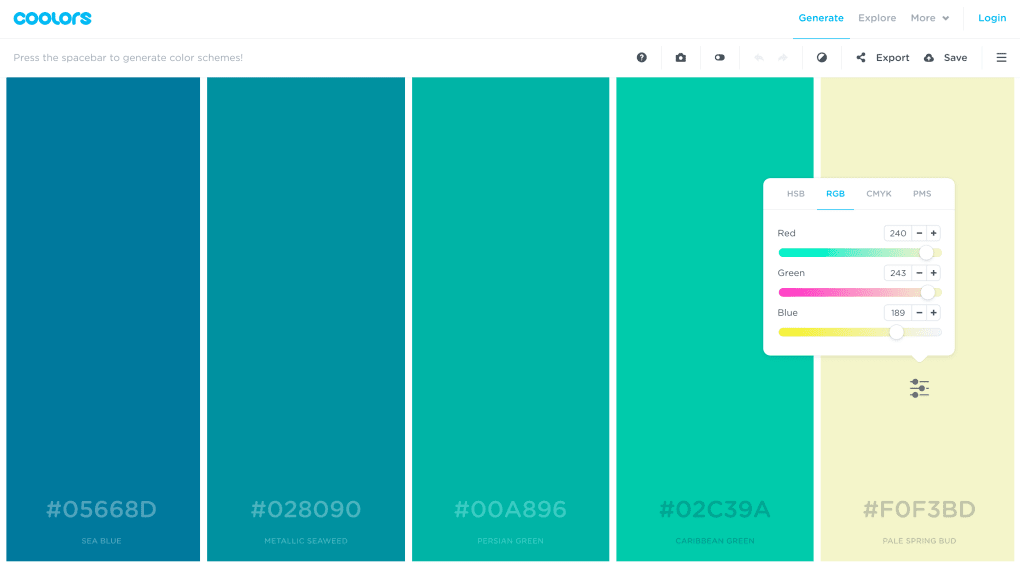
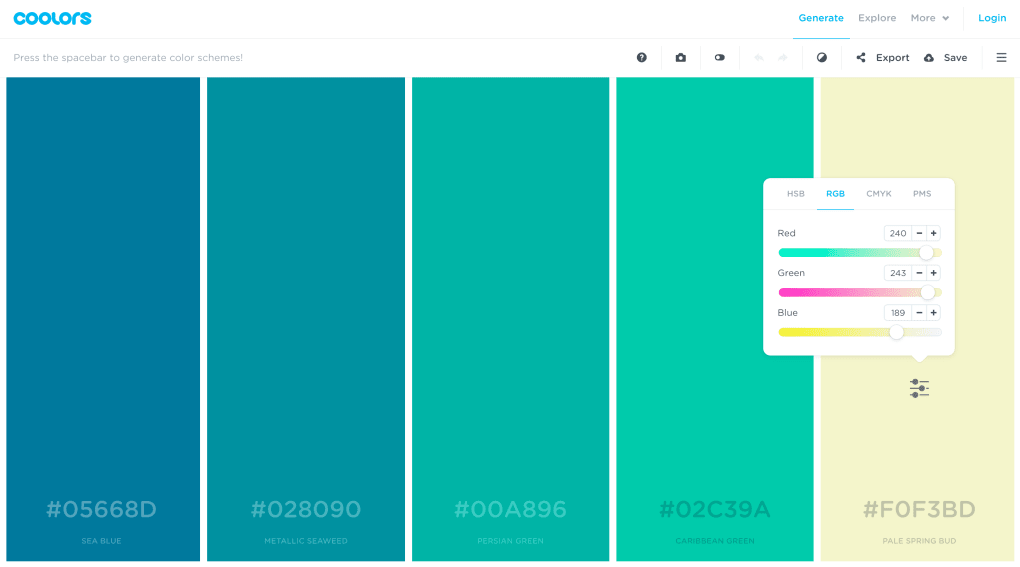
Users can refine results by selecting specific colors to retain while regenerating the remaining ones, allowing for a blend of randomness and personal preference. The tool supports customization of individual colors using HSB, RGB, and CMYK values, providing technical precision alongside creative freedom. Although the developer did not specify additional system requirements or performance benchmarks, the application is accessible through standard web browsers and mobile platforms. Its availability as an Adobe add-on and Chrome extension further enhances integration into existing design workflows, making it a versatile asset for both beginners and experienced creatives.
Key Features & Capabilities
- Instant Palette Generation: Produces five-color palettes with each tap or click, enabling rapid ideation and visual experimentation.
- Color Customization: Allows manual adjustment of HSB, RGB, and CMYK values for precise control over each hue in the palette.
- Save and Export Options: Supports multiple file formats for saving and sharing palettes, facilitating integration into design projects.
- Multi-Platform Access: Available as a web app, mobile application, desktop version, Adobe add-on, and Chrome extension for seamless cross-device use.
- Non-Ad Supported: The tool operates without advertisements, ensuring an uninterrupted creative experience.
These features enable users to generate unique color schemes for websites, branding, digital illustrations, and physical products like textiles. For example, a UI designer can quickly generate a palette for a new app interface, refine one color to match a brand’s primary shade, and export it directly into their design software. Similarly, a textile artist might use the tool to explore complementary tones for a fabric collection. The ability to retain selected colors while regenerating others introduces a layer of guided creativity, balancing spontaneity with intentionality. The inclusion of browser and design tool integrations reduces workflow friction, allowing users to stay within their preferred environment while leveraging Coolors’ functionality.
User Interface, Workflow & Performance
The user interface of Coolors is described as clean and modern, emphasizing simplicity and intuitive navigation. The layout centers around a large palette display area, with color swatches clearly presented and easily accessible. Interaction is primarily gesture-based—tapping or clicking generates new palettes, while selecting a color enables adjustment of its values. The workflow is linear and efficient: generate, refine, save, export. This design minimizes cognitive load, making it accessible even to users with limited design experience.
Performance observations are based on general software behavior patterns. The application operates within standard web environments and mobile platforms, suggesting responsive behavior on supported devices. The developer did not specify resource usage details, such as CPU or RAM consumption. However, given its web-based nature and lack of complex processing, it is expected to run smoothly on most modern systems. Stability is implied through the consistent availability of the tool across platforms and the absence of reported crashes or errors in public documentation. The interface remains responsive during interactions, supporting smooth transitions between palette generations and value adjustments.
Compatibility & System Requirements
Coolors is accessible as a web application, mobile app, and desktop software, indicating broad platform support. The software is available on Windows, macOS, and other major operating systems through browser access and dedicated apps. The developer did not specify exact system requirements, installation size, or hardware specifications. Compatibility information is limited to platform availability, with no mention of minimum processor speed, RAM, or storage needs. Performance details were not provided, and no official statements were made regarding support for older OS versions or low-end hardware.
Users can access Coolors via standard web browsers without requiring additional plugins or downloads, enhancing accessibility. The presence of a Chrome extension and Adobe add-on suggests integration with widely used creative tools, allowing for real-time palette creation within design environments. For users seeking offline functionality, the developer did not clarify whether a standalone desktop version includes offline capabilities. Platform compatibility remains consistent across devices, though specific technical details are not available.
Pros and Cons
Pros
- Free to use with no advertisements
- Simple, intuitive interface suitable for beginners and professionals
- Multiple platforms and integrations (web, mobile, desktop, Adobe, Chrome)
- Instant generation of visually harmonious color palettes
- Supports detailed color customization and export in various formats
Cons
- Exact system requirements and performance metrics were not specified
- Limited information on offline functionality
- Customization depth may be insufficient for advanced color theory applications
- Limited support for collaborative features or shared palettes
- No official documentation on update frequency or version history
FAQ Section
Is Coolors available for desktop use?
Yes, Coolors is available as a desktop application alongside its web and mobile versions, allowing users to access the tool directly on their PC or Mac.
Can I use Coolors offline?
The developer did not specify whether the desktop or mobile version supports offline functionality. Access typically requires an internet connection, especially for the web-based version.
Is Coolors safe to use?
As a web-based tool accessible through standard browsers, Coolors does not require installation of potentially risky software. It operates without ads, reducing exposure to third-party scripts.
What file formats can I export my palettes in?
Coolors supports multiple export formats, enabling users to save and share their color schemes for use in design projects, branding materials, and digital assets.
Is there a license or subscription required?
No, Coolors is completely free to use with no subscription or licensing fees. The tool remains accessible without payment or account creation.
Final Thoughts
Coolors delivers a focused, efficient solution for generating color palettes with a user-friendly design that appeals to both novices and seasoned creatives. Its game-like interface encourages exploration without overwhelming users, while the ability to customize and export palettes ensures practical utility across various projects. The availability across multiple platforms and integrations with Adobe and Chrome enhances its value in professional workflows. Although specific technical details such as system requirements, performance data, and update schedules are not provided, the tool’s consistent functionality and clean design speak to its reliability. For designers, artists, and anyone involved in visual creation, Coolors is a must-have resource for quick, inspired color decisions.
Download Coolors now




.png)



