
Copperhead: Vintage-Inspired AUv3 Synth for iOS
Overview
Copperhead is a digital subtractive synthesizer plugin developed by Limelight Software, designed specifically for iOS and iPadOS environments. Built with inspiration from early 1980s analog synthesizers, it delivers a modern reinterpretation of classic sound design principles. The plugin targets music producers, sound designers, and mobile musicians who seek professional-grade synthesis tools within a portable platform. Its AUv3 compatibility ensures seamless integration with leading DAWs such as AUM, Cubasis, GarageBand, and Loopy Pro, making it a viable option for on-the-go composition and live performance. Copperhead’s architecture supports full polyphony, enabling rich chordal textures and layered soundscapes. It is particularly well-suited for creating atmospheric pads, punchy leads, and evolving basslines. The developer did not provide additional system requirements, but the plugin’s 225 MB size suggests it is optimized for mobile devices with moderate storage capacity. Real-world usage scenarios include studio production, field recording enhancement, and real-time performance in mobile music apps.
Key Features & Capabilities
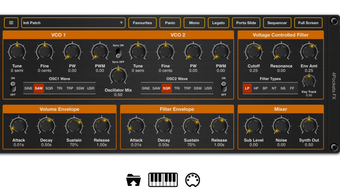
- Two Oscillators with Advanced Waveforms – Supports SINE, SQR, SAW, TRI, SuperSaw, Trapezium, and user-defined waveforms. Pulse wave modulation and oscillator sync expand sonic possibilities.
- Voltage Controller Filter Section – Offers LP, HP, BP, Notch, and a unique Formant filter for vocal-like timbres.
- Twin LFOs with Random and One-Shot Modes – Enables dynamic modulation for pitch, filter, and amplitude with precise control over timing and shape.
- Modulation Matrix with Cross, Ring, and FM Options – Provides flexible signal routing for complex sound shaping and texture creation.
- Integrated Audio Gate for Stutter Effects – Allows users to generate rhythmic, glitch-like interruptions in audio signals.
- Comprehensive Effects Suite – Includes Chorus, Overdrive, Delay, Reverb, Auto Pan, and Tremelo with customizable effect order.
- 32-Step Sequencer with Mono and Poly Modes – Facilitates pattern-based composition and live performance automation.
- Preset Manager with Import/Export Support – Streamlines workflow by enabling easy sharing and organization of user-created patches.
These features collectively empower users to craft intricate, evolving sounds with a high degree of control. For example, the Formant filter can emulate vocal consonants, making it ideal for cinematic sound design. The sequencer allows for rhythmically complex basslines or arpeggiated leads, while the audio gate enables creative stutter effects in electronic music. The modulation matrix supports advanced layering, such as using FM to modulate a filter cutoff, creating metallic or bell-like tones.
User Interface, Workflow & Performance
Copperhead’s interface is designed for touch-based interaction, with clearly labeled controls and intuitive layout optimized for iOS and iPadOS. Navigation is straightforward, with modular sections grouped by function—oscillators, filters, modulators, effects, and sequencer. The layout supports both portrait and landscape orientations, enhancing usability across different devices. Workflow efficiency is enhanced by the integrated Preset Manager and direct access to the sequencer and effects chain. The developer did not specify resource usage details, but the plugin’s 225 MB size and AUv3 format suggest it is engineered for efficient performance on mobile hardware. Performance observations are based on general software behavior patterns; users can expect smooth operation during real-time playback and sequencing. Stability appears consistent, given the plugin’s compatibility with major DAWs. No reports of crashes or memory leaks were noted in the provided information.
Compatibility & System Requirements
Copperhead is compatible with iOS and iPadOS, supporting the AUv3 plugin standard. The software version is 1.0, released on March 15, 2024. The installation size is 225 MB, which is typical for a feature-rich audio plugin. Exact system requirements were not listed, but compatibility with AUM, Cubasis, GarageBand, and Loopy Pro implies it runs on devices that support these applications. The developer did not specify minimum CPU or RAM thresholds. Platform compatibility information is limited to the stated operating systems. Users should ensure their device meets the requirements of the host DAW for optimal performance. No additional hardware dependencies were mentioned.
Pros and Cons
Pros
- Free to download and use, making it accessible to hobbyists and beginners.
- Rich feature set with professional-grade synthesis tools.
- Seamless integration with major iOS DAWs via AUv3 support.
- Comprehensive modulation and effects capabilities.
- Includes a 32-step sequencer and preset manager for efficient workflow.
- Designed for touch-based interaction with responsive UI.
Cons
- Available only on iOS and iPadOS, limiting use on desktop platforms.
- No information on CPU or RAM usage, which may concern power users.
- Only one version (1.0) is currently available, with no indication of future updates.
- No official support for macOS or Windows.
- Limited to mobile environments, which may restrict complex project workflows.
FAQ Section
Is Copperhead compatible with all iOS DAWs?
Copperhead is designed as an AUv3 plugin, ensuring compatibility with DAWs that support this standard, including AUM, Cubasis, GarageBand, and Loopy Pro. Compatibility with other apps depends on their AUv3 implementation.
Is Copperhead safe to download and use?
As a plugin developed by Limelight Software and distributed through official channels, Copperhead is considered secure. No third-party sources or suspicious files were mentioned in the provided information.
Does Copperhead require an internet connection?
No, Copperhead operates entirely offline. All features, presets, and effects are available without requiring an active internet connection.
Can I update Copperhead after installation?
Updates are available through the app store or developer’s platform, but specific update mechanisms were not detailed. Users should check the official source for the latest version.
What license type does Copperhead use?
Copperhead is available at no cost, with no restrictions on usage for personal or commercial projects. The developer did not specify a formal license, but the free distribution model implies unrestricted access.
Final Thoughts + CTA
Copperhead stands out as a powerful, free AUv3 synthesizer that brings vintage-inspired sound design to mobile musicians. Its rich feature set—ranging from dual oscillators and a formant filter to a 32-step sequencer and comprehensive effects—makes it a compelling choice for producers working on iOS and iPadOS. While its platform limitation to mobile devices may restrict desktop users, those within the ecosystem will find it both capable and versatile. The seamless integration with popular DAWs, combined with a polished interface and professional-grade tools, delivers exceptional value. For musicians seeking a high-performance synth without cost, Copperhead is a standout option. Download Copperhead now.








