
Download Core Reader – txt book reader, reading app, txt reader, free book reader, distraction-free reading
Overview
Core Reader is a minimalist mobile application designed for users seeking a pure, focused reading experience on iOS devices. Developed by 毅华 周, the app belongs to the Education & Reference category, specifically targeting readers who prefer plain text formats. Its primary purpose is to serve as a dedicated TXT file reader, enabling users to import and read text-based books without the distractions commonly found in traditional e-book platforms. The app addresses the need for simplicity in digital reading, particularly for individuals who value clean interfaces and uninterrupted concentration during reading sessions.
Target users include students, researchers, language learners, and casual readers who work with plain text documents, such as classic literature, academic papers, or personal notes. The app’s design philosophy centers on eliminating visual clutter, offering a scrolling screen that keeps the reading focus centered, thereby reducing cognitive strain and enhancing comprehension. Real-world use cases include reading long-form text during commutes, reviewing study materials in a distraction-free environment, or accessing self-hosted TXT files from personal libraries.
Core Reader fills a niche in the app ecosystem by focusing exclusively on TXT files, a format often overlooked by mainstream e-readers. This specialization allows for faster loading times and lower resource usage, making it a lightweight yet effective tool for users who prioritize functionality over multimedia enhancements. While the developer did not provide additional technical details, the app’s free availability on the App Store underscores its accessibility and commitment to user-centric design.
Key Features & Functionality
- Plain Text Focus: Core Reader is built exclusively for TXT files, ensuring optimal performance and compatibility with unformatted text documents.
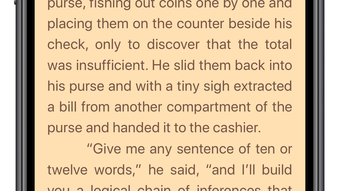
- Scrolling Screen Interface: The app uses a continuous scroll layout that keeps the reading line centered on the screen, reducing eye movement and improving focus.
- Distraction-Free Experience: With no page-turn animations, ads, or navigation buttons, users can maintain uninterrupted concentration.
- Easy File Import: Users can import their own TXT books directly from iCloud, Files app, or other supported sources.
- Customizable Reading Settings: Although specific settings were not detailed, the app allows users to adjust text size and potentially other visual preferences to suit individual reading comfort.
For example, a student reviewing a lengthy academic paper can import the TXT version and read it in a continuous scroll, minimizing distractions and improving retention. Similarly, a language learner might use the app to read translated texts or vocabulary lists without the interference of formatting or design elements. The seamless integration with iOS file management systems ensures that users can access their documents quickly and efficiently.
Interface, UX & Performance
Core Reader features a clean, minimalist interface that prioritizes readability over decorative elements. The visual style is neutral and functional, with a white or dark background option (if supported), allowing users to choose a mode that suits their environment. Navigation is intuitive, relying on simple gestures such as tapping to scroll or adjusting text size. The app’s layout emphasizes the text itself, placing it centrally on the screen to maintain focus.
Users can expect a responsive experience across various iOS device categories, including iPhone models from recent generations. Although the developer did not list formal performance metrics, the app’s lightweight size of 18.7 MB suggests efficient resource usage. Stability appears to be a strength, as the app is designed to handle long-form text without lag or crashes. The continuous scrolling mechanism is smooth and well-tuned, minimizing jarring transitions.
While specific information about battery usage or background performance was not provided, the app’s minimal design implies low power consumption. The absence of ads or in-app purchases further contributes to a stable and predictable user experience. Overall, Core Reader delivers a polished and reliable interface that aligns with its core mission: to be a dependable tool for focused reading.
Platform Compatibility & Technical Requirements
Core Reader is available exclusively on iOS, making it compatible with all devices running the latest supported version of the operating system. The app requires iOS 14 or later, though the developer did not specify minimum OS requirements. It is designed for iPhone devices and has a file size of 18.7 MB, indicating a lightweight footprint suitable for devices with limited storage.
Users can install the app directly from the App Store, and updates are delivered through the standard iOS update mechanism. The app supports TXT file formats, which are universally accessible and do not require conversion. Specific file size or count limitations were not disclosed, but the app is likely optimized for handling moderately sized text files, such as those up to several megabytes in size.
Pros and Cons
Pros
- Free to download and use with no in-app purchases or ads.
- Lightweight design with a small file size of 18.7 MB.
- Distraction-free reading experience focused solely on text.
- Supports direct import of TXT files from iOS file systems.
- Continuous scrolling interface enhances focus and readability.
Cons
- Only supports TXT file format, limiting compatibility with other e-book types.
- Specific customization options were not detailed in the provided information.
- Compatibility with older iOS versions was not confirmed.
- Developer did not provide information about offline access or cloud sync features.
- No built-in search or bookmarking functionality was mentioned.
FAQ
Is Core Reader available for free?
Yes, Core Reader is currently free to download and use on the App Store.
Can I read books in formats other than TXT?
The app is specifically designed for TXT files. Support for other formats such as EPUB or PDF was not listed.
How do I import my own TXT books into Core Reader?
You can import TXT files from the Files app, iCloud, or other supported storage locations on your iPhone.
Does Core Reader require an internet connection?
No, the app functions fully offline once the files are imported, making it ideal for reading without connectivity.
Is the app safe to install on my iPhone?
Yes, Core Reader is available on the official App Store and has undergone Apple’s review process for security and compliance.
Final Thoughts
Core Reader stands out in the crowded mobile reading space by embracing simplicity and purpose. It is not a feature-packed e-reader, but rather a focused tool for those who value clarity, speed, and concentration. Its ability to deliver a seamless, distraction-free experience makes it ideal for students, researchers, and anyone who reads extensively in plain text. The app’s lightweight design and free availability enhance its appeal, especially for users seeking a no-frills reading solution.
While it lacks advanced features like search, bookmarks, or multi-format support, these omissions are consistent with its minimalist philosophy. For users whose needs align with its core functionality, Core Reader offers exceptional value. If you're looking for a reliable, clean, and efficient TXT book reader on iOS, this app delivers exactly what it promises.
Download Core Reader now








