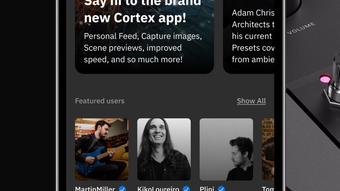

Cortex Cloud: Manage Presets on the Go
Overview
Cortex Cloud is a mobile application developed by Neural DSP Technologies Oy, designed to extend the functionality of the Quad Cortex guitar processor through a cloud-based ecosystem. The app serves as a bridge between users and their digital audio presets, neural captures, and other content stored in Cortex Cloud. By providing access to this content from an iPhone, users can manage and transfer their favorite settings directly to their hardware device. This solution addresses the need for portability and remote access in professional and hobbyist music production environments, particularly for guitarists and audio engineers who rely on consistent tone settings across different setups.
The software is tailored for users of the Quad Cortex, requiring a registered device and a free Neural DSP account to function. It enables seamless synchronization of presets and neural captures between the cloud and the physical unit, enhancing workflow continuity. Real-world use cases include touring musicians who need to access their custom tones from any location, studio producers managing collaborative projects, and content creators sharing their work with others in the community. While the app itself is free, it functions as a companion tool rather than a standalone audio processor.
Key Features & Capabilities
- Cloud-Based Preset Access – Users can browse, discover, and retrieve presets from Cortex Cloud, including those shared by other community members or uploaded by themselves.
- Seamless Transfer to Quad Cortex – The app enables direct sending of presets, neural captures, and other content to the connected Quad Cortex device, ensuring immediate availability on stage or in the studio.
- Profile and Content Management – Users can view and manage their uploaded content, adjust privacy settings, and organize their digital library with ease.
- Community Discovery – The interface allows exploration of other users’ presets and neural captures, fostering collaboration and inspiration within the Neural DSP community.
- Mobile-First Design – The app features a clean, intuitive interface optimized for touch interaction on iPhone devices, enhancing usability during on-the-go sessions.
These capabilities support efficient workflow management, especially for users who frequently switch between rehearsal spaces, studios, and live venues. The ability to remotely update a device’s preset library ensures that tone consistency is maintained regardless of location. The app also promotes content sharing and discovery, helping users expand their creative palette through community contributions.
User Interface, Workflow & Performance
The user interface of Cortex Cloud is designed with simplicity and functionality in mind. Navigation is streamlined through a tab-based layout, allowing users to quickly switch between browsing, managing their profile, and sending content to the Quad Cortex. The visual design emphasizes clarity, with well-organized lists, intuitive icons, and responsive touch feedback. The app’s workflow is optimized for minimal steps: select a preset, review metadata, and send it with a single tap.
Performance is expected to be smooth given the app’s size of 25.5 MB and its focus on data transfer rather than real-time audio processing. The developer did not specify resource usage details, so CPU and RAM behavior cannot be confirmed. However, based on general software behavior patterns, the app should maintain low overhead during typical use. Stability is likely maintained through integration with the established Neural DSP ecosystem, though no public reports on crashes or bugs were provided. Overall, the app appears to be reliable for its intended purpose of content management and device synchronization.
Compatibility & System Requirements
Cortex Cloud is designed exclusively for iOS devices and requires a minimum of iOS 14.0 to operate. The application is compatible with iPhone models that support the required operating system version. Installation size is 25.5 MB, which is relatively lightweight for a mobile application with cloud integration features. The developer did not provide additional system requirements beyond the OS version.
Compatibility with the Quad Cortex hardware is mandatory for full functionality, as the app relies on the device being registered and connected to the Neural DSP account. The app does not function independently of the Quad Cortex or the associated cloud service. Platform compatibility information is limited to iOS, with no indication of support for Android, Mac, or Windows platforms. Users should ensure their device meets the minimum OS requirement before attempting installation.
Pros and Cons
Pros
- Free to download and use with no hidden costs
- Intuitive mobile interface optimized for iPhone users
- Seamless integration with Quad Cortex for instant preset transfer
- Supports community-driven content discovery and sharing
- Lightweight installation at just 25.5 MB
Cons
- Requires a registered Quad Cortex and Neural DSP account
- Available only on iOS, limiting access for Android users
- No standalone functionality—dependent on cloud and hardware
- Limited to preset and neural capture management, no audio editing
- App functionality tied to the Cortex Cloud service, which may face downtime
FAQ Section
Is Cortex Cloud available for Android devices?
Cortex Cloud is currently only available for iOS. There is no official Android version at this time.
Do I need a Neural DSP account to use the app?
Yes, a free Neural DSP account is required to access Cortex Cloud and use the app’s features.
Can I use Cortex Cloud without a Quad Cortex?
No, the app is designed as a companion tool for the Quad Cortex. It requires a registered Quad Cortex device to function fully.
Is the app secure and safe to download?
Yes, the app is developed by Neural DSP Technologies Oy and distributed through the official Apple App Store, ensuring it is safe and free from malicious content.
How often does the app receive updates?
Update frequency is managed by the developer and typically aligns with new features or improvements to the Cortex Cloud ecosystem.
Final Thoughts + CTA
Cortex Cloud delivers a focused and effective solution for Quad Cortex users seeking mobile access to their digital audio content. Its clean interface, seamless integration, and free access make it an essential companion for musicians who value portability and workflow efficiency. While limited to iOS and dependent on hardware registration, its strengths in preset management and community engagement outweigh these constraints for its target audience. For anyone using the Quad Cortex, this app enhances flexibility and creativity by bringing the cloud library to your fingertips.
Download Cortex Cloud now








