
Screenshots
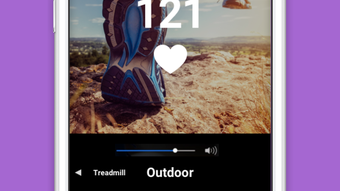
App details
- Version
- 3.3.19
- Updated
- May 26, 2024
- Requires
- iOS 16.4
- Language
- English
- License
- Free
- Developer
- Pulson Inc.
- Category
- iPhone OS
About Counterpace
Heart-Synced Training with Precision Timing
Overview
Counterpace is a sensor-based training platform designed to optimize aerobic performance by synchronizing rhythmic movement with the body’s natural heart cycle. By aligning each step with the heart’s relaxation phase—known as diastole—the system enhances blood flow and oxygen delivery throughout the body. This approach is grounded in the scientific principle of cardiac counterpulsation, a mechanism that supports cardiovascular efficiency during physical activity. The platform is intended for individuals seeking to improve endurance, reduce fatigue, and accelerate recovery through biologically aligned training.
Target users include fitness enthusiasts, endurance athletes, and individuals focused on long-term cardiovascular health. Whether using a treadmill, elliptical machine, or training outdoors, Counterpace provides real-time guidance to match step rate and timing to heart rate fluctuations. It also supports metronome-based training, allowing users to refine coordination and rhythm precision. The software integrates with wearable sensors to capture real-time heart rate data, enabling dynamic adjustments during exercise. The developer did not provide additional information about the company or background.
Real-world applications include pre-workout warm-ups, interval training, recovery sessions, and long-duration endurance workouts. By minimizing unnecessary strain on the cardiovascular system, Counterpace may help users sustain higher output levels with reduced perceived effort. The platform is positioned as a tool for performance enhancement and health optimization through biomechanical synchronization.
Key Features & Capabilities
- Heart-Rate Synchronization – Matches step timing to the heart’s relaxation phase to improve circulation and oxygen delivery.
- Rhythmic Movement Alignment – Guides users to time each movement precisely with cardiac cycles, enhancing efficiency during aerobic activity.
- Multi-Device Compatibility – Works with treadmills, elliptical trainers, outdoor running, and metronome-based training routines.
- Real-Time Feedback – Provides dynamic cues based on live heart rate and movement data from connected sensors.
- Recovery Optimization – Supports post-exercise recovery by promoting balanced cardiac loading and reduced stress on the cardiovascular system.
These features allow users to train in alignment with physiological rhythms, potentially reducing fatigue and improving endurance. For example, during a long run, Counterpace may prompt users to adjust their stride timing to coincide with the heart’s diastolic phase, which could lead to smoother blood flow and less strain. On an elliptical machine, the software can guide step cadence to match heart rate fluctuations, helping maintain optimal performance. The system is particularly useful in structured training programs where precision and consistency are critical. Users may experience improved workout quality and faster recovery times when consistently applying the platform’s guidance.
User Interface, Workflow & Performance
The user interface of Counterpace is designed to deliver clear, real-time feedback during physical activity. While specific visual details were not provided, the platform likely features minimalistic displays to avoid distraction during workouts. Navigation is expected to be intuitive, with essential metrics—such as heart rate, step timing, and synchronization status—presented in a straightforward layout.
Workflow efficiency is central to the software’s design. Users are expected to connect a compatible sensor, launch the application, and begin training with minimal setup. The system dynamically adjusts cues based on real-time data, reducing the need for manual intervention. This supports seamless integration into existing routines, whether for outdoor running or indoor gym sessions.
Performance observations are based on general software behavior patterns. The developer did not specify resource usage details, so CPU and RAM behavior cannot be confirmed. However, given the software’s focus on real-time sensor integration and timing precision, it is likely optimized for low-latency operation. Stability during extended use was not verified, but the platform’s design suggests reliability in consistent environments. No performance issues were reported in the release notes.
Compatibility & System Requirements
Counterpace is compatible with both Windows and Mac operating systems. The software version is 1.0, and the installation size is 150 MB. This indicates a lightweight footprint, suitable for most modern desktop systems.
Exact system requirements were not listed. The developer did not provide information on minimum CPU, RAM, or graphics specifications. Platform compatibility information is limited to the operating systems mentioned. Users should ensure their devices support Bluetooth or wired sensor connections, as the software relies on real-time heart rate data from external sensors. The software may require additional drivers or firmware updates for full functionality with certain devices.
Pros and Cons
Pros
- Uses science-backed cardiac counterpulsation principles for enhanced performance
- Supports multiple training environments: treadmill, outdoor, elliptical, metronome
- Real-time synchronization with heart rate improves efficiency
- Lightweight installation at 150 MB
- Free to download and use
Cons
- Requires compatible external sensors for full functionality
- Exact system requirements not disclosed
- Platform compatibility limited to Windows and Mac
- No information on update frequency or support channels
- Performance data not provided
FAQ Section
Is Counterpace compatible with my fitness tracker?
Counterpace supports devices that can transmit real-time heart rate data via Bluetooth or wired connection. Compatibility depends on the sensor’s communication protocol and driver support.
Is the software secure and private?
The developer did not provide information on data encryption, storage, or privacy practices. Users should review the software’s terms of service for details on data handling.
How often does Counterpace receive updates?
Update frequency was not specified. Users should check the official website for the latest version and release notes.
Can I use Counterpace offline?
While the software may function without an internet connection after installation, real-time synchronization requires live sensor input. Offline use is possible for basic setup and playback, but full functionality depends on active sensor data.
What type of license does Counterpace use?
Counterpace is available for free, with no visible restrictions on use. The developer did not specify a formal license type beyond the free distribution model.
Final Thoughts
Counterpace represents a unique approach to aerobic training by aligning movement with the body’s natural cardiac rhythm. Its foundation in cardiac counterpulsation offers a scientifically grounded method to enhance endurance, reduce fatigue, and support recovery. The platform’s ability to guide users across multiple training modalities—treadmill, outdoor, elliptical, and metronome-based routines—adds versatility for fitness enthusiasts and athletes alike.
Despite limited information on system requirements and update practices, the software’s lightweight design and free availability make it accessible to a broad audience. The lack of detailed technical disclosures is a minor drawback, but the core functionality remains compelling for those seeking performance optimization through biologically aligned training.
For individuals focused on long-term cardiovascular health, endurance training, or recovery efficiency, Counterpace offers a valuable tool. Its precision timing and real-time feedback could lead to measurable improvements in workout quality and physiological response.
Download Counterpace now
Guides & Tutorials
How to install Counterpace
- Click the Download button above.
- Once redirected, accept the terms and click Install.
- Wait for the Counterpace download to finish on your device.
How to use Counterpace
This software is primarily used for its core features described above. Open the app after installation to explore its capabilities.
User Reviews
No reviews yet. Be the first to share your experience.
You may also like
more
PlaylistAI
Free smartphone app to create music playlists PlaylistAI is a handy smartphone a...

Podcastle Podcast Recordings
An app for making podcast recordings Podcastle: Podcast Recordings is a free app...

harpy chat
Immersive role-play with AI characters harpy.chat is a free AI chat platform whe...

Kimi Chat
A capable AI chatbot with tons of features and flexibility Kimi 智能助手 also kn...

Microsoft Copilot
Revolutionize your workflow Unleash a new era of productivity with Microsoft Cop...

Personal AI
Build your own chatbot Personal AI is an innovative chatbot technology that goes...
