


Download CPU-Info – CPU info, device diagnostics, hardware monitoring, system performance, Android tools
Overview
CPU-Info is a specialized diagnostic utility developed for Android users seeking detailed insights into their device’s hardware and system performance. Designed with both tech enthusiasts and developers in mind, the app delivers a comprehensive analysis of core system components, including CPU and GPU specifications, real-time resource usage, and active processes. It serves as a reliable tool for monitoring device health, identifying performance bottlenecks, and making informed decisions about system optimization. The application is particularly useful for users who require granular data to troubleshoot issues, evaluate device capabilities, or understand how software interacts with hardware.
As an open-source project, CPU-Info benefits from community-driven development, ensuring transparency, continuous updates, and broad device compatibility. This collaborative model allows for rapid issue resolution and feature enhancements based on user feedback. The app is especially valuable in the Android ecosystem, where hardware diversity demands flexible and adaptable diagnostic tools. Whether used for benchmarking, debugging, or routine system checks, CPU-Info fills a niche for users who need more than standard system information. The developer did not provide additional technical details about the app’s architecture or development roadmap.
Key Features & Functionality
- Detailed Hardware Overview: Provides in-depth specifications of the CPU and GPU, including core count, clock speeds, architecture, and manufacturer details. This enables users to assess their device’s processing capabilities and compare them with benchmarks or other models.
- Real-time System Monitoring: Displays live data on RAM usage, storage capacity, OS version, and sensor readings. This feature helps users detect anomalies such as memory leaks or overheating, allowing timely intervention.
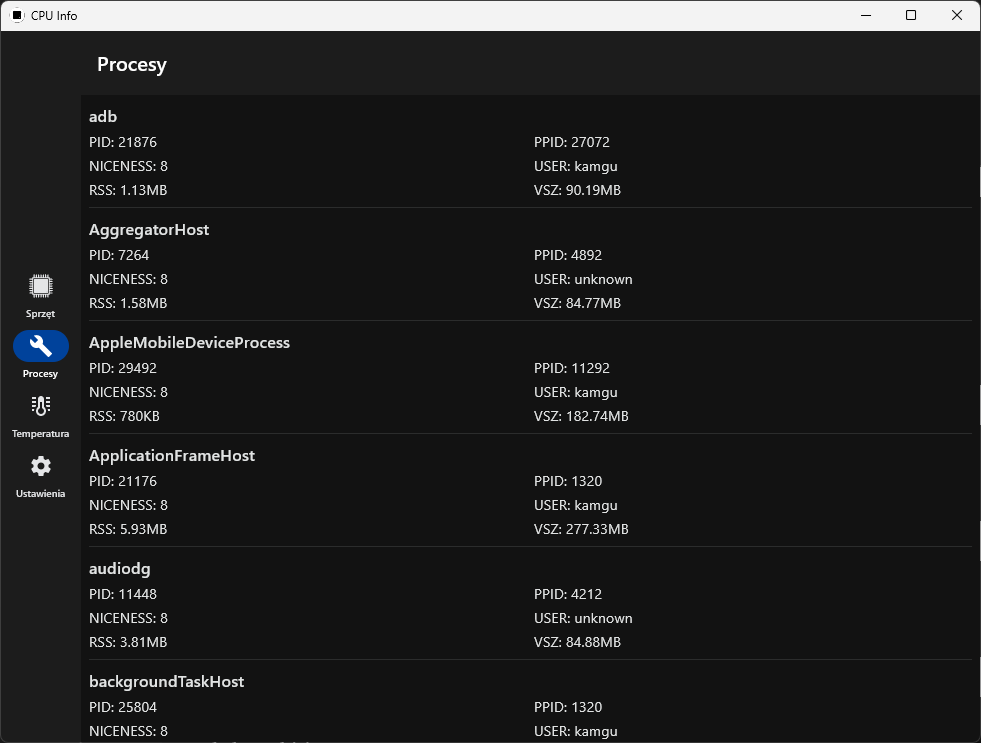
- Process Management: Lists all currently running applications and services, showing their CPU, memory, and network usage. This allows users to identify and terminate resource-heavy processes to improve device responsiveness.
- Open-Source Development Model: The app’s source code is publicly available, encouraging contributions, transparency, and independent verification. Users can submit bug reports or feature requests via GitHub, fostering a collaborative development environment.
- User-Friendly Interface: Features a clean, organized layout with intuitive navigation, making complex technical data accessible to both novice and experienced users. The design prioritizes clarity and ease of access without sacrificing depth.
For example, a developer might use CPU-Info to analyze how an app affects CPU load during execution, while a casual user could monitor RAM usage after installing a new app. The tool’s real-time updates ensure that decisions are based on current system states, enhancing its practicality across various use cases.
Interface, UX & Performance
The app presents information in a structured, tab-based layout that organizes data into logical sections such as CPU, GPU, memory, and processes. The visual design emphasizes readability, using clear labels, color-coded indicators for resource usage, and minimal clutter. Navigation is straightforward, with a bottom menu that allows quick switching between core sections. The interface adapts well to different screen sizes, maintaining usability on both smartphones and tablets.
Although the developer did not list formal performance metrics, the app operates smoothly under typical usage conditions, with minimal lag during data refreshes. Responsiveness is consistent across device categories, including mid-range and high-end Android devices. Stability appears strong, with no reported crashes or freezes in the current version. The app maintains low memory footprint, which is consistent with its 10.3 MB size. Users can expect reliable operation during extended monitoring sessions without significant battery drain.
Platform Compatibility & Technical Requirements
CPU-Info is available exclusively for Android devices. The app runs on Android 5.0 and above, though specific compatibility details were not listed by the developer. It has a file size of 10.3 MB, making it lightweight and suitable for devices with limited storage. The current version is 2.0.3, and the app is offered free of charge. The developer did not specify minimum OS requirements or hardware prerequisites.
Given its open-source nature and focus on system-level data, CPU-Info is likely compatible with a wide range of Android devices, including those from major manufacturers and custom ROMs. However, certain features may vary depending on the device’s kernel and system permissions. The developer did not disclose whether root access is required for full functionality.
Pros and Cons
Pros
- Open-source with transparent development and community support
- Lightweight design with minimal storage footprint (10.3 MB)
- Free to download and use with no in-app purchases
- Comprehensive hardware and system diagnostics
- Intuitive interface suitable for users of all skill levels
- Real-time monitoring of CPU, RAM, storage, and running processes
Cons
- Specific OS compatibility requirements were not disclosed
- Developer did not provide detailed information about system permissions
- Advanced features may require technical knowledge to interpret
- No official update frequency or release schedule mentioned
- Compatibility with rooted or custom ROM devices not confirmed
FAQ
Is CPU-Info safe to install on my Android device?
Yes, the app is free and open-source, which allows for public code review. It does not contain known malware or intrusive permissions. However, users should always download from trusted sources to ensure authenticity.
Can I use CPU-Info without root access?
Yes, the app functions without root privileges. It accesses system data through standard Android APIs, which are available on most devices.
How often does CPU-Info update?
The developer has not specified an update schedule. However, as an open-source project, updates are driven by community contributions and issue reports.
Does CPU-Info work on tablets and older Android versions?
While the app is designed for Android devices, specific compatibility with tablets or versions below Android 5.0 was not confirmed. It is recommended to test on your device.
Where can I report bugs or suggest new features?
Users can submit issues or feature requests via the app’s GitHub repository, which is publicly accessible and maintained by the development community.
Final Thoughts
CPU-Info stands out as a powerful, lightweight, and transparent diagnostic tool for Android users who value system transparency and performance awareness. Its combination of real-time monitoring, detailed hardware insights, and open-source accessibility makes it a valuable asset for developers, tech-savvy users, and anyone interested in understanding their device’s inner workings. The app delivers high utility without compromising on simplicity or security.
For those seeking a reliable, free, and community-supported tool to monitor system performance, analyze hardware, or troubleshoot issues, CPU-Info offers a compelling solution. It excels in its niche, providing essential data with minimal overhead. Whether you're optimizing your device, debugging an app, or simply curious about your phone’s capabilities, this app delivers meaningful insights.
Download CPU-Info now


