
Download CryptoCap – Lightweight Cryptocurrency Tracker for macOS, Windows & Linux
Introduction & Overview
In the fast‑moving world of digital assets, staying on top of price movements, market caps, and trading volumes can feel like a full‑time job. CryptoCap cuts through the noise with a no‑frills menu‑bar interface that puts the most critical data right at your fingertips. Designed for investors, traders, and crypto‑enthusiasts who need real‑time updates without the clutter of heavyweight dashboards, CryptoCap lets you build a custom favorites list from over 1,000 coins and tokens. Whether you’re watching Bitcoin breach a new high or waiting for an altcoin to dip to a specific target, the app’s price‑alert system delivers instant notifications the moment your threshold is met. Beyond simple price tracking, CryptoCap also offers a concise visual history, charting market cap, volume, and price trends across selectable timeframes ranging from the last 24 hours to a full year. The result is a secure, lightweight tool that integrates seamlessly into your desktop environment, allowing you to monitor the crypto market while you work, code, or browse the web. If you value speed, simplicity, and accurate data, CryptoCap is the free, constantly updated companion you’ve been waiting for.
Core Features That Set CryptoCap Apart
- Custom Favorites List: Choose any combination of the 1,000+ supported cryptocurrencies and keep them organized in a personal watchlist that updates in real time.
- Instant Price Alerts: Set precise price thresholds for any coin; CryptoCap sends a desktop notification the moment the market reaches your target, so you never miss a trade opportunity.
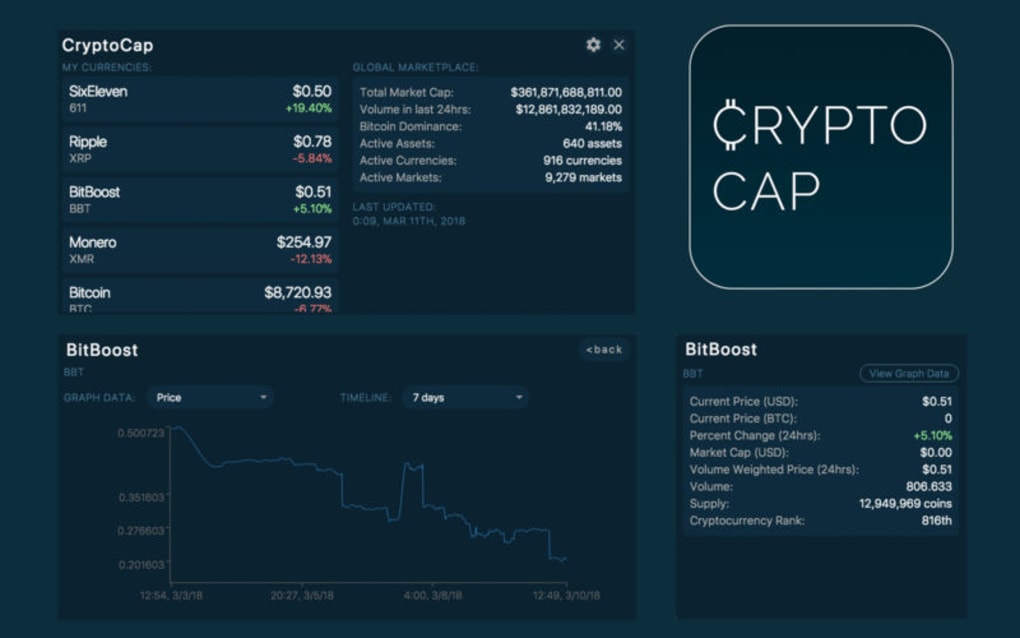
- Historical Graphs: Visualize market cap, trading volume, and price movements on interactive graphs covering periods from 24 hours to 365 days, helping you spot trends without leaving the menu bar.
- Lightweight Menu‑Bar Design: The app lives unobtrusively in your system tray, consuming minimal CPU and RAM while delivering up‑to‑the‑second data.
- Secure Data Handling: CryptoCap pulls information from reputable public APIs and never stores your personal data, ensuring a privacy‑first experience.
- Cross‑Platform Support: Available for macOS, Windows, and Linux, the same sleek interface works across all major desktop environments.
- Free Updates & Community Support: Regular updates keep the coin list current and add minor enhancements, all at no cost to the user.
Installation, Usage & Compatibility
Step‑by‑Step Installation Guide
Getting CryptoCap up and running is intentionally straightforward. First, visit the official CryptoCap website and click the Download button that matches your operating system. For macOS users, a .dmg file is provided; Windows users receive a .exe installer, and Linux enthusiasts can download a .AppImage or .deb package. Once the file is saved:
- Open the installer and follow the on‑screen prompts. The process typically takes less than a minute.
- After installation, launch CryptoCap from your Applications folder (macOS) or Start Menu (Windows) or via your desktop shortcut (Linux).
- When the app first starts, it will request permission to appear in the menu bar or system tray. Accept this request to enable real‑time updates.
How to Use CryptoCap Effectively
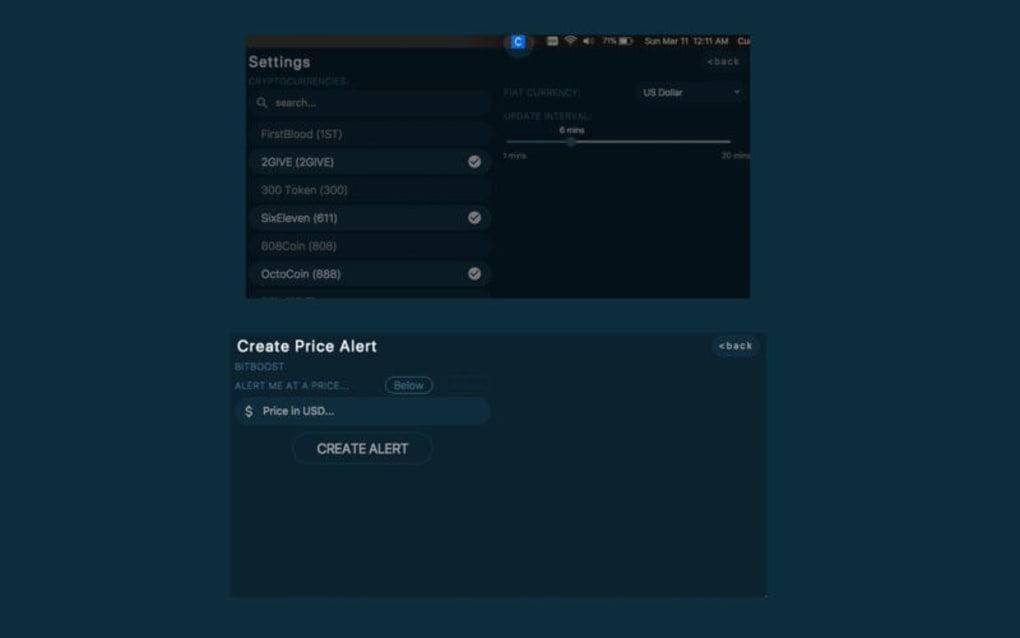
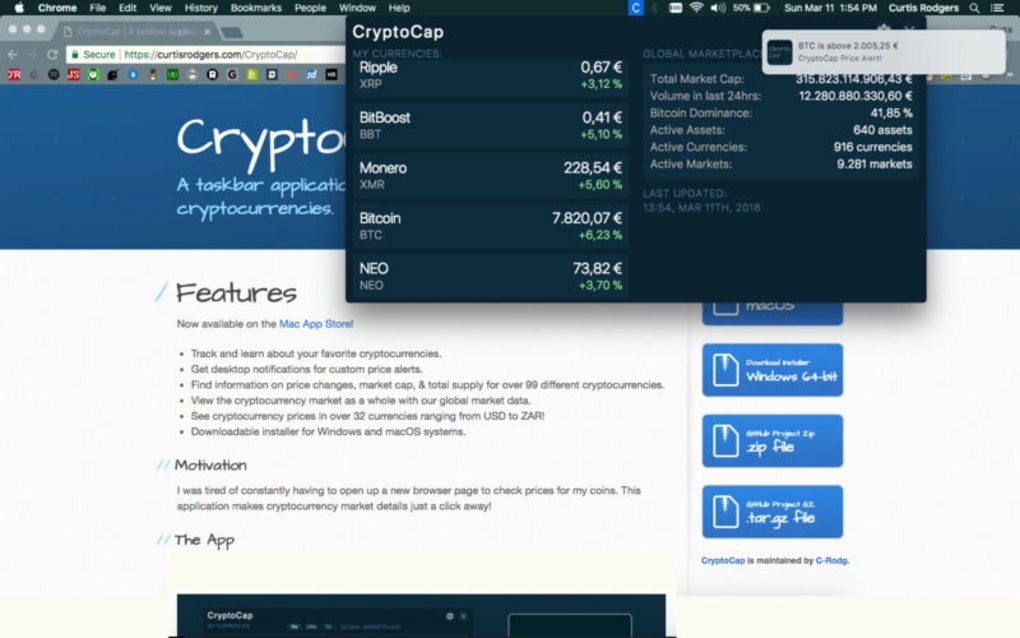
Upon launch, CryptoCap presents a clean dropdown menu displaying the top five cryptocurrencies by market cap. To customize your view, click the Settings icon and navigate to the Favorites tab. Here you can search for any coin by name or ticker symbol, then click Add to include it in your list. Each favorite shows the current price, 24‑hour change, and a small sparkline indicating recent movement.
Setting price alerts is equally simple. Select a coin from your favorites, choose Set Alert, and enter the target price. You can also define whether you want to be notified for price rises, drops, or both. Alerts appear as native desktop notifications, ensuring you receive them even if the CryptoCap window is hidden.
For deeper analysis, click the Chart button next to any coin. A pop‑up window displays a customizable graph where you can toggle between market cap, volume, and price data. Use the time‑range selector to zoom in on the last 24 hours, 7 days, 30 days, or the full 365‑day view. The charts are rendered using lightweight SVG technology, which keeps the app responsive on older hardware.
Supported Operating Systems
CryptoCap is built with cross‑platform compatibility in mind. The current stable release runs on:
- macOS 10.15 (Catalina) and later
- Windows 10 (64‑bit) and later
- Linux distributions with kernel 4.15+ (Ubuntu, Fedora, Debian, and Arch are tested)
Because the app relies on system‑native notification services, it integrates seamlessly with macOS Notification Center, Windows Action Center, and Linux desktop environments like GNOME and KDE. Minimum hardware requirements are modest: 100 MB of free disk space and less than 50 MB of RAM while idle.
Pros & Cons – A Balanced Look
Pros
- Extremely lightweight; runs in the menu bar without slowing down your computer.
- Supports over 1,000 cryptocurrencies, covering both major coins and emerging tokens.
- Instant price alerts keep you informed of market movements the second they happen.
- Historical graphs provide context for price trends without needing a separate charting tool.
- Free to download and use, with regular updates that add new coins and improve stability.
- Cross‑platform availability ensures you can use the same tool on macOS, Windows, and Linux.
Cons
- No built‑in trading functionality; you must use a separate exchange or wallet for transactions.
- Limited customization of the UI beyond the favorites list and alert thresholds.
- Relies on third‑party public APIs; occasional downtime of those services can affect data freshness.
- No mobile companion app, so you must stay at your desktop for alerts.
Frequently Asked Questions
Is CryptoCap completely free to use?
Yes, CryptoCap is offered at no cost. All core features—including favorites, price alerts, and historical charts—are available for free, and updates are released regularly without any subscription fees.
Which data sources does CryptoCap rely on?
CryptoCap pulls price, market cap, and volume data from reputable public APIs such as CoinGecko and CoinMarketCap. The app does not store personal or financial data, ensuring privacy while delivering accurate market information.
Can I set multiple alerts for the same cryptocurrency?
Absolutely. CryptoCap allows you to create as many price alerts as needed for any coin, whether you want to monitor both a bullish target and a bearish stop‑loss level.
Does CryptoCap work on older macOS versions?
The minimum supported version is macOS 10.15 (Catalina). Users on earlier releases may experience compatibility issues, so we recommend upgrading to at least Catalina for optimal performance.
How do I report a bug or request a new feature?
You can submit bug reports or feature requests through the official CryptoCap GitHub repository or via the in‑app feedback form accessible from the Settings menu. The development team actively monitors community input and often incorporates popular suggestions into upcoming releases.
Conclusion & Call to Action
CryptoCap strikes the perfect balance between simplicity and functionality for anyone who needs a reliable, real‑time view of the cryptocurrency market. Its lightweight menu‑bar design means you can keep an eye on price movements without sacrificing system performance, while the customizable favorites list and instant alerts empower you to react to market changes the moment they happen. Although the app does not include built‑in trading or a mobile companion, its free price‑tracking capabilities, cross‑platform support, and secure data handling make it a standout choice for traders, investors, and casual observers alike.
Ready to stay ahead of the crypto curve? Download CryptoCap now for macOS, Windows, or Linux and start tracking your favorite coins with confidence. Experience the convenience of a dedicated crypto dashboard that lives quietly in your menu bar, delivering up‑to‑the‑second data whenever you need it.








