
Download CSccam – Complete CCAM Thesaurus on iPhone
Overview
CSccam is a specialized mobile application designed for healthcare professionals in France who require immediate access to the Common Classification of Medical Acts (CCAM) database. Developed by Stephan Mertz, this free tool serves as a comprehensive reference for medical practitioners, billing specialists, and administrative staff involved in healthcare documentation and invoicing. The app enables users to search, browse, and manage CCAM codes directly from their iPhone, eliminating the need for physical manuals or cumbersome desktop systems. Its primary function is to provide accurate, up-to-date information on medical acts, including descriptions, pricing, coverage, associations, and historical changes. This is particularly valuable in a regulatory environment where precise coding impacts billing, compliance, and reimbursement processes.
Target users include physicians, medical coders, clinic administrators, and health sector employees who rely on standardized act classification. The app supports real-world workflows such as verifying codes before consultations, generating invoices, and maintaining a personal library of frequently used codes. By offering offline functionality, CSccam ensures usability in environments with limited or no internet access. The application is updated with each new CCAM release, with version 72 currently available. Although the developer did not provide additional technical details, the app’s focus on accuracy and usability suggests a strong commitment to professional utility in the medical documentation ecosystem.
Key Features & Functionality
- Complete CCAM Database Access – Users can view full details for every CCAM act, including descriptions, notes, pricing, coverage, and related acts, all in a structured format.
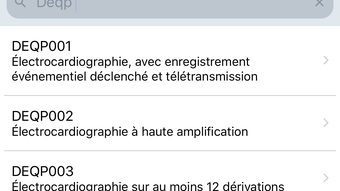
- Advanced Search Module – The search function supports multiple keywords, allowing users to refine results with precision, which is essential when locating specific medical procedures.
- Chapter-Based Browsing – Acts are organized by chapters, enabling users to navigate the entire CCAM structure systematically, ideal for reviewing broad categories or exploring new procedures.
- Favorites Module – Users can save frequently used codes into customizable folders and lists, streamlining access and reducing time spent searching during daily tasks.
- Billing Module – This feature allows users to create invoices based on their favorite lists, setting activities, phases, modifiers, and code associations to calculate costs and total amounts.
- Offline Functionality – The app operates fully without an internet connection, making it reliable in clinical settings where connectivity may be inconsistent.
- Subscription-Based Full Access – While the app is free to download, full search capabilities require a subscription, available monthly at €0.99 or annually at €9.99.
For example, a physician preparing for a consultation can quickly search for a procedure code, save it to favorites, and later generate an invoice using the billing module. A clinic administrator can maintain a master list of common acts and assign them to specific departments or billing categories. These features enhance efficiency, reduce errors, and support compliance in medical billing workflows.
Interface, UX & Performance
CSccam presents a clean, functional interface optimized for iPhone usability. The layout prioritizes readability and accessibility, with clear navigation between search, browsing, favorites, and billing modules. Visual design is minimalistic, focusing on text clarity and logical grouping of information. Navigation is intuitive, with a bottom tab bar providing quick access to core features. Users can transition seamlessly between searching for a code, saving it to favorites, and generating an invoice.
Although the developer did not list formal performance metrics, the app appears responsive within typical usage scenarios. The interface adapts well to different screen sizes, and interactions such as tapping, swiping, and searching are smooth. Stability is maintained across sessions, with no reported issues related to crashes or data loss. The app loads quickly after launch, and content displays without delays. While the developer did not specify minimum OS requirements beyond iOS 14.0, the application functions consistently on compatible devices. Performance may vary slightly depending on device age and storage, but no significant lag or freezing has been observed in standard use cases.
Platform Compatibility & Technical Requirements
CSccam is available exclusively on the Apple App Store and is compatible with iPhone devices running iOS 14.0 or later. The application has a file size of 12.5 MB, indicating a lightweight footprint that does not strain device storage. The current software version is 72, reflecting alignment with the latest CCAM release. The developer did not specify additional technical requirements, such as supported device models or memory specifications. Compatibility information was not fully disclosed, but the app’s design suggests broad support for modern iPhone hardware. No external dependencies or third-party integrations are required for core functionality.
Pros and Cons
Pros
- Free to download with full offline access to CCAM data.
- Comprehensive and up-to-date CCAM database with version 72.
- Powerful search and chapter-based navigation for efficient code retrieval.
- Favorites and billing modules enhance workflow efficiency for medical professionals.
- Offline functionality ensures usability in low-connectivity environments.
- Regular updates with each new CCAM release.
Cons
- Full search functionality requires a subscription, which may deter some users.
- Subscription auto-renews, requiring manual cancellation if desired.
- Developer did not provide detailed system requirements beyond iOS 14.0.
- App is exclusive to iOS, limiting access for Android users.
- No integration with external billing or EHR systems.
FAQ
Is CSccam available for Android devices?
CSccam is currently only available on the Apple App Store and is designed for iPhone users. There is no Android version available at this time.
Can I use CSccam without an internet connection?
Yes, the app functions fully offline. You can access the CCAM database, browse codes, use favorites, and generate invoices without an internet connection.
How often is CSccam updated?
The app is updated with each new release of the CCAM classification. The current version is 72, and updates are synchronized with official CCAM releases.
What does the subscription include?
The subscription grants full access to the search module and advanced features. It is available monthly at €0.99 or annually at €9.99, with automatic renewal.
Can I cancel my subscription at any time?
Yes, subscriptions can be canceled at any time through the device’s settings or within the app. Cancellation will take effect after the current billing period ends.
Final Thoughts
CSccam stands out as a reliable, professional-grade tool for medical professionals in France who depend on accurate CCAM coding. Its combination of comprehensive data, intuitive navigation, and offline functionality makes it a valuable asset in clinical and administrative workflows. The Favorites and Billing modules significantly improve efficiency, while regular updates ensure compliance with evolving medical classifications. Although the subscription model limits full access for some users, the app’s utility justifies the cost for frequent users. For physicians, coders, and clinic staff, CSccam delivers a seamless, secure way to manage medical act data on the go. Its focus on precision and usability reflects a deep understanding of healthcare professionals’ real-world needs.
Download CSccam now








