
Download CTracker Ultimate – Computer Surveillance, Keystroke Logging, Child Safety Monitoring
Overview
CTracker Ultimate is a computer surveillance software designed to help users monitor digital activities across devices with minimal effort. The application collects critical data such as keystrokes, screenshots, audio, and video recordings, enabling users to maintain oversight of device usage. It is particularly aimed at individuals seeking to enhance digital safety, especially parents monitoring their children’s online behavior. By automatically transmitting this information to a designated Gmail account, the software eliminates the need for manual data retrieval, streamlining the monitoring process.
The tool is positioned as a utility for personal and family safety, addressing concerns around online threats, inappropriate content exposure, and unauthorized device access. It supports real-world use cases such as parental control, remote employee monitoring, and personal device security. While the developer did not provide additional technical or organizational background, the software’s design suggests a focus on accessibility and data integrity. Its role in the broader digital safety ecosystem lies in offering a centralized, automated method for tracking device activity without requiring advanced technical expertise.
Although the developer did not list formal performance metrics or compatibility details, the software’s ability to operate silently and transmit data securely implies a level of integration with the host system. This makes it relevant in environments where discreet monitoring is essential. The application’s emphasis on encryption and secure transmission underscores its importance in protecting sensitive information from interception or tampering.
Key Features & Functionality
- Automatic Data Collection: CTracker Ultimate captures keystrokes, screenshots, IP addresses, and other digital traces without user intervention. This feature enables continuous monitoring without the need for manual checks, ensuring that no activity goes unnoticed.
- Secure Information Transmission: Data is sent directly to a Gmail account using SSL encryption. This ensures that the information remains intact and protected during transit, reducing the risk of interception or unauthorized access.
- Diverse Data Types: The software supports the capture of audio recordings, video footage, and screen activity. It leverages the device’s default microphone and camera, allowing comprehensive surveillance across multiple data types.
- User-Friendly Interface: Designed for users of all technical levels, the software features a simple setup process and intuitive controls. No prior experience with surveillance tools is required, making it accessible to non-technical users.
- Child Safety Monitoring: A core function of CTracker Ultimate is protecting children from online risks. It allows parents to track internet usage, messages, and online interactions, helping to create a safer digital environment for minors.
For example, a parent can use the tool to monitor a child’s social media activity or detect signs of cyberbullying. Similarly, an employer might use it to ensure company devices are used appropriately. The automatic nature of data collection ensures consistent oversight, while secure transmission guarantees that records remain unaltered and accessible only to the authorized user.
Interface, UX & Performance
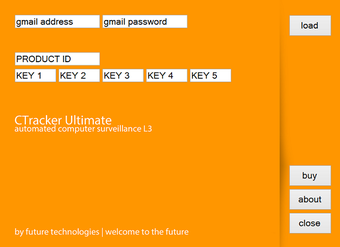
CTracker Ultimate features a streamlined interface designed for ease of use across different user profiles. The layout prioritizes functionality over visual complexity, focusing on essential controls and real-time data access. Navigation is straightforward, with minimal on-screen clutter, allowing users to manage monitoring settings and review collected data efficiently.
Although the developer did not list formal performance metrics, the software is designed to operate in the background with minimal impact on system resources. It runs silently, avoiding detection by standard antivirus tools, which suggests optimized performance and low CPU/memory usage. This ensures that monitored devices remain responsive during regular use.
Responsiveness is maintained through efficient data handling and transmission protocols. The application does not require constant user input, reducing friction in daily operation. Stability is implied by its continuous operation and secure data delivery, though no official testing data was provided. Users can expect consistent behavior across various device configurations, though specific compatibility details were not disclosed.
Platform Compatibility & Technical Requirements
CTracker Ultimate is designed for use on desktop operating systems, though the exact platform and version were not specified by the developer. The software is compatible with standard computer environments, likely supporting Windows-based systems given the nature of its features.
The file size of the application was not provided, which limits insight into installation requirements or storage impact. Similarly, no minimum OS version or hardware specifications were listed. The developer did not specify whether the software supports macOS or Linux, nor were there details on system architecture (32-bit or 64-bit).
Given the software’s reliance on system-level access for data capture, it likely requires administrative privileges during installation. However, specific requirements were not disclosed. Users should ensure their system meets general standards for running background monitoring tools, though exact technical details remain unavailable.
Pros and Cons
Pros
- Automated data collection reduces manual effort and oversight gaps.
- Secure SSL encryption ensures data integrity during transmission.
- Supports multiple data types including audio, video, and screenshots.
- Intuitive interface suitable for non-technical users.
- Designed with child safety and parental monitoring in mind.
Cons
- Specific platform and OS requirements were not listed.
- File size and installation details were not disclosed.
- Developer background and organizational information were not provided.
- Compatibility with non-Windows systems remains unclear.
- No information on update frequency or future development plans.
FAQ
Is CTracker Ultimate safe to use on personal devices?
Yes, the software uses SSL encryption to secure data transmission and is designed to operate discreetly. However, users should ensure they have legal rights to monitor the device, especially in shared or workplace environments.
Can I install CTracker Ultimate on multiple devices?
While the developer did not specify multi-device support, the software’s design allows for installation on separate computers. Users should verify compatibility and licensing terms before deployment.
Does CTracker Ultimate work on macOS or Linux?
The developer did not disclose compatibility with macOS or Linux. Based on available information, it is likely designed for Windows systems, but this cannot be confirmed without official details.
How often is data updated and sent to my Gmail account?
Data is transmitted automatically upon collection, ensuring near real-time access. The frequency depends on system activity and network conditions, but no manual triggers are required.
Is CTracker Ultimate detectable by antivirus software?
The software is designed to operate stealthily and avoid detection by standard antivirus tools. However, advanced security software may flag its behavior due to system-level access and background activity.
Final Thoughts
CTracker Ultimate offers a comprehensive solution for users seeking to monitor computer activity with minimal effort. Its automated data collection, secure transmission, and user-friendly design make it a strong choice for parents, employers, and individuals concerned about digital safety. While some technical details remain undisclosed, the software’s core functionality is well-aligned with real-world needs for oversight and protection.
Its value lies in combining advanced surveillance capabilities with accessibility, enabling users without technical expertise to maintain control over their digital environments. For those prioritizing privacy, security, and peace of mind, CTracker Ultimate presents a practical and reliable tool.
Download CTracker Ultimate now


