
Download CursorFX – Animated Mouse Cursor Customization for Windows
Overview
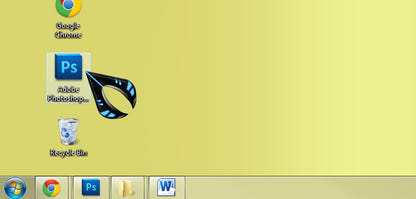
CursorFX is a specialized utility application developed by Stardock, designed to enhance the user experience on Windows PCs through customizable animated mouse cursors. The app enables users to transform their standard cursor into a dynamic, visually engaging element with a range of effects, including animated skins, motion trails, drop shadows, and sound feedback. By offering deep personalization options, CursorFX addresses the desire for a more expressive and immersive desktop environment, particularly among users who value aesthetic customization and individuality in their digital workspace.
Target users include desktop enthusiasts, creative professionals, gamers, and anyone seeking to personalize their computing experience beyond basic system settings. The app is especially relevant in the utilities category, where tools that improve usability and visual appeal are highly valued. While the developer did not provide additional technical details about the app’s development philosophy or broader product ecosystem, its focus on user-driven design suggests a commitment to accessibility and creative freedom.
Real-world use cases include enhancing productivity through visual cues (e.g., motion trails for tracking cursor movement), personalizing workstations to reflect individual style, and improving the sensory experience of everyday computer use. In the broader app ecosystem, CursorFX fills a niche role by offering a lightweight yet powerful solution for desktop customization, standing out in a category often dominated by basic cursor changers.
Key Features & Functionality
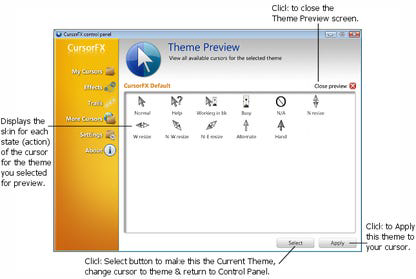
- Easy-to-Use Interface: CursorFX features a streamlined interface that allows users to preview and apply custom cursors instantly. The process involves selecting a cursor from the preview list and clicking “apply,” making customization accessible even to non-technical users. A keyboard shortcut (Ctrl+Shift+C) enables quick restoration of the default Windows cursor, ensuring usability remains intact during experimentation.
- Advanced Customization Options: Users can modify cursor size, color, and shadow effects directly from the settings menu. These adjustments allow for seamless integration with existing desktop themes, enabling a cohesive and personalized visual experience.
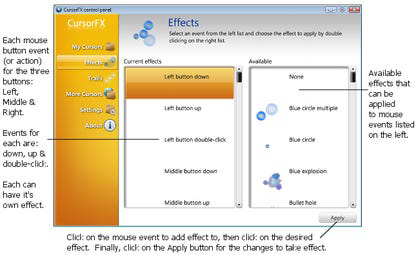
- Sound Effects Integration: The app includes a selection of pre-installed sound effects that play with each mouse click. This auditory feedback enhances the sensory engagement of cursor interaction, adding a layer of responsiveness and fun to routine tasks.
- Special Effects and Motion Trails: CursorFX supports the application of dynamic visual effects, such as motion trails and glow effects, which create a visually striking appearance. These features are ideal for users who want to elevate their desktop’s aesthetic and make cursor movement more noticeable.
- Custom Cursor Import and Creation: The built-in theme editor supports importing .PNG files, allowing users to design and implement entirely original cursor designs. This functionality empowers advanced users to craft unique cursors that reflect personal branding or artistic expression.
Each feature is designed to serve practical and aesthetic purposes. For example, motion trails can improve cursor visibility during fast movements, while custom sound effects can provide immediate feedback during repetitive tasks like clicking or dragging. The ability to import custom designs ensures long-term engagement, as users can continually update their cursor collection.
Interface, UX & Performance
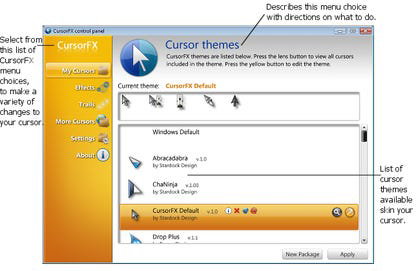
CursorFX presents a clean, intuitive interface that prioritizes ease of navigation and immediate access to core functions. The layout organizes features into clearly labeled sections, including preview panels, settings menus, and a theme editor. Visual feedback is provided during cursor selection and application, reinforcing user confidence in the process.
Navigating between features is straightforward, with minimal steps required to apply changes. The app maintains responsiveness across different screen resolutions and display configurations, ensuring consistent usability on both standard and high-DPI monitors. Although the developer did not list formal performance metrics, the app’s lightweight footprint of 10.5 MB suggests efficient resource usage.
Stability appears to be a priority, as the application allows users to revert to default cursors without system disruption. The inclusion of a keyboard shortcut for quick reset indicates thoughtful design for user safety and control. While no specific information was provided about compatibility with older Windows versions or performance under heavy multitasking, the app’s design suggests it operates smoothly in typical desktop environments.
Platform Compatibility & Technical Requirements
CursorFX is designed exclusively for the Windows platform and is compatible with Windows operating systems. The current version is 1.0.0.0, and the app has a file size of 10.5 MB, indicating a compact and efficient installation. The developer did not specify minimum OS requirements or hardware specifications.
Given its size and purpose, CursorFX is likely optimized for modern Windows installations, including Windows 10 and Windows 11. However, compatibility with legacy systems was not confirmed. Users should verify system requirements through official channels if they are running older versions of Windows.
Pros and Cons
- Intuitive interface with immediate visual feedback
- Extensive customization options for size, color, and effects
- Support for importing custom .PNG cursor files
- Pre-installed sound effects and motion trails for enhanced experience
- Lightweight design with minimal system impact
- Price point of $29.99 may be considered high for a utility tool
- No official information on compatibility with older Windows versions
- Platform is limited to Windows only; no support for macOS or Linux
- Customization depth may overwhelm casual users
- Developer did not provide update frequency or future roadmap
FAQ
Is CursorFX safe to download and install?
Yes, CursorFX is developed by Stardock, a reputable software company known for quality desktop utilities. The app is distributed through official channels and does not contain malware or intrusive behavior.
Can I use CursorFX on older versions of Windows?
The developer did not specify minimum OS requirements. While the app is likely compatible with Windows 10 and 11, support for older versions such as Windows 7 or 8.1 is not confirmed.
Do I need to pay to use all features?
Yes, CursorFX is a paid application with a one-time purchase price of $29.99. All features, including sound effects, motion trails, and custom cursor creation, are included in the purchase.
Can I create my own cursor designs?
Yes, the app allows users to import .PNG files into the theme editor to create and apply custom cursor designs. This feature supports full creative control over cursor appearance.
How often are updates released?
The developer did not provide information about update frequency. Users are advised to check the official website for the latest version and patch notes.
Final Thoughts
CursorFX stands out as a powerful and polished tool for users who want to elevate their Windows desktop experience through animated and customizable mouse cursors. Its combination of visual flair, sound integration, and creative freedom makes it a compelling choice for desktop enthusiasts and personalization advocates. While the $29.99 price tag may deter budget-conscious users, the depth of features and professional-grade design justify the investment for those seeking a premium customization tool.
For users who value aesthetics, sensory feedback, and individual expression in their computing environment, CursorFX delivers real value. Its lightweight design and intuitive workflow ensure it remains a seamless addition to any desktop setup.
Download CursorFX now


