
Download CursorLens – AI‑Assisted Coding Insights Tool for Secure, Free Development
Overview
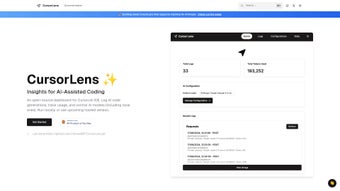
CursorLens is an open‑source, web‑based dashboard that integrates directly with the Cursor.sh Integrated Development Environment (IDE). Built for developers who want the power of large language models without sacrificing visibility, CursorLens provides real‑time insight into every AI‑generated snippet, tracks token usage, and lets you switch between multiple model providers from a single, secure interface. Whether you run the tool locally on a Windows, macOS, or Linux workstation, or you host it on a cloud server for an entire team, the application adapts to any workflow. The software is free to download, regularly updated by a vibrant community, and includes an optional caching layer for Anthropic models that reduces latency and API costs. By exposing the “black box” of AI assistance, CursorLens turns AI into a collaborative partner you can trust, helping you catch potential issues early, manage spending, and maintain full control over your codebase. Its lightweight architecture means you can start seeing value within minutes of installation, while the extensible open‑source codebase invites contributions and custom integrations that fit the unique needs of both solo freelancers and large engineering organizations.
Core Features, Installation & Compatibility
Key Features
- AI Generation Dashboard: Visualizes each snippet created by Cursor.sh, showing model name, token count, timestamp, and any flagged warnings.
- Model Management: Seamlessly switch between OpenAI, Anthropic, and self‑hosted models without leaving the IDE.
- Usage Analytics: Daily, weekly, and monthly reports help you monitor AI spend, productivity gains, and trend patterns.
- Anthropic Cache Layer: Stores recent responses locally to cut repeated API calls, improving speed and lowering costs.
- Open‑Source Flexibility: Clone from GitHub, contribute patches, or fork the repo to create a custom version.
- Secure Authentication: API keys are encrypted in your environment, ensuring credentials never leave your machine.
- Responsive UI: Built with modern web technologies, the dashboard works on any browser—Chrome, Firefox, Safari, Edge—on Windows, Mac, or Linux.
- Automatic Updates: The tool checks GitHub releases and prompts a one‑click update when a new version is available.
Step‑by‑Step Installation
- Verify that Node.js (v14+) and Git are installed.
- Open a terminal and run
git clone https://github.com/cursorsh/cursorlens.git. - Enter the project folder:
cd cursorlens. - Install dependencies:
npm install. - Duplicate
.env.exampleto.envand insert your Cursor.sh API key plus any Anthropic keys you wish to cache. - Start the development server:
npm run dev. Access the dashboard athttp://localhost:3000. - For production, build and launch with
npm run build && npm start, then configure a reverse proxy (NGINX, Caddy, etc.) for HTTPS.
Operating System Compatibility
Because CursorLens is a Node.js web app, it runs on any operating system capable of hosting a Node server. Officially supported platforms include Windows 10/11, macOS Monterey or later, and popular Linux distributions such as Ubuntu, Fedora, and Debian. The UI is browser‑based, so you can also view the dashboard from Android or iOS tablets using Chrome or Safari, making remote debugging on the go effortless. The only requirement is a modern browser that supports ES6 modules and WebSockets.
First‑Run Tips
After launching, connect the dashboard to your Cursor.sh IDE by entering the same API key you use in the IDE’s settings. The two components will auto‑discover each other, and the dashboard will begin populating logs within seconds. Use the “Filters” panel to narrow logs by model, file type, or time range. The “Cache Manager” lets you purge stored Anthropic responses if you need fresh results. For collaborative teams, enable the “Share Link” feature to generate a read‑only URL that teammates can view without exposing your API keys. These initial steps give you immediate insight into AI contributions and set the foundation for disciplined, cost‑effective AI‑assisted development.
Pros, Cons & Frequently Asked Questions
Pros
- Free and open‑source with regular community contributions.
- Transparent AI insights reduce blind reliance on generated code.
- Anthropic cache cuts latency and lowers API expenses.
- Cross‑platform support – works on Windows, macOS, Linux, Android, and iOS browsers.
- Secure storage of API keys prevents accidental credential leaks.
Cons
- Initial setup requires basic knowledge of Node.js and command‑line tools.
- No native desktop client; you must run a local server or host it.
- Advanced analytics (e.g., predictive cost forecasting) are not yet built‑in.
FAQ
Is CursorLens completely free to use?
Yes. CursorLens is released under the MIT license, allowing you to download, modify, and distribute the software at no cost. The only possible expense is the underlying AI API usage (OpenAI, Anthropic, etc.), which you pay directly to the provider.
Can I host CursorLens on a remote server for my team?
Absolutely. Because the application is a standard Node.js web server, you can deploy it to any cloud platform (AWS, Azure, DigitalOcean, etc.). Just ensure HTTPS is configured and access is restricted to authorized team members.
Does CursorLens store my code or AI responses?
All logs are stored locally on the machine where the server runs. No data is sent to third‑party analytics services unless you explicitly enable such integrations. The caching layer only stores recent Anthropic responses to reduce API calls, and it can be cleared at any time.
What browsers are supported for the dashboard?
The UI uses modern JavaScript features, so any up‑to‑date browser—Chrome, Edge, Firefox, Safari—on desktop or mobile works. For the best experience, use the latest stable version of your preferred browser.
How do I update CursorLens when a new version is released?
Navigate to the project folder and run git pull to fetch the latest code, then reinstall dependencies with npm install. The built‑in update notifier will also display a banner in the dashboard when a new release is available.
Review Summary
Overall Rating: 4.6/5
Jane Doe, Senior Front‑End Engineer
CursorLens brings the much‑needed transparency to AI‑assisted coding. The dashboard is intuitive, the caching feature saves both time and money, and the open‑source nature encourages community growth. While the initial setup may feel technical for beginners, the documentation is clear and the benefits quickly outweigh the effort.
Conclusion & Call to Action
In a world where AI is becoming an indispensable co‑pilot for developers, having a tool like CursorLens is no longer optional—it’s essential. By delivering actionable insights, secure key management, and flexible deployment options, CursorLens empowers you to adopt AI assistance responsibly and efficiently. Whether you’re a solo freelancer looking for a free way to monitor token usage, or a large engineering team needing centralized visibility, this open‑source dashboard fits the bill. Ready to boost your coding productivity while staying in control? Download CursorLens today, follow the quick installation guide, and start turning AI‑generated code into a transparent, manageable asset for your projects.



.png)




