


Download dafont – free font library, design tool, typography resource
Overview
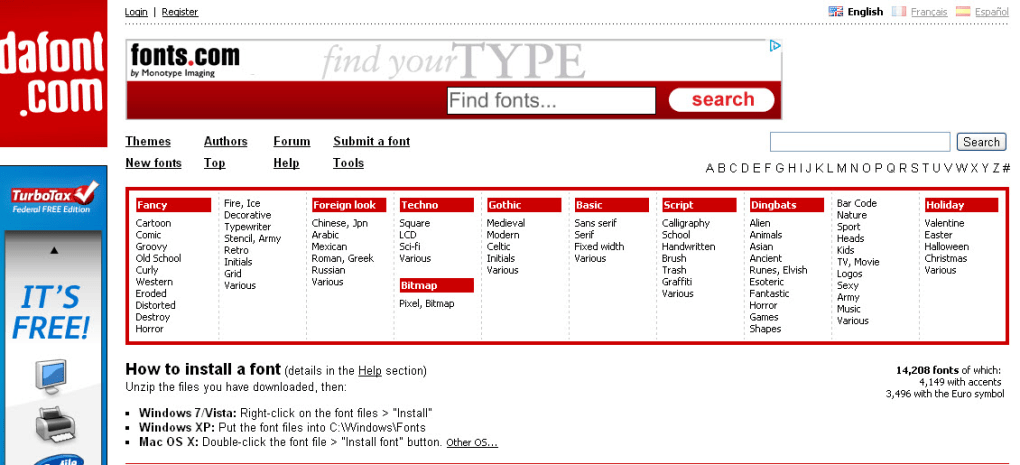
dafont stands out as one of the most comprehensive online font catalogs available today. With over 10,000 unique typefaces spanning more than 50 distinct categories, designers, hobbyists, and anyone who needs a quick typographic fix can instantly browse, preview, and download fonts for free. The platform’s clean, searchable interface lets you filter by style, theme, newest releases, or even the author’s name, making the hunt for the perfect font both intuitive and enjoyable. Whether you’re crafting a logo, designing a poster, or just experimenting with lettering for a personal project, dafont offers an unparalleled variety—from gothic and techno to script and holiday-themed typefaces. Each font file is typically small, meaning downloads complete in seconds, and the site’s straightforward “click‑to‑download” button eliminates the need for complicated registration or payment forms. In addition to the font library, dafont hosts a community‑driven message board where users can share screenshots of their designs and get help identifying unknown fonts, fostering a collaborative environment for typographic enthusiasts. While third‑party advertisements occasionally appear, they rarely disrupt the core experience, and ad‑blocking tools can mitigate any inconvenience. Overall, dafont delivers a secure, free, and constantly updated repository that makes professional‑grade typography accessible to anyone with an internet connection.
Features & Benefits
- Massive Collection: Over 10,000 fonts across 50+ categories, including fancy, foreign, techno, bitmap, gothic, script, dingbats, and holiday styles.
- Free & Immediate Downloads: No registration required; each font file is typically under a few megabytes, allowing instant download after a single click.
- Advanced Browsing Options: Filter by categories, sub‑categories, themes, newest releases, or author to pinpoint exactly what you need.
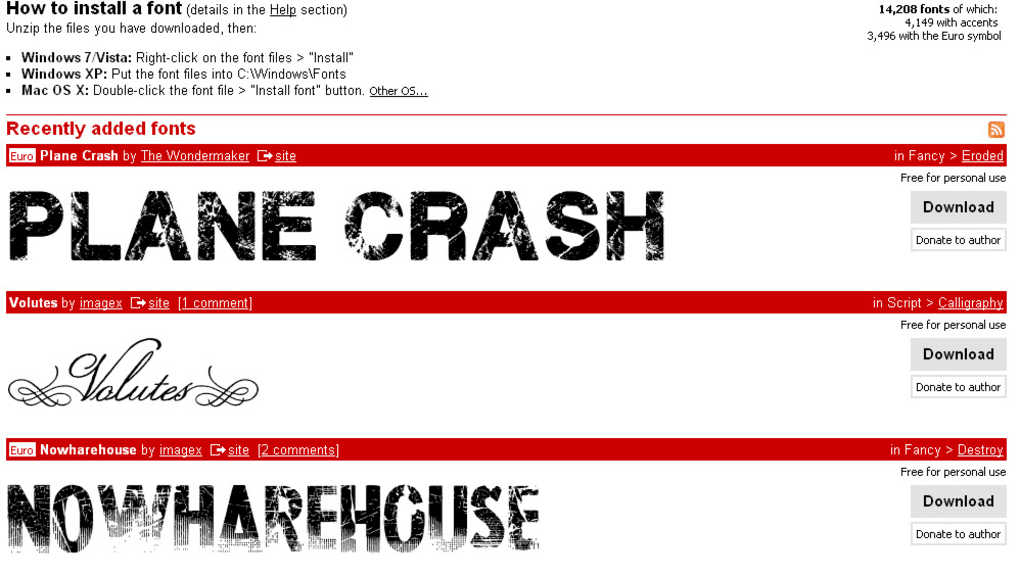
- Live Preview: View a sample text in any font before downloading, helping you assess legibility and aesthetic fit.
- Community Message Board: Share your designs, request font identification, and receive feedback from fellow designers.
- Regular Updates: New fonts are added daily, keeping the library fresh and aligned with current design trends.
- Cross‑Platform Compatibility: Fonts are delivered in standard formats (TTF, OTF, and sometimes ZIP archives) that work on Windows, macOS, Linux, Android, and iOS.
- Secure Hosting: Files are hosted on reliable servers with SSL encryption, ensuring safe downloads without malware risks.
- Search Engine Friendly: Each font page includes metadata that helps with SEO, making it easy to find fonts via Google or other search engines.
- License Transparency: Most fonts are offered for personal use, with clear licensing terms for commercial projects when applicable.
Installation, Usage & Compatibility
Installing a font from dafont is intentionally simple, catering to both novices and seasoned designers. After you locate a desired typeface, click the “Download” button; the file will typically arrive as a compressed ZIP archive or a direct TTF/OTF file. Extract the archive (if necessary) and follow the platform‑specific steps below:
Windows
1. Right‑click the extracted .ttf or .otf file and select “Install.”
2. Alternatively, drag the file into the C:\Windows\Fonts folder.
3. The font becomes immediately available in Microsoft Office, Photoshop, and any other Windows‑based application.
macOS
1. Double‑click the font file to open Font Book.
2. Click “Add Font” to install it system‑wide, or choose “User” to limit it to your account.
3. After a brief validation, the typeface appears in the font menus of macOS apps such as Pages, Keynote, and Adobe Creative Cloud.
Linux
1. Copy the font file into the ~/.fonts directory (create it if it doesn’t exist).
2. Run fc-cache -f -v to refresh the font cache.
3. The new font will now be selectable in LibreOffice, GIMP, and other Linux programs.
Mobile (Android & iOS)
While dafont primarily serves desktop environments, the TTF/OTF files can be transferred to mobile devices via cloud storage or USB. On Android, use a file manager to install the font, or apply it through a launcher that supports custom fonts. On iOS, the “Files” app combined with a third‑party font installer like iFont enables the addition of new typefaces to the system.
Supported Operating Systems: Windows 10/11, macOS Catalina or later, major Linux distributions, Android 8.0+, iOS 13+.
Once installed, you can instantly start using the font in any design software, word processor, or web project. For web designers, dafont also provides CSS‑ready @font‑face snippets (when the license permits) to embed the typeface directly into a website, ensuring consistent typography across browsers.
Pros & Cons, Frequently Asked Questions, and Conclusion
Pros
- Vast and diverse font library—all free of charge.
- Instant download with no registration barriers.
- Easy installation steps for all major operating systems.
- Community support via message board for font identification.
- Regularly updated with fresh designs and trends.
Cons
- Presence of third‑party ads can be distracting for some users.
- Most fonts are offered for personal use only; commercial licensing may require additional purchase.
- No built‑in font management tool—users must rely on OS utilities.
FAQ
Is dafont safe to download fonts from?
Yes. All files are hosted on secure servers with SSL encryption. However, it’s always good practice to scan any downloaded file with an antivirus program before installing.
Can I use dafont fonts for commercial projects?
Many fonts on dafont are free for personal use only. Each font’s page includes a licensing section that details whether commercial use is allowed or if a separate purchase is required.
Do I need to create an account to download fonts?
No. dafont offers a completely anonymous download experience—just click the download button and the file starts immediately.
How often are new fonts added to dafont?
The site receives new submissions daily. Popular designers frequently update their portfolios, ensuring the library stays fresh and relevant.
What should I do if I encounter a broken download link?
Most broken links are temporary. Try reloading the page or contacting the font’s author via the comment section. The dafont community is usually quick to respond.
Conclusion & Call to Action
In the crowded world of typography resources, dafont remains a top‑tier, free solution for designers who crave variety without the hassle of licensing fees or complex download procedures. Its expansive catalog, user‑friendly interface, and supportive community make it an essential toolbox for anyone from students working on class projects to professionals polishing brand identities. While ads can be a minor annoyance, the benefits far outweigh the inconvenience, especially when paired with an ad‑blocking extension. If you’re looking to expand your font arsenal, enhance your design workflow, or simply explore new typographic styles, dafont is the go‑to destination. Download your next favorite font today and let your creativity speak louder than ever before.



.png)




