
DashBoss: Real-Time Vehicle Performance Monitoring
Download DashBoss now and turn your iPhone or iPod touch into a high-precision vehicle data logger with wireless Bluetooth connectivity.
Overview
DashBoss is a specialized vehicle monitoring application designed for iOS users seeking advanced performance tracking and diagnostics for their vehicles. Built to work with a dedicated Bluetooth gateway hardware module, the app transforms compatible mobile devices into a real-time data-logging dashboard system. The solution is tailored for automotive enthusiasts, performance tuners, and drivers who value detailed insights into their vehicle’s behavior and health. By connecting to the car’s OBD-II port via a compact wireless gateway, DashBoss enables users to monitor hundreds of vehicle parameters without requiring tools or technical expertise for installation.
The app addresses common challenges such as inconsistent performance measurements, lack of real-time diagnostics, and limited access to vehicle health data. It provides accurate 0 to 60 mph acceleration times, quarter-mile performance benchmarks, and weather-corrected analytics using its patented AccuPerformance system. This allows users to evaluate vehicle performance under standardized conditions, making it ideal for track testing, tuning adjustments, or comparing modifications. The app also supports automatic alerts, check engine light diagnosis, and the ability to reset warning lights, offering both convenience and deeper control over vehicle systems.
Key Features & Capabilities
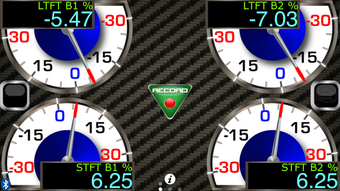
- Real-Time Dashboard Monitoring: Displays live vehicle data through intuitive analog-style gauges, allowing users to track engine RPM, speed, coolant temperature, and more during operation.
- Performance Benchmarking: Calculates 0 to 60 mph and ¼ mile elapsed times with atmospheric correction, delivering consistent, accurate performance metrics across varying weather conditions.
- Data Logging & Export: Offers one-touch data logging and the ability to save and share performance runs via email, enabling users to analyze trends or compare results over time.
- Vehicle Diagnostics: Reads and interprets OBD-II trouble codes, identifies issues with engine systems, and provides guidance on resolving common problems.
- Check Engine Light Reset: Allows users to clear the check engine light after repairs, though it does not diagnose the root cause of the issue.
- Customizable Gauges: Users can personalize the dashboard layout and select from hundreds of available vehicle parameters to display, tailoring the interface to their specific needs.
- Bluetooth Gateway Integration: Works exclusively with the DashBoss wireless gateway module, ensuring stable, low-latency communication between the vehicle and mobile device.
These features are particularly useful for users involved in car tuning, track days, or performance modifications. For example, a driver testing a new exhaust system can use the app to log acceleration times before and after installation, compare results using weather-corrected data, and confirm improvements. Similarly, a mechanic might use the diagnostic functions to quickly assess vehicle health during routine inspections.
User Interface, Workflow & Performance
The user interface of DashBoss is designed with automotive enthusiasts in mind, featuring clean, analog-style gauges that resemble traditional dashboard instruments. Navigation is straightforward, with a central dashboard view that can be customized to show preferred metrics. The workflow is optimized for real-time use, allowing users to start data logging with a single tap and view immediate feedback on performance metrics.
Performance is expected to be smooth during active monitoring sessions, as the app leverages the Bluetooth gateway for efficient data transfer. The developer did not specify resource usage details, but based on general software behavior, the app likely maintains low CPU and RAM usage during normal operation. Stability appears to be a priority, as the app supports continuous data logging and seamless integration with other Bluetooth devices. However, exact performance details were not specified by the developer.
Compatibility & System Requirements
DashBoss is designed for iOS devices and requires the accompanying DashBoss gateway hardware module for full functionality. The app is compatible with iPhone and iPod touch models that support Bluetooth 4.0 or later. The installation size is 100.0 MB, which is typical for feature-rich mobile applications with real-time data processing capabilities.
Exact system requirements were not listed. The developer did not provide additional system requirements beyond the operating system. Compatibility with specific iOS versions or hardware models is limited to what is publicly known about the gateway’s specifications. Users should ensure their device supports the necessary Bluetooth version and has sufficient storage space for the app and its data logs.
Pros and Cons
Pros
- Accurate, weather-corrected performance measurements using patented technology
- Intuitive analog-style dashboard with customizable gauge layouts
- Seamless integration with a dedicated Bluetooth gateway for reliable data transfer
- Comprehensive diagnostic tools including trouble code reading and check engine light reset
- One-touch data logging and easy export via email
- Free to download and use with no in-app purchases or subscription fees
Cons
- Requires additional hardware (DashBoss gateway) for full functionality
- Not available on Android or other platforms
- Performance may vary depending on Bluetooth signal strength and device compatibility
- Limited to iOS ecosystem, restricting broader accessibility
- Developer did not provide detailed system requirements or resource usage metrics
FAQ Section
Is DashBoss compatible with Android devices?
DashBoss is designed exclusively for iOS devices and is not available on Android or other operating systems.
Does DashBoss require a physical gateway device?
Yes, the app requires the DashBoss wireless Bluetooth gateway module to connect to the vehicle’s OBD-II port and access real-time data.
Is the app secure and safe to use?
DashBoss uses standard Bluetooth protocols for communication and does not collect or transmit personal data beyond vehicle diagnostics. The app operates locally on the device and does not require internet access for core functions.
Can I update DashBoss to the latest version?
Yes, users can update the app through the App Store. The latest version is 1.0.2, released on June 15, 2024.
Does DashBoss work offline?
Yes, the app functions fully offline once the Bluetooth gateway is connected. No internet connection is required for real-time monitoring, diagnostics, or data logging.
Final Thoughts
DashBoss delivers a powerful, professional-grade vehicle monitoring experience tailored specifically for iOS users. Its combination of accurate performance tracking, real-time diagnostics, and customizable dashboards makes it a standout tool for car enthusiasts and tuners. The free availability of the app enhances its accessibility, especially when paired with the patented AccuPerformance system that ensures reliable, weather-corrected results.
While the need for a separate hardware module may be a barrier for some users, the seamless integration and intuitive interface justify the investment for those serious about vehicle performance. The app’s focus on real-time data, ease of use, and diagnostic capabilities positions it as a top choice in its niche.
Download DashBoss now and unlock advanced vehicle insights on your iPhone or iPod touch.








