

Beschreibung
Echtzeit-AJAX-Kommentarsystem mit individuellem Kommentarformular und -feldern. Entwickelt, um die nativen Kommentare von WordPress zu optimieren. Superschnell und responsiv mit Dutzenden von Funktionen. Dies ist die beste Alternative zu Disqus und Jetpack-Kommentare, wenn du deine Kommentare in deiner Datenbank behalten möchtest.
wpDiscuz-Version 7 ist eine revolutionäre Perspektive auf die Welt der Kommentare! Dieses Plugin verändert das Kommentieren auf deiner Website und bietet dir neue Funktionen zur Anwenderinteraktion. Es wurde mit brandneuen innovativen Funktionen, die deine Website zum Leben erwecken, umfassend verbessert.
- wpDiscuz-Demo: https://wpdiscuz.com/
- Support-Forum: https://wpdiscuz.com/community/
- wpDiscuz-DSGVO: https://wpdiscuz.com/gdpr/
- wpDiscuz-Add-ons: https://wpdiscuz.com/addons/
- wpDiscuz-Dokumentation: https://wpdiscuz.com/docs/
- wpDiscuz-Add-on-Paket: https://gvectors.com/product/wpdiscuz-addons-bundle/
Kommentare – wpDiscuz-Funktionen
- Drei schöne und moderne Kommentar-Layouts
- Bietet das schnellste Kommentiererlebnis (verbesserter Core)
- Fügt ein interaktives Kommentarfeld zu Beiträgen und anderen Inhaltstypen hinzu
- Inline-Kommentare und -Feedback. Kommentare zu Beitragsinhalten.
- Live-Benachrichtigung mit Echtzeit-Aktualisierung der Kommentarblase.
- Viele Optionen für die Anmeldung über soziale Netzwerke
- Beitragsbewertung. Ermöglicht es, Beiträge direkt mit Bewertungssternen zu bewerten.
- Kommentare können für Beiträge und andere Inhaltstypen zugelassen oder unterbunden werden
- Responsives Kommentarformular und Design der Kommentarthreads
- Übersichtliche, einfache und anwenderfreundliche Oberfläche und Anwendererfahrung
- Sortierung der Kommentarliste nach den neuesten, ältesten und meistbewerteten Kommentaren
- Anonyme Kommentare (Name und E-Mail-Adresse können als nicht erforderlich festgelegt werden)
- Vollständige Integration durch Plugins für die Anmeldung über soziale Netzwerke (Facebook, Twitter …)
- Mehrstufige (verschachtelte) Kommentarthreads mit Option zur Einstellung der maximalen Tiefe
- Ermöglicht es, einen neuen Diskussions-Thread zu erstellen und auf bestehende Kommentare zu antworten
- Ajax-Button „Weitere Kommentare laden“ anstatt einer einfachen Kommentar-Seitennummerierung
- wpDiscuz-Kommentare beim Scrollen verzögert laden
- Unterschiedliche Datumsformate für Kommentare; spiegelt die Datumsformateinstellungen von WordPress wider
- Angemeldete Benutzer und Gäste können ihre Kommentare bearbeiten (der Zeitraum kann vom Administrator begrenzt werden)
- Automatische Umwandlung von URLs in Links in Kommentartexten
- Automatische Konvertierung von Bildquellen-URLs in Bilder (HTML) in Kommentartexten
- Funktion zum Umbrechen langer Kommentartexte („Weiterlesen“-Button)
- Multiple Zeilenumbrüche (begrenzt durch den WordPress-Kommentarfilter)
- Optionen zur Benachrichtigung von Kommentarautoren mit speziellen Kontrollkästchen im Kommentarformular
- Aktivierung des Abonnements über eine zusätzliche „Abonnement bestätigen“-E-Mail
- Möglichkeit, ein Kommentarsystem auf Anhangseiten hinzuzufügen, sofern dies von WordPress zugelassen wird
- Schnelles und einfaches Kommentarformular mit Ajax-Validierung und Ajax-Datenübermittlung
- Vollständig integriert und kompatibel mit WordPress
- Verwendet das WordPress-Kommentarsystem mit allen Verwaltungsfunktionen
- Sicherheits- und Anti-Spam-Funktionen verhindern, dass Spammer Kommentare hinterlassen können
- Kommentarbewertung mit positivem und negativem Ergebnis
- Intelligentes Bewertungssystem mit Tracking von angemeldeten Benutzern und Cookies
- Quicktags im Textfeld des Kommentarformulars
- Individuelle Kommentarformulare mit individuellen Feldern
- Bewertungs-Shortcode für Beiträge über ein individuelles Kommentarfeld [wpdrating] mit vielen Attributen
- Option zum Überschreiben des Kommentar-Templates und -Stils
- Hervorhebung neuer Kommentare seit dem letzten Besuch mit anderem Hintergrund
- Benachrichtigung des Kommentarautors, wenn der Kommentar freigegeben wurde
- Nur übergeordnete Kommentare und den Button „(x) Antworten anzeigen“ anzeigen
- Kommentatoren nach Rollen regulieren (Zugriff auf den Kommentarbereich der Website zulassen/einschränken)
- Option zum Laden aller Kommentare beim ersten Laden der Seite
- Integrierte Gravatar-Zwischenspeicherung
- Oben gehaltene Kommentare
- Geschlossene Kommentar-Threads (Antworten deaktivieren)
- Benutzer abonnieren / Benutzer folgen
- Integriertes Caching-System für Kommentare und Kommentarautoren
Add-ons
- | wpDiscuz – Bundle
- | wpDiscuz – Emoticons
- | wpDiscuz – User Notifications
- | wpDiscuz – Media Uploader
- | wpDiscuz – Embeds
- | wpDiscuz – Comment Author Info
- | wpDiscuz – Google reCAPTCHA
- | wpDiscuz – myCRED Integration
- | wpDiscuz – Widgets
- | wpDiscuz – Front-end Moderation
- | wpDiscuz – Subscription Manager
- | wpDiscuz – Comment Search
- | wpDiscuz – Comment Report and Flagging
- | wpDiscuz – Ads Manager
- | wpDiscuz – User & Comment Mentioning
- | wpDiscuz – Advanced Likers
- | wpDiscuz – Online Users
- | wpDiscuz – Private Comments
- | wpDiscuz – Syntax Highlighter
- | Comments Censure PRO
Integrations-Add-ons
Screenshots
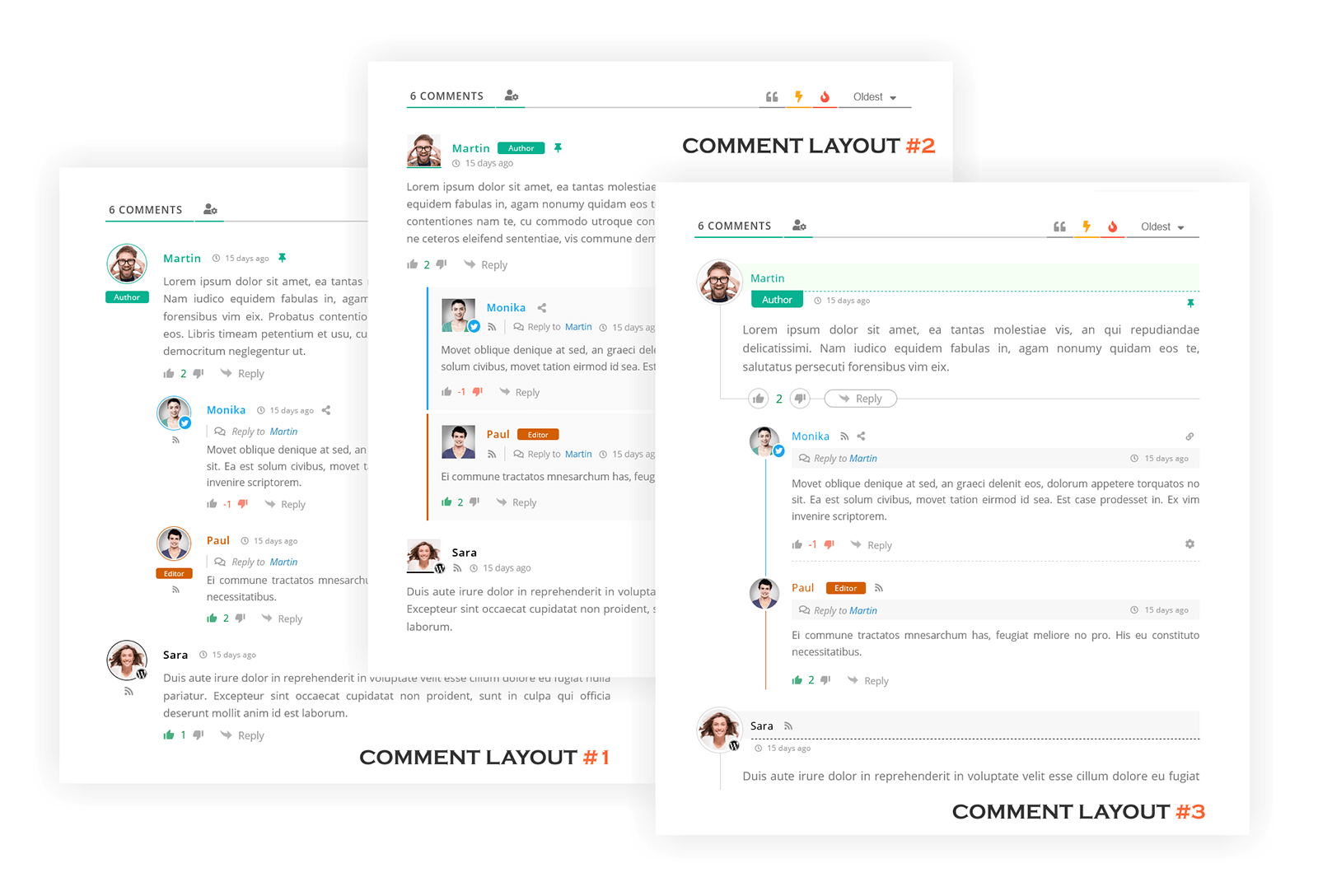
Drei wpDiscuz-Kommentar-Layouts | Screenshot #1 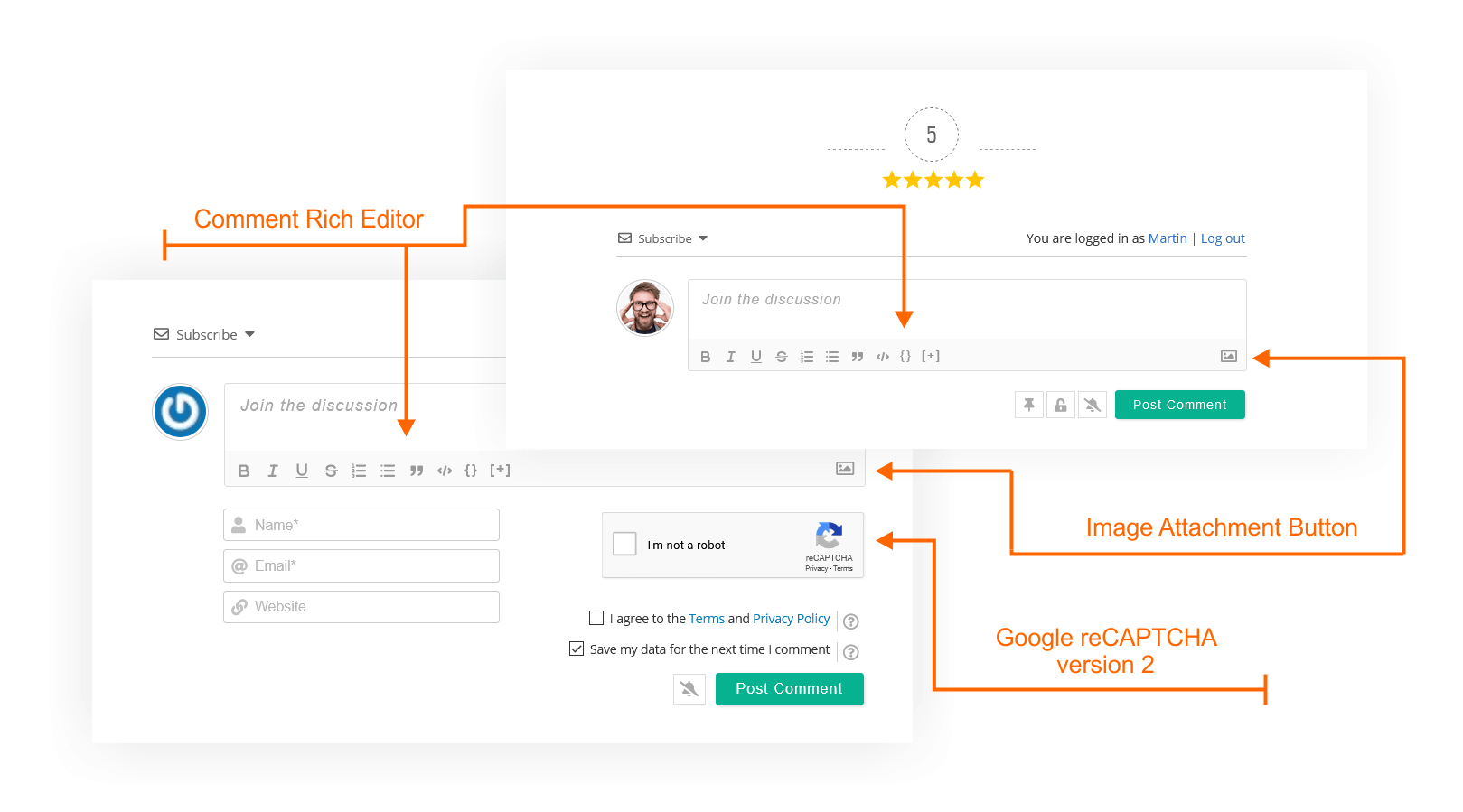
wpDiscuz-Kommentarformular | Screenshot #2 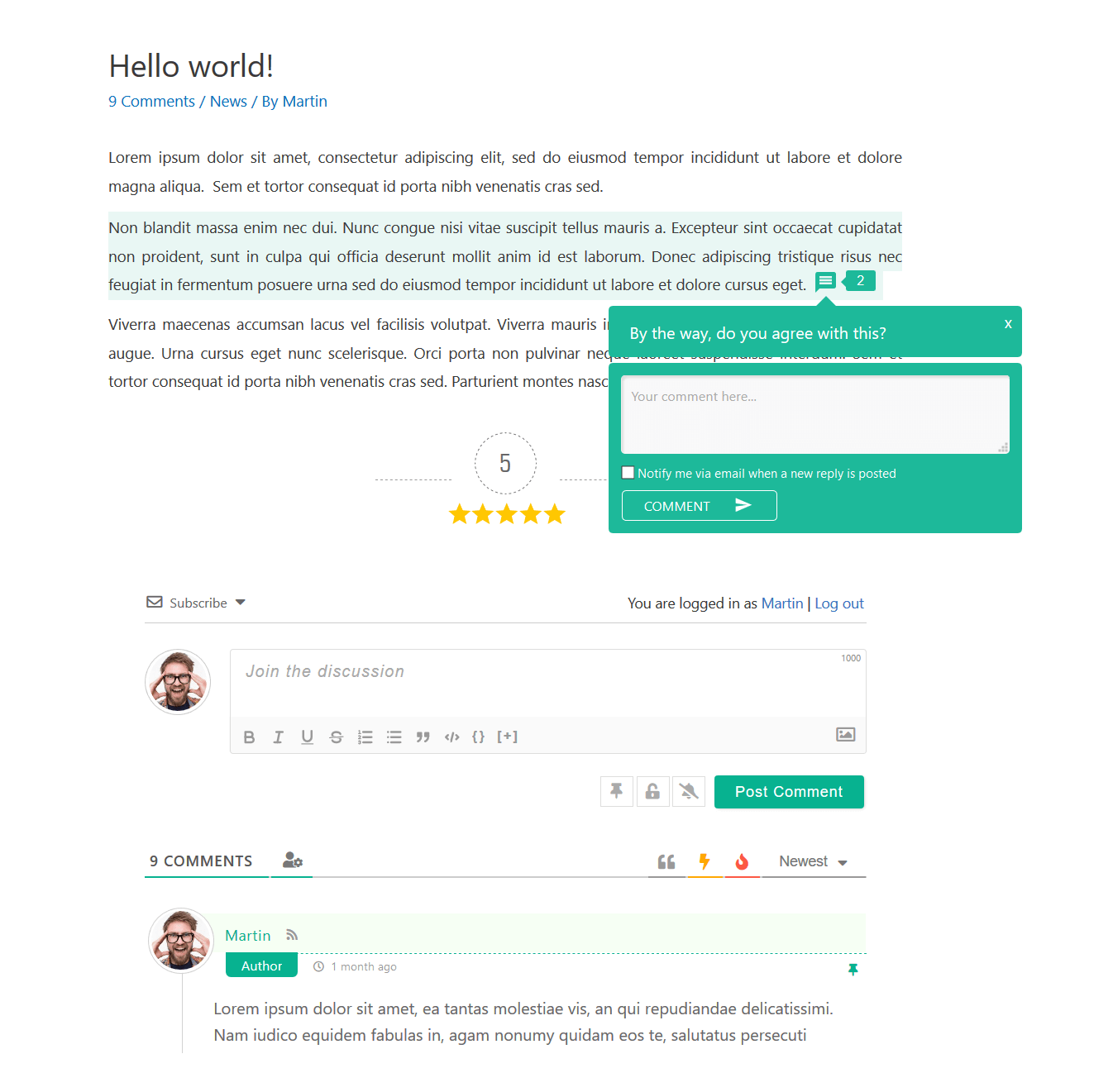
wpDiscuz-Kommentaransicht | Screenshot #3 
wpDiscuz-Kommentare auf dem Smartphone und dem Notebook | Screenshot #4 
wpDiscuz-Inline-Kommentarformular | Screenshot #5 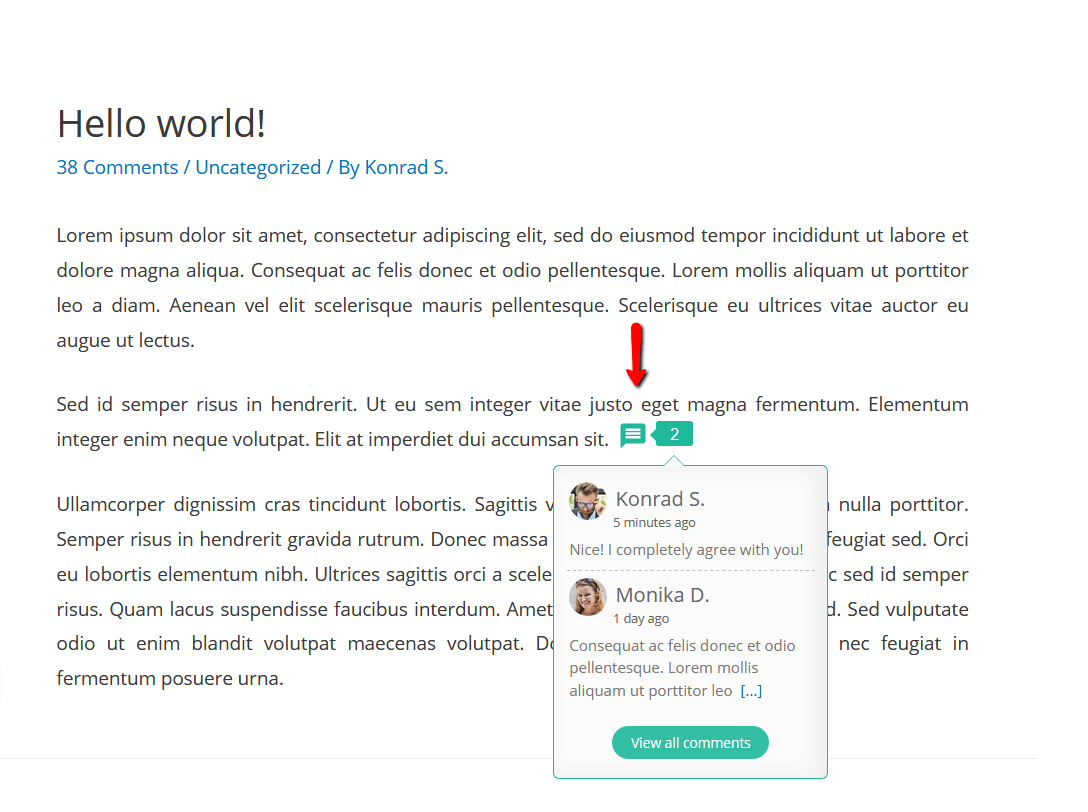
wpDiscuz-Inline-Kommentare | Screenshot #6 
wpDiscuz – Beitragsbewertung und Kommentarbewertung | Screenshot #7 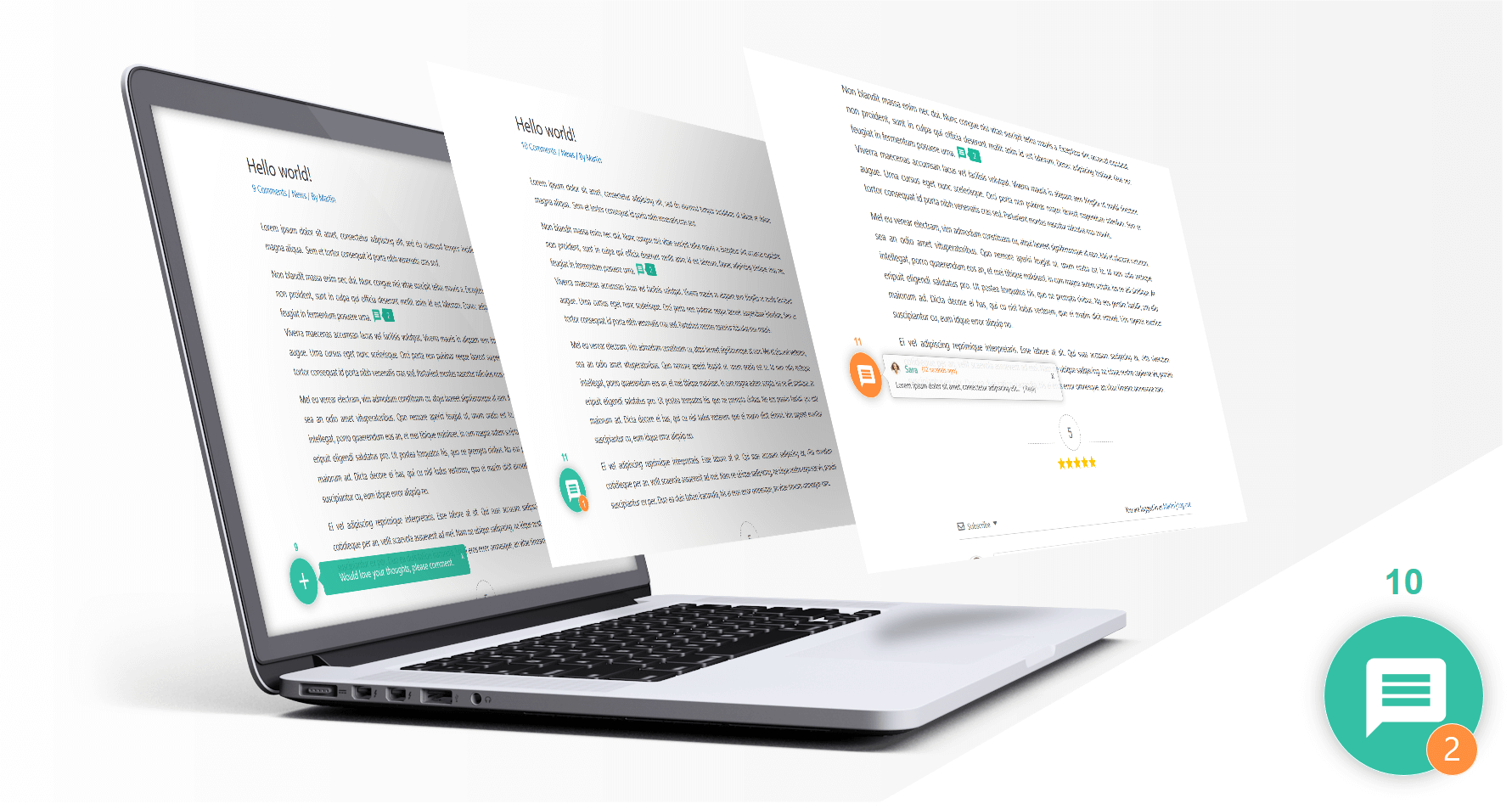
wpDiscuz – Live-Benachrichtigung mit Kommentarblase | Screenshot #8 
wpDiscuz – Anmeldung und Kommentierung über soziale Netzwerke | Screenshot #9 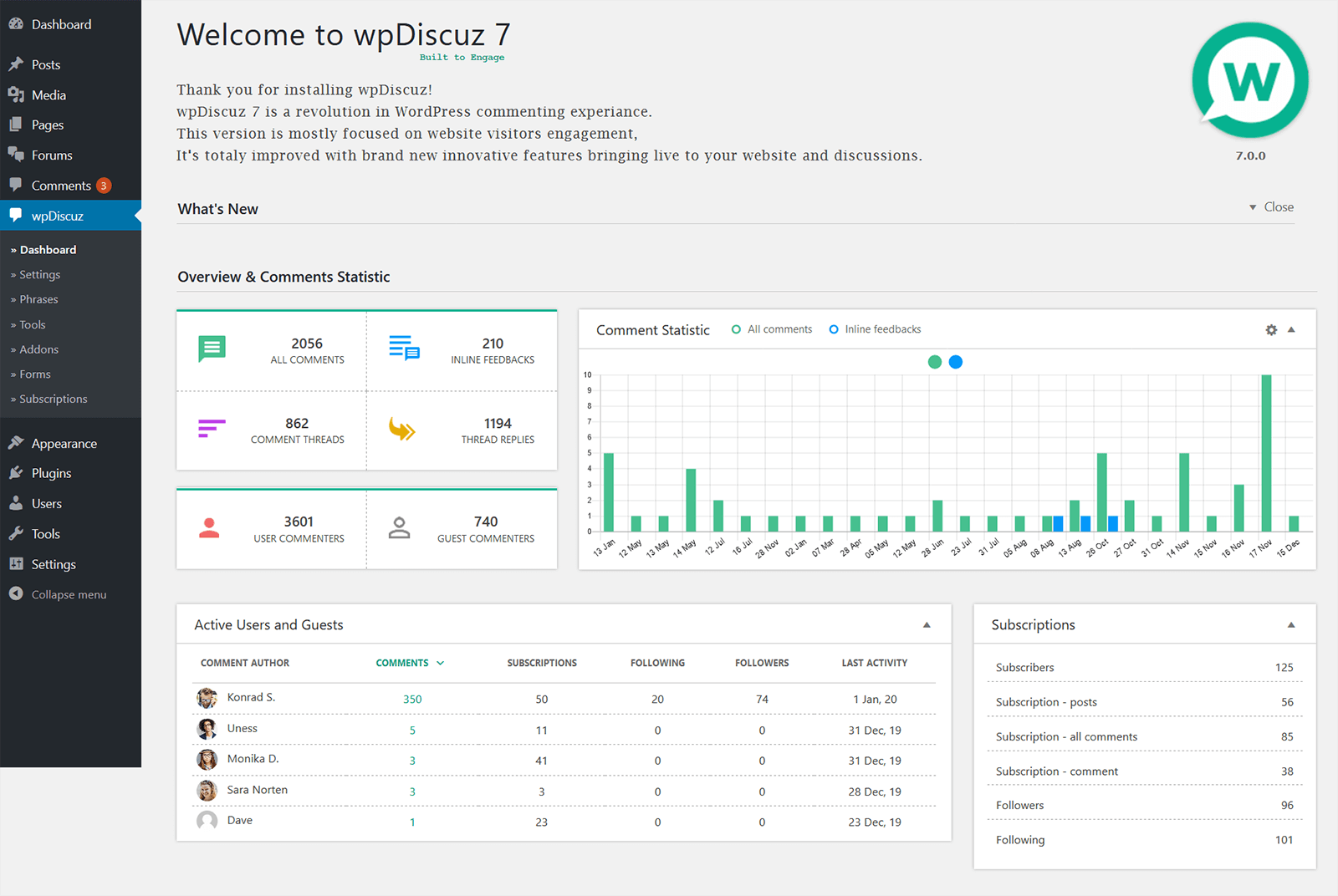
wpDiscuz-Kommentarstatistik | Screenshot #10 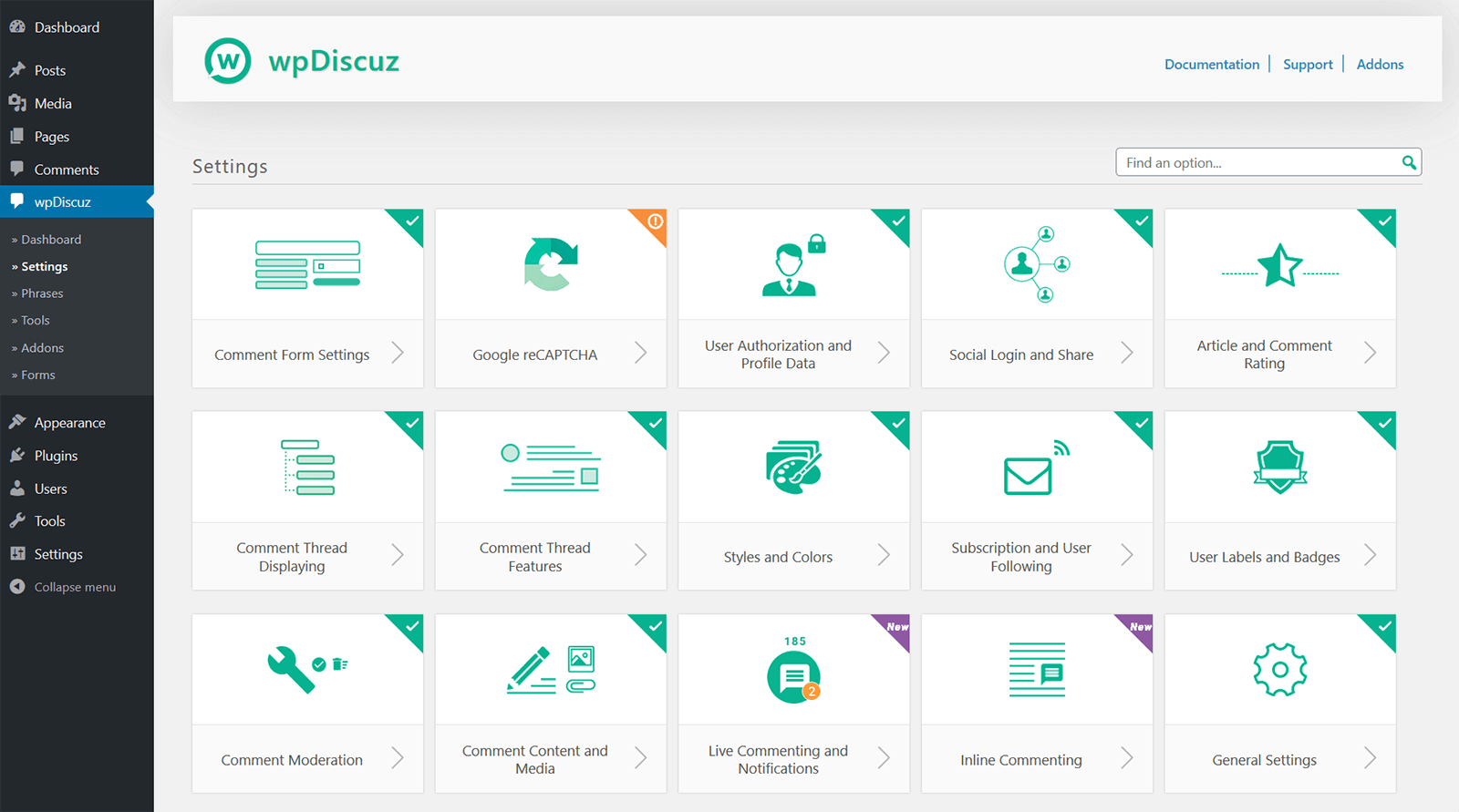
wpDiscuz-Einstellungen | Screenshot #11 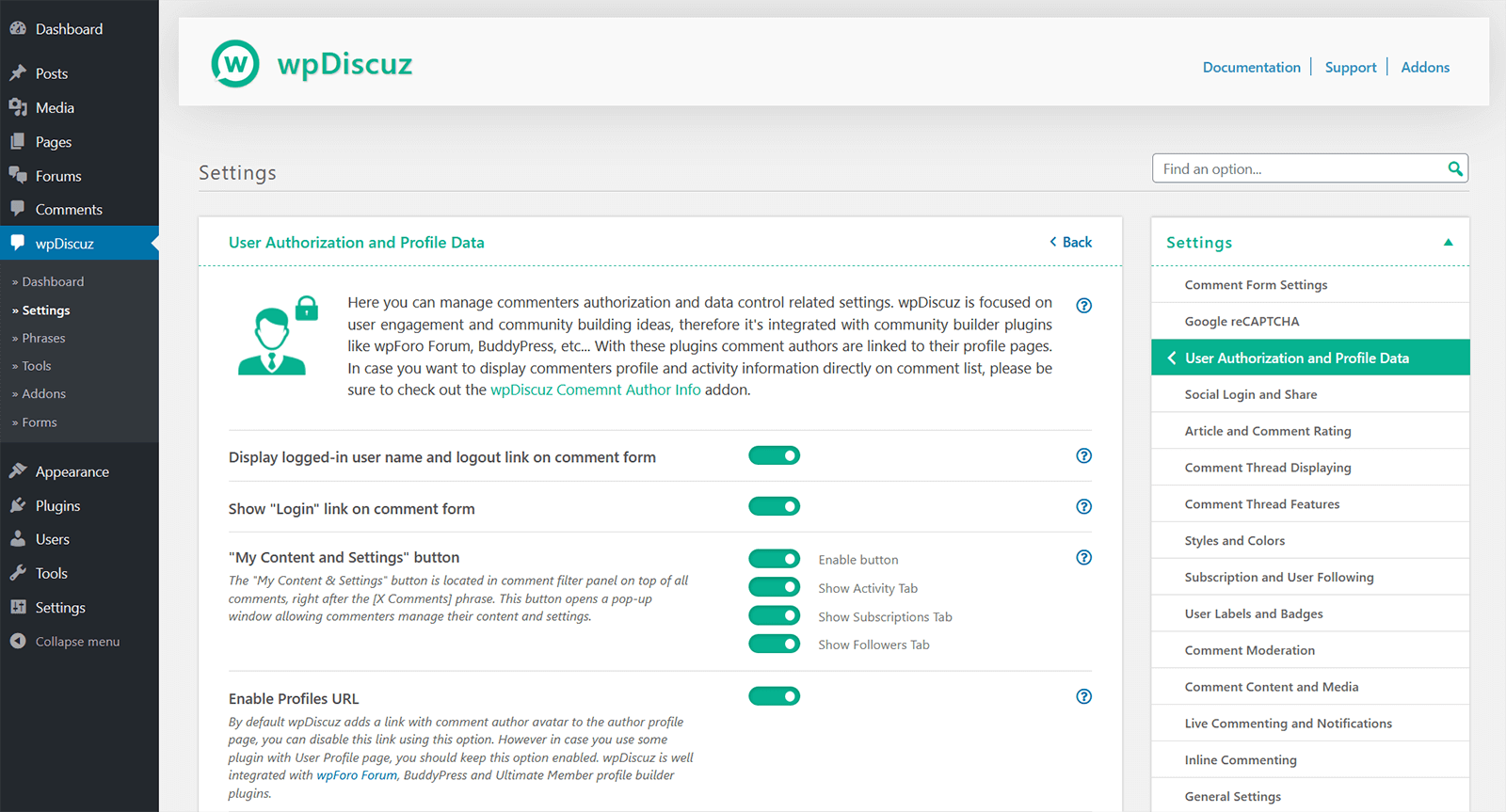
wpDiscuz – einzelne Einstellungsseite | Screenshot #12


Blöcke
Dieses Plugin unterstützt 1 Block.
- Comments – wpDiscuz Example block scaffolded with Create Block tool.
Installation
Hinweis
WICHTIG: Wenn du ein Cache-Plugin verwendest, lösche bitte nach der Aktualisierung von wpDiscuz alle Zwischenspeicher.
Installation
- Lade den Plugin-Ordner in das Verzeichnis /wp-content/plugins/ hoch
- Aktiviere das Plugin im Menü „Plugins“ in WordPress.
Nachdem du das Plugin installiert und aktiviert hast, klicke im Admin-Panel deiner Website in der linken Seitenleiste auf den Menüpunkt Kommentare.
Aktualisierung auf die wpDiscuz-7-Versionen
Bitte lies die Dokumentation:
https://wpdiscuz.com/docs/wpdiscuz-7/plugin-installation/update-to-wpdiscuz-7/
FAQ
WICHTIG
- Wenn du ein Cache-Plugin verwendest, lösche bitte nach der Aktualisierung von wpDiscuz alle Zwischenspeicher.
- Wenn das wpDiscuz-Kommentarformular fehlt, lies bitte diesen Support-Beitrag:
- Das wpDiscuz-Kommentarformular fehlt.
-
Kommentare – wpDiscuz-Einstellungen
-
Die Grundkonfiguration ist für die meisten Anwendungsfälle ausreichend. Wenn du jedoch Kommentar – wpDiscuz detaillierter konfigurieren möchtest, klicke auf den Untermenüpunkt » Einstellungen unter dem Menüpunkt wpDiscuz und ändere die Einstellungen nach deinen Wünschen.
-
Kommentare – wpDiscuz-Ausdrücke
-
Kommentare – wpDiscuz enthält Ausdrücke für das Frontend für diejenigen, die Texte und Nachrichten ohne Verwendung von .po-/.mo-Dateien anpassen möchten. Du kannst jedoch weiterhin .po/.mo-Übersetzungsdateien in Kombination mit Ausdrücken aus Kommentare – wpDiscuz verwenden. Du musst lediglich die Einstellung „Plugin-.PO/.MO-Dateien verwenden” auf der Seite Kommentare – wpDiscuz » Einstellungen aktivieren.
-
Kommentare – wpDiscuz-Dokumentation
-
Hier findest du ausführlichere Antworten zu deinen Fragen – https://wpdiscuz.com/docs/
-
Support-Forum
-
Für weiterführende Unterstützung besuche bitte unser Support-Forum
-
Ersetzt dieses Plugin das aktuelle Kommentarsystem vollständig?
-
Ja! Kommentare – wpDiscuz ersetzt das Standard-Kommentarsystem durch ein neues interaktives System.
-
Was passiert mit alten Kommentaren?
-
Nichts geht verloren! Kommentare – wpDiscuz zeigt alle alten Kommentare an.
-
Wo werden Kommentare gespeichert?
-
Kommentare – wpDiscuz verwendet das standardmäßige Kommentarspeichersystem von WordPress. Alle Kommentare befinden sich in deiner Datenbank und können über die Verwaltungsseite „Dashboard > Kommentare“ verwaltet werden.
-
Gehen meine Kommentare verloren, wenn ich dieses Plugin installiere und anschließend wieder entferne?
-
Kommentare – wpDiscuz hat keinen Einfluss auf irgendwelche Daten. Du kannst es jederzeit bedenkenlos installieren und deinstallieren.
Rezensionen


Mitwirkende und Entwickler
„Comments – wpDiscuz“ ist Open-Source-Software. Folgende Menschen haben an diesem Plugin mitgewirkt:
Mitwirkende

„Comments – wpDiscuz“ wurde in 16 Sprachen übersetzt. Danke an die Übersetzer für ihre Mitwirkung.
Übersetze „Comments – wpDiscuz“ in deine Sprache.
Interessiert an der Entwicklung?
Durchstöbere den Code, sieh dir das SVN Repository an oder abonniere das Entwicklungsprotokoll per RSS.
Änderungsprotokoll
WICHTIG!
Bitte vergiss nicht, nach der Aktualisierung alle Zwischenspeicher zu löschen und das CDN zu leeren.
Comments – wpDiscuz v7.6.44 – 15.01.2026
- Security: Fixed IDOR vulnerability in AJAX actions (CVE-2025-68997)
- Security: Added post access authorization check to voteOnComment – uses $comment->comment_post_ID from database, not user-supplied postId (prevents parameter manipulation bypass)
- Security: Added server-side rate limiting to AJAX actions (vote 20/min, rate 10/min, follow 15/min, subscribe 10/min)
- Security: Rate limiting on voteOnComment, userRate, followUser, addSubscription
- Security: Enhanced client fingerprinting (IP + User-Agent + Accept-Language)
- Security: Rate limiting executes before nonce validation for maximum protection
- Security: Object validation – verifies comment exists and is approved before processing
- Security: Post status validation – blocks access to private/password-protected posts for unauthorized users
Comments – wpDiscuz v7.6.43 – 12.01.2026
- Fixed: Insecure Direct Object References (IDOR) vulnerability
Comments – wpDiscuz v7.6.42 – 23.12.2025
- Fixed: An issue with inline commenting in Elementor
Comments – wpDiscuz v7.6.41 – 22.12.2025
- Updated: Added gutenberg toolbar button for inline feedback shortcode generation
Comments – wpDiscuz v7.6.40 – 09.12.2025
- Fixed: Disqus login vulnerability
