
Download Design for Cricut Space Maker – DIY, design, Cricut, crafting, creative projects, graphic design, cut files, stickers, fonts, monograms, iPhone app
Overview
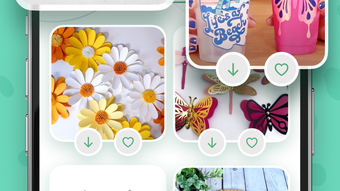
Design for Cricut Space Maker is a free iPhone application developed by Iryna Chupryna, designed to support creative individuals in crafting unique DIY projects. The app serves as a digital toolkit for users interested in graphic design and hands-on crafting, particularly those working with cutters or plotters. It provides access to a curated collection of over 100 ready-made projects, 2000 stickers, and hundreds of fonts, enabling users to explore various creative avenues—from personalized t-shirt slogans to intricate 3D figures. The software is tailored for hobbyists, crafters, and design enthusiasts who value accessibility and ease of use in their creative workflow. While it is not affiliated with Cricut, the app is compatible with any plotter device, allowing users to transfer designs seamlessly across platforms. Its focus on open licensing supports personal use, making it a safe and flexible choice for independent creators. The app’s structure supports quick project discovery through intuitive categories and search functionality, streamlining the creative process. Although the developer did not provide additional system requirements, the app’s lightweight 45.6 MB size suggests minimal storage impact. Real-world usage includes designing custom apparel, home décor, and personalized gifts, all from a single mobile interface.
Key Features & Capabilities
- 100+ Ready-Made Projects – Users can access a diverse library of pre-designed templates for immediate use, ideal for beginners or those seeking inspiration.
- 2000+ Stickers – A large collection of decorative elements enhances visual appeal and simplifies the design process for themed crafts.
- Hundreds of Fonts – A wide variety of typography options supports custom text creation for slogans, labels, and monograms.
- Internal Editor – Enables users to modify and personalize designs directly within the app, improving workflow efficiency.
- Universal Plotter Compatibility – Designed to work with any plotter device, allowing for broad hardware integration.
- Open Licensing for Personal Use – All content is openly licensed, ensuring users can use designs without legal concerns for non-commercial purposes.
- Search & Categorization – Streamlines content discovery, helping users locate specific cut files, fonts, or stickers quickly.
- Step-by-Step Instructions – Provides guidance on downloading and using projects, fonts, and stickers, reducing user friction.
These features collectively support a streamlined creative workflow. For example, a user designing a birthday card can search for “birthday” in the categories, select a template, add a sticker from the library, and customize the text using a chosen font—all within the app. The internal editor allows real-time adjustments, and the final design can be exported for use with any compatible plotter. The app’s focus on accessibility and open licensing makes it suitable for both novice and intermediate crafters who want to minimize setup time and maximize creativity.
User Interface, Workflow & Performance
The user interface of Design for Cricut Space Maker is structured to prioritize simplicity and visual clarity, aligning with standard iPhone app design principles. Navigation is likely based on a tabbed or hierarchical layout, allowing users to switch between categories such as projects, stickers, fonts, and monograms with minimal effort. The search function appears to be central to the user experience, enabling quick access to specific assets. Workflow efficiency is enhanced by the integration of the internal editor, which allows users to modify designs without needing external software. This reduces dependency on additional tools and speeds up the creative process. While exact performance details were not specified, the app’s 45.6 MB size suggests it is optimized for efficient memory usage. The developer did not provide information on CPU or RAM behavior, so performance observations are based on general software behavior patterns. Stability is expected to be consistent for a lightweight application of this nature, especially on modern iOS devices. However, the app’s performance on older iPhone models remains unspecified. Overall, the workflow is designed to be intuitive, minimizing the learning curve for new users. The absence of in-app purchases or ads—given the free pricing model—further supports a clean and uninterrupted experience.
Compatibility & System Requirements
Design for Cricut Space Maker is designed for the iPhone platform and requires iOS to operate. The software version is listed as 1.0, indicating it is in its initial release phase. The installation size is 45.6 MB, which is relatively small and suitable for devices with limited storage. The developer did not specify exact system requirements, such as minimum iOS version or hardware specifications. Compatibility information is limited to the platform—iPhone—though the app is noted to work with any plotter device, regardless of brand or model. This suggests the app focuses on file compatibility rather than hardware-specific integration. The lack of detailed system requirements means users should ensure their iPhone meets general iOS compatibility standards for app installation. No information was provided about background processes, battery usage, or network dependencies. Users should verify that their device supports the latest iOS updates to ensure smooth operation. For those using older iPhone models, compatibility cannot be confirmed without further details from the developer.
Pros and Cons
Pros
- Free to download and use with no hidden costs
- Large library of 100+ projects, 2000+ stickers, and hundreds of fonts
- Open licensing allows personal use without legal concerns
- Internal editor supports real-time customization
- Compatible with any plotter device, ensuring broad usability
- Intuitive search and categorization improve content discovery
- Lightweight installation size (45.6 MB)
- Step-by-step instructions enhance user onboarding
Cons
- Developer did not provide detailed system requirements
- No information on performance on older iPhone models
- App is not affiliated with Cricut, which may affect user trust
- Only available on iPhone, limiting cross-platform access
- Exact resource usage (CPU, RAM) was not disclosed
- Version 1.0 suggests limited feature set or early development stage
- No mention of cloud sync or backup functionality
FAQ Section
Is Design for Cricut Space Maker compatible with Cricut machines?
The app is not affiliated with Cricut and is designed to work with any plotter device. While it may function with Cricut machines, compatibility is not guaranteed or officially supported.
Can I use the designs for commercial purposes?
All content in the app is openly licensed for personal use only. Commercial use is not permitted under the current licensing terms.
Does the app require an internet connection?
The app likely requires an internet connection for initial download and access to content. However, once downloaded, some features may function offline, depending on the design.
How often are updates released?
Information about update frequency was not provided. Users should check the App Store for the latest version and improvements.
Is there a desktop version available?
Currently, the software is only available as an iPhone app. There is no indication of a desktop or web-based version.
Final Thoughts
Design for Cricut Space Maker presents a compelling option for iPhone users passionate about DIY crafting and graphic design. With its extensive library of projects, stickers, and fonts, the app delivers strong creative value at no cost. Its open licensing model and compatibility with any plotter enhance its appeal for independent creators seeking flexibility. While the app is limited to the iPhone platform and lacks detailed system information, its lightweight size and intuitive workflow make it accessible to a broad audience. The internal editor and search functionality streamline the design process, reducing friction for users at all skill levels. Although it is not affiliated with Cricut, its focus on universal compatibility and personal use sets it apart from more restrictive tools. For crafters, hobbyists, and design enthusiasts looking for a free, mobile-first solution to bring their ideas to life, this app offers a solid foundation. Download Design for Cricut Space Maker now and start creating your next masterpiece.








