How to Detect AdBlock using HTML CSS & JavaScript

Today we will learn How to Detect AdBlock using HTML CSS & JavaScript. In this tutorial, you’ll learn how to Detect AdBlock using JavaScript. In the earlier blog, I shared Detect Internet Connection using HTML CSS & JavaScript.
AdBlocker is a content filtering, that blocks check online ads from interrupting your browsing experience. This code helps the user prevent unintended flashing banners, pop-ups, and online advertisements from being displayed.
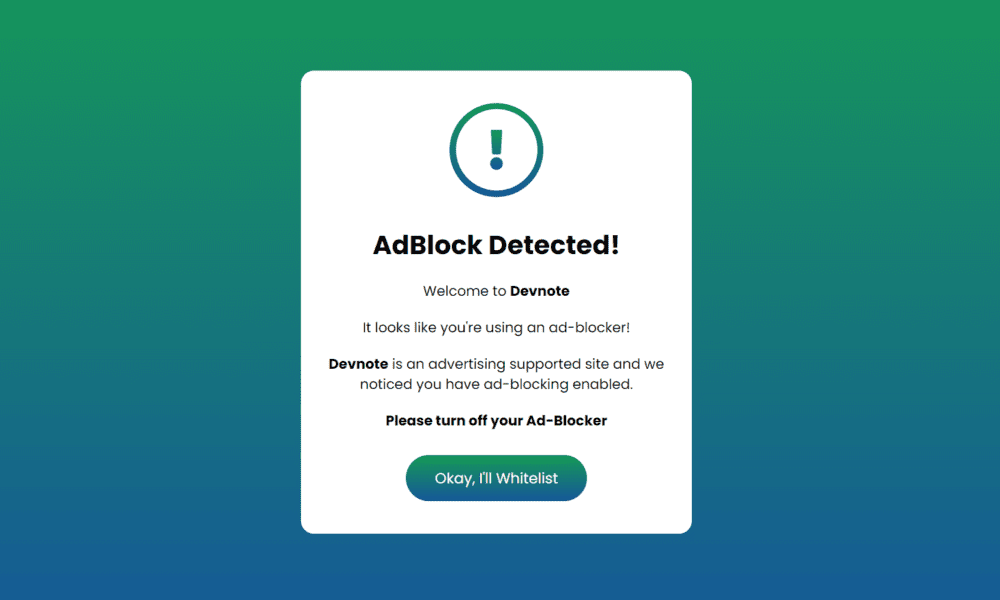
Detect AdBlock using JavaScript can see in the preview image, there is a popup box with text and a button to dismiss the popup. If the user has enabled AdBlocker, then this popup will be open; if not, then this popup will close.
Detect AdBlock using JavaScript
To create this program [Detect AdBlock using JavaScript]. First, we need to create two files: one index.html and another style.css file. After creating these files, just paste the below codes into your file.
Example
HTML File
Create an HTML file with the name index.html and paste the below codes into your HTML file.
#index.html

<!DOCTYPE html>
<html lang="en">
<head>
    <meta charset="UTF-8">
    <meta name="viewport" content="width=device-width, initial-scale=1.0">
    <title>Detect AdBlock using JavaScript</title>
    <link rel="stylesheet" href="style.css">
    <link rel="stylesheet" href="https://cdnjs.cloudflare.com/ajax/libs/font-awesome/5.15.3/css/all.min.css" />
</head>

<body>
    <div id="adsDetect"></div>
    <div class="ads-wrapper">
        <div class="ads-content">
            <div class="exclamation-icon">
                <span class="icon"><i class="fas fa-exclamation"></i></span>
            </div>
            <h2>AdBlock Detected!</h2>

            <p>Welcome to <b>Devnote</b></p>
            <p>It looks like you're using an ad-blocker!</p>
            <p><b>Devnote</b> is an advertising supported site and we noticed you have ad-blocking enabled.</p>
            <p><b>Please turn off your Ad-Blocker</b></p>

            <div class="ads-btn">
                <div class="background-layer"></div>
                <button class="okay">Okay, I'll Whitelist</button>
            </div>
        </div>
    </div>

    <script>
        const adsDetect = document.querySelector("#adsDetect");
        const adswrapper = document.querySelector(".ads-wrapper");
        const button = adswrapper.querySelector(".okay");

        let adClasses = ["ad", "ads", "adsbox", "doubleclick", "ad-placement", "ad-placeholder", "adbadge", "BannerAd"];
        for (let item of adClasses) {
            adsDetect.classList.add(item);
        }

        let getProperty = window.getComputedStyle(adsDetect).getPropertyValue("display");

        if (!adswrapper.classList.contains("show")) {
            console.log(getProperty);
            getProperty == "none" ? adswrapper.classList.add("show") : adswrapper.classList.remove("show");
        }

        button.addEventListener("click", () => {
            adswrapper.classList.remove("show");
        });
    </script>

</body>
</html>
CSS File
Create a CSS file with the name style.css and paste the below codes into your CSS file.
#style.css

@import url('https://fonts.googleapis.com/css2?family=Noto+Sans:wght@700&family=Poppins:wght@400;500;600;700&display=swap');

* {
    margin: 0;
    padding: 0;
    font-family: "Poppins", sans-serif;
    box-sizing: border-box;
}

body {
    width: 100%;
    height: 100vh;
    background: linear-gradient(#159957, #155799 100%);
}

.ads-wrapper {
    position: absolute;
    max-width: 480px;
    top: 50%;
    left: 50%;
    width: 100%;
    background: #fff;
    padding: 40px 30px;
    opacity: 0;
    pointer-events: none;
    border-radius: 16px;
    box-shadow: 1px 1px 5px rgba(0, 0, 0, 0.06);
    transform: translate(-50%, -50%) scale(1.2);
    transition: opacity 0.2s 0s ease-in-out, transform 0.2s 0s ease-in-out;
}

.ads-wrapper.show {
    opacity: 1;
    pointer-events: auto;
    transform: translate(-50%, -50%) scale(1);
}

.ads-wrapper .ads-content,
.ads-content .exclamation-icon,
.exclamation-icon .icon {
    display: flex;
    align-items: center;
    justify-content: center;
}

.ads-wrapper .ads-content {
    flex-direction: column;
}

.ads-content .exclamation-icon {
    height: 115px;
    width: 115px;
    border-radius: 50%;
    background: linear-gradient(#159957, #155799 100%);
}

.exclamation-icon .icon {
    height: 100px;
    width: 100px;
    background: #fff;
    border-radius: inherit;
}

.exclamation-icon .icon i {
    background: linear-gradient(#159957, #155799 100%);
    background-clip: text;
    -webkit-background-clip: text;
    -webkit-text-fill-color: transparent;
    font-size: 50px;
}

.ads-content h2 {
    font-size: 32px;
    margin-top: 35px;
}

.ads-content p {
    font-size: 17px;
    margin-top: 20px;
    text-align: center;
}

.ads-btn {
    height: 57px;
    width: 223px;
    margin-top: 30px;
    border-radius: 50px;
    position: relative;
    overflow: hidden;
}

.ads-btn .background-layer {
    height: 100%;
    width: 300%;
    position: absolute;
    left: -100%;
    background: linear-gradient(#159957, #155799 100%);
    transition: all 0.4s ease;
}

.ads-btn:hover .background-layer {
    left: 0;
}

.ads-content .okay {
    position: relative;
    z-index: 1;
    height: 100%;
    width: 100%;
    background: none;
    font-size: 18px;
    border: none;
    outline: none;
    color: #fff;
    cursor: pointer;
}

::selection {
    color: #fff;
    background: #159957;
}
Now you’ve successfully created How to Detect AdBlock using HTML CSS & JavaScript. If you’ve faced any errors then please
download the source code files from the given download button.