Devnote

Web Development Blog Company, Services India

MySQL Error 121 Duplicate key on write - Practical Repair Strategy
MySQL Error 121 Duplicate key on write – Practical Repair Strategy
February 13, 2026
PHP cURL error 60: SSL certificate problem - Windows & Linux Fix
PHP cURL error 60: SSL certificate problem – Windows & Linux Fix
February 11, 2026
Fix localhost refused to connect After Installing XAMPP / WAMP
Fix “localhost refused to connect” After Installing XAMPP / WAMP
February 9, 2026
Composer Error Memory exhausted When Installing Packages - Real Fix
Composer Error: Memory exhausted When Installing Packages – Real Fix
February 6, 2026
MySQL 8 Error Unknown collation: utf8mb4_0900_ai_ci - Safe Migration Guide
MySQL 8 Error Unknown collation: utf8mb4_0900_ai_ci – Safe Migration Guide
February 4, 2026
Devnote

Type and hit Enter to search

  • Home
  • Laravel
    • Auth
    • Migration
    • DATATABLE
    • Yajra
  • wordpress
    • plugin
    • WPBakery
    • woocommerce
  • PHP
    • MYSQL
    • Ajax
  • Blog
  • Informational
    • About us
    • Privacy Policy
    • Disclaimer
    • Terms and Conditions
  • Contact US
Devnote
  • Home
  • Laravel
    • Auth
    • Migration
    • DATATABLE
    • Yajra
  • wordpress
    • plugin
    • WPBakery
    • woocommerce
  • PHP
    • MYSQL
    • Ajax
  • Blog
  • Informational
    • About us
    • Privacy Policy
    • Disclaimer
    • Terms and Conditions
  • Contact US
WordPress REST API - Create, Update or Delete posts using Basic Auth

WordPress REST API – Create, Update or Delete posts using Basic Auth

Image
Devnote team
July 23, 2022
3
6.2K Views
0 Comments

In this tutorial we will learn WordPress REST API – Create, Update or Delete posts using Basic Auth. First of all, we will use JSON basic authentication a plugin install. Also, You have to download a plugin from GitHub (The link from the official WordPress documentation page). JSON Basic Authentication plugin installed, then we can create step-by-step examples.

json basic auth plugin
JSON basic auth plugin

Also read: WordPress begins with REST API – Display other’s blogs latest posts

Create a post API

We can use wp_remote_post() function in the code. wp_remote_post is a WordPress function, so we have to insert it somewhere inside the WP environment. Now, I will create create-post-api.php a file in the WordPress root directory and also add it at the beginning of the file require('wp-load.php');.

Example
<?php
#create-post-api.php

require('wp-load.php');

$api_response = wp_remote_post('http://localhost/learn_wordpress/wp-json/wp/v2/posts', array(
    'headers' => array(
       // 'Authorization' => 'Basic ' . base64_encode('USERNAME:PASSWORD')
       'Authorization' => 'Basic ' . base64_encode('admin:admin')
    ),
   'body' => array(
        'title'   => 'Lorem ipsum dolor sit amet',
        'status'  => 'draft', // We do not want to publish it immediately
        'content' => 'Lorem ipsum dolor sit amet, consectetur adipisicing elit. Corrupti nisi accusantium voluptatibus enim tempore nihil ea atque voluptatum labore alias, dolorem, et neque dolorum eligendi veritatis ipsa eaque repellendus officia.',
        'categories' => 16, // category ID
        'tags' => '2,3,6', // comma separated
        'date' => '2022-07-22T10:00:00', // YYYY-MM-DDTHH:MM:SS
        'excerpt' => 'Lorem ipsum dolor sit amet, consectetur adipisicing elit.',
        'password' => '123456',
        'slug' => 'lorem-ipsum-dolor-sit-amet'
    )
));

$body = json_decode( $api_response['body'] );

if(wp_remote_retrieve_response_message( $api_response ) === 'Created') {
    $return = array(
        'message'  => 'The post ' . $body->title->rendered . ' has been created successfully',
    );
    return wp_send_json($return, 200);
}
Postman Example
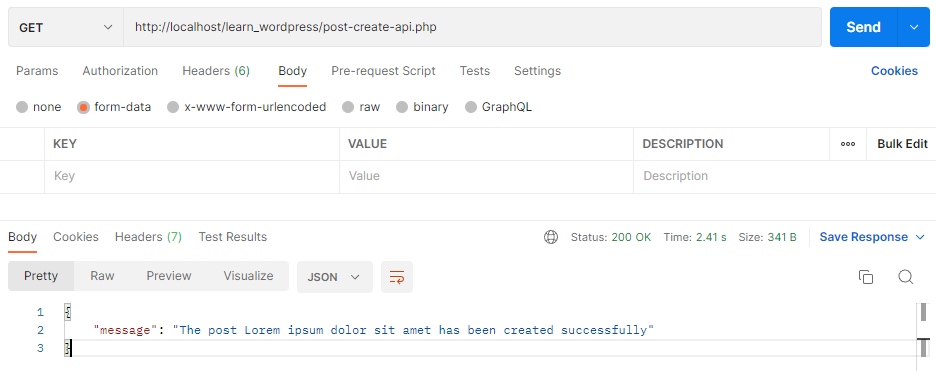
Create a post API
Create a post API
Output
Create a post API output

Update a post API

Just update the title of the created post. Here, you replace {POST_ID} with the ID of the post. I will create update-post-api.php file in the WordPress root directory and also add at the beginning of the file require('wp-load.php');.

Example
<?php
#update-post-api.php

require('wp-load.php');
$post_id = $_REQUEST['post_id'];

$api_response = wp_remote_post('http://localhost/learn_wordpress/wp-json/wp/v2/posts/'.$post_id, array(
 	'headers' => array(
		'Authorization' => 'Basic ' . base64_encode( 'admin:admin' )
	),
	'body' => array(
        'title' => 'Lorem ipsum dolor sit amet title change'
	)
) );

$body = json_decode($api_response['body']);

if(wp_remote_retrieve_response_message( $api_response ) === 'OK') {
    $return = array(
        'message'  => 'The post ' . $body->title->rendered . ' has been updated successfully',
    );
    return wp_send_json($return, 200);
}
Postman Example
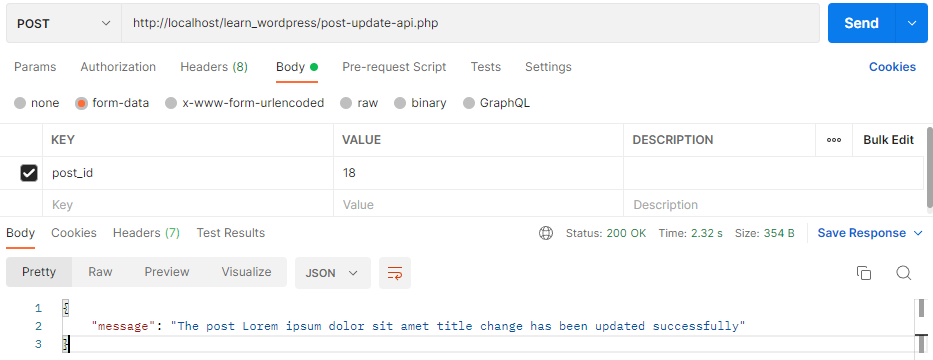
Update a post API
Update a post API
Output
Update a post API output

Delete a Post

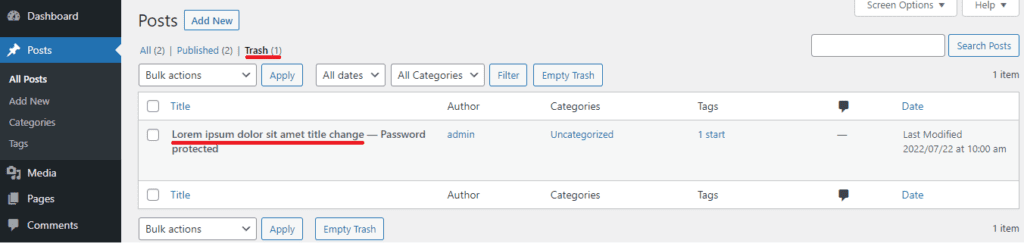
Now we remove a post from the admin panel. So we add ?force=true at the end of the request, URI and the post will be removed permanently(without moving to the trash).

Example
<?php 
#delete-post-api.php

require('wp-load.php');
$post_id = $_REQUEST['post_id'];

$api_response = wp_remote_post('http://localhost/learn_wordpress/wp-json/wp/v2/posts/'.$post_id, array(
	'method'    => 'DELETE',
	'headers'   => array(
	    'Authorization' => 'Basic ' . base64_encode('admin:admin')
	)
));

$body = json_decode($api_response['body']);

if( wp_remote_retrieve_response_message( $api_response ) === 'OK' ) {
	if( $body->deleted == true ) {
		$return = array(
            'message'  => 'The post ' . $body->previous->title->rendered . ' has been completely deleted'
        );
        return wp_send_json($return, 200);
	} else {
        $return = array(
            'message'  => 'The post ' . $body->title->rendered . ' has been moved to trash'
        );
        return wp_send_json($return, 200);
	}
}
Postman Example
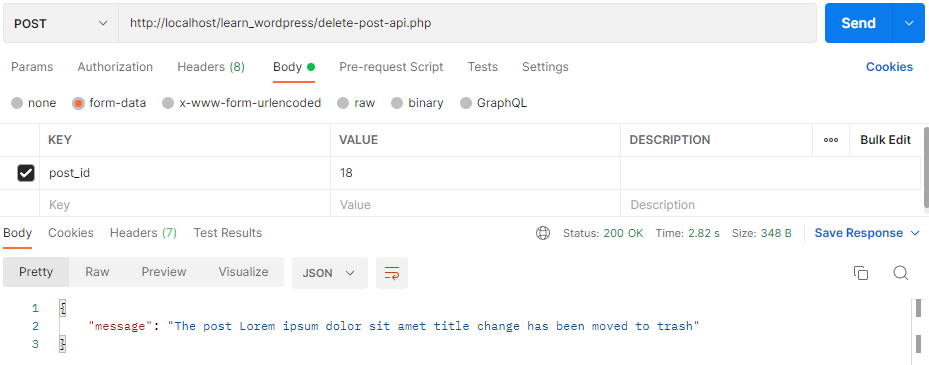
Delete a post API
Delete a post API
Output
Delete a post API output

This was a small tutorial on Basic Authentication in WordPress REST API.

Categories:

APIwordpress

Other Articles

WordPress begins with REST API – Display others blogs latest posts
Previous

WordPress begins with REST API – Displays other’s blogs latest posts

How to send email via cpanel smtp server in laravel
Next

How to send email via Cpanel SMTP server in Laravel

No Comment! Be the first one.

Leave a Reply Cancel reply

Your email address will not be published. Required fields are marked *

Related Posts

WordPress Critical Error When Editing with Gutenberg - Root Cause + Fix

WordPress Critical Error When Editing with Gutenberg – Root Cause + Fix

February 2, 2026
Solve Elementor stuck on loading After Update - Permanent Solution

Solve Elementor stuck on loading After Update – Permanent Solution

January 23, 2026
WordPress wp-cron.php Not Running on cPanel - Real Fix Without Plugins

WordPress wp-cron.php Not Running on cPanel – Real Fix Without Plugins

January 21, 2026
Fix Cloudflare ERR_TOO_MANY_REDIRECTS After Forcing HTTPS in Laravel or WordPress

Fix Cloudflare ERR_TOO_MANY_REDIRECTS After Forcing HTTPS in Laravel or WordPress

January 9, 2026
Devnote

Devnote provides a collection of tutorials about PHP, Laravel, WordPress, Django, MySQL, Bootstrap, Jquery, Ajax, APIs, CRUD operations, etc.

Devnote © , All Rights Reserved.

Page Links

  • Home
  • About us
  • Blog
  • Contact US
  • Site map

Category

  • PHP
  • Laravel
  • wordpress
  • HTML
  • jQuery

Follow Us

Facebook Instagram Twitter Youtube Linkedin Pinterest
Morbi, Gujarat, India - 363641
This website uses cookies to improve your experience. We'll assume you're ok with this, but you can opt-out if you wish. Cookie settingsACCEPT
Privacy & Cookies Policy

Privacy Overview

This website uses cookies to improve your experience while you navigate through the website. Out of these cookies, the cookies that are categorized as necessary are stored on your browser as they are essential for the working of basic functionalities of the website. We also use third-party cookies that help us analyze and understand how you use this website. These cookies will be stored in your browser only with your consent. You also have the option to opt-out of these cookies. But opting out of some of these cookies may have an effect on your browsing experience.
Necessary
Always Enabled
Necessary cookies are absolutely essential for the website to function properly. This category only includes cookies that ensures basic functionalities and security features of the website. These cookies do not store any personal information.
Non-necessary
Any cookies that may not be particularly necessary for the website to function and is used specifically to collect user personal data via analytics, ads, other embedded contents are termed as non-necessary cookies. It is mandatory to procure user consent prior to running these cookies on your website.
SAVE & ACCEPT
Advertisement
Advertisement