-
-
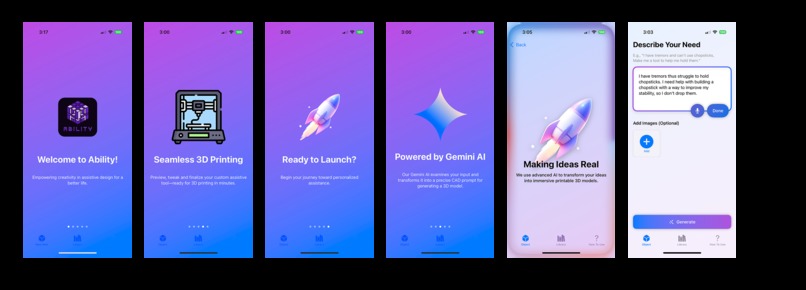
On boarding Screens
-
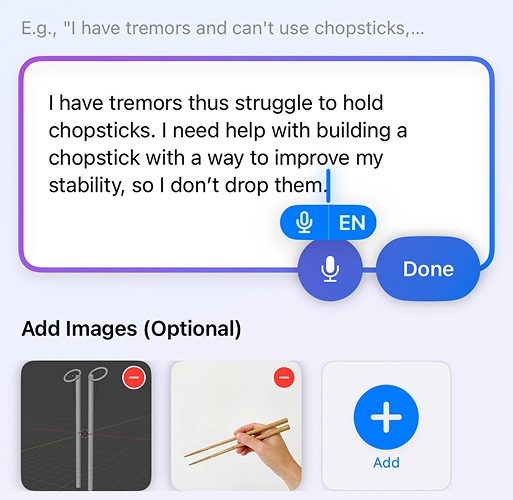
Usage or How to Use of the App
-
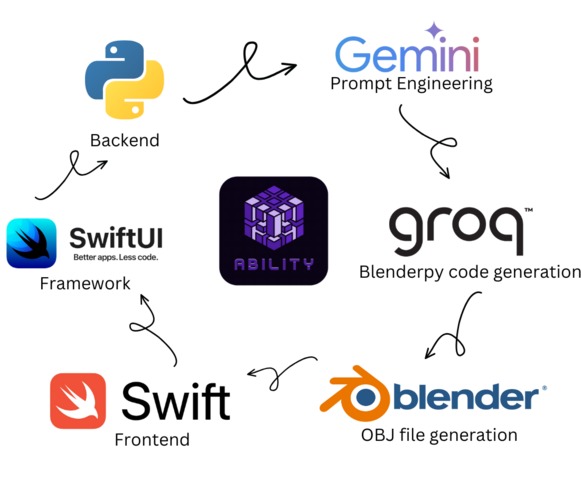
Tech Stack
-
Logo


Inspiration
Innovation often starts with a simple question: "How can I make life easier for someone?" For me, that question led to the creation of an app that uses generative AI and Blender to design 3D-printable assistive devices for individuals with disabilities. The inspiration for this project came from a combination of personal experiences and an appreciation for technology's ability to solve real-world problems.
What if there was a way to customize solutions for each person’s unique needs?
What it does
That’s where the idea for my app was born.
By allowing users to provide input and photos of what they need assistance with, the app leverages generative AI to:
- Analyze the problem
- Create personalized 3D models in Blender
These models can then be 3D-printed to provide real-world solutions.
Whether it’s:
- A custom grip for holding utensils
- A device to assist with mobility
- Something entirely new
The goal is to make assistive technology more accessible and tailored to each individual.
How we built it
Building this app required the integration of multiple technologies.
The front end was developed using Swift UI frameworks for iOS, ensuring a smooth user experience. The backend leverages AI-driven text processing with Gemini for text prompt engineering, allowing the app to understand and process user input efficiently.
For the core functionality, we used:
- Grok to generate Blender bpy scripts, automating the creation of 3D models based on user needs.
- A custom Blender Python script to convert generated models into
.objfiles, making them compatible with most 3D printers.
This combination of AI and automation enables the rapid design of custom assistive devices with minimal user effort.
Tech Stack
- Frontend: Swift UI (iOS)
- Backend: AI-driven text processing with Gemini
- 3D Model Generation: Grok-generated Blender bpy scripts
- File Conversion: Blender Python scripts to
.objformat
Challenges we ran into
Ensuring AI-Generated Models Were Functional & Customizable
Since every user has unique needs, we had to refine the AI prompts and Blender scripts multiple times to create accurate and practical designs.
Optimizing Mobile App Performance
Handling complex AI computations on a mobile device was a challenge. We had to balance processing power between:
- The device (for responsiveness)
- Cloud-based AI models (for heavy computations)
This optimization was crucial for maintaining a seamless user experience while leveraging powerful AI capabilities.
Accomplishments that we're proud of
We built an intuitive tool that doesn’t just create models but actively helps users design custom assistive devices with ease. Seeing our app’s potential to improve accessibility and independence has been incredibly rewarding.
On the technical side, working with Gemini, Blender scripting, and Swift UI pushed our learning curve, and we’re proud of what we’ve accomplished in a short time.
What we learned
- Fine-tuning AI-generated 3D models for real-world usability
- Balancing on-device and cloud AI computations to optimize performance
- Improving UI/UX for an accessibility-focused tool
What's next for our app
- Refining AI-generated models: Enhancing prompts and Blender scripts for more precise outputs.
- Expanding accessibility options: Adding features for different disabilities and unique use cases.
- Building a more interactive dashboard: Allowing users to set preferences, track designs, and iterate on their models for better customization.
Built With
- Swift UI
- Gemini AI
- Grok
- Blender bpy scripting
- Python
- 3D Printing



Log in or sign up for Devpost to join the conversation.